
A WooCommerce category slider shows your product categories as a “shop by category” carousel with a photo, the product count and an optional sale badge. Categories without their own image use a photo from one of their products. The category slider is free.

Set it up
- Create a slider and choose Categories as the type.
- Pick a style: Cards or Circles (free), Big tiles or Colour blocks PRO.
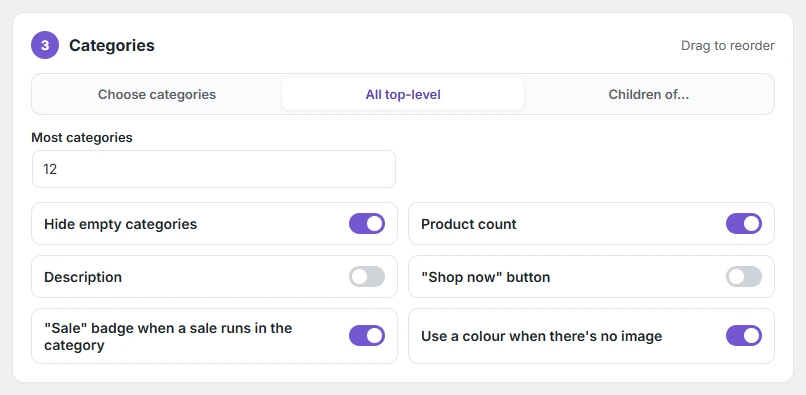
- Choose the source: Choose categories (pick and drag to reorder), All top-level, or Children of… a parent category.
- Set Most categories (1–50) and click Publish.
| Option | What it does |
|---|---|
| Hide empty categories | Leaves out categories with no products. |
| Product count | Shows “4 products” under the name. |
| Description | Shows the category description. |
| “Shop now” button | Adds a button to each tile. |
| “Sale” badge when a sale runs in the category | Marks categories that have products on sale. |
| Use a colour when there’s no image | A coloured tile when neither the category nor its products have a photo. |
If you choose Choose categories but pick none, the slider shows all top-level categories, so it is never empty.