
The Slidario Pro product gallery slider replaces the WooCommerce product image gallery on product pages with a faster slider that has thumbnails, hover zoom, a full-screen lightbox, a product video and different photos for each variation. It works with classic and block themes.
This feature is part of Slidario Pro and works while your Pro license is active. In the free plugin it shows with a PRO badge.

Turn it on
- Go to Slidario → Settings → Product gallery.
- Turn on Use Slidario on product pages.
- Optional: choose categories under Only in these categories; leave empty for all products.
- Pick a layout and the options below, then Save changes.
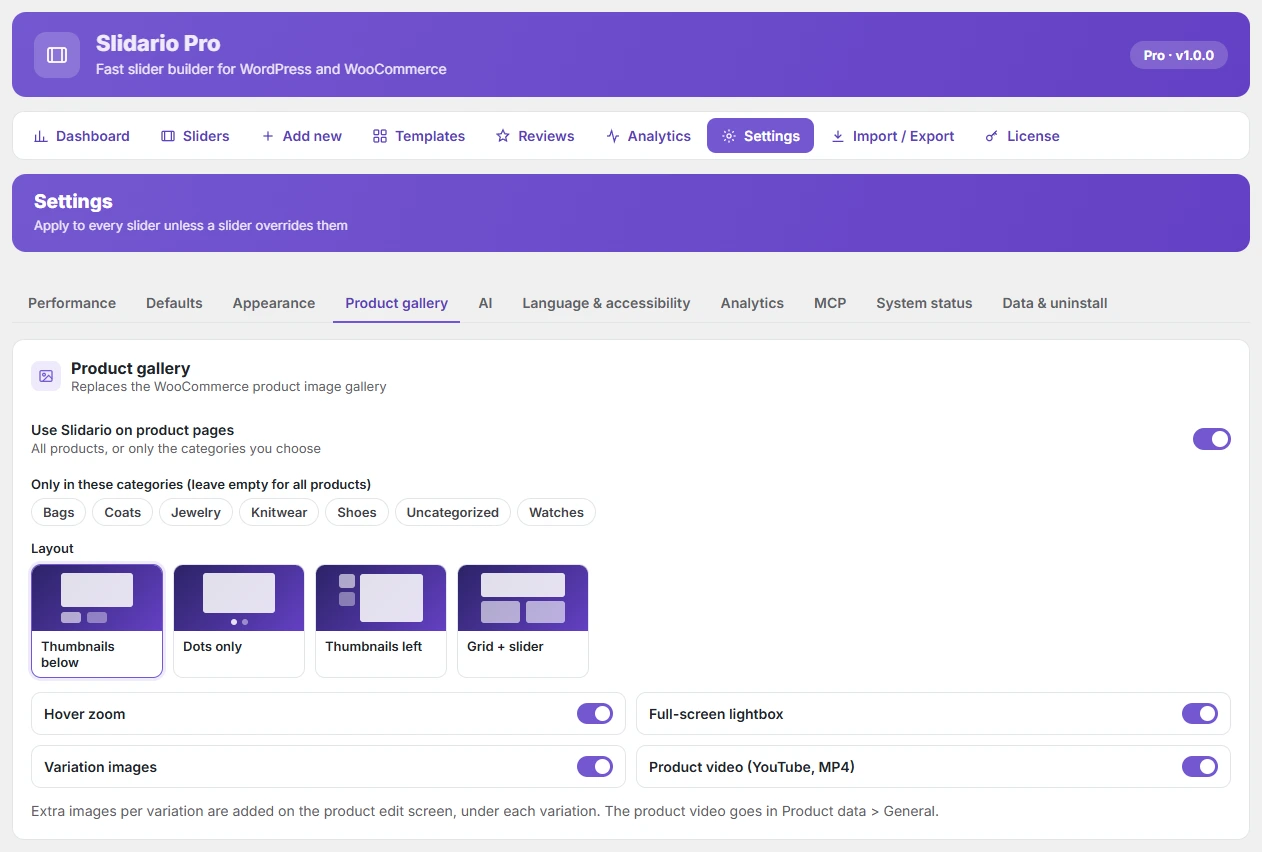
| Option | What it does |
|---|---|
| Layout | Thumbnails below, Dots only, Thumbnails left, or Grid + slider (a photo grid on desktop, a slider on phones). |
| Hover zoom | A round magnifier (2.5×) follows the mouse over the photo. |
| Full-screen lightbox | Click a photo to open it full screen; arrow keys and Escape work. |
| Variation images | Each variation can have its own photo set. See variation images and product video. |
| Product video (YouTube, MP4) | Adds a video slide to the gallery. |
When the license is not active, product pages show WooCommerce’s own gallery again.