
The Location-Wise Product Display in Cart feature allows you to group cart items based on the store or warehouse location they belong to. This improves clarity for customers and helps them understand which items will be fulfilled from which location.
How to Enable Location-Based Cart Grouping
- Go to Location Manage → Order & Cart
- Open the Cross-Location Order Management panel
Group Cart Items by Location — On/Off
Enable Group Cart Items by Location for Better Visibility.
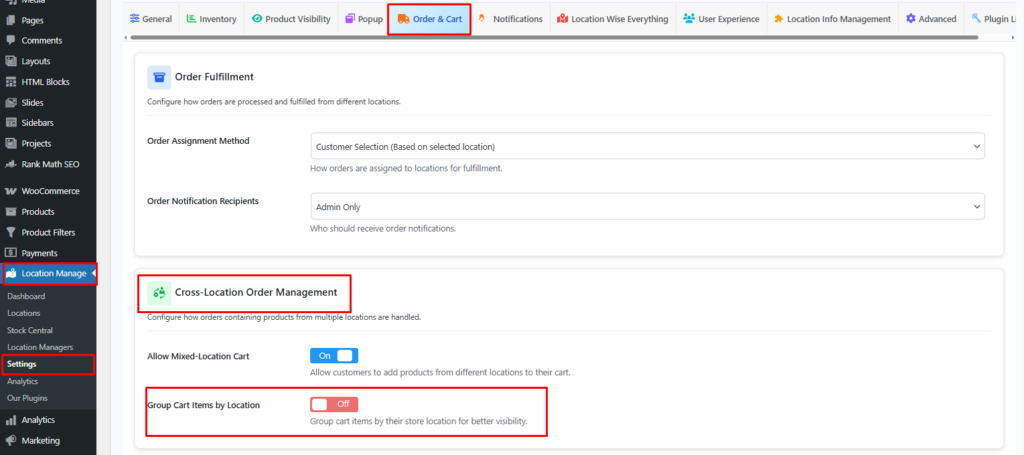
What This Setting Does
When enabled:
- Cart items are grouped visually by their assigned location
- Each group shows the location name (e.g., New York Warehouse)
- Customers can clearly see which products come from which location
- Helps reduce confusion when mixed-location carts are allowed
When disabled:
- All items appear together in a single list
- Location information is not visually grouped, though still tracked internally
Why Use Group Cart Items by Location?
Benefits for Customers
- Better transparency about fulfillment origins
- Helps customers understand shipping fees/conditions if they vary per location
- Easier to identify which order items might ship separately
Benefits for Store Admins
- Reduces customer support questions
- Keeps mixed-location orders organized
- Supports complex multi-warehouse operations
Best Use Cases
Enable if:
✔ You allow mixed-location carts
✔ You want to show customers exactly where items are coming from
✔ You offer multiple shipping methods per location
✔ Your fulfillment varies by store or warehouse
Disable if:
✘ You do not allow mixed-location orders
✘ You want a simple, unified cart view
Example Display (Conceptual)
📦 New York Warehouse
- Product A (Qty: 2)
- Product B (Qty: 1)

📦 Los Angeles Warehouse
- Product C (Qty: 1)
Each group is visually separated for clarity.
Recommended Pairing Settings
For best results, use this alongside:
- Allow Mixed-Location Cart: ON
- Show Location Selector: ON
- Location-Based Shipping Methods: ON
With Location-Wise Cart Grouping, your WooCommerce store becomes more intuitive to customers while accommodating complex multi-location inventory and fulfillment workflows.