
Manage StockWhere It Matters Most
Multi Locations Product & Inventory Management for WooCommerce
Run multiple warehouses, stores, or pickup points — and manage every product, stock level, and order from one WooCommerce dashboard. Multi Locations Product & Inventory Management for WooCommerce lets you set stock per location, assign products to specific stores, and keep inventory accurate across your entire operation without manual work.
Customers pick their preferred location, see only what’s available there, and check out with confidence. Whether you’re managing two branches or twenty, this WooCommerce multi locations inventory management plugin keeps your catalog, stock, and order routing in sync — so you spend less time fixing errors and more time growing.
Everything You Need for WooCommerce Multi Location Inventory Management
Built for stores that operate across multiple locations — this plugin covers every core need for Multi Locations Product & Inventory Management for WooCommerce: per-location stock, pricing, order routing, and customer experience, all from one place.
Advanced WooCommerce Multi-Location Inventory Features That Run Your Store on Autopilot
Beyond the basics, this WooCommerce multi-location inventory management plugin handles the complex parts — automating workflows, syncing data across multiple warehouses, and giving you real-time control without the manual grind.
Set Up WooCommerce Multi-Location Inventory in 3 Simple Steps
No complex configuration. No developer needed. Follow three straightforward steps to start managing stock, orders, and locations across your entire WooCommerce store network.
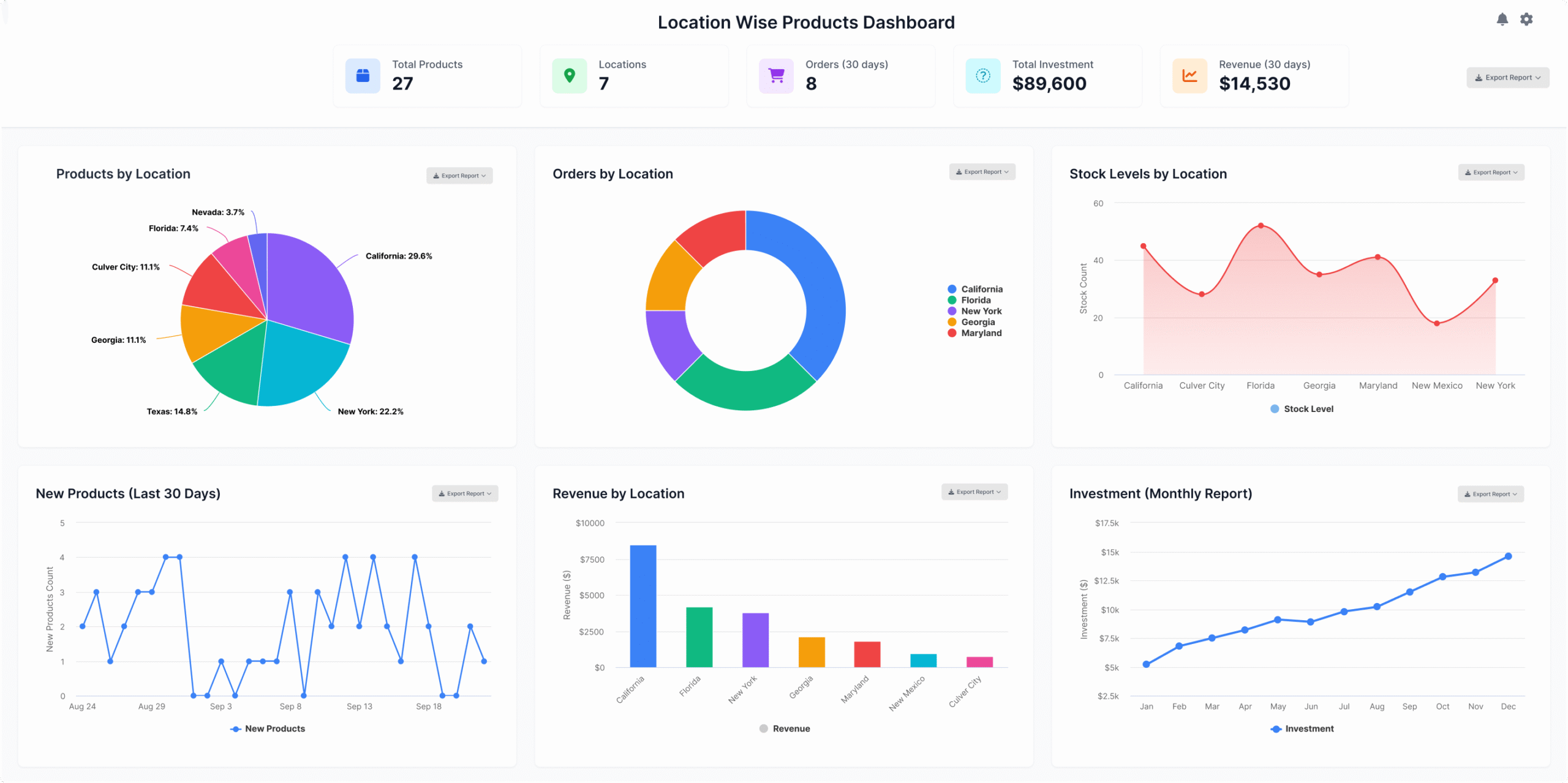
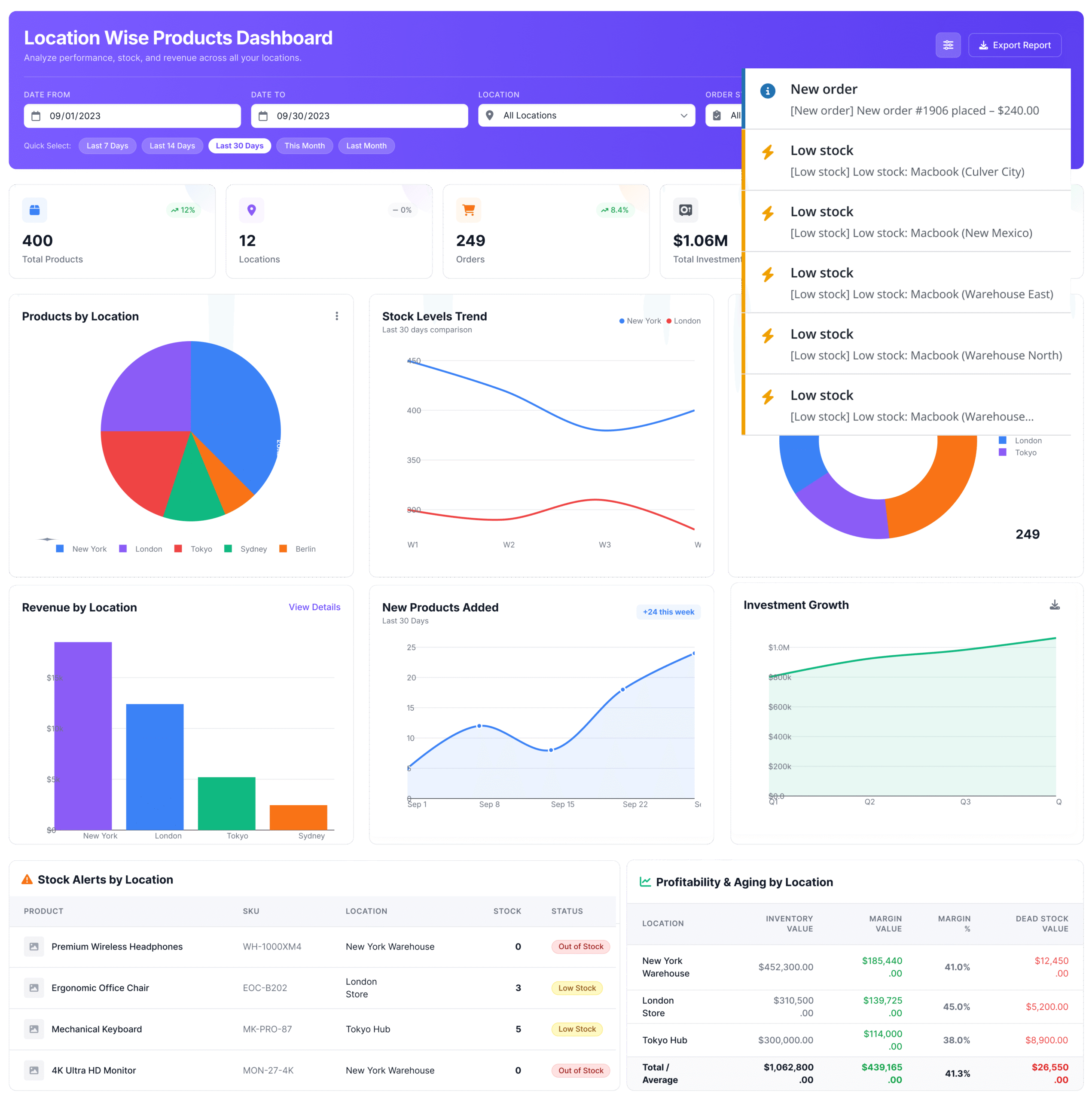
Multi-Location Inventory Analytics Dashboard for WooCommerce
Get complete visibility into your store performance with the Multi Locations Product & Inventory Management for WooCommerce plugin — track stock levels, sales activity, and location-specific trends across every warehouse and store from one centralized dashboard.
Built for serious WooCommerce multi-location operations, the analytics dashboard gives you a clear picture of what’s selling, what’s running low, and how each location is performing — so you spend less time guessing and more time acting on real data.
Experience a more personalized WooCommerce shopping journey today.
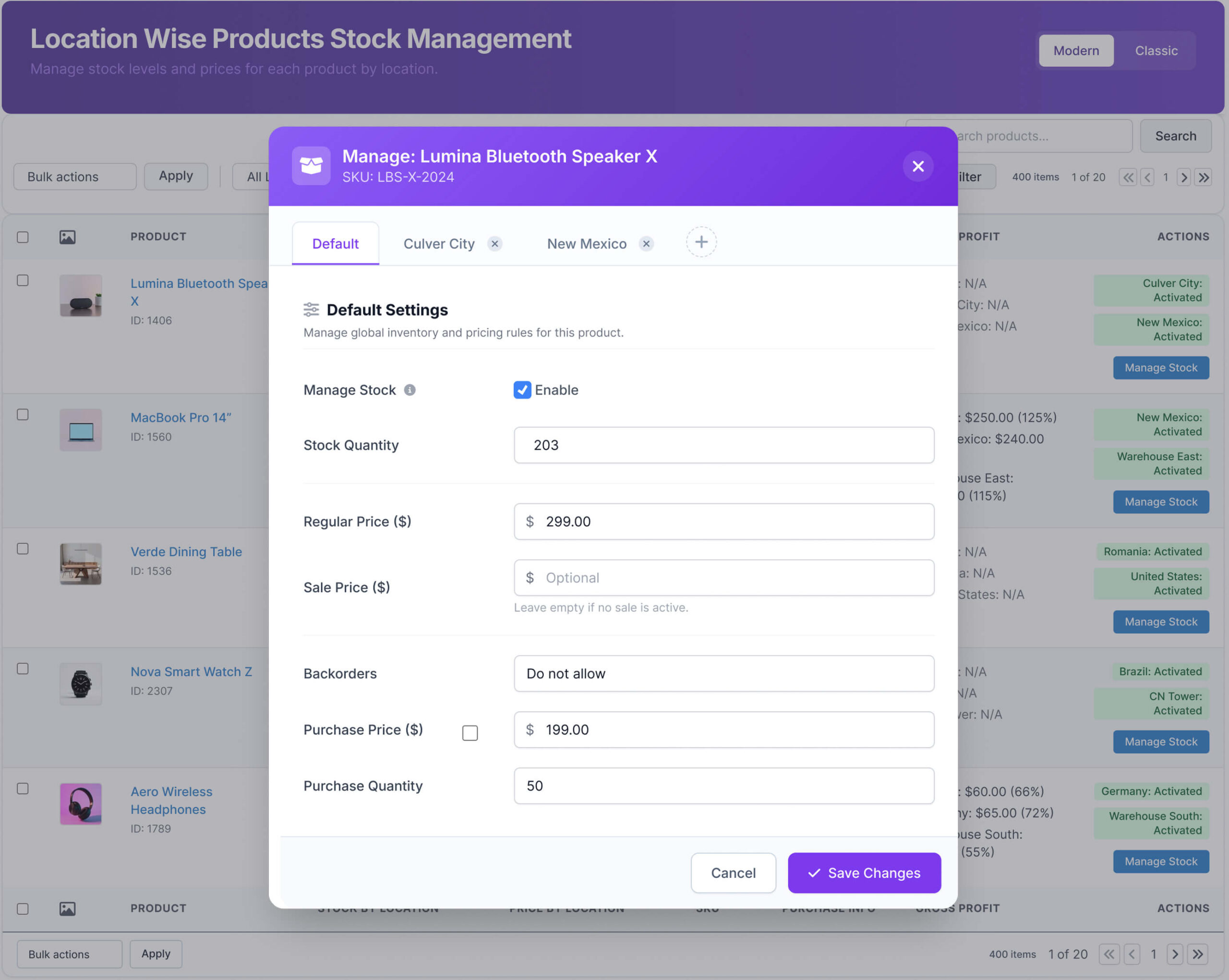
Multi-Location Product Stock Management for WooCommerce with Real-Time Control
Take full control of your inventory with a dedicated Multi Locations Product & Inventory Management for WooCommerce plugin that lets you manage stock per location with real-time updates and centralized control across all your stores — from a single admin dashboard.
Whether you run two stores or twenty warehouses, this plugin handles WooCommerce multiple inventory locations from one place. Monitor stock levels, keep inventory accurate across every branch, and stop chasing manual updates — the system does the heavy lifting so your team can focus on selling.
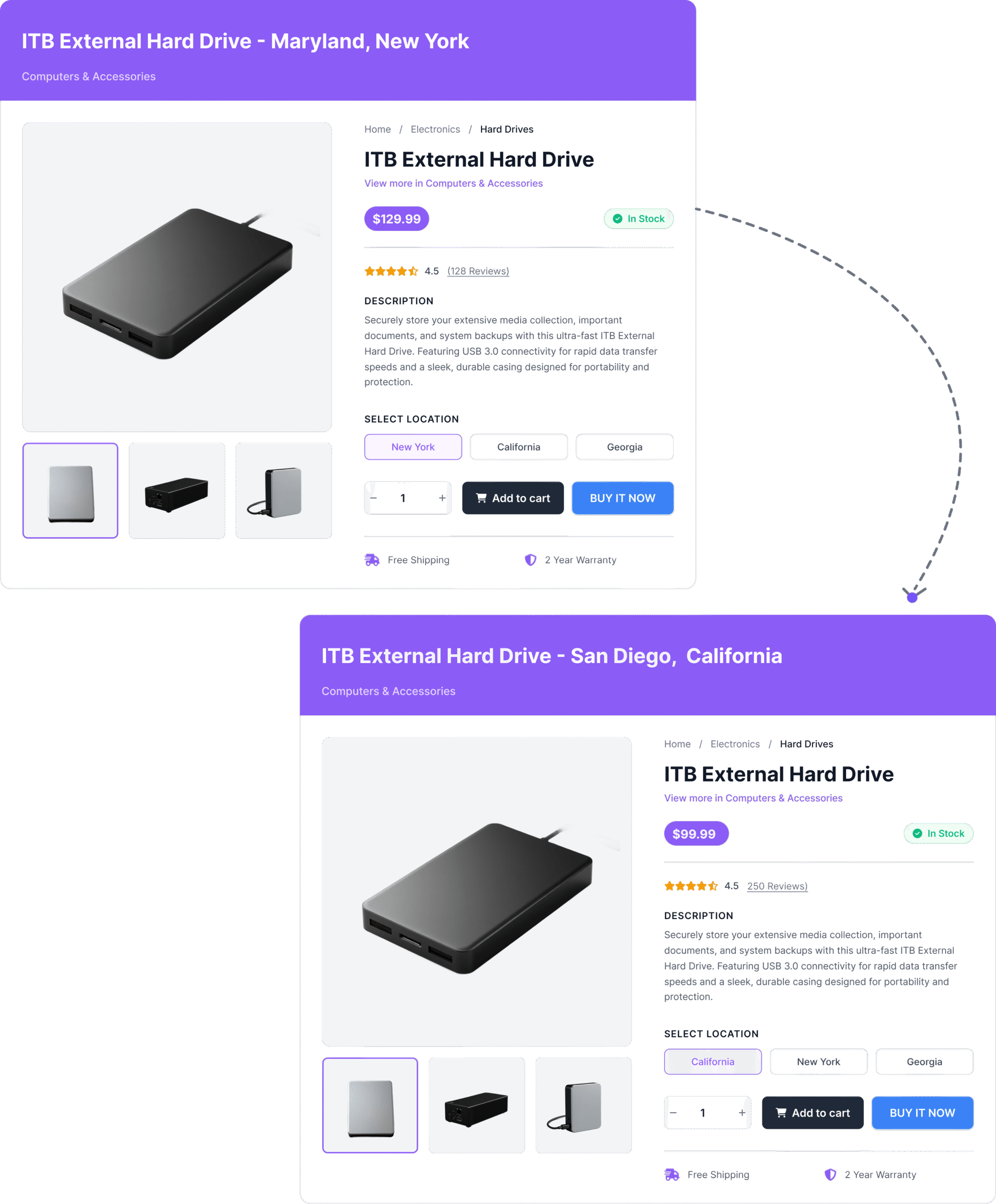
Location-Based Pricing, Product Availability & Payments for WooCommerce
Show the right price, stock status, and payment options to every customer — automatically — based on their selected store location. With WooCommerce multi locations inventory management, your store adapts in real time so customers always see accurate, relevant information without manual updates.
Each location can carry its own pricing rules, tax configuration, and stock quantities. Whether you run two stores or twenty, your customers never see mismatched prices or availability that doesn’t match their nearest location.
From location-specific payment gateways to regional promotions and real-time stock display, every part of the buying experience reflects the store the customer actually shops from.
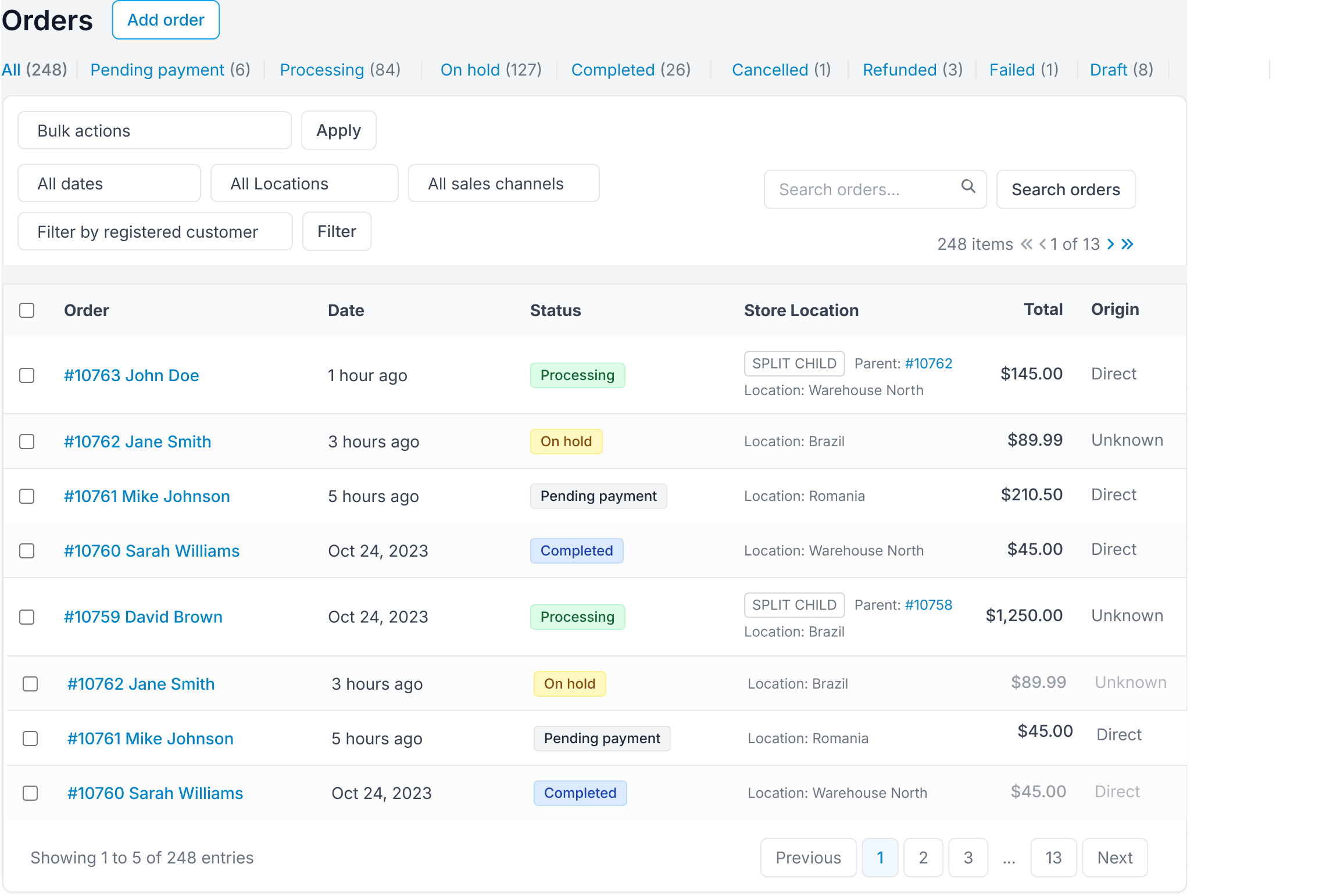
Smart Order Routing & Automated Fulfillment Across Multiple Warehouses
Stop manually deciding which warehouse ships which order. The plugin automatically routes each order to the most suitable location — based on stock availability, customer proximity, and your custom fulfillment rules. Whether you run two stores or twenty, orders get assigned to the right place without you lifting a finger.
Built for WooCommerce multi-location inventory management, this system handles high-order volumes accurately — splitting, assigning, and tracking fulfillment across all your locations from one place.
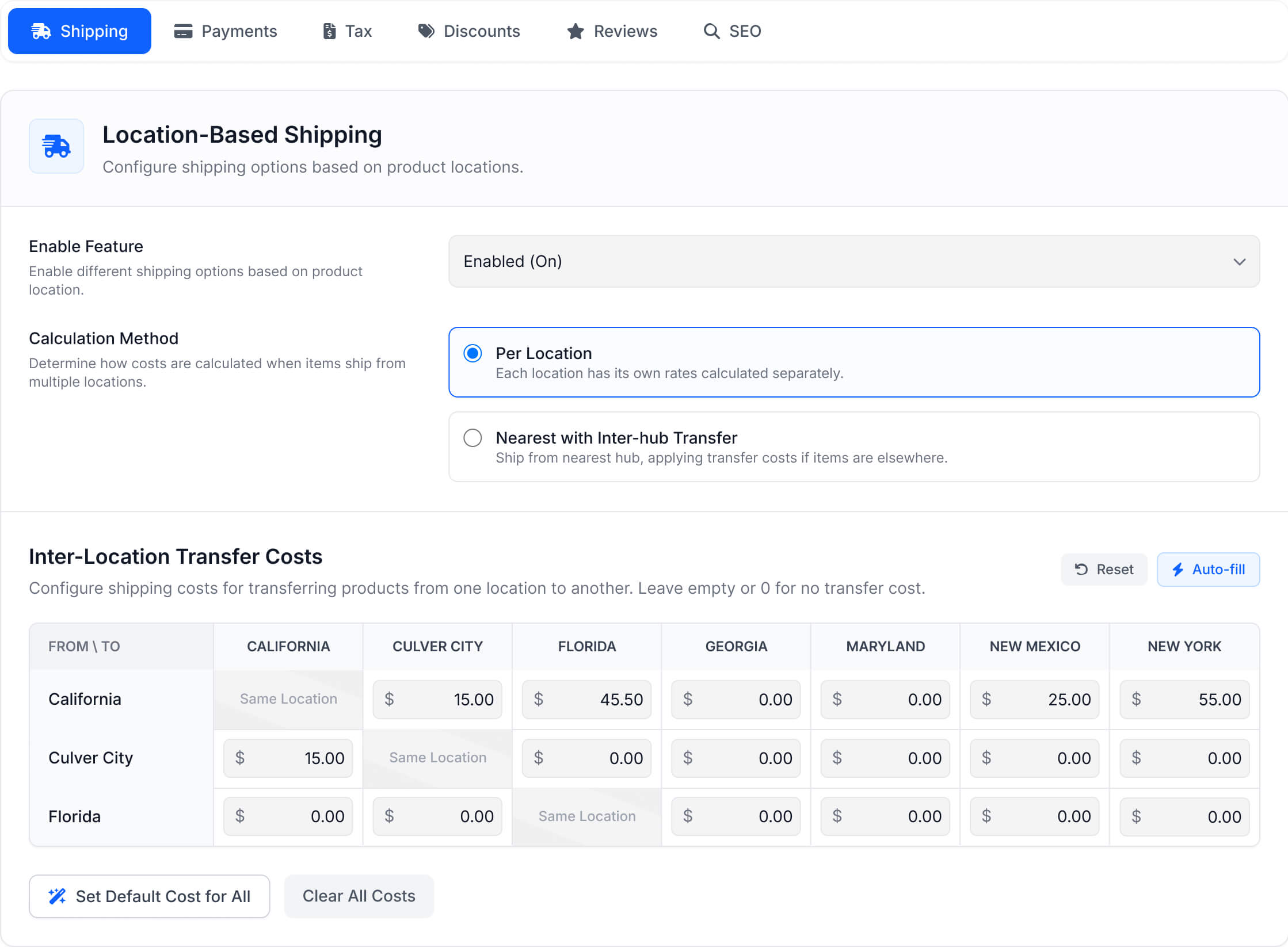
Location-Based Shipping, Delivery & Local Pickup for WooCommerce
Give every store location its own shipping setup — rates, zones, delivery rules, and pickup options configured exactly how that location needs them. Built for WooCommerce multi-location operations, you get full control over how shipping costs are calculated, applied, and presented to customers at checkout, with no guesswork and no one-size-fits-all compromise.
Whether you run two locations or twenty, each one can have its own delivery logic — so customers always see accurate costs, real availability, and pickup options that actually match where they’re shopping from.
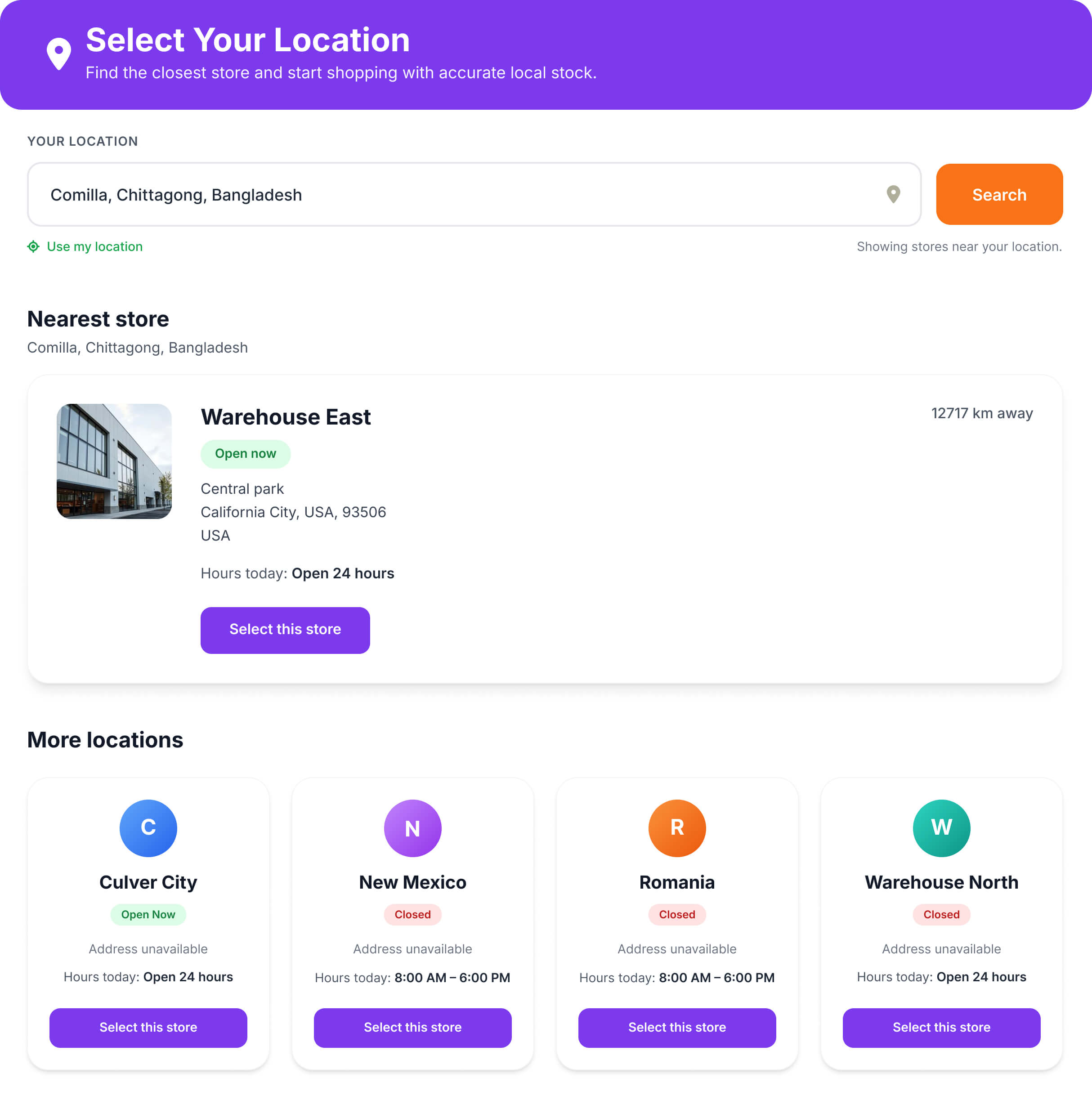
Automatic Store Detection & Smart Location-Based Shopping for WooCommerce
Customers should never have to hunt for the right store — the right store should come to them. This plugin automatically detects customer location via IP and recommends the most relevant store, complete with accurate stock status, store details, and availability. It’s a core part of WooCommerce multi locations inventory management that turns passive browsers into confident buyers.
When customers see products, pricing, and store information that actually match their location, they buy faster. Display the right catalog for the right store — and reduce the friction that kills conversions.
Multi-Store Management, Alerts & Integrations for WooCommerce
Running multiple WooCommerce locations means juggling stock, staff, orders, and customer data across different places — often without a clear picture of what’s happening where. This plugin brings it all under one roof: assign managers to specific stores, route alerts to the right people at the right time, and connect your external systems through a structured REST API. Whether you’re managing two warehouses or twenty pickup points, every location stays visible, accountable, and in sync.
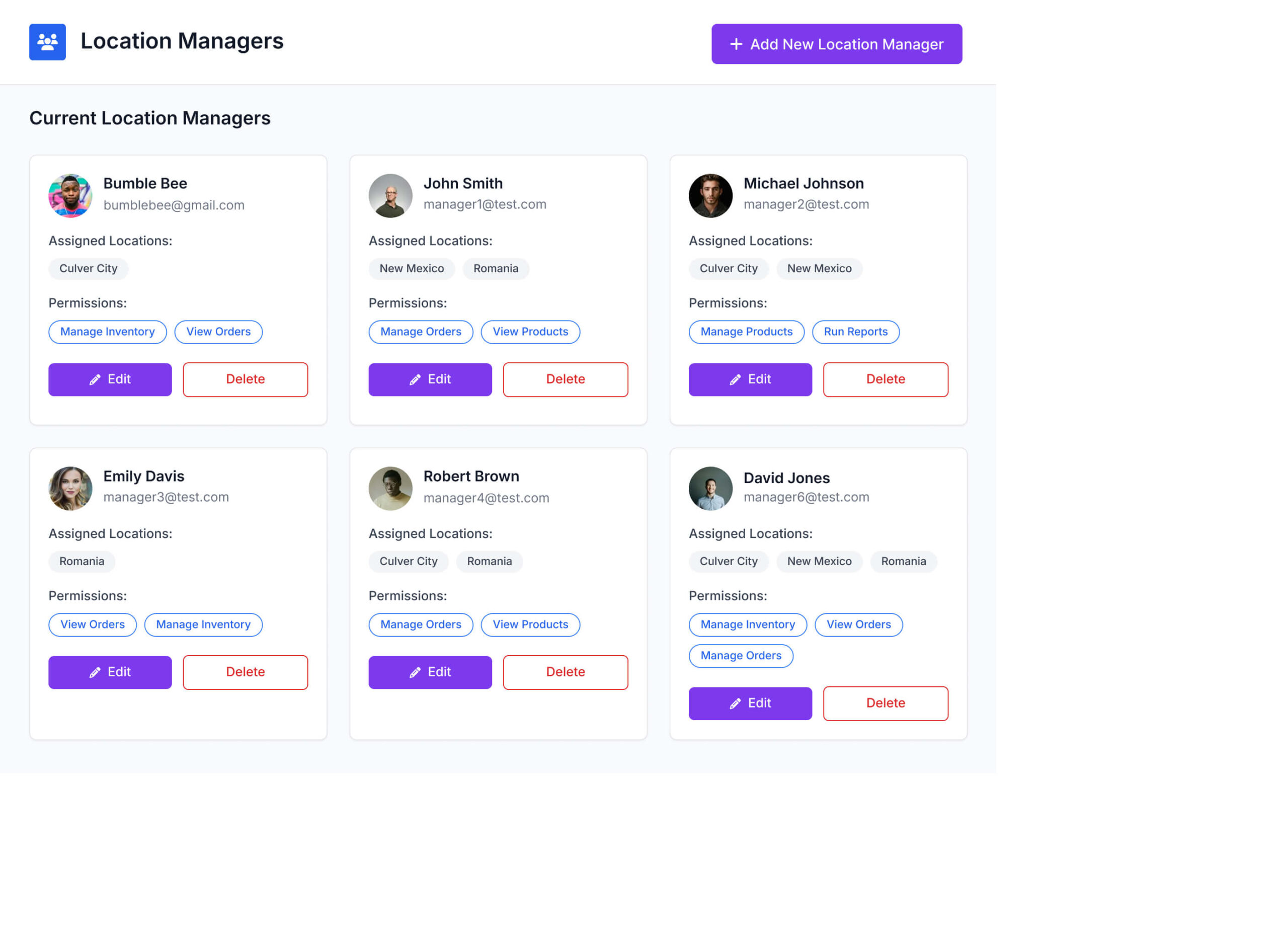
WooCommerce Shop Manager Role & Multi-Store Staff Access Control
Give each store location its own dedicated manager — with exactly the access they need and nothing more. Using location manager roles in this WooCommerce multi locations inventory management plugin, you can assign staff to specific stores, control what they see, and keep your broader operation protected from unauthorized changes.
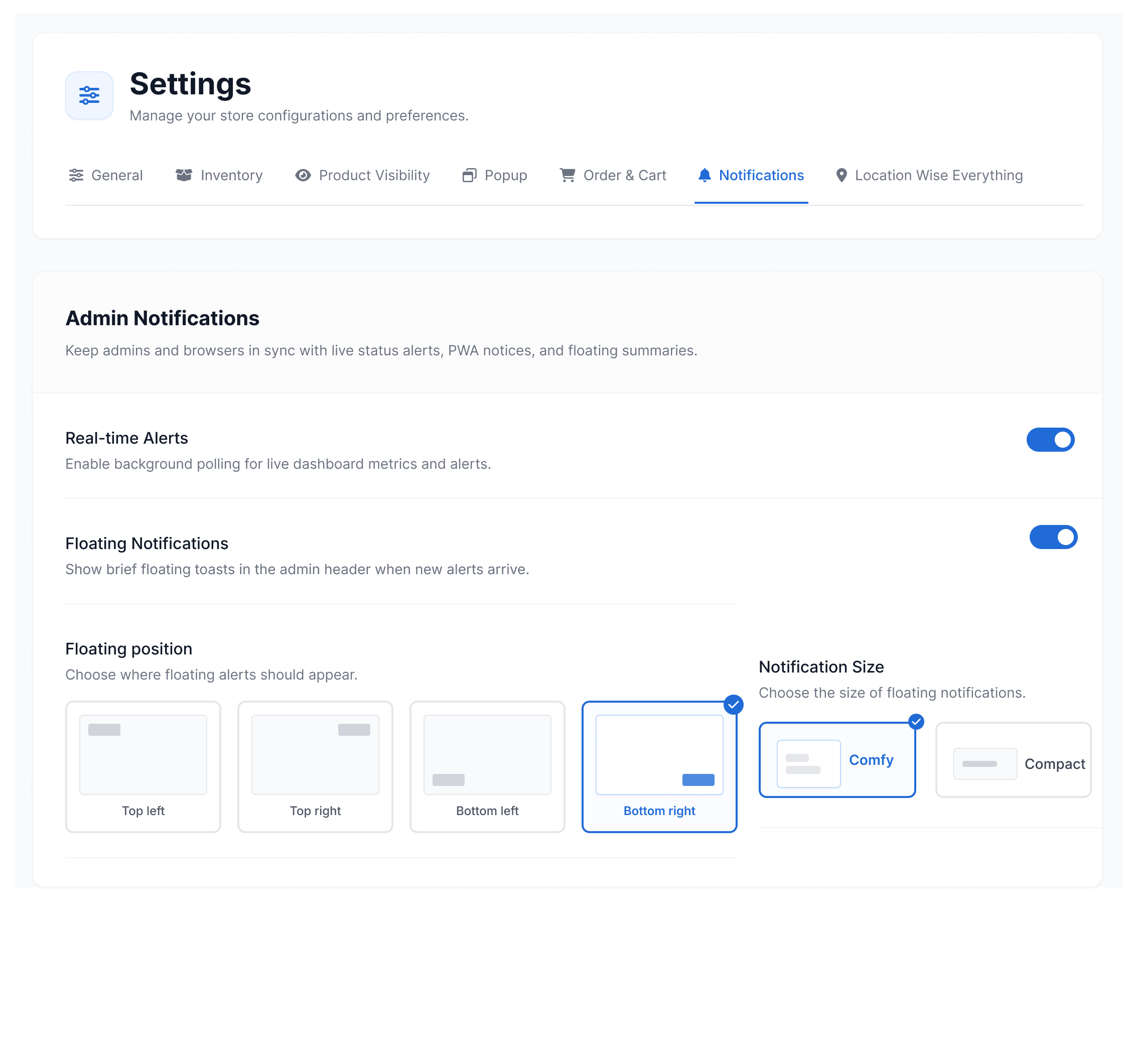
Real-Time Location-Based Notifications for WooCommerce Admin and Devices
Never miss a critical update across your stores. Whether it’s a stock drop at a specific warehouse, a high-value order at a branch, or a fulfillment event across multiple locations — this WooCommerce multi-location notification system keeps your team informed the moment it happens. No manual checking, no delays, no missed alerts.
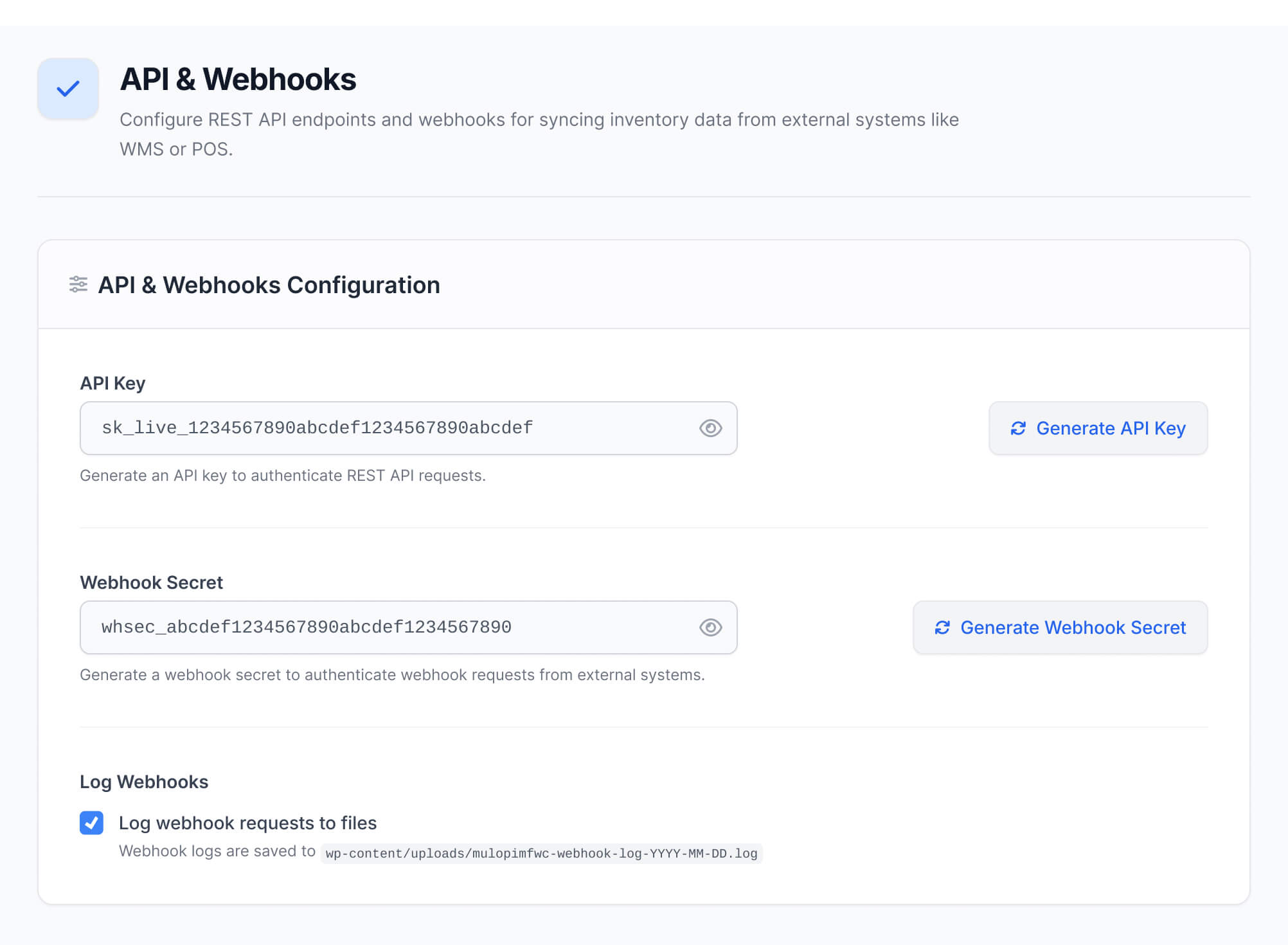
REST API Integration, Data Sync & Webhook Management for WooCommerce
Connect your WooCommerce multi-location inventory to external systems and keep data synchronized across every platform — automatically. The plugin’s built-in REST API compatibility and webhook support let your store talk to POS systems, ERP tools, WMS platforms, and third-party services without custom middleware. You stay in control of what data flows, who can access it, and when actions fire.
Why WooCommerce Store Owners Trust Plugincy?
Thousands of store owners worldwide rely on Plugincy for plugins that are reliable, lightweight, and built to grow with their business. Our WooCommerce multi-location inventory management plugin delivers consistent performance — helping stores manage products, stock, and orders across multiple locations without added complexity.
+Many More












+ Many More
Works With Your Existing WooCommerce Theme — No Custom Code Needed
Your store’s design should never have to change just because you’re managing inventory across multiple locations. This WooCommerce multi locations inventory management plugin is built to drop into your existing setup without touching your layout, colors, or custom styles.
The plugin integrates with your current WooCommerce theme at the data and logic layer — it handles location assignment, stock tracking, customer location selection, and order routing entirely behind the scenes. No template overrides, no required child theme, no developer time just to get it working.
Whether you’re running Astra, Avada, OceanWP, or a fully custom theme built with Elementor or the block editor, the plugin respects your design and works within it. The responsive location selector, product availability display, and admin controls all follow your existing styling — and if you need fine-tuned adjustments, built-in custom CSS support lets you match any store look without touching plugin files.
Pick Your Multi Location Inventory Management Plan for WooCommerce
Every store is different. Whether you run one WooCommerce store or manage inventory across multiple branches and warehouses, there’s a plan built for your scale. Each package gives you full control over stock, pricing, order routing, and fulfillment — with WooCommerce Multi Locations Inventory Management tools that grow with your business.
Single Site
Normally $99
$79/year
$20 Savings
Most Popular
Up to Three Sites
Normally $297
$199/year
$98 Savings
Up to Five Sites
Normally $495
$299/year
$196 Savings
Single Site
Normally $499
$349(lifetime)
$150 Savings
Most Popular
Up to Three Sites
Normally $699
$499(lifetime)
$200 Savings
Up to Five Sites
Normally $999
$599(lifetime)
$400 Savings
Free vs Pro: WooCommerce Multi Location Inventory Management Plugin Feature Comparison
Not sure which plan fits your store? Compare the free and pro versions of this WooCommerce Multi Location Inventory Management plugin side by side — and pick what actually matches where your business is today. The free version covers the essentials: unlimited locations, per-location stock, customer location selection, and cart validation, all at no cost. The Pro version adds advanced stock control, location-specific pricing, order splitting, inter-location transfers, role-restricted access, and more — for stores that need full multi-location operations from one place. See exactly what each plan includes before you decide.
| Features | PRO $79 – $599 Get Started | FREE Get Started |
|---|---|---|
| Create store locations | ✓ | ✓ |
| Store location taxonomy | ✓ | ✓ |
| Assign products to store locations | ✓ | ✓ |
| Location-based product filtering | ✓ | ✓ |
| Customer location selector modal | ✓ | ✓ |
| Selected location stored for customer browsing | ✓ | ✓ |
| Show products based on selected location | ✓ | ✓ |
| Product title location display option | ✓ | ✓ |
| Basic location selector on frontend | ✓ | ✓ |
| Basic product availability by location | ✓ | ✓ |
| WooCommerce shortcode compatibility | ✓ | ✓ |
| WooCommerce widget compatibility | ✓ | ✓ |
| AJAX cart content check | ✓ | ✓ |
| AJAX cart clear support when changing location | ✓ | ✓ |
| Basic store-location settings page | ✓ | ✓ |
| Basic WooCommerce product/location integration | ✓ | ✓ |
| Translation-ready text | ✓ | ✓ |
| Central inventory dashboard | ✓ | ✖ |
| Stock Central management page | ✓ | ✖ |
| Manage product stock across all locations from one screen | ✓ | ✖ |
| Location-wise stock quantity management | ✓ | ✖ |
| Location-wise product price management | ✓ | ✖ |
| Location-wise sale price management | ✓ | ✖ |
| Location-wise backorder management | ✓ | ✖ |
| Location-wise stock status handling | ✓ | ✖ |
| Bulk inventory editing | ✓ | ✖ |
| Product location stock table | ✓ | ✖ |
| Stock Central import/export | ✓ | ✖ |
| Import stock data by location | ✓ | ✖ |
| Export stock data by location | ✓ | ✖ |
| Advanced import/export settings | ✓ | ✖ |
| Location manager assignment | ✓ | ✖ |
| Assign users as location managers | ✓ | ✖ |
| Location manager admin page | ✓ | ✖ |
| Location manager access control | ✓ | ✖ |
| Manage location-specific permissions | ✓ | ✖ |
| Dashboard analytics | ✓ | ✖ |
| Location-wise sales analytics | ✓ | ✖ |
| Inventory analytics | ✓ | ✖ |
| Customer location insights | ✓ | ✖ |
| Customer location tracking | ✓ | ✖ |
| Frontend product filter by location | ✓ | ✖ |
| Location archive page / location listing template | ✓ | ✖ |
| Location archive SEO support | ✓ | ✖ |
| Location-wise SEO tools | ✓ | ✖ |
| Frontend location information display | ✓ | ✖ |
| Product page location selector | ✓ | ✖ |
| Single product location selector | ✓ | ✖ |
| Location information modal | ✓ | ✖ |
| Classic location popup layout | ✓ | ✖ |
| Modern location popup layout | ✓ | ✖ |
| Modern simple location popup layout | ✓ | ✖ |
| Popup layout controls | ✓ | ✖ |
| Cart location change handling | ✓ | ✖ |
| Cart block location grouping | ✓ | ✖ |
| Split orders by location | ✓ | ✖ |
| Location-wise order handling | ✓ | ✖ |
| Location-wise email support | ✓ | ✖ |
| Location-based shipping rules | ✓ | ✖ |
| Location-wise shipping/payment/tax controls | ✓ | ✖ |
| Location-wise local pickup | ✓ | ✖ |
| Cash on pickup payment gateway | ✓ | ✖ |
| WooCommerce Blocks support for cash on pickup | ✓ | ✖ |
| Location-wise coupon restrictions | ✓ | ✖ |
| Restrict coupons by store location | ✓ | ✖ |
| Location business hours | ✓ | ✖ |
| Location hours restriction | ✓ | ✖ |
| Restrict checkout/order availability by location hours | ✓ | ✖ |
| Location-wise product recommendations | ✓ | ✖ |
| Recommendation engine | ✓ | ✖ |
| Location-wise reviews | ✓ | ✖ |
| Store location reviews | ✓ | ✖ |
| Location-based customer experience tools | ✓ | ✖ |
| Text management / label customization | ✓ | ✖ |
| Custom frontend texts | ✓ | ✖ |
| API settings page | ✓ | ✖ |
| Inventory sync API | ✓ | ✖ |
| External inventory integration support | ✓ | ✖ |
| Cache compatibility tools | ✓ | ✖ |
| Import/export v2 support | ✓ | ✖ |
| Add-ons page | ✓ | ✖ |
| Admin notifications | ✓ | ✖ |
| Advanced admin dashboard | ✓ | ✖ |
| License activation and validation | ✓ | ✖ |
| Pro updates | ✓ | ✖ |
| Priority support | ✓ | ✖ |
| Buy Now | Free Download |
What Store Owners Say About This WooCommerce Multi Location Inventory Management Plugin
From small shops to multi-warehouse brands, store owners and WooCommerce developers trust Plugincy to keep inventory accurate, orders clean, and operations running across every location — without the spreadsheet chaos. Here’s what real users have to say about their experience with our WooCommerce multi location inventory management plugin.
Ethan Morales
We run two stores in Chicago, and stock tracking finally makes sense. Setup took minutes, and inventory updates sync the moment a sale goes through. No delays, no mismatches.
Daniel Foster
We manage three furniture outlets across Vancouver. Stock syncs instantly across all branches, and setting location-specific pricing without touching a single line of code has saved us countless hours. It’s been rock-solid since day one.
Sophia Turner
Setup across several branches went smoothly from the start. When a display issue came up, the support team resolved it quickly and followed up to make sure everything was working right.
Emily Chen
Managing five warehouse sites used to mean hours of manual updates. Now the dashboard is fast, reports are clear, and what used to take hours wraps up in minutes. Support fixed my import issue the same day I reported it.
Jacob Reynolds
We run a clothing franchise across six regional branches. Stock alerts, per-location pricing, and performance reporting all work exactly as expected — and the Pro analytics helped us pinpoint which locations were actually driving sales.
Liam Anderson
Three small warehouses, one clean dashboard. Real-time stock control and per-location pricing finally behave the way I always needed them to. No workarounds, no hacks.
Clara Johnson
We’re on the Pro plan mainly for the team access features. Each branch manager works within their own assigned location — no overlap, no confusion. The analytics tell us exactly which store needs restocking before it becomes a problem.
Nora Campbell
I used to maintain separate spreadsheets for every branch. Now one dashboard handles pricing, stock levels, and location filters across all of them. The time I’ve saved is real.
Michael Ortiz
We’re a WooCommerce agency managing multi-location clients. Location-based pricing, order tagging by branch, and accurate out-of-stock visibility have made client stores far easier to run — and customer complaints about stock accuracy dropped almost completely.
Hannah Lewis
Running retail and warehouse sites together used to be a mess. Now inventory stays synced in real time, reports are clean, orders are accurate, and we’ve cut manual stock errors by nearly ninety percent.
Ryan Patel
We sell across five cities. Stock data stays consistent across every location, and switching between them is instant. I’ve never had to second-guess whether the numbers are right.
Ava Mitchell
Stock tracking was genuinely chaotic before this plugin. The support team walked me through configuring reports and location syncs — patient, clear, and fast. Night and day difference from before.
Liam Parker
We operate four tech accessory stores, and this plugin keeps all inventory accurate across locations. Stock syncing is reliable, and location-based reports help us restock fast. It’s stable, lightweight, and fits seamlessly into WooCommerce.
Noah Peterson
We manage different regions with this plugin. It keeps pricing clean per branch and updates run fast without slowing WooCommerce.
Grace Howard
Had a small issue during setup, but support replied within minutes and guided me through it perfectly. Couldn’t be happier.
Mia Thompson
As a WooCommerce consultant, I install this plugin for most of my multi-branch clients. It’s flexible, easy to configure, and support always responds quickly with real solutions. Clients love how easily they can track stock per store.
Frequently Asked Questions About Multi Location Inventory Management Plugin for WooCommerce
Have questions? Here are straight answers to the most common queries about features, setup, compatibility, and usage — so you can pick the right Multi Locations Product & Inventory Management for WooCommerce solution with confidence.
Still Have Questions? Our Team Is Ready to Help You
Our support team is ready to help with setup, configuration, and any feature question you run into. Ask anything — get clear, helpful answers so you can move forward without second-guessing.