
New
AI drafts and MCP changes you approve
AI Visibility & Brand Mention Tracker for WordPress
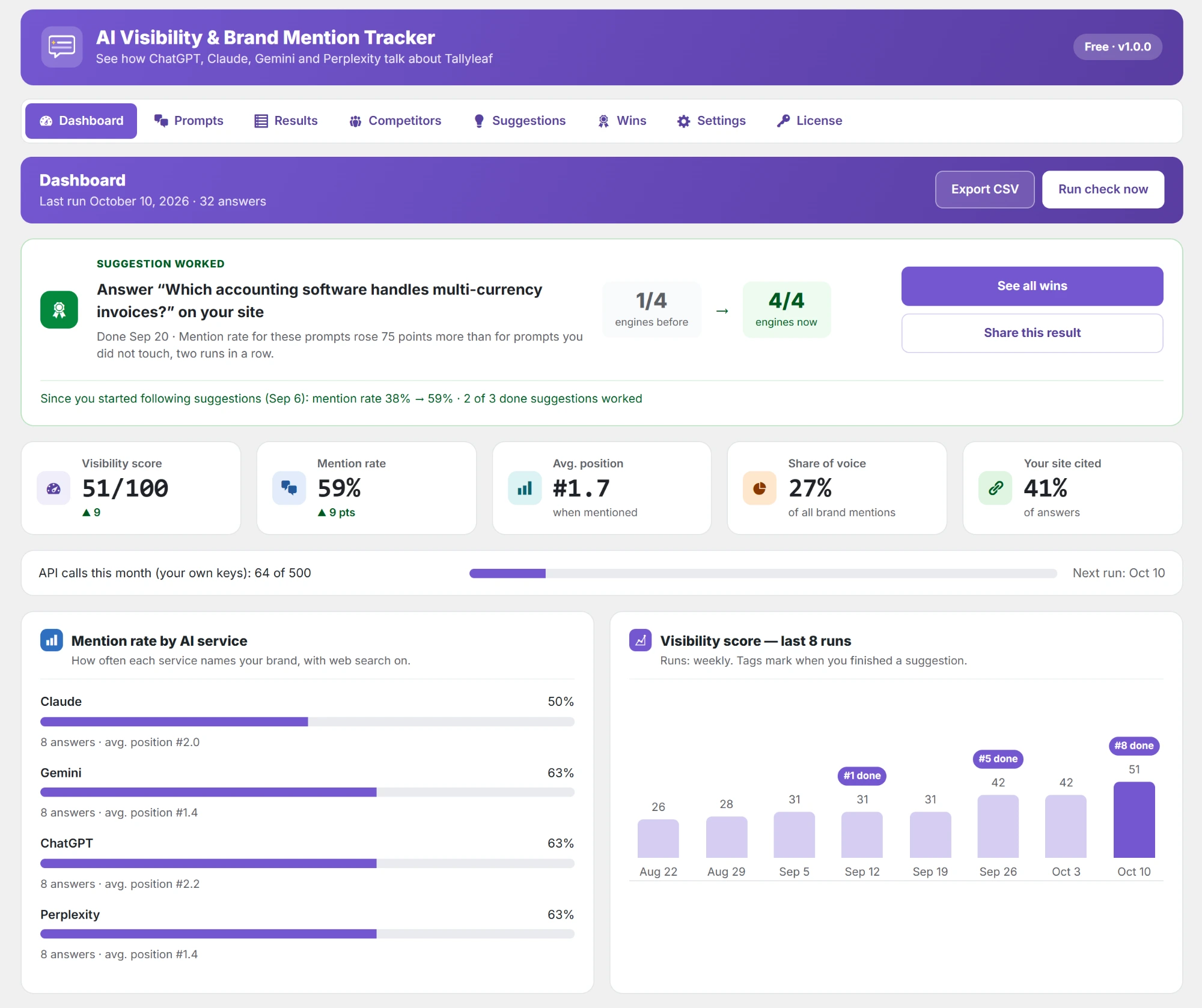
Track brand mentions in AI answers, right inside WordPress. The plugin asks ChatGPT, Claude, Gemini and Perplexity the questions your customers ask, and shows whether they recommend you, who they name instead and which sites they trust. Then it tells you what to fix, writes the missing page for you to approve, and proves what worked.
✓ Your own API keys
✓ No SaaS account
✓ Data stays on your site
● ● ● yoursite.com/wp-admin › AI Visibility
Customer asks
“Which accounting software is best for a small business?”
C ChatGPT
✓ Names you · #1
A Claude
✓ Names you · #2
G Gemini
✗ Not mentioned
P Perplexity
✓ Names you · #1
What the AI Visibility & Brand Mention Tracker Does for You
Four jobs in one WordPress plugin: find out whether AI recommends you, see who it names instead, fix what keeps you out of the answer, and prove the fix worked.
● ● ● yoursite.com/wp-admin › AI Visibility › Results
Why it matters
Why You Should Check If ChatGPT Mentions Your Brand
When someone asks ChatGPT for the best product or company in your field, it names three or four brands. If you are not one of them, you never get the visit, and your analytics never shows the loss. Ranking first on Google does not mean AI names you: AI answers often lean on other sites, such as review sites, forums and lists.
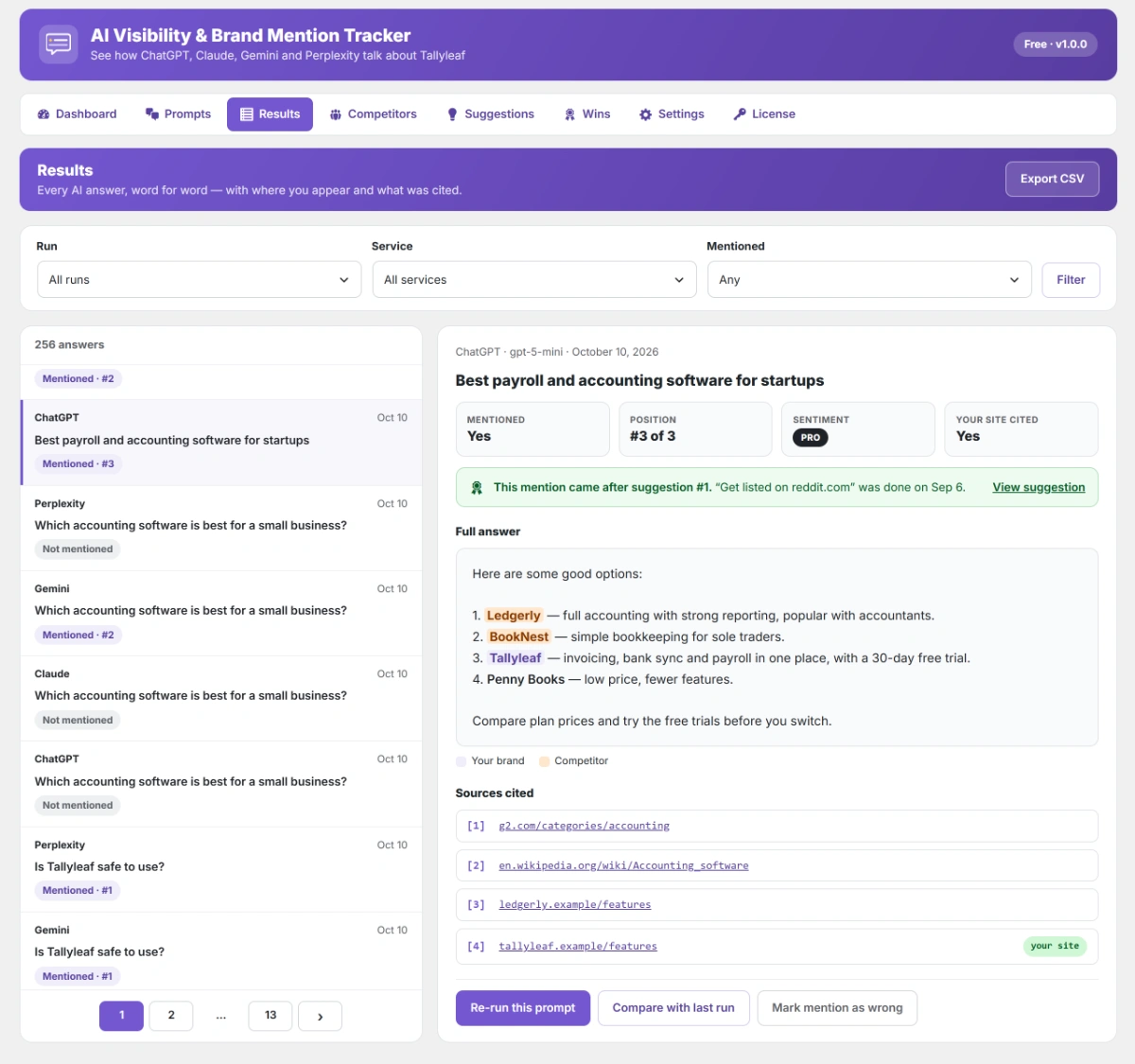
This WordPress plugin checks it for you. It asks the questions your customers ask, reads every answer word for word, highlights your brand and your competitors, and lists the sites the AI used. You see where you stand in ChatGPT, Claude, Gemini and Perplexity, without leaving your dashboard or paying for a SaaS tool.
Be the brand AI recommends, and know it.
Key Features of the AI Visibility Tracker for WordPress
Everything you need to see how ChatGPT, Claude, Gemini and Perplexity talk about your brand, and to change it. Each feature answers one question: are you named, who wins instead, why, and what to fix next.
Who Is the AI Visibility Tracker For?
Anyone whose customers ask AI before they buy. If a buyer can ask ChatGPT about your kind of product or service, this plugin shows whether you are in the answer, and what to do when you are not.
How to Start Tracking Your AI Visibility
Four steps. Your first results in about five minutes, with no account to create and no code to write. After that, the plugin checks on its own every week.
1
STEP 01
Install the Plugin
Install it free from WordPress.org and open AI Visibility in your dashboard. No account to create.
2
STEP 02
Add a Key and Your Brand
Paste an API key for at least one AI service, then your brand name, other names and website. Keys stay encrypted on your site.
3
STEP 03
Run Your First Check
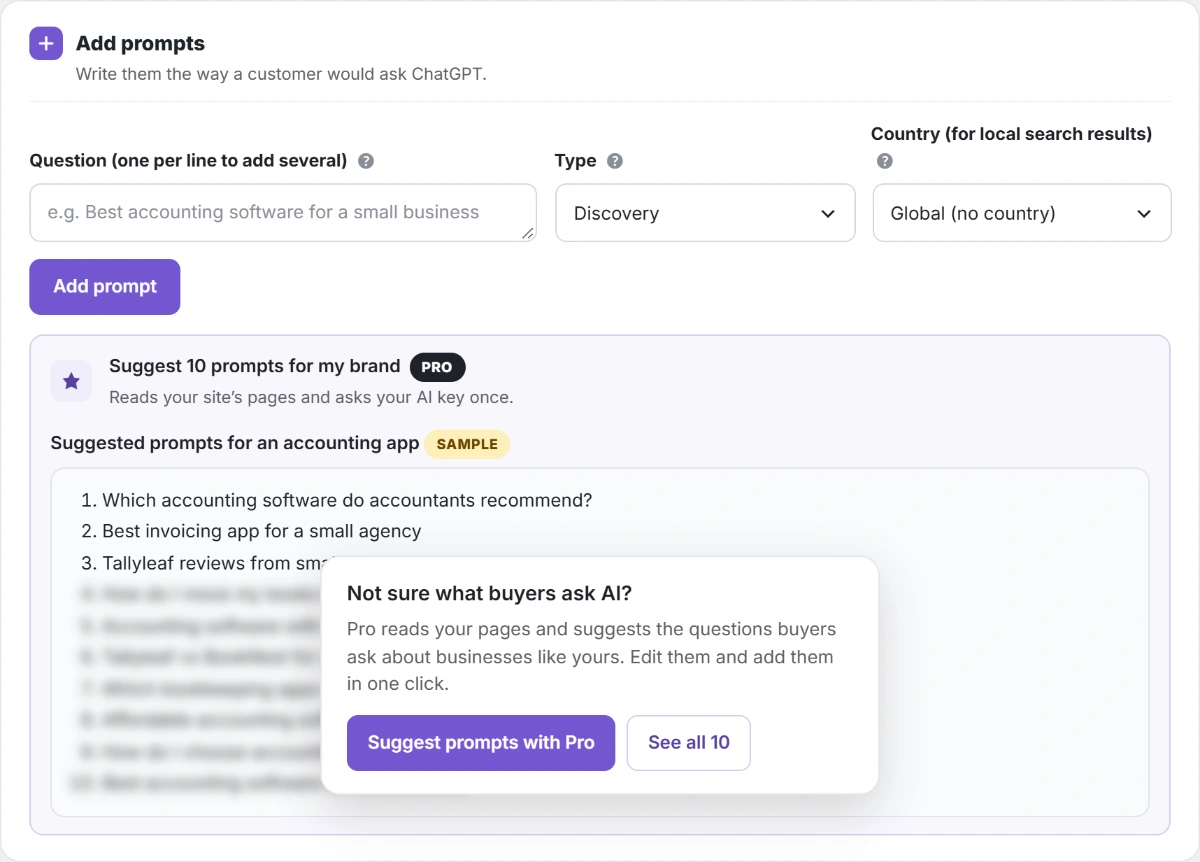
Add the questions buyers ask, or let Pro suggest them, and click Run check now. Results come in within minutes.
4
STEP 04
Fix It and See It Work
Work through the suggestions, or let Pro draft the missing page. The plugin checks every week and shows what worked.
Competitor tracking
Track Your AI Share of Voice Against Competitors, Right in WordPress
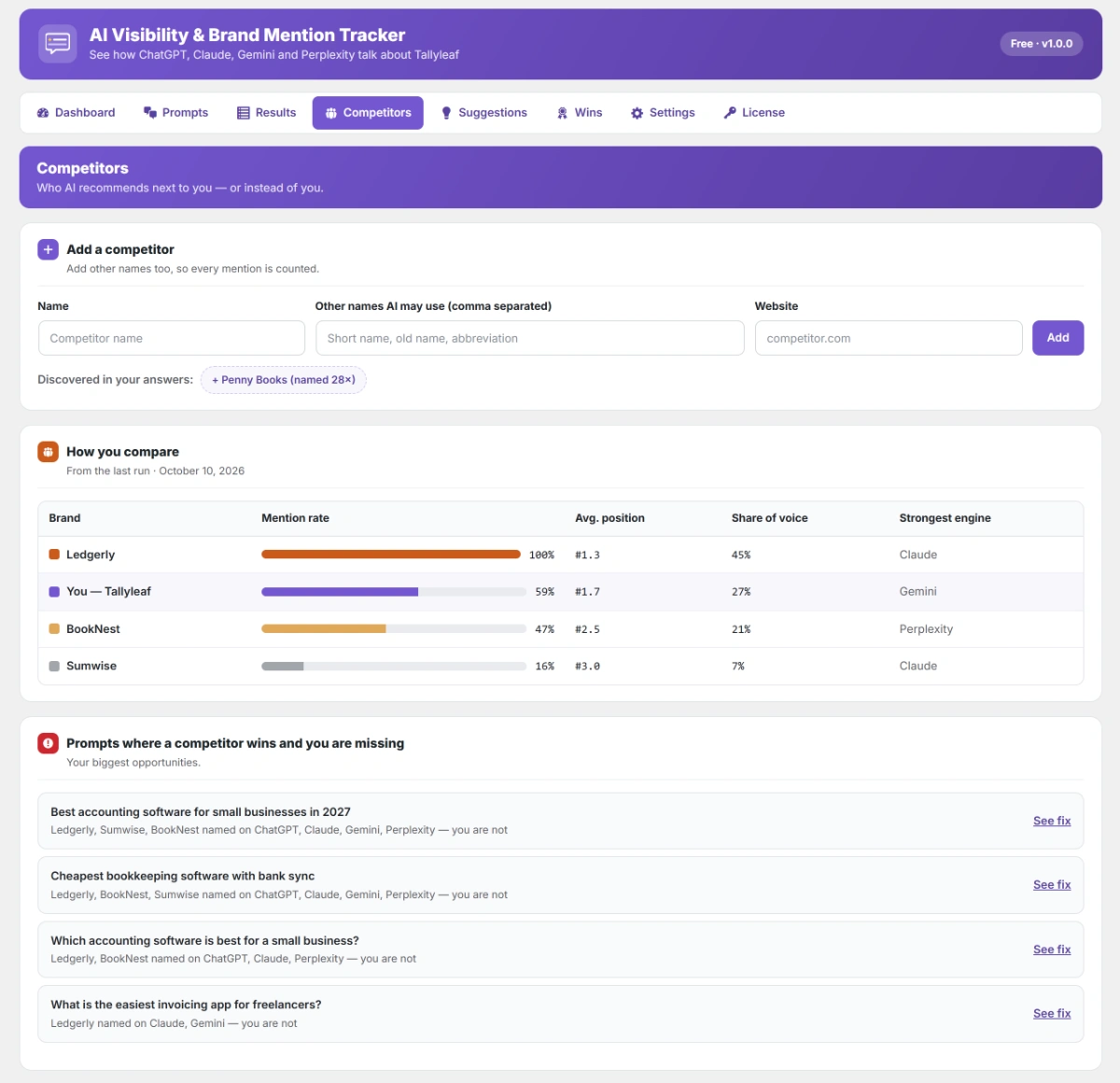
See who AI recommends instead of you. Compare your mention rate, average position and share of voice with every competitor, and see which AI service each one is strongest on. The questions where a competitor wins and you are missing are your biggest chances to grow.
● ● ● yoursite.com/wp-admin › AI Visibility › Competitors
● ● ● yoursite.com/wp-admin › AI Visibility › Results
AI citation tracking
AI Citation Tracking: See Which Sites ChatGPT Cites About You
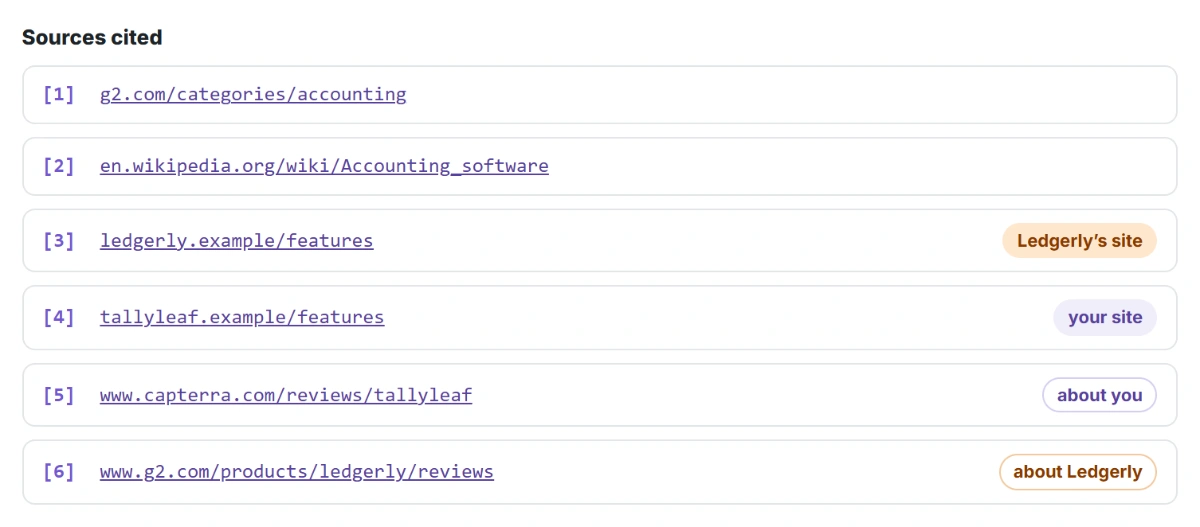
AI answers are built from other websites. The plugin lists every site each answer cites and labels it: your own site, a page about you, a competitor’s site or a page about a competitor. So you know which review sites, lists and forums shape what AI says, and where to earn a mention next.
GEO and AEO suggestions
Generative Engine Optimization (GEO) for WordPress, Backed by Evidence
After every check you get a short list of what to do next, and why: each fix shows the AI answers behind it. That is generative engine optimization (GEO) and answer engine optimization (AEO) without the guesswork. Mark a fix done and the plugin watches the questions it affects for six weeks.
● ● ● yoursite.com/wp-admin › AI Visibility › Suggestions
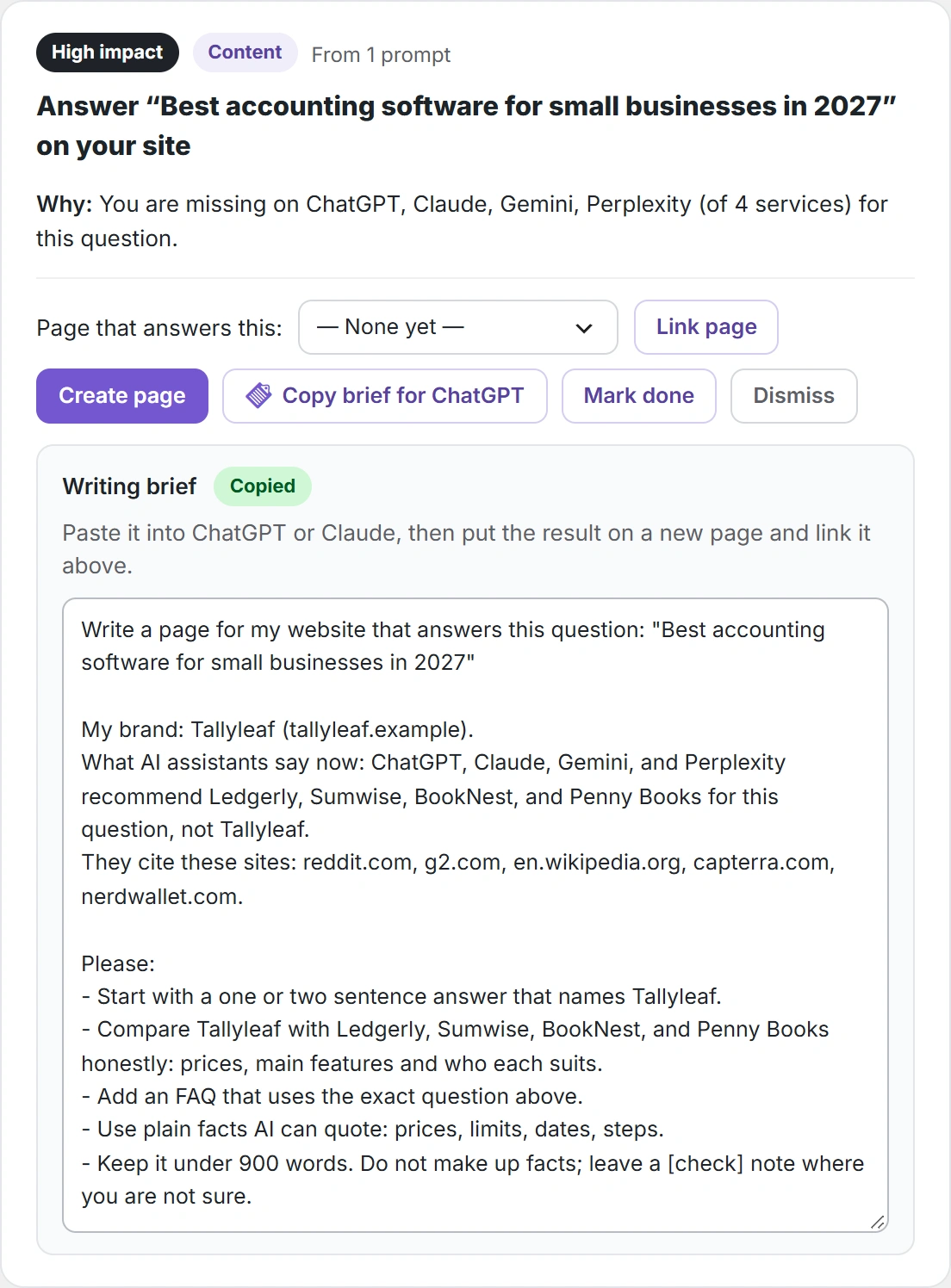
● ● ● yoursite.com/wp-admin › AI Visibility › Approvals
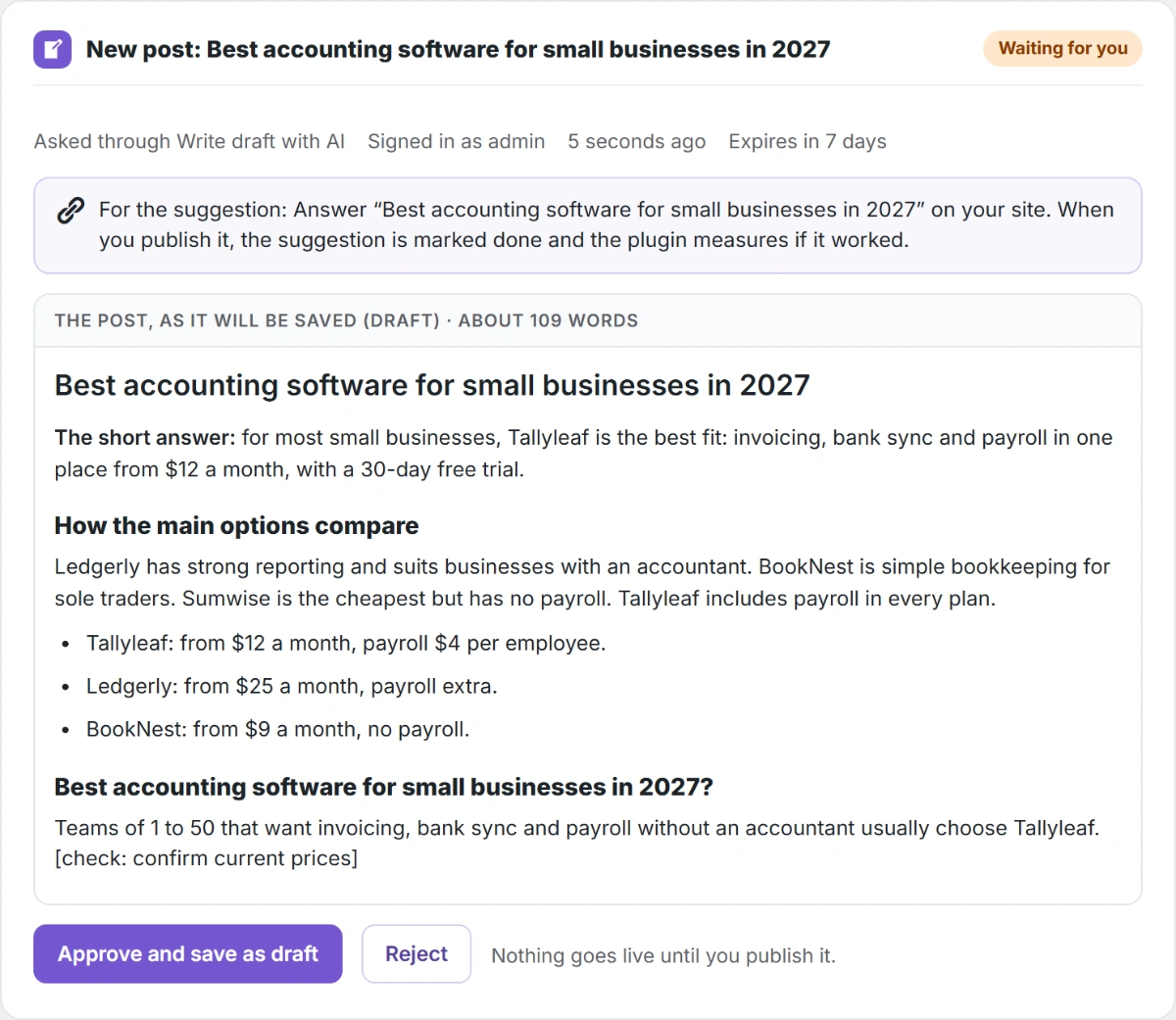
Pro · AI drafts
Write the Page That Gets Your Brand Into AI Answers
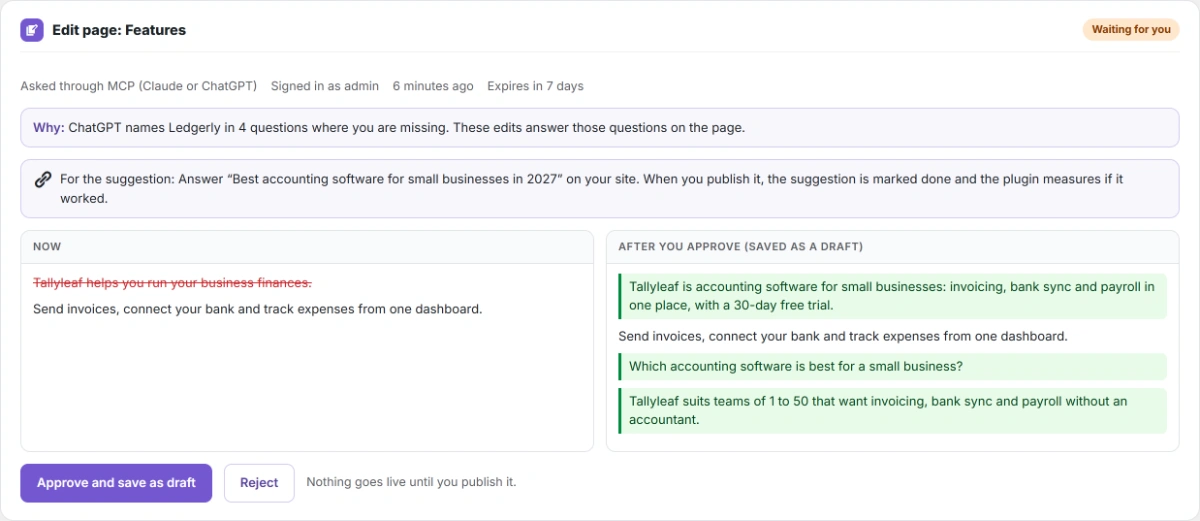
When AI names other brands for a question and not you, the fix is a page that answers it. Pro writes that page in one click, from your own evidence: the question, the brands AI names instead and the sites it cites. You read it, approve it, and it is saved as a draft. Nothing goes live until you publish it.
Wins
Proof of What Moved Your AI Visibility
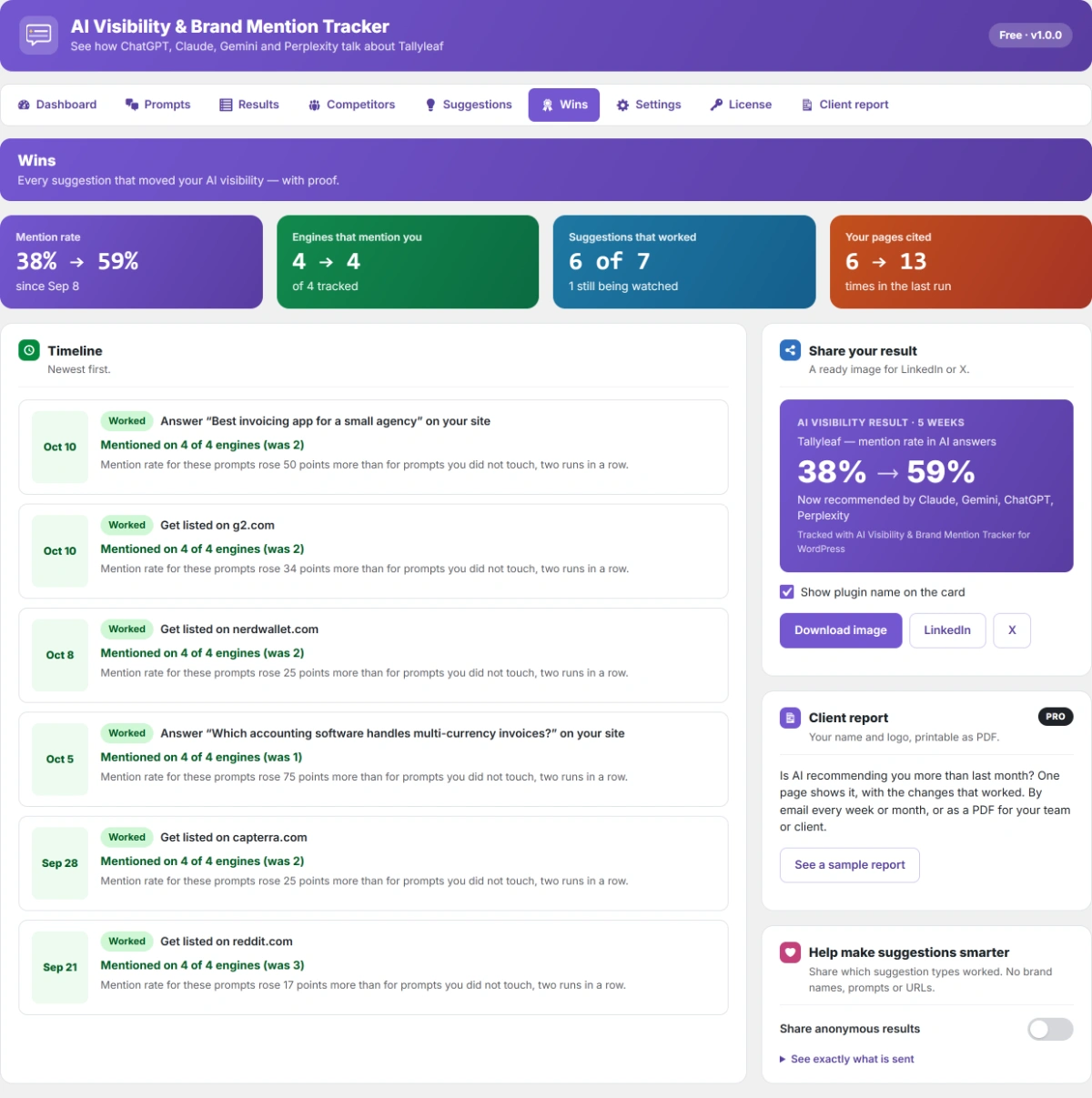
Stop guessing which work paid off. The Wins page shows every suggestion that worked, how many AI engines now mention you, and your mention rate since you started. Show it to your boss, team or client in one click.
● ● ● yoursite.com/wp-admin › AI Visibility › Wins
● ● ● yoursite.com/wp-admin › AI Visibility › Client report
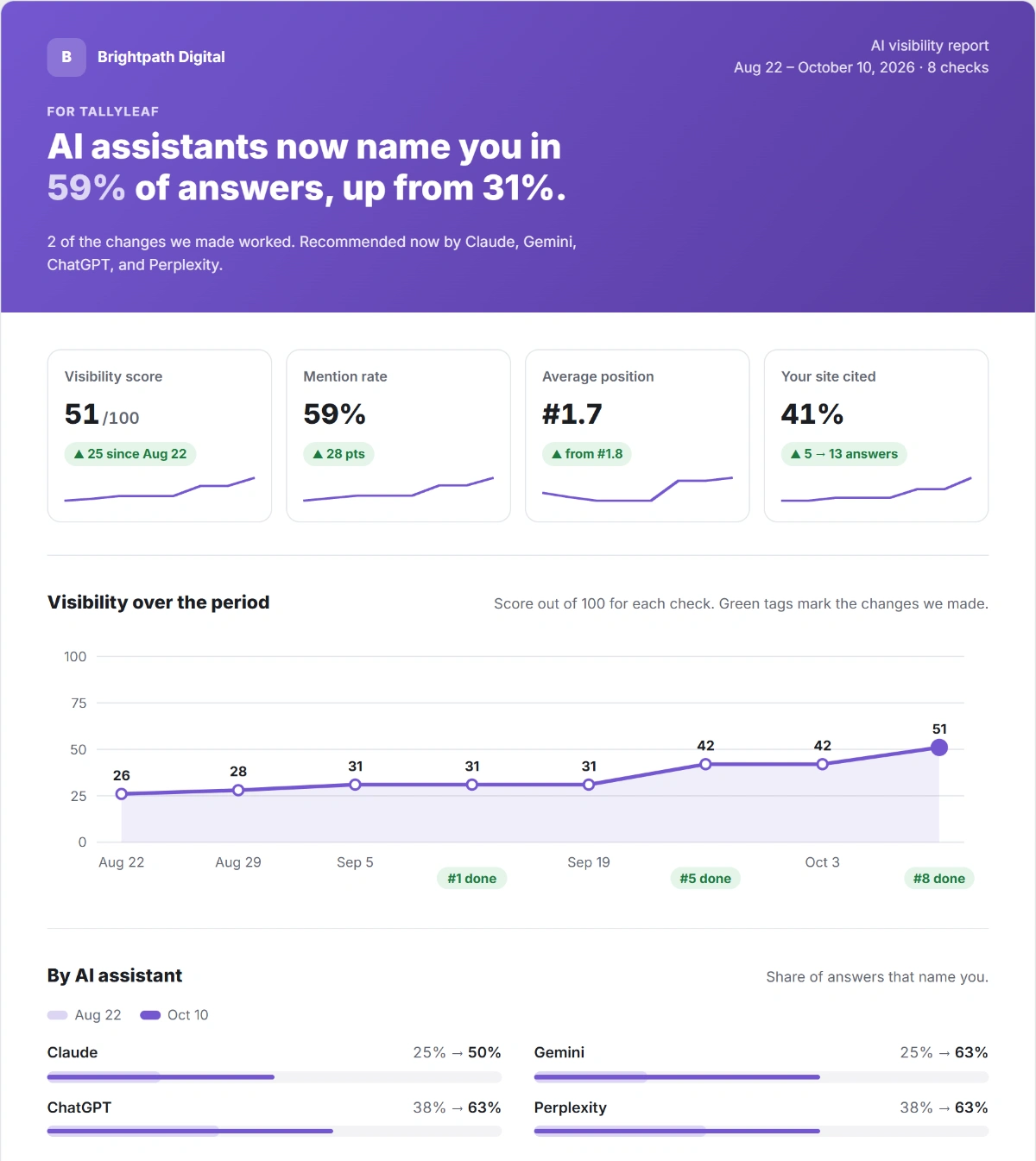
Pro · reports
White-Label AI Visibility Reports From WordPress, by PDF or Email
Is AI recommending you more than last month? One report answers it, for your team or your clients: the headline result, four key numbers, the trend, what you changed and what it did, competitors, cited sites and the next three actions. Agencies add their own name and logo; site owners get it in their inbox without opening the dashboard.
No SaaS account
An AI Brand Monitoring Plugin for WordPress, With No SaaS Account
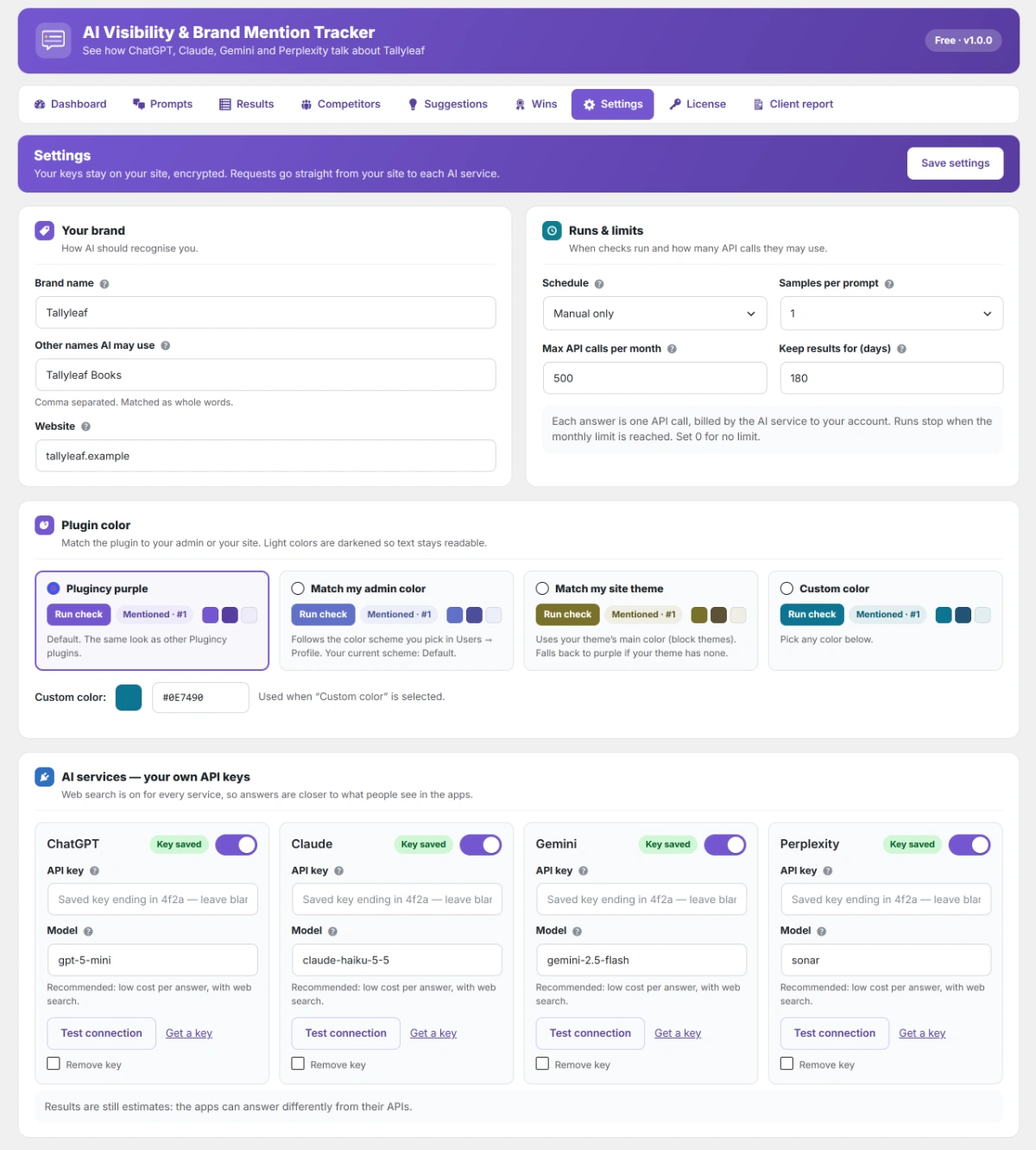
Most AI visibility tools are SaaS: a monthly fee, and your data on their servers. Many WordPress plugins only count AI bot visits or create an llms.txt file; they never ask the AI what it actually says about you. This plugin asks ChatGPT, Claude, Gemini and Perplexity from your own server, with your own API keys. You pay the AI services directly, only for what you use: 8 questions on 4 services is 32 calls, a few cents with the default models.
● ● ● yoursite.com/wp-admin › AI Visibility › Settings
● Claude · connected to yoursite.com with MCP
How visible is Tallyleaf in AI this week?
✓ aivbm/get-visibility-summary
Your AI visibility score is 51/100, up 9 from last week. ChatGPT, Gemini and Perplexity name you in 63% of answers. Ledgerly still leads share of voice with 45%.
Add text to our Features page so ChatGPT names us.
⏳ Waiting for your approval
I wrote the edit. Nothing has changed yet: approve it in WordPress under AI Visibility → Approvals.
MCP
MCP for WordPress: Let Claude or ChatGPT Work on Your AI Visibility
Ask in plain words instead of clicking through reports, for example “Which competitor does Perplexity recommend most?” Your AI assistant reads your score, answers, competitors and suggestions through MCP. With Pro it can also add competitors, edit pages and write posts, but only with your OK: every change waits on the Approvals page, and pages are saved as drafts.
Free plugin
Start With the Free AI Visibility WordPress Plugin, See Pro Before You Buy
The free plugin is complete for tracking one brand: all four AI services, competitors, sources, suggestions and proof of what worked, with no time limit. Where a Pro feature lives, the free plugin shows a real sample of it, so you see exactly what you would get before you pay.
Trusted WordPress Plugins for Growing Businesses
Built by Plugincy, the team behind WordPress plugins used by growing stores and agencies. Buy with a refund guarantee and real people behind the support.
Works With Your SEO Plugin and Theme
Tested with 60+ popular plugins and themes, on PHP 7.4 to 8.4 and multisite. It adds the AI side to the SEO you already do, without slowing your site: nothing loads on the front end.
AI Visibility & Brand Mention Tracker Pro Pricing
Every plan includes every Pro feature, updates and support, so you only choose how many sites you need. AI service costs stay on your own API key, usually a few cents per check.
Single Site
Normally $99
$79
/ year
$20 savings
Most popular
Up to Three Sites
Normally $297
$149
/ year
$148 savings
Up to Five Sites
Normally $495
$199
/ year
$296 savings
Single Site
Normally $349
$249
one time
$100 savings
Most popular
Up to Three Sites
Normally $699
$449
one time
$250 savings
Up to Five Sites
Normally $999
$599
one time
$400 savings
15-day money-back guarantee. AI service costs are billed by each provider to your own API key.
Free vs Pro: Compare the AI Visibility Tracker Versions
The free plugin is complete for tracking one brand, with no time limit. Pro saves you the hours: it writes the missing pages, checks every day and sends the reports for you.
What you get
Pro
from $79 / year
Free
on WordPress.org
TRACK
See if ChatGPT, Claude, Gemini and Perplexity recommend you
Visibility score, mention rate, position and the sites AI cites
Every answer word for word, with brands highlighted
Competitors, AI share of voice and the questions you are missing
Check schedule
Daily, weekly or manual
Weekly or manual
Samples per question, for steadier numbers
Up to 3
1
Know if AI praises or warns against you (sentiment)
—
FIX
GEO and AEO fixes, each measured for six weeks
A writing brief for ChatGPT for each missing page
AI writes the missing page; you approve the draft
—
Page-by-page edits from a deep AI review
—
Prompt ideas from your own pages
—
PROVE AND REPORT
Wins page and a share image
White-label reports by PDF, or by email every week, 2 weeks or month
—
WORK WITH AI ASSISTANTS
CSV export, dashboard widget, MCP read tools
Claude or ChatGPT make changes through MCP, after your OK
—
Every feature, explained: see the full Free vs Pro comparison on the pricing page
Questions About the AI Visibility & Brand Mention Tracker
Straight answers about how the plugin works, what it costs to run, and how it helps your brand get named by ChatGPT, Claude, Gemini and Perplexity.
Find Out If AI Recommends Your Brand
Start free with your own API key and see your first AI answers in minutes. Upgrade when you want AI drafts, daily checks and reports that send themselves.
Didn’t find your answer? Read the documentation · Contact support, 24/7