
The Require Location Selection and Location Switching Behavior settings help control how customers interact with products across different store or warehouse locations. These settings ensure users select a location before shopping, and define what happens when they switch locations mid-session.
How to Access These Settings
- Go to Location Manage → Settings
- Open User Experience
- Scroll to the User Experience Settings panel
Here you will find options related to customer interaction, location enforcement, and location-switch handling.
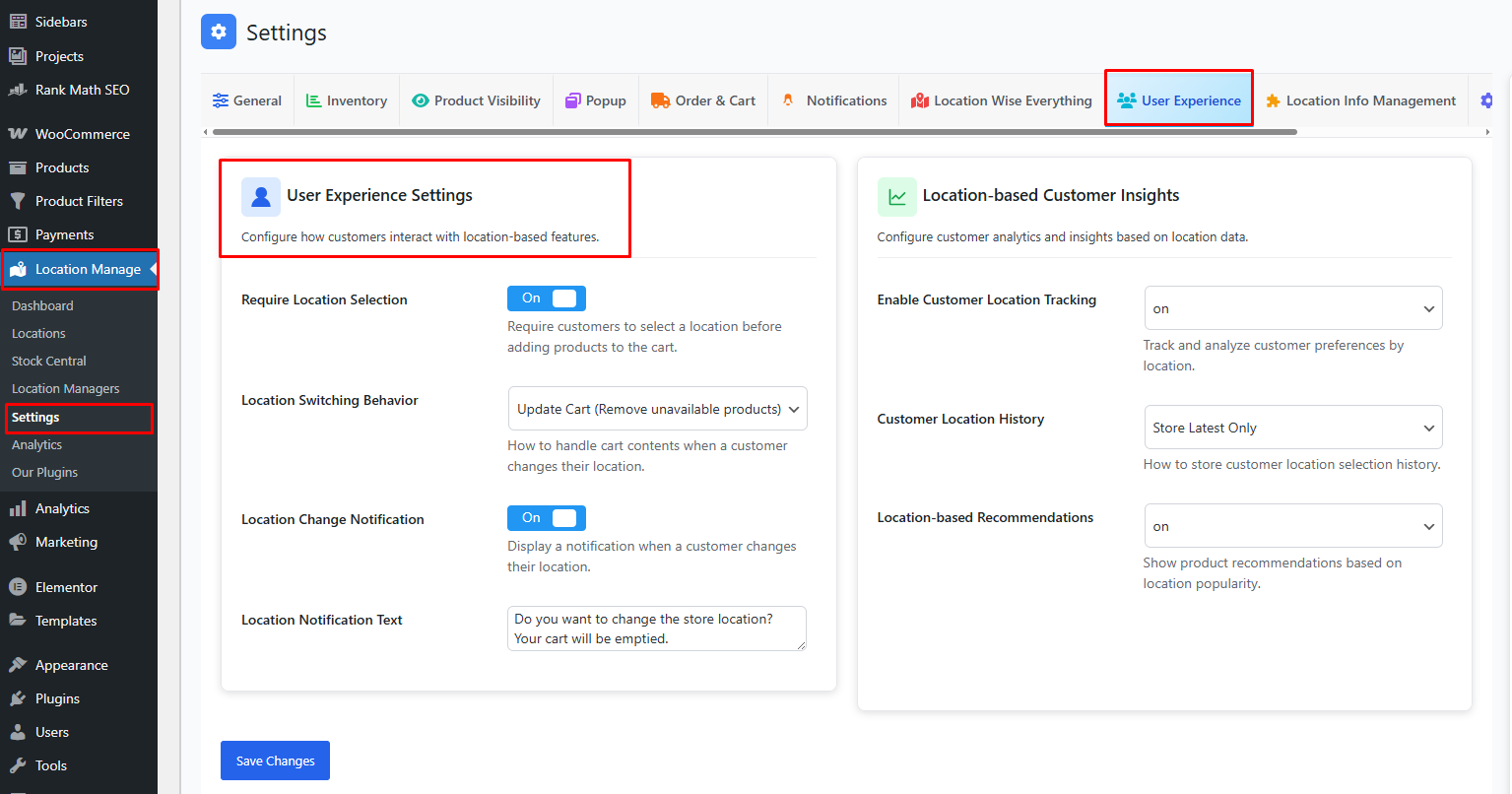
Require Location Selection — ON/OFF
ON
When enabled:
- Customers must select a location before:
- Adding products to cart
- Viewing location-specific inventory
- Viewing location-based pricing
- Checking out
If a location is not selected:
- A prompt or modal will appear asking the user to choose a location
- The “Add to Cart” button may be disabled until selection is made
- Product pages will not display location-specific details until a location is chosen
This prevents:
- Accidental shopping without a defined location
- Incorrect stock visibility
- Wrong pricing based on default/global settings
OFF
When disabled:
- Customers can browse products without selecting a location
- The system may use:
- A default location
- Automatic location detection (if configured)
- Global fallback inventory
However, it may lead to inconsistent inventory visibility unless carefully configured.
Location Switching Behavior
The Location Switching Behavior setting defines how the shopping cart responds when a customer changes their selected location. Since product availability can vary by location, this option helps you control the customer experience and maintain cart accuracy.
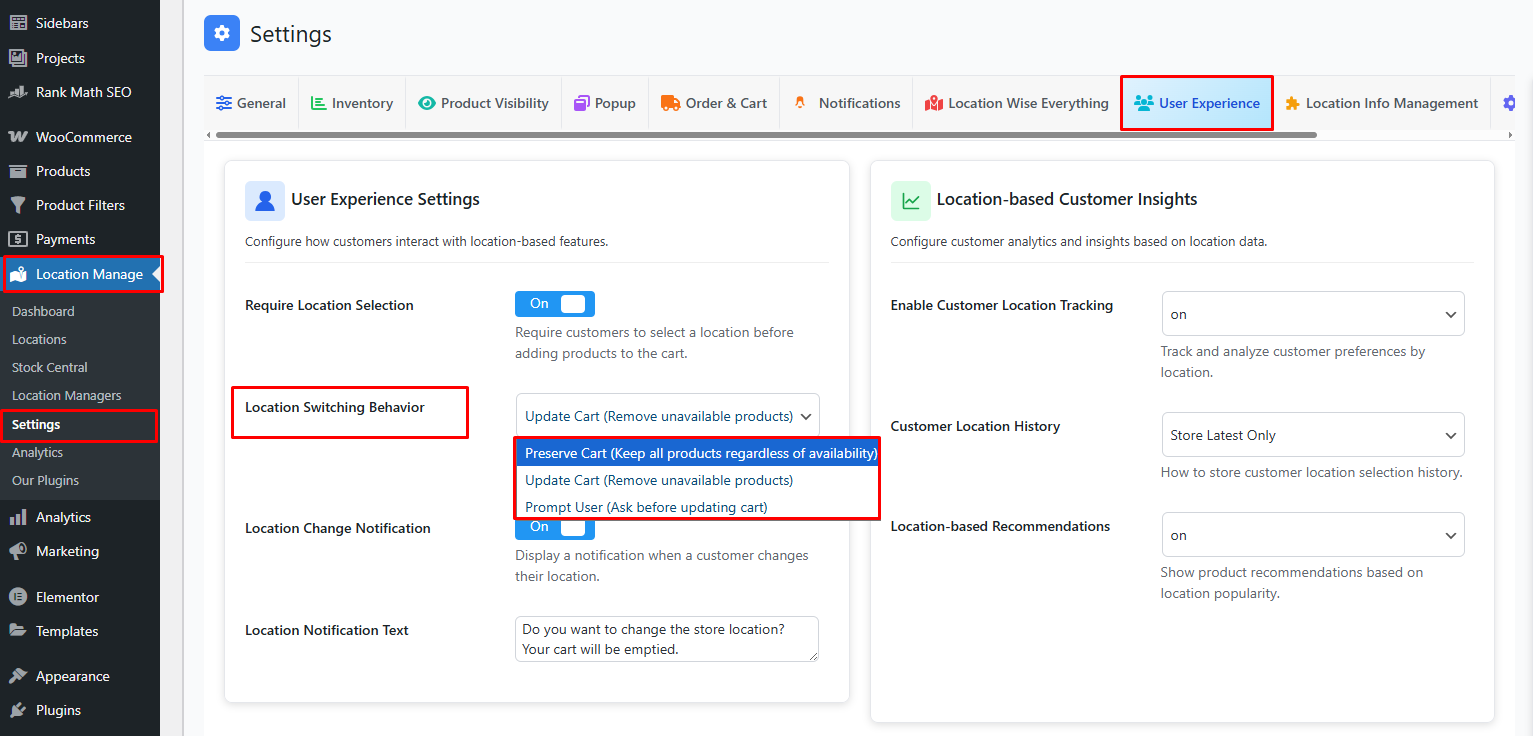
1. Preserve Cart
All products remain in the cart when the customer switches locations, even if some items are not available in the newly selected location.
Behavior Details:
- No products are removed from the cart.
- Unavailable products may still appear in the cart.
- Stock availability is not revalidated during location change.
Best Use Case:
- When you want a smooth, interruption-free shopping experience.
- Suitable for stores that allow backorders or plan to fulfill items from another location later.
Note: Customers may see out-of-stock items at checkout if availability is not validated again.
2. Update Cart
The cart is automatically updated to match the selected location’s inventory.
Behavior Details:
- Products not available in the selected location are removed immediately.
- The cart always reflects accurate, location-based stock.
- No user interaction is required.
Best Use Case:
- When strict inventory accuracy is required.
- Ideal for stores with location-specific stock and no cross-location fulfillment.
Note: This option may reduce cart items but ensures checkout accuracy.
3. Prompt User
The system detects unavailable products after a location change and asks the customer how to proceed.
Behavior Details:
- A confirmation prompt is shown to the user.
- Users can choose whether to update the cart or keep all items.
- No changes are made without user consent.
Best Use Case:
- When you want to balance transparency and user control.
- Ideal for customer-focused stores that want to avoid surprise cart changes.
Note: This option improves user trust by clearly communicating cart updates.
Why Require Location Selection?
Accurate Inventory
Customers see only stock from their selected store/warehouse.
Correct Pricing
Location-based pricing is displayed only when a location is selected.
Proper Logistics
Shipping, pickup availability, and delivery windows remain accurate.
Reduced Customer Confusion
Prevents users from thinking a product is out of stock when it’s simply not available at the selected location.
Best Practices
- Turn Require Location Selection ON for multi-store or multi-warehouse setups
- Enable location switching confirmation to avoid accidental changes
- Clear the cart on location change if cross-location ordering is disabled
- Keep the cart if cross-location ordering is allowed
- Use a location selector modal on site load for clear UX
- Test switching behavior across mobile and desktop
Summary
| Setting | Description |
|---|---|
| Require Location Selection | Forces user to choose a location before adding to cart |
| Confirm on Location Switch | Asks user to confirm when changing location |
| Clear Cart on Switch | Empties cart if switching to another location |
| Keep Cart on Switch | Keeps cart and recalculates product data |
| Restrict Checkout Switch | Prevents location changes during checkout |