
Manage StockWhere It Matters Most
Multi Location Inventory Management for WooCommerce
Manage multiple store locations effortlessly with Multi Location Product & Inventory Management for WooCommerce-the complete solution for businesses that sell across cities, warehouses, or branches. Keep your inventory, pricing, and fulfillment perfectly synced while giving customers a faster, location-based shopping experience.
This plugin helps you control stock, assign managers, and automate order routing with precision. From location-based pricing and shipping to auto order fulfillment and real-time quantity tracking, every feature is built to simplify operations, reduce errors, and boost efficiency.
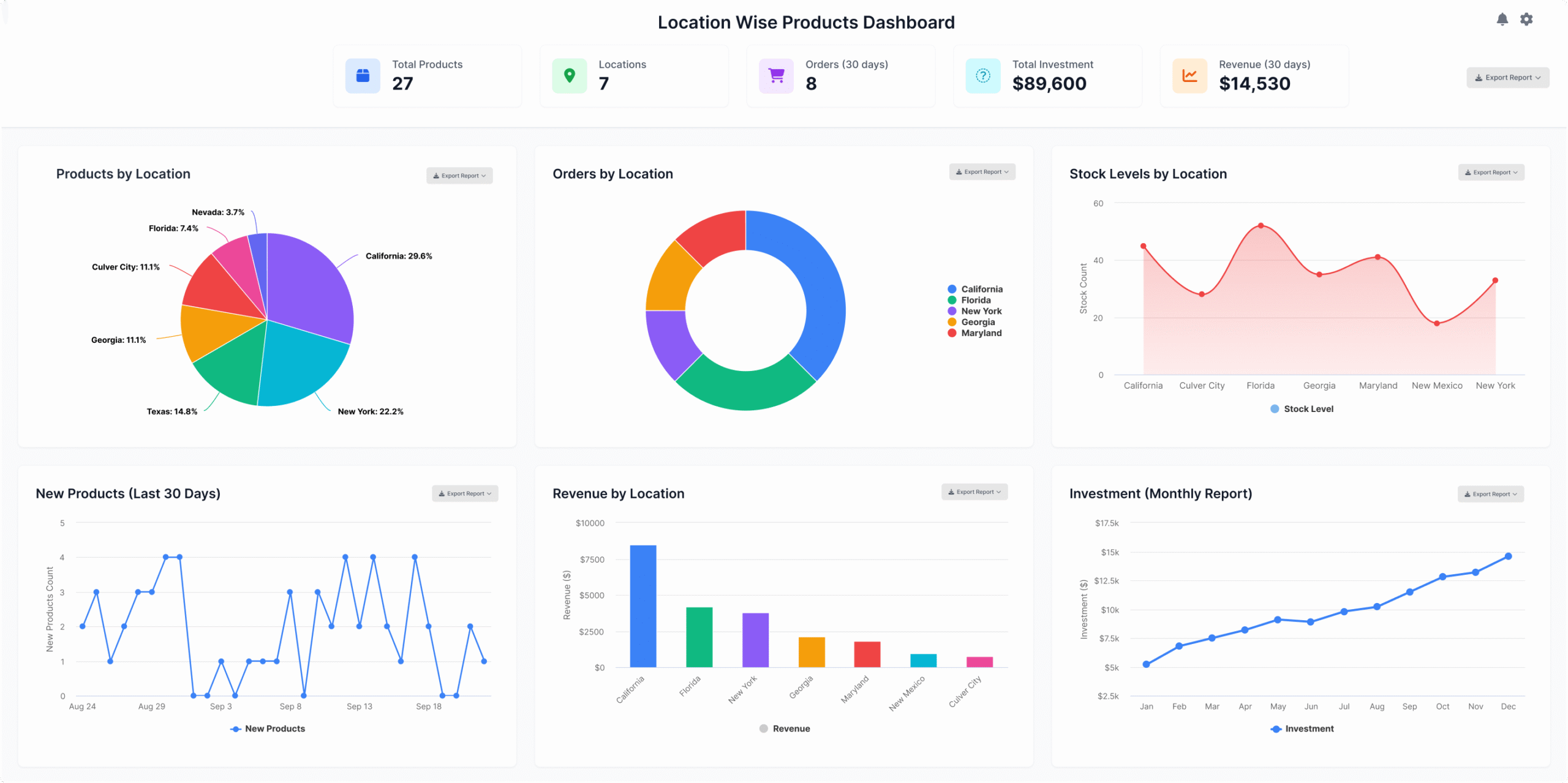
Discover the Essential Features
Our plugin is packed with powerful features designed to enhance your WooCommerce store, streamline the checkout process, and improve customer satisfaction, ultimately increasing conversions and driving more sales.
New Exclusive Features
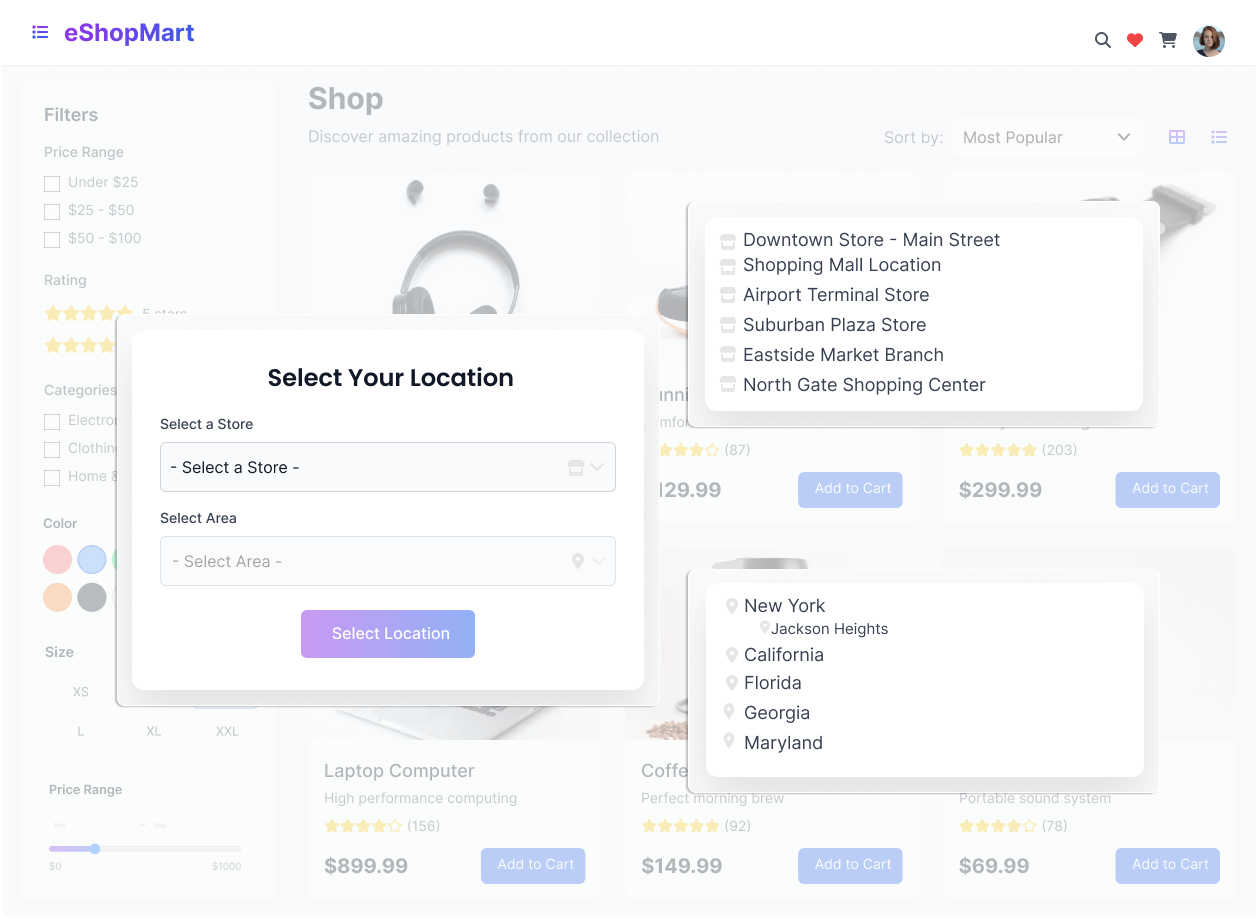
Experience a more personalized WooCommerce shopping journey today.
Find Products Near You
Looking for products available in your area? Our location-based search feature makes it easy to find what you need—faster, smarter, and with better accuracy. Simply select your city, region, or preferred store to instantly view products available near you.
Whether you’re shopping online or planning to visit a nearby outlet, this feature ensures that you only see items that can be purchased or delivered from your selected location—saving time and improving your shopping experience.
Simple Steps to a Better Checkout
It’s easy to get started. Just follow these three simple steps to organize and manage your store’s inventory more efficiently with the Multi Location Product & Inventory Management plugin.
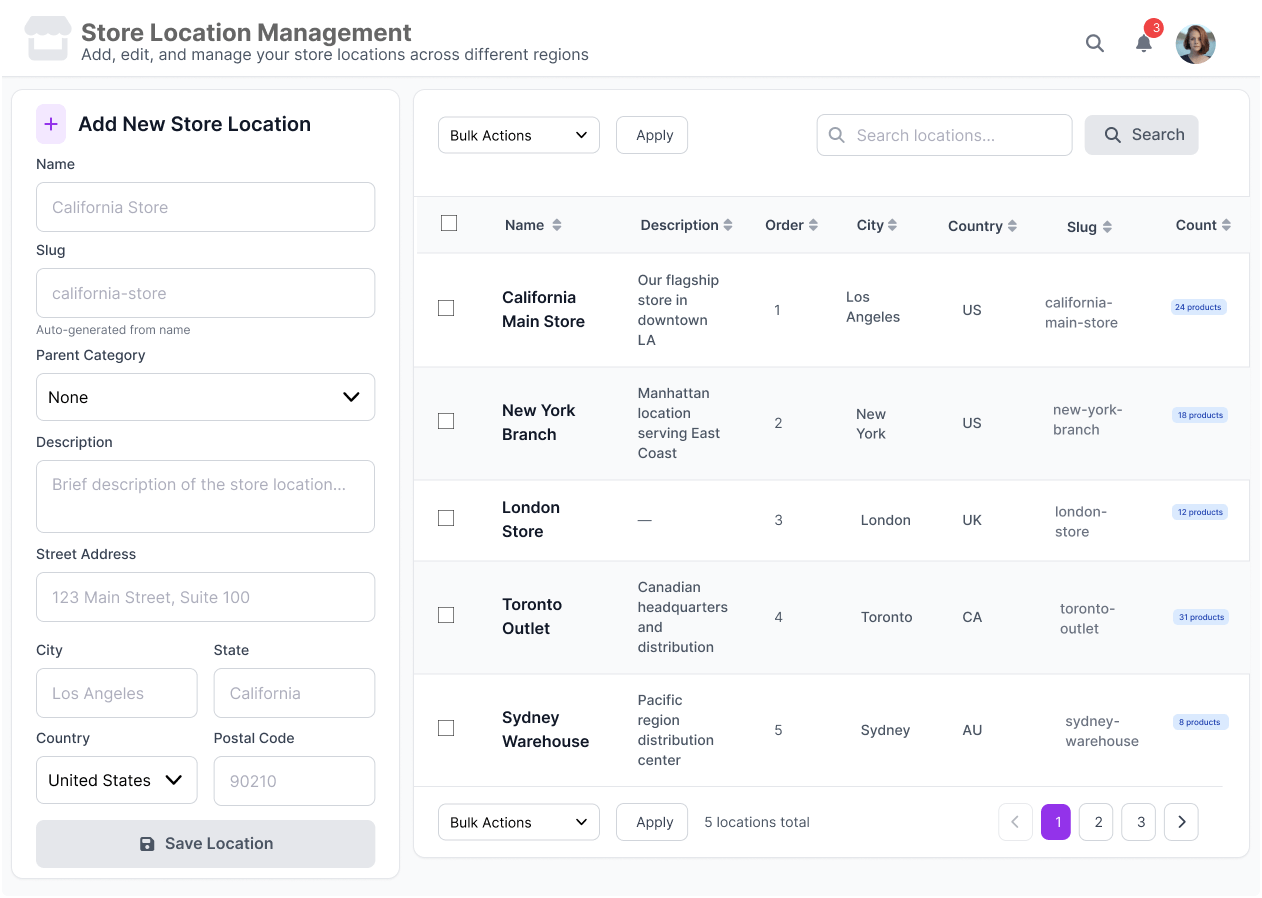
Manage Store Locations in Just a Few Steps
Effortlessly add, edit, and manage your WooCommerce store locations across multiple regions-all from a single, organized dashboard. The Store Location Management system helps you keep inventory and store data consistent, whether you run a few outlets or an entire global network.
Once saved, your locations appear in a clean, sortable list for quick management. Filter, search, and update stores in seconds to maintain accurate regional operations.
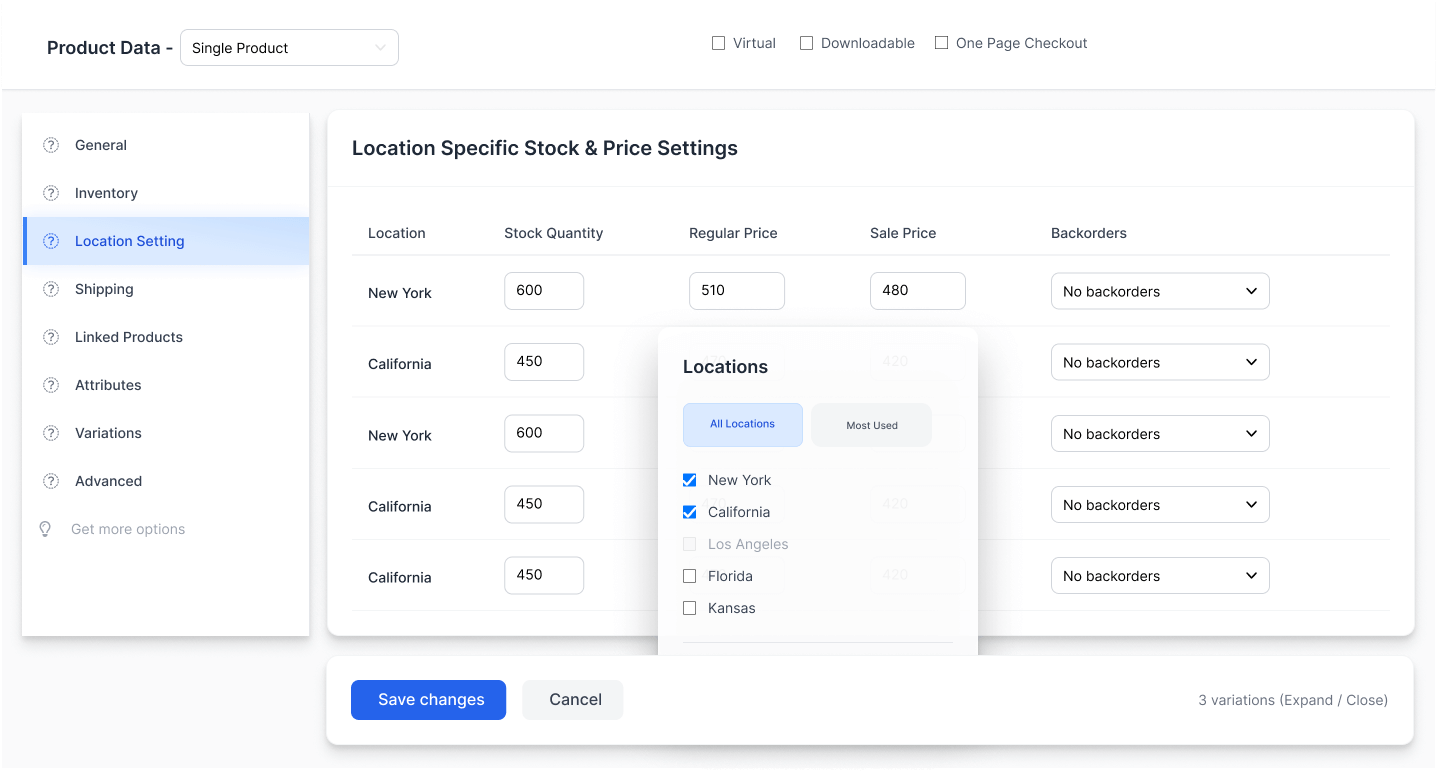
Easy Product-Wise Configuration for Multi-Location Stores
Simplify inventory control by managing stock and pricing for each location directly from your product detail page. The Multi-Location Product & Inventory Management plugin allows you to create and adjust location-based inventories without affecting your main product data.
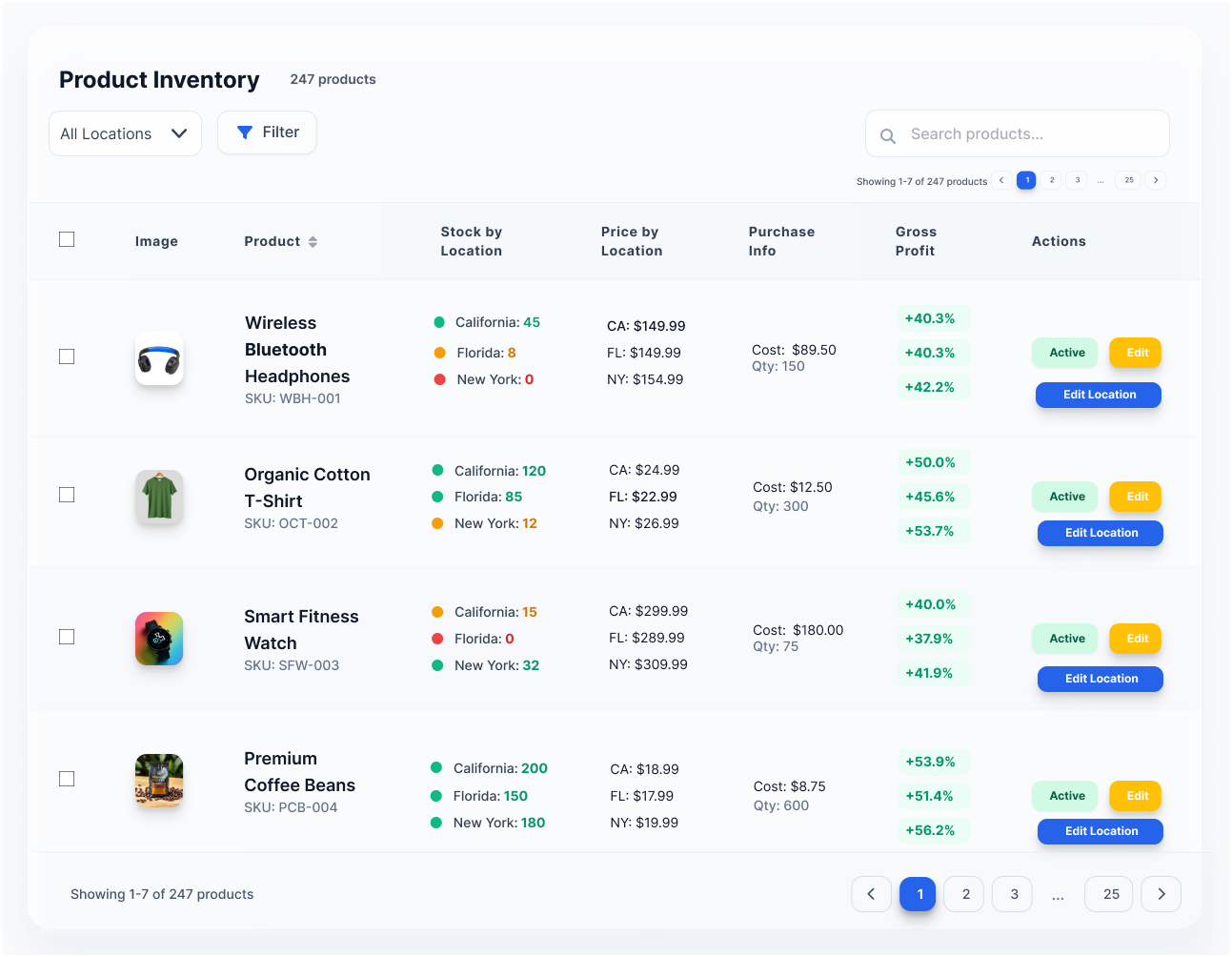
Manage Your Entire Inventory from One Dashboard
Stay in control of your WooCommerce stock and pricing across all store locations with a single, powerful dashboard. Monitor inventory levels, pricing changes, and profit margins in real time-no switching between stores or spreadsheets needed.
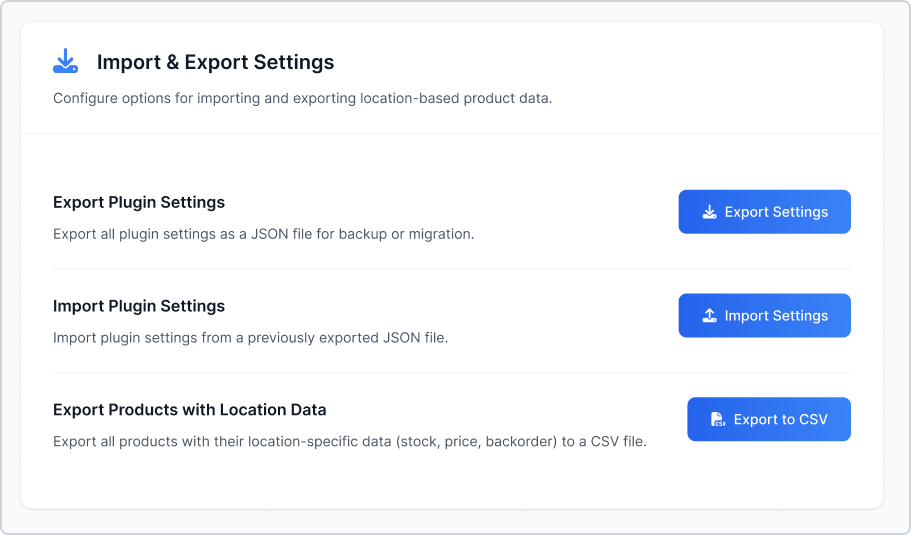
Excel Inventory Stock Imports & Exports
Simplify bulk inventory management with our built-in Excel import and export functionality. The plugin allows you to upload, update, and manage large product lists effortlessly using XLS or XLSX files. Powered by AJAX, it ensures fast and reliable performance even when handling thousands of records at once.
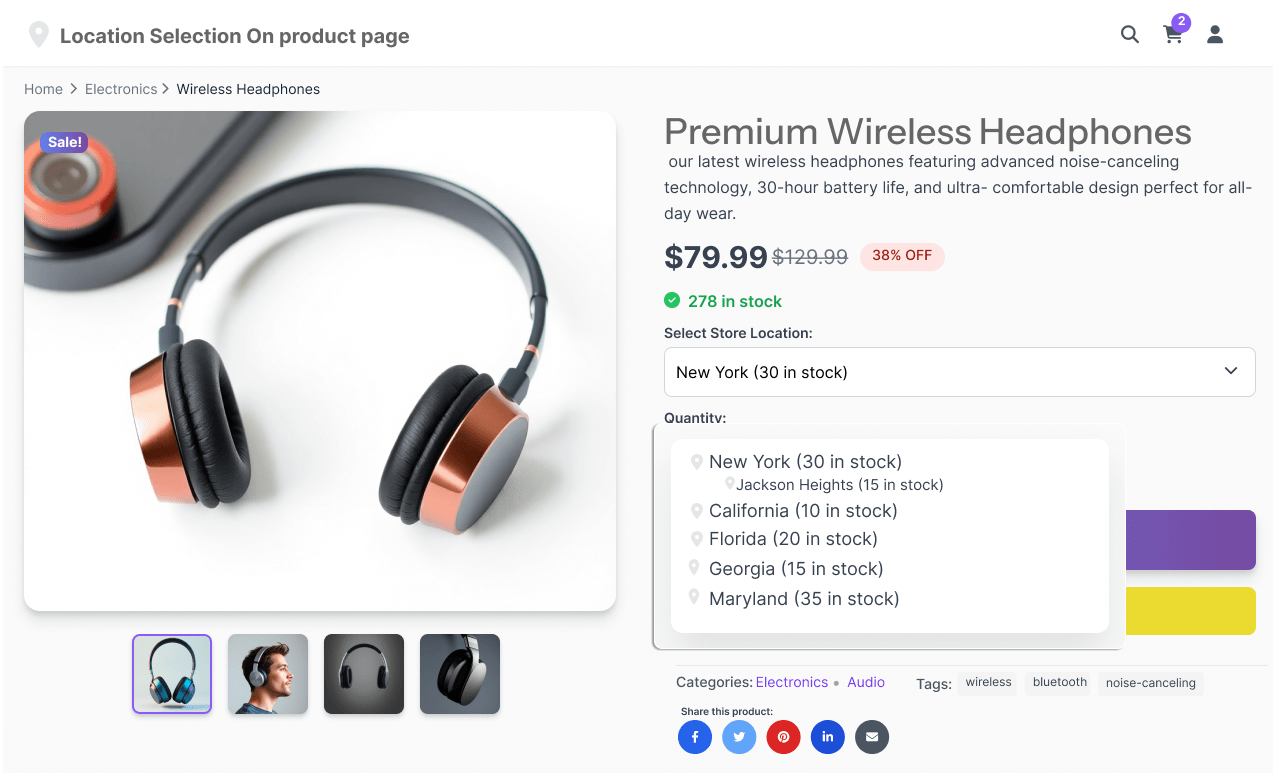
Flexible Location Selection Styles on Product Pages
Give your customers more control when choosing store locations directly on the product page. With three intuitive display styles, you can personalize how location options appear in your WooCommerce store, improving user experience and purchase confidence.
Empower Your Team with Location Manager Control
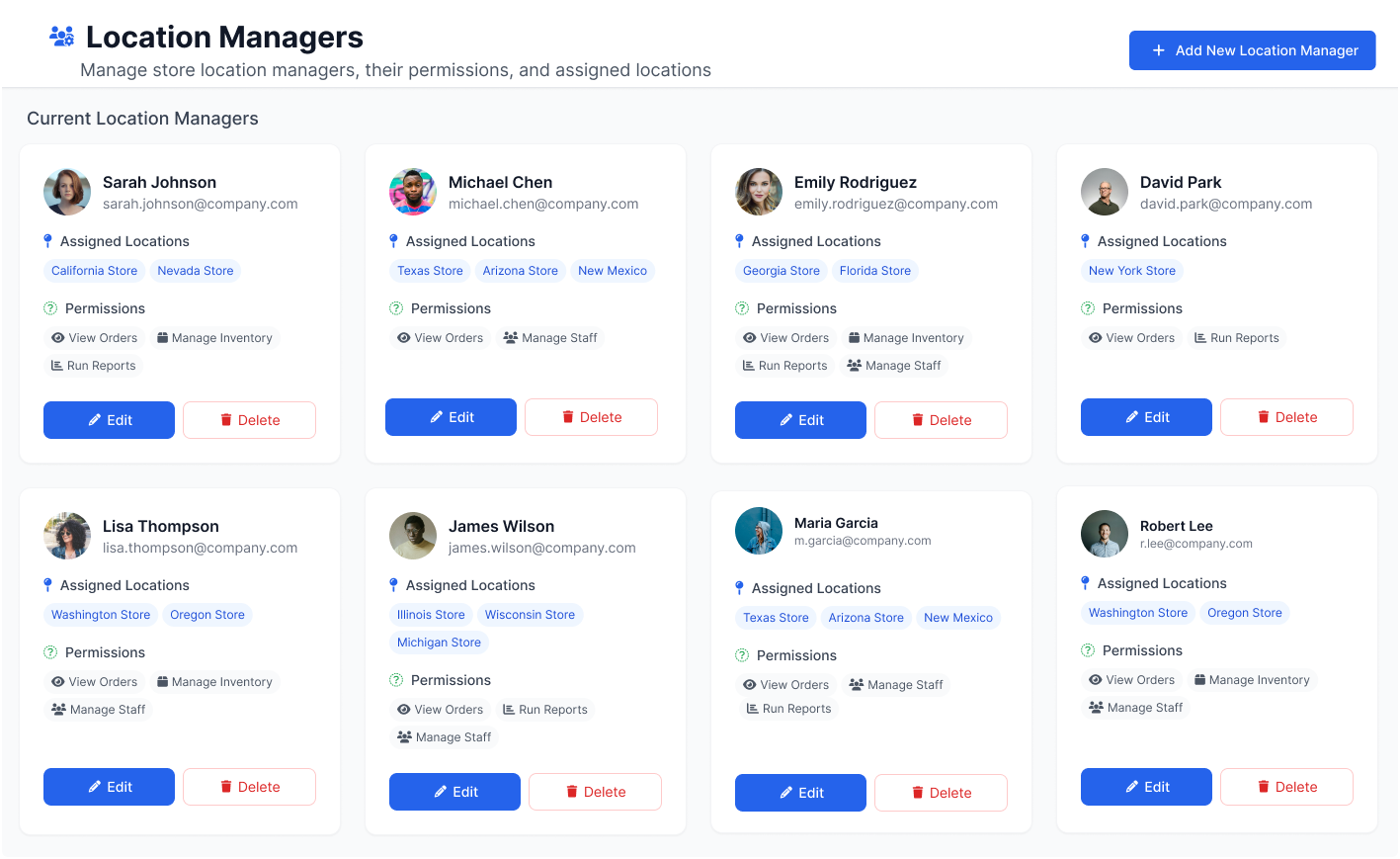
Take your multi-location store management to the next level with the Location Managers feature. This tool allows you to assign specific users to handle inventory, stock updates, and order fulfillment at each store or warehouse. By giving managers focused access, you ensure precision, accountability, and smooth operations across all locations.
Advanced Reporting for WooCommerce Multi-Location Stores
Get full visibility into your business performance with smart reporting tools built for WooCommerce. The Export Report feature lets you generate detailed insights into inventory, sales, and stock movement across every store location. Whether you’re tracking performance or planning restocks, these reports help you make data-driven decisions with ease.
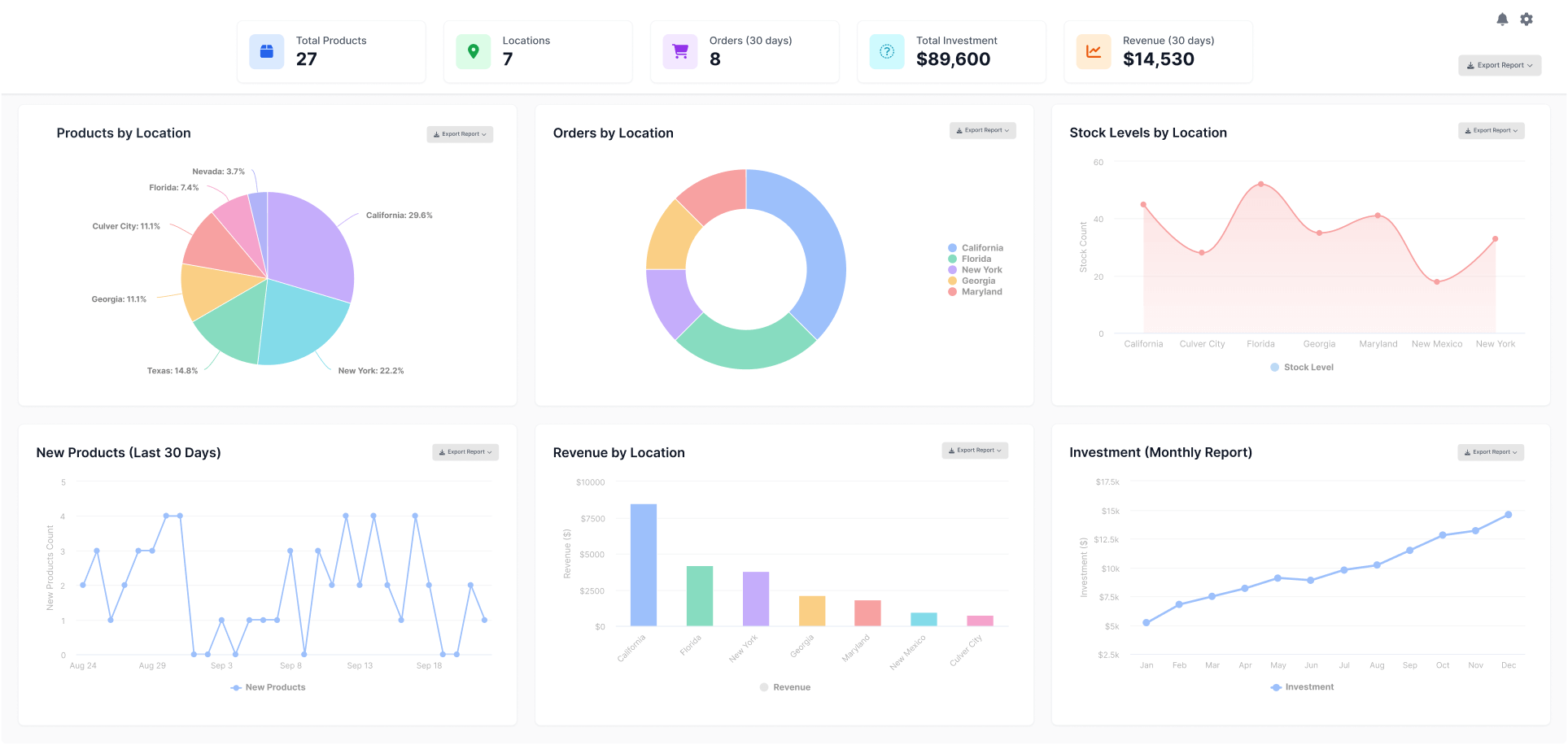
Transform Your Multi-Location Business
Streamline your WooCommerce store with powerful multi-location management capabilities.Experience seamless integration with advanced location-based features that scale with your growing business.
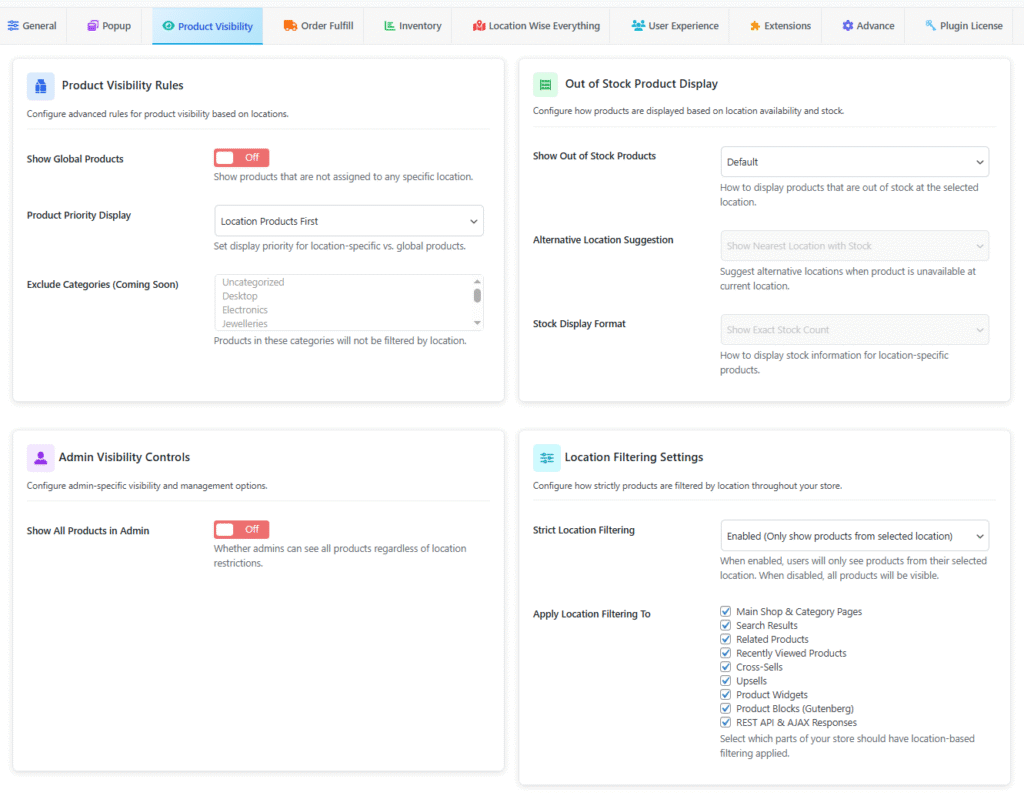
Advanced Product Visibility & Stock Control
Simplify complex multi-location management with intelligent visibility rules and dynamic stock display options.
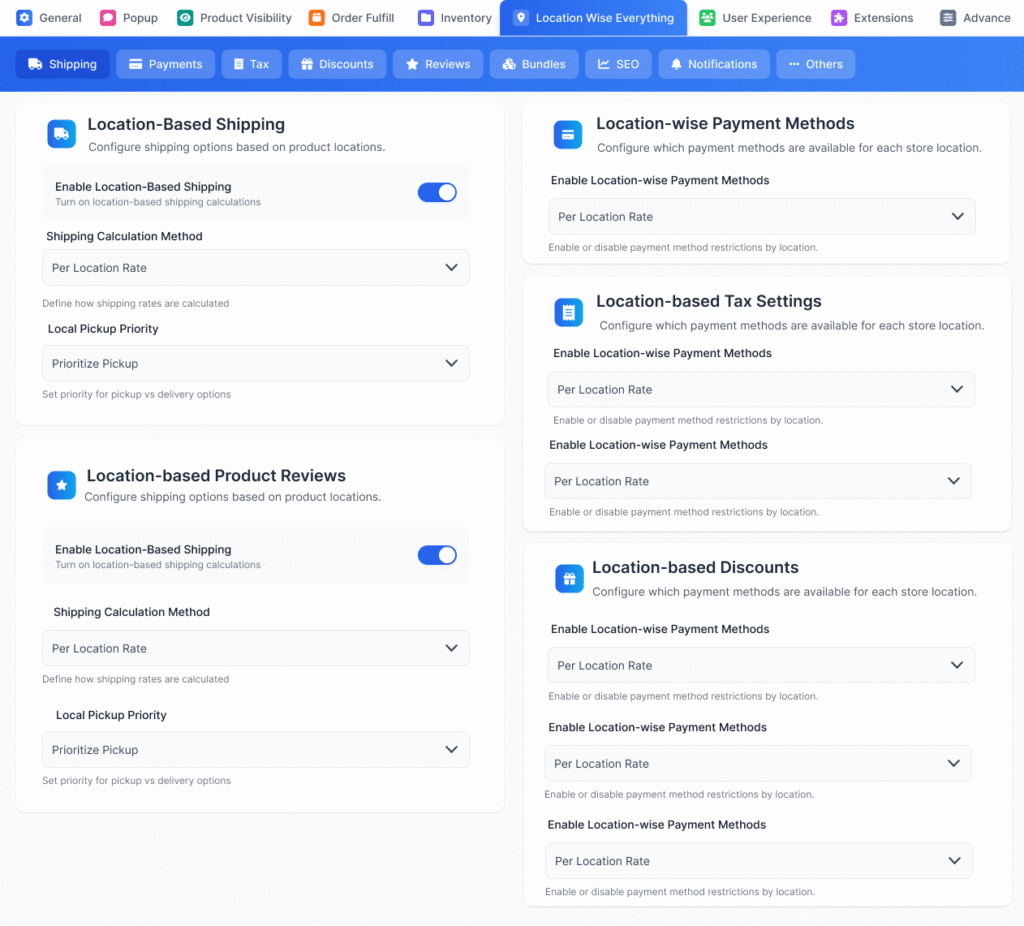
Advanced Multi-Location Management for WooCommerce Stores
Take full control of your multi-location WooCommerce setup with advanced configuration tools. Easily manage every store’s pricing, tax, shipping, and promotions from one dashboard. This flexibility ensures each location operates independently while maintaining centralized oversight for smoother management and better customer experience.
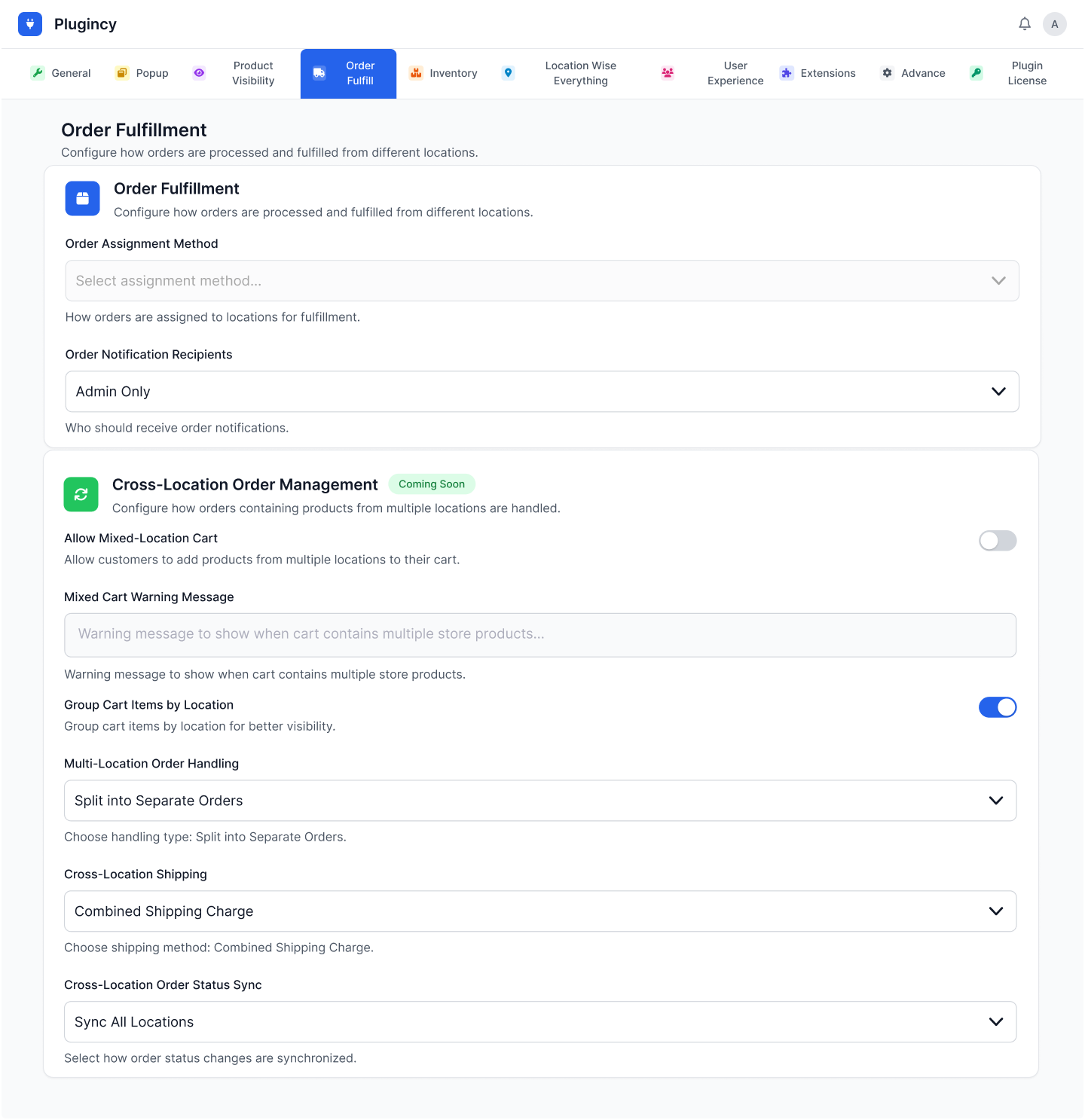
Smart Order Processing and Distribution for WooCommerce
Optimize your order fulfillment process with smart automation and flexible assignment options that ensure customers get their orders from the most efficient location.
Trusted WordPress Plugins for Growing Businesses
Thousands of store owners around the world rely on Plugincy for reliable, lightweight, and sales-driven plugins that deliver real results.
Benefits of WooCommerce Multi Location Product & Inventory Management Plugin
Take full control of your WooCommerce store with advanced multi-location inventory tools. The plugin helps you manage product stock, pricing, and orders effortlessly across multiple locations—all from a single dashboard. Whether you run warehouses, retail shops, or regional branches, it keeps your inventory perfectly in sync and your operations running smoothly.












+ Many More
Theme-Friendly Multi Location Inventory Management Plugin
The Multi Location Product & Inventory Management plugin is built to work smoothly with most popular WooCommerce themes. Its flexible design ensures your store’s layout, colors, and styling stay consistent while adding advanced multi-location features. No coding or theme adjustments required. Just install, activate, and manage your stock easily.
Choose Your Packages
Select the perfect plan that suits your store’s needs. Whether you’re just starting out or looking for advanced features, we have flexible packages tailored for every stage of your eCommerce journey. Upgrade anytime to unlock additional benefits and premium support!
Single Site
Normally $99
$79/year
$20 Savings
Most Popular
Up to Three Sites
Normally $297
$199/year
$98 Savings
Up to Five Sites
Normally $495
$299/year
$196 Savings
Single Site
Normally $499
$349(lifetime)
$150 Savings
Most Popular
Up to Three Sites
Normally $699
$499(lifetime)
$200 Savings
Up to Five Sites
Normally $999
$599(lifetime)
$400 Savings
Free vs PRO Comparison
Explore the key differences between the Free and PRO versions of the Multi Location Product & Inventory Management for WooCommerce.
| Features | PRO $79 – $599 Get Started | FREE Get Started |
|---|---|---|
| Manage Location | ✓ | ✓ |
| Set location in product page as like category | ✓ | ✖ |
| Location wise stock, regular price, sale price, Backorders manage | ✓ | ✓ |
| Inventory/Stock Management in admin product table | ✓ | ✖ |
| Show location in product title | ✓ | ✓ |
| Show related, search, recent, cross-sell, upsell product based on location | ✓ | ✓ |
| Show location wise product info in single product & archive pages | ✓ | ✓ |
| Show popup | ✓ | ✓ |
| Restrict location (if no location set purchasable or not) | ✓ | ✓ |
| Dropdown widget/short code | ✓ | ✖ |
| Order Assign Method handle (customer seleced location, admin will assign) | ✓ | ✓ |
| Location based shipping | ✓ | ✖ |
| Location wise discounts | ✓ | ✓ |
| Location wise tax | ✓ | ✖ |
| Location wise variation | ✓ | ✖ |
| Location wise email notification | ✓ | ✖ |
| Inventory reservation handle | ✓ | ✓ |
| Location wise URL | ✓ | ✓ |
| Location wise invoices | ✓ | ✖ |
| Location wise customer analytics | ✓ | ✓ |
| Location-wise Payment Methods | ✓ | ✓ |
| Location-based Product Reviews | ✓ | ✓ |
| Location SEO Settings | ✓ | ✖ |
| Buy Now | Free Download |
What Users Says About Us
Users love the simplicity, speed, and reliability of Plugincy plugins. From developers to WordPress site owners, they trust us for high-quality tools, responsive support, and a seamless website experience.
Ethan Morales
We run two stores in Chicago, and this plugin made stock tracking simple. Setup took minutes and updates sync instantly.
Daniel Foster
We run three furniture outlets across Vancouver, and this plugin saved us countless hours. Stock syncs instantly, and I can finally set branch-specific pricing without touching code. It’s been rock-solid since day one and till now.
Sophia Turner
We manage several branches online. Setup went smoothly, and support fixed a display issue quickly with clear follow-up help.
Emily Chen
As someone managing five warehouse sites, I can say this tool changed everything. The dashboard is fast, reports are easy, and support fixed my import issue in no time. Manual updates that took hours now finish in just minutes .
Jacob Reynolds
We run a clothing franchise with six regional branches. The plugin handles stock alerts, pricing, and reporting like a pro. I didn’t expect it to be this stable. The Pro analytics helped us spot which locations perform best.
Liam Anderson
We’ve got three small warehouses. Real-time stock control and per-location pricing finally work just the way I needed.
Clara Johnson
Our company uses the Pro plan mainly for team management. Each branch manager now has their own access, and support was fantastic during setup. The analytics help us see which store needs restocking, saving hours of internal coordination.
Nora Campbell
I used to juggle spreadsheets for each branch. Now one dashboard does it all, pricing, stock, and location filters.
Michael Ortiz
We’re a WooCommerce agency working with regional clients. The location-based pricing and order tagging make client stores easier to manage. It also fixed out-of-stock visibility, cutting customer complaints almost completely.
Hannah Lewis
Running both retail and warehouse sites used to be messy. This plugin keeps all inventory synced in real time. Our reports are cleaner, orders are accurate, and we’ve reduced manual stock errors by nearly ninety percent.
Ryan Patel
We sell across five cities. This plugin keeps data consistent and switching locations is quick and super reliable.
Ava Mitchell
Before this plugin, stock tracking was chaos. The support team was quick to help me configure reports and location syncs.
Liam Parker
We operate four tech accessory stores, and this plugin keeps all inventory accurate across locations. Stock syncing is reliable, and location-based reports help us restock fast. It’s stable, lightweight, and fits seamlessly into WooCommerce.
Noah Peterson
We manage different regions with this plugin. It keeps pricing clean per branch and updates run fast without slowing WooCommerce.
Grace Howard
Had a small issue during setup, but support replied within minutes and guided me through it perfectly. Couldn’t be happier.
Mia Thompson
As a WooCommerce consultant, I install this plugin for most of my multi-branch clients. It’s flexible, easy to configure, and support always responds quickly with real solutions. Clients love how easily they can track stock per store.
Questions We Get Frequently In Our Inbox
Got questions? You’re not alone! Here are some of the most common queries we receive—answered to help you get the most out of your Plugincy experience.
Didn’t find your answer?
Our support team is here to help you with any questions you might have.