
Location-Based Product Filtering ensures that customers only see products that are available for their selected store or warehouse location. Once locations are created and assigned to products, your store can dynamically control product visibility across the entire WooCommerce site.
How Location-Based Product Filtering Works
- You add locations and assign them to products
- Customers select a location (or a location is auto-assigned)
- Products are displayed based on the selected location
- Inventory, pricing, and availability follow the same location rules
Configure Product Visibility Based on Location
To control how strictly products are filtered by location, follow these steps:
- Go to Location Manage → Settings
- Open the Product Visibility section
- Find the Location Filtering Settings panel
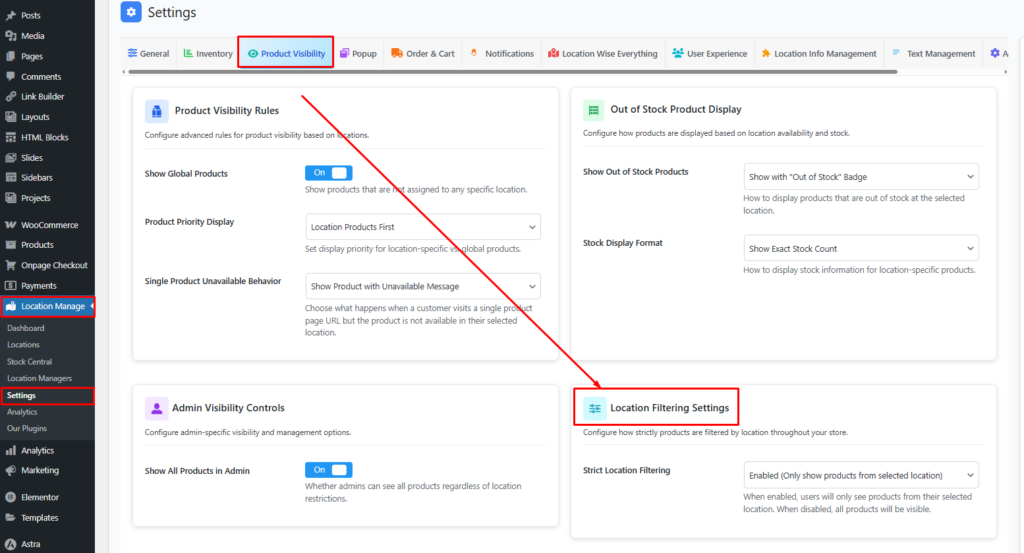
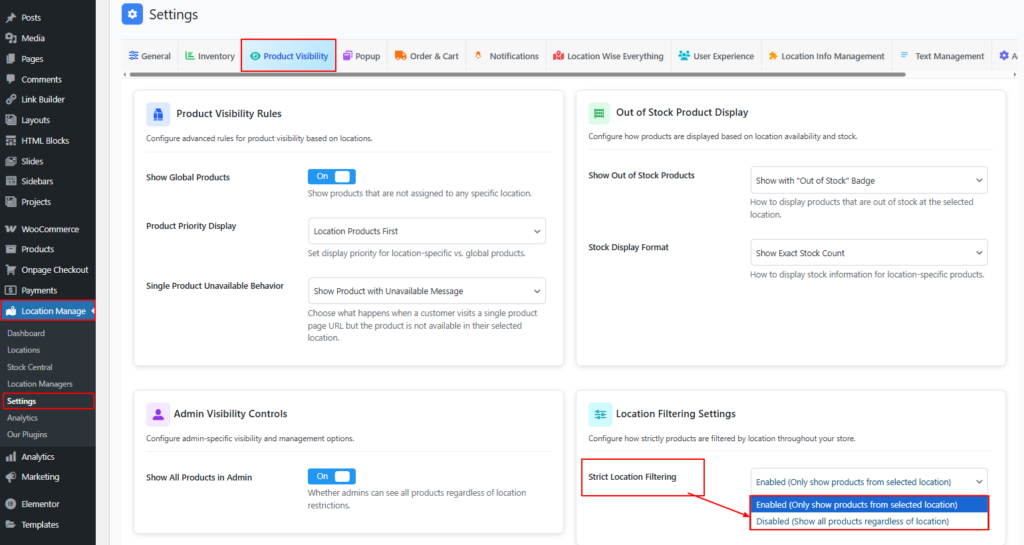
Strict Location Filtering
Strict Location Filtering Option
- Enabled
Only show products from the selected location
Customers will see only products assigned to their chosen location. - Disabled
Show all products regardless of location
All products remain visible, even if they are not assigned to the selected location.
🔎 Recommended: Enable this option for multi-warehouse or pickup-based stores to avoid confusion.
Save & Test Location-Based Filtering
- Click Save Changes
- Select a location on the frontend
- Visit:
- Shop page
- Category pages
- Search results
- Verify that:
- Only location-assigned products appear
- Other products are hidden (if strict filtering is enabled)
Common Use Cases
- Show only local warehouse stock
- Hide products not available for pickup at selected store
- Ensure accurate product lists in AJAX filters and REST API
Best Practices
- Enable Strict Location Filtering for full location control
- Test filtering on widgets, blocks, and related products
- Combine with location-based pricing and inventory for best results
With Location-Based Product Filtering, your WooCommerce store becomes fully location-aware—showing the right products to the right customers, improving accuracy, and delivering a smoother shopping experience.