
Before using Inter-Location Transfer Costs, you must first add shipping methods in WooCommerce and assign shipping methods to each location.
👉 If you haven’t done this yet, please follow the guide:
Learn how to add shipping & assign to locations
Inter-Location Transfer Costs allow you to add internal logistics charges when products must be moved from one warehouse/store location to another in order to fulfill a customer’s order. This applies only when using the Nearest With Inter-Hub Transfer Cost shipping calculation method.
This ensures multi-location logistics remain accurate, transparent, and profitable.
How to Configure Inter-Location Transfer Costs
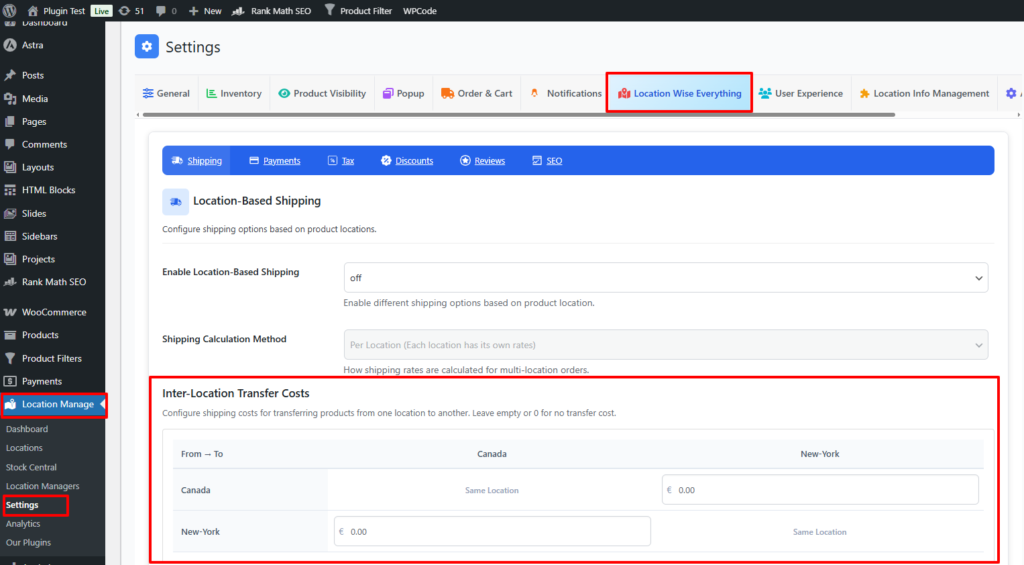
- Go to Location Manage → Settings
- Open Location Wise Everything → Shipping
- Find the Inter-Location Transfer Costs panel
Inside this panel, you can configure internal movement costs between each warehouse or store location.
Purpose of Inter-Location Transfer Costs
These costs apply when:
- A product is unavailable in the customer’s nearest warehouse
- Another location has the required stock
- Items need to be moved internally between hubs
- You’re using Nearest With Inter-Hub Transfer Cost as the shipping calculation method
The system will automatically:
- Identify the nearest fulfillment location
- Determine secondary fulfillment sources
- Add the appropriate transfer fee
How Transfer Cost Calculation Works
Assume you have three locations:
- Location A
- Location B
- Location C
If the customer is nearest to Location A, but a product is only available in Location C, then:
A ← C = $7 (transfer cost)
If multiple products come from different locations, the system adds up all related transfer costs.
Inter-Location Transfer Cost Table
You’ll see a cost matrix allowing you to define internal logistics charges:
| From \ To | Location A | Location B | Location C |
|---|---|---|---|
| Location A | 0 | 3 | 7 |
| Location B | 3 | 0 | 5 |
| Location C | 7 | 5 | 0 |
You can define costs based on:
- Fuel & transport costs
- Handling and packaging costs
- Distance between hubs
- Warehouse labor costs
The same-to-same location row/column is always 0.
When Transfer Costs Are Applied
✔ Applied when:
- Shipping Method = Nearest with Inter-Hub Transfer Cost
- Products must be sourced from other locations
- Cart contains multi-location items
✘ Not applied when:
- Shipping Method = Per Location
- All items are available in nearest hub
- Location-based shipping is turned off
Best Practices
- Set realistic values based on internal transportation expenses
- Review and adjust periodically
- Ensure consistency between similar locations
- Keep transfer costs lower than customer-facing shipping fees
- Test with multi-location orders to confirm accuracy
Example Scenario
Customer is closest to Location B
Cart contains:
- Product 1 → Location B
- Product 2 → Location C
Transfer cost from C → B = $5
Calculation:
Shipping cost (Location B)
+ Inter-location transfer cost ($5)
Customer sees a unified shipping fee, while internally your store calculates correct logistics cost recovery.
With Inter-Location Transfer Cost Management, you gain precise control over internal warehouse logistics, ensuring transparent, efficient, and financially optimized shipping operations across all locations in WooCommerce.