
Location-Based SEO Data Structure ensures that search engines receive accurate, structured information about product availability and store/warehouse details. When enabled, the system adds location-specific schema markup to product pages, improving visibility in location-based searches and enhancing rich results such as “Available Near You” or Local Store Availability.
This feature works through structured data formats such as JSON-LD, which Google and other search engines use to understand your multi-location product inventory.
How to Enable Location-Based Structured Data
- Go to Location Manage → Settings
- Open Location Wise Everything → SEO
- Toggle:
Location Structured Data — ON/OFF
- ON
Adds location-specific structured data for product pages - OFF
Product schema will follow default WooCommerce structure
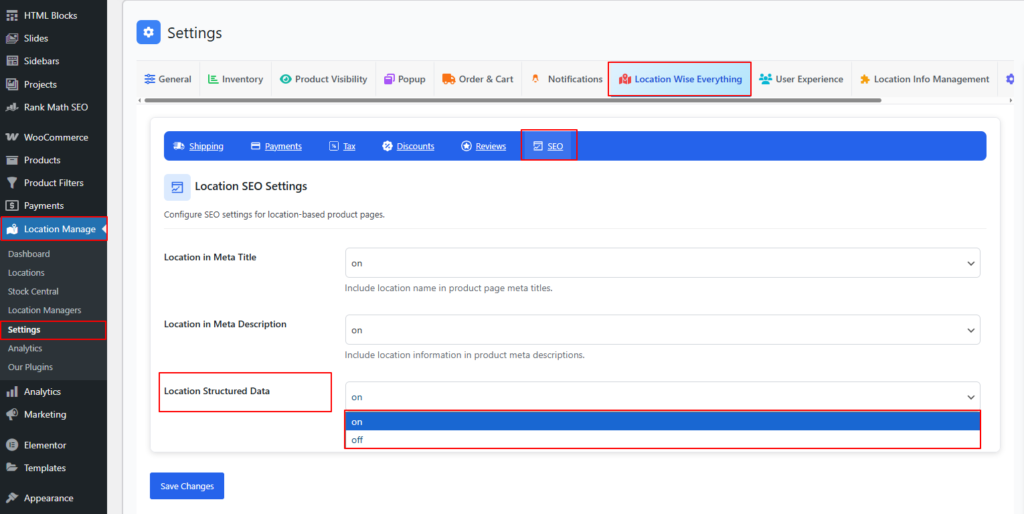
What Structured Data Includes (When Enabled)
When Location Structured Data is enabled, the plugin injects enhanced schema information such as:
1. Product Availability by Location
The schema includes:
- Availability status (InStock, OutOfStock, LimitedAvailability)
- Location-wise stock quantity (if enabled)
- Warehouse/store name
- Store geographical position
Example (conceptual):
"availability": "http://schema.org/InStock",
"inventoryLocation": "New York Warehouse",
"stockLevel": "12"
2. Store/Location Business Information
The structured data includes:
- Location name
- Location address (street, city, country)
- Postal code
- Latitude & longitude (for local search relevance)
- Contact email / phone (if configured)
- Opening hours (if business hours enabled)
Example (conceptual):
"provider": {
  "@type": "Store",
  "name": "Los Angeles Warehouse",
  "address": {
    "streetAddress": "123 Market St",
    "addressLocality": "Los Angeles",
    "addressRegion": "CA",
    "postalCode": "90001",
    "addressCountry": "US"
  },
  "geo": {
    "latitude": "34.0522",
    "longitude": "-118.2437"
  }
}
3. Pickup & Delivery Information
If applicable, structured data can also reflect:
- Pickup availability at a specific location
- Local delivery area support
- Estimated delivery/pickup time
Example (conceptual):
"hasDelivery": true,
"availableAtOrFrom": {
  "@type": "Place",
  "name": "Chicago Pickup Hub"
}
4. Multi-Location Handling
If the cart contains products from multiple locations or the product is available in more than one store, structured data may include multiple entries:
"offers": [
   {
     "@type": "Offer",
     "location": "New York Warehouse",
     "availability": "InStock"
   },
   {
     "@type": "Offer",
     "location": "Houston Warehouse",
     "availability": "OutOfStock"
   }
]
Why Location-Based Structured Data Matters
✔ Enhances local SEO visibility
Search engines can show your product for regional queries (e.g., “Product near me”).
✔ Enables rich results
Google may display availability, store info, and pickup options directly in search.
✔ Improves search accuracy
Structured data helps Google understand:
- Which location has stock
- Which location provides pickup
- Which warehouse fulfills the order
✔ Supports multi-location ranking
Each location can independently contribute to search visibility.
Best Practices for Location SEO Data
- Ensure each location has:
- Complete address
- Accurate contact info
- Latitude & longitude
- Business hours
- Keep location names consistent and descriptive
- Enable Location in Meta Title and Meta Description for better keyword relevance
- Use unique location slugs to avoid duplicate content signals
- Test structured data using the Google Structured Data Testing Tool
Summary
| Feature | What It Does |
|---|---|
| Product Location Schema | Shows availability per store |
| Business Location Schema | Adds address + geo + hours |
| Multi-Location Entries | Lists all stores carrying the product |
| Pickup/Delivery Schema | Enhances local search experience |
Location-Based SEO Data Structure ensures your WooCommerce store is fully optimized for multi-location search visibility—helping each location rank individually and increasing the chances of appearing in local search results, rich snippets, and “near me” queries.
If you want, I can also generate sample full JSON-LD markup to include in your theme or plugin.