
# 1Woocommerce Product Filter
Dynamic AJAX Product Filters for WooCommerce – Real-Time, Flexible & SEO-Ready
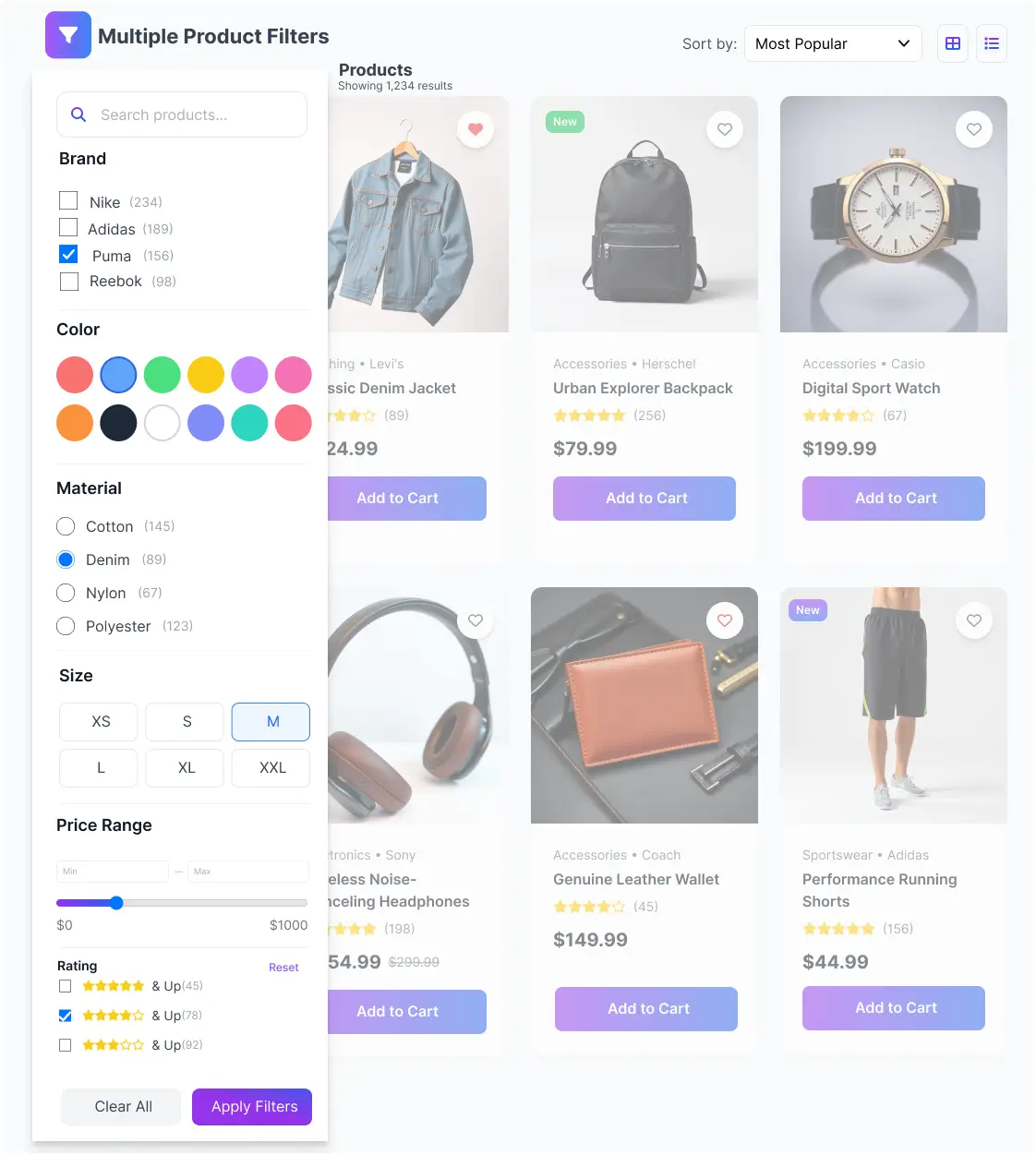
Turn your WooCommerce store into a faster, more conversion-ready shopping experience with Dynamic AJAX Product Filters for WooCommerce. Product results update instantly as shoppers apply filters — no page reloads, no waiting. Just fast, fluid product discovery that keeps customers engaged and reduces bounce rates.
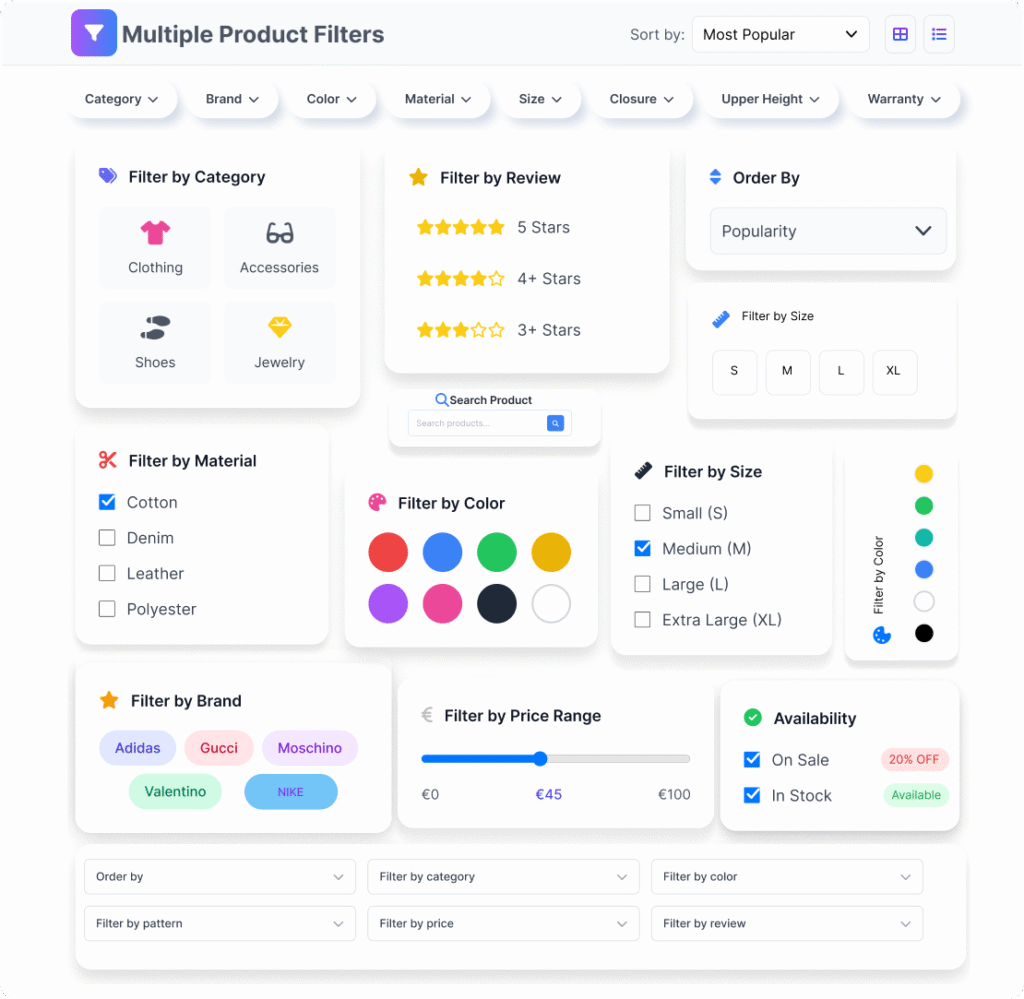
Customers can filter by category, tags, price, rating, stock status, sale status, brand, author, SKU, product ID, discount percentage, product dimensions, featured status, post date (including today, this week, this month, this year, or a specific date range), custom fields, custom taxonomies, and attributes like color, size, and material. This advanced WooCommerce AJAX product filter system lets shoppers combine multiple filters at once using AND or OR query logic — giving them precise control over what they see, without any page reload.
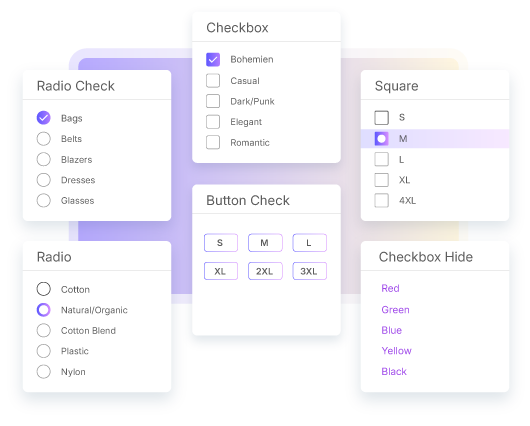
The filter UI supports checkboxes, radio buttons, Select2 dropdowns, price sliders, button checks, and visual swatches — color, image, circular, and borderless styles. Every control is built for clarity. Shoppers always know what they’ve selected.
Built for SEO, the plugin generates crawlable filter URLs — either as query strings or clean permalinks — so filtered pages can be indexed by search engines. Responsive layouts include 4 dedicated mobile views: Top View, Collapsible, Drawer, and iOS-style, each with configurable breakpoints. Placement is flexible — use shortcodes, widgets, Gutenberg blocks, or page builders including Elementor, WPBakery, Divi, Beaver Builder, Bricks, Oxygen, and JetEngine.
Set Up WooCommerce AJAX Product Filters in Minutes — No Code Needed
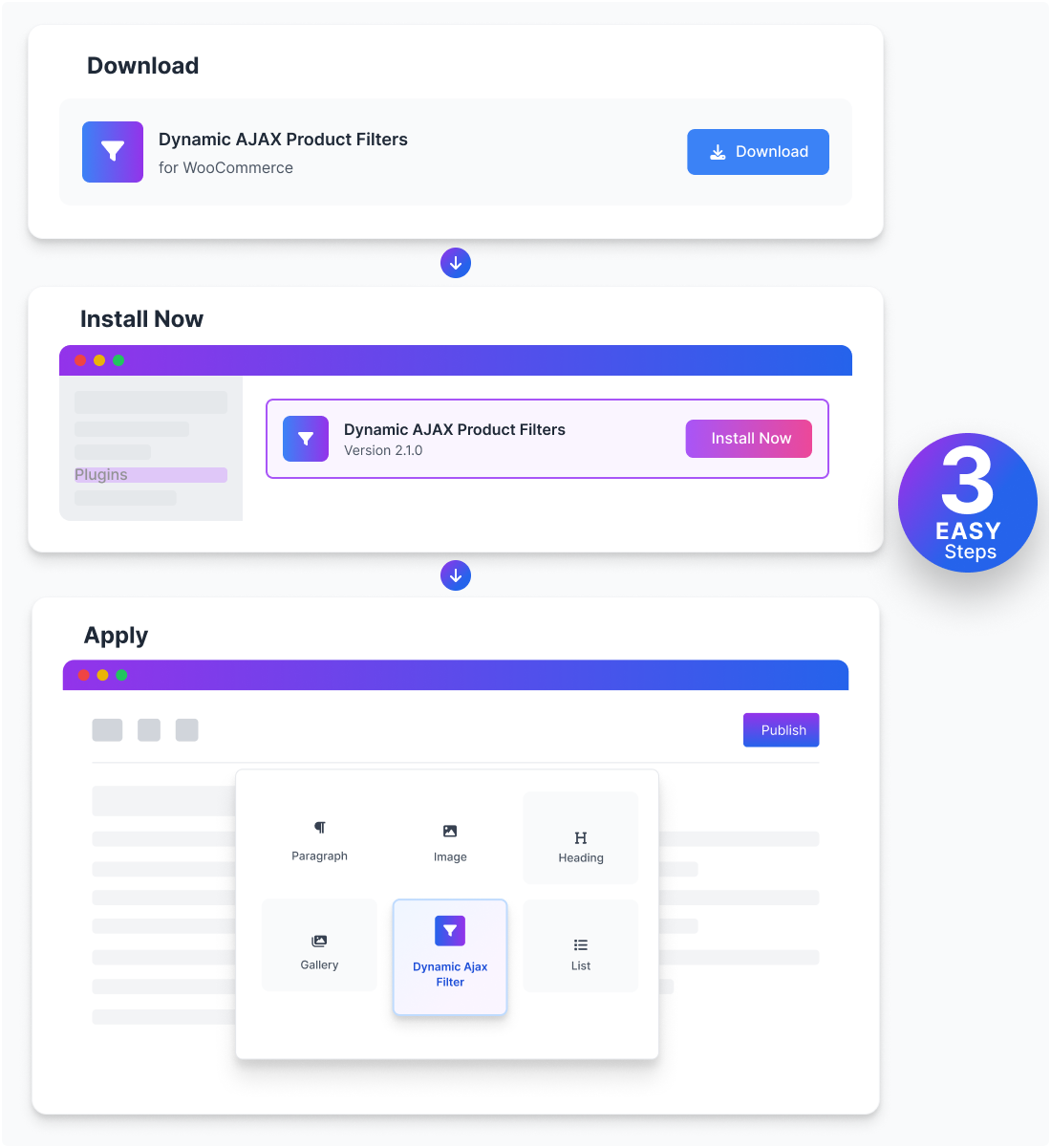
Getting Dynamic AJAX Product Filters for WooCommerce running on your store takes just a few minutes. Install, activate, and you land inside a clean admin interface — no developer, no configuration wizard. From there, create a filter form, pick your filter types, and place them anywhere using a shortcode, widget, Gutenberg block, or Elementor widget.
Every filter is configurable from one place. Choose the display style — checkbox, radio button, select dropdown, price slider, button check, or visual swatch (color, image, borderless, circular). Control the layout, set default values, tweak display text, and decide whether filters apply instantly on click or only after the customer hits Apply. Changes reflect on your storefront right away, so you always see exactly what your customers see.

Download the Plugin
Start by downloading Dynamic AJAX Product Filters for WooCommerce. The free version covers core filtering needs. The Pro version adds advanced filter types, custom field filtering, deeper styling controls, and more.

Install & Activate the Plugin
Upload the plugin to your WordPress site, install, and activate — takes under a minute. No coding needed. Once active, the filter form builder is ready to use from your dashboard.

Apply Filters
Add filters anywhere on your site using the plugincy_filters shortcode, a widget, a Gutenberg block, or directly inside Elementor. Pick whichever fits your layout — all display methods work out of the box. Learn More
All Features of Dynamic AJAX Product Filters for WooCommerce
These are the actual features built into the plugin — what they do, and why they matter for your store.
Every Filter Layout Your WooCommerce Store Needs – Built Into One Plugin
Your store has its own look. Your filters should match it. Dynamic AJAX Product Filters for WooCommerce gives you full control over how filters appear — from compact dropdowns to rich visual swatches — so the browsing experience feels native to your brand, not bolted on. Choose from multiple ready-to-use filter layouts. Each one works with the AJAX Product Filters for WooCommerce engine, updating results in real time without a page reload. Whether you’re selling apparel, electronics, or handmade goods, there’s a layout that fits.
Filter Layout Options for Every WooCommerce Store Style
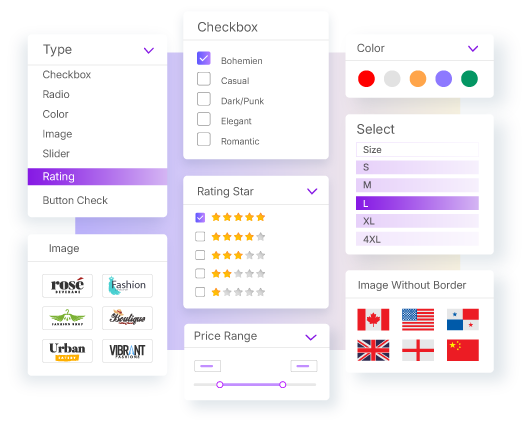
Not every store looks the same — and your filters shouldn’t either. With Dynamic AJAX Product Filters for WooCommerce, you get full control over how filters are displayed, styled, and structured across your entire storefront. Choose from a wide range of UI controls: Select2 dropdowns, checkboxes, radio buttons, price sliders, button checks, and visual swatches including image, color, borderless, and circular styles. Whether your store uses a minimal layout or a visually rich product grid, there’s a filter style that fits without requiring custom code.
Each layout is built to feel natural for shoppers. Filters don’t just look good — they work fast, respond instantly via AJAX, and adapt cleanly to your brand’s visual style.
Available Filter Layout Options
Price, Rating & Attribute Sliders — Precise Filtering with Real-Time AJAX Updates
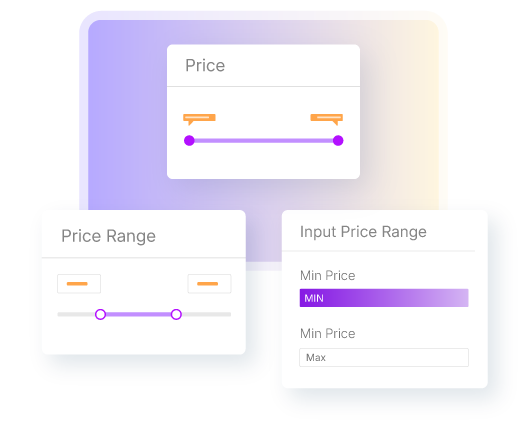
Shoppers rarely know the exact product they want — they know a range. The Dynamic AJAX Product Filters for WooCommerce plugin gives them draggable sliders to set exact price ranges, filter by dimension values, or narrow down by discount percentage. No guessing. No page reloads. Just results that match what they actually need, using a reliable woocommerce price filter plugin built for speed.
Every slider interaction triggers an instant AJAX update. This woocommerce ajax product filter plugin recalculates and displays matching products on the fly — desktop or mobile — without interrupting the browsing flow. Shoppers can also type exact min/max values directly into the input fields if they prefer precision over dragging.
Key Feature Highlights:
Multi-Select Checkbox Filters for Faster, More Accurate WooCommerce Product Discovery
Shoppers rarely know exactly what they want from a single attribute. With the checkbox filter in Dynamic AJAX Product Filters for WooCommerce, customers can select multiple values at once — size, color, material, or any custom attribute — and see matching products update instantly, without a page reload.
Every selection triggers a live AJAX response, so the product grid reflects the filtered results right away. No waiting. No confusion. A dedicated Chips Widget shows all currently active filter selections in one place, making it easy for shoppers to track what they’ve applied and remove individual filters without starting over.
Checkbox filters come in several display styles to match your store’s design and product type:
Filter by Any Parameter — Price, Stock, Date & More
Your customers shouldn’t have to scroll through dozens of irrelevant products. With Dynamic AJAX Product Filters for WooCommerce, they can narrow down results instantly — by price, size, stock status, date, custom fields, and more — without a single page reload. Every filter update happens live, keeping shoppers focused and moving toward checkout.
This is more than a basic filter plugin. It’s an advanced AJAX product filters system for WooCommerce that covers every filtering scenario a real store actually needs — from simple category browsing to complex multi-parameter queries across thousands of products.
Filter by Taxonomies, Attributes & Custom Fields with AJAX Product Filters for WooCommerce
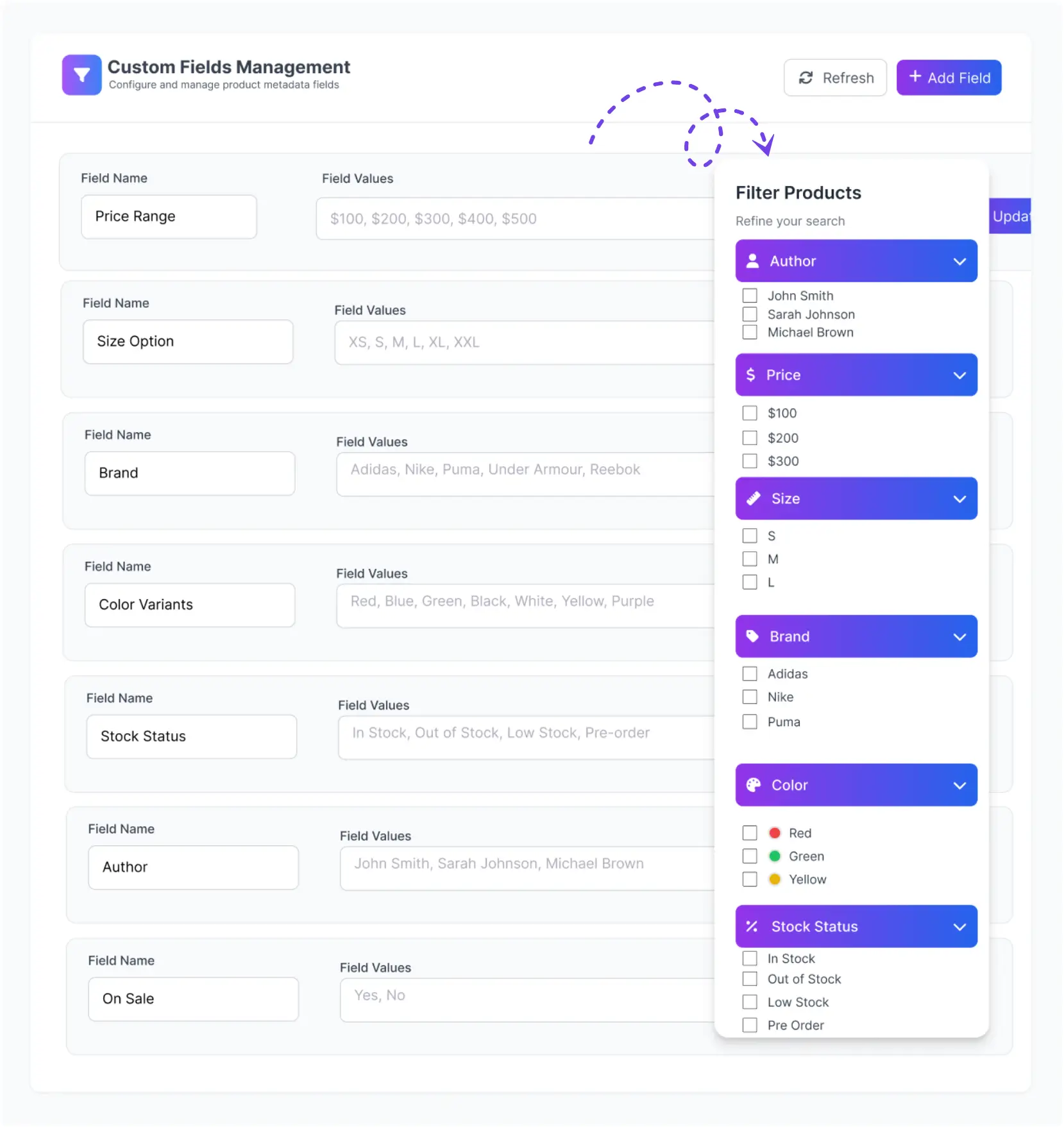
Shoppers rarely know exactly where to look — they know what they want. Dynamic AJAX Product Filters for WooCommerce lets them get there fast, with full support for WooCommerce taxonomies, product attributes, and custom fields. Categories, tags, brands, authors, SKUs, custom meta — all available as filters, combinable at once, updating results instantly via AJAX without any page reload.
The filter logic goes beyond simple matching. Stores can apply AND/OR query relations across multiple filters, giving precise control over how results respond to shopper selections. Whether it’s a large catalog with hundreds of variations or a niche store with specific metadata, this setup keeps navigation clean and results accurate.
This also works effectively as a WooCommerce category filter, helping stores with large catalogs stay organized and easy to browse. The AJAX Product Filters for WooCommerce handles the heavy filtering work so shoppers spend less time searching and more time buying.
SEO-Friendly Filter URLs That Search Engines Can Actually Index
Search engines need to find your filtered pages — not just your homepage. Dynamic AJAX Product Filters for WooCommerce gives you direct control over how filter URLs are generated, so every filtered product page can be crawled, indexed, and ranked. Clean, keyword-rich URLs also make filtered links easier to share and understand for shoppers.Whether you’re running a large catalog or a niche store, the right URL method depends on your indexing strategy, site speed, and how customers browse. This plugin lets you choose — without touching any code.

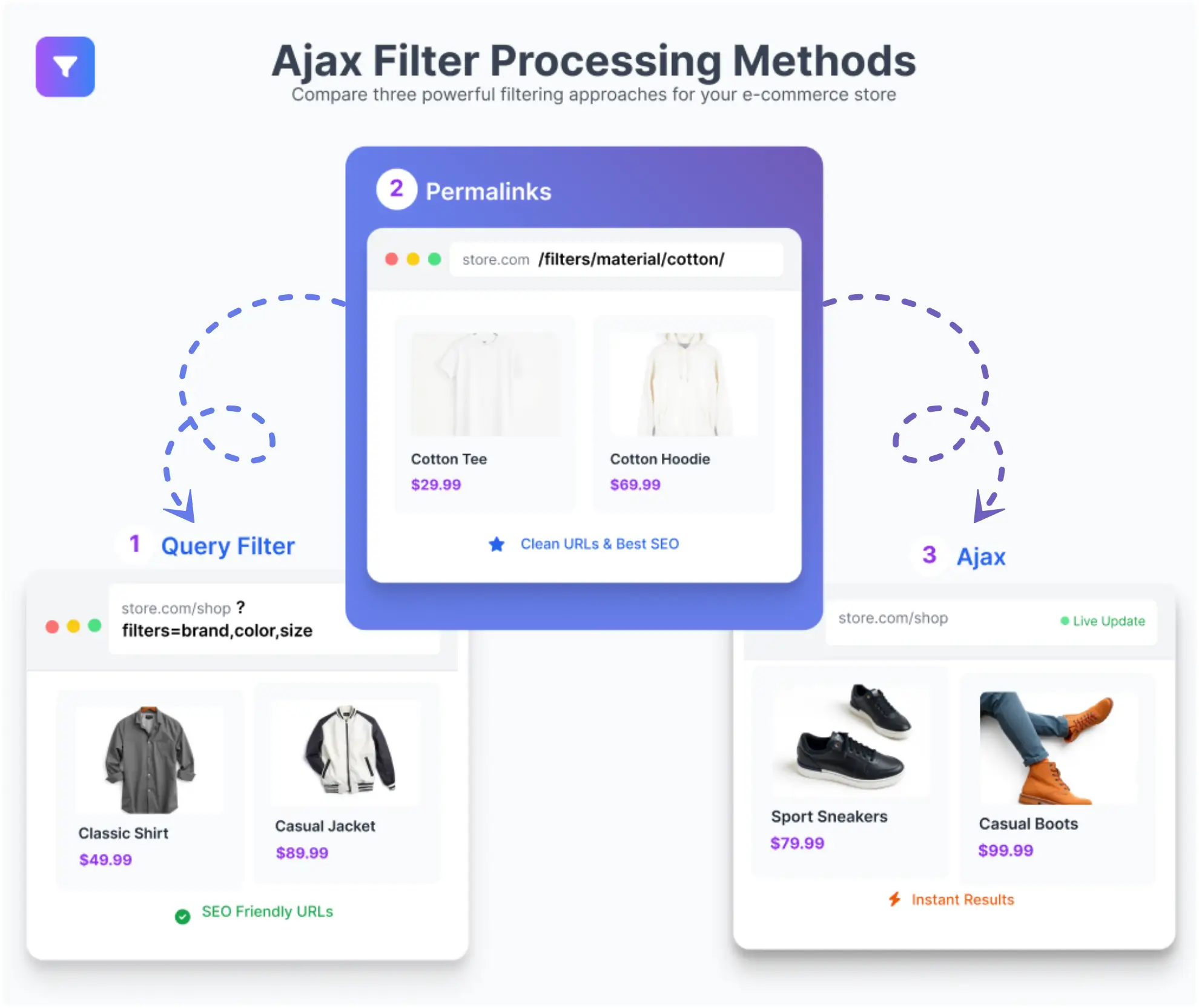
Flexible URL Methods for SEO, Speed, and Better UX
Take full control of how filtered URLs are structured based on your store’s SEO goals and performance needs.
Dynamic AJAX Product Filters for WooCommerce — Built for Flexibility and Speed
Not all filter plugins look good and perform well at the same time. Dynamic AJAX Product Filters for WooCommerce does both. Filters load fast, stay consistent as your catalog grows, and give shoppers a clean, intuitive way to narrow down products without page reloads.
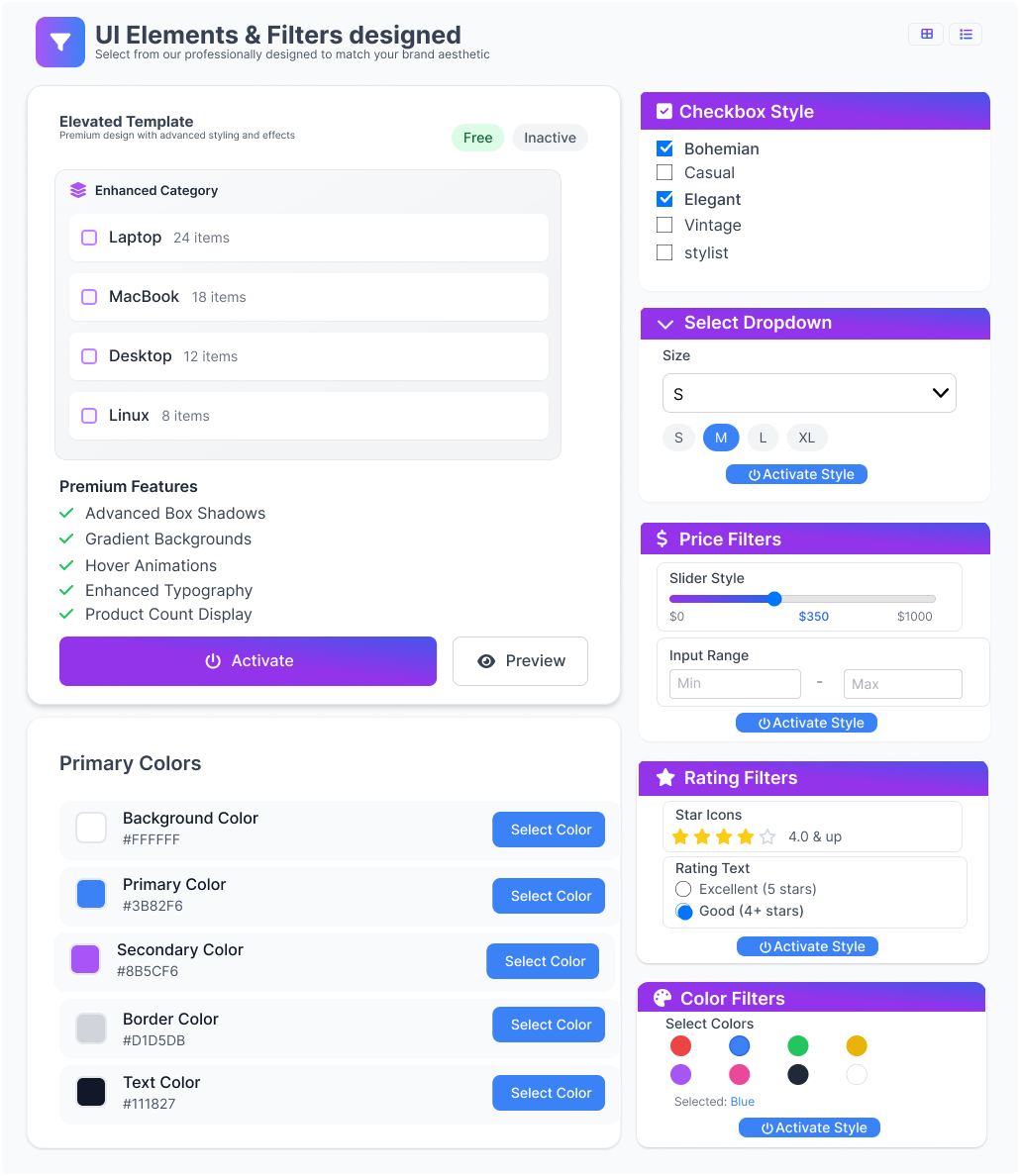
The UI gives you real control. Pick from a wide range of filter display styles — whatever fits your store’s layout and your customers’ habits.
These AJAX product filters for WooCommerce are built to handle real stores — large catalogs, varied layouts, and customers who expect fast results. Every element is configurable without touching code.
Page-Specific Product Filters for Categories, Collections & More
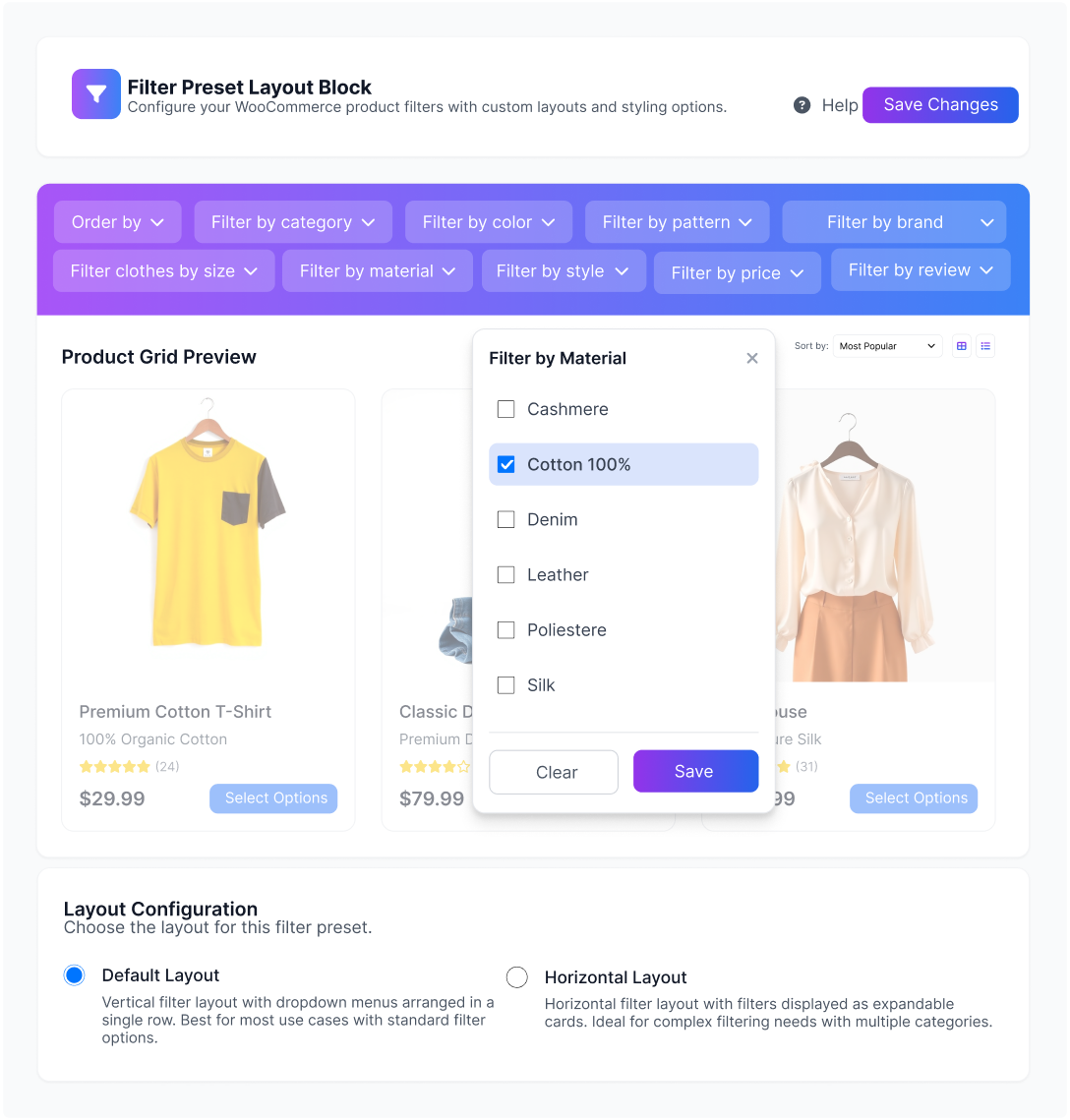
Not every page sells the same thing — so why show the same filters everywhere? With Dynamic AJAX Product Filters for WooCommerce, you can assign a dedicated filter form to each category page, collection, or individual product archive. Shoppers see filters that actually match what they’re browsing, not a one-size-fits-all list that adds noise.
Each filter form can be placed above the product grid, in a left or right sidebar, or inside a collapsible panel — using shortcodes, widgets, Gutenberg blocks, or Elementor widgets. This makes it easy to set up WooCommerce AJAX Product Filters exactly where they make sense, without touching any theme code.
WooCommerce Product Filter Options – Price, Brand, Attributes & More
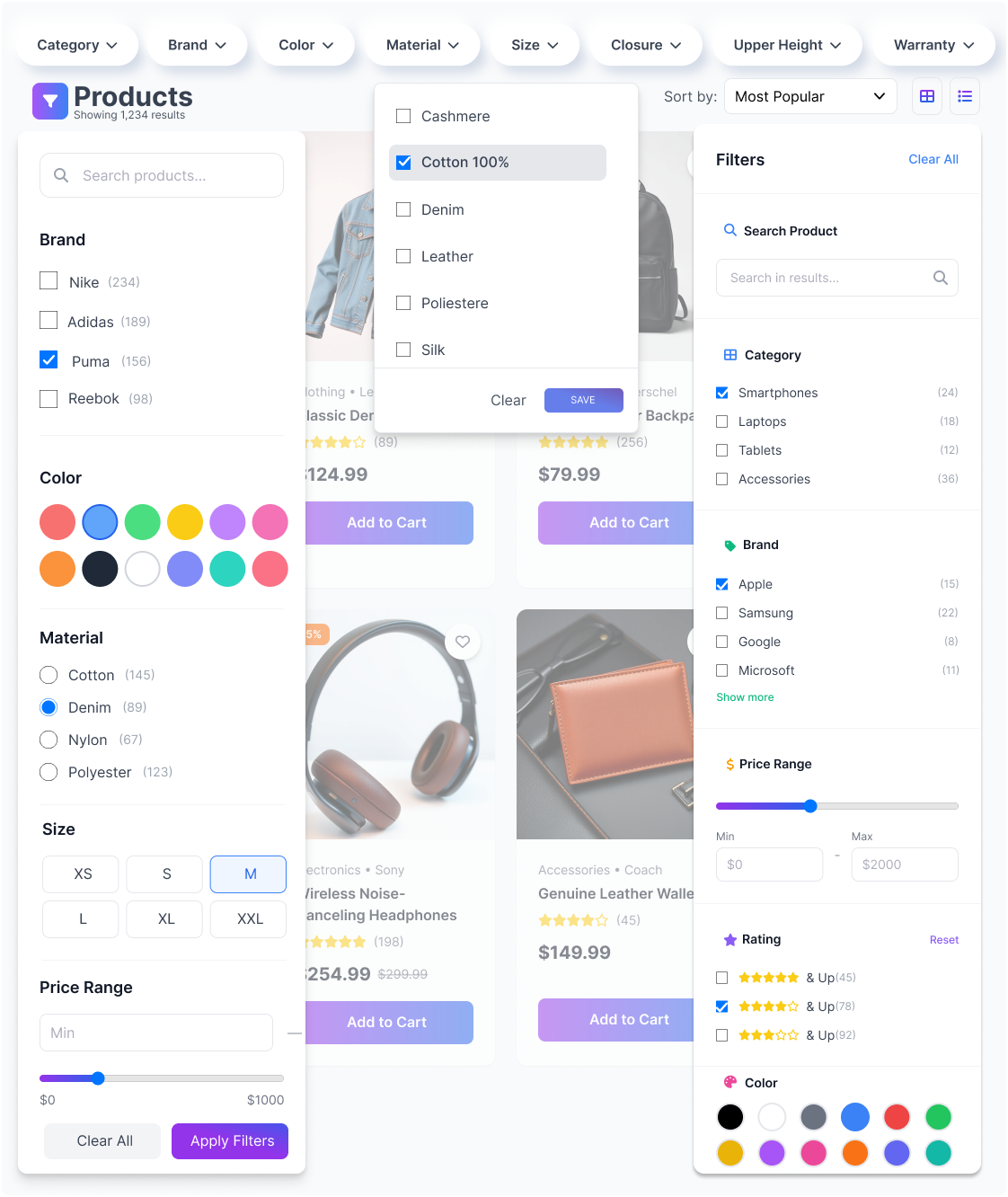
Dynamic AJAX Product Filters for WooCommerce gives your customers the tools to find exactly what they want — without digging through irrelevant results. Filter by price, category, rating, brand, stock status, sale status, attributes, custom fields, custom taxonomies, SKU, discount, date, and more. Every filter updates results instantly via AJAX, no page reload needed.
For stores with large catalogs or complex product data, the plugin handles advanced use cases just as well — custom WooCommerce structures, metadata-heavy products, multi-taxonomy setups. It works whether you’re running a 50-product shop or a 50,000-product catalog.
Place Filters Anywhere – Sidebar, Page Builder, or Shortcode
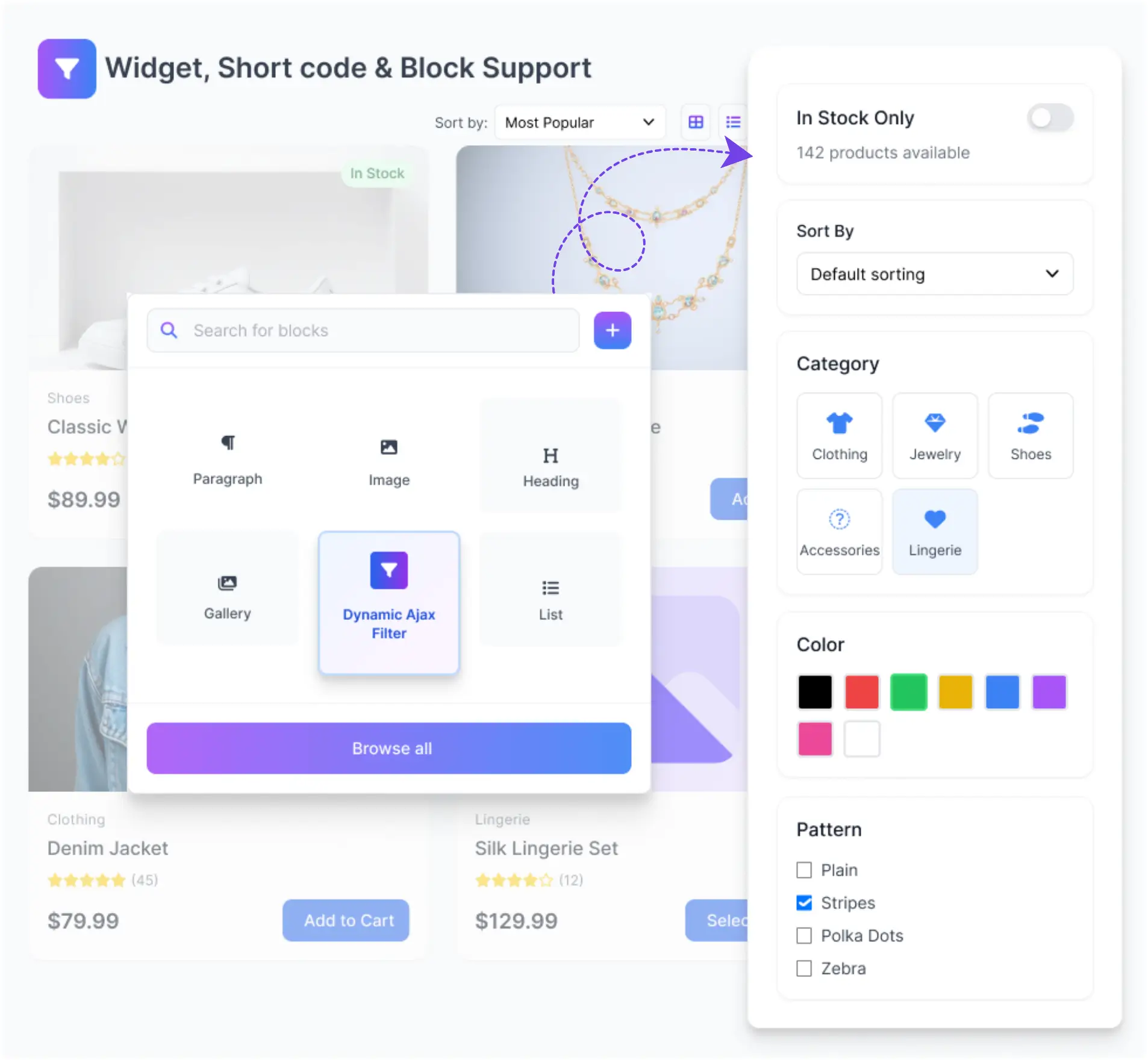
With Dynamic AJAX Product Filters for WooCommerce, you decide where filters appear — not the theme. Place them in sidebars, category pages, product listings, or any custom section across your store. The plugin fits into your existing layout without forcing a rebuild.
It works as a fully flexible WooCommerce AJAX product filter solution that integrates with the tools you already use. Gutenberg blocks, Elementor widgets, widget-ready areas, and shortcodes — all supported out of the box. A built-in Shortcode Builder makes placement even faster, no manual coding needed.
SEO Indexing Control for WooCommerce Filter URLs
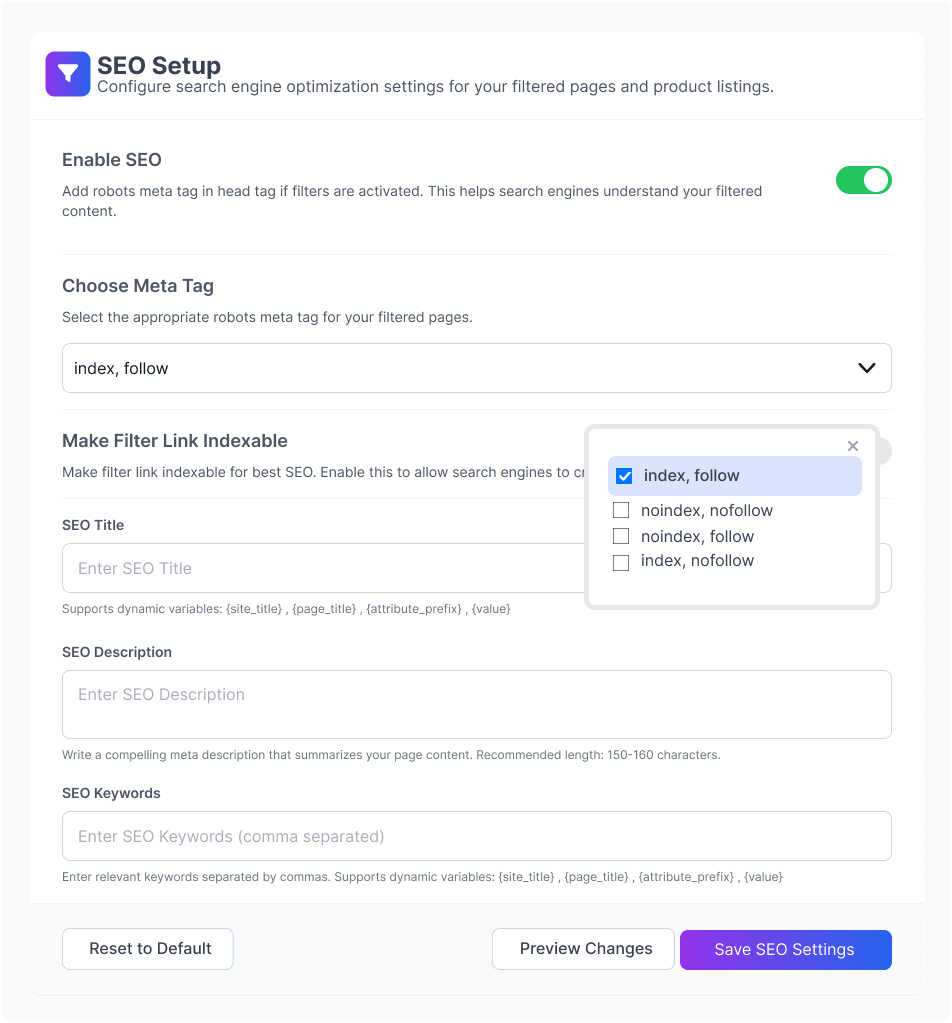
Not every filtered URL deserves a spot in Google’s index. With Dynamic AJAX Product Filters for WooCommerce, you decide which filter combinations get indexed and which ones stay out — so you keep your SEO clean without losing product visibility.
The plugin gives store owners direct control over how search engines treat filtered pages. Whether you want to capture long-tail traffic from specific filter combinations or prevent index bloat from low-value URLs, the SEO settings in this WooCommerce AJAX product filter let you align filter URLs with your actual SEO strategy — not fight against it.
Filter Color & Loader Customization for WooCommerce
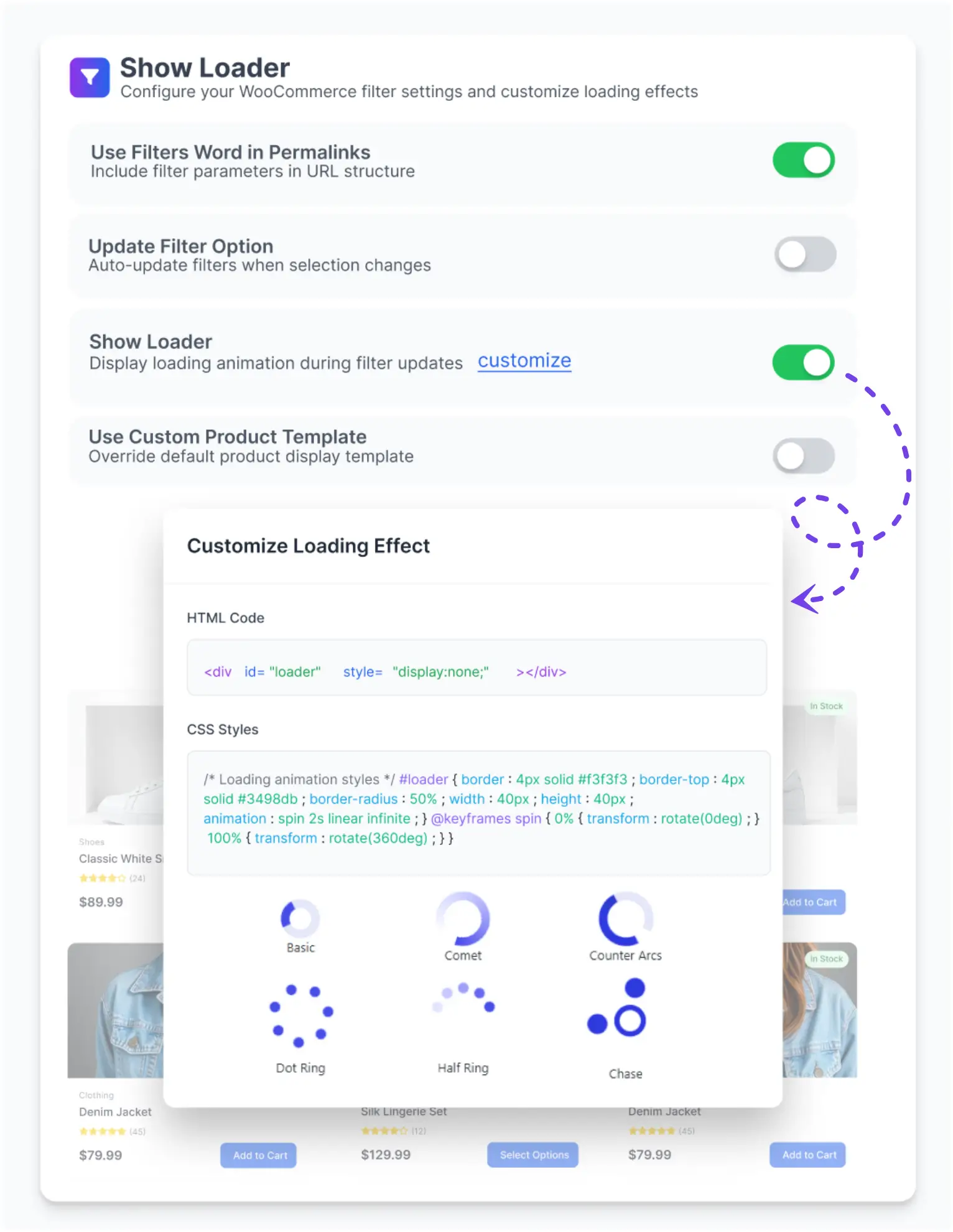
The filtering area should feel like part of your store — not an afterthought. Dynamic AJAX Product Filters for WooCommerce includes built-in design controls that let you adjust filter colors, loading behavior, and visual styles to match your theme exactly. No custom code needed to get started.
These settings sit within the Filter Design & Styling panel and work alongside the loading effect configuration. Change a color, pick a loader style, save — and your WooCommerce AJAX Product Filters area updates to reflect it immediately in the admin preview.
Responsive Filter Design Built for Every Screen Size
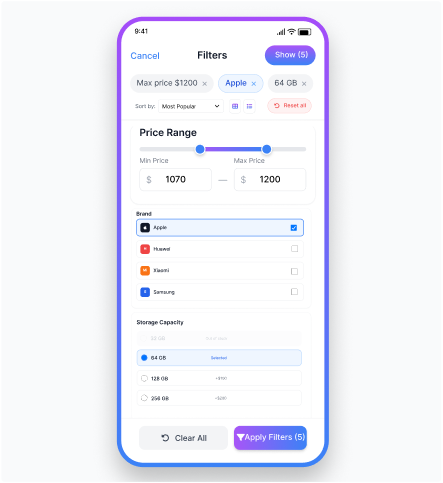
Shoppers browse on phones, tablets, and desktops — often all three. Dynamic AJAX Product Filters for WooCommerce handles all of them without friction. The filter layouts adapt cleanly to every screen size, and touch-friendly controls make refining results on mobile just as quick as on a desktop.
On mobile, you get four distinct layout options: Top View, Collapsible, Drawer, and iOS-style. Each one keeps the filtering interface clear and accessible without cluttering the product grid. You can also set custom breakpoints to decide exactly when the mobile layout kicks in — so the experience fits your store’s design, not the other way around.
Whether a customer is on a small phone or a wide monitor, the WooCommerce AJAX product filters stay fast, consistent, and easy to use — helping shoppers find what they need and move forward.

Trusted WordPress Plugins for Growing Businesses
Thousands of store owners worldwide rely on Plugincy for reliable, lightweight, and sales-driven plugins that deliver real results.
Works with Any WooCommerce Theme-Zero Conflicts
Dynamic AJAX Product Filters for WooCommerce works with any WooCommerce theme — free, premium, or fully custom-built. There are no layout conflicts, no broken designs. The filters slot in cleanly, and your store looks exactly the way you built it.
Behind the scenes, the plugin uses auto-injected CSS classes to align with your active theme’s structure automatically. This means you don’t need to write custom CSS just to make filters fit. Block themes and the WooCommerce Block editor are fully supported too, so modern store setups work just as well as classic ones.
Store owners can customize filter appearance and keep a consistent design — without worrying about theme conflicts breaking their layout every time something updates.












+ Many More
Pricing Plans for Dynamic AJAX Product Filters for WooCommerce
Dynamic AJAX Product Filters for WooCommerce comes with pricing plans built for real stores — not just a single fixed option. Whether you are launching a new shop or running an established store with heavy traffic, there is a plan that fits where you are right now. Pick between yearly or lifetime access. Need more as your store grows? Upgrade anytime without losing your existing setup. Every plan includes access to the Pro version — with features like the Shortcode Builder, Developer Hooks, advanced filter logic, SEO-friendly URLs, and mobile layout controls for WooCommerce AJAX Product Filters that keep your storefront running exactly as intended.
Single Site
Normally $49
$39/year
20% Savings
Most Popular
Up to Three Sites
Normally $147
$69/year
53% Savings
Up to Five Sites
Normally $245
$99/year
60% Savings
Single Site
Normally $140
$99(lifetime)
29% Savings
Most Popular
Up to Three Sites
Normally $420
$179(lifetime)
57% Savings
Up to Five Sites
Normally $700
$229(lifetime)
67% Savings
Free vs PRO: What’s the Difference?
Not sure if the free version covers your needs? Here’s a clear breakdown. The free version of Dynamic AJAX Product Filters for WooCommerce gives you solid filtering — categories, tags, price, rating, attributes, stock status, and sale status. Enough to get started.
The PRO version goes further. You get additional filter types like Brands, Custom Taxonomy, Dimensions (length, width, height, weight), SKU, Discount percentage, Post Date ranges, Custom Fields, and Featured Products. On top of that, PRO includes Form Templates, Import/Export settings, Developer Hooks, Browser History navigation, and advanced Mobile Sidebar controls. These are tools built for stores that need more control over the filtering experience.
If you’re running a growing store with a large catalog or specific filtering requirements, the PRO upgrade gives you the flexibility to match exactly that.
| Features | PRO $39 – $229 Get Started | FREE Get Started |
|---|---|---|
| AJAX product filtering | ✓ | ✓ |
| Filter by product categories | ✓ | ✓ |
| Filter by product attributes | ✓ | ✓ |
| Filter by product tags | ✓ | ✓ |
| Price range filter | ✓ | ✓ |
| Rating filter | ✓ | ✓ |
| Product search filter | ✓ | ✓ |
| Dynamic filter option updates | ✓ | ✓ |
| Basic loader / loading indicator | ✓ | ✓ |
| Query string filter URLs | ✓ | ✓ |
| AJAX-only filter mode | ✓ | ✓ |
| Product selector setting | ✓ | ✓ |
| Pagination selector setting | ✓ | ✓ |
| Product shortcode selector setting | ✓ | ✓ |
| Remove out-of-stock products | ✓ | ✓ |
| Basic indexable filter link / anchor option | ✓ | ✓ |
| Custom product template option | ✓ | ✓ |
| Custom product template code editor | ✓ | ✓ |
| Product template placeholders | ✓ | ✓ |
| Product link placeholder | ✓ | ✓ |
| Product title placeholder | ✓ | ✓ |
| Product image placeholder | ✓ | ✓ |
| Product price placeholder | ✓ | ✓ |
| Product excerpt placeholder | ✓ | ✓ |
| Product category placeholder | ✓ | ✓ |
| Product SKU placeholder | ✓ | ✓ |
| Product stock placeholder | ✓ | ✓ |
| Add-to-cart URL placeholder | ✓ | ✓ |
| Product ID placeholder | ✓ | ✓ |
Shortcode: [plugincy_filters] | ✓ | ✓ |
Shortcode: [plugincy_filters_single] | ✓ | ✓ |
Shortcode: [plugincy_filters_selected] | ✓ | ✓ |
| Gutenberg block support | ✓ | ✓ |
| Basic form style controls | ✓ | ✓ |
| Checkbox layout | ✓ | ✓ |
| Button checkbox layout | ✓ | ✓ |
| Radio layout | ✓ | ✓ |
| Radio check layout | ✓ | ✓ |
| Square layout | ✓ | ✓ |
| Square check layout | ✓ | ✓ |
| Checkbox hide layout | ✓ | ✓ |
| Color swatch layout | ✓ | ✓ |
| Color without border layout | ✓ | ✓ |
| Color circle layout | ✓ | ✓ |
| Color with value layout | ✓ | ✓ |
| Image layout | ✓ | ✓ |
| Image without border layout | ✓ | ✓ |
| Dropdown select layout | ✓ | ✓ |
| Select2 dropdown layout | ✓ | ✓ |
| Select2 classic layout | ✓ | ✓ |
| Basic price layout | ✓ | ✓ |
| Price slider layout | ✓ | ✓ |
| Rating star layout | ✓ | ✓ |
| Rating text layout | ✓ | ✓ |
| Set colors for attribute terms | ✓ | ✓ |
| Set images for attribute terms | ✓ | ✓ |
| Hierarchical category filter | ✓ | ✓ |
| Hide child category mode | ✓ | ✓ |
| Filter minimization with arrow | ✓ | ✓ |
| Filter minimization without arrow | ✓ | ✓ |
| Initially minimized filters | ✓ | ✓ |
| Single selection option | ✓ | ✓ |
| Show product count | ✓ | ✓ |
| Max-height / scroll control | ✓ | ✓ |
| WooCommerce attribute REST endpoint | ✓ | ✓ |
| Admin filter status / debug indicator | ✓ | ✓ |
| Translation-ready text | ✓ | ✓ |
| Custom loader HTML & CSS customization | ✓ | ✖ |
| SEO permalink filter URL mode | ✓ | ✖ |
| Advanced SEO-friendly filter URLs | ✓ | ✖ |
| Custom filters word in permalinks | ✓ | ✖ |
| Attribute type in permalinks | ✓ | ✖ |
| Custom permalink prefix settings | ✓ | ✖ |
| SEO meta controls for filtered pages | ✓ | ✖ |
| SEO title for filtered pages | ✓ | ✖ |
| SEO description for filtered pages | ✓ | ✖ |
| Custom trust badge icons | ✓ | ✖ |
| SEO keywords for filtered pages | ✓ | ✖ |
| Custom taxonomy filters | ✓ | ✖ |
| Select custom product taxonomies | ✓ | ✖ |
| Custom field filters | ✓ | ✖ |
| Brand filter | ✓ | ✖ |
| Auto-detect brand taxonomies | ✓ | ✖ |
| Manually choose brand taxonomies | ✓ | ✖ |
| Product author filter | ✓ | ✖ |
| Stock status filter | ✓ | ✖ |
| Sale status filter | ✓ | ✖ |
| Featured products filter | ✓ | ✖ |
| Dimension filter | ✓ | ✖ |
| Dimension order control | ✓ | ✖ |
| Mobile icon-only add-to-cart button | ✓ | ✖ |
| Dimension visibility control | ✓ | ✖ |
| SKU filter | ✓ | ✖ |
| Discount filter | ✓ | ✖ |
| Date / new arrivals filter | ✓ | ✖ |
| Exclude attributes from filter setup | ✓ | ✖ |
| Exclude custom fields from filter setup | ✓ | ✖ |
| Product exclusion rules | ✓ | ✖ |
| Separate hierarchical category layout | ✓ | ✖ |
| Dynamic rating layout | ✓ | ✖ |
| Input price range layout | ✓ | ✖ |
| Chips layout | ✓ | ✖ |
| Button chips layout | ✓ | ✖ |
| Stepper layout | ✓ | ✖ |
| Boxed stepper layout | ✓ | ✖ |
| Compact stepper layout | ✓ | ✖ |
| Pill stepper layout | ✓ | ✖ |
| Color swatch with label layout | ✓ | ✖ |
| Image with value layout | ✓ | ✖ |
| Icon card layout | ✓ | ✖ |
| Icon list layout | ✓ | ✖ |
| Icon chip layout | ✓ | ✖ |
| Icon badge layout | ✓ | ✖ |
| Icon-only layout | ✓ | ✖ |
| Chip dropdown layout | ✓ | ✖ |
| Modern dropdown layout | ✓ | ✖ |
| Checkbox dropdown layout | ✓ | ✖ |
| Advanced price slider layout | ✓ | ✖ |
| Chart slider layout | ✓ | ✖ |
| Price range button layout | ✓ | ✖ |
| Price range card layout | ✓ | ✖ |
| Rating slider layout | ✓ | ✖ |
| Search with icon layout | ✓ | ✖ |
| Built-in template selection | ✓ | ✖ |
| Modern template | ✓ | ✖ |
| Basic template | ✓ | ✖ |
| Basic bordered template | ✓ | ✖ |
| Sorting selector setting | ✓ | ✖ |
| Result count selector setting | ✓ | ✖ |
| Text management settings | ✓ | ✖ |
| Wait cursor while filtering | ✓ | ✖ |
| Overlay while filtering | ✓ | ✖ |
| Smart auto-scroll after filtering | ✓ | ✖ |
| Pagination via AJAX | ✓ | ✖ |
| Product sorting via AJAX | ✓ | ✖ |
| Browser history step navigation | ✓ | ✖ |
| Accessibility hardening | ✓ | ✖ |
| Advanced pagination settings | ✓ | ✖ |
| Number + previous/next pagination mode | ✓ | ✖ |
| Load more pagination mode | ✓ | ✖ |
| Infinite scroll pagination mode | ✓ | ✖ |
| Advanced pagination selectors | ✓ | ✖ |
| Mobile breakpoint control | ✓ | ✖ |
| No-products text customization | ✓ | ✖ |
| Select2 placeholder customization | ✓ | ✖ |
| Import settings | ✓ | ✖ |
| Export settings | ✓ | ✖ |
| Reset settings | ✓ | ✖ |
| Elementor product query compatibility | ✓ | ✖ |
| Elementor Pro WooCommerce query compatibility | ✓ | ✖ |
| WooCommerce Blocks product grid compatibility | ✓ | ✖ |
| WooCommerce shortcode product query compatibility | ✓ | ✖ |
| WooCommerce REST product query compatibility | ✓ | ✖ |
| JetEngine listing grid compatibility | ✓ | ✖ |
| Woo Product Grid query compatibility | ✓ | ✖ |
| WC Product Table query compatibility | ✓ | ✖ |
| Third-party product grid query hooks | ✓ | ✖ |
| WPML current/default language handling | ✓ | ✖ |
| WPML string registration | ✓ | ✖ |
| WPML string translation | ✓ | ✖ |
| Language-aware cache keys | ✓ | ✖ |
| License activation and validation | ✓ | ✖ |
| Pro updates | ✓ | ✖ |
| Priority support | ✓ | ✖ |
| Buy Now | Free Download |
Real Results from WooCommerce Store Owners
Real WooCommerce store owners. Real results. See how Dynamic AJAX Product Filters changed the way their customers shop — faster product discovery, fewer abandoned sessions, and filters that just work.
Tom Graham
Real-time filtering keeps customers engaged. It integrates well with themes, and shortcodes make filter placement simple.
Zoe Tanaka
It simplified the shopping experience on my site. Customers can now find products instantly. The support team was very responsive and helped me customize everything perfectly.
Jennifer Lawson
This filter plugin is reliable and efficient. Attribute filters, price sliders, and rating options all work instantly without stressing the site. I tested it on a large catalog, and performance stayed consistent even with heavy traffic.
Olivia Parker
The interface is tidy with collapsible filters to avoid clutter. Searchable dropdowns improve navigation, and ensure smooth browsing.
Michael Donovan
I had issues with other filters breaking themes, but this one is reliable. AJAX filtering works seamlessly, and collapsible filters tidy long lists. Customers have even praised the improved usability confirming the plugin’s effectiveness.
Lily adams
Dynamic AJAX Filters transformed my store. Smooth, real-time filtering for price, attributes, and categories boosted conversions and improved the overall shopping experience.
rhahin
This plugin is fantastic! It makes filtering products super easy for customers with options like price, rating, and categories; all without reloading the page. It works perfectly with any theme, is fast, and easy to set up. The support team is great too. I highly recommend it to anyone running a Woo Commerce store.
Daniel Moore
Strong balance of speed and flexibility. I like being able to enable or disable filters by page, which gives me control when needed.
Rachel Carter
Fast, stable, and developer-friendly. Exactly what I needed for handling large WooCommerce stores with multiple attributes.
softexpert
This plugin works flawlessly—easy to install and manage. The dynamic filtering is smooth, and the SEO and shortcode options are a great bonus. Perfect for improving WooCommerce usability!
Ethan Smith
Clean design, strong performance, and responsive support. The filters work reliably and don’t require extra fixes or troubleshooting.
Alicia Williams
As a developer, I value tools that don’t cause conflicts. This filter integrates smoothly with Elementor, respects custom themes, and doesn’t slow down the site. The caching option in Pro has been a lifesaver for stores with big inventories.
Samir Khan
Loved it though. Setup was quick, and the shortcode flexibility let me drop filters wherever needed. Customers get results instantly including mobile. The custom loader option also made it easy to match the plugin’s visuals with our branding.
Maya Thompson
Filters work instantly and integrate smoothly. Collapsible sections reduce clutter, and customers like the faster shopping experience.
Linda Howard
Support deserves a mention. I had a small CSS issue, and the reply included a direct snippet to fix it. That’s the kind of practical support developers need. Reliable plugin, reliable people, a rare combination in WooCommerce tools.
David Lee
Customers can narrow results by filters like attributes or ratings quickly, and the mobile drawer option keeps things intuitive.
Frequently Asked Questions About Dynamic AJAX Product Filters
Common questions about Dynamic AJAX Product Filters for WooCommerce — covering setup, compatibility, customization, SEO behavior, and performance. Short answers, no fluff.
Still Have Questions About Dynamic AJAX Product Filters?
Browse the documentation first — it covers everything from installation and filter setup to SEO configuration, mobile layouts, and developer hooks. Over 60 articles across 15 categories.
Still stuck? Our support team is ready to help.