

Collapsible filters let shoppers open and close filter sections while browsing. They help keep store pages neat and easy to use by saving space and reducing clutter. Many store owners want to make this feature work on their sites and often wonder how to add collapsible filters in WooCommerce.
Add collapsible filters in WooCommerce by installing the Dynamic AJAX Product Filters plugin. Go to Product Filters → Form Style, select a filter, then enable Minimization Options like “Enabled with Arrow” or “Initially Minimized.” Save changes to display expandable filter sections on your shop page.
If you’re curious about improving your store’s layout and making it easier to browse, this article shares all the simple steps. You’ll learn how collapsible filters make your shop more organized, user-friendly, and better suited for both desktop and mobile users.
How to Add Collapsible Filters in WooCommerce?
By default, WooCommerce doesn’t include collapsible filters for products. To get this feature, you need a plugin that allows you to expand and collapse filter sections easily. One of the best options for this is the Dynamic Ajax Product Filters for WooCommerce plugin. It’s simple to use, doesn’t require any coding, and works automatically after setup.
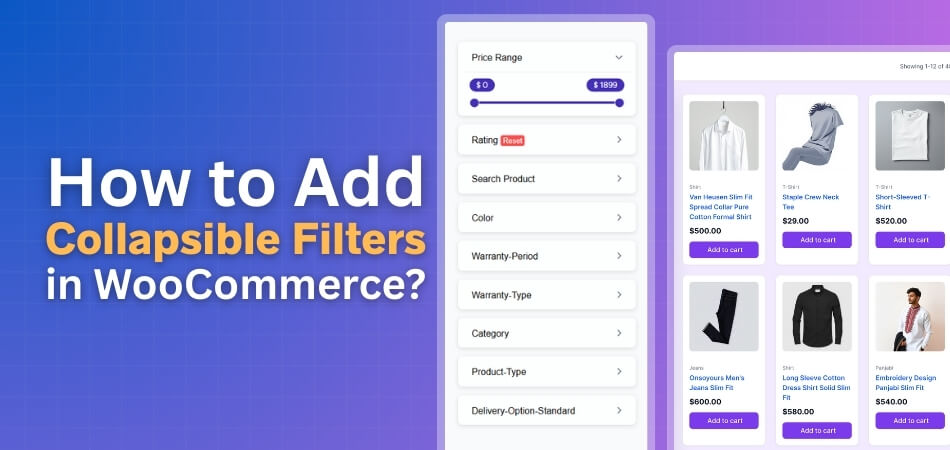
This WooCommerce product filters plugin comes with both free and paid versions, giving you flexibility based on your store’s needs. Once installed, it will help you create user-friendly collapsible filter sections, improving your store layout and customer experience.
Install the Plugin
You’ll first need to install and activate the plugin before setting up collapsible filters.
Free Version
To install the free version:
- Go to your WordPress Admin Dashboard → Plugins.
- Click Add New Plugin.
- Type Dynamic AJAX Product Filters for WooCommerce into the search bar.
- Click Install Now, then Activate once it’s installed.
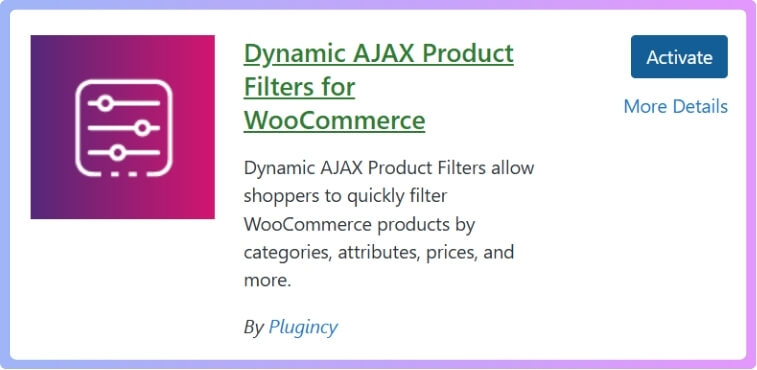
After activation, you’ll find a new section called Product Filters in your dashboard where all filter settings are managed.
Pro Version
If you’ve purchased the Pro version, the steps are slightly different:
- Go to Plugins → Add New Plugin.
- Click Upload Plugin.
- Choose the downloaded ZIP file and click Install Now.
- Once installed, click Activate.
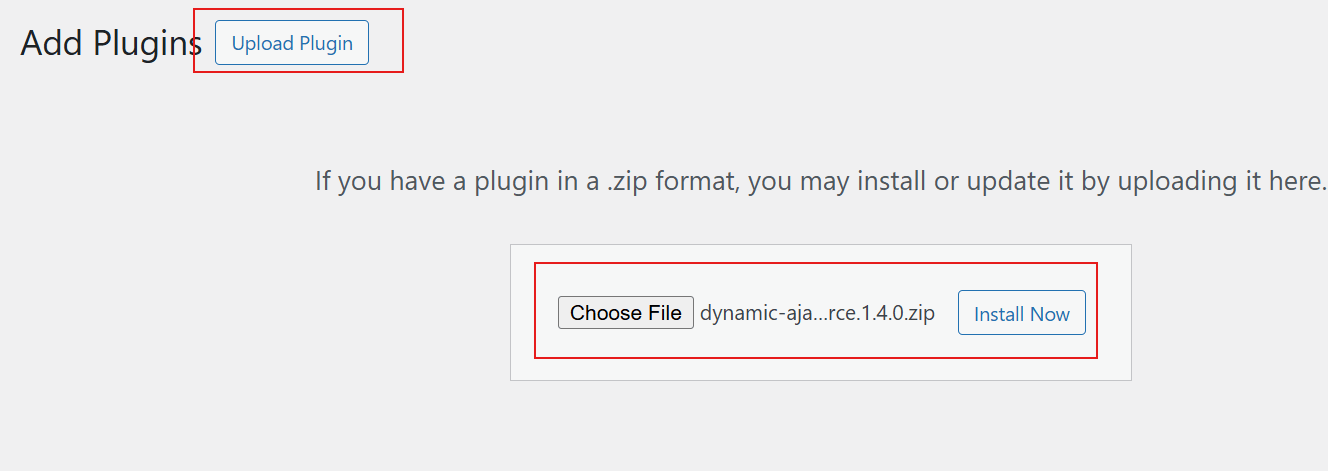
The Pro version gives you extra options for styling, layout, and smooth transitions in collapsible filter behavior.
Set Up Collapsible Filters
After the plugin is activated, you can start setting up your collapsible filters:
From your dashboard, go to Product Filters → Form Manage. Here, you can add the filters you want for your shop — for example, category, price, color, or brand filters. Once added, you can adjust how each filter looks and behaves.
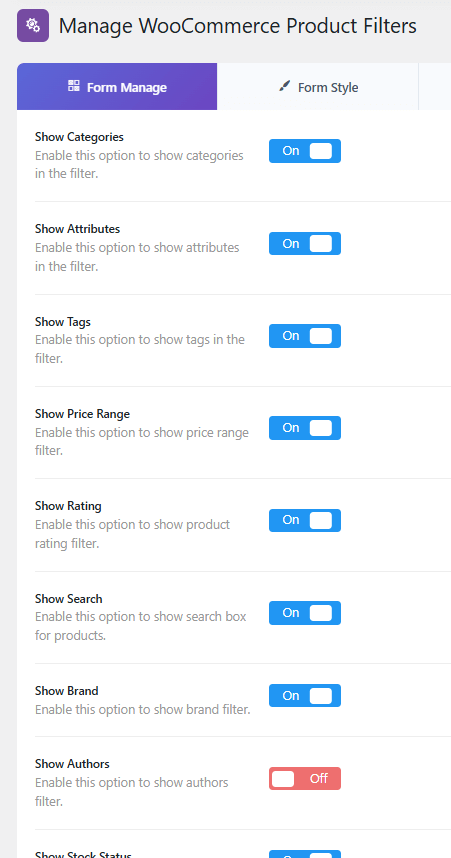
Now go to Product Filters → Form Style. In the “Configure Style for” dropdown, select the filter you want to make collapsible. This step lets you control how your filters appear to customers.
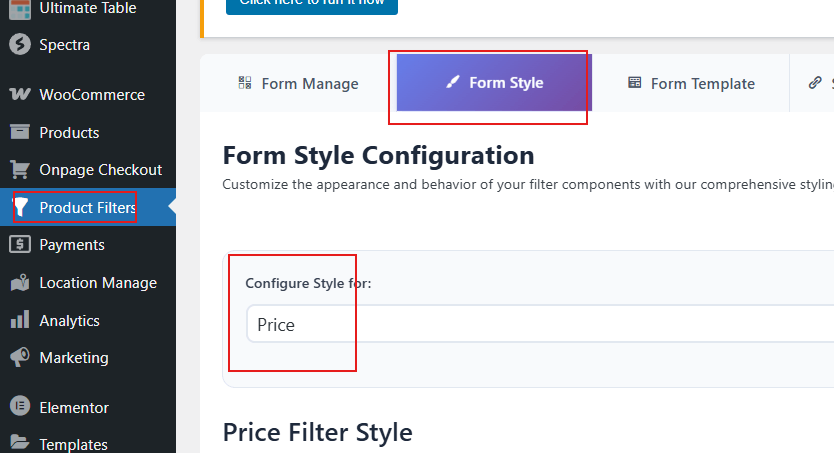
Enable Collapsible Options
Scroll down the page until you find the Optional Settings section. Here, look for Enable Minimization Option. This setting controls whether your filters can collapse or expand. You’ll see four options to choose from:
- Enabled with Arrow: The filter can collapse and expand, with an arrow icon beside the title.
- Enabled without Arrow: Works the same, but without the arrow icon.
- Initially Minimized: The filter starts in a collapsed state by default.
- Disabled: Collapsible behavior is turned off.
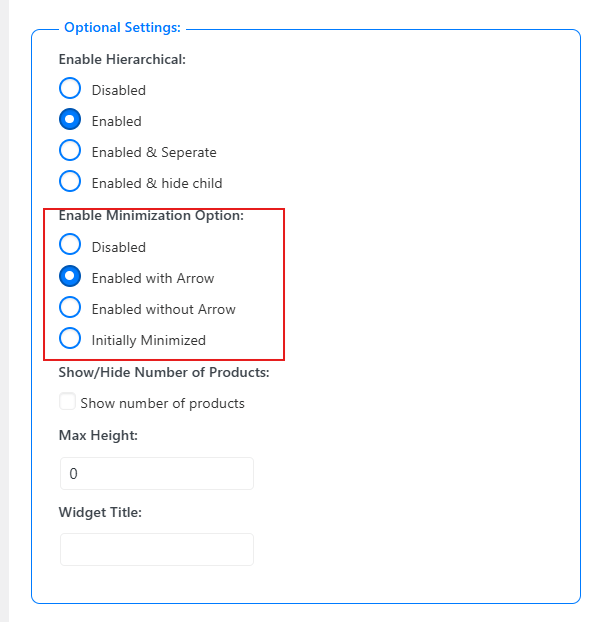
Pick the option that fits your store’s design, then click Save Changes to apply.
Final Step
If you have multiple filters (like price, color, or size), repeat these steps for each one. This ensures all filters can collapse or expand based on your settings.
Once you save your changes, visit your shop page and test the filters. You’ll now see clean, collapsible filter sections that make your site look organized and more professional.
Using collapsible filters through product filters for WooCommerce helps improve your store’s usability and keeps your layout neat while giving customers a smoother browsing experience.
Why Are Collapsible Filters Better Than Static Filters?
Collapsible filters let shoppers open or close filter sections anytime they want. These filters keep product pages neat and help people focus on what they need. Static filters stay open all the time and take up too much space on the screen. Let’s see why collapsible filters make shopping simpler and cleaner.
Saves Space on Product Pages
Collapsible filters hide parts that shoppers are not using right now. This keeps the page looking tidy and easy to move through. It also gives more space for products to show clearly. With more room on screen, shoppers can see more items at once. This helps them shop faster without feeling crowded.
Improves Focus and Clarity
When filters are folded, only the chosen ones stay visible. This keeps the view clean and helps shoppers focus on selected options. Less clutter means fewer mistakes while picking filters. A clear layout helps people understand what’s active. It also makes the site look better and feel more modern.
Faster Page Loading
Having fewer filter panels open makes pages load smoothly. The browser doesn’t need to display all filters at once. This helps the site run faster, especially on phones. Quick loading keeps people from leaving the page early. A smooth and light design makes the store feel well-built.
Easier for Mobile Users
Small screens can get messy with many filters showing together. Collapsible filters let users open only the parts they need. This keeps things simple and avoids too much scrolling. It also makes tapping easier with enough space between options. A clean mobile layout helps shoppers shop comfortably.
Better User Experience
People like shopping on sites that feel simple and clear. Collapsible filters give them control over what they see. They can expand one part, close another, and move easily. This smooth control makes shopping enjoyable. It builds trust and keeps people coming back for more.
Collapsible filters bring a neat and easy look to any store. They save space, improve speed, and make pages easier to explore. Shoppers can find what they want without getting lost in clutter. Try using collapsible filters to make your store look clean and feel simple to use.
How to Organize Product Filters Before Making Them Collapsible?
Good product filters help shoppers find what they want quickly and easily. When filters are set in a clear order, browsing feels smooth and simple. Many stores forget to group filters before adding fancy designs. Read below to learn how to organize them before making them collapsible for better results.
Plan Your Filter Order
Start by arranging filters in a way that makes sense for shoppers. Keep the most used options like price and category at the top. This helps customers focus on what matters first. A clear order makes it easy for people to compare products quickly without confusion.

Group Related Filters Together
Combine filters that belong in the same group, like color and size. When you keep related options close, customers understand your layout faster. For example, brand and style filters can sit next to each other. This setup keeps your store neat and your filters simple to use.
Use Clear and Simple Filter Names
Make sure every filter name is short and easy to read. Long or unclear names can confuse people and slow them down. Use plain words like “Brand,” “Color,” or “Price.” Simple labels guide shoppers smoothly through your filter options without wasting their time.
Arrange Categories in Layers
Put your categories in a clear order before adding collapsible features. Before you make your filters collapsible, it’s important to group them properly. For example, when you enable hierarchical category filters in WooCommerce, customers can browse through main and subcategories easily, making your collapsible design even more effective. A clear layout helps buyers find products step by step without stress.
Test Before Making Filters Collapsible
Check how your filters look and feel before collapsing them. Make sure each filter group opens smoothly and closes without hiding key options. Try the layout on mobile and desktop to confirm it’s easy to use. Testing early helps fix small design problems before they confuse shoppers.
Good filter grouping makes your store easier to use and understand. It helps shoppers reach products faster and keeps the design clean. Always test your layout before you turn on collapsible filters. A few small changes now can make a big difference for your customers.
Tips to Make Collapsible Filters Work Smoothly on Mobile Devices
Making collapsible filters work well on mobile devices keeps shopping smooth and simple. Small screens need special care for clear menus and easy taps. With smart setup and simple design, you can stop overlap and keep everything running fine.
- Use Responsive Layouts: Design filters that fit different screen sizes automatically so users never need to scroll sideways or zoom in.
- Add Tap-Friendly Buttons: Make filter buttons large enough for comfortable tapping, reducing wrong clicks, and keeping users happy while browsing categories.
- Keep Menus Clear: Design filter menus to open neatly without covering other parts of the screen to avoid confusion.
- Add Simple Arrows: Use small arrow icons beside filters to show expandable sections, helping users know where to tap without guessing.
- Use Smooth Animation: Let filters slide open and close gently, keeping the experience soft and avoiding sudden movements that distract users.
- Limit Filter Levels: Keep only key filter levels visible on small screens, so menus stay tidy and don’t feel cramped or confusing.
- Check Overlap Issues: Test filters on several devices to make sure dropdowns don’t hide buttons or stack wrongly on smaller screens.
Good collapsible filters make mobile shopping easier and more enjoyable. Keep design simple, test it often, and fix small spacing issues early. These small steps help visitors move around freely and find what they need without stress or confusion.
Common Issues That Can Affect Collapsible Filters
Collapsible filters are great for keeping your WooCommerce sidebar neat and simple. But sometimes, they do not work as expected. Filters might not appear, or they may not open or close properly. Let’s look at the common issues and how to fix them below.
Missing Filter Widgets
Sometimes the filter section disappears completely, which can confuse users. This often happens when a plugin or theme blocks the widget area. Checking your widget settings in the dashboard can help bring them back. If nothing shows up, you may need to fix missing filter widgets to restore your WooCommerce sidebar quickly.
Plugin Conflicts
Many times, filters break after installing a new plugin. This happens when scripts from different plugins clash with the filter code. Try disabling new plugins one by one to see which causes trouble. Once found, you can replace it or contact the plugin maker for help.
Theme Compatibility Issues
Filters may stop working after changing or updating a theme. Some themes override WooCommerce templates or block JavaScript that runs filters. You can test by switching to the default WooCommerce theme. If filters work there, it means your main theme needs an update or code fix.
JavaScript Errors
Collapsible filters depend on small JavaScript functions to open and close. If there’s even one broken line, the entire feature can fail. Check your browser console for red error messages. Fixing or removing faulty scripts usually makes your filters work properly again.
Caching and Outdated Files
Old cached files can stop new changes from loading. This makes filters behave strangely or not update at all. Clear your website and browser cache to see if it helps. Also, make sure your plugins, theme, and WooCommerce are running the latest versions.
Collapsible filters make shopping smoother when they work correctly. But if they stop, small fixes usually solve the issue fast. Always test changes carefully before saving. Keeping your setup updated will help filters stay steady and simple to use.
Frequently Asked Questions
If you’re planning to add collapsible filters to your WooCommerce store, you might have a few questions. These FAQs will help you understand how collapsible filters work, how to manage them, and how to make them look good on your site. Let’s go through some common questions to help you set them up easily.
Can I Add Collapsible Filters Without Coding in WooCommerce?
Yes, you can add collapsible filters even if you don’t know how to code. All you need is a plugin like Dynamic Ajax Product Filters for WooCommerce. It lets you create collapsible filter sections in just a few clicks. Once installed, you can control how filters expand or close right from your dashboard.
Which Plugin Is Best for Adding Collapsible Filters in WooCommerce?
One of the best plugins for this is Dynamic Ajax Product Filters for WooCommerce. It’s easy to install, works smoothly, and comes in both free and paid versions. The plugin also gives you control over design and animation styles. With this tool, your store can have neat collapsible filters that improve user experience.
How Do Collapsible Filters Help Improve My Store Layout?
They make your store look more organized by reducing clutter. When shoppers can collapse sections they don’t need, they see more products at once. This clean look makes browsing feel easier and less stressful. It also helps your website appear more professional and well-structured.
Can I Customize the Look of Collapsible Filters in WooCommerce?
Yes, most filter plugins let you change how your filters look. You can pick icons, colors, and even animation styles for expanding or closing sections. These small design touches help match your store’s theme. A clean and matching design helps shoppers feel more comfortable while browsing.
Do Collapsible Filters Work on Mobile Devices?
Yes, collapsible filters work very well on phones and tablets. They save space on small screens by keeping filter sections closed until needed. This makes it easier to browse without too much scrolling. Always test your filters on mobile to make sure everything opens and closes smoothly.
Can I Use Collapsible Filters With Other WooCommerce Plugins?
Yes, you can use them alongside most WooCommerce plugins. However, sometimes plugins may conflict with each other and cause filters to stop working. If this happens, try disabling the newest plugin to see if it fixes the issue. Keeping all plugins updated also helps avoid these small problems.
What Should I Check If Collapsible Filters Stop Working?
If they stop working, first clear your site cache and refresh your page. Then, check your plugin settings to see if the collapsible option is still enabled. Sometimes an update or theme change can turn it off. If the problem stays, contact the plugin support team for help.
Do Collapsible Filters Affect Website Speed?
They can affect speed if you use too many scripts or heavy themes. To avoid this, choose a light plugin and keep your filter design simple. Using caching tools also helps your pages load faster. A balanced setup gives you smooth filters without slowing down your site.
Bottom Line
Adding collapsible filters keeps your WooCommerce store neat and simple to explore. It helps shoppers focus on what matters and makes your pages look more organized. You can easily set this up by installing and activating the Dynamic Ajax Product Filters plugin and adjusting its settings, which is the quick answer to how to add collapsible filters in WooCommerce.
To keep your store running smoothly, update plugins often and test your filters on both desktop and mobile. Check your layout after each change to make sure everything looks right. Small updates can make big improvements, so keep refining your filters and good luck creating a clean, easy shopping experience for your visitors.
