

Product ratings play a major role in buying decisions. Most customers prefer products with higher ratings, and without a proper rating filter, it becomes difficult to find trusted products quickly.
A WooCommerce rating filter plugin allows users to filter products based on star ratings, such as 4★ & up or 5★ only. This improves trust, speeds up decision-making, and increases conversion rates.
Quick Answer
WooCommerce rating filter plugins let users filter products by star ratings like 4★ and above. The best plugins support AJAX filtering, real-time updates, and integration with product reviews.
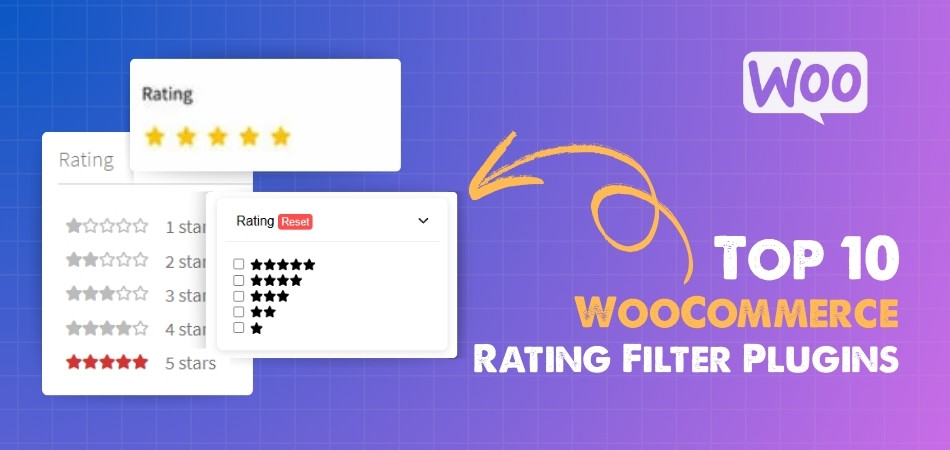
Why Rating Filters Increase Trust & Conversions
Rating filters directly influence how users make buying decisions. When customers can quickly find highly rated products, they feel more confident and are more likely to complete a purchase. Here’s why rating filters are so powerful:
- Builds instant trust – Products with higher ratings are seen as more reliable, helping users trust the store without needing deep research.
- Reduces decision time – Instead of comparing many products, users can filter 4★ and above items and decide faster.
- Highlights social proof – Ratings act as real customer feedback, showing that others have already tested and approved the product.
- Improves product visibility – High-rated products get more exposure when users apply rating filters.
- Filters out low-quality options – Users avoid poorly rated products, leading to a better shopping experience.
- Boosts conversion rate – When users see trusted products quickly, they are more likely to add items to cart and complete checkout.
Rating filters improve trust and simplify decision-making, helping users choose better products and increasing overall conversions.
How Rating Filters Work in WooCommerce
Understanding how rating filters work helps you set them up correctly and ensure accurate results for users. In WooCommerce, rating filters are connected to product reviews and star ratings.
- Based on product reviews – Ratings come from customer reviews where users rate products (usually 1★ to 5★).
- Average rating calculation – WooCommerce calculates an average rating for each product based on all reviews.
- Filter by rating range – Users can select options like 4★ & up or 5★ only to refine results.
- AJAX-powered filtering – Modern plugins update results instantly without page reload when users apply rating filters.
- Works with other filters – Rating filters can be combined with price, category, brand, and other filters for more precise results.
- Displays rating visually – Star icons are shown in filters and product listings to help users quickly understand product quality.
WooCommerce rating filters use review data to help users find highly rated products quickly and improve overall shopping experience.
Types of Rating Filters (Stars, Range, Multi-Select)
Rating filters can be displayed in different ways depending on your store design and user behavior. Choosing the right type improves usability and helps users find trusted products faster.
- Star-based filters (e.g., 4★ & up) – The most common type where users select ratings like 5★, 4★ & above. It is simple and easy to understand.
- Exact rating selection (1★ to 5★) – Allows users to choose a specific rating level instead of a range. Useful for detailed filtering.
- Range-based rating filters – Lets users select a rating range (for example, 3★ to 5★). Provides more control over filtering.
- Multi-select rating filters – Users can select multiple rating levels at once (e.g., 4★ and 5★). Helpful for comparing high-rated products.
- Dropdown rating filters – Displays rating options inside a dropdown menu, useful for saving space on mobile or compact layouts.
- Icon-based filters – Uses star icons visually instead of text, improving clarity and user experience.
Choosing the right rating filter type improves usability and helps users quickly identify high-quality products.

UX Best Practices for Rating Filtering
A well-designed rating filter should be simple, clear, and quick to use. Good UX helps users trust the results and choose products faster.
- Place rating filters near other key filters – Keep them in the sidebar or top filter bar so users can access them easily.
- Use star icons instead of text only – Visual stars help users understand ratings instantly without reading.
- Highlight “4★ & up” as default – Most users prefer high-rated products, so showing this option prominently improves usability.
- Show product count per rating – Display how many products match each rating level to guide user decisions.
- Enable AJAX filtering – Update results instantly without page reload for smoother browsing.
- Allow combination with other filters – Let users combine rating with price, category, or brand for better accuracy.
- Optimize for mobile users – Use collapsible filters or slide-out panels to keep the interface clean on smaller screens.
Following UX best practices ensures rating filters are easy to use, improving trust and helping users find high-quality products faster.
Top 10 WooCommerce Rating Filter Plugins (Comparison Table)
When customers shop online, product ratings play a key role in their decisions. A WooCommerce rating filter plugin helps users quickly find highly rated products by filtering reviews. Below is a comparison table of the best plugins to help you choose the right one for your store.
| Plugin Name | Free Version | Paid Version | Starting Price | Key Strength |
| Dynamic AJAX Product Filters for WooCommerce | Yes | Yes | $39/year or $79 lifetime | Fast AJAX rating filtering with SEO-friendly URLs and flexible layouts |
| WooCommerce Product Filter by Barn2 | No | Yes | $79/year | High-performance filtering with strong rating filter support for large stores |
| Filter Everything | Yes | Yes | $44 (one-time) | Advanced rating filtering with taxonomy and custom field support |
| YITH WooCommerce AJAX Product Filter | Yes | Yes | $105/year | Easy-to-use rating filters with preset layouts and strong compatibility |
| JetSmartFilters | No | Yes | $43/year | Visual rating filters with Elementor integration and dynamic UI control |
| HUSKY (WOOF) – WooCommerce Products Filter | Yes | Yes | $42 (one-time) | Flexible rating filtering with advanced logic and customization |
| Product Filter by WBW | Yes | Yes | $59/year | Beginner-friendly setup with basic rating filtering support |
| Advanced AJAX Product Filters | Yes | Yes | $44 (one-time) | Lightweight AJAX filtering with simple rating filter integration |
| WPC Smart Filters for WooCommerce | Yes | Yes | $29/year | Simple and fast rating filtering for small stores |
| WooCommerce Product Filters (Official Plugin) | No | Yes | $79/year | Native WooCommerce solution with reliable rating filter support |
1. Dynamic AJAX Product Filters for WooCommerce
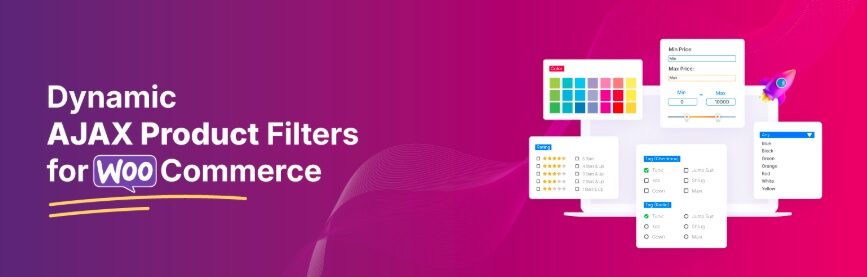
Finding highly rated products should be quick and easy. Dynamic AJAX Product Filters for WooCommerce helps customers filter products by ratings instantly without reloading the page. Users can select options like 4★ and above or 5★ only, making it easier to discover trusted products. The plugin keeps browsing smooth and helps customers make faster decisions based on real user reviews.
Key Features:
- AJAX Rating Filtering – Filters products by star ratings in real time without page reload
- Filter by Rating with Other Conditions – Combine rating with price, category, brand, and attributes
- Multiple Filter Layouts – Display rating filters as stars, checkboxes, or dropdowns
- Real-Time Product Count Updates – Shows how many products match selected rating filters
- Mobile-Friendly Filter Design – Optimized layouts for mobile and tablet users
- SEO-Friendly URLs (Pro) – Creates clean URLs for filtered rating pages
- Customizable UI Styles – Adjust how rating stars and filter blocks appear
- Works with Reviews System – Uses WooCommerce product ratings and review data
- Shortcodes and Widgets Support – Place rating filters anywhere on your store
- Page Builder Compatibility – Works with Elementor, Divi, and other builders
Limitations
- Advanced features require the Pro version
- Requires product reviews to generate rating filters
- May need optimization for stores with large datasets
Pricing
| Plan | Price (Discounted) | Normal Price | Features |
| Single Site | $39/year | $49 | All pro features, full access, 1 year support, 1 year updates |
| Up to 5 Sites | $89/year | $99 | All pro features, full access, 1 year support, 1 year updates |
| Unlimited Sites | $189/year | $199 | All pro features, full access, 1 year support, 1 year updates |
| Single Site (Lifetime) | $79 one-time | $89 | Full access, lifetime support, unlimited updates |
| Up to 5 Sites (Lifetime) | $139 one-time | $149 | Full access, lifetime support, unlimited updates |
| Unlimited Sites (Lifetime) | $289 one-time | $299 | Full access, lifetime support, unlimited updates |
Rating-based filtering helps customers quickly find trusted products, improving confidence and increasing conversions in WooCommerce stores.
2. WooCommerce Product Filter by Barn2
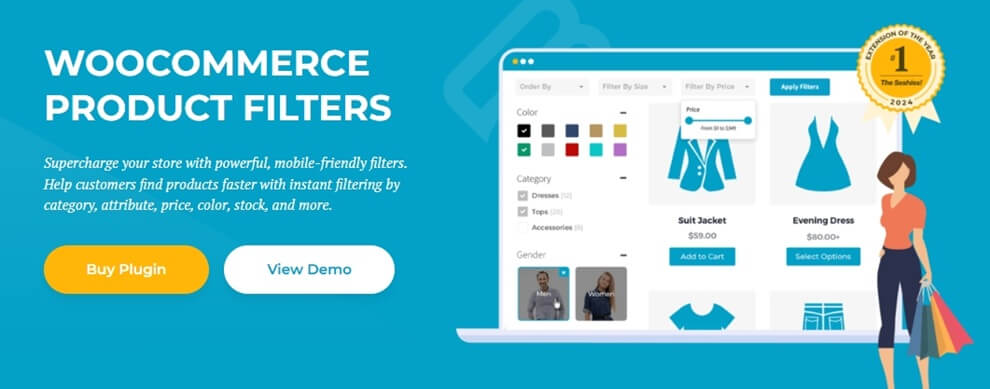
WooCommerce Product Filter by Barn2 makes it easy for customers to find highly rated products by combining rating filters with structured filtering. Users can quickly select options like 4★ and above to focus on trusted products. The plugin is built for performance, ensuring smooth filtering even in stores with large product catalogs.
Key Features:
- Rating-Based Filtering – Filter products using star ratings such as 4★ & up or 5★ only
- AJAX Filtering – Instantly updates results without page reload
- Combine Rating with Other Filters – Works with category, price, brand, and attributes
- Clean Filter Layouts – Displays rating filters in a simple and structured way
- Mobile-Friendly Design – Slide-out filter panel for better mobile usability
- SEO-Friendly Filter URLs – Generates clean URLs for filtered pages
- Flexible Display Options – Show rating filters as stars, checkboxes, or lists
Limitations
- No free version available
- Limited advanced UI customization
- Less control over deep filtering logic compared to developer-focused plugins
Pricing
| Plan | Price | Type |
| Single Site | $79/year | Yearly |
| 5 Sites | $139/year | Yearly |
| 20 Sites | $249/year | Yearly |
Barn2 Product Filter provides reliable rating filtering with strong performance, making it ideal for stores focused on structured navigation.
3. Filter Everything
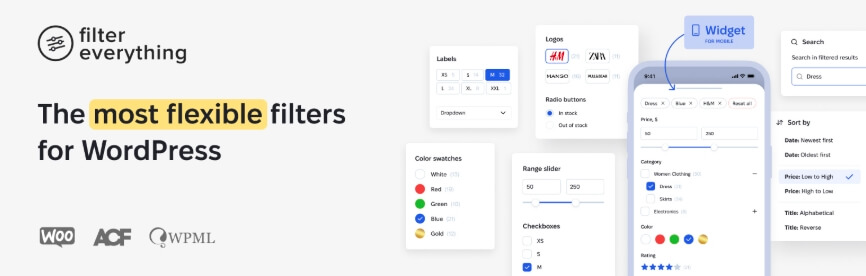
Filter Everything allows store owners to create flexible rating-based filters using WooCommerce review data. Customers can quickly filter products by star ratings and combine them with other conditions like category, price, or attributes. It is a strong option for stores that need advanced filtering logic and more control over how rating filters work.
Key Features:
- Rating-Based Filtering – Filter products using star ratings like 4★ & up or 5★
- AJAX Filtering – Updates results instantly without page reload
- Combine Rating with Multiple Filters – Works with categories, tags, price, and custom fields
- Advanced Filtering Logic – Supports complex filtering conditions for better accuracy
- SEO-Friendly URLs – Creates clean URLs for rating-filtered pages
- Supports Custom Fields – Useful for stores with advanced product setups
- Builder Compatibility – Works with Elementor, Divi, and other page builders
Limitations
- Setup can be complex for beginners
- Requires proper configuration for best performance
- UI customization may need manual adjustments
Pricing
| Plan | Price | Type |
| Regular License | $44 | One-time |
| Extended License | $144 | One-time |
Filter Everything provides flexible rating filtering with advanced control, making it suitable for stores with complex filtering needs.
YITH WooCommerce AJAX Product Filter
YITH WooCommerce AJAX Product Filter helps customers quickly find highly rated products by applying rating filters in real time. Users can select options like 4★ and above to focus on trusted items. The plugin is easy to use and offers a clean interface, making it suitable for stores that want simple rating filtering without complex setup.

Key Features:
- Rating-Based Filtering – Filter products by star ratings such as 4★ & up
- AJAX Filtering – Updates results instantly without reloading the page
- Preset Filter Groups – Quickly set up rating filters with predefined options
- Multiple Layout Options – Display rating filters in sidebar or horizontal layouts
- Mobile-Friendly Filters – Popup-style filters for better mobile usability
- Combine with Other Filters – Works with price, category, brand, and attributes
- Page Builder Support – Compatible with Elementor, Gutenberg, and shortcodes
Limitations
- Advanced features require premium version
- Limited deep customization compared to advanced plugins
- Less flexible for complex filtering logic
Pricing
| Plan | Price | Type |
| Free Version | $0 | Basic features |
| Premium Version | $105.33/year | Yearly |
YITH WooCommerce AJAX Product Filter offers simple and effective rating filtering, making it a good choice for improving product trust and discovery.
5. JetSmartFilters
JetSmartFilters enables advanced rating-based filtering with full design control, especially for Elementor and Gutenberg users. It allows customers to filter products by ratings along with other conditions, updating results instantly. This makes it ideal for stores that want both flexible filtering and custom UI design.

Key Features:
- Rating-Based Filtering – Filter products by star ratings like 4★ & up or 5★
- AJAX Filtering – Real-time updates without page reload
- Multiple Filter Types – Checkbox, select, range, and search filters
- Combine Rating with Other Filters – Works with category, price, brand, and attributes
- Dynamic Filtering Logic – Adjust results based on user selection
- Elementor & Gutenberg Integration – Full control over filter design and placement
- Flexible Layout Options – Place filters anywhere using widgets or blocks
Limitations
- Requires Elementor or page builder for full functionality
- Not beginner-friendly
- Limited free features
Pricing
| Plan | Price | Type |
| Single Site | $43/year | Yearly |
| Unlimited Sites | $88/year | Yearly |
JetSmartFilters offers flexible and customizable rating filtering, making it ideal for stores focused on design and advanced filtering control.
6. HUSKY (WOOF) – WooCommerce Products Filter
HUSKY (formerly WOOF) provides flexible rating-based filtering using WooCommerce review data. It allows users to filter products by star ratings along with other conditions like category, price, and attributes. The plugin is suitable for stores that need advanced filtering control and customizable logic.

Key Features:
- Rating-Based Filtering – Filter products by star ratings such as 4★ & up
- AJAX Filtering – Instant updates without page reload
- Advanced Filtering Logic – Supports AND/OR conditions for precise results
- Combine with Multiple Filters – Works with category, price, brand, and attributes
- Shortcode & Widget Support – Place filters anywhere on your site
- Search Integration – Supports filtering with keyword search
- Customizable Filter Layouts – Flexible display options
Limitations
- Interface feels outdated
- Setup can be complex for beginners
- Performance depends on proper configuration
Pricing
| Plan | Price | Type |
| Free Version | $0 | Basic features |
| Premium Extensions | $42+ | One-time |
HUSKY (WOOF) offers flexible rating filtering with advanced control, making it suitable for stores with complex filtering needs.
7. Product Filter by WBW
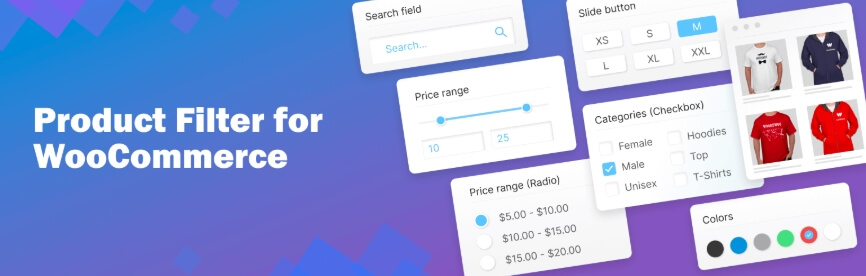
Product Filter by WBW offers a simple way to add rating-based filtering to your WooCommerce store. Customers can quickly filter products by star ratings and combine them with other filters like category or price. It is designed for easy setup, making it suitable for beginners and small to medium stores.
Key Features:
- Rating-Based Filtering – Filter products by star ratings like 4★ & up
- AJAX Filtering – Instant updates without page reload
- Multiple Display Types – Checkbox, dropdown, and radio options
- Combine with Other Filters – Works with category, price, and attributes
- Drag-and-Drop Builder – Easy filter setup and management
- Shortcode & Widget Support – Flexible placement across pages
Limitations
- Limited advanced filtering features
- Basic UI customization options
- Not ideal for large or complex stores
Pricing
| Plan | Price | Type |
| Free Version | $0 | Basic features |
| Pro Version | $59+/year | Yearly |
Product Filter by WBW provides simple rating filtering, making it a good choice for small WooCommerce stores.
8. Advanced AJAX Product Filters
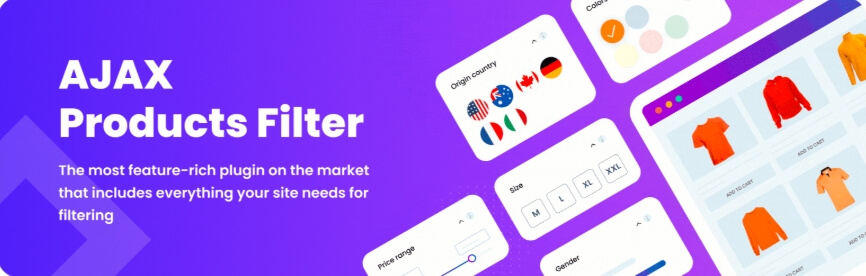
Advanced AJAX Product Filters allows users to filter products by ratings quickly using real-time updates. It focuses on speed and simplicity, making it easy for customers to find highly rated products without navigating multiple pages. The plugin works well for stores that need lightweight filtering with basic customization.
Key Features:
- Rating-Based Filtering – Filter products by star ratings like 4★ & up or 5★
- AJAX Filtering – Instant product updates without page reload
- Combine with Other Filters – Works with category, price, brand, and attributes
- Multiple Layout Options – Checkbox, slider, and dropdown styles
- Flexible Placement – Add filters in sidebar or above product listings
- SEO-Friendly URLs – Supports clean URLs for filtered results
Limitations
- Limited advanced features
- Basic UI customization
- May require optimization for large product catalogs
Pricing
| Plan | Price | Type |
| Single Site | $44 | One-time |
| 3 Sites | $69 | One-time |
| 5 Sites | $109 | One-time |
Advanced AJAX Product Filters offers fast and simple rating filtering, making it suitable for performance-focused WooCommerce stores.
9. WPC Smart Filters for WooCommerce
WPC Smart Filters for WooCommerce provides a simple way to filter products by ratings using a lightweight setup. It helps users quickly find highly rated products without complex configuration. The plugin is suitable for small to medium stores that need basic rating filtering with stable performance.
Key Features:
- Rating-Based Filtering – Filter products by star ratings such as 4★ & up
- AJAX Filtering – Instant updates without page reload
- Combine with Other Filters – Works with category, price, and attributes
- Simple Interface – Clean and easy-to-use filter design
- Shortcode & Widget Support – Flexible placement on pages
- Theme Compatibility – Works with most WooCommerce themes
Limitations
- Limited advanced filtering options
- Basic UI customization
- Not ideal for large or complex stores
Pricing
| Plan | Price | Type |
| Free Version | $0 | Basic features |
| Pro Version | $29+/year | Yearly |
WPC Smart Filters offers simple and fast rating filtering, making it a good choice for smaller WooCommerce stores.
10. WooCommerce Product Filters (Official Plugin)
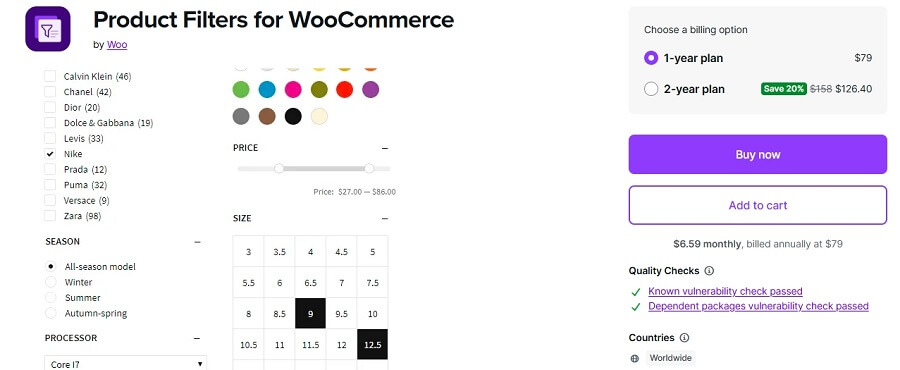
WooCommerce Product Filters is the official solution built by the WooCommerce team. It supports rating-based filtering using product reviews and ensures stable performance with full compatibility. Customers can easily filter products by star ratings to find trusted items quickly.
Key Features:
- Rating-Based Filtering – Filter products by star ratings like 4★ & up
- AJAX Filtering – Real-time updates without page reload
- Native WooCommerce Integration – Works smoothly with core features
- Combine with Other Filters – Supports category, price, stock, and attributes
- Block-Based Filtering – Designed for modern WooCommerce themes
- Reliable Performance – Regular updates and compatibility support
Limitations
- No free version available
- Limited customization compared to third-party plugins
- Fewer advanced filtering features
Pricing
| Plan | Price | Type |
| Single Site License | $79+/year | Yearly |
WooCommerce Product Filters provides reliable rating filtering with strong compatibility, making it a stable choice for WooCommerce stores.
Comparison Table (Rating Filter Capability)
This table focuses specifically on how well each plugin handles rating-based filtering, which is important for trust-driven product discovery. Rating filters rely on review data and should work smoothly with other filters for the best experience.
| Plugin Name | Rating Filter Support | AJAX Filtering | Combine with Other Filters | Large Catalog Performance | UI Flexibility |
| Dynamic AJAX Product Filters for WooCommerce | Excellent | Yes | Excellent | Excellent | High |
| WooCommerce Product Filter by Barn2 | Excellent | Yes | Excellent | Excellent | Medium |
| Filter Everything | Excellent | Yes | Excellent | Good | High |
| YITH WooCommerce AJAX Product Filter | Very Good | Yes | Very Good | Good | Medium |
| JetSmartFilters | Excellent | Yes | Excellent | Good | Very High |
| HUSKY (WOOF) | Very Good | Yes | Excellent | Depends on setup | High |
| Product Filter by WBW | Good | Yes | Good | Medium | Medium |
| Advanced AJAX Product Filters | Good | Yes | Good | Medium | Medium |
| WPC Smart Filters for WooCommerce | Basic | Yes | Basic | Small stores | Low |
| WooCommerce Product Filters (Official Plugin) | Very Good | Yes | Very Good | Good | Medium |
Key Insights
- Best rating filtering performance – Dynamic AJAX Product Filters and Barn2 provide strong, reliable rating filtering with fast results.
- Best for advanced filtering logic – Filter Everything and JetSmartFilters allow deeper control and combinations.
- Best for large stores – Plugins with optimized queries handle thousands of products without slowing down.
- Beginner-friendly options – WBW and WPC Smart Filters are easier to set up but offer fewer advanced features.
A strong rating filter capability helps users quickly find trusted products, improving both user confidence and conversion rates in WooCommerce stores.
Which Rating Filter Plugin Should You Choose?
Choosing the right WooCommerce rating filter plugin depends on how important reviews, trust, and product quality visibility are for your store. Below is a quick guide based on real use cases:
- Best overall solution – Dynamic AJAX Product Filters for WooCommerce
Offers fast rating filtering with strong flexibility and smooth performance for all store sizes. - Best for large stores – WooCommerce Product Filter by Barn2
Handles large product catalogs efficiently with stable rating filtering. - Best for advanced filtering logic – Filter Everything
Ideal for stores that need complex filtering combinations including ratings. - Best for design flexibility – JetSmartFilters
Perfect for Elementor users who want full control over rating filter design. - Best for beginners – YITH WooCommerce AJAX Product Filter
Easy setup with simple rating filter options and clean interface. - Best free option – HUSKY (WOOF)
Provides flexible rating filtering without initial cost. - Best lightweight option – Advanced AJAX Product Filters
Good for stores that want fast performance with simple setup. - Best for small stores – WPC Smart Filters for WooCommerce
Basic rating filtering with minimal configuration. - Best official solution – WooCommerce Product Filters
Reliable option with strong WooCommerce compatibility.
The right rating filter plugin helps users quickly find high-quality products, improving trust and increasing conversion potential.
Common Issues with Rating Filters (And Fixes)
Rating filters are powerful, but they depend heavily on review data and proper setup. If something is missing, the filter may not work as expected. Here are the most common issues and how to fix them:
- Rating filter not showing
This happens when products don’t have reviews yet. WooCommerce only displays rating filters after at least one product has ratings. - Products not appearing after filtering
If products are missing ratings or reviews are disabled, they won’t show when users select rating filters. Make sure ratings are enabled and visible. - Incorrect rating results
WooCommerce uses average ratings from reviews. If reviews are inconsistent or missing, filtering results may not match expectations. - Filter not working with other filters
Sometimes rating filters don’t combine properly with price or category filters. Ensure your plugin supports multi-filter logic (AND/OR conditions). - Slow filtering performance
Large product catalogs can slow down filtering. Use AJAX-based plugins to improve speed and responsiveness. - No visual rating display
If star ratings are not visible in product listings, users may not understand the filter. Enable star ratings in WooCommerce settings.
Fixing rating filter issues ensures accurate results and helps users quickly find high-quality products, improving trust and conversions.
How to Set Up Filter by Rating in a WooCommerce Store?
If you want customers to find products based on reviews, adding a rating filter is a useful option. For this setup, we will use Dynamic AJAX Product Filters for WooCommerce as an example. This plugin helps you display rating filters and update product results smoothly without page reload.
Step 1: Install the Plugin
Before adding rating filters, you need to install the plugin on your WooCommerce store.
Installation from the Dashboard
- Go to your WordPress Admin Dashboard → Plugins
- Click Add New Plugin
- In the search bar, type Dynamic AJAX Product Filters for WooCommerce
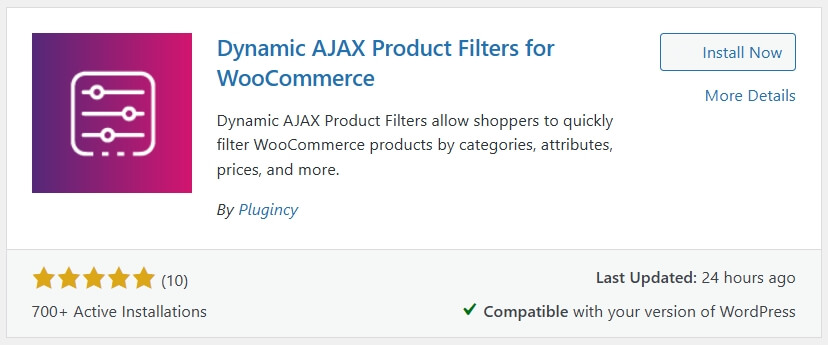
- Click Install Now, then Activate
Installation Manually
Go to Plugins in your WordPress dashboard
- Click Add New Plugin
- Select Upload Plugin
- Click Choose File and select the plugin ZIP file from the WordPress directory or official website
- Click Install Now, then Activate
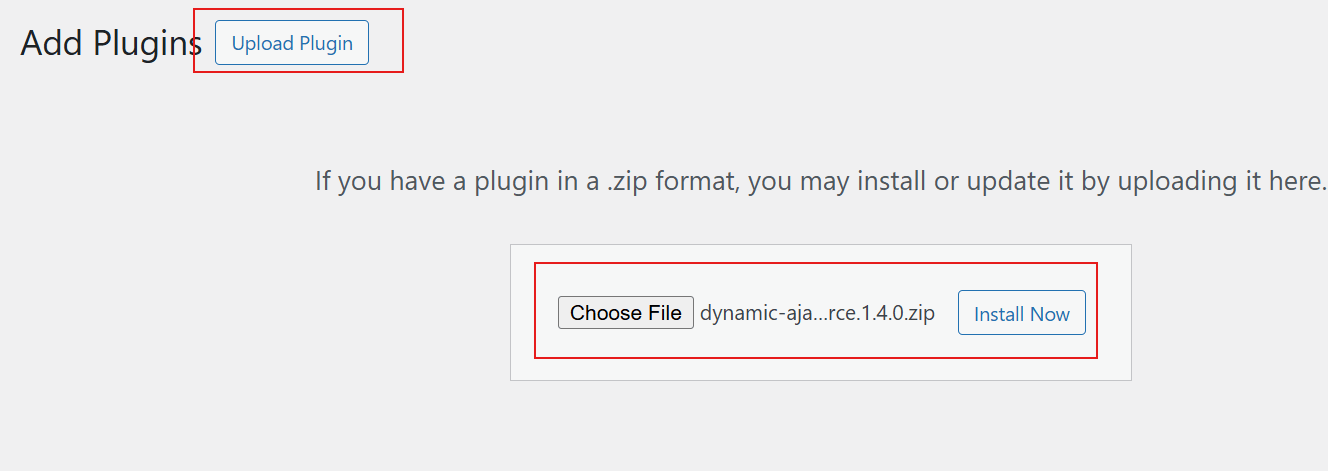
Installing the plugin is the first step to enabling rating-based filtering in your WooCommerce store.
For Premium Version
If you purchase the premium version, you will receive a license key.
- Go to Product Filters → Plugin License
- Find the license key field and paste your key there
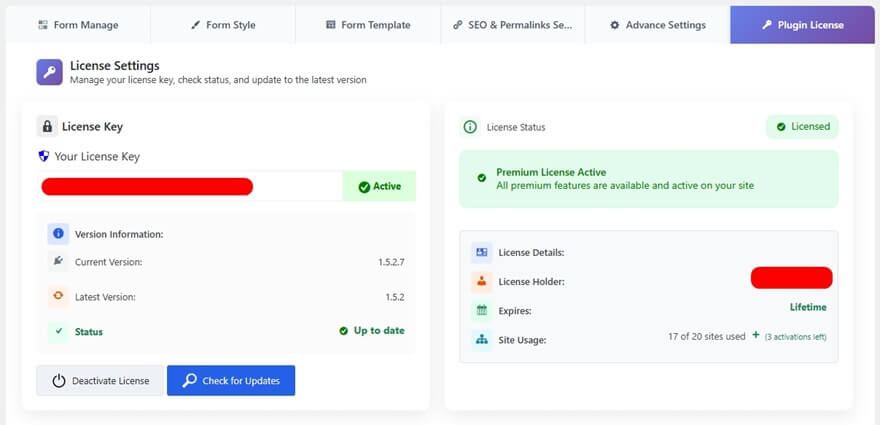
Activating the license unlocks premium features, including advanced rating filter options.
Step 2: Collect Customer Reviews
The rating filter works only when your products have reviews. Make sure customers are leaving feedback.
- Encourage reviews: Ask customers to leave reviews after purchase using follow-up emails or small incentives
- Check visibility: Ensure star ratings are visible on product pages, as the filter uses this data
Step 3: Manage Rating in the Filter Widget Form
Once ratings are available, enable the rating filter in the plugin settings.
- In your WordPress dashboard, go to Product Filters → Form Manage
- Find the Show Rating option
- Turn it on to display the rating filter in the widget
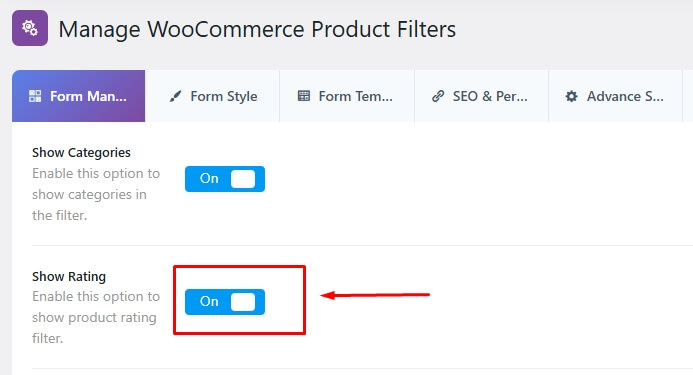
- Select With AJAX for faster updates without page reload
- Click Save Changes
Enabling AJAX with rating filters ensures faster updates and a smoother browsing experience for users.
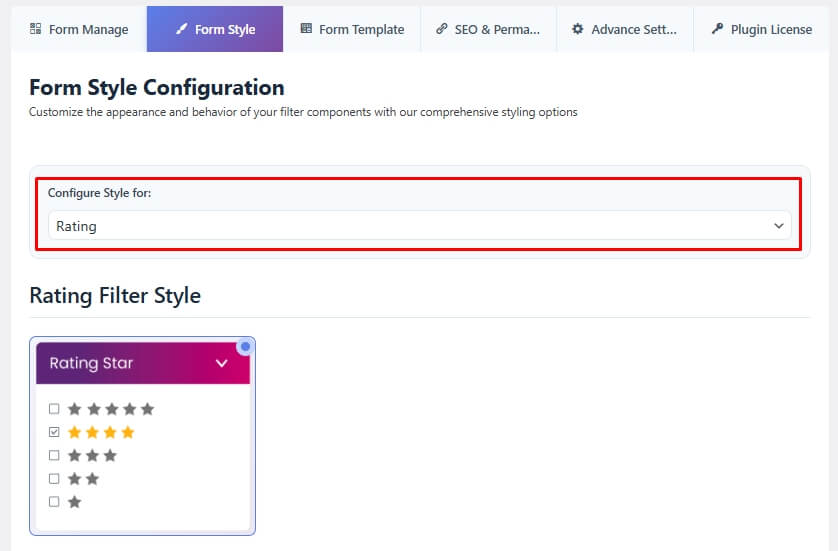
Step 4: Style and Customize the Rating Widget
The plugin allows you to design the rating filter to match your store layout.
- Go to Product Filters → Form Style
- From the Select Attribute dropdown, choose Rating
- Pick a display style for the rating filter:
- Rating Star
- Rating
- Dynamic Rating
- Adjust the settings based on your selected style to control how ratings are displayed
- Click Save to apply your changes
Step 5: Display the Product Filter on Your Page
After setup, place the filter on your store so customers can use it.
- Go to the page where you want to display the filter
- Add this shortcode: [plugincy_filters]
- To show products with the filter, add: [products]
- Place the shortcode in a page, widget area, or sidebar
After completing these steps, users will be able to filter products by rating in your WooCommerce store, making it easier to find highly rated items.
Proper styling and placement of the rating filter improves usability and helps users quickly find trusted products.
FAQ (Rating Filter Plugins)
What is a WooCommerce rating filter plugin?
A WooCommerce rating filter plugin allows users to filter products based on customer ratings, such as 4★ and above, helping them find trusted products quickly.
How do I enable rating filters in WooCommerce?
Enable product reviews in WooCommerce settings, ensure products have ratings, then use a filter plugin to display rating-based filtering options.
Why is my rating filter not showing?
This usually happens when products have no reviews. Rating filters only appear when at least one product has ratings.
Can rating filters be combined with other filters?
Yes, most plugins allow combining rating filters with price, category, brand, and other attributes for better product discovery.
Do rating filters improve conversion rates?
Yes, users trust highly rated products more, which increases the chances of purchase.
Are rating filters SEO-friendly?
They can be, especially when plugins support clean URLs and proper indexing of filtered pages.
Can I display rating filters as stars?
Yes, most plugins support star-based visual filters, making it easier for users to select ratings.
Rating filter plugins help improve trust and product discovery, making them essential for conversion-focused WooCommerce stores.
Conclusion
WooCommerce rating filter plugins help customers quickly find trusted and high-quality products based on real user reviews. By allowing users to filter items by star ratings, these plugins improve confidence, reduce decision time, and create a smoother shopping experience.
Choosing the right WooCommerce rating filter plugin depends on your store size, filtering needs, and level of customization. Plugins that offer fast AJAX filtering, clear star-based UI, and smooth integration with reviews deliver the best results for both usability and conversions.
When set up properly, rating filters not only improve product discovery but also highlight your best products, leading to higher engagement and better sales performance.
A well-implemented rating filter builds trust, improves user experience, and increases conversion potential in WooCommerce stores.
