

WooCommerce plugins help store owners add powerful features and improve how their shops work online. These plugins manage tasks like shipping, payments, marketing, and product displays. As your store grows, using smart tools can make a big difference in sales. Plugins offer simple ways to improve customer experience and store performance.
If you’re wondering what is product bundle pricing, it’s a method where several products are sold together at a lower price than if purchased separately.
This pricing strategy increases the average order value, encourages more sales, and gives customers better deals. It’s widely used in e-commerce to simplify shopping and drive more conversions through upselling.
Want to learn how bundling boosts your store’s sales? Discover the top benefits of this pricing method today. Keep reading to explore tips for using bundle pricing in WooCommerce.
Why Do Online Stores Use Product Bundle Pricing?
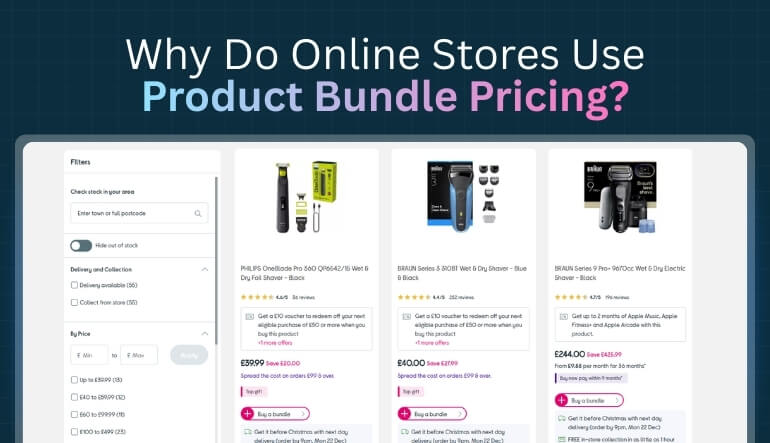
When you shop online, you’ll often see deals where products are grouped together as one offer. It might be a combo of items that go well with each other. These offers usually come with a small discount to catch your eye. But have you ever wondered why stores do this?
More Money Per Order
Stores use product bundles because they encourage shoppers to buy more in a single purchase. Instead of choosing just one item, the customer ends up picking two or three. This increases the store’s Average Order Value, or AOV. It works the same way as buying a burger and feeling tempted to add fries and a drink. You spend a bit more, but it still feels like a good deal.
Makes Shopping Easier
Bundling also makes shopping faster and simpler for customers. Instead of searching for every item, they get everything in one go. For example, buying a school supplies set is easier than adding each item to the cart. This saves time and helps people not miss anything they might need. Stores like to keep things simple so customers don’t leave without buying.
Clears Out Old Stock
Sometimes, stores have items that don’t sell quickly on their own. By bundling them with popular products, they get rid of the slow-moving items. It’s like getting a free notebook with your favorite pen. You may not have bought the notebook alone, but with the bundle, it feels like a bonus. This helps the store clear shelf space for new items.
Looks Like a Better Deal
People love deals. When they see a bundle with a small discount, it feels like they’re saving money. Even if it’s just a small price drop, it gives the feeling of getting more value. This is called perceived value. It’s not about the exact price, but how good the deal feels when buying.
Boosts Product Discovery
Sometimes you discover a new product just because it’s in a bundle. Let’s say you love a skincare cream, and it comes bundled with a lip balm you’ve never tried. You try it and may end up liking it. Bundles help stores show more products without making things too salesy or pushy. It’s a smart way to promote new or lesser-known items.
Keeps Inventory in Balance
Managing a big store with many products in different locations can be tricky. When stores bundle products, they can better control how much stock they have and where. For example, with tools like WooCommerce multi locations inventory management, store owners can track which bundles are available in which warehouse. This keeps things organized and avoids issues like running out of popular bundles.
Builds Customer Trust
When customers see bundles that make sense and actually help them, they feel the store understands their needs. This builds trust. If someone buys a phone and gets a charger and case in one bundle, they feel cared for. It’s not just about price; it’s about making shopping better and smarter.
What is Product Bundle Pricing?
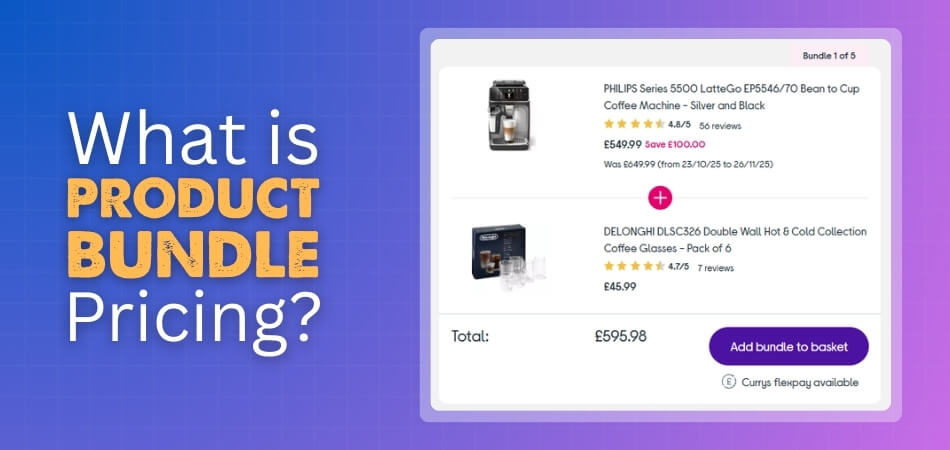
Product bundle pricing means selling several related items together for one simple price. This helps customers feel they get more value without spending extra time. Stores use bundle pricing to increase sales and make shopping easier. Try using smart bundles to boost store growth today. Here in the section below, we’ve compiled a list of types of product bundles you can offer:
Mixed Bundles
Mixed bundles combine different items that work well together, giving customers useful choices in one deal. These bundles usually include products that match common needs, creating simple buying decisions for shoppers. Many stores use mixed bundles to make purchases smoother and increase customer satisfaction during checkout.
Buy-More-Pay-Less Bundles
Buy-more-pay-less bundles encourage customers to purchase more items through simple tiered discounts. These deals reward bigger orders by offering lower prices at higher quantities. Stores like these bundle because they improve sales numbers and give customers a reason to add extra items.
BOGO Bundles
BOGO bundles give customers a free or discounted product when they buy a specific item. These offers help shoppers feel like they receive extra value with every purchase. Stores often use BOGO deals to promote popular products and boost fast buying decisions.
Cross-Sell Bundles
Cross-sell bundles group items based on what a customer likes or often buys together. These suggestions help shoppers find useful products quickly without searching too long. Stores benefit because these bundles increase order value and help customers discover items they may enjoy.
Gift Box Bundling
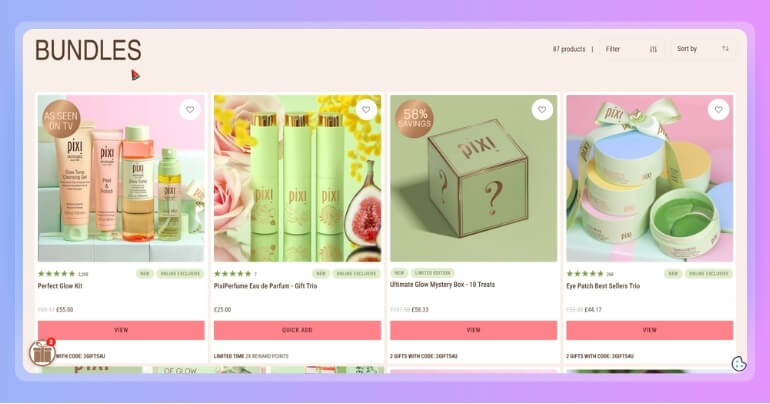
Gift box bundling offers ready-made sets designed for special events like birthdays or holidays. These bundles allow shoppers to pick or customize items that fit a theme. Stores use gift boxes to simplify gifting and increase customer convenience during busy shopping times.
Build Your Own Bundles
Build-your-own bundles allow customers to choose items from a set list to create personalized sets. These bundles work well for themes like wellness, cooking, or art supplies. Stores like this option because it increases engagement and gives customers more control over their purchases.
Tiered Bundles
Tiered bundles offer different package sizes or item quantities at various price points. Shoppers save more when choosing larger bundles, making the deal more appealing. Stores use tiered options to encourage bigger purchases while keeping the overall buying process easy and clear.
Subscription Bundles
Subscription bundles let customers receive selected products every month or at another chosen time. These bundles help customers enjoy regular deliveries without extra work. Stores benefit from subscription bundles because they create steady sales and help build long-term customer loyalty.
Leader Bundling
Leader bundling pairs one main product with lower-priced accessories sold together at a deal. These bundles help customers get everything they need in one step, making shopping smoother. Stores use leader bundling to highlight important products while increasing overall order value.
Mixed-Leader Bundling
Mixed-leader bundling combines a key product with several additional items in one package. Customers enjoy getting useful extras while saving money on the main item. Stores choose this bundle type because it encourages buying complete sets rather than single products.
Examples of Product Bundle Pricing in Real Stores
Many big brands use product bundles to sell more and make shopping easier for customers. Let’s look at a few examples:
Amazon often shows “Frequently Bought Together” bundles. For example, when buying a laptop, you might see a laptop bag and a mouse added in a bundle. It’s convenient, and customers feel like they’re getting everything they need in one go.
McDonald’s is a classic example of bundle pricing. Their meal combos (burger, fries, and drink) cost less than buying each item separately. These bundles are simple and help customers make quick choices.
In WooCommerce stores, bundling is used in many smart ways. A store selling cameras might offer a bundle of the camera, tripod, and memory card. Another store might bundle digital items — like an online course, ebook, and checklist — as a learning kit.
Even subscription boxes are a type of bundle. Stores bundle snacks, books, or beauty items and send them every month. These bundles save time and give customers something to look forward to regularly.
How to Set Up Product Bundle Pricing in WooCommerce?
You can create product bundles in WooCommerce using a special plugin. It lets you sell many items together. Bundles help you grow sales and give better value to your customers. Follow these easy steps to set everything up without confusion.
Step 1: Install the Product Bundles Plugin
- Open your WooCommerce account and find the Product Bundles plugin. Click to add it to your store.
- Follow the setup steps shown on the screen. These steps help you install and activate the plugin.
- You can upload the plugin file or connect it directly. After that, it will show up in your plugins list.
Step 2: Create a New Bundle Product
- Go to your dashboard and click Products > Add New. This will open a page to add a product.
- Choose “Product Bundle” from the product type list. Now you can add items into a bundle.
- Search for the products you want to include. You can add one or more items inside the bundle.
Step 3: Set Up the Bundle Items
- For each item, choose how many your customer can buy. Use the Min and Max settings to do this.
- If the item is not required, you can make it optional. Customers can choose to add it or skip it.
- For items with options, like sizes or colors, you can control which ones show in the bundle.
Step 4: Add Prices and Discounts
- You can set one fixed price for the bundle in the General tab. Use the regular price or sale price.
- To use each product’s price, check “Priced Individually” on the item. This adds the item’s cost to the total.
- You can also give a discount on each item. This helps attract more people to buy the bundle.
Step 5: Change More Settings if Needed
- Choose how your bundle looks on the product page. You can show items in a table or grouped view.
- Turn on “Manage stock” to track bundle stock. This helps stop customers from buying sold-out items.
- For shipping, you can set the bundle as assembled or unassembled. That changes the shipping weight and cost.
Step 6: Test Your Bundle Before You Publish
- Add your bundle to the cart and check the total price. Make sure the discount works the right way.
- Complete a test checkout to check the cart, emails, and final order. Fix anything that looks wrong.
- Go to Analytics > Bundles to see your bundle sales. If needed, you can also sync plugin inputs in WooCommerce to keep things working well together.
Common Mistakes to Avoid With Bundle Pricing
Bundle pricing can boost sales, but only when done the right way. Many store owners make simple mistakes that hurt results. Avoiding these errors will help your bundles work better. Here are some key mistakes you should watch out for.
- Wrong Product Mix: Bundling random items together confuses buyers. Use products that go well with each other always.
- No Real Value: If the bundle price is not better than the single items, buyers won’t feel it’s worth buying.
- Overcomplicated Options: Too many choices inside a bundle can confuse users. Keep it clean and easy to pick.
- Missing Discounts: Forgetting to add small discounts makes bundles less attractive. Always show clear savings to your buyers.
- Poor Product Titles: Using unclear or long titles makes bundles hard to understand. Use short and helpful names instead.
- No Stock Checks: Selling bundles with out-of-stock items causes trouble. Always track and update bundle stock properly.
- Ignoring Display Layout: A messy layout makes bundles look bad. Use clean designs that show each item clearly.
Best Practices for Creating High-Converting Product Bundles
When you shop online, you often see product bundles that look like a really good deal. They make you stop, think, and maybe even add them to your cart. Bundles work well when they feel useful and easy to buy. To make them truly effective, stores need to follow these smart steps before putting them together.
Pick the Right Items
A great bundle always includes items that match or work well together. If you’re selling a mobile phone, bundle it with a charger or phone case, not random stuff. Think about what customers often need with the main product. Keep it simple so buyers don’t feel confused about what they’re getting. Good bundles save time and feel useful from the start.
Show Clear Value
People want to know they’re saving money when they buy a bundle. Always show the total price and the discount compared to buying items one by one. Even a small discount can make someone choose the bundle. If there’s no real saving, the bundle may seem pointless. Clear savings make the bundle look like a smart choice.
Use Simple Design
A clean design helps people understand what’s in the bundle right away. Use neat titles, clear pictures, and short notes under each item. When everything looks neat, it’s easier to trust and buy. Messy bundles can make people skip them. Good design makes the bundle feel more friendly and easy to explore.
Offer Some Choice
People like to feel they can choose what suits them. Let them pick between colors, sizes, or even remove an item they don’t want. For example, if someone wants to sell shoes online with WooCommerce, offering size and color choices inside a bundle can make more people click “buy.” Giving control makes the bundle feel more personal and flexible.
Keep It Easy to Buy
Don’t make buyers click too many things just to get the bundle. One button should add the whole bundle to the cart. Too many steps can make them leave the site. Keep the checkout smooth and fast. A good bundle saves time, not adds more work.
Highlight Best-Selling Bundles
If a bundle is popular, show it off on the homepage or product pages. Use a tag like “Best Deal” or “Top Pick.” When people see others buying it, they feel more sure about it. It builds trust and makes the offer stronger. Popular bundles often help sell other products too.
Test and Improve
Not every bundle will work the same way. Try different bundles to see what your customers like most. Change prices, items, or design and watch what happens. Use your store data to see what sells well. Small changes can help you build bundles that sell better over time.
Is Product Bundling Right for Your Store: How to Identify That?
Not every store needs product bundles, but many can benefit from them when used the right way. Before adding bundles, it’s good to know if they match your products and goals. Bundling helps sales, but only if it fits well. Here are five simple tips to help you decide.
Sell Related Products
If your store has items people often buy together, bundling can be a smart move. For example, selling pens, notebooks, and folders together makes sense. These items solve one problem and make shopping easier. When your products work as a group, bundles often lead to more orders.
Increase Order Size
Bundling works well if you want customers to spend more without pushing them too hard. A good bundle adds extra value without needing extra effort. Buyers feel happy to get more in one go. This small trick helps you earn more from the same visitor.
Slow-Moving Stock
Sometimes, a few items don’t sell well alone but can move faster inside bundles. Pairing old stock with new or popular items clears shelf space faster. It also reduces waste and losses. Bundles help turn stuck products into something more useful for customers.
Get Many Small Orders
Stores with many low-value orders can bundle items to raise the total price and save on shipping. Customers prefer paying once instead of buying small things again and again. Bundles fix this by offering more in one go. They also make deliveries smoother and faster.
Offer Gifts or Kits
If your store sells seasonal items, starter kits, or ready-made gift sets, bundling is a great idea. It saves shoppers time when picking gifts or first-time buys. These bundles can boost your store during the holidays. They also make your product page look more exciting.
Frequently Asked Questions about Product Bundle Pricing
Product bundle pricing is a simple way to sell multiple products together at a single price. It helps online stores boost sales and give customers better value. Below are some FAQs and answers to help you understand it more clearly:
What Types of Products Work Best for Bundle Pricing?
Products that solve one problem or are used together work best in bundles. For example, phone cases with chargers, or notebooks with pens. These make shopping easier. Customers often prefer bundles that are useful, practical, and save time during checkout.
Can Bundle Pricing Work for Digital Products?
Yes, bundle pricing works well for digital goods like ebooks, courses, and software downloads. Many stores use it to offer learning packs or software suites. Digital bundles are easy to deliver and great for increasing order value without extra shipping.
Do Customers Always Save Money With Bundles?
Most bundles offer small savings to attract customers, but not all bundles guarantee a lower total price. Some give value through convenience or product matching. It depends on the store’s goal—more sales, better UX, or clearing extra inventory stock.
How Does Bundle Pricing Affect Returns?
Bundles may reduce returns if customers feel they got more value. However, if one item in the bundle fails, buyers may return the full pack. Clear product info and proper testing help reduce this issue before it reaches the customer.
Can I Offer Customizable Bundles in My Store?
Yes, many stores let customers pick items to build their own bundles. This increases engagement and makes the offer feel personal. Tools like WooCommerce plugins allow flexible bundles, giving buyers more choice and making them more likely to buy.
Final Verdicts
Product bundle pricing helps online stores sell more by offering useful product groups at better prices. Customers love saving money and getting everything they need in one place. By bundling related items, you make shopping faster and more enjoyable. That’s what makes this strategy so powerful for e-commerce businesses.
When thinking what is product bundle pricing, remember that it’s not just about discounts—it’s about smart selling. This approach increases order value, clears old stock, and builds customer trust by offering thoughtful, ready-to-go product sets.
If your store offers items that naturally go together, bundle pricing could be the perfect fit. Start small, test different combinations, and watch your sales and customer satisfaction grow.
