

Handling stock for an online store can quickly become a tough task, especially when you sell across multiple locations. From tracking inventory to managing warehouse stock and preventing overselling, every detail matters. That’s why WooCommerce inventory management plugins are so helpful—they simplify these jobs and save you time. These tools let you manage stock, orders, and product data smoothly across all your sales points.
Among the top 10 best WooCommerce inventory management plugins, several stand out for their flexibility and strong performance. Plugins like Multi Location Product & Inventory Management for WooCommerce, TUM Inventory Management for WooCommerce, and WooCommerce Multi Locations Inventory Management are trusted choices for multi-warehouse stores.
Curious which one suits your business best? Keep reading to explore the complete list of plugins that can help you manage, organize, and control your WooCommerce inventory with ease.
Top 10 Best WooCommerce Inventory Management Plugins
Running a WooCommerce store becomes easier when your inventory is well organized. The right inventory plugin helps track stock levels, manage multiple warehouses, and prevent overselling. Here’s a list of the top 10 WooCommerce inventory management plugins that can help you save time and handle your store more efficiently.
1. Multi Location Product & Inventory Management for WooCommerce
This plugin is perfect for online stores that handle stock in different warehouses or branches. It’s one of the best WooCommerce Multi Locations Inventory Management Plugin options because it lets you manage product quantities, pricing, and availability separately for each location while showing customers where their items will be shipped from.
Key features:
- Create unlimited inventory locations with separate stock tracking.
- Real-time dashboard with stock value, low-stock, and out-of-stock reports.
- Show product availability by location directly on product pages.
- Import or export stock details easily via CSV files.
- Enable backend-only mode for manual order assignments to selected warehouses.
2. TUM Inventory Management for WooCommerce
TUM offers strong tools for medium to large businesses that need detailed control over multi-location stock and order management. It helps you assign customer orders to specific fulfillment centers and monitor inventory with detailed reports.
Key features:
- Tracks stock levels across warehouses or store branches.
- Assigns orders to the right fulfillment location.
- Sends automatic low-stock alerts for each warehouse.
- Generates reports for individual locations.
- Lets you customize fulfillment rules based on stock or distance.
3. WooCommerce Multi Locations Inventory Management
Great for larger businesses that operate several warehouses or fulfillment centers. This plugin automates stock control and order routing by automatically choosing the nearest warehouse to fulfill each order.
Key features:
- Detects the nearest warehouse for order fulfillment automatically.
- Allows different product prices per location.
- Sets custom pickup and shipping rules per store or region.
- Includes a map-based store locator for customers.
- Let’s admins manually assign or override order fulfillment locations.
4. Smart Manager for WooCommerce
Smart Manager provides a powerful spreadsheet-style dashboard that makes stock management faster and easier. You can manage thousands of products, update stock in bulk, and edit data without having to open each product page.
Key features:
- Manage stock, products, and orders from one spreadsheet-like interface.
- Update stock, SKUs, and prices instantly with inline editing.
- Schedule automated bulk updates for routine changes.
- Export inventory data using filters and custom columns.
- Use advanced search and filters to create warehouse-specific reports.
5. WP Inventory Manager
A flexible and customizable plugin for businesses that need more control over how they record and track inventory. It offers an easy-to-use interface and supports custom fields for warehouses or product categories.
Key features:
- Manage inventory using custom post types and custom fields.
- Add warehouse-specific stock data fields.
- Track stock levels and get alerts when quantities run low.
- Create detailed item movement and stock availability reports.
- Sync SKUs with WooCommerce products for accurate tracking.
6. Central Stock for WooCommerce
Ideal for brands running multiple WooCommerce storefronts under one network. Central Stock keeps one unified inventory that updates across all connected sites to ensure stock accuracy everywhere.
Key features:
- Share a single inventory source across all WooCommerce sites.
- Sync stock updates instantly across storefronts.
- Manage all stock from a single dashboard.
- Prevent overselling with real-time synchronization.
- Keep SKUs consistent and uniform across multiple stores.
7. Stock Sync for WooCommerce
If you manage more than one WooCommerce store, this plugin ensures your stock stays consistent everywhere. When inventory changes on one site, it automatically updates all other linked stores in real time.
Key features:
- Syncs stock between multiple WooCommerce stores using SKUs.
- Updates inventory automatically across all connected sites.
- Prevents overselling by keeping quantities up to date.
- Supports two-way synchronization for better control.
- Easy setup for businesses with multi-store operations.
8. ATUM Inventory Management for WooCommerce
ATUM’s free core plugin offers complete stock control features for small to large stores. It combines supplier management, purchase orders, and product editing tools into a single clean dashboard.
Key features:
- View and edit all stock in one “Stock Central” dashboard.
- Manage suppliers and purchase orders efficiently.
- Export inventory data as CSV files.
- Add extra tools through premium add-ons.
- Modern interface that’s easy to navigate.
9. Stock Manager for WooCommerce
This plugin helps you make quick stock and price edits from one screen without opening individual product pages. It’s simple but powerful enough for stores with large product lists.
Key features:
- Manage stock, prices, and variations in one view.
- Use search filters to find products quickly.
- Import and export data with CSV support.
- Perform bulk edits for faster updates.
- Display stock and SKU details in a clear layout.
10. Bulk Stock Management for WooCommerce
Perfect for stores that need a fast way to make large stock changes. It focuses on bulk updates and offers a simple, straightforward interface.
Key features:
- Update stock for many products at once from one page.
- Filter and sort products by category or stock status.
- Change stock status (in stock, out of stock) in bulk.
- Export and print stock reports easily.
- Saves time by simplifying large stock adjustments.
Key Benefits of Using Inventory Management Plugins
Managing stock manually can get messy and confusing very fast. That’s why using inventory plugins is a smart and simple choice. They help you keep track of every product and update your store automatically. Let’s go through the key benefits below so you can see how they make things easier.
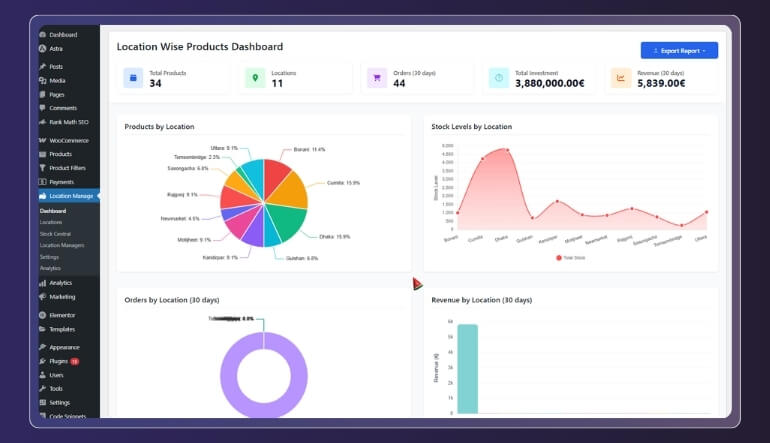
Real-Time Stock Updates
With inventory plugins, your stock count changes right away after every sale. You no longer need to update numbers by hand or guess what’s left. It keeps your store accurate and avoids overselling. Real-time updates also help manage large catalogs where stock moves fast. It’s great for keeping product information always correct across all sales channels.
Easier Multi-Location Control
If your business runs from many places, these plugins make life easier. You can check stock for each store or warehouse in one dashboard. It helps you decide where to send products from and keeps your data in sync. This control ensures you never sell from the wrong location. It’s perfect for stores that deliver from more than one branch.
Saves Time and Effort
Updating hundreds of items one by one takes too much time. Inventory plugins let you edit in bulk, import data, and even set automatic updates. It saves hours each week and keeps your stock list fresh without extra work. You can also schedule reports and alerts to save more time. That means more focus on growing your business instead of managing stock.
Prevents Overselling
One big problem in online stores is selling items that are already gone. With inventory plugins, your stock count updates the second a product sells. This stops overselling and keeps customers happy since they get what they ordered. It also helps maintain a good reputation for trust and reliability. You’ll have fewer refunds and better customer reviews as well.
Better Order Accuracy
When your inventory is always right, your order process improves. The system knows exactly what’s in stock and where it is. This means fewer mistakes, faster shipping, and smoother customer experiences. Accurate stock data also helps staff process orders quickly. It keeps everything organized and reduces mix-ups between warehouses.
Helps Track Product Movement
These tools make it easy to see which items sell fast and which ones sit on shelves. You can study stock movement, see trends, and reorder in time. It helps you make smart buying decisions and avoid waste. With clear movement reports, you can plan better sales and discounts. It’s an easy way to keep your store running smoothly all year.
Centralized Stock Management
Instead of switching between many systems, you can control everything from one dashboard. It brings all your product data, warehouses, and stock numbers together. This gives a clear view of your entire business in seconds. Centralized control also helps staff access the same data anywhere. It keeps your operations more connected and reliable.
Custom Alerts and Reports
Inventory plugins send low-stock alerts and build easy-to-read reports. You’ll know when to restock before running out. Reports also help you plan better sales and improve inventory control over time. You can set custom alerts for specific products or warehouses. This keeps your team aware and ready before any stock issue happens.
Are Paid WooCommerce Inventory Plugins Worth It?
If you’re running a WooCommerce store, you’ve likely seen both free and paid plugin options. While free tools can handle basic tasks, paid plugins often offer more control, automation, and advanced features. Here’s a simple table to help you compare different aspects and decide if paid plugins are right for your store.
| Aspect | Free Plugin | Paid Plugin |
| Feature Depth | Offers basic stock tracking for one store. | Includes advanced features like multi-location, reports, and automation. |
| Support & Updates | Often, community-based support and fewer updates. | Paid versions include dedicated support and regular updates. |
| Scalability | Works well for small stores with few SKUs or locations. | Better suited for growing stores with many products or warehouses. |
| Integration Options | May lack integrations with other tools (ERP, POS, etc). | Offers more integrations, connectors, and add-ons. |
| Cost | Free to use, minimal upfront cost. | Requires a license fee or subscription; higher cost. |
| Risk of Overselling | Basic syncing may lead to stock errors in complex setups. | Stronger stock control and sync across multiple stores/locations. |
| Time Investment | Setup and manual management can take more time. | Offers automation, bulk tools, and dashboard views. |
| Flexibility & Customisation | Limited custom features; may need custom coding. | More custom rule-sets, dashboards, reports, and branch logic. |
Paid inventory plugins can be a smart investment when your store has many locations or lots of products. If you’re just starting out, a free or simpler plugin might be enough for now. Keep in mind- the right plugin depends on your needs, budget, and growth plans.
How to Choose the Right Inventory Management Plugin for Your Store?
Picking the best inventory plugin can feel tricky at first. Each plugin offers something different depending on your store size and setup. You should know what features matter most before deciding. Read the guide below to learn how to choose the right plugin for your WooCommerce store.
Know Your Store Needs
Before choosing a plugin, think about your store’s daily tasks. Do you manage one store or several warehouses? Knowing this helps you find tools that fit your business size. Write down what features you really need, like stock tracking, reports, or automation. The clearer your needs, the easier your choice will be.
Check for Real-Time Stock Updates
A good plugin should update stock levels right after every sale. This keeps your numbers accurate and avoids overselling. Real-time updates are very useful for busy stores with fast-moving stock. Look for tools that sync instantly across all locations. This feature helps keep customers happy and your data correct.
Look for Multi-Location Support
If you sell from more than one warehouse or store, this is important. Plugins with multi-location support help manage stock at each site separately. You can also route orders to the right warehouse automatically. It makes managing different locations smooth and error-free. Choose one that gives a clear view of each place.
Review Reporting and Analytics
Reports help you see what products sell well and what do not. A plugin with good reporting tools saves you from guessing. It should show sales trends, low-stock alerts, and order patterns. These insights help you plan restocks and promotions better. Pick one with clear, easy-to-read reports and charts.
Test Ease of Use
A plugin should be easy to use, even for beginners. Complicated dashboards can slow down your work. Pick one with a clean layout and simple navigation. Try out the demo or free version first. You should feel comfortable using it without needing much training.
Compare Free and Paid Features
Some free plugins cover the basics, while paid ones offer advanced tools. Paid versions often include automation, order routing, and detailed reports. If your store is growing, paid options can save time and reduce errors. Compare the benefits and decide if the price matches the value you’ll get.
Check Support and Updates
Always choose a plugin that offers regular updates and support. Outdated plugins can cause errors or security issues. Good support means you’ll get quick help when something goes wrong. Read reviews to see how well the developers respond. This gives you peace of mind when running your store.
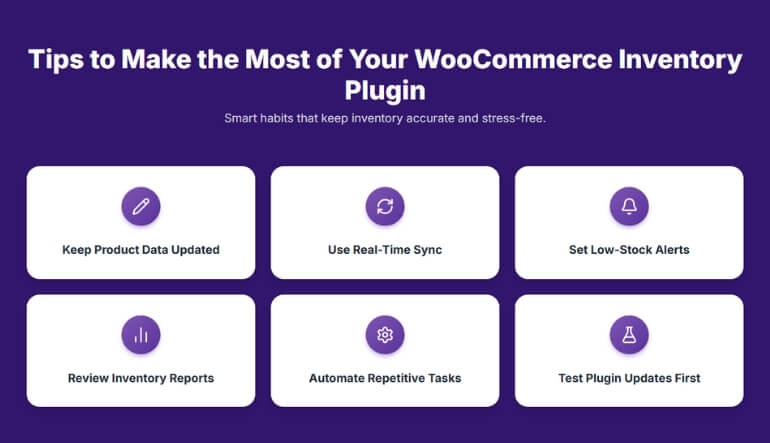
Tips to Make the Most of Your WooCommerce Inventory Plugin
Using an inventory plugin can make your online store easier to manage. But to get the best results, you need to use it smartly. With a few good habits, you can save time and keep your stock accurate. Read the tips below to learn how to use your plugin effectively.
Keep Your Product Data Updated
Make sure all product details like names, SKUs, and prices stay correct. Outdated data can lead to wrong stock counts or missing items. Update your list often, especially when adding new products. Regular updates help your plugin track items properly and prevent mistakes.
Use Real-Time Sync Features
Turn on automatic syncing if your plugin supports it. Real-time updates make sure stock levels change right after a sale or return. It helps prevent overselling and keeps your inventory up to date. This is very useful if you sell through more than one online store.
Set Low-Stock Alerts
Always use the alert feature to get messages when stock is low. These alerts help you restock in time and avoid losing sales. Choose a safe level that gives you time to reorder before running out. You can also set different alerts for each product or warehouse.
Review Reports Regularly
Inventory reports show how well your store is doing. Check them weekly or monthly to spot trends and plan better. Reports can tell you which items sell the most or which stay too long. Use this data to plan sales, discounts, or new product orders.
Automate Repetitive Tasks
Plugins often let you automate tasks like stock updates or report creation. Setting up automation saves time and reduces human errors. You can plan daily updates or automatic reorders for fast-moving products. This helps you manage your store even when you are busy.
Train Your Team to Use It
If more than one person handles inventory, teach them how the plugin works. Everyone should know how to check stock, update details, and read reports. When the whole team understands the system, fewer mistakes happen. Clear roles and training keep your stock data correct.
Test Plugin Updates Before Applying
Always test a new plugin update before using it on your live store. Sometimes updates can change settings or cause small issues. Testing first helps you stay safe and avoid store problems. Keep backups ready so you can restore if something goes wrong.
Managing WooCommerce Stock: Common Mistakes to Avoid
Running a WooCommerce store means keeping your inventory organized and accurate. Small stock mistakes can cause lost sales or upset customers. Let’s look at some often-overlooked errors that store owners should watch out for.
- Ignoring Seasonal Stock Changes: Not adjusting stock before busy seasons leads to shortages or excess items. Study past sales and stock up before high-demand months.
- Skipping Supplier Coordination: Failing to inform suppliers about stock needs causes late restocks. Keep clear communication with suppliers to ensure timely deliveries.
- Poor SKU Organization: Using random or repeated SKUs confuses your inventory system. Create a clear SKU format that’s easy to track and identify.
- Forgetting Product Variations: Overlooking stock for different sizes or colors causes uneven inventory. Track each variation separately to avoid missing items during orders.
- Not Backing Up Inventory Data: Losing data from errors or crashes can disrupt your business. Always keep regular backups to restore accurate stock information fast.
- Overlooking Expiry Dates: Selling expired or near-expiry products hurts your store’s image. Check expiry dates regularly and mark older items for clearance first.
- Ignoring Stock Aging Reports: Not checking aging reports leaves old items unsold for months. Use reports to plan discounts or bundles for slow-moving products.
- Inconsistent Stock Audits: Skipping full stock audits for long periods causes data mismatch. Schedule routine audits to keep your digital and physical stock aligned.
Frequently Asked Questions
Before choosing or using a WooCommerce inventory plugin, it’s normal to have a few questions in mind. Whether you’re new to online stores or managing multiple warehouses, understanding these tools can make your work easier. Below are some common FAQs that explain how these plugins work and how they can help your store grow:
How Do Inventory Plugins Improve Store Efficiency?
These plugins automate most inventory tasks that usually take hours to handle manually. They update stock counts, track orders, and sync data across stores. This saves time, reduces mistakes, and helps your team focus on sales and customer service instead of manual record-keeping.
Do I Need Technical Knowledge to Use These Plugins?
Not really. Most inventory plugins are built with easy dashboards and clear settings. Even if you’re new to WooCommerce, you can manage stock, set alerts, and view reports without coding. Some plugins even offer demos or setup wizards to guide you step by step.
What Type of Reports Do These Plugins Offer?
They usually provide sales, stock, and performance reports that help you track business progress. You can see which products sell fast, which ones move slowly, and when to restock. Reports also help you plan sales, discounts, and future product orders better.
Can I Integrate These Plugins With Other Tools?
Many premium plugins integrate smoothly with tools like POS systems, CRMs, or ERP software. This allows you to connect all your sales channels under one system. It saves time and keeps your business data organized across different platforms.
Do These Plugins Support Barcode Scanning?
Yes, some plugins come with barcode scanning support to speed up stock checks. You can use scanners or apps to update product quantities instantly. This makes inventory management faster and more accurate, especially for stores with large product lists.
How Often Should I Update My Plugin?
You should update plugins whenever a new version is released. Updates include security patches, new features, and bug fixes. Keeping your plugin up to date ensures smooth performance, prevents errors, and keeps your store secure from potential issues.
Can Inventory Plugins Work With Variable Pricing?
Yes, most advanced plugins let you set different prices for products across various locations or warehouses. This feature is helpful when managing regional pricing or special offers, giving you better control over your pricing strategy.
What Happens If I Deactivate the Plugin?
If you turn off the plugin, your WooCommerce store will still work, but stock updates will stop. You might face outdated inventory data until it’s reactivated. Always make a backup before disabling to avoid losing important settings or reports.
Do These Plugins Help With Supplier Management?
Some plugins, like ATUM, include supplier management tools. They help track purchase orders, supplier details, and incoming stock. This makes it easy to restock items and manage your supplier relationships from one central dashboard.
Bottom Lines
Managing inventory the right way can change how smoothly your store runs. With the right tools, you can keep stock accurate, speed up order handling, and cut down costly errors. The goal is to make your store easier to manage while giving your customers a better shopping experience.
The Top 10 Best WooCommerce Inventory Management Plugins listed above make this possible by saving time and boosting accuracy. They’re built to fit every type of store, from small online shops to large multi-location brands. Each plugin brings its own set of strengths that help you manage your stock your way.
If you’re ready to simplify your workflow and improve store performance, start by picking one plugin that fits your needs. A well-chosen inventory tool can make daily operations smoother and help your business grow faster.
