

Safari-only cart problems usually appear when something in the WooCommerce cart flow is less stable than it seems in other browsers. Products may disappear, mini cart updates may stop syncing, or checkout may lose continuity even while the storefront still looks normal.
That makes the issue both easy to miss and frustrating to trace. This guide explains why WooCommerce cart breaks on Safari only, where those failures usually begin, and what can help make cart behavior more reliable.
How Does Safari Expose Cart Weaknesses Faster?
Safari often exposes cart problems sooner because it is less forgiving when sessions, cookies, dynamic updates, or browser-dependent storefront behavior are not working as cleanly as they should. A cart can appear stable elsewhere, while Safari shows where that stability is already weaker than expected.
These patterns usually explain why Safari surfaces the problem earlier:
- Stricter cookie behavior reveals weak session handling
- Cleaner browser behavior exposes hidden cart dependencies
- Dynamic updates fail more noticeably on Safari
- Guest cart continuity becomes easier to break
- Frontend customizations show browser-specific weaknesses faster
- Mobile Safari adds more pressure to the cart flow
- Private browsing can expose the issue even sooner
Where Safari Usually Starts Stressing The Cart Flow
Safari usually exposes cart problems in the parts of the buying journey that rely most on live updates, session continuity, and browser-sensitive storefront behavior. The store may still look normal at first, but these pressure points often begin to fail earlier on Safari.
Common pressure points usually include:
- Add-To-Cart Actions: Products may seem to add normally, but Safari can expose where the request, session, or follow-up cart state is not holding properly.
- Mini Cart Updates: Mini cart counts, product lists, or totals may stop reflecting changes correctly when Safari stresses dynamic cart refresh behavior.
- Cart Persistence Between Pages: Items may disappear after navigation when Safari exposes weak session continuity or cart data that is not persisting reliably.
- Quantity And Total Changes: Quantity edits may appear to work briefly, while item counts, subtotals, or totals fail to stay in sync.
- Checkout Handoff: Cart behavior may seem stable earlier, then break once Safari pushes the session into checkout and payment-related transitions.
- Guest Session Continuity: Guest carts often become unstable faster because Safari reveals where the store relies too heavily on fragile session behavior.
- Stock Validation During Cart Flow: Stores using multi inventory management for WooCommerce should test whether stock-aware cart actions remain consistent across Safari browsing, cart updates, and checkout steps.
- Mobile Safari Browsing: Shopping flow problems can surface more quickly on iPhone or iPad Safari, where cart behavior faces tighter browser conditions.
Why WooCommerce Cart Breaks On Safari Only?
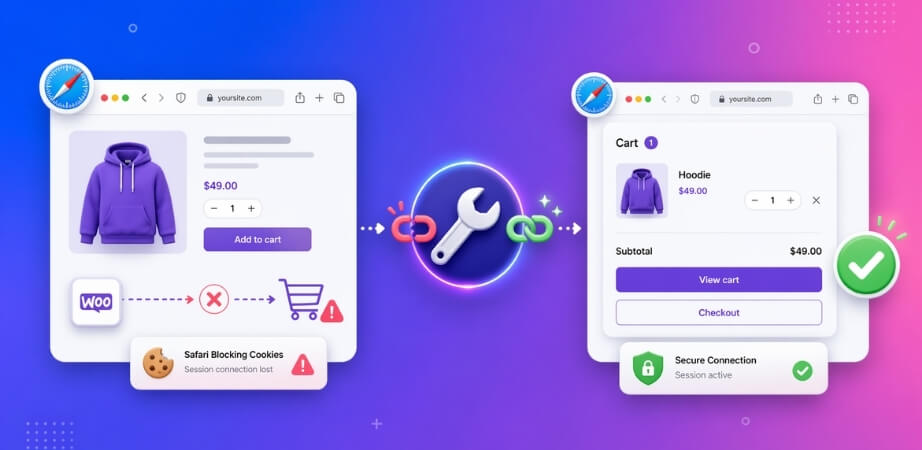
Safari-only cart failures usually happen when the store depends on cookies, session, caching, or front-end behavior that seems stable in other browsers but becomes less reliable under Safari’s stricter handling. The cart may still look normal at first, yet products can disappear, updates can stop syncing, or checkout can lose continuity once Safari exposes those weaker parts of the flow.
Several browser-specific and store-level issues usually sit behind that behavior.
Cause 1: Intelligent Tracking Prevention (ITP) Disrupts Cart Continuity
Safari’s Intelligent Tracking Prevention can make cart continuity more fragile by tightening how tracking-related cookies and browser storage are handled. If the cart depends on cookie behavior that is already weak, Safari can expose that weakness faster by making cart identity harder to preserve across normal shopping steps.
Cause 2: SameSite And Cookie Rules Break Session Persistence
Safari can be less forgiving when cookie settings are incomplete, mismatched, or interrupted by redirects and mixed session conditions. When that happens, WooCommerce may fail to preserve the cart session properly, even though the same store appears to behave normally in other browsers.
Cause 3: Cached Cart And Checkout Pages Stop Reflecting Live Data
Cart, checkout, and account pages need to stay dynamic. If caching plugins, server-side caching, or CDN rules serve stale versions of those pages, Safari often makes the mismatch easier to notice through empty carts, outdated totals, or checkout steps that no longer match the live session.
Cause 4: JavaScript Timing And AJAX Cart Updates Fail On Safari
Many WooCommerce stores rely on AJAX, cart fragments, and JavaScript-driven updates to keep add-to-cart actions, mini carts, and totals in sync. Safari often exposes timing weaknesses more quickly when those scripts load out of order, initialize too early, or depend on fragile frontend assumptions.
Cause 5: Payment And Express Checkout Layers Add Safari-Specific Friction
Some Safari cart issues become more visible only after the shopper moves toward checkout. Express checkout buttons, embedded payment elements, or Apple-device-friendly payment flows can introduce browser-sensitive behavior that causes loops, layout problems, or stalled progress after the cart itself looked fine.
Cause 6: Safari-Specific Theme Or Script Bugs Expose Frontend Weaknesses
Some themes and plugins are tested more heavily in Chrome than in Safari. Custom cart drawers, quick-view tools, animation-heavy scripts, and WebKit-sensitive frontend code can all create browser-specific conflicts that stay hidden elsewhere but become much easier to notice on Safari.
How To Fix WooCommerce Cart Problems On Safari?
Fixing Safari-only cart issues usually means tightening the exact parts of the cart flow that Safari stresses first. The goal is not to treat Safari as an isolated exception, but to make cart behavior more stable where sessions, dynamic pages, checkout flow, and browser-side updates are already too fragile.
Fix 1: Reduce ITP-Related Cart Fragility
Safari’s Intelligent Tracking Prevention can expose weaker cart continuity faster, especially when the store depends on cookie behavior that is already less stable than it should be. The goal here is to make sure the cart can stay attached to the shopper without depending on fragile browser-side assumptions.
- Test cart behavior with Safari privacy settings only as a temporary diagnostic step.
- Check whether cart continuity depends on cross-site or tracking-like behavior.
- Confirm products stay in the cart after refresh, navigation, and return visits.
- Retest guest cart flow from product page through checkout.
Fix 2: Correct SameSite And Session Cookie Handling
If Safari is rejecting or failing to preserve cart cookies properly, session persistence needs to be cleaned up before the rest of the cart flow can become reliable. Weak cookie settings often show up through dropped carts, broken continuity, or inconsistent checkout behavior.
- Confirm the store runs fully on HTTPS.
- Check whether cookie settings stay consistent during redirects and page changes.
- Review whether mixed cookie rules are interrupting cart continuity.
- Retest the cart after session-related changes are applied.
Fix 3: Keep Cart And Checkout Pages Uncached
Empty carts, stale totals, and broken checkout flow often come from cached page output rather than the cart itself. Safari tends to make that mismatch easier to notice when dynamic WooCommerce pages are not being handled correctly.
- Exclude /cart/, /checkout/, and /my-account/ from cache.
- Review server, plugin, and CDN caching rules on WooCommerce pages.
- Clear all cache layers after meaningful changes.
- Confirm the cart and checkout always reflect the live session.

Fix 4: Tighten JavaScript And AJAX Cart Updates
If Safari is exposing timing or execution weaknesses, the cart update layer needs to be made more dependable. Add-to-cart actions, mini cart refreshes, and totals should update cleanly without relying on fragile script timing.
- Check Safari for JavaScript errors tied to cart actions.
- Disable script delay, deferral, or combination features during testing.
- Confirm add-to-cart, mini cart refreshes, and totals update in the correct order.
- Remove unnecessary frontend effects around cart behavior where possible.
Fix 5: Test Payment And Express Checkout Separately
Some Safari cart issues do not become obvious until the shopper reaches payment. If the cart looks fine earlier in the journey, the payment layer should be isolated and tested on its own.
- Test the cart before and after entering checkout.
- Review express checkout buttons and embedded payment elements on Safari.
- Check for layout, validation, or loop issues during payment steps.
- Disable one payment feature at a time and retest.
Fix 6: Isolate Safari-Specific Theme And Plugin Conflicts
Safari-only failures often remain hidden until custom cart behavior, theme logic, or plugin interactions are stripped back. A simpler test environment usually makes the real conflict much easier to find.
- Disable non-essential plugins one by one and retest on Safari.
- Switch temporarily to a WooCommerce-compatible default theme if needed.
- Remove custom cart drawers, quick views, and heavy frontend enhancements during testing.
- Check whether WebKit-sensitive scripts behave differently from Chrome-based testing.
Testing WooCommerce Cart Behavior On Safari After The Fix
Seeing the cart behave normally once is not enough. Safari issues often look resolved at first, then resurface during a slightly different path through the store. Testing should make sure the cart now feels steady through real shopping actions, not just a single successful click.
- Cart Holds After Refresh: Add a product, refresh the page, and confirm the item stays in the cart without disappearing or resetting unexpectedly.
- Navigation Keeps The Cart Intact: Move between product, cart, and checkout pages to confirm the same cart session stays active throughout.
- Mini Cart Updates Properly: Add or remove items and check whether the mini cart, totals, and item counts update correctly.
- Quantity Changes Stay In Sync: Edit quantities and confirm subtotals, totals, and product counts remain accurate after each change.
- Checkout Preserves Cart Contents: Open checkout and confirm products, totals, and cart state carry forward without dropping or reloading incorrectly.
- Guest And Logged-In Results Match: Test both browsing states to confirm Safari handles the cart reliably for different shopper conditions.
- Apple Devices Show Consistent Behavior: Test Safari on Mac, iPhone, or iPad to confirm the cart works consistently across Apple devices.
- Safari Now Matches Other Browsers: Compare Safari with another browser and confirm the same cart actions produce the same result.
- Retesting Follows Cache Clears: Clear cache where needed and repeat the flow to verify inconsistent behavior no longer returns.
How Better Inventory Structure Supports More Stable Safari Cart Behavior
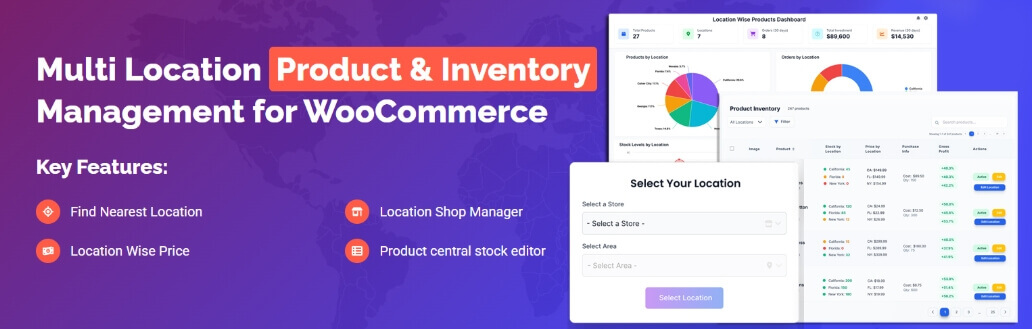
Safari cart issues are easier to trigger when storefront logic becomes too layered, patchy, or dependent on overlapping tools. A cleaner inventory structure reduces that pressure by making product, stock, and fulfillment behavior easier to manage behind the scenes. That is one reason WooCommerce multi locations inventory management can support a more stable cart experience, especially on stores where browser-specific weaknesses tend to surface faster.
- Cleaner Stock Logic: Better inventory structure reduces patchwork fixes that can create extra cart complexity.
- Less Plugin Overlap: Fewer overlapping tools means fewer browser-sensitive conflicts around product and cart behavior.
- More Predictable Cart Actions: Cleaner stock handling helps cart updates stay more consistent across different browsing conditions.
- Stronger Session Continuity: Simpler store logic makes it easier for product and cart data to hold together between pages.
- Better Checkout Consistency: Structured inventory and fulfillment flow reduce the chance of unstable behavior later in checkout.
- Easier Troubleshooting: Clearer backend logic makes Safari-related cart issues faster to isolate and fix.
- More Reliable Growth: Stores with cleaner inventory structure are usually easier to keep stable as products, locations, and workflows expand.
Frequently Asked Questions
Safari cart issues can be frustrating because the store may seem fine until a real shopper hits the exact browser conditions that expose the weakness. These questions cover a few practical concerns store owners often still have after reviewing the main causes, fixes, and testing steps.
Does Safari Always Affect Guest Shoppers More Than Logged-In Users?
Not always, but guest shoppers often reveal the problem faster. Logged-in sessions usually carry more continuity, while guest carts depend more heavily on clean browser and session handling from the start.
Can A Safari-Only Cart Problem Hurt Sales Even If No One Reports It?
Yes. Many shoppers leave quietly after a cart fails, resets, or stops updating. That makes Safari issues easy to miss while still affecting checkout completion and conversion performance.
Should Safari Be Tested Separately After Every Major Store Change?
Yes. Theme updates, plugin changes, checkout customizations, and performance settings can all affect Safari differently. Testing it separately helps catch browser-specific issues before they reach shoppers.
Can iPhone Safari And Mac Safari Show Different Cart Behavior?
Yes. Safari behavior can vary between desktop and mobile Apple devices, especially when the cart depends on touch interactions, mobile layouts, or tighter browser conditions on iPhone and iPad.
What Usually Matters More Than Fixing One Safari Bug?
Long-term cart reliability matters more. A store with cleaner session handling, fewer frontend workarounds, and less browser-sensitive cart logic is usually easier to keep stable across Safari and beyond.
Final Thoughts
Safari can be a frustrating browser to troubleshoot because the cart may look fine right up until a shopper tries to use it normally. One click works, the next step does not, and the problem hides behind a storefront that still appears mostly functional. That is exactly why WooCommerce cart breaks on safari only matters more than it first seems.
Getting past it usually comes down to making the store less fragile underneath. Fewer browser-sensitive workarounds, steadier cart behavior, and cleaner checkout flow make Safari issues much harder to trigger in the first place.
