
Slidario: AI Product Slider & Carousel for WooCommerce
Shoppers leave when they cannot see the right product fast. Slidario is a WooCommerce product slider and product carousel plugin that puts your best sellers, sale items, categories and reviews in fast, swipeable sliders on any page, styled to match your theme. Start free with 9 slider types, or use the AI product slider for WooCommerce: describe the slider in one line and AI builds it. Then see which slider brings clicks and sales.

What the Slidario WooCommerce Product Slider Does for Your Store
Four problems every WooCommerce store has, and how Slidario solves each one without code: products shoppers never see, slow and plain sliders, no idea what sells, and hours lost building them.
Show More Products, Sell More
Shoppers only buy what they see. Put best sellers, sale items, new arrivals and related products in a product carousel on your home, shop, product and cart pages, so every visit shows more of your catalog.
View Demo →
Look Like Your Theme, Load Fast
Most slider plugins look out of place and slow the page. Slidario takes your theme’s colors, fonts and buttons, and loads its files only on pages that show a slider, so your store stays fast.
View Demo →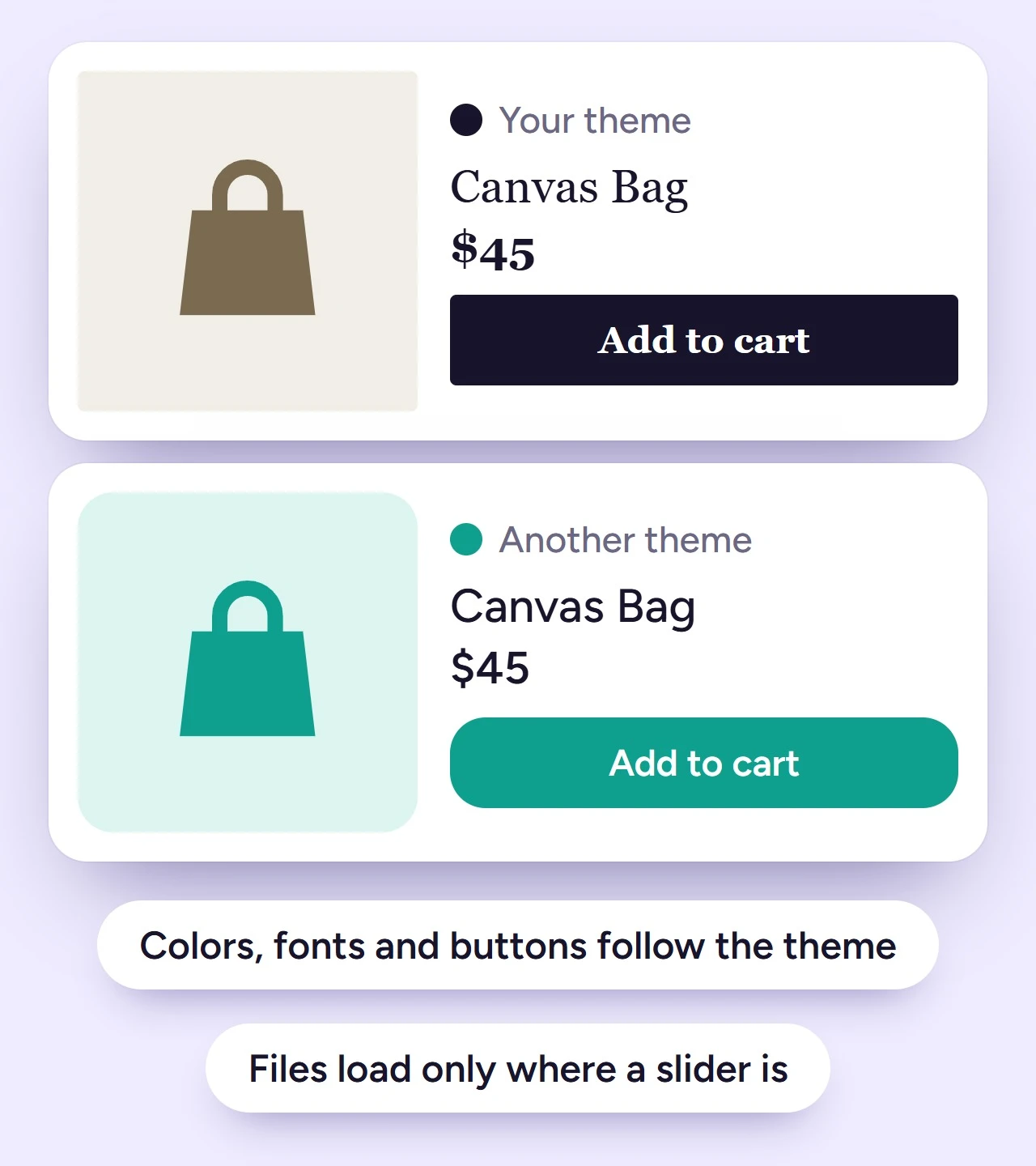
Know Which Slider Sells
See views, clicks and add to cart for every slider, and the products shoppers click most. With Pro, see the orders and revenue each slider brings, and A/B test two styles to keep the winner.
View Demo →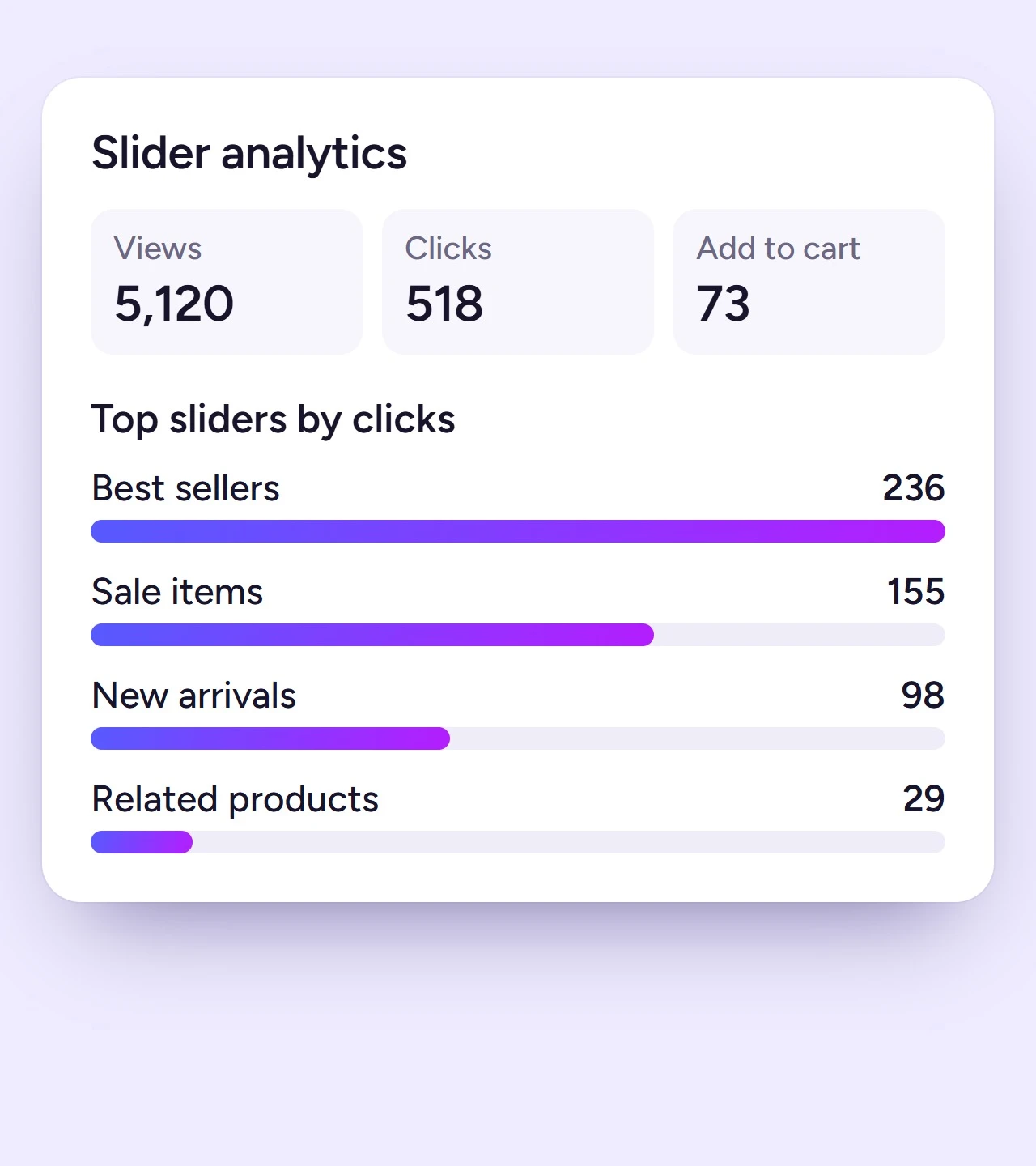
Build It in Minutes, With AI
Start from 31 ready-made templates, or let AI write your headlines and image alt text. With Pro, describe the slider in one line and the AI product slider builder makes it for you.
View Demo →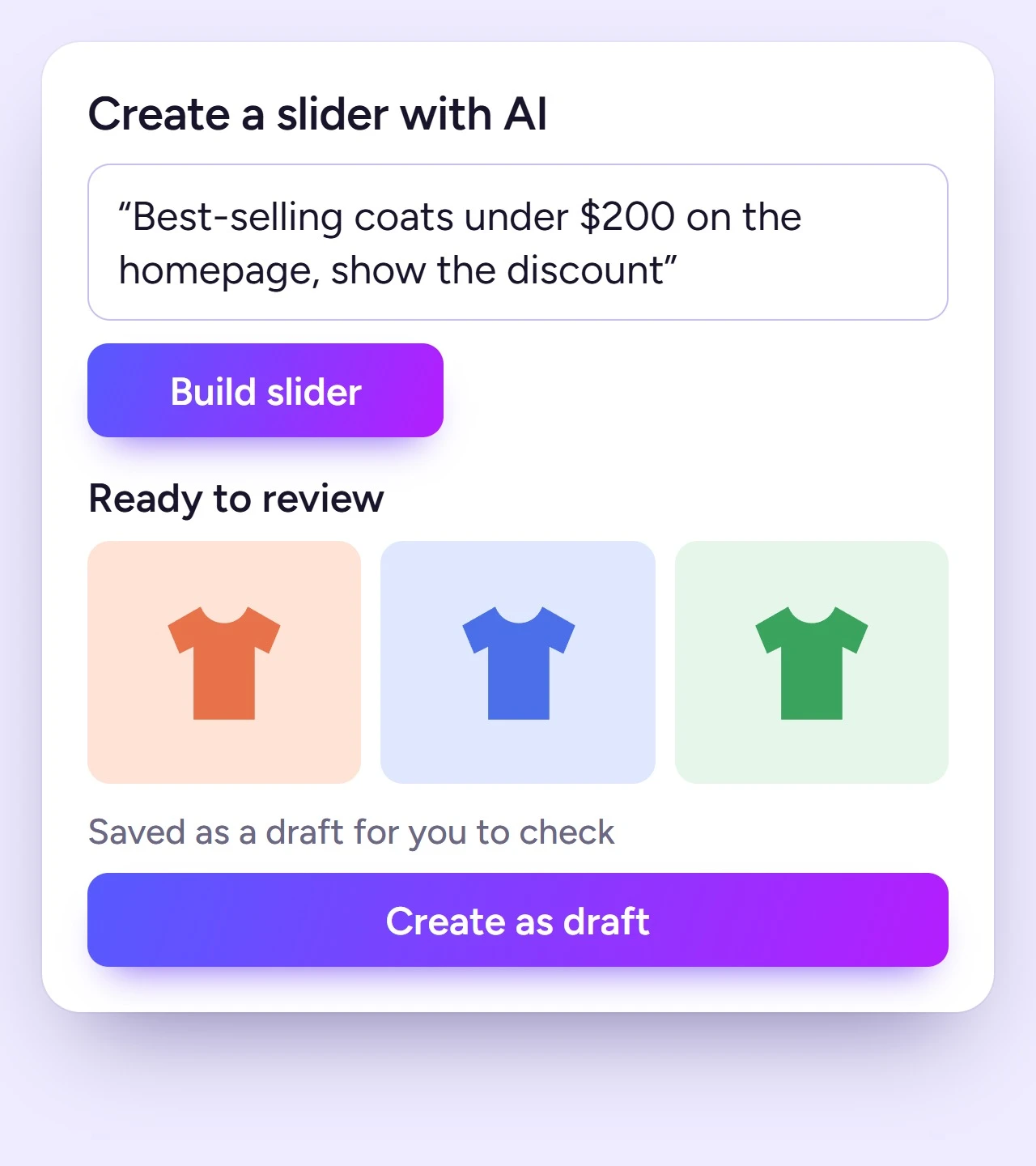

Why Your WooCommerce Store Needs a Product Slider
A shopper lands on your home page, sees six products and leaves. The other two hundred never had a chance. A product slider for WooCommerce fixes that: one row shows your best sellers, the next your sale items, the next your categories, each one a swipe away on a phone.
The right slider in the right place also lifts each order. Related products and recently viewed items on the product page, cross-sells on the cart page and a “Hurry, only 3 left” line on low-stock items all give shoppers a reason to add one more thing.
More products seen, more products sold.
Key Features of the Slidario Product Carousel Plugin
Ten slider types and the tools around them, so one plugin covers your whole store: products, categories, reviews, images, videos, posts, logos and before/after photos.
WooCommerce Product Slider
Sale, best selling, top rated, trending, new, featured, related, upsell, cross-sell or hand-picked products, with Add to cart.
Category Slider
A “shop by category” row with photos and product counts. Categories without a photo use one of their products.
Review & Testimonial Slider
Show WooCommerce reviews or your own testimonials, with stars, photo and date.
Sale Badges & Countdown
Automatic “-20%” badges, a sale countdown and “Hurry, only 3 left” for low stock.
Quick View
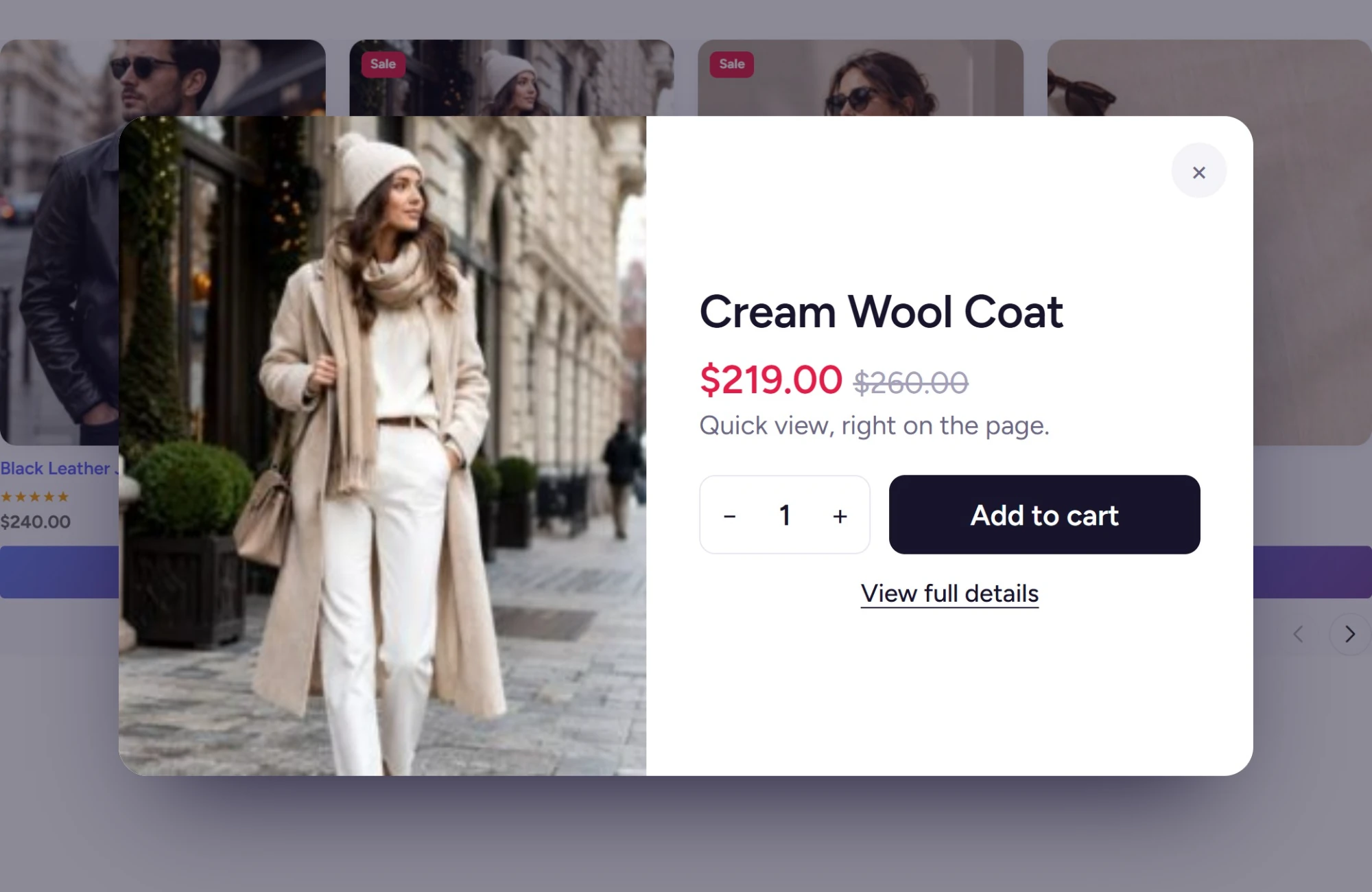
Shoppers open a product in a popup and add it to the cart without leaving the page.
Image, Video & Post Sliders
Hero banners, galleries, YouTube, Vimeo or your own videos, and blog posts. Videos load only when played.
Logo & Before/After
A brand logo carousel or ticker, and a drag-to-compare before/after slider.
31 Ready Templates
Pick a design, add your products or photos, publish. Or create a full demo in one click.
AI Writing
AI suggests headlines from the product’s name, price and sale, and writes image alt text.
Slider Analytics
Views, clicks and add to cart per slider, counted on your own site, with no cookies.
Story & Shoppable Video (Pro)
Instagram-style stories with short videos, product tags and an Add button.
A/B Tests & Revenue (Pro)
Orders and revenue per slider, and a test that shows which style sells more.
One row of products, right where shoppers look.
Carousels that keep themselves up to date, a shop by category row, a richer product gallery and stories that sell: use the ones your store needs and leave the rest off.
A WooCommerce Product Carousel That Shows the Right Products
Choose which products shoppers see, and Slidario keeps the row up to date on its own: today’s sale items, this month’s best sellers, the newest arrivals, or a hand-picked set for a campaign. Each card shows the photo, price, sale badge and an Add to cart button that works without leaving the page.
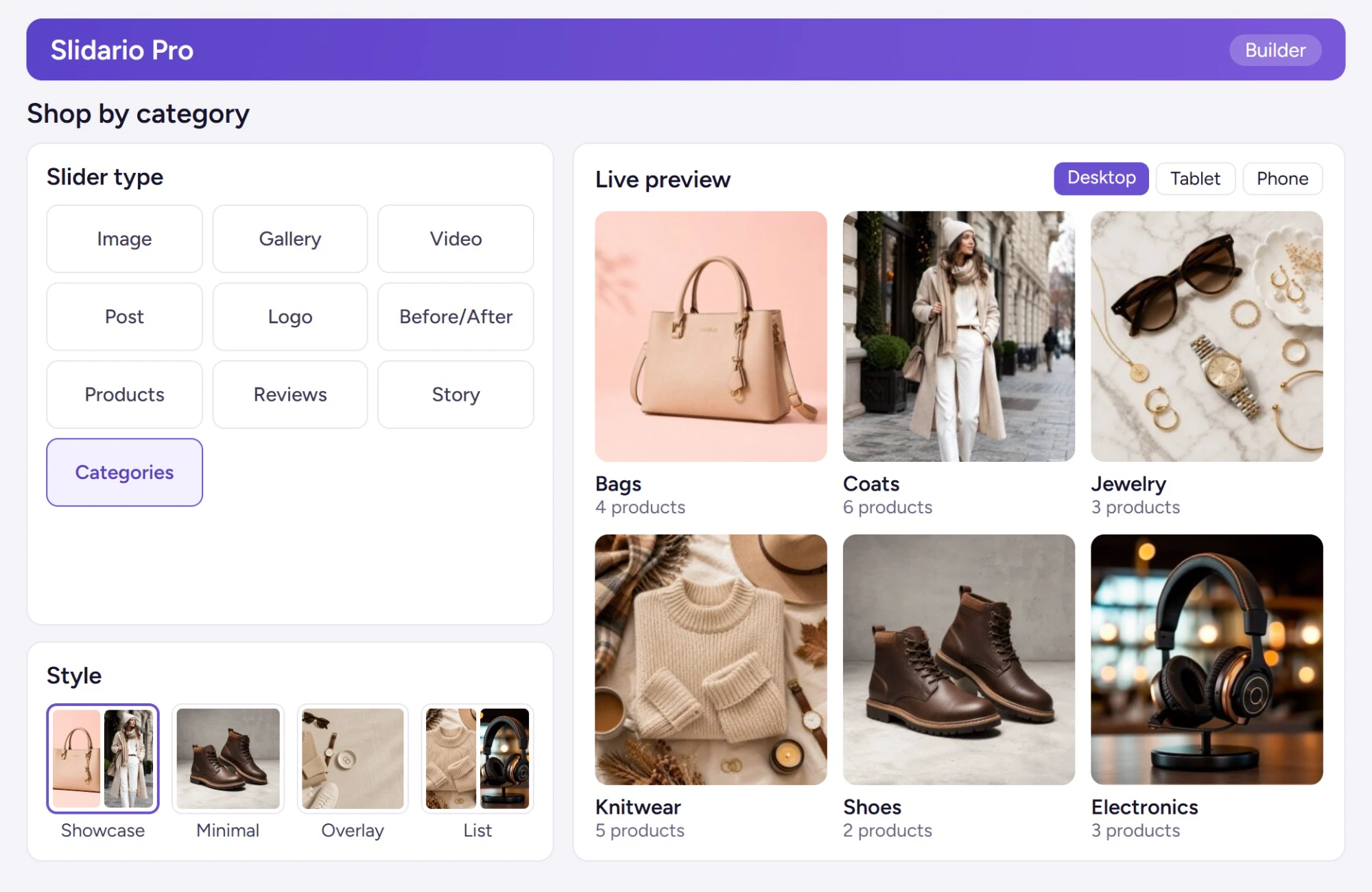
Category Slider for WooCommerce, Built in a Visual Builder
Help shoppers find their way with a “shop by category” carousel: choose the categories or show all top-level ones, and each tile gets its photo and product count. Every slider is built in the same visual builder, with a live preview on desktop, tablet and phone, so you see the result before you publish.

WooCommerce Product Gallery Slider With Zoom and Video
Your product page photos sell the product. Pro replaces the default gallery with a product gallery slider: thumbnails below or beside, zoom on hover, a full-screen lightbox, a product video and a different set of photos for each variation. And with auto-placement, sliders appear on product, shop and cart pages without adding a block to each one.

Shoppable Stories and Video for WooCommerce
Shoppers already know stories from Instagram. Put the same tap-through format on your store: a row of circles opens full-screen stories with photos or short videos, a product tag on the image and a card with the price and an Add button. Shoppers add to the cart without leaving the story.
Who Is Slidario For?
Any WordPress site that wants to show more in less space, from a small shop to an agency running dozens of client stores.
WooCommerce Stores
Put best sellers, sale items and categories on the home page, related products on product pages and cross-sells in the cart.
Fashion and Lifestyle Shops
Show the look with large photos, shoppable stories and a product gallery with zoom and video.
Agencies and Freelancers
Build client sliders fast from templates, match any theme and see what each slider earns.
Service Businesses
Show reviews, client logos and before/after photos to win trust on the first visit.
Bloggers and Publishers
Turn your latest posts into a carousel and keep readers on the site longer.
Store Owners Without a Developer
No code, no shortcode hunting: pick a template, choose products and publish.
How to Add a Product Slider in WooCommerce
Four steps and about five minutes. No code, and the slider takes your theme’s look on its own.
Install Slidario
Install it free from WordPress.org and open Slidario in your dashboard.
Pick a Template
Choose a product, category or review slider, or describe it and let Pro’s AI build it.
Choose Products and Style
Pick sale, best selling or hand-picked products and a style. The live preview updates as you go.
Place It and Watch It Work
Add the block, shortcode or page builder widget, or let Pro place it for you. Then see its clicks and sales.
Build it faster, then see what sells.
Describe a slider in plain words, or ask your AI assistant to make it. Then follow its clicks and sales, and test which style shoppers prefer.

WooCommerce AI Product Slider: Describe It, AI Builds It
Type what you want in plain words, for example “Black Friday deals on the homepage, best sellers under $50, show the discount”. The AI picks the slider type, style and products from your store, writes the headline and shows you the plan. Nothing is published until you save it.
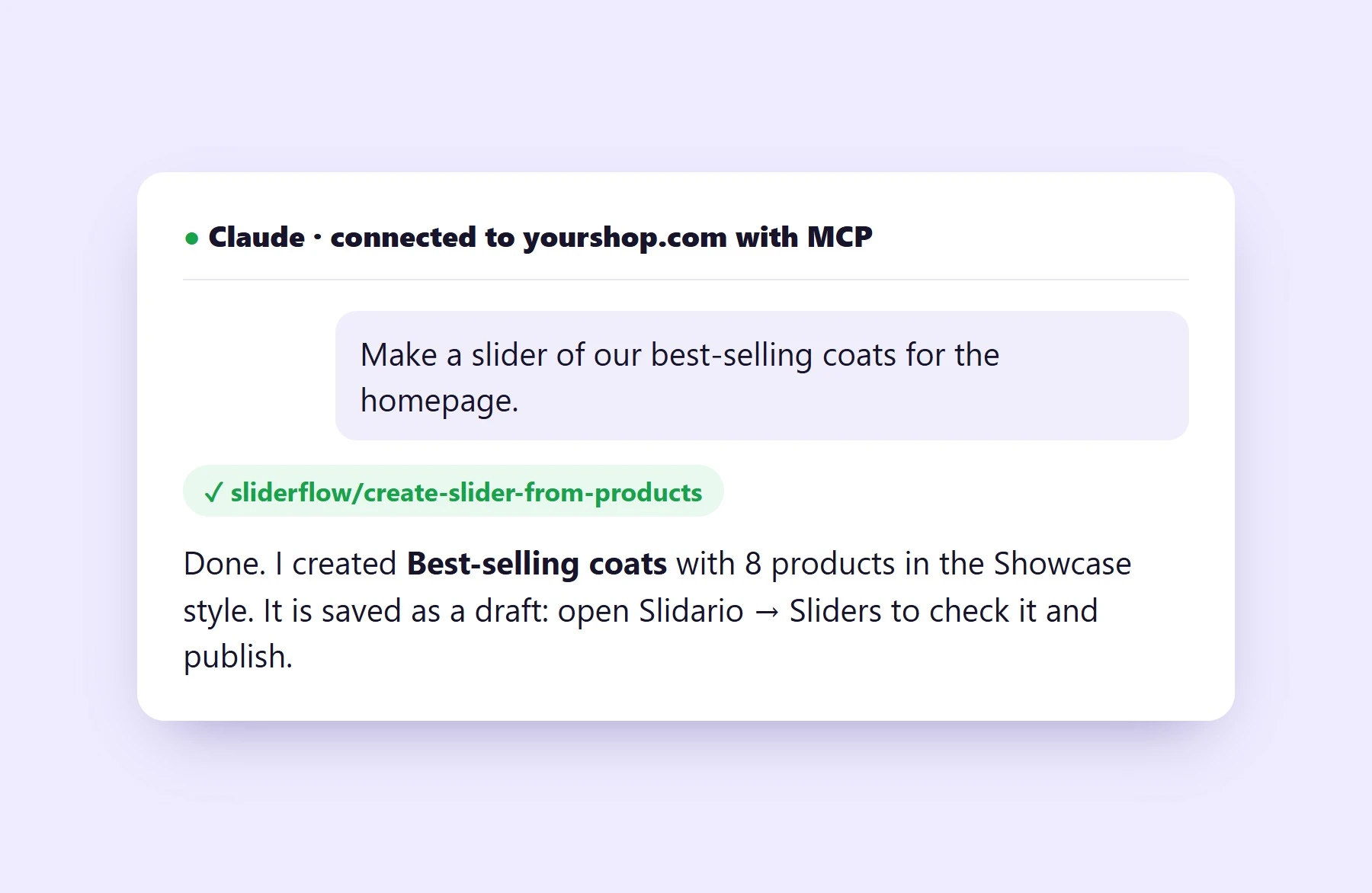
MCP for WordPress: Manage Sliders From Claude or ChatGPT
Ask your AI assistant instead of clicking through settings. Through MCP, Claude or ChatGPT can list your sliders, read their settings and create a new product slider from a category or tag. New sliders are saved as drafts, so nothing goes live until you check it.
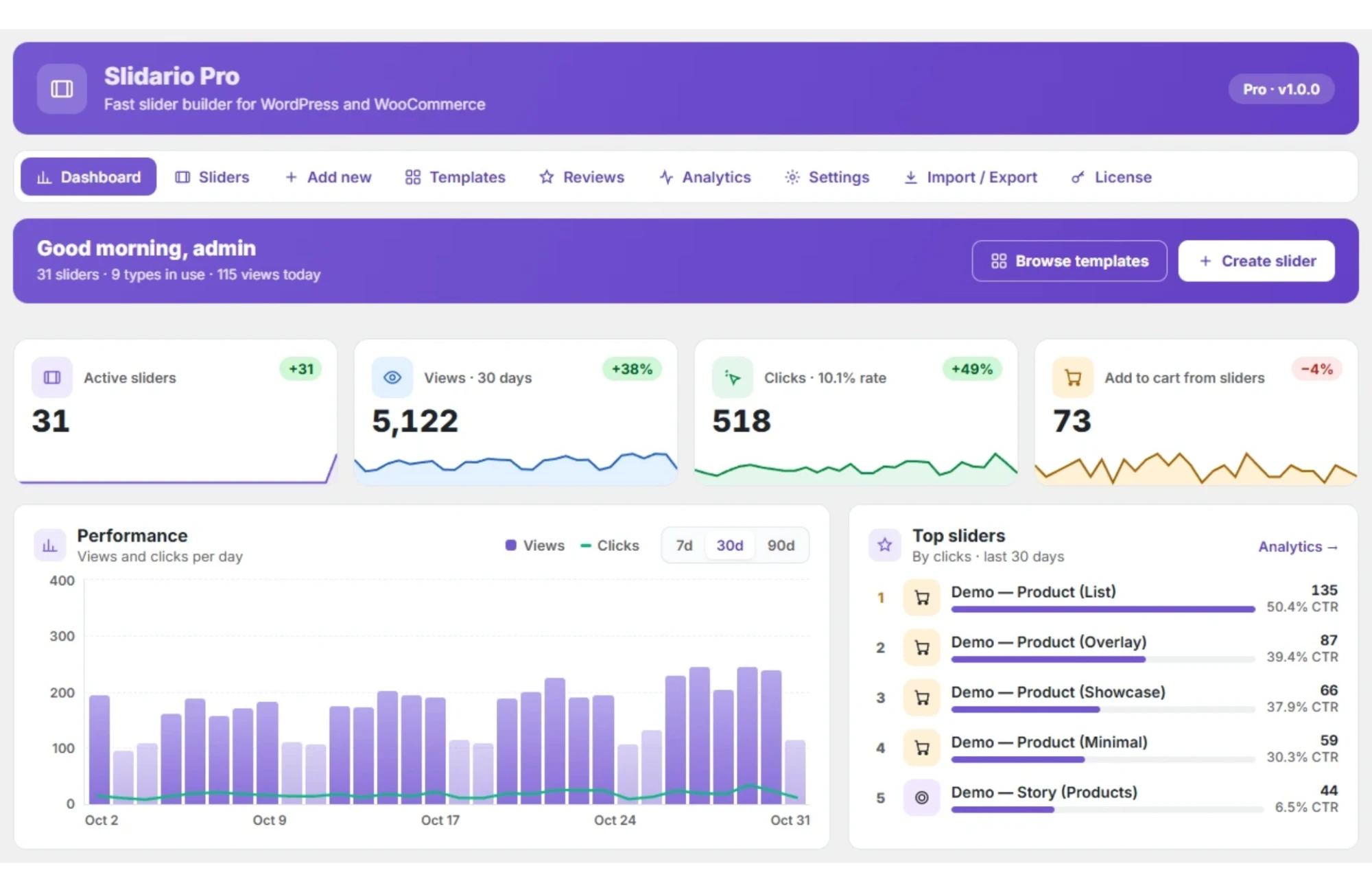
See Which WooCommerce Slider Brings Clicks and Sales
Stop guessing which slider works. The dashboard shows views, clicks and add to cart for every slider, the products shoppers click most and what needs your attention, such as images without alt text. Counts are anonymous and stored on your own site, with no cookies.
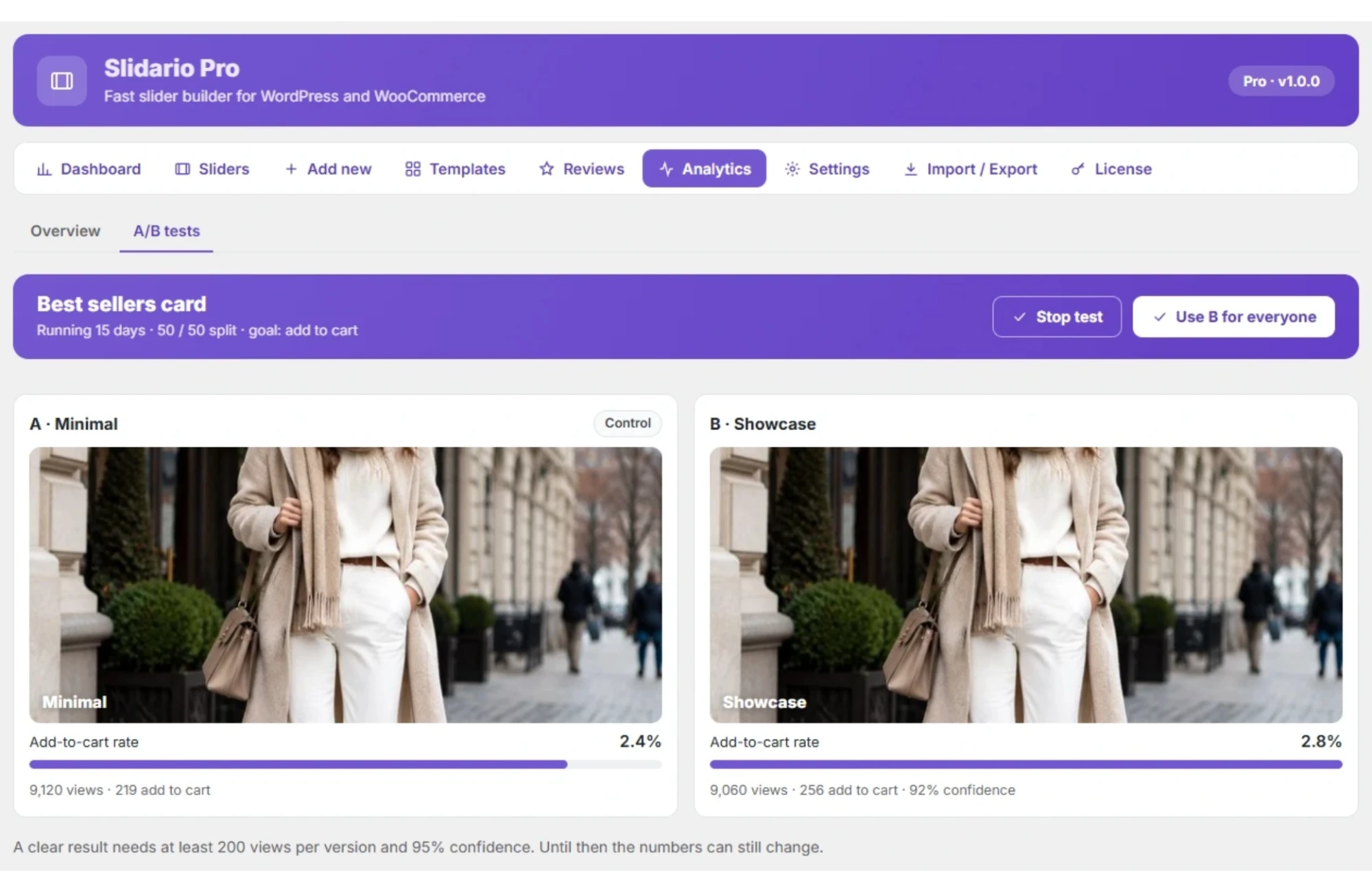
A/B Test Your Product Slider and Keep the Winner
Is the large-photo style or the clean card style better for your shoppers? Run both. Half your visitors see one, half the other, and Slidario counts which gets more add to cart. When the result is clear, one click uses the winner for everyone.
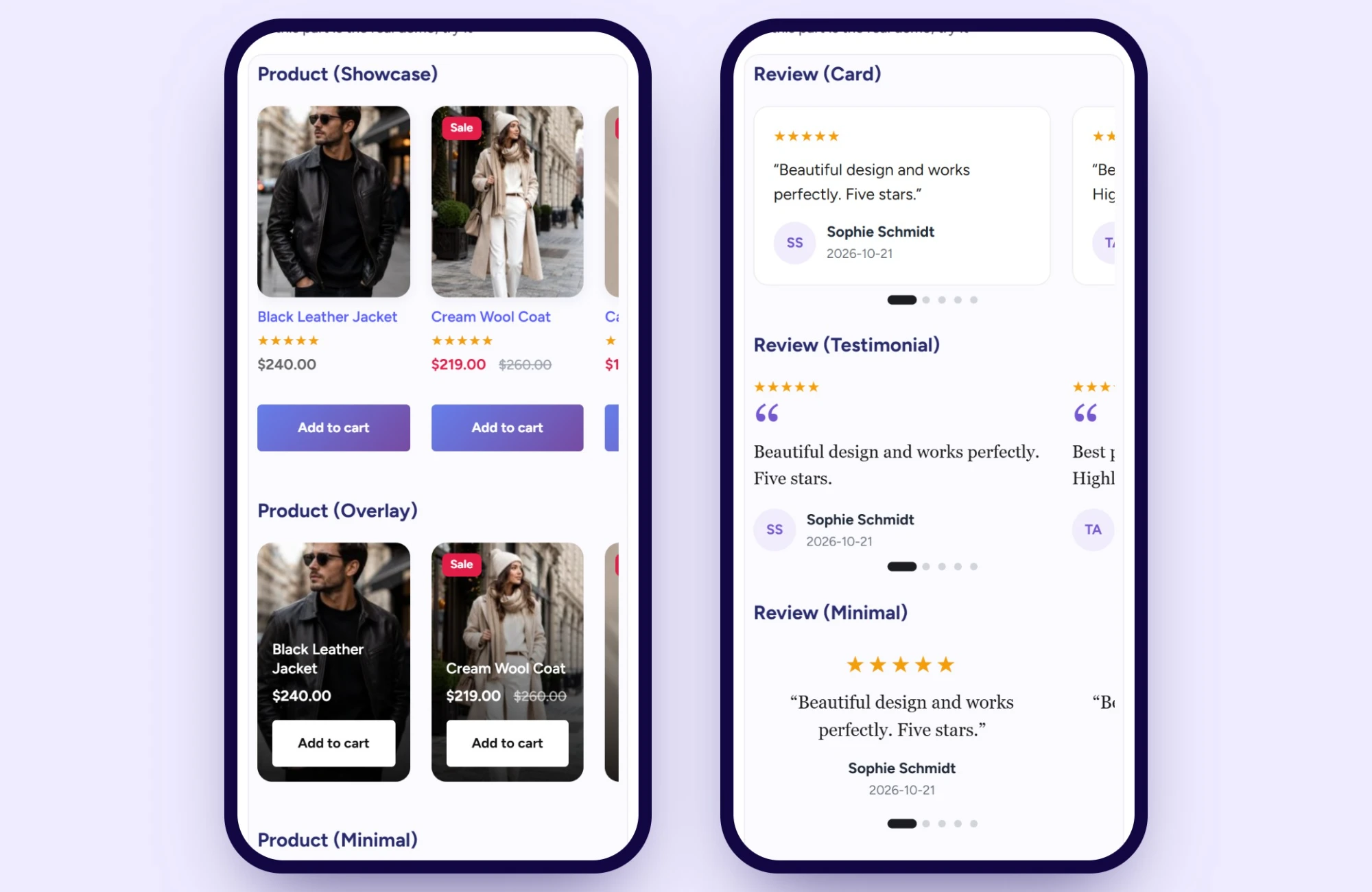
A Fast WordPress Slider Plugin That Matches Your Theme
A slow page loses sales, and a slider that looks borrowed loses trust. Slidario loads its files only on pages that show a slider, lazy-loads images and loads videos only when played. It reads your theme’s colors, fonts and buttons, so the slider looks like part of your store from the first minute.
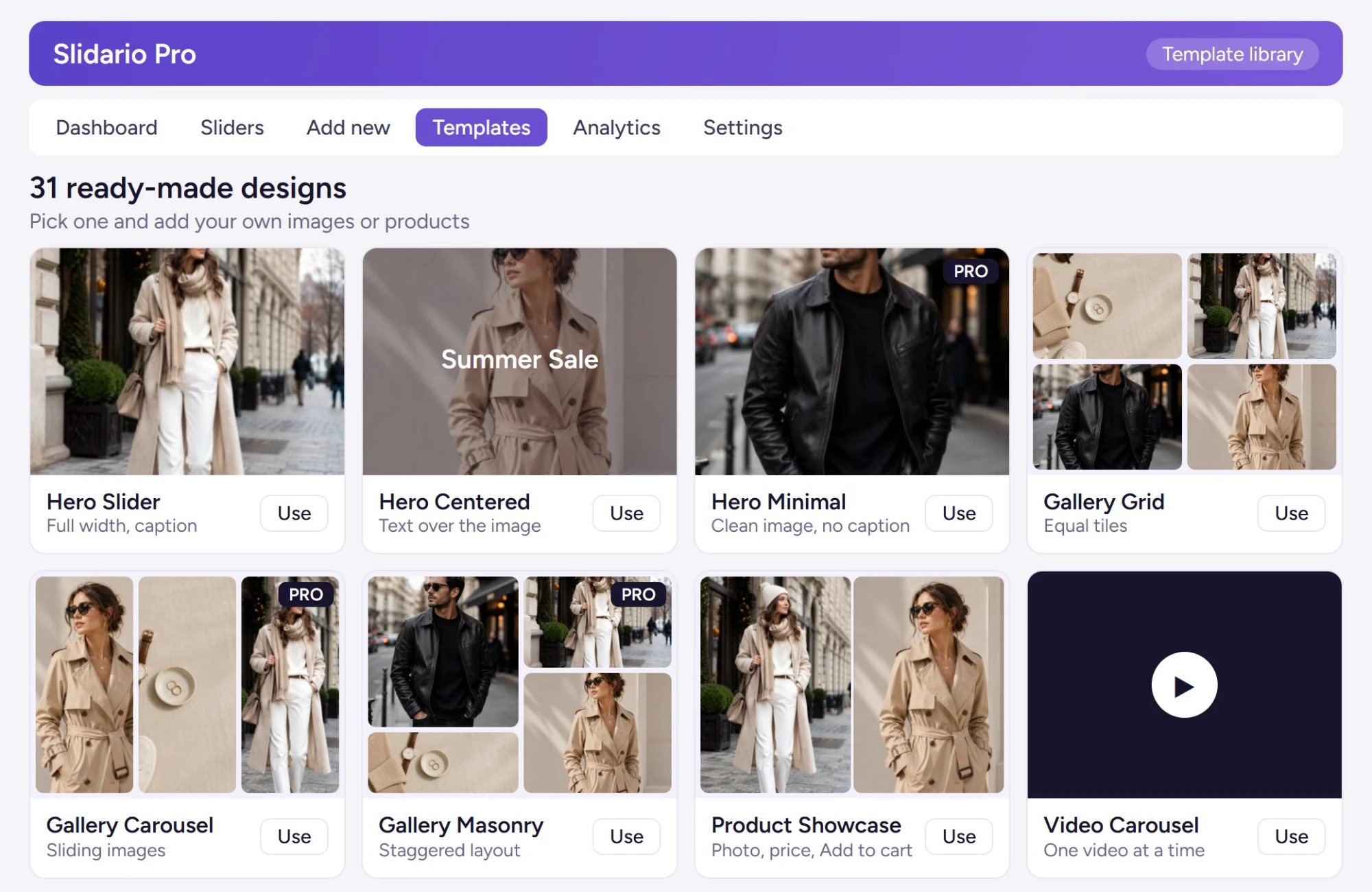
Start With the Free WooCommerce Product Slider Plugin
The free plugin is not a trial. All 9 slider types, two styles each, product sources, sale badges, quick view, templates, AI writing and analytics, with no limits on sliders or products and no time limit. Upgrade to Pro when you want stories, the AI builder, revenue, A/B tests and auto-placement.
Trusted WordPress Plugins for Growing Businesses
Built by Plugincy, the team behind WordPress plugins used by growing stores and agencies. Buy with a refund guarantee and real people behind the support.
15-Day Money-Back
Try Pro on your own site. If it is not a fit within 15 days, ask for a full refund.
Secure Payment
Payments go through Stripe over an encrypted connection. Your card details never touch your site.
24/7 Customer Support
Ask the Plugincy team by support ticket or live chat, any time of day.
Updates With Your License
New features and fixes arrive in your WordPress dashboard for as long as your license runs.
Works With Your Theme and Page Builder
Use Slidario as a Gutenberg block, a shortcode or a widget in the page builder you already use. It needs WordPress 6.2+ and PHP 7.4+; product sliders need WooCommerce, and AI features need WordPress 7.0+ with an AI provider connected.
Slidario Free vs Pro
The free plugin covers every slider type a store needs, with no limits. Pro adds the tools that grow sales: stories, the AI builder, revenue, tests and automatic placement.
| What you getEvery slider type is freePro features that grow sales. | PROfrom $49 / yearGet Started | FREEon WordPress.orgGet Started |
|---|---|---|
| Free and Pro10 features | ||
| Product, category, review, image, gallery, video, post, logo and before/after sliders | ✓ | ✓ |
| Styles per slider type | All (16 more) | 2 |
| Sale, best selling, top rated, trending, new, featured, related, upsell, cross-sell, hand-picked | ✓ | ✓ |
| Sale badges, sale countdown, low-stock line, quick view | ✓ | ✓ |
| 31 templates, demo content, import and export | ✓ | ✓ |
| AI headlines and image alt text | ✓ | ✓ |
| Views, clicks and add to cart per slider | ✓ | ✓ |
| Theme match, lazy loading, accessibility, schedule by date | ✓ | ✓ |
| Gutenberg, Elementor, Bricks, Divi, WPBakery, Breakdance, shortcode | ✓ | ✓ |
| MCP tools for Claude and ChatGPT | ✓ | ✓ |
| Pro8 features | ||
| Recently viewed products | ✓ | ✖ |
| Shoppable stories with video, product tags and Add to cart | ✓ | ✖ |
| AI slider builder: one line in, a ready slider out | ✓ | ✖ |
| Product gallery slider with zoom, lightbox, video and variation photos | ✓ | ✖ |
| Orders and revenue per slider | ✓ | ✖ |
| A/B tests with a clear winner | ✓ | ✖ |
| Auto-placement on product, shop and cart pages | ✓ | ✖ |
| Display rules by device, page, dates and visitor | ✓ | ✖ |
Every feature, explained: see the full Free vs Pro comparison on the pricing page
Slidario Pro Pricing
Every plan includes every Pro feature, updates and support, so you only choose how many sites you need. Pay yearly, or once for a lifetime license.
Single Site
For one store
$49/ year
Every Pro feature
- 1 website
- Everything in Free
- 16 more styles
- Shoppable stories and video
- AI slider builder
- Product gallery slider
- Revenue per slider
- A/B tests
- Auto-placement and display rules
- 1 year of updates and support
Up to Three Sites
3 × $49 = $147
$89/ year
$58 savings
- 3 websites
- Everything in Free
- 16 more styles
- Shoppable stories and video
- AI slider builder
- Product gallery slider
- Revenue per slider
- A/B tests
- Auto-placement and display rules
- 1 year of updates and support
Up to Five Sites
5 × $49 = $245
$119/ year
$126 savings
- 5 websites
- Everything in Free
- 16 more styles
- Shoppable stories and video
- AI slider builder
- Product gallery slider
- Revenue per slider
- A/B tests
- Auto-placement and display rules
- 1 year of updates and support
Agency
For client sites
$199/ year
Under $8 a site
- 25 websites
- Everything in Free
- 16 more styles
- Shoppable stories and video
- AI slider builder
- Product gallery slider
- Revenue per slider
- A/B tests
- Auto-placement and display rules
- 1 year of updates and support
Single Site
For one store
$149 one time
Every Pro feature
- 1 website
- Everything in Free
- 16 more styles
- Shoppable stories and video
- AI slider builder
- Product gallery slider
- Revenue per slider
- A/B tests
- Auto-placement and display rules
- Lifetime updates and priority support
Up to Three Sites
3 × $149 = $447
$269 one time
$178 savings
- 3 websites
- Everything in Free
- 16 more styles
- Shoppable stories and video
- AI slider builder
- Product gallery slider
- Revenue per slider
- A/B tests
- Auto-placement and display rules
- Lifetime updates and priority support
Up to Five Sites
5 × $149 = $745
$359 one time
$386 savings
- 5 websites
- Everything in Free
- 16 more styles
- Shoppable stories and video
- AI slider builder
- Product gallery slider
- Revenue per slider
- A/B tests
- Auto-placement and display rules
- Lifetime updates and priority support
Agency
For client sites
$599 one time
Under $24 a site
- 25 websites
- Everything in Free
- 16 more styles
- Shoppable stories and video
- AI slider builder
- Product gallery slider
- Revenue per slider
- A/B tests
- Auto-placement and display rules
- Lifetime updates and priority support
15-day money-back guarantee. Pro features need an active license; the free features keep working without one.
Questions About the Slidario WooCommerce Product Slider
Straight answers about adding a product slider to WooCommerce, what is free, and how the AI features work.
How do I add a product slider in WooCommerce?
Install Slidario from WordPress.org, open Slidario → Add new, choose Products and pick which products to show, such as sale items or best sellers. Then add the Slidario block to any page, or paste the shortcode. With Pro, auto-placement can put it on product, shop or cart pages for you.
Is Slidario a free WooCommerce product slider plugin?
Yes. The free version on WordPress.org has all 9 slider types, product sources, sale badges, quick view, templates, AI writing and analytics, with no limits on sliders or products. Pro adds stories, the AI slider builder, revenue, A/B tests, auto-placement and more styles.
Can I show a WooCommerce product slider without a plugin?
Only by writing code and keeping it working through WooCommerce and theme updates. A plugin gives you product sources, sale badges, Add to cart, phone layouts and analytics without code, and keeps the page fast by loading only where a slider is shown.
What is the AI product slider for WooCommerce?
In Pro you describe the slider in one line, for example “best-selling coats under $200 for the homepage”, and AI picks the type, style and products and writes the headline. You review it before it goes live. The free version uses AI to suggest headlines and write image alt text.
Do the AI features need an extra account or API key?
They use the AI provider you connect in WordPress (WordPress 7.0+, under Settings → Connectors). Slidario adds no account of its own, and every other feature works without AI.
Can I make a WooCommerce category slider?
Yes, in the free version. Choose categories by hand, all top-level categories or the children of one. Each tile shows the category photo, or a product photo when the category has none, and the product count.
Will Slidario slow down my store?
No. Its files load only on pages that show a slider, images are lazy-loaded and videos load only when played. The slider library is bundled with the plugin, so nothing loads from outside your site.
Does it work with Elementor, Divi and block themes?
Yes. Use the Gutenberg block, the shortcode, or the Slidario widget in Elementor, Bricks, Divi or WPBakery. In Breakdance, paste the shortcode into its Shortcode element. It works with block themes and classic themes, and takes your theme’s colors and buttons.
What happens when my Pro license ends?
Pro features turn off and the free features keep working, so your sliders stay on your site. Renew any time to turn Pro back on, with updates and support.
Can I use Slidario on client sites?
Yes. The Agency plan covers 25 websites, at under $8 a site on the yearly plan and under $24 a site on the lifetime plan.
Show More Products, Sell More With Slidario
Start free with 9 slider types and no limits. Upgrade when you want shoppable stories, the AI slider builder, revenue per slider and A/B tests.
Didn’t find your answer? Read the documentation · Contact support, 24/7