

Product filtering affects more than navigation in WooCommerce. It shapes how quickly shoppers find relevant products, how smoothly category pages work, and how well large catalogs stay usable. That makes Annasta Product Filters vs Dynamic AJAX Product Filters for WooCommerce a practical comparison for store owners who want better filtering without adding friction.
Both plugins improve on default WooCommerce filtering, but they do so in different ways. This comparison looks at their core features, SEO value, usability, performance, and compatibility to help you choose the one that fits your store more naturally.
Who Is This Comparison For?
Choosing a filter plugin becomes more important when product discovery starts affecting store usability, conversions, and SEO. This comparison is meant for WooCommerce store owners who want to understand which plugin fits their catalog structure, filtering goals, and growth plans more effectively.
- Stores with large product catalogs and many categories or attributes
- Merchants looking for faster AJAX-based product filtering
- Store owners comparing filtering flexibility and ease of setup
- WooCommerce sites that want cleaner filter URLs and better SEO control
- Shops trying to improve user experience on category and shop pages
- Teams deciding between advanced filter customization and simpler management
- Businesses that want a plugin that scales better as product ranges grow
Quick Summary
The Right plugin depends on what matters most in your WooCommerce store. Some stores need more advanced filter control and stronger SEO flexibility, while others need a cleaner AJAX filtering experience that is easier to manage and faster to roll out.
- Dynamic AJAX Product Filters focuses on performance consistency, SEO-friendly filter URLs, and scalability for large catalogs.
- Annasta Product Filters emphasizes flexible filter configuration and UI control, making it suitable for stores that want customizable filtering layouts.
Annasta Product Filters vs Dynamic AJAX Product Filters: Core Features Comparison
Looking at both plugins side by side makes the differences easier to understand. While both are built to improve WooCommerce product filtering, Annasta Product Filters leans more toward control and flexibility. In contrast, Dynamic AJAX Product Filters for WooCommerce focuses on speed, ease of use, and a smoother filtering experience for shoppers.
| Feature | Dynamic AJAX Product Filters for WooCommerce | Annasta Product Filters |
| AJAX Product Filtering | Yes | Yes |
| Multi-Filter Support | Yes | Yes |
| Attribute and Taxonomy Filters | Yes | Yes |
| Price Filtering | Yes | Yes |
| Rating, Stock, and Sale Filters | Yes | Yes |
| Custom Filtering Control | More streamlined | More flexible |
| SEO-Friendly Filter Handling | Advanced permalink support | Stronger control |
| Filter URL Management | Cleaner and easier | More advanced |
| Setup Experience | Easier to manage | More configuration-heavy |
| Best Fit | Stores wanting speed and simplicity | Stores needing deeper control |
Plugin Overview: How These Two Plugins Are Positioned
Features tell you what each plugin offers, but positioning gives a clearer sense of how each one fits into a real WooCommerce store. This section looks at the broader role both plugins play, the filtering experience they are built to support, and the type of store each one is more naturally suited for.
Dynamic AJAX Product Filters for WooCommerce
Dynamic AJAX Product Filters for WooCommerce is positioned as a fast, flexible, and SEO-aware filtering plugin built to improve real-time product discovery. It focuses on helping shoppers refine products without page reloads while giving store owners more freedom in how filters are displayed across the storefront. Its overall positioning feels geared toward modern WooCommerce stores that want smoother browsing, broader filter coverage, and more flexible filter placement without making the shopping experience feel heavy or outdated.

Technical Details
| Type of Plugin | WooCommerce product filtering plugin |
| Developed By | Plugincy |
| Current Version | 1.5.9 |
| Active Installations / Users | 700+ |
| Free / Paid Availability | Free version available, Pro version with advanced features |
Core Features
- Real-time AJAX updates
- Category, Tags, price, rating, search, brand, stock status filters
- Custom field support
- Flexible filter layouts
- Shortcode and block placement
- Page builder compatibility
- Visual swatch controls
- SEO-friendly filter URLs
- Mobile-ready layouts
- Page-specific filter display

Strengths
- Fast and smooth AJAX-based filtering experience
- Covers common WooCommerce filter needs well
- Flexible placement across different store layouts
- Cleaner browsing flow for shoppers
- Easier to manage than more control-heavy plugins
- Strong fit for modern, conversion-focused stores
Limitations
- More advanced setups can take extra time to fine-tune
- Some themes may need small layout adjustments for ideal filter placement
Real WooCommerce Use Case
Dynamic AJAX Product Filters for WooCommerce works especially well for stores where shoppers narrow products through several choices before buying. Fashion is one example, but electronics, furniture, beauty, and accessory stores can benefit too. It fits best when store owners need advanced Ajax product filters that feel fast for shoppers while still giving enough flexibility across shop and archive pages.
Annasta Product Filters
Annasta Product Filters is positioned more as a flexible, all-in-one WooCommerce filtering solution for stores that want more control over how filters behave, where they appear, and how filtered pages are handled. Its positioning feels less about keeping things minimal and more about giving store owners richer filtering styles, preset-based control, and stronger SEO-related options when product filtering needs become more layered.

Technical Details
| Type of Plugin | WooCommerce product filter plugin |
| Developed By | Annasta |
| Current Version | 1.8.3 |
| Active Installations / Users | 2,000+ |
| Free / Paid Availability | Free version with premium upgrade available |
Core Features
- AJAX-based product filtering
- Category and attribute filters
- Price and range filters
- Tag-based product filtering
- Custom taxonomy support
- Custom meta field filters
- Search and sort controls
- Active filter badges
- Infinite scroll and Load More
- SEO-friendly URL options
Strengths
- Strong control over filter behavior and display styles
- Better suited to layered or more structured filter setups
- Supports multiple presets for different pages
- Helpful SEO options for filtered product pages
- Flexible placement through block, widget, and shortcode
- Works well for stores that need more customization depth
Limitations
- Full flexibility may take more time to configure properly
- Some page-based preset control is tied more closely to premium features
- Richer options can create a steeper learning curve at the start
- Best results often depend on careful preset planning
Real WooCommerce Use Case
Annasta Product Filters makes more sense for stores with broader catalogs and more layered product discovery needs, such as furniture, auto parts, industrial items, or multi-brand fashion shops. It fits best when filtering is not just there to narrow products quickly, but also to support custom filter structures, page-specific presets, and more controlled handling of filtered URLs and product listings.
What Problem Do These Two Product Filters Plugins Solve?
As WooCommerce stores grow, users expect to narrow product lists by price, attributes, availability, and categories instantly. Without efficient filters, shoppers often abandon pages before finding relevant products, leading to lost conversions.
Both plugins solve this discovery problem using AJAX filtering. The difference is strategic: Dynamic AJAX Product Filters focuses on stability, performance, and SEO safety, while Annasta Product Filters focuses on giving store owners more control over how filters are configured and displayed.
Comparing Pricing: Dynamic AJAX Product Filters vs. Annasta Product Filters
Pricing should be evaluated in terms of long-term value, not just initial cost. Store owners should consider how much functionality is available before upgrading and whether the plugin can support growth without additional technical debt.
| Pricing Aspect | Dynamic AJAX Product Filters | Annasta Product Filters |
|---|---|---|
| Free Version | Yes (most core features) | Yes |
| Feature Availability (Free) | High | Medium |
| Premium License | Paid | Paid |
| Renewal Required | Yes | Yes |
| Value for Large Stores | High | Medium |
Filtering Types Comparison
Filter variety shapes how useful a product filter plugin actually feels in day-to-day store navigation. Some stores only need basic category, attribute, and price filters, while others need more flexible filtering options to support larger catalogs, custom product data, and different shopper behaviors.
| Filter Type | Dynamic AJAX Product Filters for WooCommerce | Annasta Product Filters |
| Category Filters | Yes | Yes |
| Attribute Filters | Yes | Yes |
| Price Filters | Yes | Yes |
| Tag Filters | Yes | Yes |
| Custom Taxonomy Filters | Yes | Yes |
| Custom Field / Meta Filters | Yes | Yes |
| Search Filters | Yes | Yes |
| Sort Filters | Basic | Yes |
| Range Filters | Yes | Yes |
| Visual Swatch Filters | Yes | More limited |
Performance, User Experience, and Scalability
Performance consistency becomes critical as catalogs grow and multiple filters are applied simultaneously. Filters that perform well on small stores may struggle under heavier loads.
Dynamic AJAX Product Filters maintains predictable performance and fast responses even with complex filter combinations. Annasta Product Filters performs reliably in many setups but may require optimization as product counts and traffic increase.
| Comparison Area | Dynamic AJAX Product Filters for WooCommerce | Annasta Product Filters |
| Filtering Speed | Built around fast AJAX updates | Supports AJAX filtering with more configuration depth |
| Browsing Experience | Smoother and more streamlined for shoppers | More structured and control-focused |
| Interface Simplicity | Easier to keep clean and intuitive | May require more setup to shape the experience |
| Large Catalog Handling | Better suited to fast product discovery across bigger catalogs | Better suited to catalogs needing more tailored filter behavior |
| Scalability | Strong fit for growing stores that want practical filtering performance | Strong fit for stores that need more advanced filtering logic as they grow |
SEO and Indexable Filter URL Capabilities
Filter URLs can help or harm SEO. Without proper control, filters may generate many low-value URLs that waste crawl budget and dilute rankings.
Dynamic AJAX Product Filters provides stronger control over URL parameters and indexing behavior. Annasta Product Filters offers basic URL handling, which may require additional SEO configuration to prevent index bloat.
| SEO Area | Dynamic AJAX Product Filters for WooCommerce | Annasta Product Filters |
| Filter URL Handling | Clean and user-friendly | More control-focused |
| Indexable Filter Pages | Supports indexable filtered URLs | Better suited to structured SEO handling |
| SEO Flexibility | More streamlined | More advanced |
| URL Cleanliness | Stronger focus on cleaner filter paths | Better for stores needing tighter URL control |
| Duplicate Content Control | More limited control | Stronger management options |
| Filter Page Optimization | Practical for general store SEO needs | Better for stores with a more deliberate filter page strategy |
| Ease of Use | Simpler to work with | Requires more setup for full SEO use |
| Best Fit | Stores wanting clean filter URLs without extra complexity | Stores wanting more control over filtered page SEO |
Setup Complexity and Learning Curve
Ease of setup affects how quickly filters can be deployed without errors. Plugins with simpler configuration reduce maintenance effort.
Dynamic AJAX Product Filters offers a straightforward setup with sensible defaults. Annasta Product Filters provides more configuration flexibility, which can increase setup time for non-technical users.
| Setup Area | Dynamic AJAX Product Filters for WooCommerce | Annasta Product Filters |
| Initial Setup | More straightforward | More configuration-heavy |
| Learning Curve | Easier for most store owners | Steeper at the beginning |
| Filter Configuration | Simpler to manage | More flexible but more involved |
| Page-Level Setup | Easier to apply in practical store layouts | More planning may be needed |
| SEO Option Handling | More direct and limited | More detailed and settings-driven |
| Time to Launch | Faster for most stores | Longer for more tailored setups |
| Admin Experience | More approachable day to day | Better for users wanting deeper control |
Theme and Plugin Compatibility
Compatibility matters because a filter plugin has to work smoothly with the rest of a WooCommerce setup, not just offer a long feature list. Theme structure, page builders, product archives, and plugin interactions all influence how reliable and flexible filtering feels in everyday use. Here’s how Dynamic AJAX Product Filters for WooCommerce and Annasta Product Filters compare in terms of compatibility across different store environments.
| Compatibility Area | Dynamic AJAX Product Filters for WooCommerce | Annasta Product Filters |
| WooCommerce Integration | Strong fit for standard WooCommerce stores | Strong fit for WooCommerce stores needing deeper filter control |
| Theme Compatibility | Better suited to a wide range of modern themes | Works well, but may need more setup depending on theme structure |
| Shop and Archive Page Support | Smooth fit across shop and archive layouts | Strong support with more configuration flexibility |
| Page Builder Compatibility | More aligned with flexible storefront layouts | Usable, but setup can feel more structured |
| Filter Placement Flexibility | Easier to place across different sections | More control over placement methods |
| Shortcode Support | Yes | Yes |
| Widget or Block Support | Yes | Yes |
Support and Documentation Comparison
Support quality matters when a filter plugin becomes part of everyday store management. Clear documentation can shorten setup time, while responsive support becomes more important when filters interact with custom themes, larger catalogs, or more advanced WooCommerce setups. This comparison looks at how both plugins stand in terms of learning resources, troubleshooting help, and day-to-day support value.
| Support Area | Dynamic AJAX Product Filters | Annasta Product Filters |
|---|---|---|
| Documentation Quality | Clear and structured | Good |
| Technical Guidance | Strong | Moderate |
| Support Responsiveness | High | Varies |
| Learning Resources | Good | Good |
Advanced SEO & Plugin Compatibility Comparison
Advanced SEO and compatibility features become more important as a WooCommerce store grows. Basic filtering may be enough for smaller catalogs, but stores with larger inventories, custom themes, page builders, or a stronger SEO focus usually need more control over filtered URLs, page behavior, and how the plugin fits into the rest of the site. This section looks at where Dynamic AJAX Product Filters for WooCommerce and Annasta Product Filters go beyond the basics.
| Advanced Area | Dynamic AJAX Product Filters for WooCommerce | Annasta Product Filters |
| URL Filtering Modes | Supports query strings, permalinks, and AJAX-only mode | Supports AJAX, URL, and button-submitted filtering modes |
| SEO-Focused URL Handling | Supports custom permalink structures and SEO-friendly filtered URLs | Stronger fit for stores wanting more structured SEO control over filtered pages |
| Theme Compatibility | Compatible with most WordPress themes, including custom and premium themes | Works across WooCommerce shop, archive, and shortcode-created product pages |
| Page Builder Flexibility | Stronger emphasis on flexible layouts, shortcode use, and block support | More structured placement across supported WooCommerce product listing contexts |
| Product Variation Compatibility | Works with variable products and attribute-based filtering | Better aligned with stores wanting more filter behavior control across archives |
| Archive and Product List Support | Built for shop filtering with flexible display options | Explicit support for shop, taxonomy archives, and shortcode-created product pages |
Which Plugin Is Better for Which Type of Store?
The right filter plugin depends less on which one has the longer feature list and more on how well it matches the way a store is built. Catalog size, filter complexity, SEO goals, and day-to-day management all shape which option feels like the better fit in practice.
| Store Type | Better Choice | Reason |
|---|---|---|
| Small store | Annasta Product Filters | Configuration flexibility |
| Medium store | Depends | UX vs performance priorities |
| Large store | Dynamic AJAX Product Filters | Scalable performance |
| SEO-focused store | Dynamic AJAX Product Filters | Clean URLs |
| Custom product structures | Annasta Product Filters | Flexible logic |
| Non-technical owner | Dynamic AJAX Product Filters | Easier setup |
Potential SEO Issues Caused by Product Filter Plugins
Filter plugins can improve product discovery, but they can also create SEO problems when filtered pages are not handled carefully. URL variations, duplicate page paths, weak indexable pages, and crawl waste are some of the most common issues. Before choosing any filter plugin, it helps to understand where SEO risks usually come from and how they can affect long-term visibility.
- Duplicate Content Across Filtered URLs: Different filter combinations can generate multiple URLs with very similar product listings, which can make it harder for search engines to understand which version matters most.
- Index Bloat From Low-Value Pages: Not every filtered page deserves to be indexed. When too many thin or low-intent filter combinations become crawlable, search engines may spend time on pages that add little SEO value.
- Crawl Budget Waste: Large stores can generate hundreds or even thousands of filter-based URL combinations. That can lead search engines toward unimportant pages instead of key category or product pages.
- Weak Or Thin Filtered Landing Pages: Some filtered pages may not contain enough unique value to perform well in search, especially when they show only a small product set with no supporting content.
- Poor Canonical Handling: Without proper canonical control, filtered pages may compete with main category pages or with other filtered versions of the same listing.
- Messy URL Structures: Long query strings and inconsistent filter parameters can make filtered URLs harder to manage, less shareable, and less SEO-friendly.
- Accidental Indexing Of Temporary Filter States: Sort orders, stock filters, price ranges, and other short-term filter states can end up being indexed even when they were never meant to become search pages.
- Internal Linking Dilution: When too many filter combinations are linked internally, authority can spread across low-priority pages instead of supporting core category and product URLs.
- Reduced Category Page Visibility: In some cases, filtered URLs can start competing with the main category pages that should be ranking for broader commercial keywords.
- Missed SEO Opportunities From Poor Filter Strategy: Filter plugins can support SEO when used well, but without a clear indexing strategy, stores may end up creating noise instead of valuable search landing pages.
Which Ajax Product Filter Plugin Should I Choose?
The best choice depends on what you expect product filtering to do for your store. When priority is a cleaner shopper experience, faster AJAX updates, and a setup that feels easier to work with, Dynamic AJAX Product Filters for WooCommerce is usually the more natural option. It fits stores that want strong filtering without turning configuration into a bigger project than it needs to be.
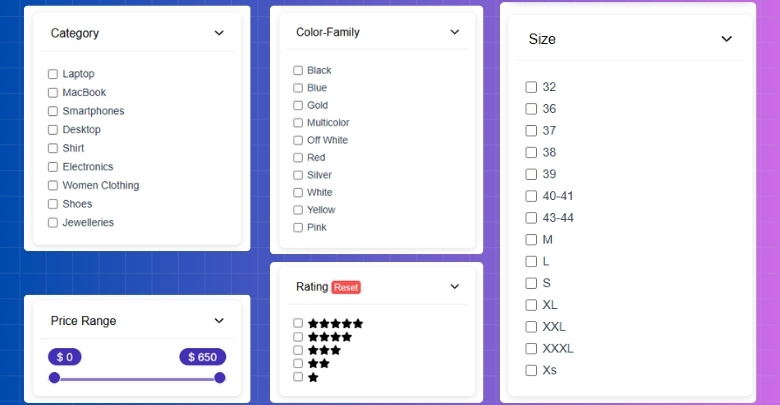
Annasta Product Filters makes more sense when filtering needs are more detailed, and store owners want tighter control over how filters behave across different pages. It stands out more in stores where filtering is tied not only to usability, but also to page structure, preset control, and the broader SEO handling of filtered results.
Put simply, stores that want filtering to feel lighter and more straightforward will likely lean toward Dynamic AJAX Product Filters for WooCommerce. Stores that need filtering to do more behind the scenes will likely find Annasta Product Filters a better fit.
Frequently Asked Questions
After learning about these two powerful product filter plugins, you might still have some questions. Here are five common ones that many users ask when deciding which plugin to use or how to get the best out of them.
Can I Use Both Plugins Together on the Same Site?
It’s not recommended to use both plugins at the same time because they might conflict and slow down your site. Pick the one that best fits your needs and disable any other similar filters. This helps keep your store running smoothly.
Will These Plugins Affect My Site’s Loading Speed?
Both plugins are designed to be fast, but any extra plugin adds some load. Choosing a well-optimized plugin and using caching can keep your site quick. Testing on your own setup is the best way to see the impact.
Can I Customize the Filters to Match My Brand’s Style?
Yes, both plugins offer good options to change colors, fonts, and layouts. Annasta uses the WordPress Customizer, while Dynamic AJAX works well with Elementor and block editor styling. This helps keep your store’s look consistent.
Do These Plugins Work With All WooCommerce Themes?
Generally, yes. Both plugins are built to work with most WooCommerce-compatible themes. However, it’s always a good idea to test them on your specific theme to make sure everything looks and works right.
How Easy Is It to Switch From One Plugin to Another?
Switching is possible but requires some setup time. You’ll need to remove filters from the old plugin and add them again with the new one. Backing up your site before making changes is always a safe choice.
Final Verdict
Dynamic AJAX Product Filters for WooCommerce makes more sense for stores that want filtering to feel fast, modern, and easier to manage without giving up SEO value. It is the stronger fit when cleaner URLs, smoother shopper flow, and scalable performance matter more than deep preset logic.
Annasta Product Filters stands out more for stores that want tighter control over filter behavior, preset-based layouts, and more structured handling across different category or archive contexts. It fits better when filtering needs to be shaped more deliberately behind the scenes.
Between Annasta Product Filters vs Dynamic AJAX Product Filters for WooCommerce, the choice comes down to what kind of store you are running. Dynamic fits stores that want filtering to stay practical, fast, and SEO-aware. Annasta fits stores that need more configuration depth and finer control over how filtering behaves across the catalog.
