

Inventory management is one of the biggest challenges for growing online stores. As businesses expand into multiple warehouses or fulfillment centers, keeping track of product quantities across each location becomes complex. This raises a common question among store owners: Does WooCommerce have an inventory management system for multiple locations?
The short answer is no, not by default. WooCommerce includes a basic stock management system that tracks inventory for each product but only from a single source. It doesn’t offer built-in tools for handling multiple warehouses, regional stock levels, or location-based fulfillment.
In this guide, you’ll discover how WooCommerce handles inventory, what its limitations are, and how you can extend it to manage multiple warehouses effectively.
Does WooCommerce Have an Inventory Management System for Multiple Locations?
WooCommerce is one of the most user-friendly eCommerce platforms for managing online stores, but when it comes to tracking inventory across several warehouses or physical stores, its default setup shows limitations. Here’s a closer look at how WooCommerce handles stock management and what options you have for multi-location inventory.
Default Setup
WooCommerce includes a basic inventory management system that tracks stock levels at the product level. When you enable stock management, it automatically updates quantities as customers make purchases. However, this setup only supports one global stock count per product, making it suitable for small stores operating from a single warehouse or retail space.
Core Limitation
The main limitation of WooCommerce is that it doesn’t natively distinguish between multiple storage or fulfillment locations. All quantities are managed as a single number, regardless of where your products are physically stored. This can cause challenges for larger businesses that need accurate visibility into inventory across different regions or warehouses.
Why It Matters
As your business grows, managing stock per location becomes essential. Multi-location inventory ensures that orders are fulfilled from the nearest warehouse, reducing delivery times and shipping costs. It also helps prevent overselling, improves restocking accuracy, and gives store owners better insights into regional demand and stock movement.
Plugin Support
While WooCommerce alone doesn’t include multi-location features, plugins such as multi location product management for WooCommerce fill this gap perfectly. They allow you to create separate warehouse profiles, assign stock to each location, and automate order fulfillment. This turns WooCommerce into a complete system for managing complex, location-based inventory setups.
How It Works
Once installed, a multi-location plugin integrates seamlessly with your WooCommerce dashboard. Each warehouse or store can have its own stock levels, pricing, and fulfillment rules. When a customer places an order, the system automatically selects the best location to ship from, updates that warehouse’s stock, and keeps all other data synchronized in real time.
Real Benefits
Adding multi-location functionality gives WooCommerce stores enterprise-level control over stock and logistics. It leads to faster order processing, lower shipping costs, and more accurate reporting. Most importantly, it enhances customer satisfaction by ensuring that products are delivered faster and always available from the most efficient fulfillment point.
Benefits of Using Multi-Location Inventory in WooCommerce
Managing inventory efficiently becomes more challenging as your store grows across regions or warehouses. Multi-location inventory in WooCommerce solves this by helping store owners stay organized, reduce delays, and maintain accurate stock records. Let’s look at how it strengthens operations and makes your store more dependable.
Faster Order Processing
Orders are automatically fulfilled from the nearest or best-stocked warehouse, saving time and shipping costs. This process ensures customers receive their products quickly and reduces the pressure on your central warehouse. The result is smoother operations and a more consistent fulfillment experience for every order.
Accurate Stock Tracking
Each product update — whether a sale, return, or adjustment — syncs instantly across all warehouses. A multi-location inventory management in WooCommerce system allows store owners to maintain visibility of exact stock levels at every site. This accuracy prevents overselling and keeps product availability consistent across regions.
Reduced Shipping Costs
Fulfilling orders from the closest warehouse lowers shipping costs and minimizes transit times. It also reduces handling errors and logistics complexity, creating a cost-effective delivery structure that benefits both the store and the customer.
Better Customer Experience
Customers value speed, accuracy, and transparency. Multi-location management ensures faster shipping and fewer “out of stock” messages, improving the overall experience. When shoppers know they can depend on timely delivery, it builds trust and encourages repeat purchases.
Scalable Store Growth
Adding new warehouses or fulfillment centers becomes effortless. As your store expands, you can assign stock to new locations without changing your existing setup. This scalability allows WooCommerce businesses to grow naturally while keeping full control over logistics.
Regional Pricing Flexibility
Multi-location inventory makes it easy to set location-specific prices to reflect regional costs, taxes, or demand. This flexibility allows you to stay competitive in different markets while keeping profitability steady across all warehouses.
Improved Reporting and Insights
With centralized reporting, you can monitor stock movements, warehouse performance, and sales trends from one dashboard. This data helps plan restocks, manage promotions, and make informed business decisions based on actual demand patterns.
Easier Stock Transfers
Shifting inventory between warehouses becomes seamless. Whether you’re balancing high-demand regions or moving seasonal items, every transfer updates in real time, keeping all warehouses synced and ready to serve customers efficiently.
Common Challenges in Managing Multi-Location Inventory in Default WooCommerce
Managing inventory across multiple warehouses sounds easy in theory, but WooCommerce’s default system isn’t built for it. Since WooCommerce tracks stock as a single quantity per product, store owners often face delays, inaccuracies, and fulfillment problems. Here are some of the most common challenges and what causes them.
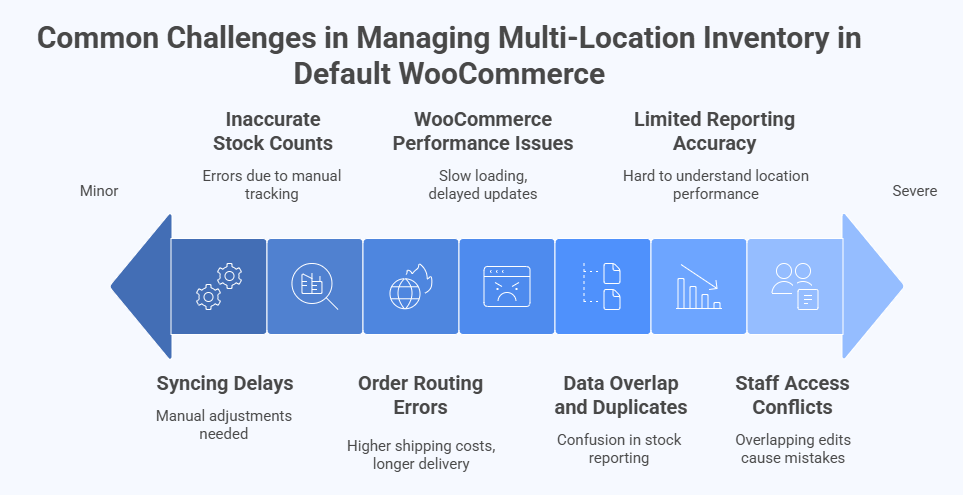
Syncing Delays
WooCommerce doesn’t automatically update stock across multiple storage points. If one product sells in one location, that change isn’t reflected elsewhere without manual adjustments. This lack of synchronization often leads to overselling or confusion about actual stock availability.
Inaccurate Stock Counts
When managing stock manually across different warehouses, errors are inevitable. Since WooCommerce only supports a single stock count, it’s easy to lose track of quantities at each location. These multi-location management challenges in WooCommerce make it difficult to maintain accurate visibility and balance stock effectively across multiple fulfillment centers.
Order Routing Errors
WooCommerce can’t automatically route orders to specific fulfillment locations. Every order is processed from the same source, which can lead to higher shipping costs and longer delivery times, especially when a closer warehouse could have fulfilled the order faster.
WooCommerce Performance Issues
Adding manual stock management processes or external syncing tools can slow down store performance. Without a structured system, databases become overloaded, leading to WooCommerce slow loading and delayed updates during high-traffic periods.
Data Overlap and Duplicates
Using spreadsheets or third-party imports to manage multi-location data often creates duplicate product entries. This overlap causes confusion in stock reporting and increases the risk of sending incorrect products or quantities to customers.
Limited Reporting Accuracy
Default WooCommerce reports show total product sales and stock levels, but not per warehouse or region. This lack of detail makes it hard to understand how each location performs or to forecast future demand accurately.
Staff Access Conflicts
When multiple staff members handle inventory updates, overlapping edits can cause mistakes or overwrite stock values. WooCommerce doesn’t include built-in access control for warehouse-level roles, leading to miscommunication and inconsistent data.
Best Plugins to Manage Multi-Location Inventory Smoothly in WooCommerce
WooCommerce doesn’t include built-in multi-location inventory features, but several plugins can help manage stock across warehouses, stores, and fulfillment centers effectively. These tools automate stock syncing, simplify order routing, and give full visibility over product movement.
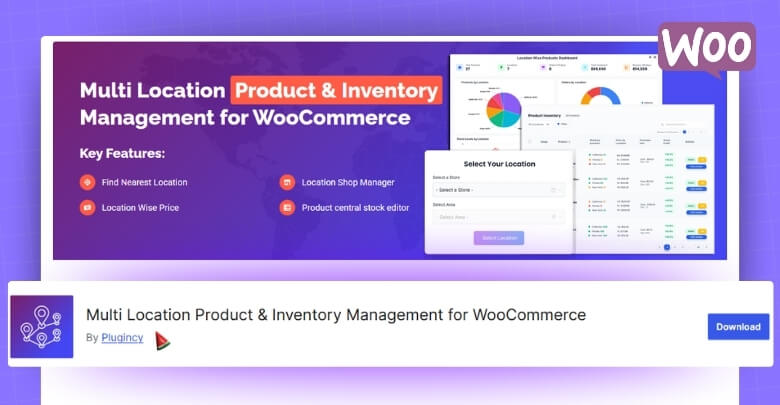
1. Multi Location Product Management for WooCommerce
This plugin provides a complete solution for managing stock across multiple warehouses, outlets, or pickup points. It allows assigning products to specific locations, automating order routing, and tracking inventory in real time. With support for location-based pricing and tax, it keeps WooCommerce efficient and perfectly suited for multi-store management.
2. ATUM Inventory Management for WooCommerce
ATUM offers a powerful inventory dashboard that helps store owners control stock, suppliers, and purchase orders in one place. Its reporting and visual analytics make it easy to monitor performance. While it doesn’t natively separate warehouse stock, extensions can enhance its functionality for more advanced multi-location control.
3. Smart Manager for WooCommerce
Smart Manager brings spreadsheet-style inventory control to WooCommerce. It allows quick bulk editing of product quantities, prices, and SKUs from a single screen. Ideal for stores with large catalogs, it saves time by eliminating repetitive updates and keeps product data organized without needing to open each product page.
4. WooCommerce Stock Manager
WooCommerce Stock Manager is a free, simple tool designed for small to mid-sized stores. It lets users update product stock, SKUs, and prices easily from one interface. The plugin supports CSV import and export, making it convenient for managing basic inventory tasks without extra complexity or heavy setup.
5. Unicommerce WooCommerce Integration
Unicommerce is an enterprise-grade integration that connects WooCommerce with external warehouse and logistics systems. It syncs stock automatically across channels, processes orders from the nearest warehouse, and tracks shipments in real time. This makes it ideal for large-scale businesses managing inventory across multiple regions or online marketplaces.
Things to Consider When Setting Up Multi-Location Inventory Plugins in WooCommerce
Before enabling a multi-location inventory system, it’s important to make sure everything runs smoothly with your WooCommerce setup. These quick tips help you maintain accurate stock, faster performance, and error-free operations across all locations.
- Check Plugin Compatibility: Make sure the plugin version matches your WooCommerce and WordPress setup to avoid sync or checkout errors. Test it on a staging site first.
- Configure Locations Correctly: Add accurate warehouse names and addresses to prevent confusion when routing orders or transferring products.
- Enable Real-Time Stock Sync: Keep automatic stock synchronization active so every sale or return updates instantly across all warehouses.
- Set Fulfillment Priority: Define which location processes orders first based on proximity, stock availability, or shipping cost.
- Review Role Permissions: Restrict inventory editing access to authorized staff to prevent errors and maintain data security.
- Optimize Database and Speed: Use caching and cleanup tools to ensure your WooCommerce store stays fast even with frequent updates.
- Test Before Going Live: Place a few test orders from different regions to verify correct order routing and stock updates.
- Keep Regular Backups: Maintain fresh backups of your store and inventory data to recover quickly in case of plugin issues or update failures.
Frequently Asked Questions About Multi-Location Inventory in WooCommerce
Managing inventory across multiple warehouses can bring up a lot of questions — especially if you’re just starting to expand your WooCommerce store. Below are some of the most common questions store owners ask about setup, functionality, and performance when using multi-location inventory systems.
What Is Multi-Location Inventory Management in WooCommerce?
It’s a system that lets you manage product stock across several warehouses, stores, or fulfillment centers. Each location has its own stock levels, which can be tracked and updated individually to improve order accuracy and delivery efficiency.
Does WooCommerce Have an Inventory Management System for Multiple Locations?
By default, WooCommerce doesn’t include built-in support for managing multiple stock locations. However, you can use third-party plugins to add this functionality and manage inventory per warehouse or region.
How Does Multi-Location Inventory Improve Order Fulfillment?
It allows orders to be automatically routed to the nearest or best-stocked warehouse, reducing shipping times and costs. This helps improve customer satisfaction and overall store efficiency.
Can I Use Multiple Warehouses Without a Plugin?
Technically yes, but it’s inefficient. Managing stock manually across spreadsheets or databases can cause errors and delays. Using a plugin ensures automatic syncing and accurate real-time inventory updates.
Will Multi-Location Inventory Affect My Store’s Speed?
If not optimized, large data syncing can slow down WooCommerce. Regular database cleanup, caching, and using a well-coded plugin can maintain fast performance even with multiple warehouses.
How Do I Track Stock Levels Per Location?
Most multi-location plugins let you view detailed reports showing available quantities, sales, and stock movement for each warehouse separately, giving you full visibility across all locations.
Can I Offer Location-Based Pricing or Shipping?
Yes, advanced inventory tools let you set different prices, shipping zones, and tax rules for specific locations. This flexibility helps target regional customers more effectively.
What Happens If Stock Runs Out in One Location?
The system automatically routes orders to the next available warehouse. If no stock is available, it updates your site to prevent overselling and alerts you to restock that location.
How Often Should I Update My Inventory Settings?
You should review and update your inventory rules after every plugin update or warehouse change. Regular checks ensure your system stays accurate as your business grows.
Is Multi-Location Inventory Suitable for Small Businesses?
Yes. Even small stores benefit from using multi-location systems — especially if they sell in multiple cities or run both online and offline stock. It keeps operations organized and scalable from the start.
Conclusion
So, now you know the answer to one of the most common questions: Does WooCommerce have an inventory management system for multiple locations? While the default setup doesn’t support it, the right plugins and tools make it entirely possible to manage multiple warehouses efficiently from a single dashboard.
By using multi-location management, you can keep track of stock across different regions, reduce fulfillment time, and maintain better order accuracy. It gives your WooCommerce store the flexibility to grow without losing control over operations. Whether you run a small shop or a large network of warehouses, optimizing inventory this way keeps your store faster, smarter, and more reliable for every customer.
