
Dynamic AJAX Product Filters for WooCommerce – No Page Reload, No Waiting
Your shoppers decide in seconds. If they can’t find what they want fast, they leave. Dynamic AJAX Product Filters for WooCommerce changes that — product results update instantly as filters are applied, with zero page reloads. Faster discovery, fewer exits, more sales.
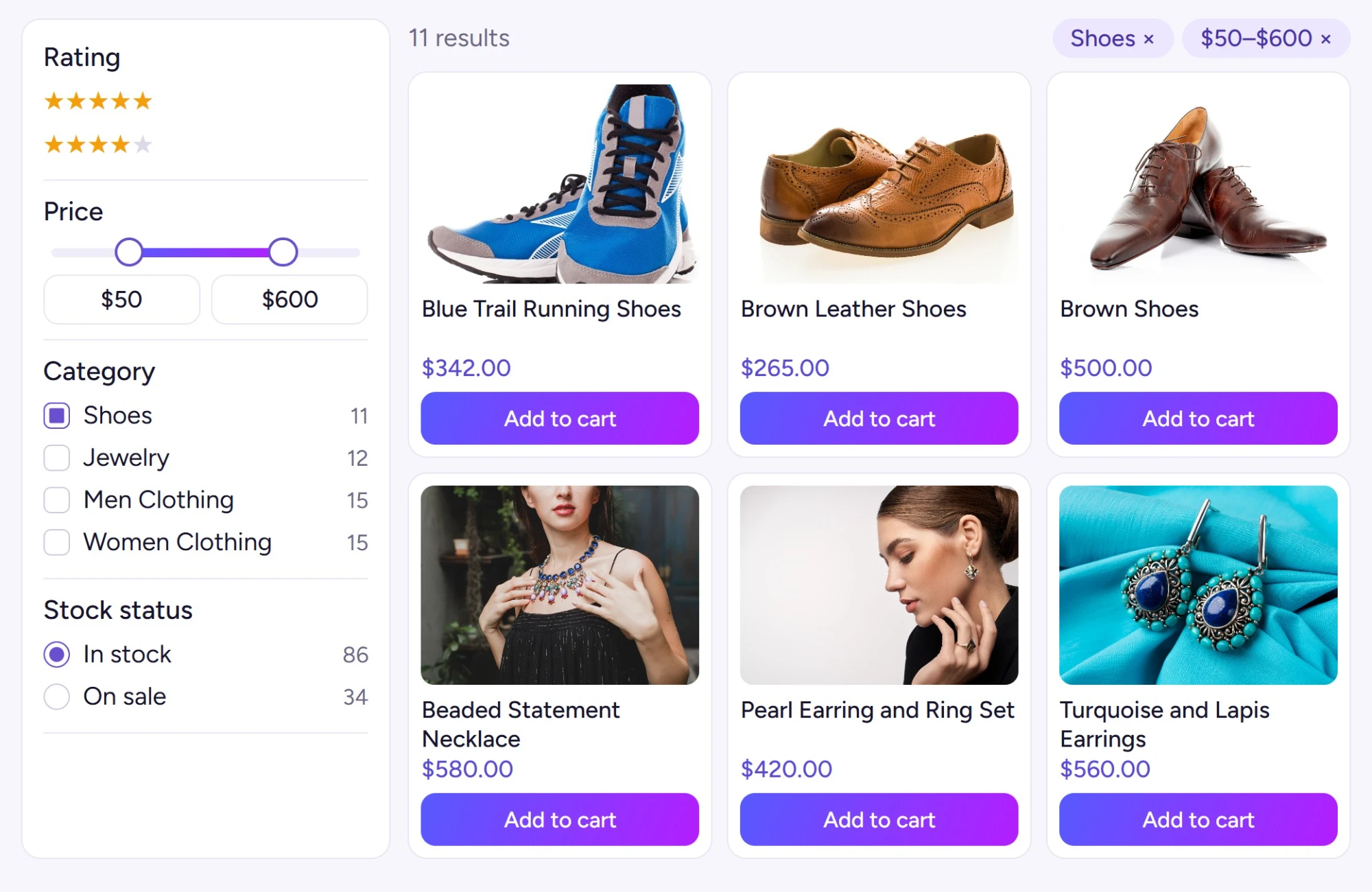












Filter by anything
Shoppers can filter by category, tags, price, rating, stock status, sale status, brand, author, SKU, product ID, discount percentage, dimensions, featured status, product date (today, this week, this month, this year, or a custom date range), custom fields, custom taxonomies, and attributes like color, size, and material. Combine multiple woocommerce product filters at once using AND or OR logic — giving customers precise control over what they see, without ever leaving the page.
Read more
Every filter style
The filter UI supports checkboxes, radio buttons, Select2 dropdowns, price sliders, button checks, and visual swatches — color, image, circular, and borderless styles. Every control is built so shoppers always know exactly what they’ve selected and can remove it in one click.
Read more
SEO and mobile, built in
Built with SEO in mind, the plugin generates crawlable filter URLs — as query strings or clean permalinks — so filtered pages can be indexed by search engines. Four dedicated mobile views keep the ajax filter woocommerce experience smooth on any device: Top View, Collapsible, Drawer, and iOS-style, each with configurable breakpoints. Place filters anywhere using shortcodes, widgets, Gutenberg blocks, or page builders — Elementor, WPBakery, Divi, Beaver Builder, Bricks, Oxygen, and JetEngine all supported.
Read more
Every Feature of Dynamic AJAX Product Filters for WooCommerce
These are the actual features built into the plugin — what each one does, and what it means for your store’s product discovery experience.
Filter by Almost Anything
Shoppers can filter by category, tags, price, rating, attributes (color, size, material), stock status, sale status, SKU, brand, author, discount percentage, dimensions (length, width, height, weight), product date, and custom taxonomies and custom fields. Every filter type is ready to configure from the plugin panel — no custom code, no extra setup.
Real-Time AJAX Filtering
Results refresh instantly as filters are applied — no page reload, no wait. The AJAX engine runs quietly in the background, so shoppers stay focused on browsing. This is what separates advanced AJAX product filters for WooCommerce from basic filter solutions that force a full page refresh every time.
Hide Empty and Unavailable Filter Options
Filter values with zero matching products disappear automatically. Shoppers never hit a dead end. The filter interface stays tight and relevant — only showing options that actually return results.
Dynamic Product Count
Matching product counts update live as each filter is applied or removed. Shoppers always know exactly how many results are waiting before they click — reducing hesitation and abandoned filter sessions.
AND / OR Filter Logic
Control how multiple filters combine. AND logic narrows results strictly — every condition must match. OR logic broadens them — any condition qualifies. Configurable per individual filter, giving store owners precise control over how queries behave across different product types.
SEO-Friendly Filter URLs
Every filtered view gets a clean, crawlable URL. Choose between query strings or permalink-style structures. A dedicated indexing control lets you decide whether filtered URLs are exposed to search engines — useful for managing duplicate content and keeping your crawl budget focused on pages that matter.
Price Sliders and Attribute Range Filters
Interactive sliders let shoppers dial in exact price ranges or filter by numeric attributes like dimensions. Faster and more intuitive than dropdowns, especially for stores with wide price spreads or size-sensitive products.
Rich Filter UI Controls
Choose from checkboxes, radio buttons, searchable Select2 dropdowns, button-style selectors, and visual swatches — color, image, icon, or borderless. Each filter type has its own design settings so the filter form fits your store’s look without touching custom CSS.
Mobile Layout Options
Mobile shoppers get purpose-built layout modes: inline, collapsible, and drawer-based. Breakpoints are configurable. Touch controls are built in. No separate mobile plugin, no workarounds — it works out of the box on phones and tablets.
Works with Major Page Builders
Elementor widgets, Gutenberg blocks, WPBakery, Divi, Beaver Builder, Bricks, Oxygen, and JetEngine are all supported. Place filters in sidebars, top bars, product grids, or anywhere else via shortcode — the plugin fits into how your store is already built.
Chips Widget for Active Filters
A dedicated chips widget shows every filter a shopper currently has selected. They can remove any single filter with one click — without reopening the full panel. Keeps the filtering process fast and transparent.
Custom Loading Animations
Pick from built-in loader styles — or supply your own HTML and CSS — to display while filtered results load. Shoppers get clear visual feedback during every AJAX request instead of staring at a frozen screen.
Ready Layout Templates
Pre-built filter form templates cut down initial setup time. Pick a layout that fits your store, adjust what you need, and go live — without constructing the filter structure from scratch every time.
Browser History Navigation
Every filtered state is pushed to browser history as shoppers refine results. Back and forward buttons work correctly. Filtered URLs can be shared or bookmarked — so shoppers can return to exactly where they left off.
Broad Theme Compatibility
Auto-injected CSS classes handle layout alignment across most WooCommerce themes. For stores where the default product grid selector needs adjustment, a built-in selector management tool handles the fix — without editing theme files.
AJAX Pagination and Sorting
Shoppers can page through results and re-sort products without losing their active filters or triggering a full reload. Filter state stays intact across every interaction — pagination, sorting, and browsing all work together cleanly.
Every Filter Layout Your WooCommerce Store Needs — All Built Into One Plugin
Your store has its own look. Your filters should match it. Dynamic AJAX Product Filters for WooCommerce gives you full control over how filters appear — from compact dropdowns to rich visual swatches — so the browsing experience feels native to your brand, not tacked on. Pick from multiple ready-to-use filter layouts, each one tied into the real-time AJAX engine that updates results instantly without a page reload. Whether you’re selling apparel, electronics, or handmade goods, there’s a layout that fits your catalog and your customers.
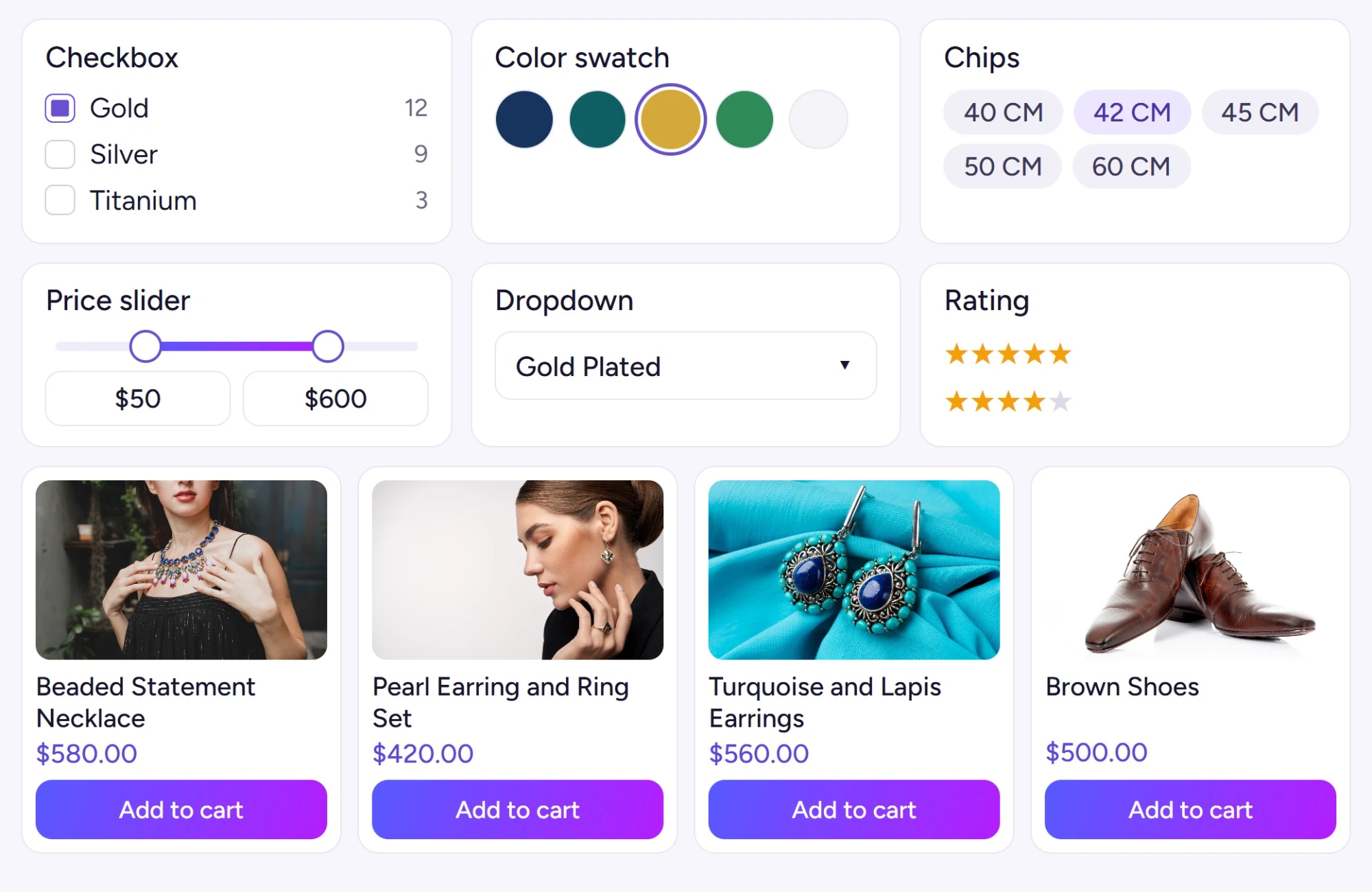
Filter Layout Options for Every WooCommerce Store Style
No two stores look the same — and your filters shouldn’t either. With Dynamic AJAX Product Filters for WooCommerce, you control exactly how filters are displayed, styled, and structured across your storefront. Choose from a full range of UI controls: Select2 dropdowns, checkboxes, radio buttons, price sliders, button checks, and visual swatches — including image, color, borderless, and circular styles. Whether your store runs a minimal layout or a visually rich product grid, there’s a filter style that fits without touching a single line of code.
Every layout is built to feel natural for shoppers. Filters don’t just look right — they respond instantly via AJAX, adapt to your brand’s visual style, and work across desktop and mobile without extra configuration.
Available Filter Layout Options
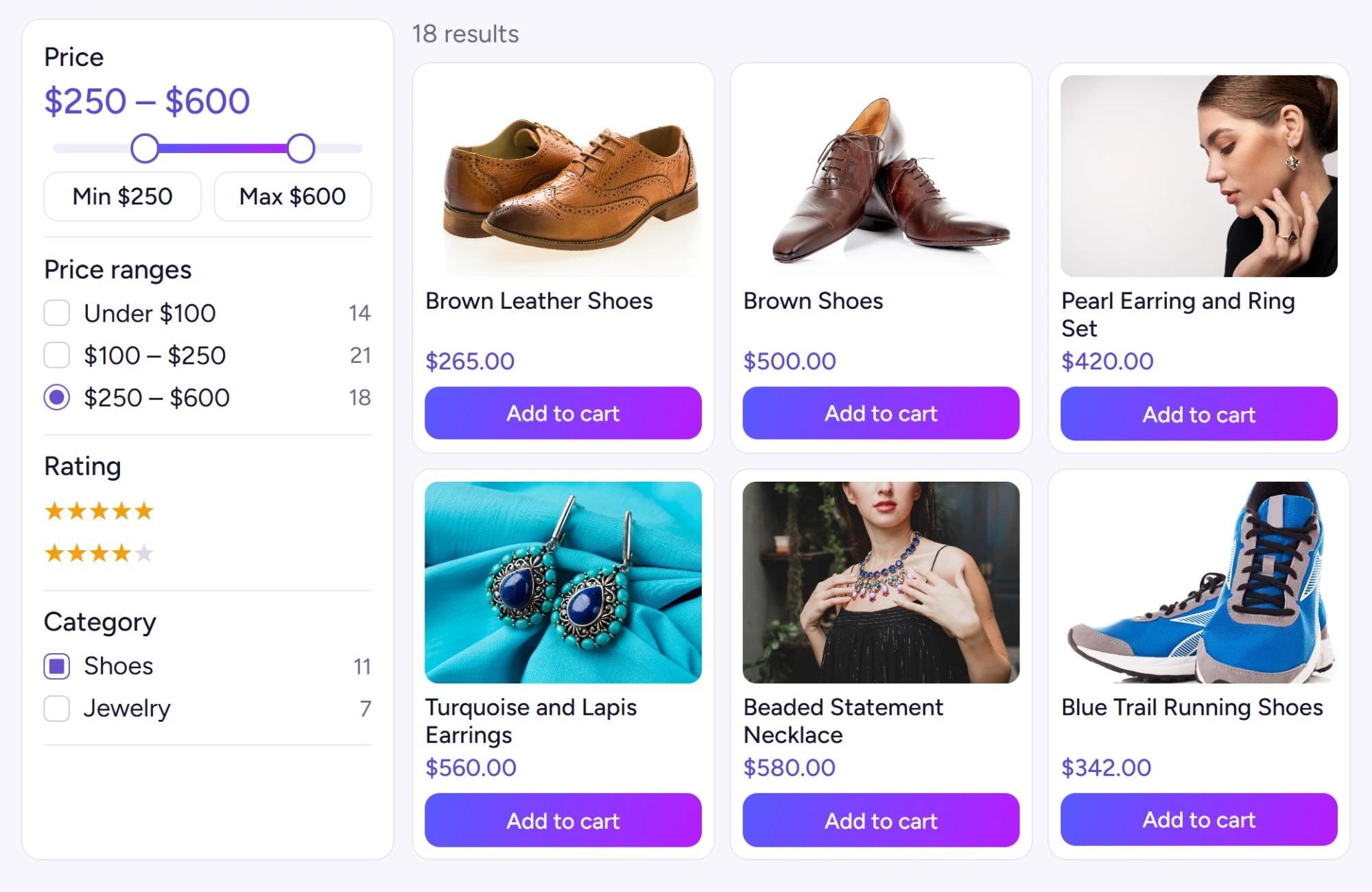
Price, Rating & Attribute Sliders — Precise Filtering with Real-Time AJAX Updates
Shoppers rarely know the exact product they want — they know a range. The Dynamic AJAX Product Filters for WooCommerce plugin gives them draggable sliders to set exact price ranges, filter by dimension values, or narrow down by discount percentage. No guessing. No page reloads. Just results that match what they actually need, using a reliable woocommerce price filter plugin built for speed.
Every slider interaction triggers an instant AJAX update. This woocommerce ajax product filter plugin recalculates and displays matching products on the fly — desktop or mobile — without interrupting the browsing flow.
Key Feature Highlights
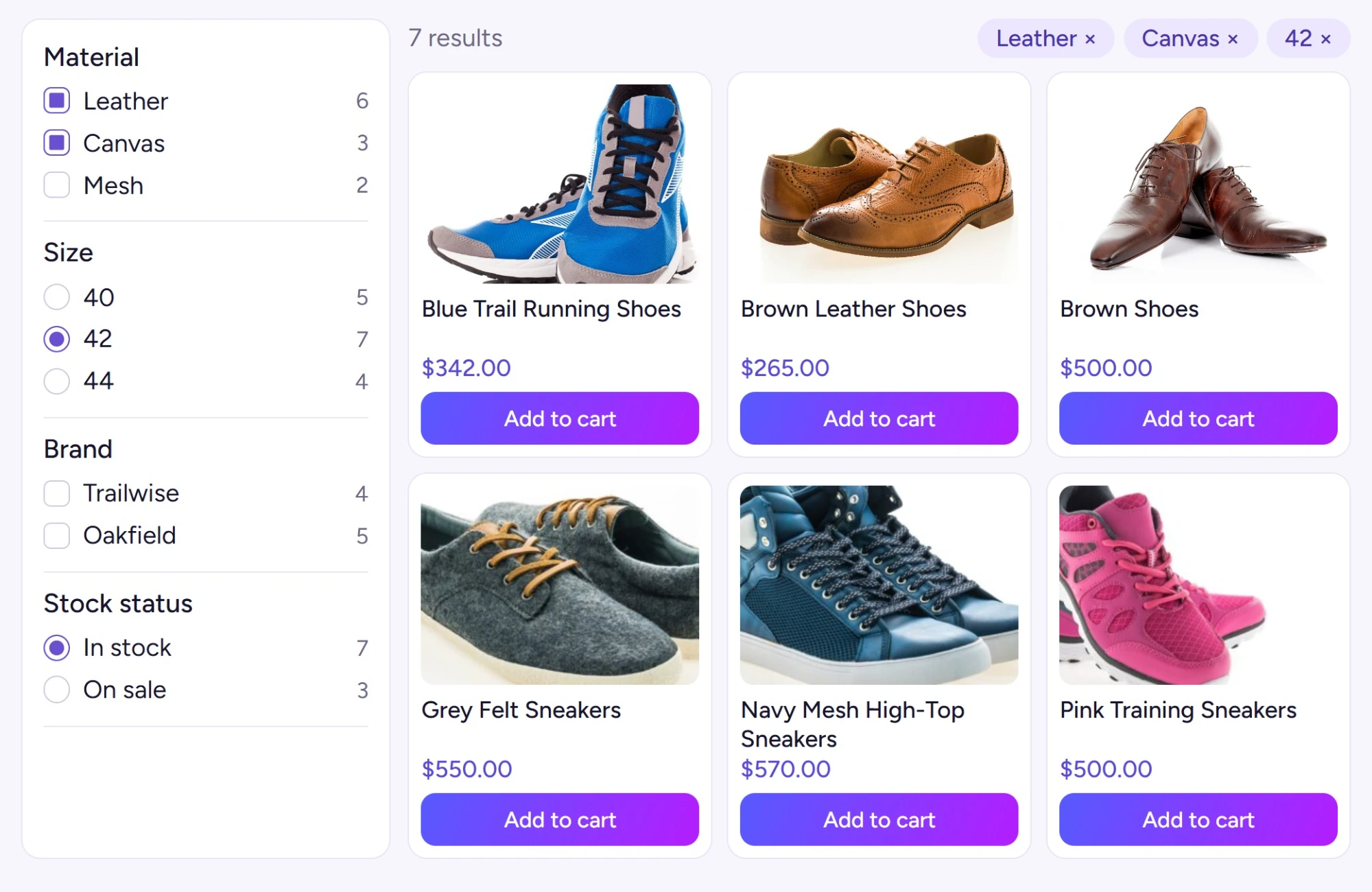
Multi-Select Checkbox Filters for Faster, More Accurate WooCommerce Product Discovery
Shoppers rarely know exactly what they want from a single attribute. With the checkbox filter in AJAX Product Filters for WooCommerce, customers can select multiple values at once — size, color, material, or any custom attribute — and see matching products update instantly, without a page reload.
Every selection triggers a live AJAX response, so the product grid reflects the filtered results right away. No waiting. No confusion. A dedicated Chips Widget shows all currently active filter selections in one place, making it easy for shoppers to track what they’ve applied and remove individual filters without starting over.
Checkbox filters come in several display styles to match your store’s design and product type:
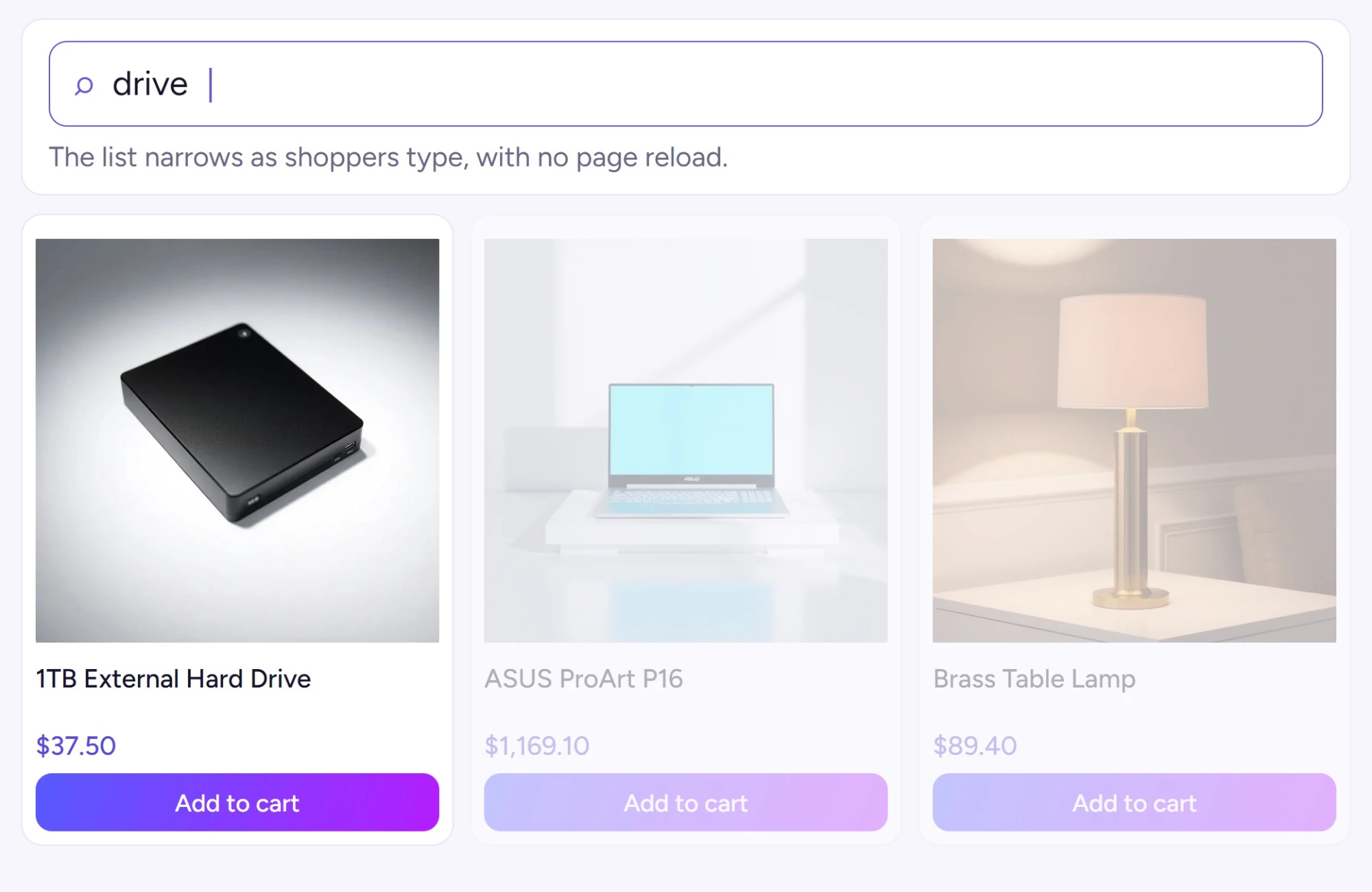
Smart Search with Auto-Suggestions — Find It Before They Give Up
Filters are perfect when shoppers know how to narrow down. But when they already know what they want, they type. Dynamic AJAX Product Filters adds an intelligent keyword search that works alongside your filters — surfacing matching products the moment they start typing.
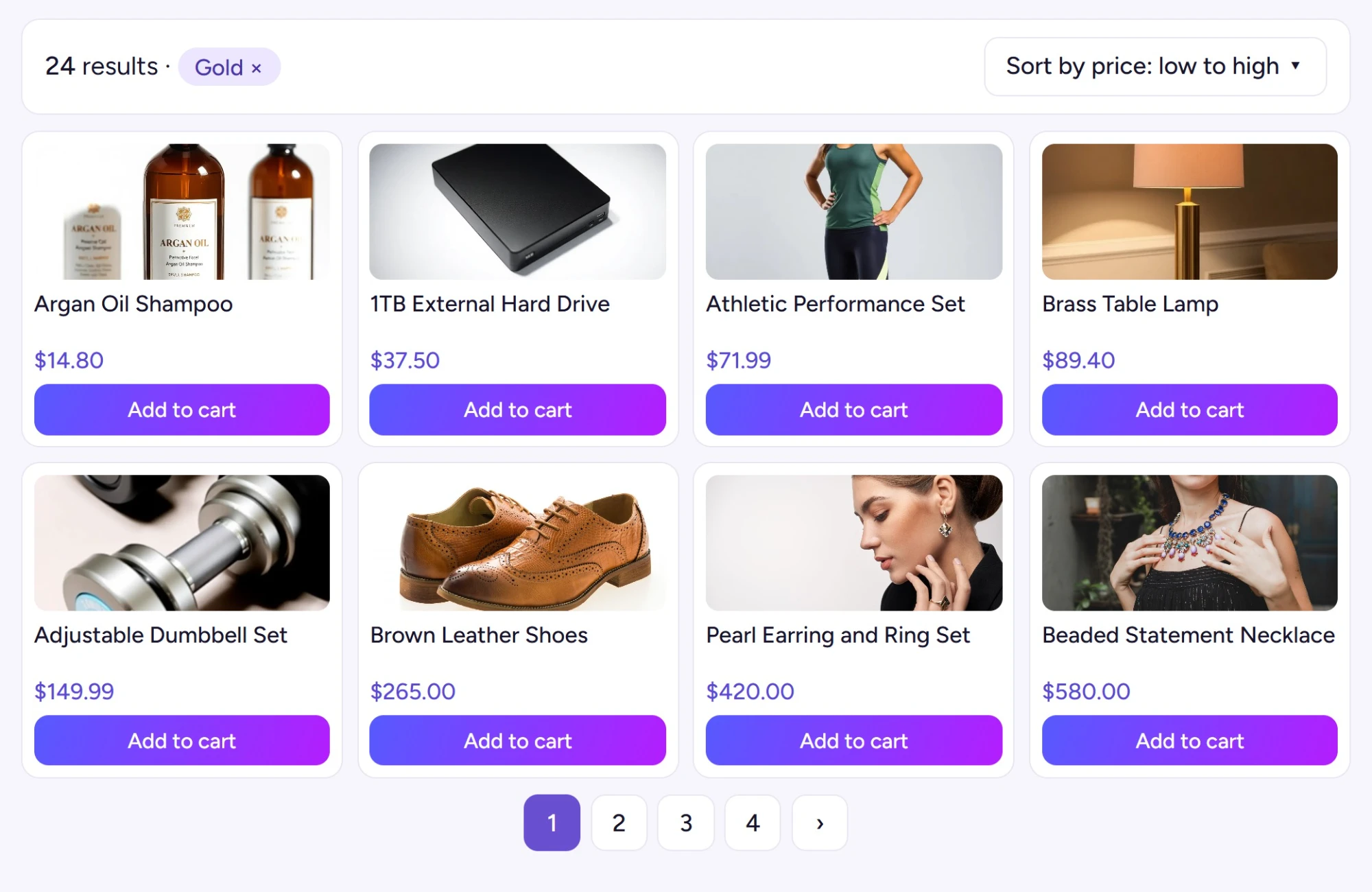
AJAX Pagination & Sorting — Without Losing a Single Filter
Here’s where most WooCommerce filter plugins quietly fail: a shopper applies three filters, scrolls, clicks page 2 — and the page reloads with every filter gone. They start over, or they leave. Dynamic AJAX Product Filters keeps pagination and sorting fully AJAX-powered, so filter state survives every click.
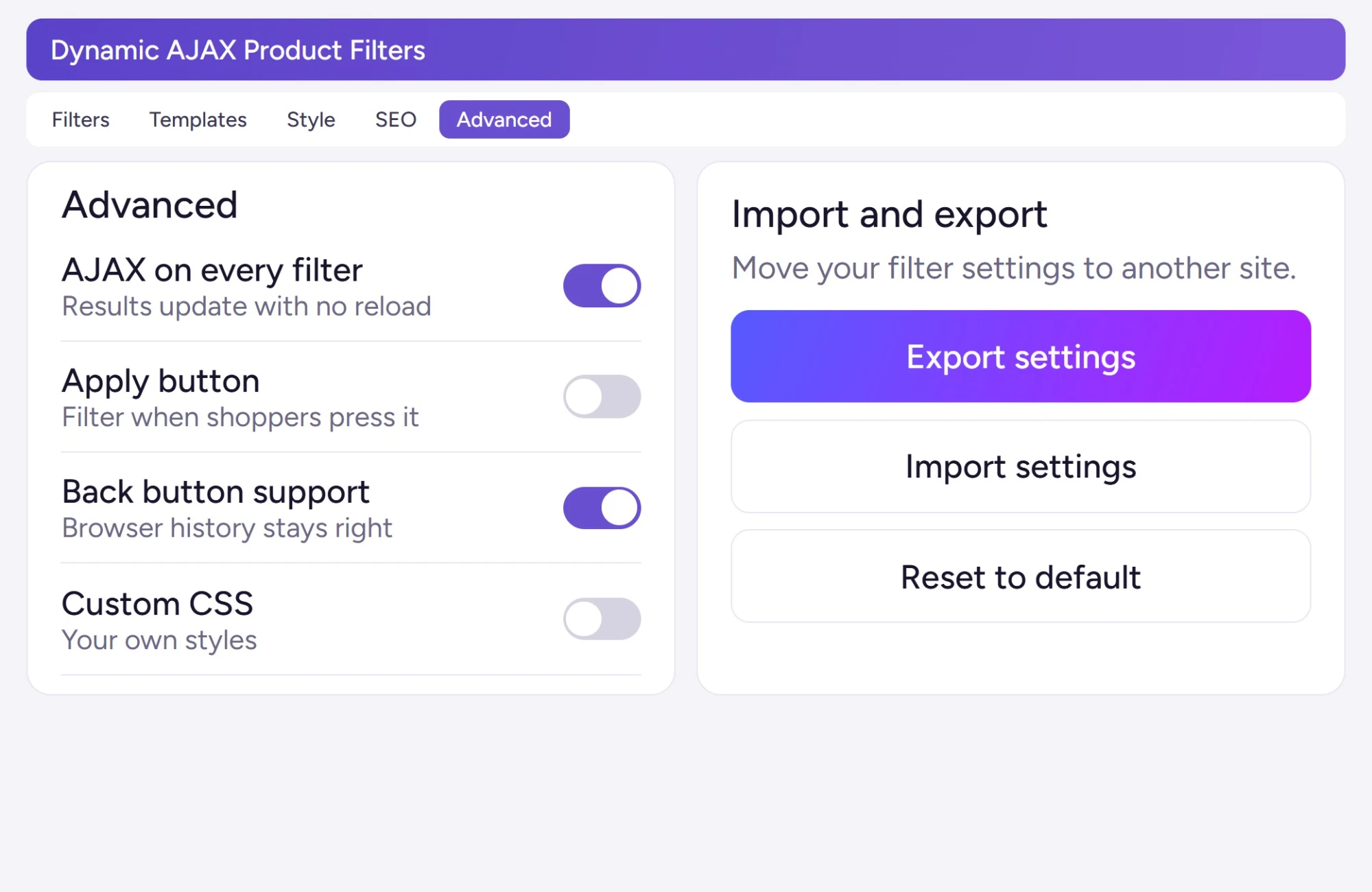
Configure Once, Deploy Everywhere — Settings Import & Export
If you build one store, you configure filters once. If you build twenty, you configure them twenty times — unless your plugin lets you export the whole setup and drop it into the next site. Dynamic AJAX Product Filters does exactly that, which is why agencies and developers keep reaching for it.
Price, stock, categories, custom fields: every filter type.
Dynamic AJAX Product Filters for WooCommerce turns every kind of product data into a filter: WooCommerce fields, custom fields, custom taxonomies and dates. Shoppers combine them freely and the grid updates instantly, without a reload.
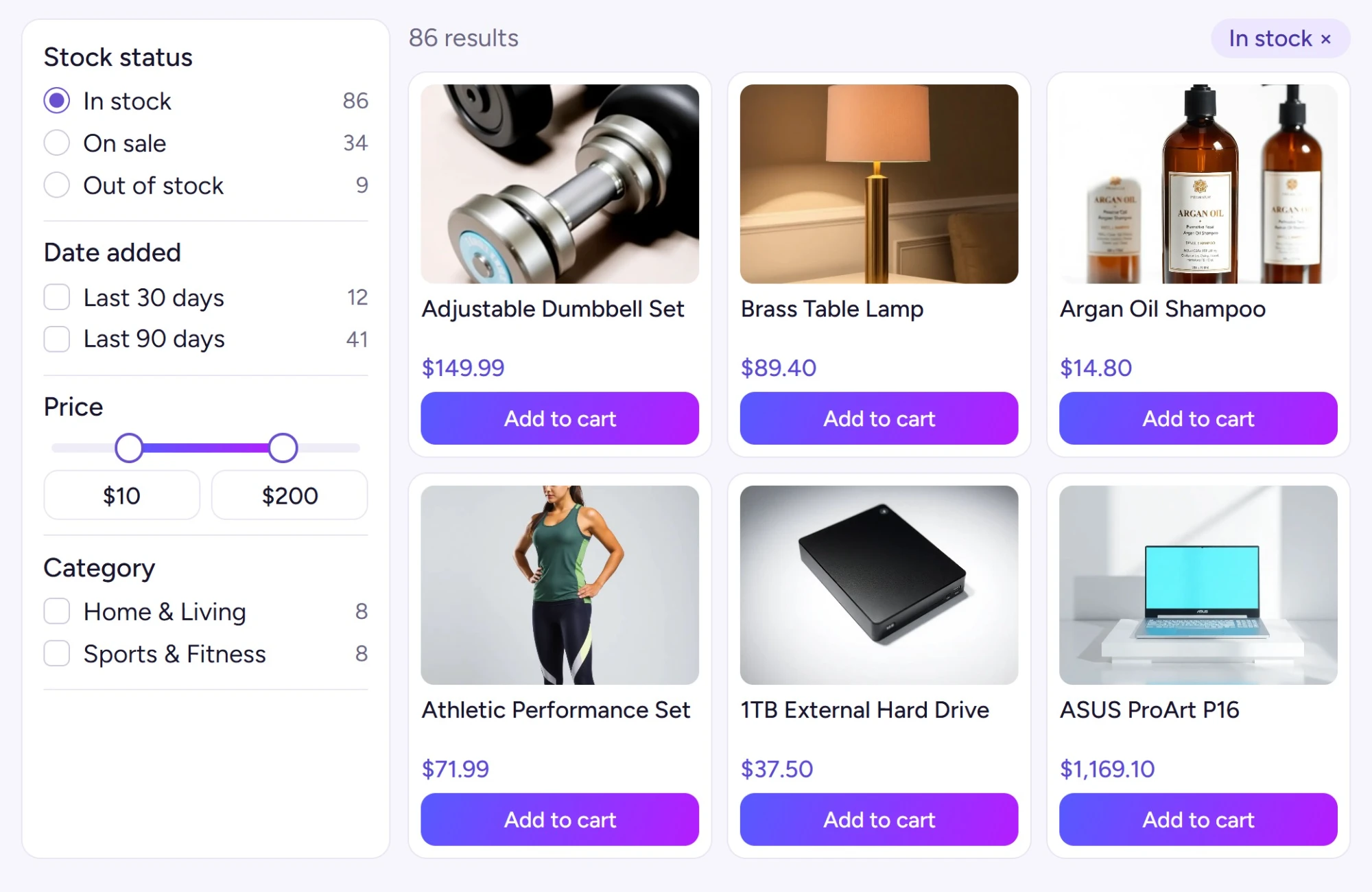
WooCommerce Product Filters by Price, Stock, Date & More
Your customers shouldn’t have to scroll through pages of products that don’t fit what they want. With Dynamic AJAX Product Filters for WooCommerce, shoppers narrow down results instantly — by price, size, stock status, date, custom fields, and more — without a single page reload. Every filter update happens live, so shoppers stay focused and move faster toward checkout.
This is more than a basic filter plugin. It’s an advanced AJAX product filters system for WooCommerce built to handle every filtering scenario a real store actually faces — from simple category browsing to complex multi-parameter queries across thousands of products.
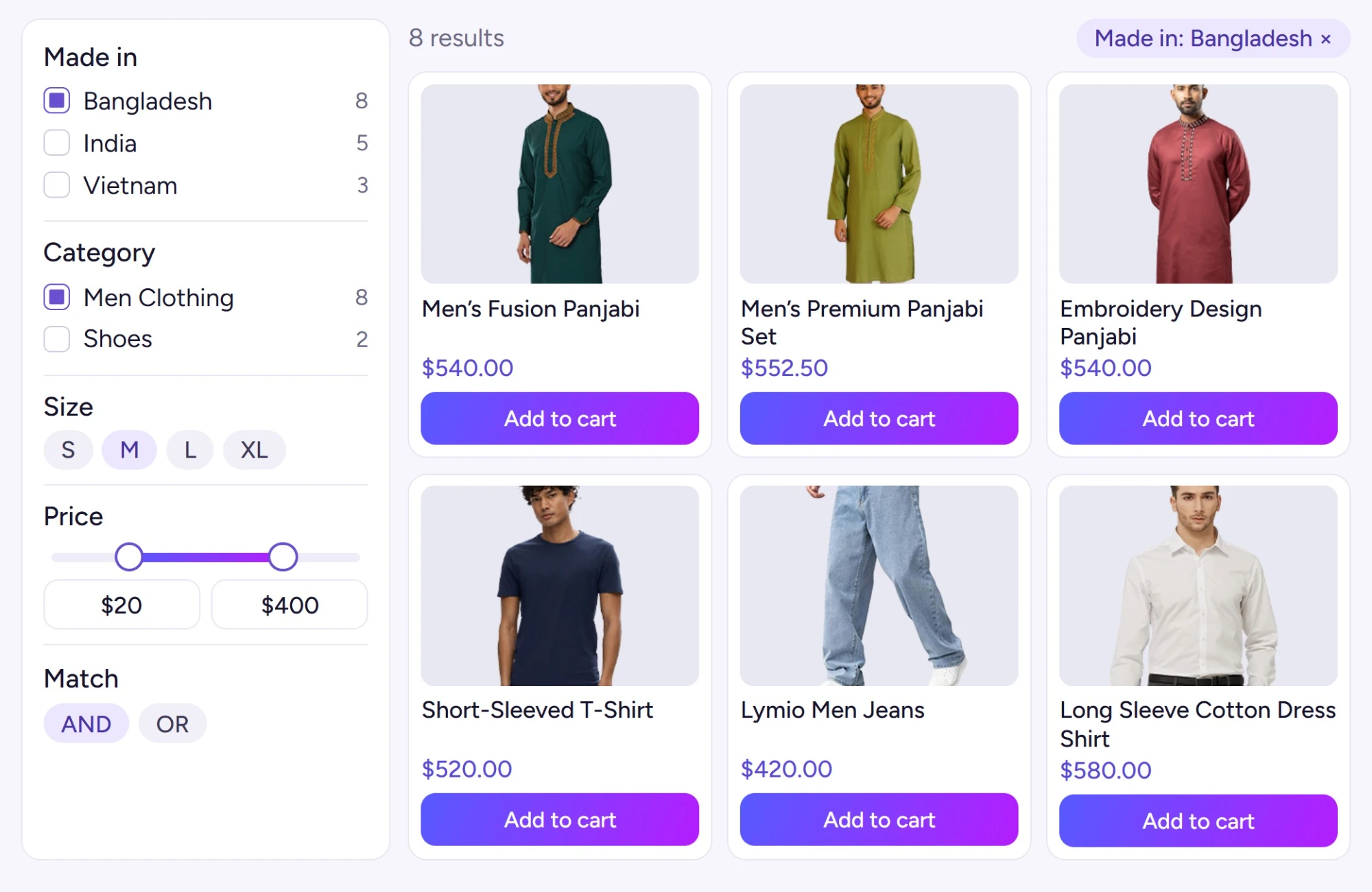
Filter by Categories, Attributes & Custom Fields — Instant AJAX Results
Shoppers don’t browse by catalog structure — they know what they want and expect to find it fast. Dynamic AJAX Product Filters for WooCommerce gives them exactly that: filters built on WooCommerce categories, product attributes, tags, brands, authors, SKUs, and custom meta fields — all working together at once, updating results instantly via AJAX with zero page reload.
The filter logic handles more than basic matching. Stores can set AND/OR query relations across multiple active filters, so results respond precisely to what each shopper selects. Whether the catalog has hundreds of variations or tight niche metadata, product discovery stays clean, fast, and accurate every time.
This works equally well as a woocommerce category filter plugin for large catalogs — keeping collections organized, browsable, and easy to navigate. Shoppers spend less time hunting through pages and more time finding products worth buying.
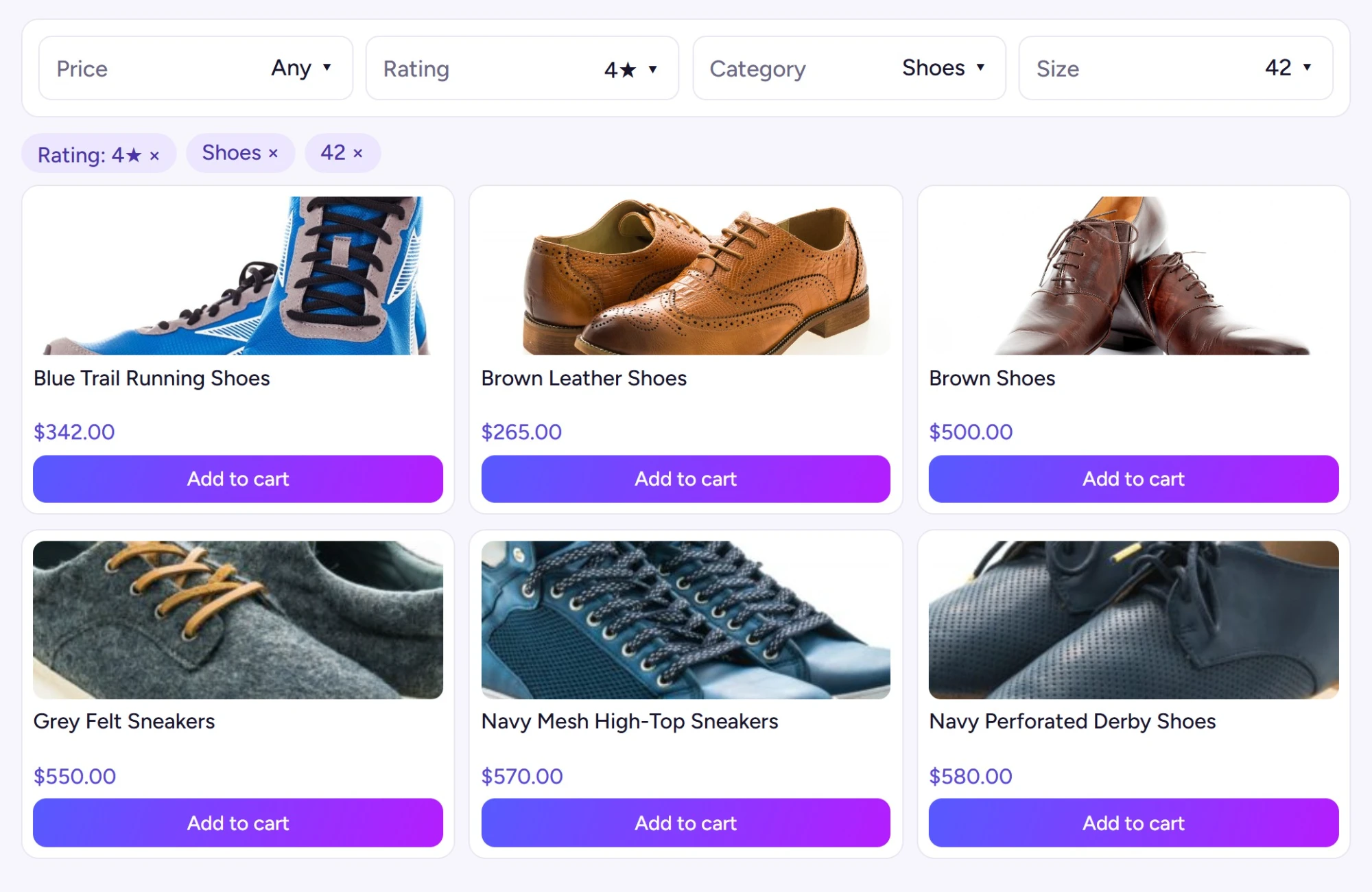
Every Filter Type Your WooCommerce Store Needs – Price, Brand, Attributes & More
Give your customers the tools to find exactly what they want — without scrolling through irrelevant results. Filter by price, category, rating, brand, stock status, sale status, attributes, custom fields, custom taxonomies, SKU, discount, date, and more. Every filter updates results instantly via AJAX — no page reload, no waiting.
Whether you run a 50-product boutique or a 50,000-product catalog with complex metadata and multi-taxonomy structures, the plugin handles it. Variable products, custom post meta, advanced attribute setups — all covered out of the box.
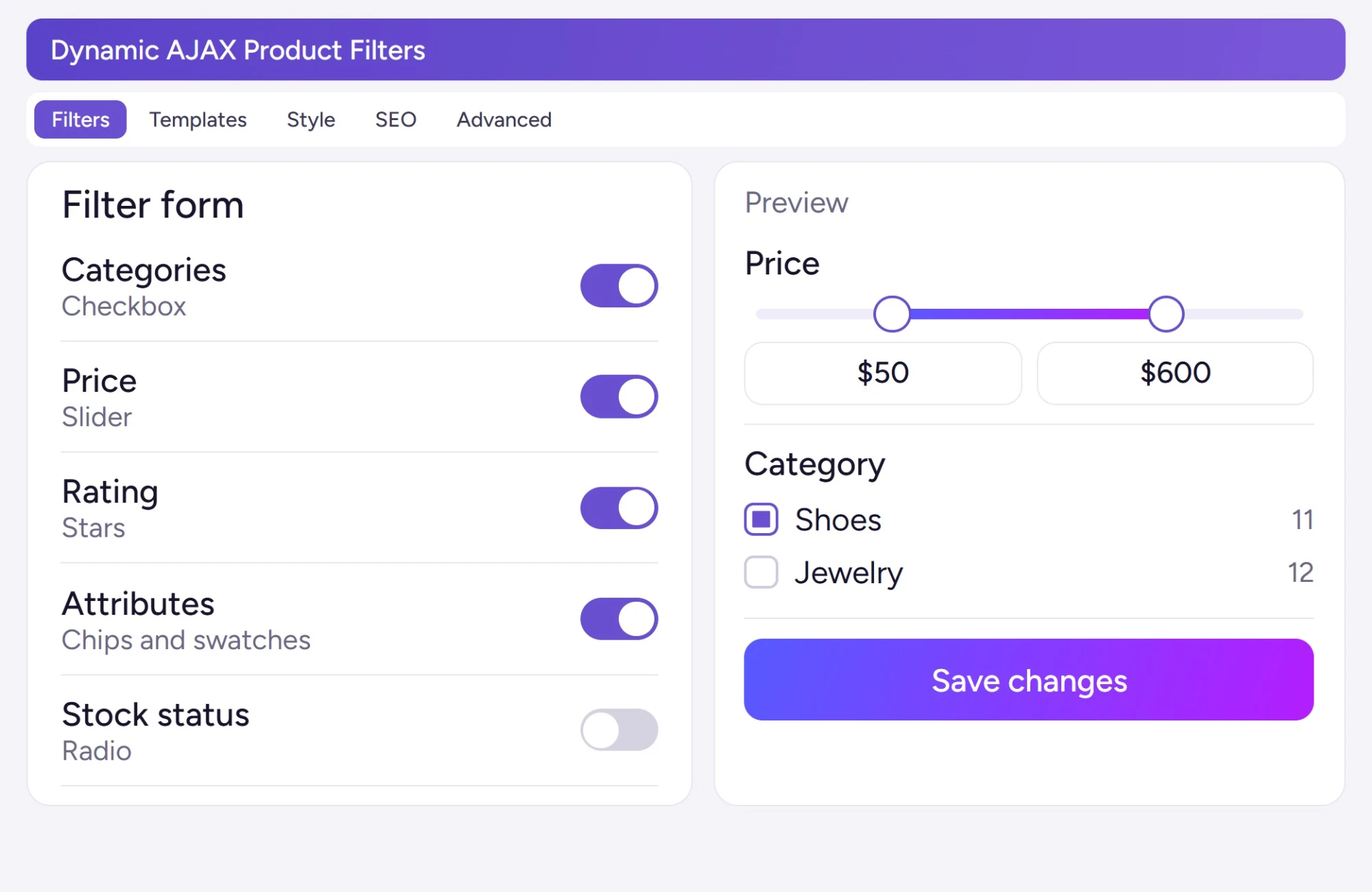
Set Up WooCommerce AJAX Product Filters in Minutes — No Code, No Developer
Getting Dynamic AJAX Product Filters for WooCommerce running on your store takes minutes, not hours. Install, activate, and you land inside a clean filter form builder — no developer needed, no setup wizard to sit through. From there, create a filter form, pick your filter types, and place them anywhere using a shortcode, widget, Gutenberg block, or Elementor widget.
Every filter is configurable from one place. Choose the display style — checkbox, radio button, select dropdown, price slider, button check, or visual swatch (color, image, borderless, circular). Control the layout, set default values, tweak display text, and decide whether filters apply instantly on click or only after the customer hits Apply. Changes reflect on your storefront right away, so you always see exactly what your customers see.
Download the Plugin
Start by downloading Dynamic AJAX Product Filters for WooCommerce. The free version covers all core filtering needs — category, attribute, tag, price, rating, stock status, and more. The Pro version adds custom taxonomy filtering, custom field filters, advanced swatches, Elementor Pro query integration, WooCommerce Blocks support, and deeper SEO controls.
Install & Activate the Plugin
Install & Activate the Plugin
Upload the plugin to your WordPress site and activate — takes under a minute. No coding, no configuration file to touch. Once active, the filter form builder appears in your dashboard and you can start building immediately.
Apply Filters
Apply Filters on Your Store
Place filters anywhere on your site using the plugincy_filters shortcode, a widget, a Gutenberg block, or directly inside Elementor. Pick whichever fits your layout — all placement methods work out of the box with no extra setup. Learn More
Filtered pages that Google can crawl and rank.
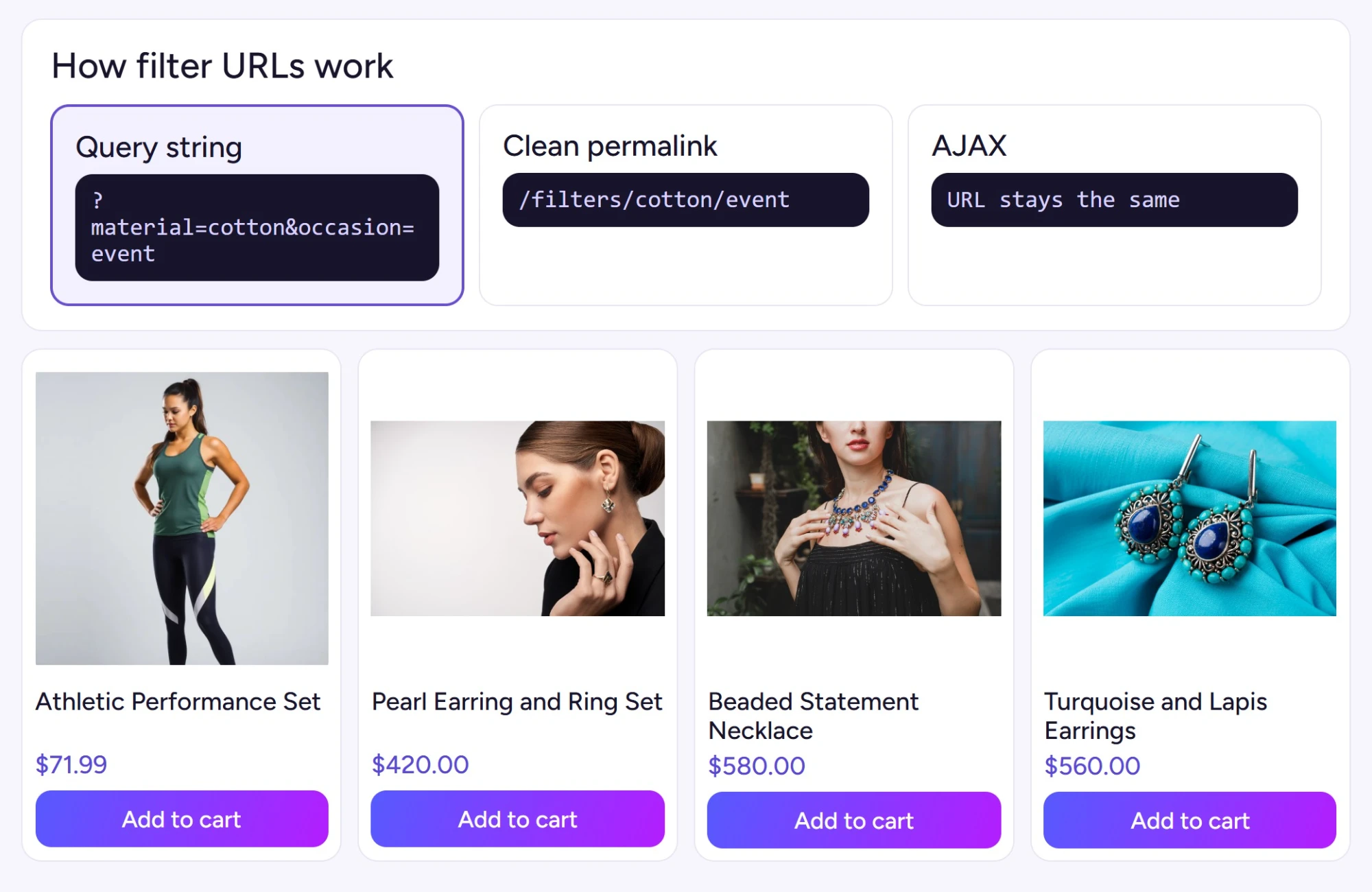
Filtered results are the pages shoppers actually search for. This WooCommerce AJAX product filter plugin gives each one a real address, its own title and your indexing rules, so those pages can bring in search traffic instead of turning into duplicate content.
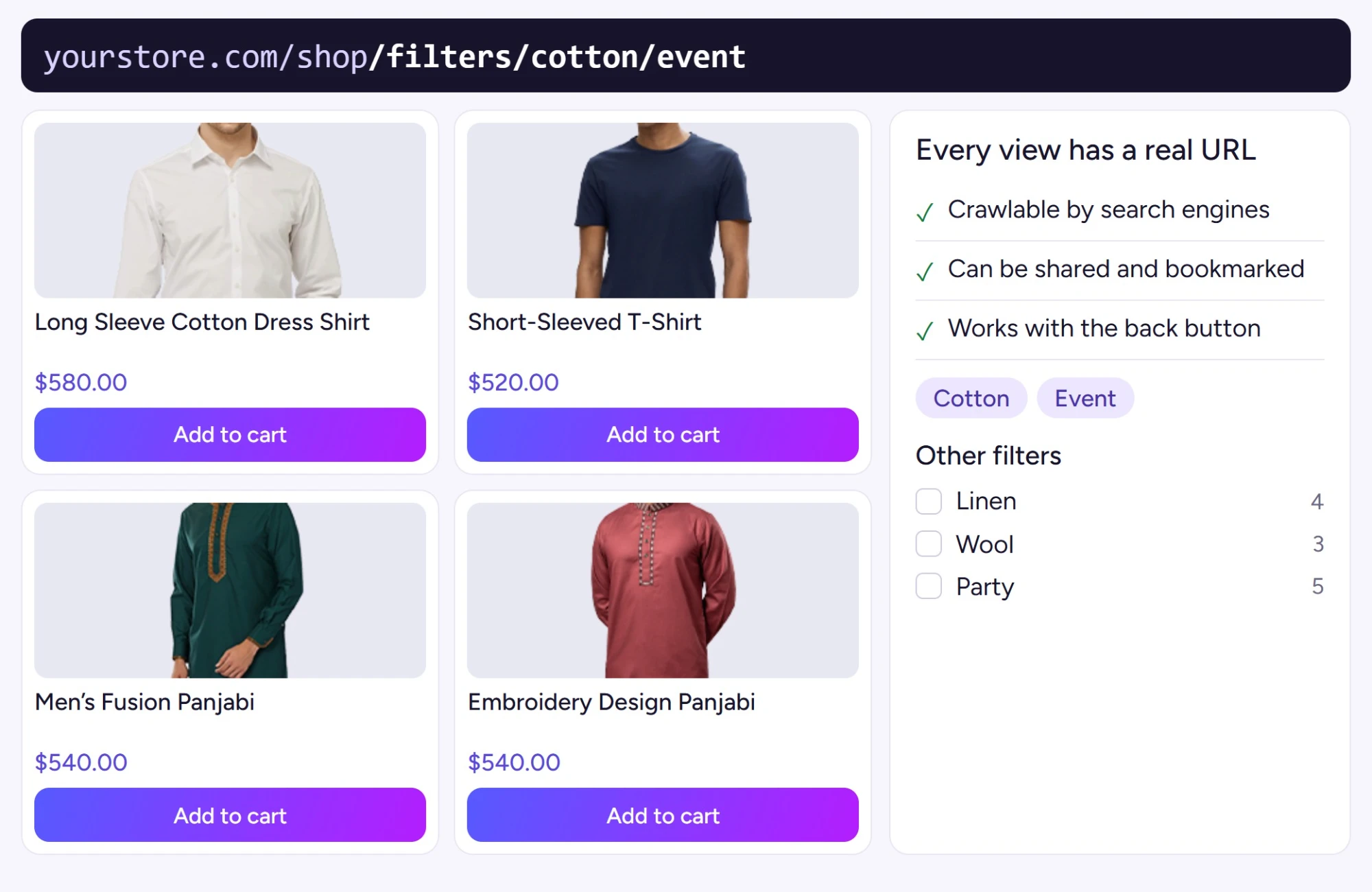
SEO-Friendly Filter URLs Search Engines Can Crawl, Index, and Rank
Your homepage ranks — but what about your filtered pages? Shoppers searching for “red running shoes under $80” or “organic cotton t-shirts size M” are looking for exactly the kind of pages your filters create. This WooCommerce category filter plugin gives you direct control over how filtered URLs are built, so each filtered result page can be crawled, indexed, and ranked — not blocked or ignored. Clean, keyword-rich URLs also make filtered links easier to share, click, and trust. Whether you run a 50-product niche store or a 10,000-SKU catalog, the right URL structure depends on your indexing strategy, site speed, and how your customers browse. Choose your method — no code required.
Control Which Filter URLs Google Indexes — And Which It Doesn’t
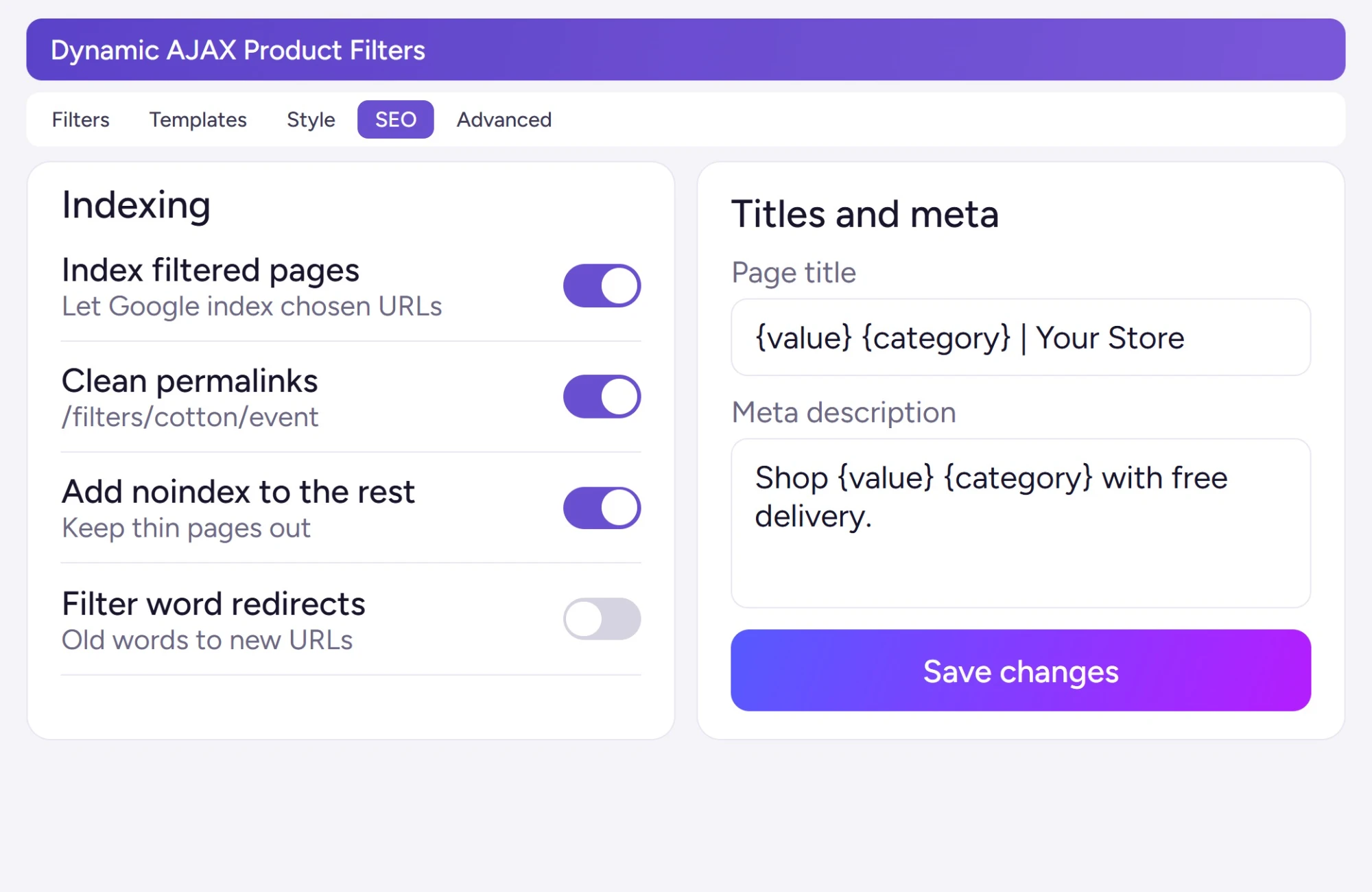
Not every filtered URL should end up in Google’s index. Some filter combinations capture real long-tail search traffic — others just bloat your index with low-value pages that hurt more than they help. With Dynamic AJAX Product Filters for WooCommerce, you decide exactly which filtered URLs get indexed and which ones don’t, so your SEO stays clean without sacrificing product visibility.
Most WooCommerce dynamic product filters hand this decision to Google — this one hands it to you. Whether you’re trying to rank specific filter combinations for long-tail queries or block duplicate filtered pages from cluttering your index, the plugin’s indexing controls let you build a strategy that actually matches how your store needs to perform in search.
Looks like your store. Sits wherever you need it.
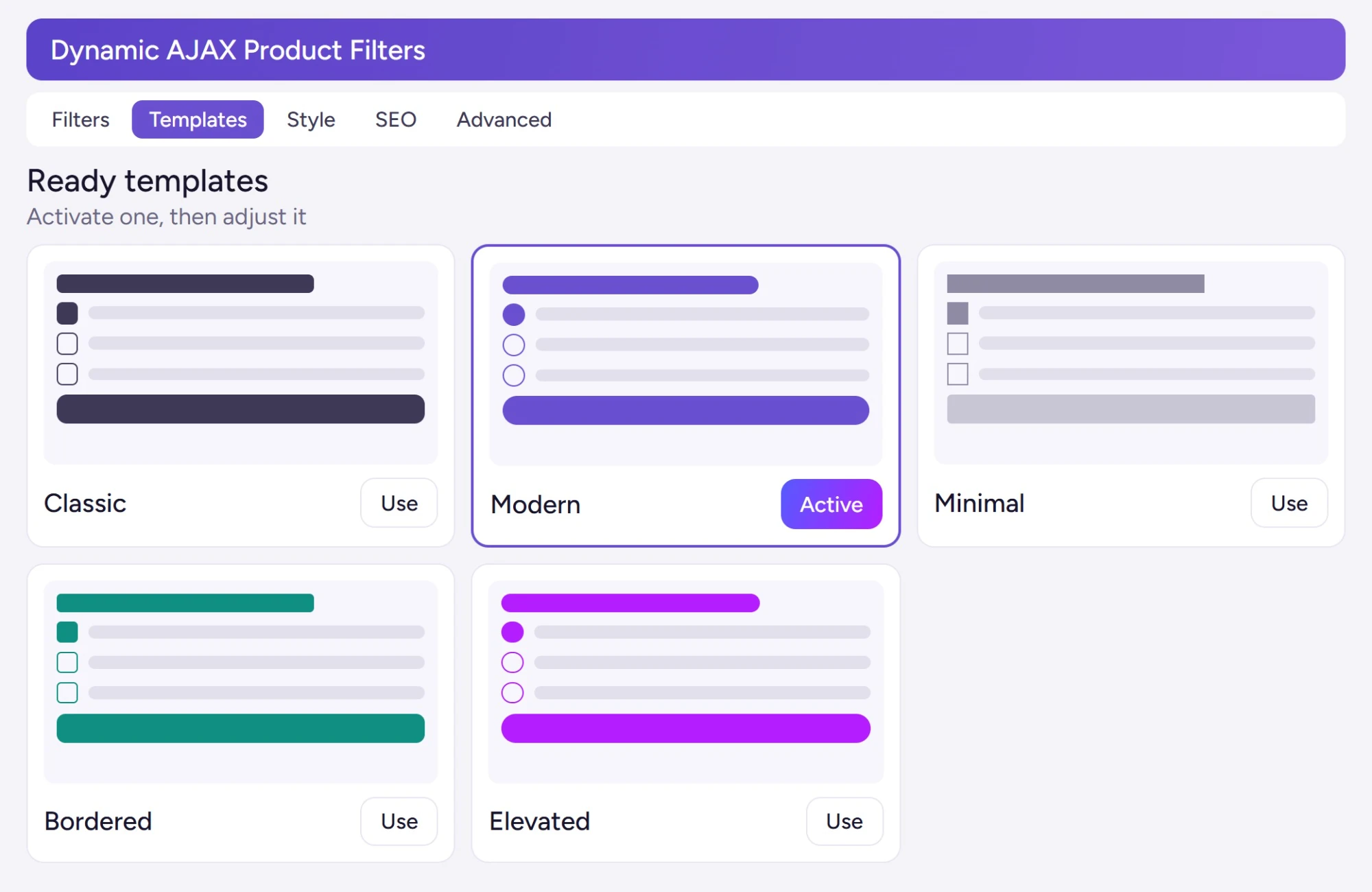
With these advanced AJAX product filters for WooCommerce, you pick a template, set your colors and place the filters with a shortcode, widget, block or page builder, so they look like part of your store on desktop and on phones.
Dynamic AJAX Product Filters for WooCommerce — Every Layout, Every Page, Full Control
Most filter plugins make you choose between good looks and solid performance. Dynamic AJAX Product Filters for WooCommerce gives you both. Filters respond instantly without page reloads, stay consistent as your catalog scales, and give shoppers a clean, intuitive way to find exactly what they want — right when they want it.
The UI puts real control in your hands. Choose from a wide range of filter display styles and mix them across filter types to match how your store is built and how your customers actually shop.
These advanced AJAX product filters for WooCommerce are built for real stores: large catalogs, varied layouts, and customers who won’t wait. Every display option, every visibility rule, every loading state is configurable — no code required.
Show the Right Filters on Every Category, Collection & Archive Page
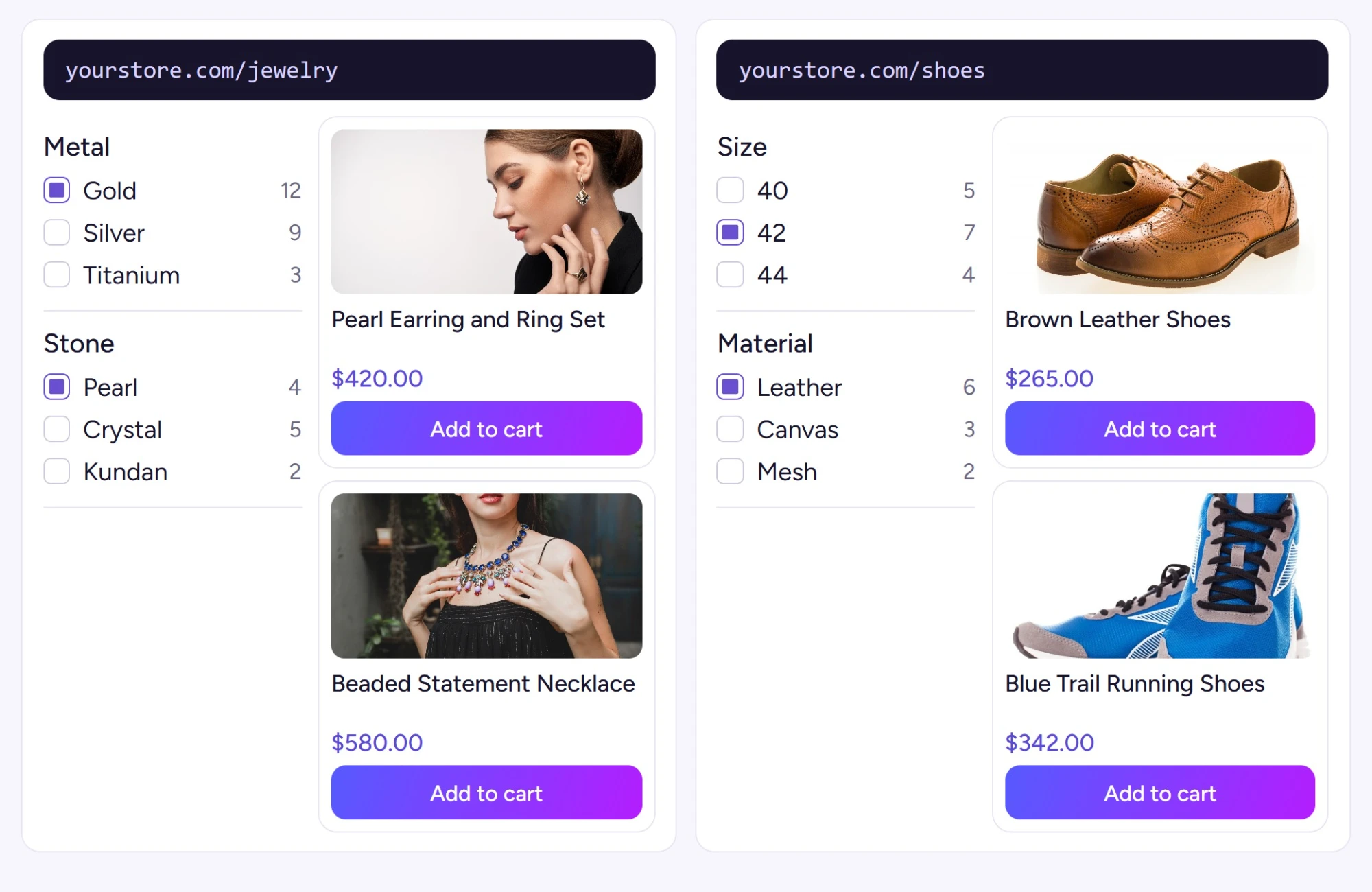
Different pages sell different products — shoppers on a “Men’s Shoes” page shouldn’t see filters built for electronics. With advanced AJAX Product Filters for WooCommerce by Plugincy, you assign a dedicated filter form to each category page, collection, tag archive, or custom product listing. Every shopper sees filters that actually match what’s in front of them — not a generic list that creates confusion and dead ends.
Each filter form drops into a left sidebar, right sidebar, top bar, or collapsible panel — using a shortcode, WordPress widget, Gutenberg block, or Elementor widget. It’s full WooCommerce dynamic product filters control, placed exactly where it makes sense, without editing a single line of theme code.
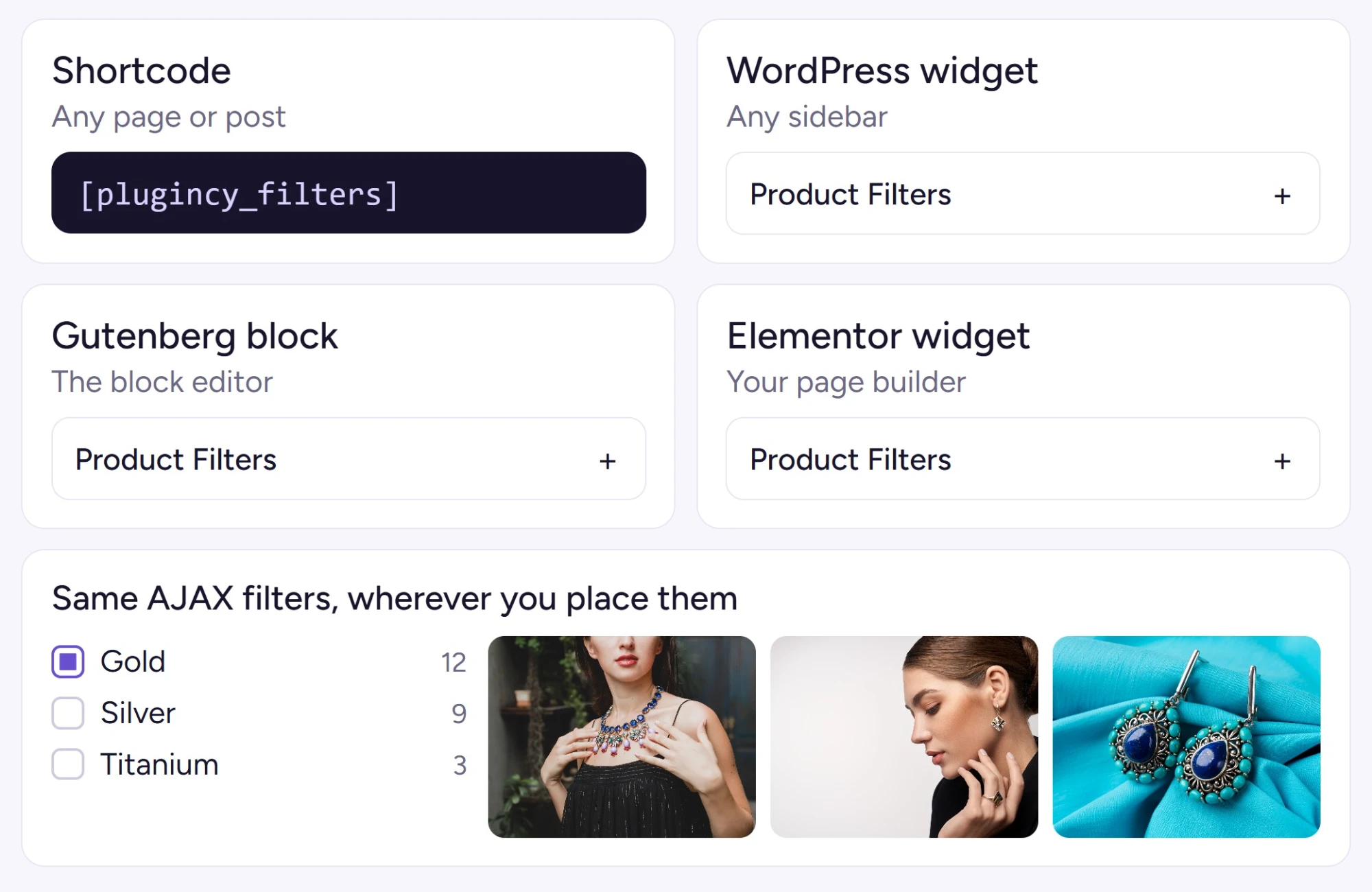
Place Your Filters Anywhere – Sidebar, Shortcode, or Page Builder
With advanced ajax product filters for woocommerce by plugincy, you choose where your filters appear — not your theme, not your layout, not anyone else. Add filters to sidebars, category pages, product listings, or any custom section without touching your existing setup. The plugin slots into your store exactly as it is today.
It works as a fully flexible WooCommerce AJAX product filter solution that connects with the tools you already rely on. Gutenberg blocks, Elementor widgets, widget-ready areas, and shortcodes — all supported out of the box. A built-in Shortcode Builder makes placement faster and cleaner, with no manual coding required.
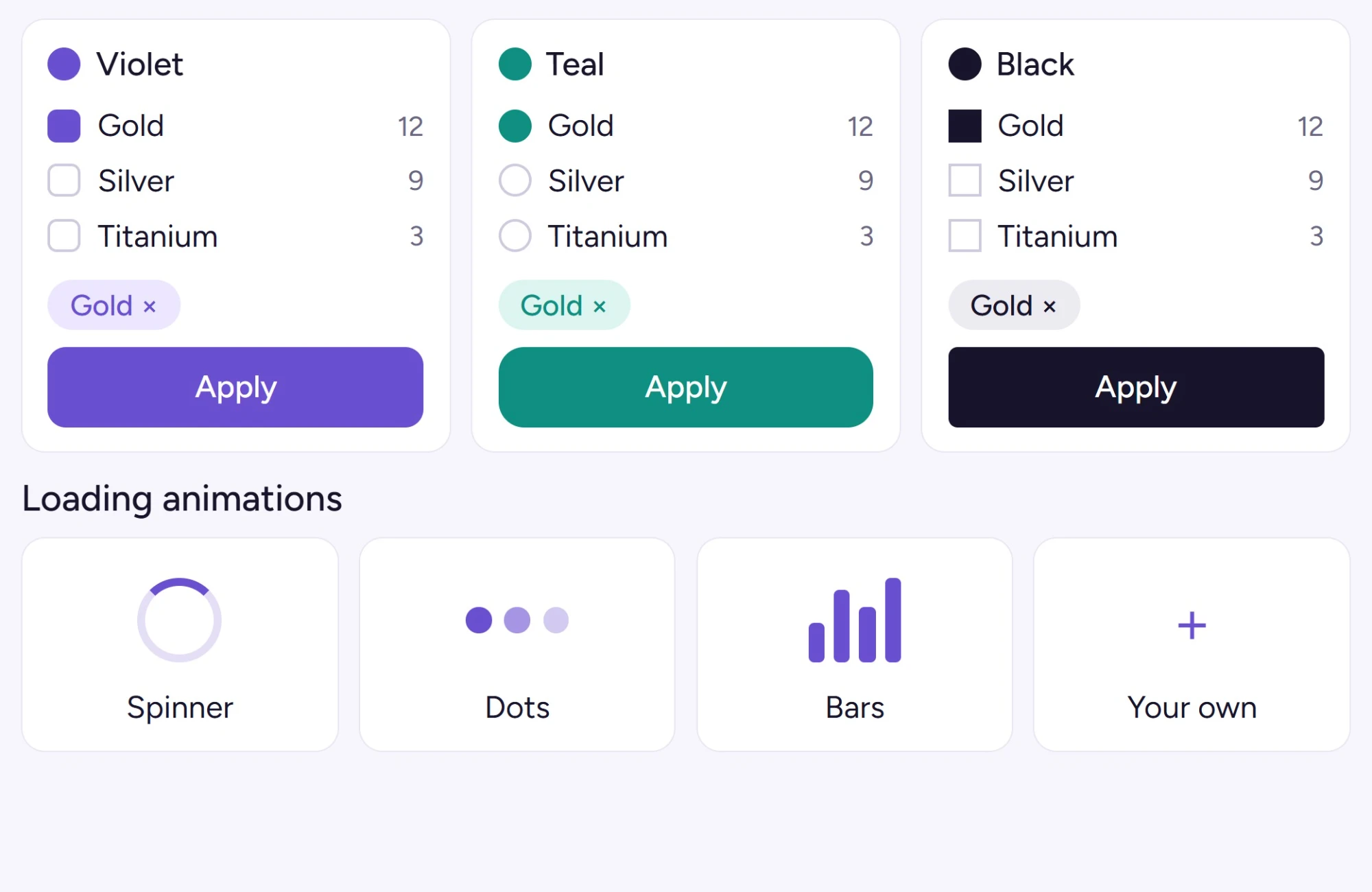
Match Your Theme Exactly — Filter Colors, Loaders & Visual Styles
Your filter area should look like it belongs — not like a third-party widget dropped in from somewhere else. Dynamic AJAX Product Filters for WooCommerce includes built-in design controls so you can adjust filter colors, loading behavior, and visual styles to match your theme exactly. No custom code required to get started.
All settings live inside the Filter Design & Styling panel, right alongside the loading effect configuration. Change a color, pick a loader animation, hit save — and the filter area updates immediately in the admin preview. What you see is what your customers see.
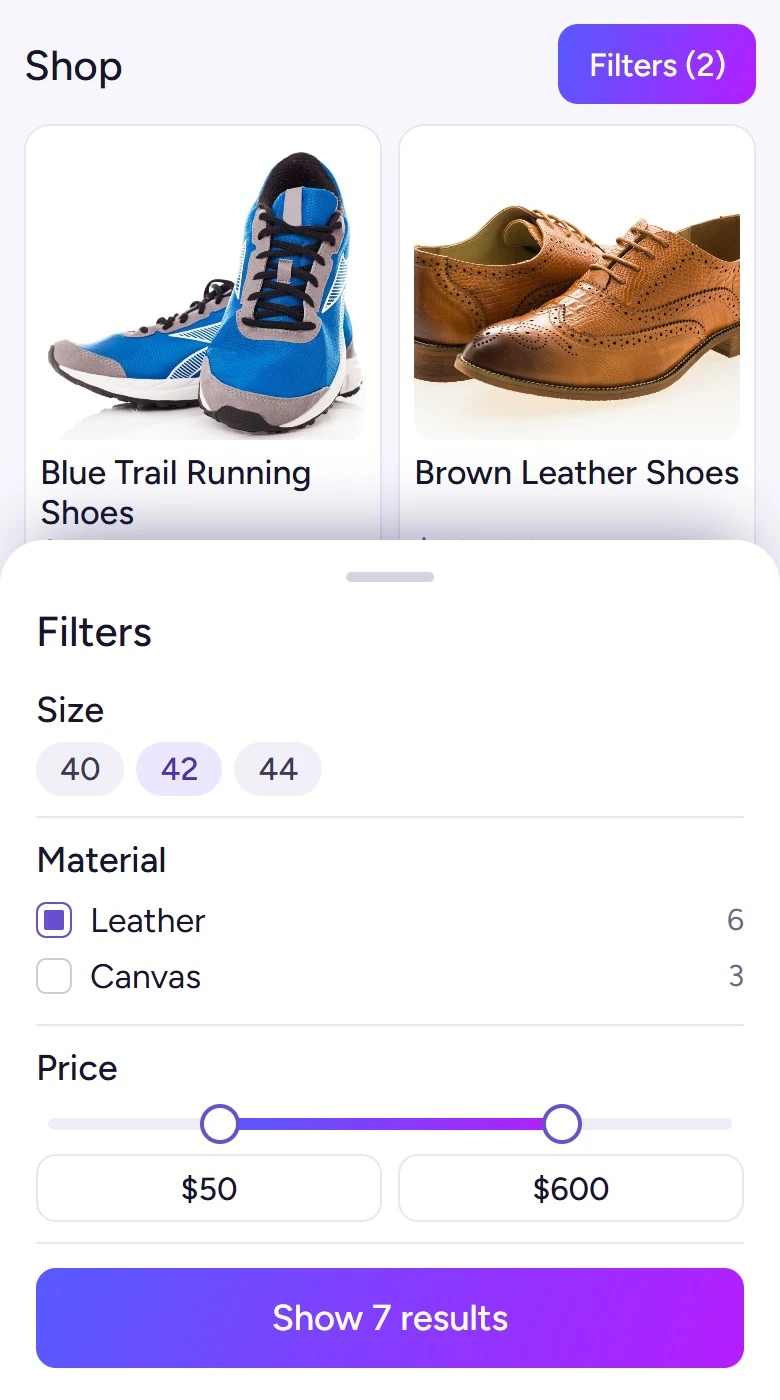
Mobile Filter Experience — Built for Thumbs, Not Just Screens
More than half your shoppers browse on a phone — and a desktop sidebar squeezed into 375 pixels kills conversions. Dynamic AJAX Product Filters gives you four purpose-built mobile presentation modes, so filtering feels native on mobile instead of an afterthought.
Works with Any WooCommerce Theme — Zero Conflicts
Dynamic AJAX Product Filters for WooCommerce works with any WooCommerce theme — free, premium, or fully custom-built. Filters slot in cleanly without breaking your layout, shifting your grid, or forcing you to write a single line of CSS to make things look right.
The plugin uses auto-injected CSS classes that align with your active theme’s structure automatically. Classic themes, block themes, and the WooCommerce Block editor are all supported — so whether you built your store two years ago or yesterday, filters just work. No layout conflicts after updates, no design surprises.
Store owners get a consistent, on-brand filter appearance across every page — without chasing down theme conflicts every time a plugin or theme updates.
What WooCommerce Store Owners Are Saying?
These are real WooCommerce store owners — not cherry-picked quotes. See why so many call Dynamic AJAX Product Filters the best WooCommerce product filter plugin they’ve used: faster product discovery, fewer abandoned sessions, and filters that actually work the way shoppers expect.
Real-time filtering keeps customers engaged instead of waiting. It fits perfectly with my theme, and dropping filters anywhere with shortcodes took minutes — not hours.
Shopping on my store got noticeably easier. Customers find what they want instantly without clicking through pages. The support team helped me fine-tune everything — fast and genuinely helpful.
Attribute filters, price sliders, and rating options all fire instantly — no lag, no page reload. I ran it on a large catalog with heavy traffic and performance held solid the entire time.
Collapsible filters keep the sidebar clean, and searchable dropdowns make long attribute lists easy to navigate. My customers browse without getting overwhelmed — exactly what I needed.
I switched after other filter plugins kept breaking my theme. This one integrates cleanly — AJAX filtering works every time, collapsible panels tidy up long lists, and my customers actually noticed the difference. That says it all.
Dynamic AJAX Filters changed how my store feels to shop. Smooth real-time filtering across price, attributes, and categories — conversions went up, and the shopping experience finally matches what customers expect.
Fantastic plugin. Price, rating, category filtering — all without a page reload. Works perfectly with any theme, setup took no time, and the support team is genuinely responsive. If you run a WooCommerce store, just install it.
The speed is there, but what I appreciate most is control — I can enable or disable filters per page. That kind of flexibility matters when you’re managing a store with different collection types.
Fast, stable, and built for developers who know what they’re doing. Handles large WooCommerce catalogs with multiple attributes without breaking a sweat.
Installs clean, manages easily, and the dynamic filtering is smooth from day one. SEO-friendly URLs and shortcode placement are genuine bonuses — not afterthoughts. Exactly right for improving WooCommerce usability.
Clean design, reliable performance, responsive support. The filters work right out of the box — no debugging, no workarounds, no frustration.
As a developer, conflicts are my biggest fear with any filter plugin. This one plays nicely with Elementor, respects custom themes, and doesn’t drag down page speed. The caching option in Pro has been a lifesaver for stores with big inventories.
Setup was quick and the shortcode flexibility meant I could drop filters exactly where I needed them — no theme hacking required.
Filters work instantly and integrate smoothly. Collapsible sections reduce clutter, and customers like the faster shopping experience.
Support deserves a mention. I had a small CSS issue, and the reply included a direct snippet to fix it. That’s the kind of practical support developers need. Reliable plugin, reliable people, a rare combination in WooCommerce tools.
Customers can narrow results by filters like attributes or ratings quickly, and the mobile drawer option keeps things intuitive.
Free vs PRO: What’s the Difference?
Not sure which version fits your store? Here’s a straight comparison. The free version of Dynamic AJAX Product Filters for WooCommerce covers the core filtering experience — categories, attributes, tags, price range, rating, keyword search, stock status, and sale status. For most stores starting out, that’s enough to get product discovery working well.
The PRO version is built for stores that need more. You get additional filter types: Brands, Custom Taxonomy, Dimensions (length, width, height, weight), SKU, Discount percentage, Product Date ranges, Custom Fields, and Featured Products. PRO also adds Form Templates for reusable filter configs, Import/Export for moving settings between sites, Developer Hooks for deeper customization, Browser History navigation so back/forward buttons work with filters, and advanced Mobile Sidebar controls for a proper mobile filtering experience.
If you’re running a larger catalog, selling across multiple categories, or need filters that match specific store requirements — PRO gives you the control to build exactly that.
| Features | PRO$39 – $229Get Started | FREE Get Started |
|---|---|---|
| AJAX product filtering | ✓ | ✓ |
| Filter by product categories | ✓ | ✓ |
| Filter by product attributes | ✓ | ✓ |
| Filter by product tags | ✓ | ✓ |
| Price range filter | ✓ | ✓ |
| Rating filter | ✓ | ✓ |
| Product search filter | ✓ | ✓ |
| Dynamic filter option updates | ✓ | ✓ |
| Basic loader / loading indicator | ✓ | ✓ |
| Query string filter URLs | ✓ | ✓ |
| AJAX-only filter mode | ✓ | ✓ |
| Product selector setting | ✓ | ✓ |
| Pagination selector setting | ✓ | ✓ |
| Product shortcode selector setting | ✓ | ✓ |
Show More (151 more rows)
| Remove out-of-stock products | ✓ | ✓ |
| Basic indexable filter link / anchor option | ✓ | ✓ |
| Custom product template option | ✓ | ✓ |
| Custom product template code editor | ✓ | ✓ |
| Product template placeholders | ✓ | ✓ |
| Product link placeholder | ✓ | ✓ |
| Product title placeholder | ✓ | ✓ |
| Product image placeholder | ✓ | ✓ |
| Product price placeholder | ✓ | ✓ |
| Product excerpt placeholder | ✓ | ✓ |
| Product category placeholder | ✓ | ✓ |
| Product SKU placeholder | ✓ | ✓ |
| Product stock placeholder | ✓ | ✓ |
| Add-to-cart URL placeholder | ✓ | ✓ |
| Product ID placeholder | ✓ | ✓ |
| Shortcode: [plugincy_filters] | ✓ | ✓ |
| Shortcode: [plugincy_filters_single] | ✓ | ✓ |
| Shortcode: [plugincy_filters_selected] | ✓ | ✓ |
| Gutenberg block support | ✓ | ✓ |
| Basic form style controls | ✓ | ✓ |
| Checkbox layout | ✓ | ✓ |
| Button checkbox layout | ✓ | ✓ |
| Radio layout | ✓ | ✓ |
| Radio check layout | ✓ | ✓ |
| Square layout | ✓ | ✓ |
| Square check layout | ✓ | ✓ |
| Checkbox hide layout | ✓ | ✓ |
| Color swatch layout | ✓ | ✓ |
| Color without border layout | ✓ | ✓ |
| Color circle layout | ✓ | ✓ |
| Color with value layout | ✓ | ✓ |
| Image layout | ✓ | ✓ |
| Image without border layout | ✓ | ✓ |
| Dropdown select layout | ✓ | ✓ |
| Select2 dropdown layout | ✓ | ✓ |
| Select2 classic layout | ✓ | ✓ |
| Basic price layout | ✓ | ✓ |
| Price slider layout | ✓ | ✓ |
| Rating star layout | ✓ | ✓ |
| Rating text layout | ✓ | ✓ |
| Set colors for attribute terms | ✓ | ✓ |
| Set images for attribute terms | ✓ | ✓ |
| Hierarchical category filter | ✓ | ✓ |
| Hide child category mode | ✓ | ✓ |
| Filter minimization with arrow | ✓ | ✓ |
| Filter minimization without arrow | ✓ | ✓ |
| Initially minimized filters | ✓ | ✓ |
| Single selection option | ✓ | ✓ |
| Show product count | ✓ | ✓ |
| Max-height / scroll control | ✓ | ✓ |
| WooCommerce attribute REST endpoint | ✓ | ✓ |
| Admin filter status / debug indicator | ✓ | ✓ |
| Translation-ready text | ✓ | ✓ |
| Custom loader HTML & CSS customization | ✓ | ✖ |
| SEO permalink filter URL mode | ✓ | ✖ |
| Advanced SEO-friendly filter URLs | ✓ | ✖ |
| Custom filters word in permalinks | ✓ | ✖ |
| Attribute type in permalinks | ✓ | ✖ |
| Custom permalink prefix settings | ✓ | ✖ |
| SEO meta controls for filtered pages | ✓ | ✖ |
| SEO title for filtered pages | ✓ | ✖ |
| SEO description for filtered pages | ✓ | ✖ |
| Custom trust badge icons | ✓ | ✖ |
| SEO keywords for filtered pages | ✓ | ✖ |
| Custom taxonomy filters | ✓ | ✖ |
| Select custom product taxonomies | ✓ | ✖ |
| Custom field filters | ✓ | ✖ |
| Brand filter | ✓ | ✖ |
| Auto-detect brand taxonomies | ✓ | ✖ |
| Manually choose brand taxonomies | ✓ | ✖ |
| Product author filter | ✓ | ✖ |
| Stock status filter | ✓ | ✖ |
| Sale status filter | ✓ | ✖ |
| Featured products filter | ✓ | ✖ |
| Dimension filter | ✓ | ✖ |
| Dimension order control | ✓ | ✖ |
| Mobile icon-only add-to-cart button | ✓ | ✖ |
| Dimension visibility control | ✓ | ✖ |
| SKU filter | ✓ | ✖ |
| Discount filter | ✓ | ✖ |
| Date / new arrivals filter | ✓ | ✖ |
| Exclude attributes from filter setup | ✓ | ✖ |
| Exclude custom fields from filter setup | ✓ | ✖ |
| Product exclusion rules | ✓ | ✖ |
| Separate hierarchical category layout | ✓ | ✖ |
| Dynamic rating layout | ✓ | ✖ |
| Input price range layout | ✓ | ✖ |
| Chips layout | ✓ | ✖ |
| Button chips layout | ✓ | ✖ |
| Stepper layout | ✓ | ✖ |
| Boxed stepper layout | ✓ | ✖ |
| Compact stepper layout | ✓ | ✖ |
| Pill stepper layout | ✓ | ✖ |
| Color swatch with label layout | ✓ | ✖ |
| Image with value layout | ✓ | ✖ |
| Icon card layout | ✓ | ✖ |
| Icon list layout | ✓ | ✖ |
| Icon chip layout | ✓ | ✖ |
| Icon badge layout | ✓ | ✖ |
| Icon-only layout | ✓ | ✖ |
| Chip dropdown layout | ✓ | ✖ |
| Modern dropdown layout | ✓ | ✖ |
| Checkbox dropdown layout | ✓ | ✖ |
| Advanced price slider layout | ✓ | ✖ |
| Chart slider layout | ✓ | ✖ |
| Price range button layout | ✓ | ✖ |
| Price range card layout | ✓ | ✖ |
| Rating slider layout | ✓ | ✖ |
| Search with icon layout | ✓ | ✖ |
| Built-in template selection | ✓ | ✖ |
| Modern template | ✓ | ✖ |
| Basic template | ✓ | ✖ |
| Basic bordered template | ✓ | ✖ |
| Sorting selector setting | ✓ | ✖ |
| Result count selector setting | ✓ | ✖ |
| Text management settings | ✓ | ✖ |
| Wait cursor while filtering | ✓ | ✖ |
| Overlay while filtering | ✓ | ✖ |
| Smart auto-scroll after filtering | ✓ | ✖ |
| Pagination via AJAX | ✓ | ✖ |
| Product sorting via AJAX | ✓ | ✖ |
| Browser history step navigation | ✓ | ✖ |
| Accessibility hardening | ✓ | ✖ |
| Advanced pagination settings | ✓ | ✖ |
| Number + previous/next pagination mode | ✓ | ✖ |
| Load more pagination mode | ✓ | ✖ |
| Infinite scroll pagination mode | ✓ | ✖ |
| Advanced pagination selectors | ✓ | ✖ |
| Mobile breakpoint control | ✓ | ✖ |
| No-products text customization | ✓ | ✖ |
| Select2 placeholder customization | ✓ | ✖ |
| Import settings | ✓ | ✖ |
| Export settings | ✓ | ✖ |
| Reset settings | ✓ | ✖ |
| Elementor product query compatibility | ✓ | ✖ |
| Elementor Pro WooCommerce query compatibility | ✓ | ✖ |
| WooCommerce Blocks product grid compatibility | ✓ | ✖ |
| WooCommerce shortcode product query compatibility | ✓ | ✖ |
| WooCommerce REST product query compatibility | ✓ | ✖ |
| JetEngine listing grid compatibility | ✓ | ✖ |
| Woo Product Grid query compatibility | ✓ | ✖ |
| WC Product Table query compatibility | ✓ | ✖ |
| Third-party product grid query hooks | ✓ | ✖ |
| WPML current/default language handling | ✓ | ✖ |
| WPML string registration | ✓ | ✖ |
| WPML string translation | ✓ | ✖ |
| Language-aware cache keys | ✓ | ✖ |
| License activation and validation | ✓ | ✖ |
| Pro updates | ✓ | ✖ |
| Priority support | ✓ | ✖ |
| Buy Now | Free Download |
Every plan and price, explained: see Dynamic AJAX Product Filters for WooCommerce pricing and the full Free vs Pro comparison
Pricing Plans for Dynamic AJAX Product Filters for WooCommerce
This WooCommerce AJAX product filter plugin comes with pricing plans built around how real stores actually work — not a one-size-fits-all option. Whether you are setting up your first shop or running a multi-site operation with steady traffic, there is a plan that fits your current stage. Choose between yearly or lifetime access. Need more sites as your business grows? Upgrade anytime — your existing setup stays intact. Every plan includes full Pro access — Shortcode Builder, Developer Hooks, advanced filter logic, SEO-friendly URLs, desktop layout controls, and mobile drawer and popup filters so your storefront works exactly the way you need it to.
Single Site
Normally $49
$39/year
20% Savings
- 1 website activation
- All Pro filter features included
- Filter by category, attribute, price, brand, stock, SKU & more
- 13+ filter UI types: dropdowns, checkboxes, sliders, swatches, chips, Icons & more
- 6 SEO-friendly URL format options for cleaner filtered pages
- Built-in filter templates for faster setup
- Mobile drawer/popup, desktop layouts & responsive controls
- AJAX filtering, sorting, pagination, load more & infinite scroll
- Custom fields, custom taxonomies, dimensions, dates & rating filters
- WPML-ready multilingual filter labels
- 1 year updates & priority support
Up to Three Sites
Normally $147
$69/year
53% Savings
- 3 website activations
- All Pro filter features included
- Filter by category, attribute, price, brand, stock, SKU & more
- 13+ filter UI types: dropdowns, checkboxes, sliders, swatches, chips, Icons & more
- 6 SEO-friendly URL format options for cleaner filtered pages
- Built-in filter templates for faster setup
- Mobile drawer/popup, desktop layouts & responsive controls
- AJAX filtering, sorting, pagination, load more & infinite scroll
- Custom fields, custom taxonomies, dimensions, dates & rating filters
- WPML-ready multilingual filter labels
- 1 year updates & priority support
Up to Five Sites
Normally $245
$99/year
60% Savings
- 5 website activations
- All Pro filter features included
- Filter by category, attribute, price, brand, stock, SKU & more
- 13+ filter UI types: dropdowns, checkboxes, sliders, swatches, chips, Icons & more
- 6 SEO-friendly URL format options for cleaner filtered pages
- Built-in filter templates for faster setup
- Mobile drawer/popup, desktop layouts & responsive controls
- AJAX filtering, sorting, pagination, load more & infinite scroll
- Custom fields, custom taxonomies, dimensions, dates & rating filters
- WPML-ready multilingual filter labels
- 1 year updates & priority support
Single Site
Normally $140
$99(lifetime)
29% Savings
- 1 website activation
- All Pro filter features included
- Filter by category, attribute, price, brand, stock, SKU & more
- 13+ filter UI types: dropdowns, checkboxes, sliders, swatches, chips, Icons & more
- 6 SEO-friendly URL format options for cleaner filtered pages
- Built-in filter templates for faster setup
- Mobile drawer/popup, desktop layouts & responsive controls
- AJAX filtering, sorting, pagination, load more & infinite scroll
- Custom fields, custom taxonomies, dimensions, dates & rating filters
- WPML-ready multilingual filter labels
- Lifetime updates & priority support
Up to Three Sites
Normally $420
$179(lifetime)
57% Savings
- 3 website activations
- All Pro filter features included
- Filter by category, attribute, price, brand, stock, SKU & more
- 13+ filter UI types: dropdowns, checkboxes, sliders, swatches, chips, Icons & more
- 6 SEO-friendly URL format options for cleaner filtered pages
- Built-in filter templates for faster setup
- Mobile drawer/popup, desktop layouts & responsive controls
- AJAX filtering, sorting, pagination, load more & infinite scroll
- Custom fields, custom taxonomies, dimensions, dates & rating filters
- WPML-ready multilingual filter labels
- Lifetime updates & priority support
Up to Five Sites
Normally $700
$229(lifetime)
67% Savings
- 5 website activations
- All Pro filter features included
- Filter by category, attribute, price, brand, stock, SKU & more
- 13+ filter UI types: dropdowns, checkboxes, sliders, swatches, chips, Icons & more
- 6 SEO-friendly URL format options for cleaner filtered pages
- Built-in filter templates for faster setup
- Mobile drawer/popup, desktop layouts & responsive controls
- AJAX filtering, sorting, pagination, load more & infinite scroll
- Custom fields, custom taxonomies, dimensions, dates & rating filters
- WPML-ready multilingual filter labels
- Lifetime updates & priority support
Why Thousands of WooCommerce Store Owners Trust Plugincy?
From small shops to fast-growing stores, thousands of WooCommerce merchants rely on Plugincy plugins — including our popular WooCommerce AJAX product filter plugin — for tools that are lightweight, reliable, and built to increase sales without slowing your site down.
15-Day Money-Back Guarantee
Try any Plugincy plugin completely risk-free. If it’s not the right fit within 15 days, you get a full refund — no questions asked.
Secure Payment
Every transaction is SSL encrypted and PCI compliant, so your payment details stay safe from checkout to confirmation.
24/7 Customer Support
Stuck on setup or have a technical question? Our support team is available around the clock to get you unblocked fast.
Lifetime Free Updates
Your license includes free updates for life — so as WooCommerce evolves, your plugin keeps pace without any extra cost.
Frequently Asked Questions About Dynamic AJAX Product Filters for WooCommerce
Common questions about this WooCommerce AJAX product filter plugin — covering setup, compatibility, customization, SEO behavior, and performance. Direct answers, no filler.
Can I use this plugin with page builders like Elementor or Divi?
Yes. The plugin works with Elementor (dedicated widget), Gutenberg (native block), WPBakery, Divi, Beaver Builder, Bricks, Oxygen, and JetEngine. You can also place filters anywhere using shortcodes or WordPress widgets — no builder required.
Is the plugin mobile-friendly?
Yes. The plugin includes dedicated mobile filter modes — inline, popup, and drawer-based — with touch-friendly controls throughout. You can set custom breakpoints and choose how filters appear on phones and tablets independently of desktop.
How can I customize the filters?
A lot — without writing any code. Checkboxes, color swatches, image swatches, dropdowns, price sliders, and rating displays each have their own design settings. The Shortcode Builder lets you configure and place filters visually. For deeper brand alignment, custom CSS and loader animations are also supported.
Does the plugin support SEO-friendly URLs?
Yes. Every filter selection generates a real, crawlable URL — either as query strings or clean permalink-style slugs. You control attribute prefixes, indexing behavior, and how filter links are exposed to search engines. Filtered pages can also get their own SEO title and description.
Does the plugin support multilingual websites?
Yes. The plugin is compatible with WPML, Polylang, and other leading multilingual plugins. Filters automatically adapt to translated attributes and taxonomies — so international customers get a fully localized browsing experience without extra configuration.
What performance benefits does this plugin offer?
Results update via AJAX — no full page reloads, ever. The plugin uses efficient queries, AJAX fragment rendering, and a built-in caching system so filtering stays fast even across large product catalogs. Cache rebuilds automatically when products, stock, or attributes change.
Can I filter by custom fields or metadata?
Yes. Beyond standard WooCommerce attributes, you can filter by SKU, product ID, discount percentage, dimensions, weight, product date, and brand or author. Filtering by post meta and custom taxonomies is also available for stores with more complex product data.
Is there support for stock or availability filters?
Yes. You can filter by stock status and sale status independently. There’s also a built-in setting to automatically remove out-of-stock products from filter results — so shoppers only see what they can actually buy.
Do I need coding skills to set it up?
No. Installation follows the standard WordPress plugin process. Filters are built and managed through the admin panel, and the Shortcode Builder handles placement without touching any code. Developer hooks are available for those who want custom integrations, but they’re entirely optional.
What kind of support do you provide?
Dedicated support via email and ticket system — covering installation, configuration, troubleshooting, and feature questions. Regular plugin updates ship with new improvements and compatibility fixes at no extra cost.
Still Have Questions? We’ve Got Answers.
Start with the plugin documentation — it covers installation, filter setup, SEO configuration, mobile layouts, and developer hooks across 60+ articles in 15 categories. Most questions are answered there in under two minutes.
If you’re still stuck, our support team is ready to help — real people, real answers.
Contact Support