

Inventory management plays a key role in keeping any store organized and profitable. When a store operates in many locations, tracking stock can quickly become confusing. Business owners often look for tools that make this process simpler and more accurate. If you’re one of them, it might lead you to think about how to choose the best multi-location inventory management plugin for your WooCommerce Store.
The best way to choose a multi-location inventory plugin is by checking real-time syncing, centralized control, and store mapping options. It should also support low-stock alerts, offer easy use, and fit well with WooCommerce features. A plugin that provides smooth updates, strong support, and clear reports helps keep stock data accurate and sales steady.
Want to know which features really matter before you pick one? Or curious about how a plugin can cut stock errors and improve sales? Keep reading, because this article covers everything you need to know in simple steps.
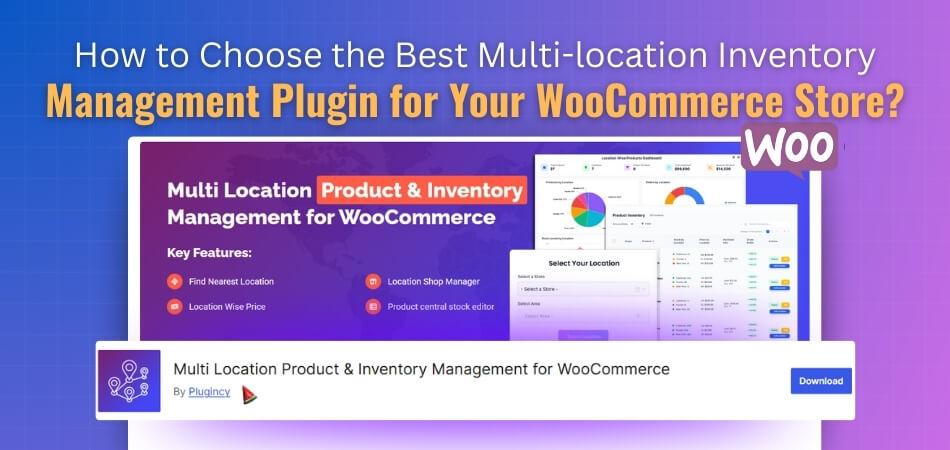
How to Choose the Best Multi-location Inventory Management Plugin for Your WooCommerce Store?
Stores with many locations can be tricky to manage. You must keep track of the stock at each place without mixing things up. A good plugin can make this task much easier and faster. Let’s look at how to pick the right one for your WooCommerce store.
Check Real-time Inventory Updates
The plugin should update stock levels right away. This helps avoid selling items that are out of stock. It also keeps your data accurate across all store locations. Look for a plugin that shows changes instantly when a product is sold or restocked. Real-time sync helps you make better stock decisions.
Look for Centralized Stock Control
Managing all inventory from one dashboard saves time. You should be able to view, edit, and update stock in all stores from one place. This makes it simple to handle bulk changes. A plugin with centralized stock control reduces confusion and saves effort for your team.
Ensure Easy Store Location Mapping
The plugin should let you map each store or warehouse clearly. You should see which products belong to which location. Easy mapping helps in finding items faster and shipping them from the right store. Choose a tool that supports clear labels and stores details.
Support for Automatic Low Stock Alerts
Getting alerts when stock is low helps you restock on time. It prevents running out of products in busy seasons. The plugin should allow setting custom alert levels for each store. This way, you can plan reorders smartly and never lose sales due to empty shelves.
Check Compatibility with WooCommerce Features
Make sure the plugin works well with WooCommerce features. It should blend smoothly with your existing setup. When evaluating premium plugin benefits, test how extra features work with your store tools. Some plugins can cause errors or slow loading speeds. Always test the plugin on your store before full use.
Review User Interface and Ease of Use
A clean and simple dashboard makes work easier. The plugin should be easy to understand even for beginners. Too many complex settings can confuse users. Look for one with clear menus, easy reports, and simple setup steps. A user-friendly plugin saves time every day.
Compare Pricing and Support Options
Different plugins offer different pricing plans. Choose one that fits your budget and business needs. Also, check if the developer provides quick customer support. Reliable support can help solve problems faster. A good plugin should give value for money and peace of mind.
Read Reviews and Ratings
Before you install, check what other users say. Reviews show how well the plugin works in real use. Look for feedback about speed, accuracy, and support. High ratings usually mean better trust and fewer issues later. Reading reviews can save you from bad choices.
Why Do You Need a Multi-location Inventory Management Plugin?
Managing stock across many store locations can be a big challenge. You must track products, sales, and restocks in real time. Doing this manually can lead to errors and lost sales. Let’s see why using a multi-location inventory management plugin is a smart move for your WooCommerce store.
Keeps Stock Data Accurate
When you manage many stores, data can get messy fast. A plugin helps you keep all stock records updated in one place. It tracks each product’s movement across all your locations. This ensures you always know what’s in stock and what’s running low. Accurate data means fewer mistakes and smoother sales.
Saves Time and Effort
Updating stock for each store by hand takes hours. The right plugin updates stock automatically when a sale happens. This saves you from manual changes and keeps your store up to date. With less work, you can focus on improving sales and serving customers better every day.
Avoids Overselling and Stockouts
Selling items you don’t have can hurt your business. A plugin prevents this by syncing stock levels instantly. When one store sells a product, the system updates all others. This keeps you from overselling and lets you reorder before running out. It helps you keep customers happy and loyal.
Simplifies Store Management
Handling many stores at once can get confusing. A good plugin gives you one dashboard to control everything. You can check stock levels, move items, and view reports easily. This setup makes managing your business faster and clearer. You get full control without the stress of switching between stores.
Improves Order Fulfillment
When orders come in, you can ship from the closest store. The plugin helps choose the best location to deliver faster. This saves shipping costs and reduces delivery time. Quick shipping improves customer satisfaction and trust. A simple plugin can make your service more efficient and reliable.
Supports Growth and Expansion
As your business grows, managing stock gets harder. The WooCommerce Multi Locations Inventory Management Plugin can handle more stores and products easily. You don’t have to change systems when you expand. It helps keep all locations in sync without extra work. This support makes scaling your store much smoother.
Helps Analyze Sales and Stock
You can learn a lot from sales reports. A plugin lets you view which store sells more and which products move faster. This helps plan restocks and discounts better. You can also track seasonal sales trends easily. Data insights help you make smarter business choices without guessing.
Should You Go for a Free or Paid Plugin?
Choosing between free and paid plugins can be tricky. Each type has its pros and cons depending on your store’s needs. Let’s compare some key points to help you make the best choice.
| Aspect | Free Plugin | Paid Plugin |
| Cost | No upfront cost, great for tight budgets. | Requires payment, but offers more advanced tools. |
| Features | Basic features only, limited control. | Full features with better customization options. |
| Support | Limited or community-based help. | Direct and faster customer support. |
| Security | May have slower updates or fixes. | Regular updates with stronger security. |
| Performance | Can slow down with more data or stores. | Optimized for speed and larger stores. |
| Updates | Not updated often, risk of bugs. | Frequent updates to fix issues and add tools. |
| Ease of Use | Simple setup but lacks advanced options. | Easy to manage with detailed settings. |
| Scalability | Works well for small stores only. | Best for growing or multi-location stores. |
A free plugin is good for learning and testing basic features. But a paid plugin gives you full power, support, and growth options. Choose the one that fits your business goals and future plans the best.
Which Type of Businesses Benefit Most from Multi-location Inventory?
Some stores handle stock in more than one place. They may have shops, warehouses, or online stores in different areas. Managing all that stock can get confusing without the right tools. Let’s see which types of businesses get the most value from using a multi-location inventory system.
Retail Stores With Many Branches
Retail chains with many outlets need to track stock at each location. A plugin helps them know which store has which items. It also helps move products between stores easily. Retail owners can restock faster and avoid customer delays. This setup keeps every branch running smoothly and in sync.
Wholesale Distributors
Distributors deal with large quantities of stock every day. Managing this manually can cause mix-ups or lost products. With an inventory plugin, they can track every shipment clearly. It helps them handle orders faster and prevent overstocking. Wholesalers gain better control and fewer losses in daily operations.
eCommerce Brands With Regional Warehouses
Online sellers often have warehouses in different regions. A plugin helps them see stock in all locations at once. It also helps send products from the closest warehouse to the customer. This saves shipping time and cost. For eCommerce brands, this system keeps deliveries quick and smooth.
Manufacturing Businesses
Manufacturers handle raw materials, parts, and finished goods. A multi-location inventory system helps track items at every stage. It keeps all production units connected and updated in real time. This helps reduce waste and plan production better. Manufacturers can work faster and deliver on time with clear stock data.
Food and Beverage Stores
Food stores and restaurants often have storage in different places. Keeping track of perishable stock is very important. A plugin helps monitor expiry dates and product levels. It allows faster restocking before items spoil. This system helps food businesses save money and avoid product waste.
Healthcare and Pharmacy Chains
Medical stores and pharmacies handle sensitive products daily. They must keep exact counts and expiry details. A plugin keeps track of all items across branches safely. It also sends alerts when stock runs low or expires. This ensures smooth service and helps meet safety rules.
Auto Parts and Hardware Businesses
These stores deal with many types and sizes of products. Stocking them across locations can be hard to manage. A plugin helps find parts fast and track sales easily. It keeps every branch updated and ready to serve. This helps stores avoid delays and lost sales.
Is Setting Up a Multi-location Inventory Plugin in WooCommerce Costly?
Setting up a multi-location inventory plugin in WooCommerce isn’t costly when planned smartly. The main cost depends on how many sites you manage. Many store owners choose a yearly plan that suits their size and budget best.
For small stores, a single-site plan is often enough to start with. The price of a premium WooCommerce multi location inventory management plugin usually ranges between eighty to three hundred dollars yearly. Paid plans often include full access, updates, and customer support, making them worth the cost for long-term stability.
If your business grows or runs many stores, higher plans bring better value. You get access to all pro tools, faster support, and unlimited updates. Paying once a year keeps everything running smoothly and helps avoid future setup or update troubles.
Best Practices for Testing the Multi-location Inventory Management Plugin
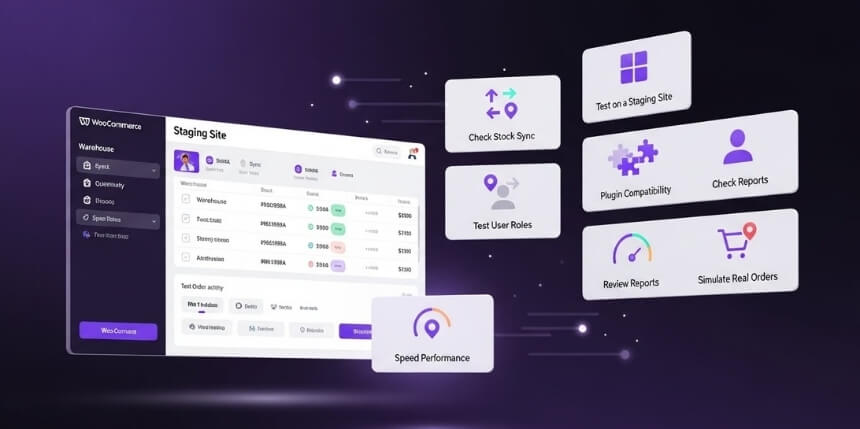
Before using your plugin on a live store, it’s smart to test it well. Testing helps you spot errors before they affect customers. It also helps you understand how the plugin handles stock across many stores. Let’s look at some simple ways to test your multi-location inventory plugin:
Test on a Staging Site
Use a test site before applying changes to your live store. This setup lets you check settings without affecting real sales or data. You can safely test updates, features, and stock movements. Staging sites are perfect for finding small issues early. Always test new updates here first.
Check Stock Sync Between Locations
Make sure stock updates appear correctly across all store locations. When you sell one item, every other location should reflect that change. Try restocking items too, to see if counts adjust properly. Proper syncing shows your plugin works as it should. Accurate sync keeps your inventory data clean and reliable.
Review Compatibility With Other Plugins
Sometimes, plugins may not work well together. Check if your multi-location plugin runs smoothly with shipping, tax, or payment plugins. Run a few orders to be sure everything connects fine. This step helps avoid checkout errors. Compatibility testing prevents big issues later on.
Test User Roles and Access
Make sure staff members have the right access level. Managers may need full control, while staff might need limited access. Test role settings to confirm permissions work as expected. This keeps your data safe and organized. Correct access settings reduce mistakes and confusion.
Check Reporting and Analytics
Run a few test sales and check your reports. Make sure numbers match the real stock movements. Review which locations sold more and which need restocks. Reports should load fast and show correct data. Reliable reports help you make smarter business decisions every day.
Review Speed and Performance
A slow plugin can affect your whole store. Check how quickly your site loads with the plugin active. Try switching between stores and reports to test speed. If it feels slow, try removing extra plugins or caching. Good performance keeps your site smooth and customers happy.
Simulate Real Orders
Place some fake orders to see how the system handles them. Check if the right warehouse ships the item. Test refunds, cancellations, and returns too. This helps confirm your plugin tracks everything properly. Running real tests builds trust before going live with your system.
Frequently Asked Questions
Before picking a plugin, it’s normal to have many small questions. Testing, setup, updates, and features can all seem confusing at first. These FAQs answer common doubts in a simple way so you can choose the right plugin easily.
What Makes a Multi-location Inventory Plugin Different From a Regular Plugin?
A regular plugin manages stock for a single store only. A multi-location plugin, however, keeps track of stock across many store branches or warehouses. It updates all stock levels in real time, preventing mix-ups. This kind of plugin helps large or growing stores stay organized and accurate.
How Does Real-time Stock Sync Improve Business Efficiency?
When stock updates happen instantly, you always know what’s available. This helps avoid overselling, canceled orders, or wrong shipments. Real-time sync keeps every store branch accurate and updated. It also saves staff time since they don’t have to enter stock details manually.
Can Multi-location Plugins Handle Both Online and Offline Stores?
Yes, many WooCommerce inventory plugins can handle both types. You can link your physical store and online shop under one system. Each sale updates stock in real time for both locations. This keeps your inventory balanced and prevents selling items you no longer have.
Do I Need Technical Skills to Install the Plugin?
You don’t need deep technical knowledge. Most plugins come with easy setup guides and help menus. You just install, activate, and set your locations. If you ever get stuck, support teams or setup wizards usually help complete the process quickly.
How Often Should I Update My Inventory Plugin?
You should update whenever a new version is released. Updates often include bug fixes, faster syncing, and stronger security. Using old versions can cause errors or slow performance. Always back up your site first, then update safely to keep your system running smoothly.
Will the Plugin Slow Down My WooCommerce Store?
A well-coded plugin won’t slow your store if installed correctly. Choose one that’s compatible with your theme and other extensions. Also, test performance after setup to confirm speed. If you face delays, removing unused plugins usually fixes the issue.
Can I Add or Remove Locations Anytime?
Yes, most multi-location plugins let you add or remove locations easily. You can edit store names, addresses, and stock levels anytime. This flexibility helps your business grow without starting over. You can expand to more areas whenever your business needs it.
Conclusion
Choosing the right tool can make or break how smoothly your store runs. With so many plugins out there, picking one that fits your setup and budget matters the most. A good plugin should save time, cut errors, and keep your stock in control across every store location.
When thinking about How to Choose the Best Multi-location Inventory Management Plugin for Your WooCommerce Store, focus on what truly helps your business. Go for something that’s easy to use, updates in real time, and works well with your existing tools. Always test it before using it live, so you can fix small issues early.
The right plugin can turn a confusing task into a simple one. It keeps your sales steady, stock balanced, and customers happy. Once you find the right match, managing multiple locations won’t feel like a challenge anymore—it will feel like smart business done right.
