

Facing the issue WooCommerce Order Received Page Not Found after checkout? This problem usually appears right after payment, where instead of seeing the confirmation or thank you page, users land on a broken or missing page, creating confusion and reducing trust in your store.
In many cases, this is closely related to a WooCommerce thank you page not working or redirect failure, which can interrupt the customer journey at the most critical step. In this guide, you will clearly understand why this happens and how to fix it step by step without breaking your checkout flow.
Quick Answer
The WooCommerce Order Received Page Not Found error usually happens when the checkout cannot properly redirect to the thank you page after payment. This is commonly caused by broken permalinks, missing order key parameters, cache conflicts, or a payment gateway redirect issue. Fixing permalinks, clearing cache, and verifying checkout endpoints usually resolves it quickly.
What “Order Received Page Not Found” Actually Means
This issue does not always mean the page is deleted. In most cases, the page exists, but WooCommerce fails to load it correctly due to a broken redirect or missing session data. That is why many store owners also describe it as a WooCommerce order confirmation page missing, even though the system has already created the order.
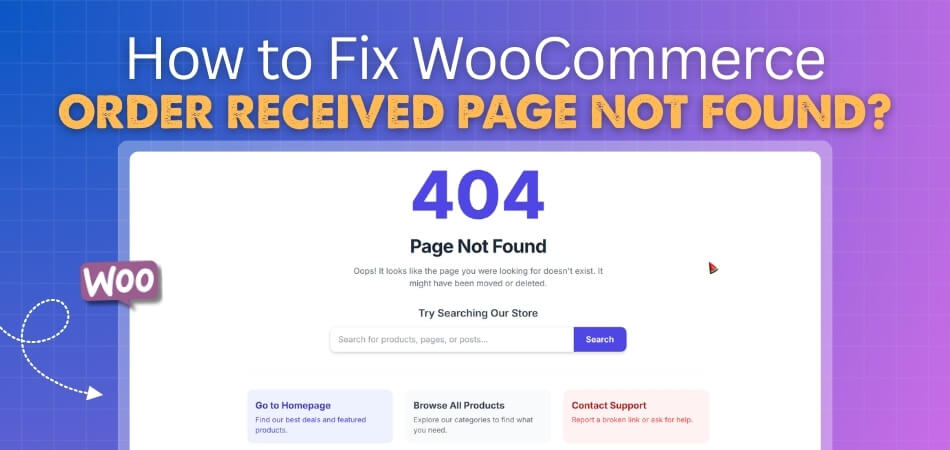
In simple terms, WooCommerce cannot complete the final step of checkout, where it shows order details like confirmation number, purchased items, and payment status. Instead, users see a 404 error or a blank page, which creates confusion and may even lead customers to think their payment failed.
Common Scenarios Where Checkout Confirmation Fails in WooCommerce
Before jumping into fixes, it’s important to understand when this issue usually appears. These real-world scenarios will help you quickly match the problem with your store behavior:
After Payment Gateway Redirect
This is the most common situation where the customer completes payment, but instead of seeing the confirmation page, they land on a 404 or broken page. It usually points to a redirect failure or incorrect return URL from the payment gateway.
When the Thank You Page Is Refreshed
If a customer refreshes the order confirmation page, WooCommerce may fail to reload it properly. This happens because the system depends on a unique order key in the URL, which can expire or become invalid after refresh.
Only for Guest Users
Sometimes logged-in users see the order page correctly, but guest users face the error. This is often related to session handling or cookie issues where WooCommerce cannot identify the order.
Works on Desktop but Fails on Mobile
If the checkout works fine on desktop but not on mobile devices, it usually indicates caching, JavaScript conflicts, or browser-specific session problems affecting the redirect.
Happens After Plugin or Theme Update
You may notice the issue starts suddenly after updating a plugin or switching themes. This often signals a compatibility issue affecting WooCommerce endpoints or checkout flow.
Occurs Only with Specific Payment Methods
In some cases, the error appears only when using certain gateways like Stripe, PayPal, or manual bank transfer. This suggests a problem with how that gateway handles the return or confirmation URL. Identifying the exact scenario helps you narrow down the root cause faster, making your troubleshooting process more accurate and efficient.
Root Causes of WooCommerce Order Received Page Not Found
Now that you’ve seen when this issue appears, let’s break down the real causes behind it. Instead of limiting to a few points, these are grouped by system layer so you can identify the exact source more accurately.
1. URL & Permalink Configuration Issues
WooCommerce relies heavily on proper URL structures and endpoints. If permalinks are not correctly configured or saved, the system cannot resolve the order received page. Even a small change in URL structure without refreshing permalinks can trigger a 404 error. Another common issue is a broken or modified endpoint. If the order-received endpoint is changed, translated incorrectly, or conflicts with another page slug, WooCommerce fails to locate the confirmation page.
2. Checkout & Redirect Problems
A WooCommerce checkout redirect issue often occurs when the system fails to send users to the correct URL after completing payment. This can happen due to incorrect checkout page assignment or misconfigured redirect logic. Payment gateways also play a major role here. If the return URL is not properly defined or the gateway fails to pass required parameters, customers will not reach the thank you page, resulting in a “page not found” error.
3. Plugin & Theme Conflicts
Many stores use plugins that customize checkout behavior, add AJAX features, or optimize performance. These plugins can sometimes interfere with WooCommerce’s default redirect flow, causing the confirmation page to break. Themes can also override WooCommerce templates. If a theme modifies the checkout or thank you page incorrectly, it may disrupt how the order confirmation page loads.
4. Session, Cookie & Order Key Issues
WooCommerce depends on session data and a unique order key to display the confirmation page. If the session expires too early or cookies are blocked, the system cannot match the order with the user. Missing or stripped URL parameters are another major cause. Without the correct order key in the URL, WooCommerce treats the request as invalid and shows a not found error.
5. Cache, CDN & Server-Level Conflicts
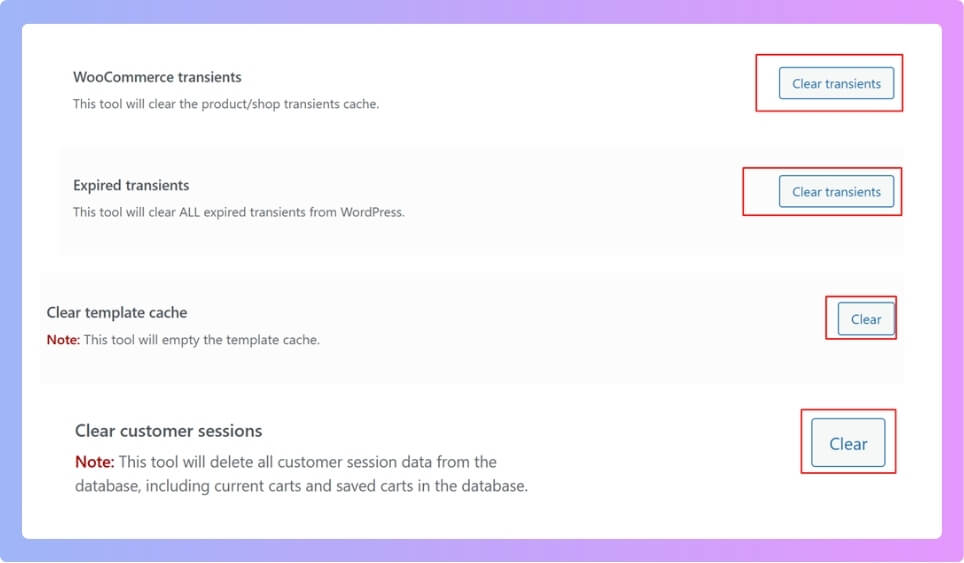
Caching is one of the most overlooked causes. If your cache plugin stores the checkout or order received page, it may remove dynamic data required to load the correct order. Server-level caching, CDN services, or reverse proxy systems can also serve outdated or incomplete pages. This often results in inconsistent behavior across devices or users.
6. Custom Code & Advanced Configuration Errors
Custom functions added to your site, especially in the theme’s functions file, can accidentally override WooCommerce redirects. A small mistake in redirect logic can send users to the wrong URL. Multilingual setups and security tools can also interfere. Translation plugins may change endpoint slugs, while security systems may block important parameters needed to load the confirmation page. Breaking down root causes by system layer makes troubleshooting easier, helping you quickly pinpoint and fix the exact issue without unnecessary guesswork.
Quick Fix Checklist
Before applying deep fixes, start with these quick checks. Many WooCommerce Order Received Page Not Found issues can be fixed without touching code if the problem comes from permalink, cache, endpoint, or checkout settings.
Refresh WooCommerce Permalinks
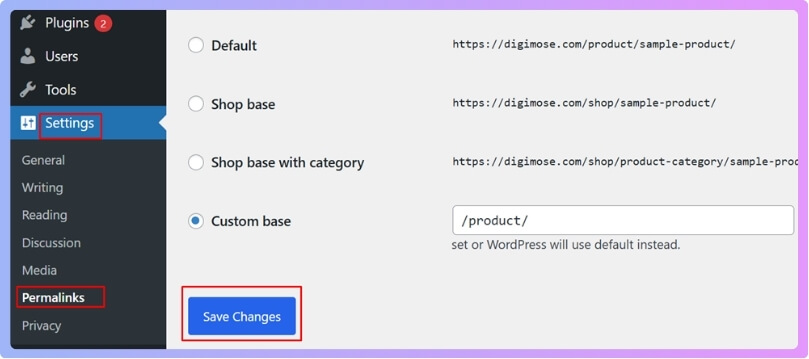
Go to WordPress Dashboard → Settings → Permalinks, then click Save Changes without editing anything. This refreshes rewrite rules and often fixes broken WooCommerce endpoints, including the order received page.
Check WooCommerce Checkout Page Assignment
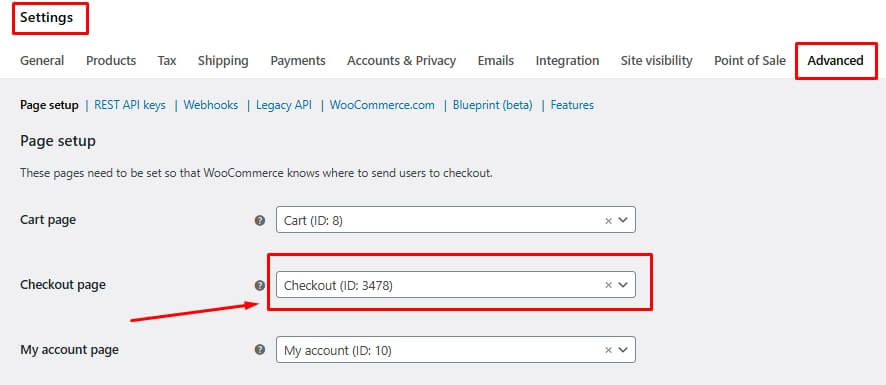
Go to WooCommerce → Settings → Advanced and confirm the correct checkout page is selected. If WooCommerce points to the wrong page, the thank you page and order confirmation flow may break.
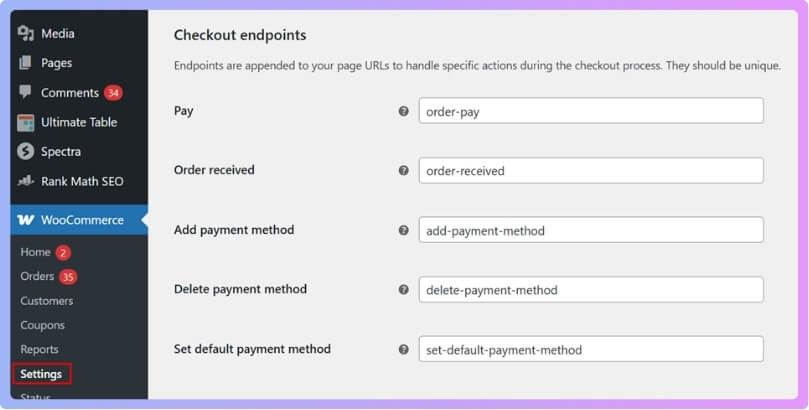
Verify the Order Received Endpoint
Check the endpoint settings under WooCommerce → Settings → Advanced. Make sure the order-received endpoint is not removed, renamed incorrectly, or conflicting with another page slug.
Clear All Cache Layers
Clear plugin cache, browser cache, server cache, and CDN cache. Also exclude cart, checkout, my account, and order received pages from caching to protect WooCommerce session data.
Test Payment Gateway Return URL
Place a test order using the affected payment method. If the issue happens only after payment, the gateway may not be sending customers back to the correct WooCommerce confirmation URL.
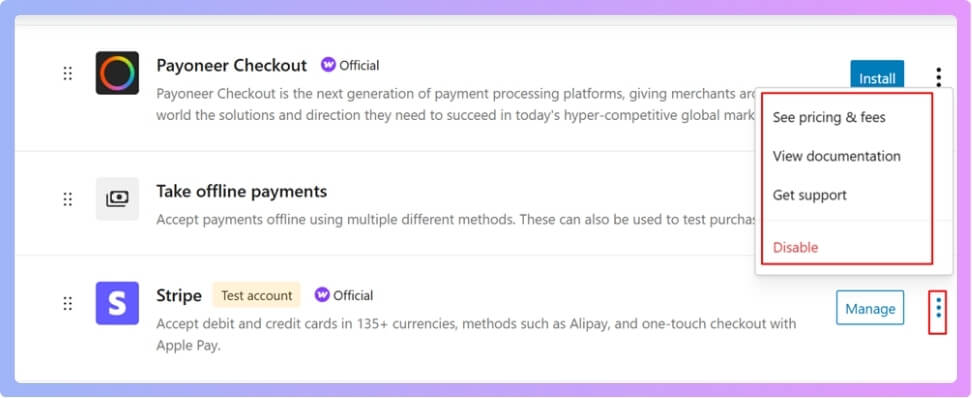
Temporarily Disable Conflict Plugins
Disable checkout, redirect, cache, security, speed optimization, and multilingual plugins one by one. Then test checkout again to find which plugin is breaking the order confirmation page.
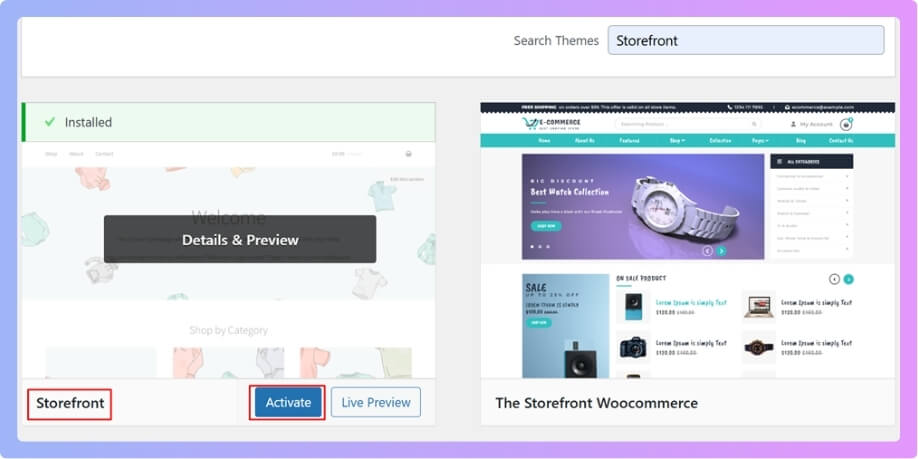
Switch to a Default Theme for Testing
Temporarily test with a default theme like Storefront or Twenty Twenty-Four. If the issue disappears, your active theme may be overriding WooCommerce checkout or thank you page templates.
Check Guest Checkout and Cookies
Test one order as a guest and another as a logged-in user. If the issue appears only for guests, review cookie settings, session handling, and any security plugin blocking WooCommerce cookies.
Remove Custom Redirect Code
Check functions.php or custom snippets for checkout redirect code. Incorrect redirect logic can send customers to a broken URL instead of the correct WooCommerce order received page.
Test on Mobile and Desktop
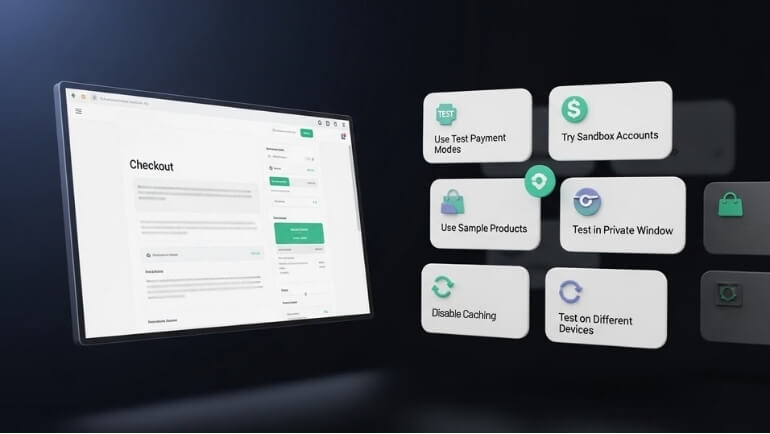
Run checkout tests on both mobile and desktop. If the error appears only on one device type, caching, JavaScript, or browser-specific session issues may be involved. Start with these quick checks before deep debugging, as most order received page errors come from settings, cache, redirects, or plugin conflicts.
Advanced Issues Behind WooCommerce Order Received Page Not Found
If the issue still exists after applying standard fixes, it usually falls into advanced cases. These are harder to detect but very important for complete troubleshooting.
Custom Checkout Page Builders
If you are using a custom checkout builder or page builder, it may override WooCommerce’s default flow. In some cases, the builder removes required hooks or changes how the thank you page loads, which leads to the error. Always test with the default checkout layout to confirm.
Headless or API-Based WooCommerce Setup
In headless setups where frontend and backend are separated, the order received page depends on API responses instead of standard WooCommerce templates. If the API does not return correct order data or routing is misconfigured, the confirmation page may fail completely.
Multilingual Plugin Conflicts
Plugins like WPML or Polylang can translate URLs and endpoints. If the order-received endpoint is translated incorrectly or differs between languages, WooCommerce cannot match the request, causing a missing confirmation page.
CDN Edge Caching Issues
Even if you clear your main cache, CDN edge nodes may still serve outdated versions of your checkout pages. This leads to inconsistent behavior where some users see the page correctly while others get a “not found” error.
Security or Firewall Blocking Parameters
Some security plugins or server firewalls block URL parameters like order ID or order key. Since WooCommerce relies on these parameters to display the confirmation page, blocking them will break the page completely.
SSL or Mixed Content Problems
If your checkout runs on HTTPS but some return URLs or resources load over HTTP, the browser may block the redirect or fail to load the page properly. This often results in a broken or blank confirmation page.
Why This Issue Hurts Your Store
This problem is not just technical, it directly impacts your business performance. Here’s how:
- Loss of Customer Trust: When users do not see a confirmation page after payment, they become unsure if the order was successful. This creates doubt and reduces trust in your store.
- Increased Support Requests: Customers often contact support asking if their order was placed correctly. This increases your workload and slows down operations.
- Payment Confusion and Refund Risk: Without a proper confirmation page, users may attempt to place the order again or request refunds, thinking the first transaction failed.
- Drop in Conversion Tracking Accuracy: If the thank you page does not load, conversion tracking tools like Google Analytics or Facebook Pixel may not record the purchase correctly, affecting your data.
- Negative Impact on Repeat Purchases: A poor checkout experience can discourage customers from returning. Even one bad experience at the final step can reduce future sales.
Advanced issues often require deeper inspection, but fixing them ensures a smooth checkout experience and protects both customer trust and store performance.
Default WooCommerce vs Optimized Checkout (Comparison Table)
After fixing the issue, many store owners realize the default checkout setup can still be fragile. Below is a clear comparison to help you understand the difference between standard WooCommerce checkout and an optimized solution.
| Feature | Default WooCommerce | Optimized Checkout Plugin |
|---|---|---|
| Redirect Reliability | Can fail with gateway or session issues | Stable and controlled redirect flow |
| Thank You Page Load | Depends on settings and plugins | Ensures consistent confirmation page load |
| Handling Missing Order Key | Limited error handling | Smart fallback and recovery logic |
| Mobile Checkout Experience | Basic and sometimes slow | Optimized for speed and smooth flow |
| Plugin Conflict Resistance | High chance of conflict | Built to minimize conflicts |
| Cache Compatibility | Often breaks with cache | Works better with cache exclusions |
| Conversion Tracking | May fail if page breaks | Reliable tracking with proper redirect |
| User Experience | Standard | Streamlined and user-friendly |
Plugin Recommendation
If you want a long-term solution instead of repeatedly fixing errors, using an optimized checkout system is the best approach.
Why an Optimized Checkout Helps
An optimized checkout plugin improves how WooCommerce handles redirects, sessions, and order confirmation pages. Instead of relying on default behavior, it ensures users always land on the correct thank you page after completing payment.
Recommended Solution: One Page Quick Checkout for WooCommerce
This solution helps fix common checkout issues by ensuring a smooth and reliable order completion process. It improves how WooCommerce handles redirects, reduces the chance of broken thank you pages, and keeps the checkout flow fast and stable across all devices and payment methods.
Why This Works
This plugin is built to simplify and stabilize the entire checkout flow. It reduces the chances of redirect failure and ensures the confirmation page loads properly after every successful order.
- Ensures reliable redirect after payment
- Reduces checkout-related errors
- Improves mobile and desktop experience
- Works well with most payment gateways
- Minimizes conflicts with caching and other plugins
Which Solution Should You Choose?
Choosing the right fix depends on your situation. Here’s a simple way to decide:
- If the Issue Is Minor: If your issue comes from permalinks, cache, or settings, you can fix it quickly using the checklist and step-by-step guide without needing extra tools.
- If the Issue Is Repeated or Unstable: If the problem keeps coming back, especially after updates or with certain payment gateways, it’s better to use an optimized checkout solution to avoid future breakdowns.
- If You Want Better Performance and UX: If your goal is not only fixing the error but also improving conversion and user experience, switching to an optimized checkout system is the smarter long-term move.
While quick fixes can solve the issue temporarily, using an optimized checkout solution ensures long-term stability, better performance, and a smoother customer experience.
FAQ
Below are the most common questions users search related to this issue. These are structured to match AI Overview and Featured Snippet intent.
Why is my WooCommerce order received page not found?
This usually happens when WooCommerce fails to redirect users properly after checkout. The most common causes include broken permalinks, missing order key, cache conflicts, or a payment gateway redirect issue. Fixing URL structure and clearing cache often resolves it.
Why is my WooCommerce thank you page not working?
A WooCommerce thank you page not working issue is often caused by session expiration, plugin conflicts, or incorrect checkout settings. If WooCommerce cannot validate the order session or key, it fails to load the confirmation page.
How do I fix WooCommerce order confirmation page missing?
To fix the WooCommerce order confirmation page missing problem, start by refreshing permalinks, verifying checkout page settings, and clearing all cache layers. Then check plugins, themes, and payment gateway return URLs for conflicts.
Can cache cause the order received page error?
Yes, caching is one of the most common causes. If the checkout or order received page is cached, WooCommerce cannot load dynamic session data, which leads to a broken or missing confirmation page.
Does the payment gateway affect the redirect?
Yes, payment gateways control the final redirect after payment. If the return URL is incorrect or parameters are missing, users may not reach the confirmation page and see a “page not found” error instead.
Is this issue related to WooCommerce endpoints?
Yes, endpoints like order-received are essential for displaying the confirmation page. If the endpoint is changed, removed, or conflicts with another URL, WooCommerce cannot load the page properly.
Final Thoughts
The WooCommerce Order Received Page Not Found issue may look serious, but in most cases, it comes from small configuration or redirect problems. Once you identify the exact cause, whether it’s permalinks, cache, plugins, or payment gateway settings, the fix becomes straightforward. If your store frequently faces checkout-related issues, it’s better to move toward a more stable checkout setup that ensures consistent redirects and a smooth confirmation experience. Fix the problem today so your customers always complete their journey with confidence. A stable checkout and working confirmation page are essential for trust, tracking, and conversions, so resolving this issue should always be a top priority for any WooCommerce store.
