

Product filters can improve navigation fast, but not every plugin solves the same kind of store problem. Some WooCommerce setups need deep control across custom listing layouts and page builders. Others need a cleaner, more focused AJAX filtering system built around the shop experience itself.
This JetSmartFilters vs Dynamic AJAX Product Filters for WooCommerce comparison focuses on what actually matters when choosing between them. That includes filtering flexibility, usability, SEO impact, compatibility, and overall fit for different types of stores. Rather than relying on surface-level feature claims, this guide looks at where each plugin works best and what trade-offs come with it.

Who This Product Filters Plugins Comparison Is For
Plenty of filter plugin comparisons make both options sound interchangeable, but that is rarely the case in a real store setup. The right choice usually depends on how your shop is built, how complex your catalog is, and how much control you want over filtering, layout, and SEO behavior.
This comparison will be useful for:
- Growing WooCommerce stores that plan to scale inventory
- Stores reliant on organic search and SEO
- Performance-focused eCommerce shops
- Non-technical owners who need reliable filtering
- Developers and agencies optimizing WooCommerce builds
It looks beyond surface features and digs into real performance behavior and SEO impact.
Quick Summary
Both plugins improve product discovery, but they are not built around the same type of WooCommerce setup. One leans more toward flexible filter integration across custom layouts, while the other stays more centered on straightforward WooCommerce product filtering.
- Dynamic AJAX Product Filters for WooCommerce focuses on reliable performance, clean indexable URLs, and scalable filtering behavior.
- JetSmartFilters provides powerful layout flexibility and visual customization with broader integration for page builders like Elementor.
JetSmartFilters vs Dynamic AJAX Product Filters: Core Features Comparison
Core features may sound similar on the surface, but these two plugins are built with different priorities. Dynamic AJAX Product Filters for WooCommerce stays more WooCommerce-centered, while JetSmartFilters leans further into builder-based and custom layout filtering. Here is a comparison of the core features at a glance.
| Core Feature | Dynamic AJAX Product Filters for WooCommerce | JetSmartFilters |
| AJAX Filtering | Yes | Yes |
| Indexable Filter URLs | Yes | Limited / not a main strength |
| Performance on Large Catalogs | Strong focus | Good, but more setup-dependent |
| Attribute Filtering | Yes | Yes |
| Price Filtering | Yes | Yes |
| Stock Status Filtering | Yes | Yes |
| Custom Taxonomy Support | Yes | Yes |
| Mobile Filtering UX | Mobile-optimized | Responsive, builder-dependent |
| SEO Control | Stronger built-in control | More limited |
| Scalability | Better suited to growing product catalogs | Better suited to custom filtering layouts |
| Filter Placement | Widget, shortcode, block | Builder and listing/grid based |
| WooCommerce Focus | Direct | Partial within broader ecosystem |
| Builder Dependence | Low | Higher |
| Custom Field Filtering | Yes | Yes |
| Multi-Filter Logic | Yes | Yes |
What Problem Do These Two Product Filter Plugins Solve?
Finding products gets harder as a WooCommerce catalog grows. Both plugins solve that by helping shoppers narrow results faster with AJAX-based filtering instead of forcing them to reload pages and browse category after category.
Dynamic AJAX Product Filters for WooCommerce is built to solve a more direct WooCommerce problem: making shop and category pages easier to filter by attributes, price, stock status, tags, ratings, SKU, date ranges, and custom fields, while also supporting cleaner permalink handling for SEO-focused stores.
JetSmartFilters solves a broader layout and content-filtering problem. It is designed for stores and sites that use Elementor, Gutenberg, Bricks, WooCommerce shortcodes, and other dynamic listing setups where filters need to work across custom grids, archive layouts, and builder-driven pages.
Plugin Overview – Product Positioning and Best Use Case
Two filter plugins can look similar on a feature list and still feel very different once they are used in a real store. One is aimed more at WooCommerce shops that want clean, straightforward product filtering. The other fits stores that rely more on custom layouts, page builders, and a more flexible filtering structure. Looking at the product positioning helps make that difference easier to spot.
Dynamic AJAX Product Filters for WooCommerce
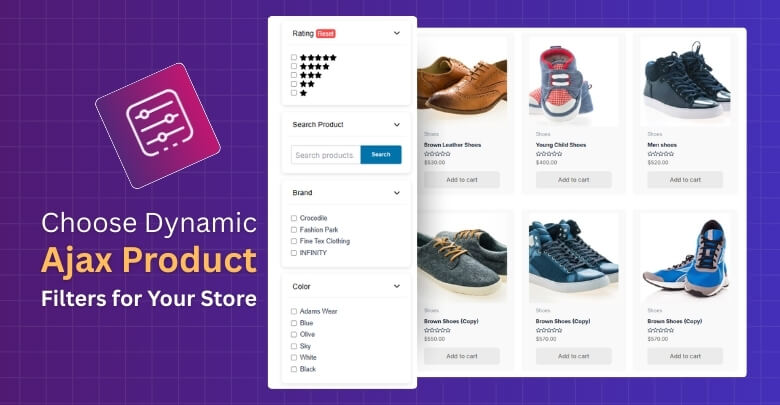
Dynamic AJAX Product Filters for WooCommerce is positioned as a focused filtering plugin for stores that want faster product discovery without making the shop experience unnecessarily complex. It stays close to the core WooCommerce workflow and fits practical Ajax product filters for WooCommerce use cases built around speed, filtering depth, flexible placement, and SEO-aware URL handling. That makes its main feature set easier to evaluate.

Key Features:
- Real-time AJAX filtering without full page reloads
- Category, tag, attribute, and taxonomy-based filtering
- Price range filtering with instant product updates
- Stock status, sale status, and rating-based filtering
- Custom field and metadata-based filtering
- Multi-filter support for combining several filter conditions at once
- Shortcode, widget, and block-based filter placement
- Indexable filter URLs with custom permalink support
Strengths:
- WooCommerce-first filtering approach
- Broad support for product data filters
- Stronger focus on filtered URL control
- Flexible filter placement across shop layouts
- Practical fit for larger product catalogs
Considerations:
- Best aligned with a dedicated WooCommerce store filtering
- More product-centered than builder-centered in its overall approach
- Strongest fit when usability and filtering depth matter most
Real WooCommerce Use Case
Fashion stores, electronics catalogs, furniture shops, and parts-based WooCommerce setups can benefit from this plugin when shoppers need to narrow products quickly by price, size, stock, rating, or custom product data. In that kind of store, smooth filtering inside the shop page matters more than extra design complexity, which is where Dynamic AJAX Product Filters for WooCommerce fits naturally.
JetSmartFilters
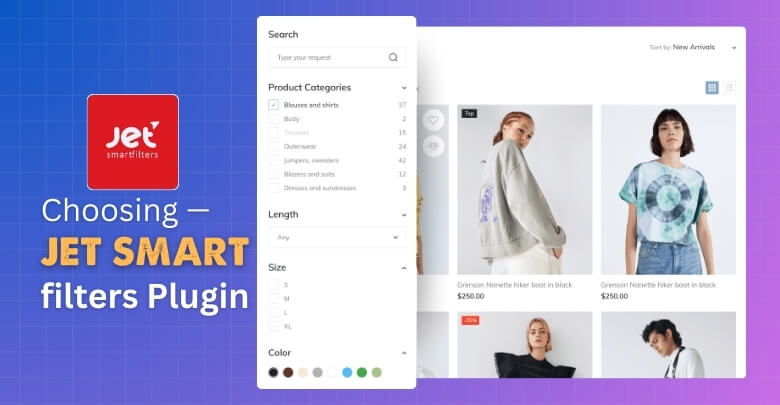
JetSmartFilters is positioned as a broader filtering plugin for stores that want filters to work across custom layouts, listing grids, and builder-based WooCommerce setups rather than only inside a standard shop flow. It is built around AJAX filtering, multiple filter types, flexible filtering logic, and integration with Elementor, Gutenberg, Bricks, and Divi, which makes it a stronger fit for stores where layout control plays a bigger role in how products are discovered.
Key Features:
- Real-time AJAX filtering for WooCommerce products and other dynamic content.
- Support for 12 filter types.
- Filtering for WooCommerce products, posts, pages, and custom post types.
- Multi-parameter filtering across dynamic listings.
- Elementor, Gutenberg, Bricks, and Divi compatibility.
- Search, rating, range, checkbox, select, and date range filter support.
- Customizable results output and filtering logic.
- Permalink structure customization for filters.
Strengths:
- Strong fit for builder-based WooCommerce stores.
- Broader use beyond products alone.
- Wide range of filter types for custom setups.
- More flexible for custom listing and archive layouts.
- Better suited to stores already built around the Crocoblock or page-builder workflow. This last point is an inference from its official editor integrations and positioning.
Considerations:
- Best aligned with stores using custom grids, listing templates, or builder-driven shop structures.
- More flexible when filtering needs extend beyond standard WooCommerce product archives.
- Strongest fit when layout control and filtering logic matter as much as the filter itself.
Real WooCommerce Use Case
Builder-based fashion stores, multi-brand catalogs, furniture shops with custom archive layouts, and content-heavy WooCommerce sites can make better use of JetSmartFilters when filters need to work inside tailored grids and landing-page style shop designs. In that kind of setup, filtering is not just about narrowing products by price or attribute, but also about matching the store’s custom layout structure, which is where JetSmartFilters fits more naturally.
JetSmartFilters vs Dynamic AJAX Product Filters: Pricing Comparison
Pricing difference is less about a small gap in entry cost and more about how each plugin is sold. Dynamic AJAX Product Filters for WooCommerce gives more flexibility for stores, comparing yearly and lifetime licensing, while JetSmartFilters makes more sense when it is being considered either as a standalone plugin or as part of the wider Crocoblock toolkit.
| Pricing Area | Dynamic AJAX Product Filters for WooCommerce | JetSmartFilters |
| Pricing model | Standalone plugin pricing | Standalone plugin + suite pricing |
| Entry cost | Lower starting price | Slightly higher starting price |
| Multi-site options | Available | Better value through Crocoblock plans |
| Lifetime license | Available | Available through Crocoblock lifetime plans |
| Bundle value | More plugin-focused purchase | Better fit for users wanting a broader plugin stack |
Available Filter Types Comparison
Filter depth is one of the clearest differences between these plugins. Dynamic AJAX Product Filters for WooCommerce stays closer to standard WooCommerce product filtering, while JetSmartFilters gives more variety in how filters can be presented and used across custom layouts.
| Filter Type Area | Dynamic AJAX Product Filters for WooCommerce | JetSmartFilters |
| Category filters | Yes | Yes |
| Tag filters | Yes | Yes |
| Attribute filters | Yes | Yes |
| Price filters | Yes | Yes |
| Rating filters | Yes | Yes |
| Search filters | Yes | Yes |
| Custom taxonomy filters | Yes | Yes |
| Meta field filtering | Yes | Yes |
| Sorting and pagination widgets | Product-focused filtering flow | Yes |
Performance, Navigation Experience, and Scalability
Performance consistency affects bounce rates and conversions, especially under heavy traffic. Filters that perform smoothly in small environments may stumble with larger catalogs if not optimized.
Dynamic AJAX Product Filters maintains predictable AJAX behavior even with complex combinations and large catalog sizes. JetSmartFilters performs well in standard setups but may require careful optimization for large or highly cataloged WooCommerce stores.
| Comparison Area | Dynamic AJAX Product Filters for WooCommerce | JetSmartFilters |
| AJAX response flow | Built around instant product updates | Built around AJAX-powered filtered results |
| WooCommerce shop focus | More direct | More layout-dependent |
| Large catalog handling | Stronger performance-oriented positioning | Good, but more tied to setup structure |
| Mobile filtering UX | Mobile-friendly shop filtering | Depends more on builder layout and filter placement |
| Multi-filter experience | Product-focused, straightforward | Flexible across custom listings |
| Scalability fit | Better aligned with growing product catalogs | Better aligned with custom filtering systems |
| Setup impact on UX | More predictable in standard WooCommerce stores | More influenced by provider, builder, and layout choices |
SEO Performance and Filter URL Indexing
Filter URLs can help or hurt WooCommerce SEO depending on how much control the plugin gives you. One plugin puts more emphasis on indexable filtered pages and crawl control, while the other gives more flexibility around URL structure, permalinks, and SEO metadata inside custom filter setups.
| SEO Area | Dynamic AJAX Product Filters for WooCommerce | JetSmartFilters |
| Indexable filter URLs | Yes | Possible, but less central in positioning |
| Noindex control | Yes | Not highlighted as a main built-in SEO control |
| Crawl control focus | Stronger | Moderate |
| Custom permalink support | Yes | Yes |
| URL structure options | SEO-focused filtered URLs | Plain or Permalink structure options |
| SEO title and description for filtered URLs | Not highlighted as a core feature | Yes |
| URL alias customization | Not highlighted | Yes |
| Best SEO fit | Stores targeting indexable filter pages | Stores needing flexible filter URL structure |

Setup, Configuration, and Ease of Use
Getting filters live is not always just about installation. The difference usually shows up in how much structure each plugin expects, how filters are assigned, and how easy the setup feels once real shop pages are involved.
| Setup Area | Dynamic AJAX Product Filters for WooCommerce | JetSmartFilters |
| Initial setup flow | More direct WooCommerce-focused setup | More provider and layout-based setup |
| Where settings live | WordPress admin under Product Filters | Smart Filters settings and Crocoblock settings |
| Filter placement | Shortcode, widget, and block support | Widgets, blocks, builders, shortcodes, providers |
| Builder dependency | Low | Higher |
| WooCommerce archive setup | More straightforward | More setup-aware |
| Custom layout support | Moderate | Strong |
| Ease for standard stores | Easier | More involved |
| Ease for custom stores | Good | Better fit |
Compatibility With Themes and Plugins
Store compatibility rarely becomes a serious question until filters need to work across real themes, page builders, and plugin-heavy WooCommerce setups. That is where the gap between these two plugins starts to show, especially in how each one fits standard shop structures versus more customized build environments.
| Compatibility Area | Dynamic AJAX Product Filters for WooCommerce | JetSmartFilters |
| WooCommerce themes | Works with most WooCommerce-compatible themes | Works with WooCommerce, but fit depends more on builder/provider setup |
| Elementor support | Yes | Yes |
| Gutenberg support | Yes, via block-based placement | Yes |
| Bricks support | Not highlighted as a main integration | Yes |
| Divi support | Not highlighted as a core integration | No native support highlighted currently |
| WPML compatibility | Yes | Yes |
| Builder dependence | Low | Higher |
| Best fit | Standard WooCommerce stores | Custom builder-based stores |
Support and Documentation Comparison
Filters are easy to like when they work and frustrating when something breaks. At that point, quality of support and clarity of documentation matter just as much as features, especially when store setups involve custom layouts, extra plugins, or more advanced filter logic.
| Support Area | Dynamic AJAX Product Filters for WooCommerce | JetSmartFilters |
| Official documentation depth | More focused and shorter | Broader and more layered |
| Setup tutorials | Basic setup guidance | Extensive knowledge base tutorials |
| Feature-specific docs | Limited | Strong coverage |
| Builder-related guidance | Minimal | Extensive |
| Video learning resources | Not strongly highlighted | Yes |
| Ecosystem help content | More plugin-specific | Part of a larger Crocoblock help ecosystem |
Advanced Filter SEO and Plugin Compatibility Comparison
Technical differences start to matter once filtered URLs, tracking, and third-party performance layers enter the picture. Both plugins can improve product discovery, but they do not handle SEO-sensitive filtering in quite the same way.
| Technical Area | Dynamic AJAX Product Filters for WooCommerce | JetSmartFilters |
| URL Parameter Handling | More SEO-oriented filtered URL focus | More configurable URL structure |
| Indexable URL Support | Yes, explicitly supported | Possible, but less central |
| Permalink Structure Flexibility | Custom permalink support | Plain and Permalink modes |
| Cache Plugin Compatibility | Better fit for standard WooCommerce setups | More setup-dependent in custom builds |
| CDN Compatibility | More predictable in typical shop filtering | More dependent on builder and provider setup |
| AJAX State and URL Sync | Built around shareable filtered URLs | Supports structured filter URLs and aliases |
| Analytics Tracking Stability | Clearer when URL state is preserved | More dependent on apply mode and layout setup |
| Theme / Builder Dependency | Lower | Higher |
| Custom Query Compatibility | Product-focused | Stronger across listings and dynamic content |
| Duplicate URL Risk | Lower with controlled indexing | Higher if URL structure is not planned carefully |
| Crawl Control Flexibility | Stronger built-in index / noindex direction | More URL customization than crawl control |
| SEO Risk Level | Lower for stores targeting indexable filter pages | Moderate in complex builder-driven setups |
Which Filter Plugin Is Better for Which Type of Store?
Store fit matters more here than raw feature count. Both plugins can improve filtering, but they make more sense in different WooCommerce setups once layout style, catalog structure, and SEO priorities come into play.
| Store Type | Better Fit | Why |
| Standard WooCommerce store | Dynamic AJAX Product Filters for WooCommerce | More direct WooCommerce-focused filtering flow |
| Large product catalog | Dynamic AJAX Product Filters for WooCommerce | Stronger product-filtering and SEO-oriented positioning |
| SEO-focused store | Dynamic AJAX Product Filters for WooCommerce | Clearer emphasis on indexable filtered URLs |
| Store using Elementor | JetSmartFilters | Native builder-oriented workflow |
| Store using Gutenberg | JetSmartFilters | Built to work directly with block-based layouts |
| Store using Bricks | JetSmartFilters | Official Bricks compatibility is a core part of positioning |
| Store using Divi | JetSmartFilters | Supported through Crocoblock’s Divi integration add-on |
| Custom archive or listing layouts | JetSmartFilters | Better suited to flexible listing and grid structures |
| Content-heavy WooCommerce site | JetSmartFilters | Broader filtering beyond products alone |
| Store wanting simpler day-to-day filter management | Dynamic AJAX Product Filters for WooCommerce | More product-centered and less builder-dependent |
Common SEO Risks With Product Filter Plugins
Filter plugins can make shopping easier, but they can also create SEO issues that stay unnoticed until traffic, indexing, or crawl patterns start slipping. The problem usually is not the filter itself. The problem is what happens when filtered URLs multiply faster than the store owner can control them.
- Too many low-value URLs: Every extra filter combination can create another version of a page, even when that page adds little or no search value.
- Near-duplicate filtered pages: Many filtered results end up looking almost the same, which can weaken page uniqueness and make indexing less efficient.
- Unclear indexation decisions: Not every filtered page deserves to appear in search. Without a clear plan, stores can end up exposing pages that were never meant to rank.
- Messy URL structures: Long, inconsistent, or parameter-heavy URLs can make filtered navigation harder to manage for both search engines and users.
- Crawl waste on large catalogs: Search engines may spend time crawling endless filter combinations instead of focusing on the category and product pages that matter more.
- Diluted ranking signals: When too many similar filtered pages exist, authority can spread across variations instead of staying concentrated on stronger pages.
Which Product Filter Plugin Should I Choose?
The best choice depends less on which plugin has more features and more on how your store actually works. Difference becomes clearer once you look at whether your priority is a cleaner WooCommerce filtering flow or a more custom builder-driven setup.
- Dynamic AJAX Product Filters for WooCommerce: Makes more sense for stores that want filtering to stay practical, product-focused, and easier to manage inside the usual WooCommerce shop structure.
- JetSmartFilters: Fits better where filters need to follow custom layouts, builder-based pages, and a store design that goes beyond the default WooCommerce setup.
Frequently Asked Questions
After comparing these two plugins, you might still have some questions. Here are answers to common queries that can help you understand both tools better and decide what fits your needs.
Can I Use JetSmartFilters Without Elementor?
Yes, JetSmartFilters supports Gutenberg and Bricks Builder besides Elementor. You can use its widgets and blocks in these editors for custom filter layouts. This makes it flexible even if you don’t use Elementor.
Does Dynamic AJAX Product Filters Work Well With Large Product Catalogs?
It works smoothly for small to medium stores. For very large catalogs, performance might slow slightly, but it remains usable. Caching plugins can help improve speed further.
Can I Combine Both Plugins On The Same Website?
Technically, yes, but it’s not recommended. Using both may cause conflicts or slow down your site. It’s better to choose one plugin that fits your needs to avoid complications.
Are Both Plugins Compatible With Multilingual Sites?
JetSmartFilters supports WPML and other translation plugins well, making it suitable for multilingual stores. Dynamic AJAX Product Filters also works with most translation plugins, though compatibility depends on the plugin used.
Is There Support Available If I Run Into Issues?
JetSmartFilters offers dedicated support with its premium plans, including tutorials and live help. Dynamic AJAX Product Filters has a community forum and premium support for paid users. Both provide useful resources for troubleshooting.
Final Verdict: JetSmartFilters vs Dynamic AJAX Product Filters
JetSmartFilters vs Dynamic AJAX Product Filters for WooCommerce comparison is not about finding a universal winner. It is about understanding which plugin makes more sense for the way a WooCommerce store is built, managed, and scaled.
Dynamic AJAX Product Filters for WooCommerce is the better fit for stores that want filtering to stay practical, product-focused, and closely tied to the usual WooCommerce shop experience. JetSmartFilters makes more sense where filters need to work across custom layouts, builder-based pages, and more flexible listing structures.
