

Product filtering does more than help shoppers narrow results in WooCommerce. It shapes how easily customers move through the catalog, how quickly they reach relevant products, and how well larger stores handle growing product depth. Once a store expands, default browsing usually stops being enough.
That is where Clever WooCommerce Product Filter vs Dynamic AJAX Product Filters for WooCommerce becomes a useful comparison. While both plugins are built to improve filtering, they differ in performance, SEO handling, flexibility, and how well they support stores over time.
Who Does This Plugin Comparison Help Most
This comparison is especially useful for stores that are not just looking for a filter plugin, but trying to choose one that fits how the catalog works now and how it may evolve later.
It is particularly relevant for:
- WooCommerce store owners planning catalog growth
- SEO-driven online shops
- Stores prioritizing performance and SEO
- Large catalogs with layered attributes and categories
- Stores comparing long-term flexibility before setup
- Shop owners replacing a limited or outdated filter plugin
- Teams evaluating filtering impact on user experience
- WooCommerce businesses with more complex product discovery needs
Quick Summary
Dynamic AJAX Product Filters for WooCommerce is the better fit for stores that need stronger filter control, broader filter coverage, and more flexibility as catalog and SEO needs become more demanding.
Clever WooCommerce Product Filter is more suitable for stores that want product filtering with a simpler setup and a more straightforward store management experience.
Overall, Dynamic AJAX Product Filters for WooCommerce makes more sense for WooCommerce stores focused on scalability, filter depth, and long-term flexibility, while Clever WooCommerce Product Filter fits stores with lighter filtering needs and a more basic product discovery setup.
Clever WooCommerce Product Filter vs Dynamic AJAX Product Filters: Core Features Comparison
Both plugins assist with dynamic WooCommerce filtering, letting shoppers refine product listings without full page reloads. But their approaches differ: Dynamic AJAX Product Filters emphasizes predictable performance and SEO-safe URLs, while Clever WooCommerce Product Filter offers layout flexibility and various display formats that are attractive for visually driven storefronts.
Core features tell you what each plugin is built to handle before the deeper trade-offs come into focus. In this case, Clever WooCommerce Product Filter covers the standard filtering needs most WooCommerce stores expect, while Dynamic AJAX Product Filters for WooCommerce stretches further into advanced filter sources, URL handling, and page-level control.
| Core Feature Area | Dynamic AJAX Product Filters for WooCommerce | Clever WooCommerce Product Filter |
| AJAX product filtering | Yes | Yes |
| Category filtering | Yes | Yes |
| Attribute filtering | Yes | Yes |
| Price filtering | Yes | Yes |
| Rating filtering | Yes | Yes |
| Stock status filtering | Yes | Yes |
| Brand-related filtering | Yes | Yes |
| Tag filtering | Yes | Limited / less emphasized |
| Keyword search filtering | Yes | Not a standout core feature |
| Custom field filtering | Yes | More limited |
| Custom taxonomy filtering | Yes | More limited |
| Multi-select filtering | Yes | Yes |
| Multiple filter layouts | Yes | Yes |
| Widgets/shortcode style placement | Yes | Yes |
| Different filters for different pages | Yes | Less emphasized |
| Filter URL and indexation control | Yes | More limited |
What Problem Do These Two Product Filter Plugins Solve?
WooCommerce stores with many products often leave visitors scrolling and guessing instead of quickly finding what they want. Customers expect filtering that supports multiple conditions, for example, filtering by price, color, stock status, category, and brand simultaneously and displays results instantly without page reloads.
Both plugins address this product discovery problem by enhancing WooCommerce navigation with AJAX-powered filtering. The difference is in how performance, URL management, and scalability are treated.
- Dynamic AJAX Product Filters focuses on performance stability, crawl-safe URLs, and long-term use in growing stores.
- Clever WooCommerce Product Filter focuses on visual flexibility and multiple filter layout options, which suit stores with design priorities.
Pricing and Value Comparison
Pricing decisions should be based on long-term value rather than light feature lists. Stores need to consider how much useful functionality is accessible before upgrading and how much support and scalability each plugin offers.
| Pricing Aspect | Dynamic AJAX Product Filters | Clever WooCommerce Product Filter |
| Free Version | Yes (core features) | No |
| Feature Availability (Free) | High | Medium |
| Premium License | Paid | Paid |
| Renewal Required | Yes | Yes |
| Value for Large Stores | High | Medium |
Key Takeaway: A strong free version with advanced filtering control helps stores scale without high initial costs.
Plugin Overview – Core Positioning and Store Fit
Feature lists only show part of the picture. This section looks at the broader role each plugin is meant to play, so it becomes easier to see which one aligns better with different WooCommerce store setups.
Dynamic AJAX Product Filters for WooCommerce
Dynamic AJAX Product Filters for WooCommerce is aimed at stores where filtering needs to stay adaptable, not fixed. As an Ajax Product Filter for WooCommerce, it makes more sense in environments where product data is more layered, filter logic needs more freedom, and store owners want filtering to work differently across different parts of the catalog.

Technical Sides of the Product Filter
| Type of Plugin | WooCommerce product filtering plugin |
| Developed By | Plugincy |
| Current Version | 1.5.9 |
| Active Installations / Users | 700+ |
| Free / Paid Availability | Free version available, Pro version with advanced features |
Core Features
- Live AJAX filtering with instant product refresh
- Filtering by categories, tags, attributes, and price
- Rating and stock-based product filtering
- Support for custom fields and custom taxonomies
- Multi-select filtering across multiple filter groups
- Search filter for keyword-based product discovery
- Filter display types like checkboxes, sliders, buttons, and swatches
- Placement through widgets, shortcodes, and blocks
- Separate filter setups for separate pages
- URL controls for filtered page handling
Strengths
- Handles more complex product data more comfortably
- Gives store owners more freedom in filter setup
- Works better for stores with layered catalog logic
- More capable in SEO-oriented filter setups
- Easier to adapt across different catalog sections
Limitations
- Some advanced features are not available on the free versions
- Setup may take a little more planning when a store uses many filter combinations
Real WooCommerce Use Case
Think of a store selling car parts, electronics, or technical equipment where shoppers rarely filter by just one thing. They may want to narrow products by compatibility, stock, price, brand, and multiple attributes at once. That is the kind of store where Dynamic AJAX Product Filters for WooCommerce feels more naturally suited.
Clever WooCommerce Product Filter
Clever WooCommerce Product Filter is positioned more around practical store filtering without pushing too far into a highly technical setup. It fits stores that want shoppers to narrow products by common catalog conditions while keeping the filtering system more familiar and easier to manage.
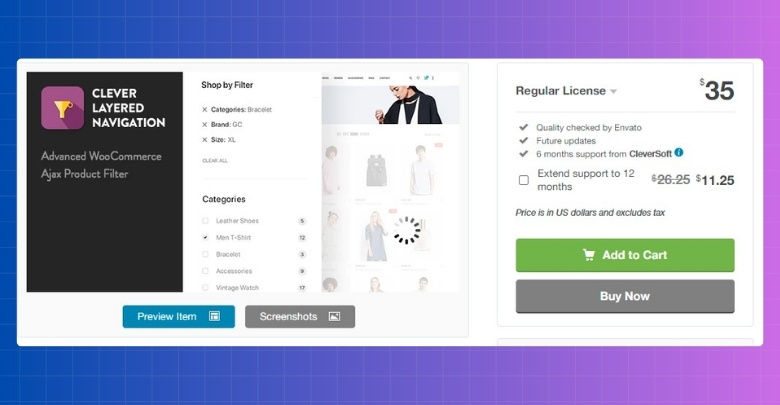
Technical Sides Clever WooCommerce Product Filter
| Type of Plugin | Premium WooCommerce AJAX product filter plugin |
| Developed By | CleverSoft |
| Current Version | N/A |
| Active Installations / Users | N/A |
| Free / Paid Availability | Premium only |
Core Features
- AJAX filtering with instant product updates
- Price-based product filtering
- Attribute-based multi-select filtering
- Product filters for new, on-sale, and in-stock items
- Review and rating-based filtering
- Color and image-style filter presentation
- Filter widgets and shortcode support
- Multiple display layouts for filter blocks
- Product sorting support within the filter flow
- Search support alongside product filtering
Strengths
- Covers the filtering basics most stores look for first
- Easier to understand for more standard catalog setups
- Works well for stores using common WooCommerce filter conditions
- Multi-select attribute filtering improves default layered navigation
- Front-end filtering stays practical without feeling too overbuilt
Limitations
- Less focused on custom-field-heavy filtering setups
- More limited around advanced filter URL control
- Not as geared toward page-specific filter planning
Real WooCommerce Use Case
Clothing, accessories, or home goods stores with a fairly standard WooCommerce catalog can get solid use from Clever WooCommerce Product Filter. When shoppers mostly filter by price, size, color, stock, sale status, or ratings, a more familiar filtering approach can be enough without needing a more advanced setup.
Product Filtering Types Comparison
Supported filter types shape how narrow or flexible product discovery can become across a WooCommerce catalog. This section focuses on the range of filtering options each plugin offers and where that range starts to matter more in real store use.
| Filtering Type Area | Dynamic AJAX Product Filters for WooCommerce | Clever WooCommerce Product Filter |
| Price filtering | Yes | Yes |
| Category filtering | Yes | Yes |
| Attribute filtering | Yes | Yes |
| Tag filtering | Yes | Less emphasized |
| Rating filtering | Yes | Yes |
| Stock status filtering | Yes | Yes |
| New / sale product filtering | Possible through filter setup | Yes |
| Custom taxonomy filtering | Yes | More limited |
| Custom field filtering | Yes | More limited |
| Keyword search filtering | Yes | Search support available |
| Multi-select filtering | Yes | Yes |
| Color or visual filter styles | Yes | Yes |
| Button, checkbox, or slider-style filters | Yes | Supported through filter layouts |
| Page-specific filter sets | Yes | Less emphasized |
Performance, User Experience, and Scalability
Performance consistency is crucial when traffic increases or filters are used in combination. Filters should respond quickly and predictably, without increasing bounce rates or causing frustration.
Dynamic AJAX Product Filters maintains stable performance, even when multiple filter conditions are applied. Clever WooCommerce Product Filter performs well in many situations, but its performance under load can depend on hosting, theme, and configuration.
| Area | Dynamic AJAX Product Filters for WooCommerce | Clever WooCommerce Product Filter |
| Product updates during filtering | Instant AJAX updates | AJAX-based updates |
| Catalog depth handling | Better suited to broader, more layered catalogs | Better suited to standard store filtering needs |
| Shopper flow | Built around fast multi-filter interactions | More straightforward filtering flow |
| Filter setup range | More flexible as filtering needs expand | More comfortable for lighter filtering use |
| Mobile browsing | Responsive, mobile-optimized layouts | AJAX filtering is available, bit is ut less performance-led positioning |
| Long-term scalability | Better fit for stores expecting filtering complexity to grow | Better fit for stores with simpler product discovery needs |
SEO and Indexable Filter URL Capabilities
Filtered URLs matter when a store wants product filters to support search visibility instead of just changing what shoppers see on the page. In this comparison, the bigger difference is not AJAX itself, but how much control each plugin gives over URL behavior and SEO handling.
| SEO Aspect | Dynamic AJAX Product Filters | Clever WooCommerce Product Filter |
| Clean Filter URLs | Yes | Limited |
| Index / Noindex Control | Yes | Basic |
| Crawl Budget Optimization | High | Medium |
| Faceted Search Safety | Strong | Basic |
| Duplicate URL Risk | Low | Medium |
Key Takeaway: URL control today prevents SEO problems tomorrow.

Installation, Setup, and Ongoing Ease of Use
Ease of use starts before the first filter goes live. This part of the comparison looks at how each plugin feels to install, configure, and keep working with once the store begins adding more filter rules and layout changes.
| Area | Dynamic AJAX Product Filters for WooCommerce | Clever WooCommerce Product Filter |
| Installation path | Free install from the WordPress dashboard, Pro by ZIP upload | Premium marketplace-style install |
| Getting started guidance | Clear installation and setup steps are documented | Marketed as easy to set up and quick to start |
| Placement options during setup | Widgets, blocks, shortcodes, and page builder placement | Standard filter placement with shortcode/widget-style use |
| Setup depth | More settings and a configuration range | Simpler overall setup feels |
| Learning curve | Slightly higher because of broader controls | Easier to grasp for standard store setups |
| Ongoing adjustments | Better for stores that expect filter logic to evolve | Better for stores that want lighter day-to-day management |
Theme and Plugin Compatibility
Compatibility becomes more important once a filter plugin has to fit into an existing WooCommerce stack instead of a clean test store. That includes theme behavior, builder support, and how easily filters can be placed where the shop layout actually needs them.
| Compatibility Area | Dynamic AJAX Product Filters for WooCommerce | Clever WooCommerce Product Filter |
| WooCommerce theme support | Positioned to work with any WooCommerce theme | Works with WooCommerce, but broader theme-fit detail is less emphasized publicly |
| Elementor support | Yes | Less clearly highlighted |
| Gutenberg support | Yes | Less clearly highlighted |
| Widget support | Yes | Yes |
| Shortcode support | Yes | Yes |
| Placement flexibility | Widgets, shortcodes, blocks, and builder-friendly placement | More centered on standard widget and shortcode-style placement |
| Best compatibility angle | Better for mixed builder and theme setups | Better for more conventional WooCommerce layouts |
Support and Documentation Comparison
Support quality shows up most when a plugin needs troubleshooting, styling changes, or a more specific setup than the default one. What matters here is not only whether help exists, but how easy it is to find useful guidance when the store setup gets more specific.
| Area | Dynamic AJAX Product Filters for WooCommerce | Clever WooCommerce Product Filter |
| Documentation structure | Dedicated documentation hub with categorized guides | More limited public guidance from the marketplace listing |
| Setup help | Step-by-step install and setup guides | Basic product-page guidance |
| Styling help | Separate docs for filter design and display options | Less detailed publicly |
| SEO help | Dedicated SEO and filter URL documentation | Less clearly documented |
| Advanced settings help | Import, export, and settings guidance available | Less emphasis on advanced admin guidance |
| Troubleshooting depth | Broader written guidance across features | More dependent on seller-side support |
Key Takeaway: Stronger support reduces downtime.
Advanced Settings and Filter Handling Comparison
Basic filters are only part of the picture. What matters more on many WooCommerce stores is how much control a plugin gives once filtering needs become more detailed. Here’s the advanced settings and filter handling comparison.
| Advanced Area | Dynamic AJAX Product Filters for WooCommerce | Clever WooCommerce Product Filter |
| Filter range | Supports tags, stock, sale status, SKU, dimensions, date ranges, custom fields, and more | Focuses more on standard WooCommerce filter conditions |
| URL handling | Query strings, permalinks, or AJAX-only mode | Standard AJAX filtering flow |
| Page-specific filter setup | Better to use different filters on different parts of the store | Less focused on page-by-page filter setup |
| Custom data support | Supports custom fields | Less clearly documented |
| Variation-related filtering | Works with product variations | Covers common WooCommerce filtering use |
| Placement control | Shortcodes and more flexible placement options | Widget and shortcode-based placement |
| Settings range | More admin-side control | Simpler settings structure |
Which Product Filter Plugin Is Better for Which Type of Store?
Choosing between these two plugins becomes easier once the comparison is tied to the kind of store you run. Looking at store type, growth plans, and filtering needs gives a more practical answer than features alone.
That makes the real difference easier to spot.
| Store Type | Better Choice | Reason |
| Small store | Clever WooCommerce Product Filter | Works well for standard filtering needs with a more visual filtering setup |
| Medium store | Depends | Choice comes down to whether the store values simpler filtering or more control as needs grow |
| Large store | Dynamic AJAX Product Filters for WooCommerce | Better suited to layered catalogs and broader filtering demands |
| SEO-focused store | Dynamic AJAX Product Filters for WooCommerce | Gives more control over filtered URL handling |
| Non-technical owner | Clever WooCommerce Product Filter | Feels more familiar for stores that want a lighter setup path |
| Visual-first store | Clever WooCommerce Product Filter | Puts more emphasis on front-end filter presentation |
| Store using custom fields or taxonomies | Dynamic AJAX Product Filters for WooCommerce | Handles broader filter data more comfortably |
| Store planning long-term catalog growth | Dynamic AJAX Product Filters for WooCommerce | Leaves more room for added filtering depth later |
SEO Mistakes That Often Happen With Product Filter Plugins
Filter plugins can improve product discovery, but they can also create search issues when filtered pages are left unmanaged. Problems usually start when too many filter combinations become crawlable, indexable, or inconsistent across the catalog.
Common SEO mistakes include:
- Letting Too Many Filter Combinations Get Indexed: Category, attribute, price, brand, and stock filters can create far more URLs than a store actually needs in search.
- Creating Duplicate or Near-Duplicate Filtered Pages: Different filter paths can lead to pages with almost the same products and very little unique value.
- Using Messy Parameter-Based URLs Without Control: Long or inconsistent query strings can make filtered pages harder to manage and less useful from an SEO standpoint.
- Sending Crawlers Into Low-Value Filtered Pages: Search engines can end up spending time on filtered results instead of more important category or product pages.
- Leaving Weak or Conflicting Canonical Signals in Place: When canonical handling is unclear, filtered pages can compete with the main category pages.
- Indexing Filtered Pages That Offer No Real Search Value: Not every filtered state deserves to become a landing page.
- Overlooking Internal Linking Dilution: Too many crawlable filter links can spread ranking signals across pages that were never meant to rank.
Which Ajax Product Filter Plugin Should I Choose?
The decision usually comes down to how far you need filtering to go in your store. One plugin is a better match for stores with more demanding filter logic, while the other makes more sense when the goal is to keep filtering simpler and easier to work with.
- Dynamic AJAX Product Filters for WooCommerce: Makes more sense when filtering needs are likely to grow with the catalog. It gives more room for custom product data, broader filter handling, and tighter control over how filters work across the store.
- Clever WooCommerce Product Filter: Feels more suitable for stores that want product filtering to stay practical and visually clear without turning setup into a bigger task. It works better when the catalog follows a more standard WooCommerce structure, and the main goal is smoother browsing.
Frequently Asked Questions
Choosing the right product filter plugin often leaves store owners with a few extra questions. Here are some that many people still ask even after going through all the main features and comparisons.
Can I Use These Filters on a Multi-Language Store?
Yes, both plugins can work with multi-language setups when paired with translation plugins like WPML or Polylang. It ensures your filters appear in all supported languages. Always check compatibility with your translation plugin before setting it live.
Do These Plugins Affect Page Loading Speed?
Both are designed to work quickly, but Dynamic Ajax Product Filters has extra caching options that may help larger stores. AJAX filtering itself is lightweight compared to full page reloads. Keeping your theme and hosting optimized will also improve performance.
Can I Show Filters Only on Certain Categories?
Dynamic Ajax Product Filters supports assigning different filters to different pages or categories. This helps keep filter options relevant for each section of your store. Clever WooCommerce Product Filter applies the same filters site-wide by default.
Will the Filters Work With Custom Product Types?
Yes, as long as custom product types are built using WooCommerce’s product structure, filters can detect them. Some extra setup may be needed for unique attributes. Always test with a few products before going live.
Can Customers Use Multiple Filters at Once?
Absolutely, both plugins allow applying multiple filters together for precise results. Dynamic Ajax Product Filters also gives more flexibility with how those filters appear in URLs. This can be useful for sharing or bookmarking specific filtered pages.
Final Verdict: Clever WooCommerce Product Filter vs Dynamic AJAX Product Filters
When the choice is narrowed down to Clever WooCommerce Product Filter vs Dynamic AJAX Product Filters, the better option depends on how much depth your store really needs from product filtering.
For stores with simpler catalogs and a stronger preference for visual, familiar filtering, Clever WooCommerce Product Filter can still do the job well. But for WooCommerce stores that need filtering to handle more product data, more control, and more growth over time, Dynamic AJAX Product Filters for WooCommerce is the stronger overall fit.
So in this Clever WooCommerce Product Filter vs Dynamic AJAX Product Filters comparison, Dynamic AJAX Product Filters is the better choice for stores that want more flexibility without outgrowing their filter setup too quickly.
