

Filtering and search behavior in WooCommerce matter far more than most store owners realize. While filtering enhances product discovery, search influences whether customers can even find products in the first place. Efficient search and filter solutions improve engagement, reduce bounce rates, and support conversions — but they do it in very different ways.
This comparison evaluates Ajax Search Lite against Dynamic AJAX Product Filters for WooCommerce to help you choose the right tool for your store’s needs, whether you are focusing on product discovery UX, SEO performance, catalog scalability, or technical robustness.
Who This Comparison Is For
Store fit matters more than feature count when choosing between a search plugin and a filter plugin. Right comparison is most useful for WooCommerce sites trying to improve product discovery, reduce friction in navigation, and choose a tool that matches how customers actually browse.
- WooCommerce store owners focused on product discovery
- Stores prioritizing smoother search or filtering behavior
- Merchants with large or layered product catalogs
- Non-technical users seeking a practical plugin fit
- Agencies and developers refining WooCommerce UX
- Teams comparing search-led and filter-led browsing
Quick Summary
Product discovery does not always start the same way in WooCommerce. Some stores depend more on typed search, while others rely on category browsing and layered refinement to help shoppers reach the right products faster.
- Dynamic AJAX Product Filters for WooCommerce fits better when shoppers need to narrow products through attributes, price, stock status, rating, and other filter conditions across shop and archive pages.
- Ajax Search Lite makes more sense when customers are more likely to search by keyword and benefit from live suggestions, instant search feedback, and a search-led browsing experience.
Ajax Search Lite vs Dynamic AJAX Product Filters: Core Features Comparison
Core features differ because these plugins improve product discovery from opposite directions. Dynamic AJAX Product Filters for WooCommerce is built around filter-led browsing with real-time product refinement, while Ajax Search Lite is built around live search, predictive suggestions, and search-based navigation across WordPress and WooCommerce content.
| Feature Area | Dynamic AJAX Product Filters for WooCommerce | Ajax Search Lite |
| AJAX Behavior | Real-time product filtering | Real-time live search |
| Live Search vs Live Filtering | Filter-led browsing | Search-led discovery |
| Search Suggestions | Not a highlighted core feature | Predictive search suggestions |
| Attribute Filtering | Yes | Not a core filter strength |
| Price Filtering | Yes | Not clearly highlighted |
| Stock Status Filtering | Yes | Not clearly highlighted |
| Custom Field Support | Yes | Yes |
| Custom Taxonomy Support | Yes | Categories and tags supported in search |
| WooCommerce Product Discovery Fit | Better for narrowing large product sets | Better for finding products through typed queries |
| Mobile UX | Mobile-friendly filtering layouts | Mobile device support highlighted |
| SEO Control | Index / noindex and crawlable filter URL control | Not positioned around filter-page SEO control |
| Scalability | Better suited to layered catalogs | Better suited to search-driven discovery |
| Page Builder Fit | Shortcode, widget, and block support | Elementor Loop Grid and JetEngine Listing Grid support |
| Performance on Larger Catalogs | Better fit for repeated filter refinement | Better fit for fast search-led lookup |
| Best For | Stores needing deeper product filtering | Stores needing stronger live search |
What Problem Do These Two Product Filter Plugins Solve?
Product discovery problems in WooCommerce do not always come from the same place. Sometimes visitors know exactly what they want but cannot reach it quickly through the default search. In other cases, they need a better way to reduce a large catalog into a smaller set of relevant products. That is why these two plugins solve related, but not identical, store challenges.
Dynamic AJAX Product Filters for WooCommerce solves browsing friction in larger or more layered catalogs by letting shoppers refine products step by step without reloading the page, which is especially useful when search alone is not enough to reach the right product set.
Ajax Search Lite solves search friction by replacing basic on-site search with live results, predictive suggestions, and broader content search support, which helps when shoppers already know what they want and want to find it faster.
Plugin Overview – Where Each One Fits in WooCommerce
Search tools and filter tools shape product discovery in different ways, so their role inside a WooCommerce store is not the same. One is meant to help shoppers reach products faster through live search input, while the other is meant to reduce a wider catalog through structured filtering logic.
Dynamic AJAX Product Filters for WooCommerce
Dynamic AJAX Product Filters for WooCommerce is positioned as an Ajax Product Filter for WooCommerce stores that depend more on structured browsing than simple keyword lookup. It fits better in setups where shoppers move through categories, attributes, price ranges, stock conditions, and other layered choices before narrowing products down to the most relevant options.

Key Features
- Live AJAX filtering with instant product updates
- Filtering by category, attributes, tags, price, and rating
- Support for stock status, sale status, SKU, product ID, dimensions, and date ranges
- Custom taxonomy and custom field filtering support
- Multiple filter layouts, including checkboxes, dropdowns, sliders, swatches, and buttons
- Page-specific filter display for different shop and archive pages
- Query-based and permalink-based filter URL support
- Index and noindex control for filtered pages
- Shortcode and widget support for flexible placement
- Mobile-friendly filter layouts for smaller screens
Strengths
- Gives stores broader product refinement options
- Handles layered browsing more effectively
- Supports stronger filter control across different pages
- Offers more SEO-oriented filter URL handling
- Fits growing catalogs more comfortably
Limitations
- Some advanced features may depend on paid plans
- Full SEO control may need higher-tier access
Real WooCommerce Use Case
Stores selling apparel, electronics, furniture, or parts can use Dynamic AJAX Product Filters for WooCommerce when shoppers usually narrow products by several conditions before deciding.
Ajax Search Lite
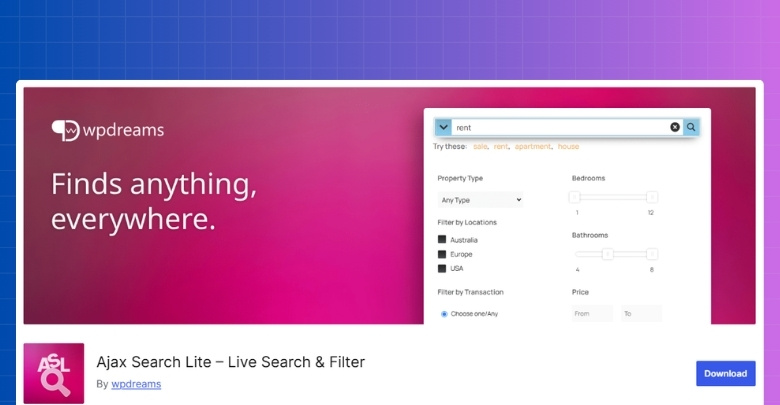
Ajax Search Lite is positioned as a live search plugin for WooCommerce and WordPress sites that want faster product lookup through typed search. It makes more sense in stores where visitors often arrive with a product idea already in mind and expect instant suggestions instead of browsing through multiple filter layers.
Key Features
- Live AJAX search with instant result updates
- Predictive search suggestions while typing
- Search support for WooCommerce products
- Search across posts, pages, products, and custom post types
- Custom field search support
- Category and tag-based search source support
- Search result image display support
- Shortcode and widget support
- Built-in search templates and styling options
- Mobile device support
Strengths
- Improves product lookup speed
- Makes typed search more useful
- Supports broader on-site content search
- Works well for intent-driven visitors
- Easier fit for search-led stores
Limitations
- Advanced search features may require the Pro version
- Less suited to filter-heavy browsing journeys
- Does not replace full-layered product filtering
Real WooCommerce Use Case
Stores selling books, electronics, supplements, or branded items can use Ajax Search Lite when shoppers are more likely to search by name, keyword, or product term instead of browsing through many filter combinations.
Comparing Pricing Between These Two Product Filter Plugins
Pricing should be reviewed not just in terms of upfront cost but in long-term value and scalability. Ajax Search Lite is generally free and popular, which reduces entry cost. Dynamic AJAX Product Filters for WooCommerce offers a free version with most core features and paid upgrades for advanced control.
| Pricing Aspect | Dynamic AJAX Product Filters for WooCommerce | Ajax Search Lite |
|---|---|---|
| Free Version | Yes (most core features) | Yes |
| Feature Availability (Free) | High | Moderate |
| Premium License | Paid | Optional |
| Renewal Required | Yes | Optional |
| Value for Large Stores | High | Medium |

Filtering Types Comparison
Filter depth changes how shoppers interact with a WooCommerce catalog once they move beyond the first results page. The gap between these two plugins is noticeable here because one is built to refine products through multiple filter conditions, while the other is meant to support discovery more through live search and lighter narrowing options.
| Filter Type | Dynamic AJAX Product Filters for WooCommerce | Ajax Search Lite |
|---|---|---|
| Category | Yes | No |
| Attributes | Yes | No |
| Price Range | Yes | No |
| Stock Status | Yes | No |
| Tags | Yes | No |
| Custom Taxonomies | Yes | No |
Performance, User Experience, and Scalability
Store experience starts to separate more clearly when product discovery tools are used over and over across a growing catalog. What matters here is not only how fast results appear, but how naturally each plugin supports the way shoppers move, refine, and reach products as catalog demands become heavier.
| Area | Dynamic AJAX Product Filters for WooCommerce | Ajax Search Lite |
| Main interaction style | Step-by-step product refinement | Instant search-based lookup |
| Best user flow | Browse and narrow | Search and jump |
| Handling repeated actions | Better for repeated filter changes | Better for repeated search attempts |
| Catalog exploration style | Stronger for broader browsing journeys | Stronger for direct product finding |
| Fit for layered product data | Better suited | More limited |
| Fit as catalog complexity grows | Stronger | More search-dependent |
| Shopper experience focus | Refinement control | Search speed |
SEO and Indexable Filter URL Capabilities
Filtered pages can either support organic visibility or create crawl waste if URLs are poorly structured. Dynamic AJAX Product Filters for WooCommerce provides advanced control over URL parameters and indexing, reducing SEO risk.
Ajax Search Lite has minimal SEO impact by default, and requires a custom SEO strategy for search results indexing to avoid low-value pages in search engine results.
| SEO Aspect | Dynamic AJAX Product Filters for WooCommerce | Ajax Search Lite |
|---|---|---|
| Clean Filter URLs | Yes | N/A |
| Search Results SEO | Basic | Manual optimization needed |
| Index / Noindex Control | Yes | Manual |
| Crawl Budget Optimization | High | Medium |
| Duplicate URL Risk | Low | Medium |
Setup Complexity and Learning Curve
The ease of setup influences how quickly these tools can be deployed. Plugins that require fewer adjustments reduce the risk of errors and maintenance effort.
Dynamic AJAX Product Filters is relatively straightforward to configure with predictable defaults. Ajax Search Lite is also easy to install, but may require some tweaks for search relevance and result formatting.
| Area | Dynamic AJAX Product Filters for WooCommerce | Ajax Search Lite |
| Primary setup focus | Filter configuration | Search configuration |
| Admin setup depth | Higher | Moderate |
| Placement method | Shortcode, widget, block | Widget, shortcode, automatic replacement |
| Styling setup | Separate form style controls | Built-in templates and style options |
| Store data preparation | More important | Less demanding |
| Learning curve | More settings to work through | Easier to start with |
| Best fit for setup style | Stores want more control | Stores want quicker deployment |
Theme and Plugin Compatibility
Compatibility matters most when a plugin has to fit into an existing WooCommerce setup without forcing layout workarounds or breaking the browsing flow. What separates these two is less about basic installation and more about how naturally each one fits themes, page builders, search placements, and broader store structure.
| Area | Dynamic AJAX Product Filters for WooCommerce | Ajax Search Lite |
| WooCommerce focus | Built specifically for WooCommerce filtering | Supports WooCommerce search |
| Theme compatibility | Positioned as working with any WooCommerce theme | Works across WordPress themes; WooCommerce support included |
| Page builder support | Elementor and Gutenberg highlighted | Broad page builder support, including Elementor, Divi, Oxygen, Breakdance, Gutenberg, and Beaver |
| Widget support | Yes | Yes |
| Shortcode support | Yes | Yes |
| Block support | Highlighted | Not clearly highlighted |
| Elementor-specific integration | General page builder compatibility highlighted | Elementor support plus Loop Grid support |
| JetEngine integration | Not clearly highlighted | JetEngine Listing Grid support |
| Multilingual compatibility | Not clearly highlighted in sources checked | WPML, Polylang, and qTranslateX compatibility listed |
| Placement flexibility | Stronger for filter placement across store areas | Stronger for search placement across site areas |
Support and Documentation Comparison
Support quality matters most after setup, when search behavior or filtering logic needs adjustment inside a live store. The difference here comes down to how clearly each plugin exposes its help resources, how structured the public documentation is, and how easy it is to find the next step when something breaks or needs tuning.
| Support Area | Dynamic AJAX Product Filters for WooCommerce | Ajax Search Lite |
|---|---|---|
| Documentation Quality | Clear & structured | Good |
| Technical Guidance | Strong | Basic |
| Support Responsiveness | High | Varies |
| Community Resources | Good | Good |
Advanced SEO & Plugin Compatibility Comparison
Technical differences start to matter when a plugin has to live inside a broader WooCommerce stack without creating SEO blind spots or front-end friction. Area is less about headline features and more about URL behavior, cache friendliness, builder integration, and how safely each plugin fits into a store that already depends on themes, plugins, and structured content.
| Area | Dynamic AJAX Product Filters for WooCommerce | Ajax Search Lite |
| URL Handling Model | Query string, permalinks, or AJAX | Search query based |
| SEO-Focused URL Control | Stronger | More limited |
| Index / Noindex Control | Yes | Not clearly highlighted |
| Crawlable Discovery Paths | Yes | Not a core strength |
| Cache-Oriented Positioning | Not clearly highlighted | Search phrase caching and image precaching |
| Page Builder Compatibility | Elementor and Gutenberg highlighted | Broad builder support including Elementor, Divi, Oxygen, Breakdance, Gutenberg, Beaver |
| WooCommerce Archive Fit | Built for shop and archive filtering | Supports WooCommerce shop search and archive live loading |
| Custom Field Compatibility | Yes | Yes |
| Custom Taxonomy / Category Support | Yes | Yes, within search and filter context |
| Multilingual Compatibility | Not clearly highlighted | WPML, Polylang, and qTranslateX listed |
| Technical Control Depth | Higher for filter behavior | Higher for search behavior |
Which Product Filter Plugin Is Better for Which Type of Store?
Best fit depends on how customers usually reach products inside the store. Some WooCommerce setups benefit more from fast keyword search, while others get more value from structured filtering across a larger catalog. That is where the gap between these two plugins becomes easier to judge.
| Store Type | Better Choice | Reason |
| Small store | Ajax Search Lite | Faster product lookup |
| Medium store | Depends | Search vs filtering priority |
| Large catalog store | Dynamic AJAX Product Filters for WooCommerce | Better refinement depth |
| SEO-driven store | Dynamic AJAX Product Filters for WooCommerce | Stronger URL control |
| Search-heavy store | Ajax Search Lite | Better live search flow |
| Filter-heavy store | Dynamic AJAX Product Filters for WooCommerce | Better layered browsing |
| Non-technical owner | Ajax Search Lite | Easier starting point |
| Page-builder-heavy store | Ajax Search Lite | Broader builder support |
| Catalog with many attributes | Dynamic AJAX Product Filters for WooCommerce | Better attribute-based narrowing |
| Store focused on direct product finding | Ajax Search Lite | Better for typed intent |
What Often Goes Wrong With Product Search and Filter Plugins?
Search and filter tools can improve WooCommerce product discovery, but weak implementation often creates new friction instead of removing it. Problems usually appear when search behavior, filter logic, and store structure do not line up with how shoppers actually browse.
- Weak Search Relevance: Results appear quickly but still fail to surface the products shoppers expect.
- Misaligned Filter Logic: Available filters do not match the way customers naturally narrow products.
- Messy URL Behavior: Too many filter combinations create cluttered URLs or weaker page signals.
- Search-Only Improvement: Live search gets better, but overall browsing still feels hard in larger catalogs.
- Scaling Friction: Filter or search behavior becomes harder to manage as product data expands.
- Layout Inconsistency: Plugin output works unevenly across themes, builders, or customized shop pages.
- Disconnected Discovery Flow: Search and filtering exist on the same store, but do not support a smoother journey.
- Weaker Mobile Experience: Search bars or filter panels take too much space or feel harder to use on smaller screens.
- Feature Overload: Store owners add more discovery tools than the catalog actually needs.
- Low Conversion Impact: Technical improvements are visible, but they do not translate into better product finding or buying flow.
Which Product Filter Plugin Should I Choose?
The right choice depends on how product discovery happens in your store. Some WooCommerce sites need visitors to reach products faster through typed search, while others need a stronger way to narrow products through layered browsing across shop and category pages.
- Choose Dynamic AJAX Product Filters: Better fit for stores that rely on filter-led discovery, deeper product refinement, cleaner filter URL control, and broader handling of attributes, price, stock, and other product conditions.
- Choose Ajax Search Lite: When your store depends more on search-led discovery, faster keyword lookup, live suggestions, and a simpler way to help shoppers find products they already have in mind.
Frequently Asked Questions
Here is a short intro to the FAQs. Picking the right tool can feel tricky when both options promise faster results. These questions focus on real decisions you face during setup, testing, and daily use. They avoid repeating the basic features and prices you already covered and get into practical tips you can apply right away.
Can You Use Both Plugins on One Site Without Confusing Users?
Yes, you can run both if you place them with a clear purpose. Use Ajax Search Lite in the header for quick lookups and keep Dynamic Ajax Product Filters inside shop or category pages for focused product refining. Label the search bar and the filter area clearly so visitors understand where to start. Test with a few users and watch where they click to confirm that the roles feel natural.
How Should You Plan Your Site Structure for the Best Results?
Good structure makes both tools shine. In WooCommerce, group products with clean categories and use clear product attributes like size and color with consistent names. For your content, use clear titles and helpful excerpts so search suggestions look meaningful. When your base data is tidy, both search and filters return better matches and feel faster.
What If Results Feel Slow on Shared Hosting?
First, check image sizes and remove heavy plugins that you do not need. Turn on caching at the server or plugin level and clear caches after you adjust settings. Limit the number of items shown at once and avoid loading very large result sets on the first view. If speed still suffers, consider a better hosting plan or a small content delivery setup for images.
How Can You Track Which Actions Lead to More Clicks or Sales?
Create events for key actions such as typing in the search box, choosing a filter, and clicking a result. Track these events in your analytics tool and build simple reports that show which keywords or filters lead to product views and checkouts. Compare weeks to see which settings change user behavior. Use these findings to keep the helpful parts and remove low-value options.
Final Verdict: Ajax Search Lite vs Dynamic AJAX Product Filters
The final decision comes down to how shoppers are expected to find products in your store. In this Ajax Search Lite vs Dynamic AJAX Product Filters comparison, Dynamic AJAX Product Filters for WooCommerce stands out as the stronger choice for WooCommerce stores that need deeper product refinement, better handling of layered browsing, and more control over filter-driven discovery across larger catalogs.
Ajax Search Lite still makes sense for stores where search plays a bigger role in navigation, especially when visitors are more likely to type product names, keywords, or terms and expect fast suggestions. For stores that need stronger filtering logic, broader catalog control, and a more structured product discovery path, Dynamic AJAX Product Filters for WooCommerce is the more capable option.
