

When shoppers cannot narrow down products quickly, store navigation becomes harder, product discovery slows down, and more visitors leave without buying. That is why choosing the right filter plugin matters for both user experience and store growth.
In this comparison of Ultimate WooCommerce Filters vs Dynamic AJAX Product Filters for WooCommerce, we look at how both plugins handle filtering features, speed, SEO, compatibility, setup, and overall store usability. Whether you run a small catalog or a large WooCommerce store, this guide will help you understand which plugin fits your filtering needs better.
Quick Summary
Choosing between these two plugins mostly comes down to how much control, speed, and filtering flexibility your store needs. Both are built to improve product discovery in WooCommerce, but they are not aimed at exactly the same type of setup.
- Dynamic AJAX Product Filters for WooCommerce is better suited to stores that need faster live filtering, more control over filter behavior, and a smoother experience for shoppers browsing larger or more complex product catalogs.
- Ultimate WooCommerce Filters works better for stores that want a more straightforward filtering solution for standard catalog navigation without needing too much configuration or advanced filter logic.
Ultimate WooCommerce Filters vs Dynamic AJAX Product Filters: Side-by-Side Comparison
Both plugins are designed to make WooCommerce product filtering easier, but they differ in how much control, speed, and flexibility they offer. Looking at the side-by-side comparison helps show where each plugin is better suited and which one aligns more closely with a store’s filtering needs.
| Feature | Ultimate WooCommerce Filters | Dynamic AJAX Product Filters for WooCommerce |
| AJAX Filtering | Supports live product filtering without full page reloads | Built around AJAX-based filtering for faster product updates |
| Filter Types | Covers common filter needs for WooCommerce catalogs | Supports broader filtering control for more varied store setups |
| Product Discovery | Helps shoppers narrow results more easily | Designed to improve product discovery with smoother filtering flow |
| Large Catalog Handling | Suitable for standard filtering use cases | Better aligned with stores that need stronger scalability and performance |
| Filter Behavior Control | More focused on essential filtering logic | Offers more flexibility in how filters behave across shop pages |
| User Experience | Improves browsing compared to default WooCommerce filtering | Prioritizes faster interaction and a smoother shopper experience |
| Setup Approach | More suitable for stores looking for a simpler starting point | Better for stores that want deeper filter customization |
| Store Fit | Better for simpler or mid-level filtering needs | Better for stores with complex filtering demands or growth-focused setups |
What Problem Do These Two Product Filter Plugins Solve?
Filtering plugins solve a common WooCommerce weakness: default product browsing often does not give shoppers enough control to narrow down products quickly and efficiently. When filtering feels limited, product discovery becomes slower, navigation gets less intuitive, and more visitors leave before finding the right item.
- Dynamic AJAX Product Filters for WooCommerce solves that problem with a stronger focus on faster live filtering, smoother product updates, and more flexible filter behavior, making it a better fit for stores with more complex browsing paths.
- Ultimate WooCommerce Filters addresses the same issue by giving stores a more structured way to help shoppers sort through products using common catalog criteria, making standard WooCommerce navigation easier to manage.
Plugin Overview – Role and Positioning in WooCommerce
Role and positioning matter because not every WooCommerce filter plugin is built with the same store priorities in mind. Some are better suited to straightforward catalog filtering, while others are designed for stores that need faster AJAX interaction, more flexible filter behavior, and greater control as product discovery becomes more complex.
Ultimate WooCommerce Filters
Ultimate WooCommerce Filters is positioned as a more straightforward WooCommerce filtering plugin for stores that want common product filters without building a deeply customized filtering setup. It is designed more for stores that want shoppers to browse products by color, size, attributes, categories, and tags through a widget, block, or shortcode.

Technical Details
| Type of Plugin | WooCommerce product-filter plugin |
| Developed By | Rustaurius |
| Current Version | 3.3.7 |
| Active Installations / Users | 600+ |
| Free / Paid Availability | Both free & Premium versions available |
Key Features
- Filtering by color with visible swatches.
- Filtering by size for variation-based browsing.
- Filtering by WooCommerce attributes, categories, and tags.
- Smart product search with autocomplete support.
- Block, shortcode, and widget support for filter placement.
- Optional table-format shop view for easier comparison.
- Rating-based product filtering.
- In-stock and on-sale product filtering.
- Reset-all option for easier filter clearing.
- WPML support for multilingual stores.
Strengths
- Covers common WooCommerce filter needs clearly and simply.
- Works well for stores that rely on color, size, and attribute browsing.
- Supports widget, shortcode, and block placement for easier setup.
- Adds helpful extras like smart search and table view.
- Premium version expands layout and filter customization options.
Limitations
- Some advanced features are only available in the premium version.
- Full filter flexibility may depend on paid features.
- Broader customization options are more limited in the base version.
Real WooCommerce Use Case
Fashion, footwear, accessories, or gift stores can use Ultimate WooCommerce Filters to help shoppers browse by color, size, category, tag, stock status, or rating without needing a more advanced filtering setup. That makes it a practical fit when standard catalog filters are enough for the store’s browsing flow.
Dynamic AJAX Product Filters for WooCommerce
Dynamic AJAX Product Filters for WooCommerce is positioned as a more flexible Ajax Product Filter for WooCommerce, especially for stores that need faster product discovery, smoother browsing flow, and broader control over how filters work across shop and archive pages. Compared with a simpler filtering setup, it fits better in WooCommerce stores where live filtering speed, catalog depth, and filter behavior have a direct impact on the overall shopping experience.

Technical Details
| Type of Plugin | WooCommerce product filtering plugin |
| Developed By | Plugincy |
| Current Version | 1.5.9 |
| Active Installations / Users | 700+ |
| Free / Paid Availability | Free version available, Pro version with advanced features |
Key Features
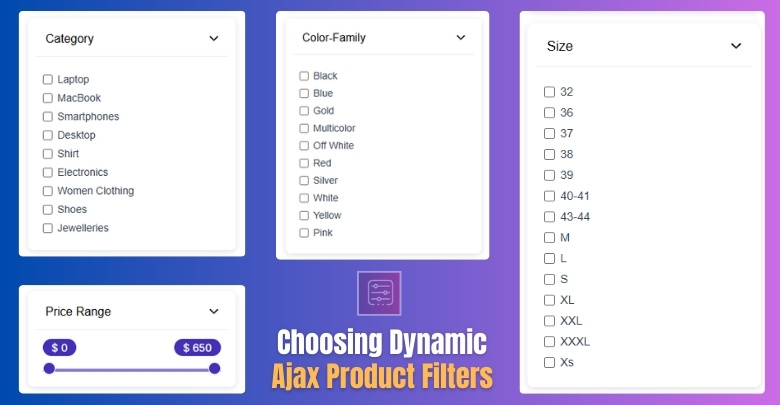
- Live AJAX filtering with instant product updates
- Filtering by category, attributes, tags, price, and rating
- Support for stock status, sale status, SKU, product ID, dimensions, and date ranges
- Custom taxonomy and custom field filtering support
- Multiple filter layouts, including checkboxes, dropdowns, sliders, swatches, and buttons
- Page-specific filter display for different shop and archive pages
- Query-based and permalink-based filter URL support
- Index and noindex control for filtered pages
- Shortcode and widget support for flexible placement
- Mobile-friendly filter layouts for smaller screens
Strengths
- Makes filtering feel faster and smoother during active browsing
- Covers more product data points beyond basic WooCommerce filters
- Gives stores more flexibility over where and how filters appear
- Supports SEO-focused filter URL handling more directly
- Fits better when catalogs are larger or filtering needs are more layered. This is an inference from the plugin’s documented feature range and positioning.
Limitations
- More advanced SEO controls may depend on higher-tier features
- Stores with highly specific filtering needs may need the premium feature set
Real WooCommerce use case
Stores selling clothing, electronics, furniture, or auto parts can use Dynamic AJAX Product Filters for WooCommerce to let shoppers narrow results by price, size, brand, stock status, rating, or custom fields without repeated page reloads. That makes it a stronger fit where filtering directly affects product discovery speed and catalog usability.
Dynamic AJAX Product Filters vs Ultimate WooCommerce Filters: Pricing Comparison
Pricing matters because both plugins offer a free starting point, but paid plans shape how much flexibility, support, and long-term value a store actually gets. This pricing comparison helps show which plugin is easier to enter with, which one scales better across multiple sites, and which one gives more room for advanced filtering as store needs grow
| Pricing Aspect | Dynamic AJAX Product Filters | Ultimate WooCommerce Filters |
|---|---|---|
| Free Version | Yes (with most core features) | Yes |
| Feature Availability (Free) | High | Medium |
| Premium License | Paid | Paid |
| Renewal Required | Yes | Yes |
| Value for Large Stores | High | Medium |
Endnote: Most stores can start with a free version and upgrade later as needed.

Filtering Types of These Two Plugins Comparison
Filtering types determine how precisely shoppers can narrow down products inside a WooCommerce store. Wider filter coverage helps more complex catalogs, while simpler filter sets are often enough for stores with standard browsing needs.
| Filter Type Area | Ultimate WooCommerce Filters | Dynamic AJAX Product Filters for WooCommerce |
| Category Filter | Yes | Yes |
| Tag Filter | Yes | Yes |
| Attribute Filter | Yes | Yes |
| Color Filter | Yes | Yes, through attributes and filter styles |
| Size Filter | Yes | Yes, through attributes and variation-based filtering |
| Price Filter | Not clearly highlighted on the main plugin page I checked | Yes |
| Rating Filter | Yes | Yes |
| Stock Status Filter | Yes | Yes |
| Sale Status Filter | Yes | Yes |
| SKU Filter | Not highlighted on the main plugin page I checked | Yes |
| Custom Field Filter | Not highlighted on the main plugin page I checked | Yes |
| Custom Taxonomy Filter | Attribute, category, and tag support are clearly listed; broader taxonomy support is not clearly detailed on the main page I checked | Yes |
Performance, User Experience, and Scalability
Performance, user experience, and scalability determine how well a WooCommerce filter plugin holds up as product catalogs grow and shopper behavior becomes more demanding. The difference here is not just about filtering speed, but about how consistently each plugin supports repeated refinement, more complex filter logic, and a smoother browsing journey at scale.
| Area | Ultimate WooCommerce Filters | Dynamic AJAX Product Filters for WooCommerce |
| Filtering Response Model | Standard filter flow with simpler scope | Real-time AJAX-first |
| Best Fit for Repeated Refinement | Moderate | Strong |
| Handling More Filter Logic | More limited | Stronger |
| Support for Deeper Product Data | More basic | Better suited |
| Store Growth Readiness | Better for stable catalogs | Better for expanding catalogs |
| Shopper Flow Under Heavy Filtering | More dependent on simpler use cases | More controlled |
| Long-Term Scalability | Moderate | Higher |
SEO and Indexable Filter URL Capabilities
Clean, indexable URLs are important for organic visibility and crawl budgeting. Filters that append uncontrolled parameters can produce many low-value URLs, risking duplicate content and SEO issues. Dynamic AJAX Product Filters for WooCommerce offers robust control over filter URLs and indexing behavior. Ultimate WooCommerce Filters provides basic URL behavior with limited SEO controls, requiring tuning and supplemental strategies to avoid SEO issues.
| Area | Ultimate WooCommerce Filters | Dynamic AJAX Product Filters for WooCommerce |
| Crawlable Filter URLs | Not clearly stated | Yes |
| Indexable Filter Pages | Not clearly stated | Yes, with SEO settings |
| Clean URL Positioning | Not clearly highlighted | Explicitly highlighted |
| Index / Noindex Control | Not clearly stated | Yes |
| Shareable Filter URLs | Not clearly highlighted | Yes |
| SEO-Focused URL Handling | Not clearly emphasized | Strongly emphasized |
Endnote: URL controls protect organic performance.
Set Up Experience and Learning Curve
Set-up experience affects how quickly a store can move from plugin activation to a usable filter system. The difference here usually comes down to how many decisions need to be made in the admin area, how much filter behavior can be customized, and how much store structure needs to be prepared before filters feel complete.
| Area | Ultimate WooCommerce Filters | Dynamic AJAX Product Filters for WooCommerce |
| Initial Setup Path | More option-driven | More settings-driven |
| Admin Configuration Depth | Lower | Higher |
| Filter Method Choices | Basic enable/disable flow | Query string, permalinks, AJAX |
| Placement Method | Widget, block, shortcode | Shortcode-based |
| Styling Controls | More basic placement-first setup | Separate style settings available |
| Store Data Preparation | Less demanding for standard use | More important for full use |
| Learning Curve | Lighter | Moderate |
| Best Fit for Setup Style | Stores wanting simplicity | Stores wanting control |
Theme and Plugin Compatibility
Compatibility matters because a filter plugin has to work inside an existing WooCommerce stack, not in isolation. Real value here comes from how easily filters can be placed across store layouts, how well the plugin fits different page structures, and whether compatibility support is clearly presented instead of left implied.
| Area | Ultimate WooCommerce Filters | Dynamic AJAX Product Filters for WooCommerce |
| Shortcode Support | Yes | Yes |
| Widget Support | Yes | Yes |
| Block Support | Yes | Yes |
| Page-Specific Filter Assignment | Not clearly stated | Yes |
| Theme Styling Controls | Not clearly highlighted | Yes |
| Custom Field Compatibility | Not clearly stated | Yes |
| Custom Taxonomy Compatibility | Not clearly stated | Yes |
| Multilingual Compatibility | WPML support listed | Not clearly highlighted in the source checked |
| Placement Flexibility | Standard | Higher |
Support and Documentation Comparison
Support quality affects how quickly issues can be resolved and how easily users can configure the plugin correctly. Dynamic AJAX Product Filters provides clear documentation and structured guidance. Ultimate WooCommerce Filters has decent documentation, but advanced visual options may require more support for customization questions.
| Area | Ultimate WooCommerce Filters | Dynamic AJAX Product Filters for WooCommerce |
| WordPress.org Support Tab | Yes | Yes |
| Public Documentation Hub | Not clearly verified | Yes |
| Dedicated Support Page | General support center available | Yes |
| Live Chat Support | Not clearly verified | Yes |
| Ticket-Based Support | General support center available | Yes |
| Plugin-Specific Setup Docs | Not clearly verified from public sources | Yes |
| Help Path Visibility | More general | Clearer |
Advanced Technical Comparison
Technical differences matter when a filter plugin has to work cleanly inside a real WooCommerce stack, not just display filters on the front end. Focus here is on how much control each plugin gives over URL structure, archive behavior, filter placement logic, and deeper product-data handling once store requirements move beyond standard catalog filtering.
| Area | Ultimate WooCommerce Filters | Dynamic AJAX Product Filters for WooCommerce |
| URL Structure Control | Not clearly documented | Custom permalinks supported |
| Filter Placement Logic | Standard placement via block, shortcode, widget | Page-specific filter assignment |
| Custom Field Handling | Not clearly documented | Supported |
| Product Variation Handling | Size and attribute filtering supported | Explicitly supports variable products |
| Store Data Depth | Built for standard WooCommerce filter inputs | Built for broader product data inputs |
| Admin Control Depth | Lighter | Higher |
| Archive Flexibility | Better suited to common archive use | Better suited to different shop and archive needs |
| Technical Headroom | More limited | Higher |
Which Product Filter Plugin Is Better for Which Type of Store?
The best choice depends on how much filtering depth, SEO control, and catalog complexity a store actually needs. Dynamic AJAX Product Filters for WooCommerce is positioned more strongly for stores that rely on advanced filtering logic and crawlable filter URLs, while Ultimate WooCommerce Filters is positioned more around standard browsing needs such as color, size, attributes, categories, and tags.
| Store Type | Better Choice | Reason |
| Small store | Ultimate WooCommerce Filters | Flexibility & customization |
| Medium store | Depends | Visual vs performance needs |
| Large store | Dynamic AJAX Product Filters | Stable performance |
| SEO-driven store | Dynamic AJAX Product Filters | Clean URLs |
| Non-technical owner | Dynamic AJAX Product Filters | Predictable setup |
| Visual-first store | Ultimate WooCommerce Filters | Custom layouts |
Hidden SEO Risks With Product Filter Plugins
Hidden SEO risks often appear after filter plugins are installed, not during setup. Filtered navigation can improve product discovery, but it can also create index bloat, duplicate URLs, weak category signals, and crawl waste when SEO settings are handled loosely.
- Too many indexable filter URLs can flood search engines with low-value pages that do not deserve to rank.
- Duplicate filtered pages can appear when multiple URL versions lead to nearly the same product set.
- Weak category relevance can happen when filtered pages compete with the main category and shop pages.
- Crawl budget waste becomes a problem when bots spend time on filter combinations instead of important pages.
- Thin filtered pages may get indexed even when they add little unique search value.
- Broken internal SEO signals can happen when filter links create too many unnecessary ranking paths.
- Uncontrolled parameter URLs may lead to messy indexing patterns and inconsistent crawl behavior.
- Poor canonical handling can confuse search engines about which version of a page should rank.
- Indexing every filter combination can dilute overall store SEO instead of improving it.
- AJAX without crawlable URL structure can limit SEO value if filtered states are not accessible in an indexable form.
Which Ajax Product Filter Plugin Should I Choose?
Right fit depends on how much filtering depth your store actually needs once real shoppers start narrowing products. Stores that rely on layered filtering, cleaner filter URLs, and more control over browsing logic will usually benefit from one direction, while stores with simpler catalog needs may not need that much complexity.
- Dynamic AJAX Product Filters for WooCommerce makes more sense when filtering is closely tied to product discovery, SEO opportunities, and catalog expansion, especially for stores that need more control over how filters behave across different pages.
- Ultimate WooCommerce Filters is the better match when standard WooCommerce filtering is enough for the store, particularly if the goal is to keep product browsing clear and useful without adding a more advanced filtering system.
Frequently Asked Questions
Customers often have practical questions before deciding which filter plugin suits their WooCommerce store. Here are some of the most common ones that can help clear doubts and guide the right choice.
Can These Plugins Work With Custom WooCommerce Themes?
Yes, both plugins are built to work with most WooCommerce-compatible themes. Dynamic Ajax Product Filters has wider flexibility for modern custom designs, while Ultimate WooCommerce Filters integrates smoothly with simpler themes. Always test compatibility before final setup.
Do These Plugins Affect Website Loading Speed?
Dynamic Ajax Product Filters is optimized for speed and includes caching in the Pro version, keeping stores fast. Ultimate WooCommerce Filters performs well on small stores but slows with larger catalogs. Performance largely depends on your hosting and setup.
Can Filters Be Used On Category Pages Only?
Yes, filters can be limited to category or shop pages depending on your needs. Dynamic Ajax Product Filters offers precise page-level control, while Ultimate WooCommerce Filters automatically adapts to shop structures. Both provide flexibility for managing display.
Are These Plugins Beginner-Friendly To Configure?
Ultimate WooCommerce Filters is simpler to set up, making it beginner-friendly. Dynamic Ajax Product Filters comes with more options, so it takes longer to learn but offers greater flexibility. Both include widgets and blocks for easy placement.
Do These Plugins Support Multilingual Stores?
Dynamic Ajax Product Filters and Ultimate WooCommerce Filters are both compatible with multilingual setups. Ultimate WooCommerce Filters is fully WPML-ready, while Dynamic Ajax integrates well with translation tools. Multilingual support ensures international customers can shop without language barriers.
Final Verdict: Ultimate WooCommerce Filters vs Dynamic AJAX Product Filters
In this Ultimate WooCommerce Filters vs Dynamic AJAX Product Filters for WooCommerce comparison, Dynamic AJAX Product Filters for WooCommerce stands out as the stronger option for stores that need broader filtering logic, cleaner URL control, and better long-term flexibility as catalogs grow.
Ultimate WooCommerce Filters still has a place for stores that want a simpler filtering setup built around standard WooCommerce browsing needs. But for stores where filtering plays a bigger role in navigation, scalability, and search visibility, Dynamic AJAX Product Filters for WooCommerce is the more complete choice.
