
Multi Locations Product & Inventory Management for WooCommerce
Run multiple warehouses, stores, or pickup points, and manage every product, stock level, and order from one WooCommerce dashboard. Multi Locations Product & Inventory Management for WooCommerce lets you set stock per location, assign products to specific stores, and keep inventory accurate across your entire operation without manual work.
Customers pick their preferred location, see only what’s available there, and check out with confidence. Whether you’re managing two branches or twenty, this WooCommerce multi locations inventory management plugin keeps your catalog, stock, and order routing in sync, so you spend less time fixing errors and more time growing.
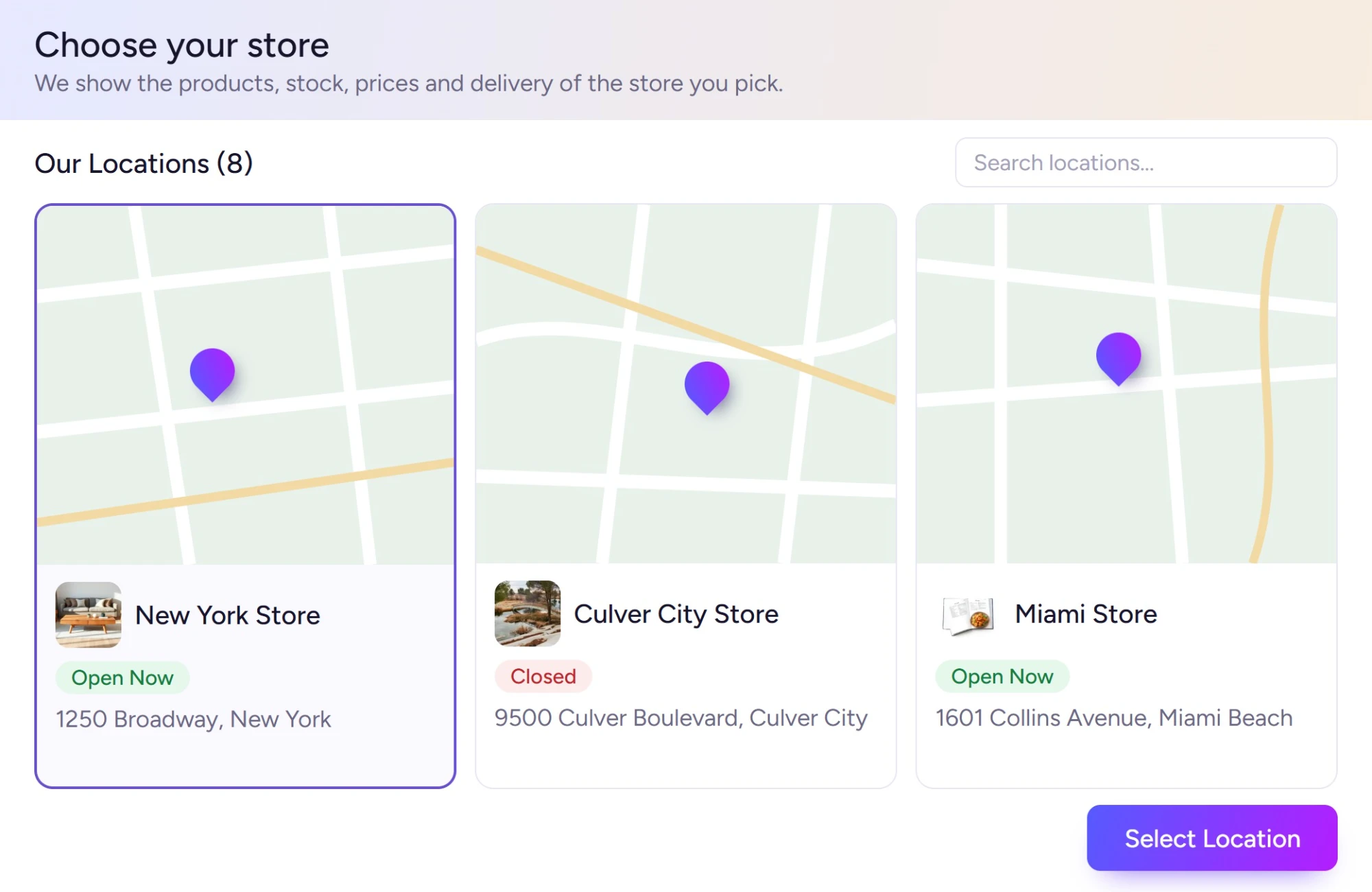












Everything You Need for WooCommerce Multi Location Inventory Management
Built for stores that operate across multiple locations: this plugin covers every core need for Multi Locations Product & Inventory Management for WooCommerce: per-location stock, pricing, order routing, and customer experience, all from one place.
Location-Wise Stock Management
Set separate stock quantities for each store, warehouse, or pickup point. Track in-stock, out-of-stock, and backorder status per location with accurate, location-specific inventory data, no guesswork across your WooCommerce multi location inventory.
Location-Wise Pricing Control
Set different regular and sale prices for each location. Adjust pricing based on regional costs, demand, or promotions, without affecting stock or pricing at your other stores.
Location Shop Manager Roles
Assign staff to specific locations with controlled access. Each manager sees only their assigned store’s products, stock, and orders, no access to data they shouldn’t touch.
Centralized Inventory Dashboard
View stock levels, location activity, and inventory flow across all your stores from one admin screen. No tab-switching, no spreadsheet juggling, everything in a single dashboard.
Location Selector for Customers
Let customers pick their preferred store directly from the product page. Their selection persists across browsing, so they always see stock, pricing, and availability relevant to their chosen location.
Automatic Nearest Store Detection
Automatically detect a customer’s location and recommend the closest eligible store. Customers land on the right location without having to search, better experience, fewer wrong orders.
Location-Based Shipping Rules
Configure which WooCommerce shipping methods, rates, and zones apply to each location. Customers see only the delivery options available from the store fulfilling their order.
Location-Based Payment Methods
Show or hide specific payment gateways based on the customer’s selected store. Offer cash on pickup, regional gateways, or location-specific checkout flows without extra plugins.
Smart Order Fulfillment Routing
Route each order to the right location based on stock availability, customer proximity, or your own rules. Orders reach the correct store automatically, reducing delays and manual reassignment.
Auto User Location Detection
Detect the customer’s location on arrival and assign the appropriate store without any action from them. Stock availability and delivery info update instantly to match their location.
Real-Time Stock Visibility
Show customers live stock levels for their selected location, exact quantities, availability labels, or simplified in/out status. No stale data, no “available” messages for items that aren’t.
Multiple Product Type Support
Assign both simple and variable products to one or more locations. Manage per-variation stock per location, so a size or color at one store doesn’t interfere with another.
Location-Based Customer Restriction
Hide or disable products for customers whose selected location doesn’t carry them. Keep your catalog clean and prevent orders that can’t be fulfilled from a given store.
Inventory Import, Export & Bulk Data Management
Upload or download stock levels, prices, and location assignments in bulk via CSV, XLS, or XLSX. Update hundreds of product-location combinations in one go, no individual product edits needed.
Advanced Inventory Dashboard
Go beyond basic stock counts, track location performance, inventory flow, low-stock alerts, and order activity across all stores. Spot problems before they affect customers.
Quick Inventory Updates from Product Level
Edit stock for any location directly from the product page or product list quick-edit. No need to open a separate location panel, update and move on.
Each Store in Its Own Currency
London can sell in pounds, Tokyo in yen and Dubai in dirhams: the shop switches currency with the store, from the cart to the order.
Reviews from the Shopper’s Store
Reviews are tied to the store they were written at, and product pages show the reviews from the shopper’s own store first, with the store name on each.
Stock and prices, per store.
Multi Locations Inventory Management for WooCommerce gives every store, warehouse and pickup point its own stock and prices, with analytics that show how each one is doing.
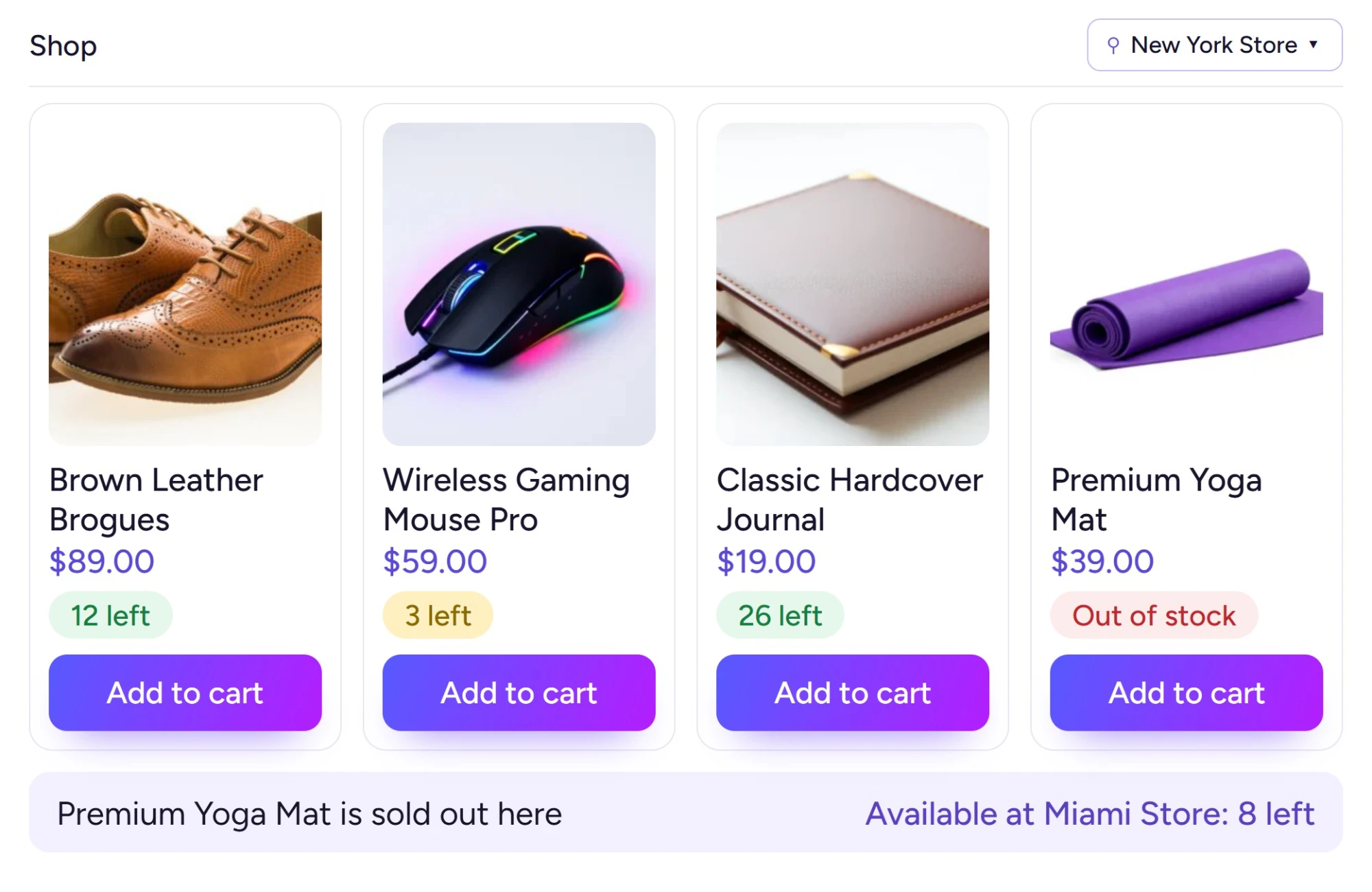
Multi-Location Product Stock Management for WooCommerce with Real-Time Control
Take full control of your inventory with a dedicated Multi Locations Product & Inventory Management for WooCommerce plugin that lets you manage stock per location with real-time updates and centralized control across all your stores, from a single admin dashboard.
Whether you run two stores or twenty warehouses, this plugin handles WooCommerce multiple inventory locations from one place. Monitor stock levels, keep inventory accurate across every branch, and stop chasing manual updates: the system does the heavy lifting so your team can focus on selling.
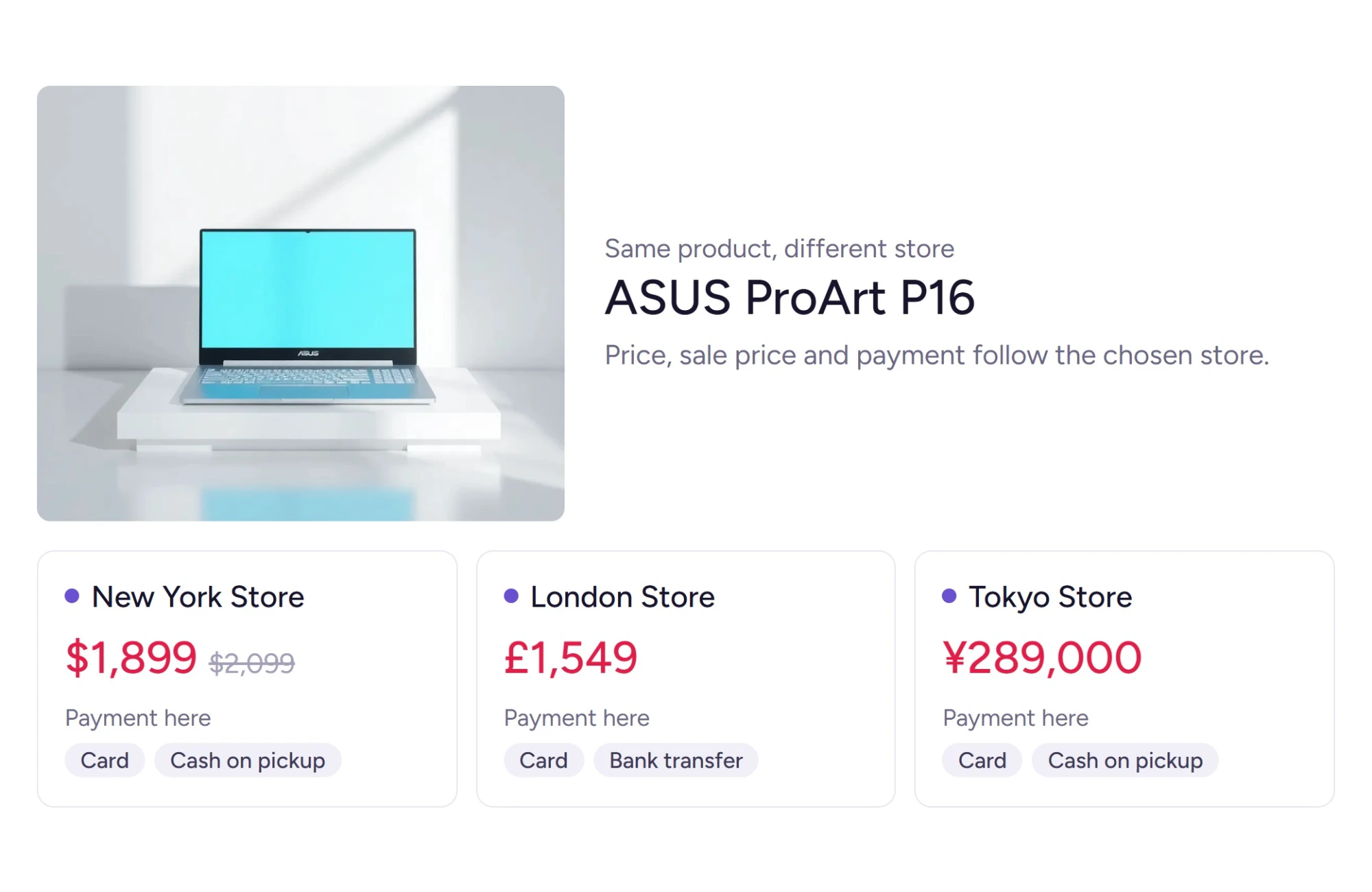
Location-Based Pricing, Product Availability & Payments for WooCommerce
Show the right price, stock status, and payment options to every customer, automatically, based on their selected store location. With WooCommerce multi locations inventory management, your store adapts in real time so customers always see accurate, relevant information without manual updates.
Each location can carry its own pricing rules, tax configuration, and stock quantities. Whether you run two stores or twenty, your customers never see mismatched prices or availability that doesn’t match their nearest location.
From location-specific payment gateways to regional promotions and real-time stock display, every part of the buying experience reflects the store the customer actually shops from.
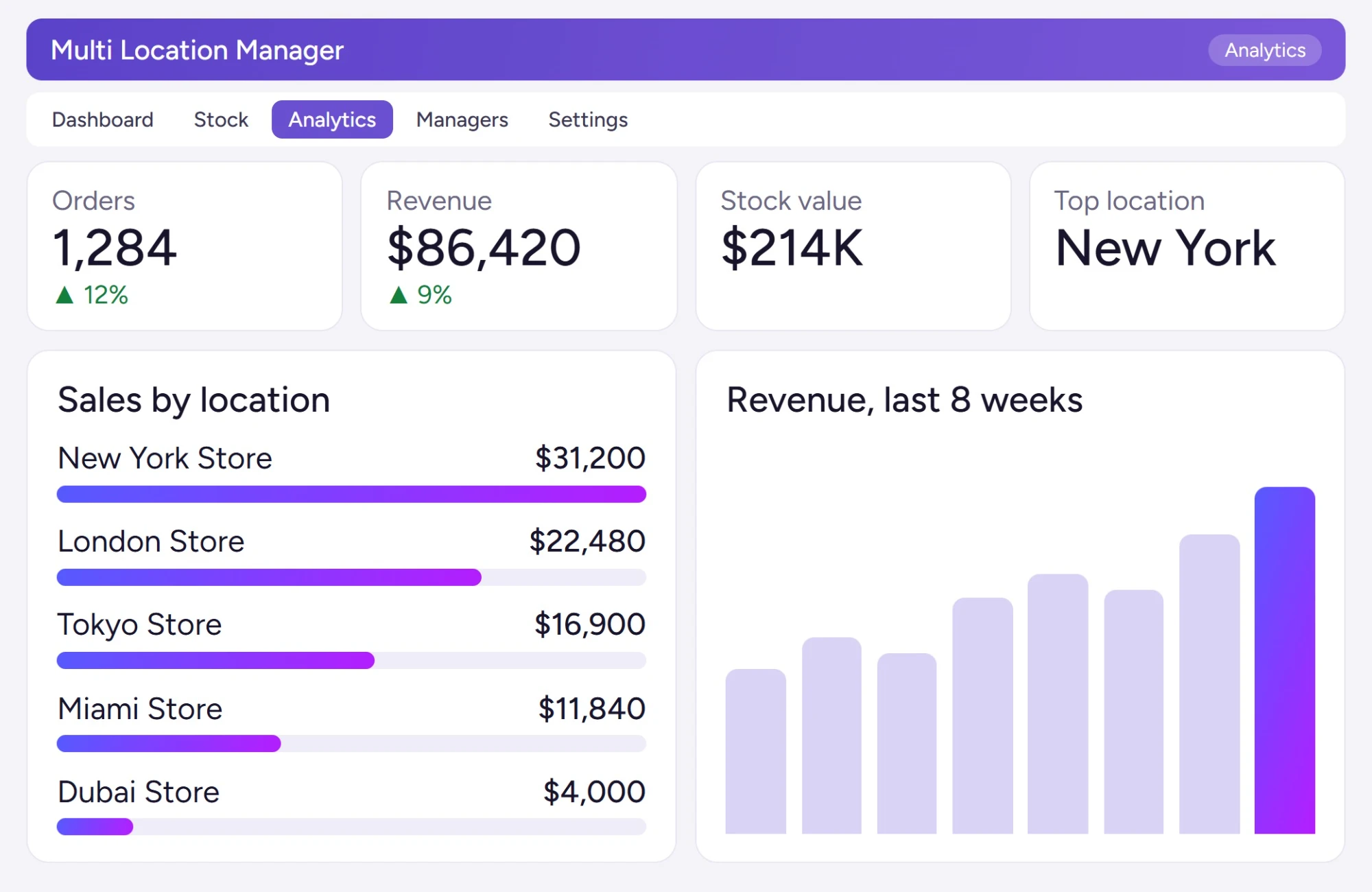
Multi-Location Inventory Analytics Dashboard for WooCommerce
Get complete visibility into your store performance with the Multi Locations Product & Inventory Management for WooCommerce plugin, track stock levels, sales activity, and location-specific trends across every warehouse and store from one centralized dashboard.
Built for serious WooCommerce multi-location operations, the analytics dashboard gives you a clear picture of what’s selling, what’s running low, and how each location is performing, so you spend less time guessing and more time acting on real data.
Experience a more personalized WooCommerce shopping journey today.
Every order goes to the right store.
Shoppers see their nearest store first, each order goes to the location that can fill it, and every store keeps its own shipping methods and pickup.
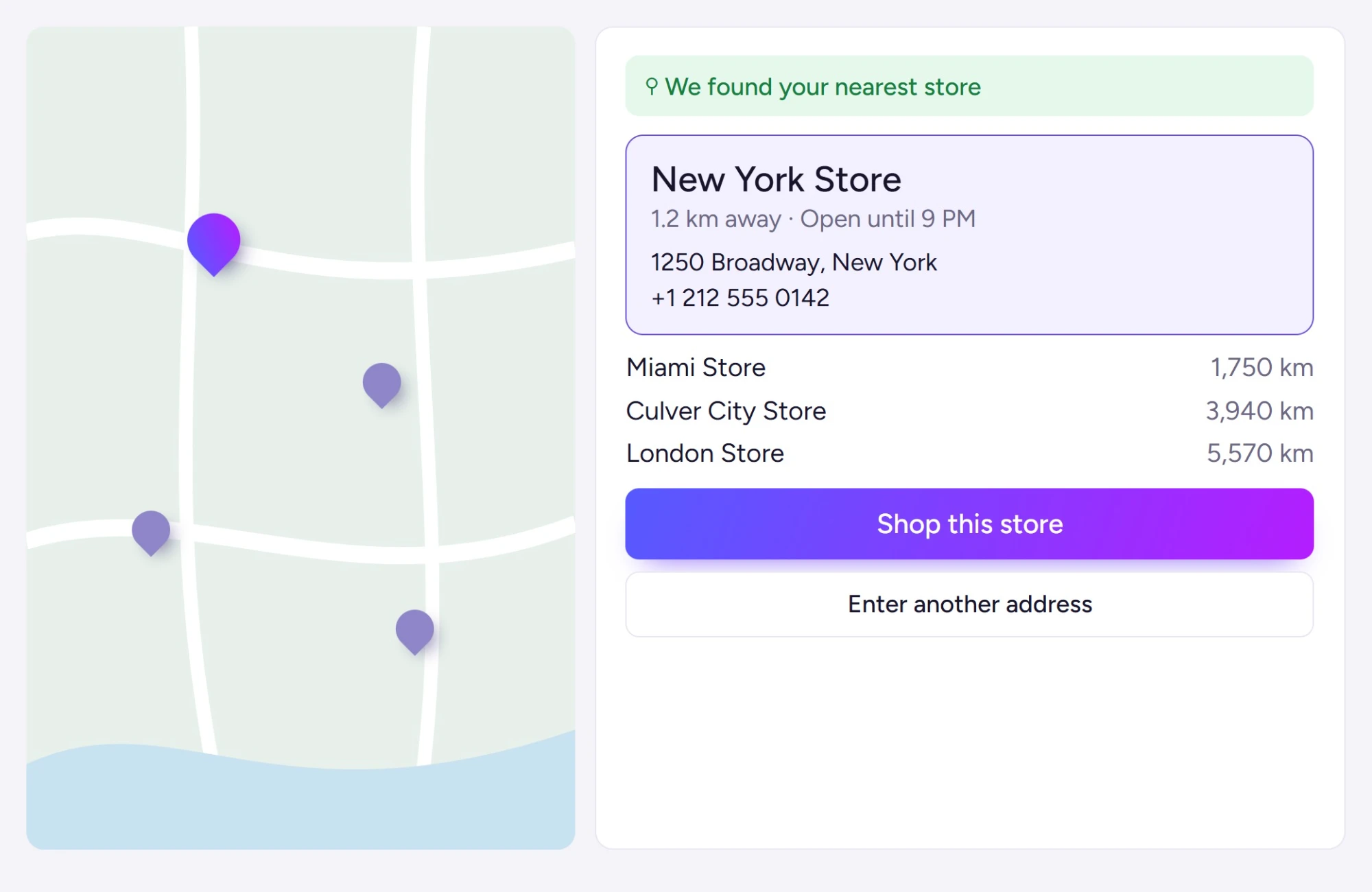
Automatic Store Detection & Smart Location-Based Shopping for WooCommerce
Customers should never have to hunt for the right store: the right store should come to them. This plugin automatically detects customer location via IP and recommends the most relevant store, complete with accurate stock status, store details, and availability. It’s a core part of WooCommerce multi locations inventory management that turns passive browsers into confident buyers.
When customers see products, pricing, and store information that actually match their location, they buy faster. Display the right catalog for the right store, and reduce the friction that kills conversions.
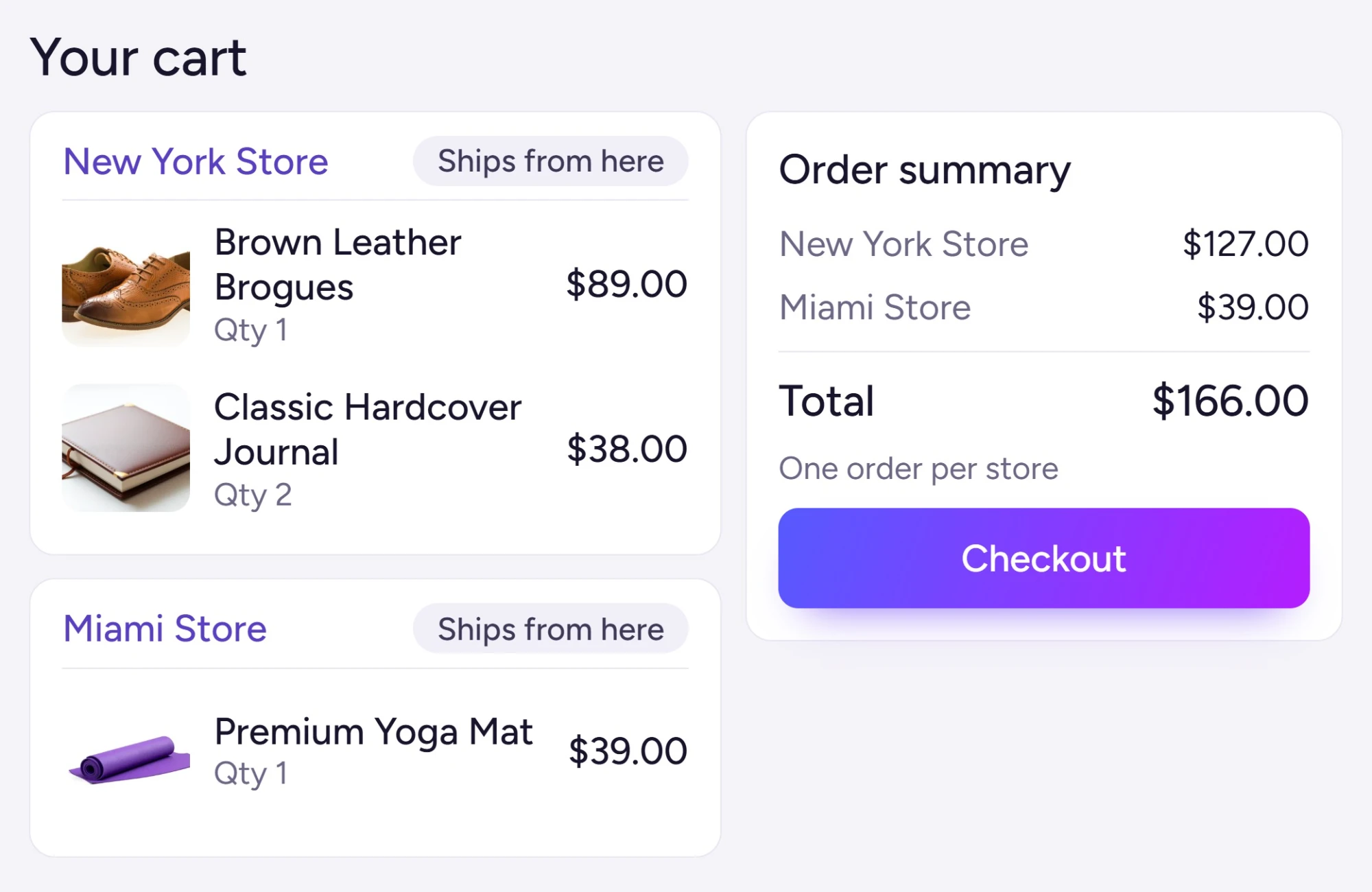
Smart Order Routing & Automated Fulfillment Across Multiple Warehouses
Stop manually deciding which warehouse ships which order. The plugin automatically routes each order to the most suitable location, based on stock availability, customer proximity, and your custom fulfillment rules. Whether you run two stores or twenty, orders get assigned to the right place without you lifting a finger.
Built for WooCommerce multi-location inventory management, this system handles high-order volumes accurately, splitting, assigning, and tracking fulfillment across all your locations from one place.
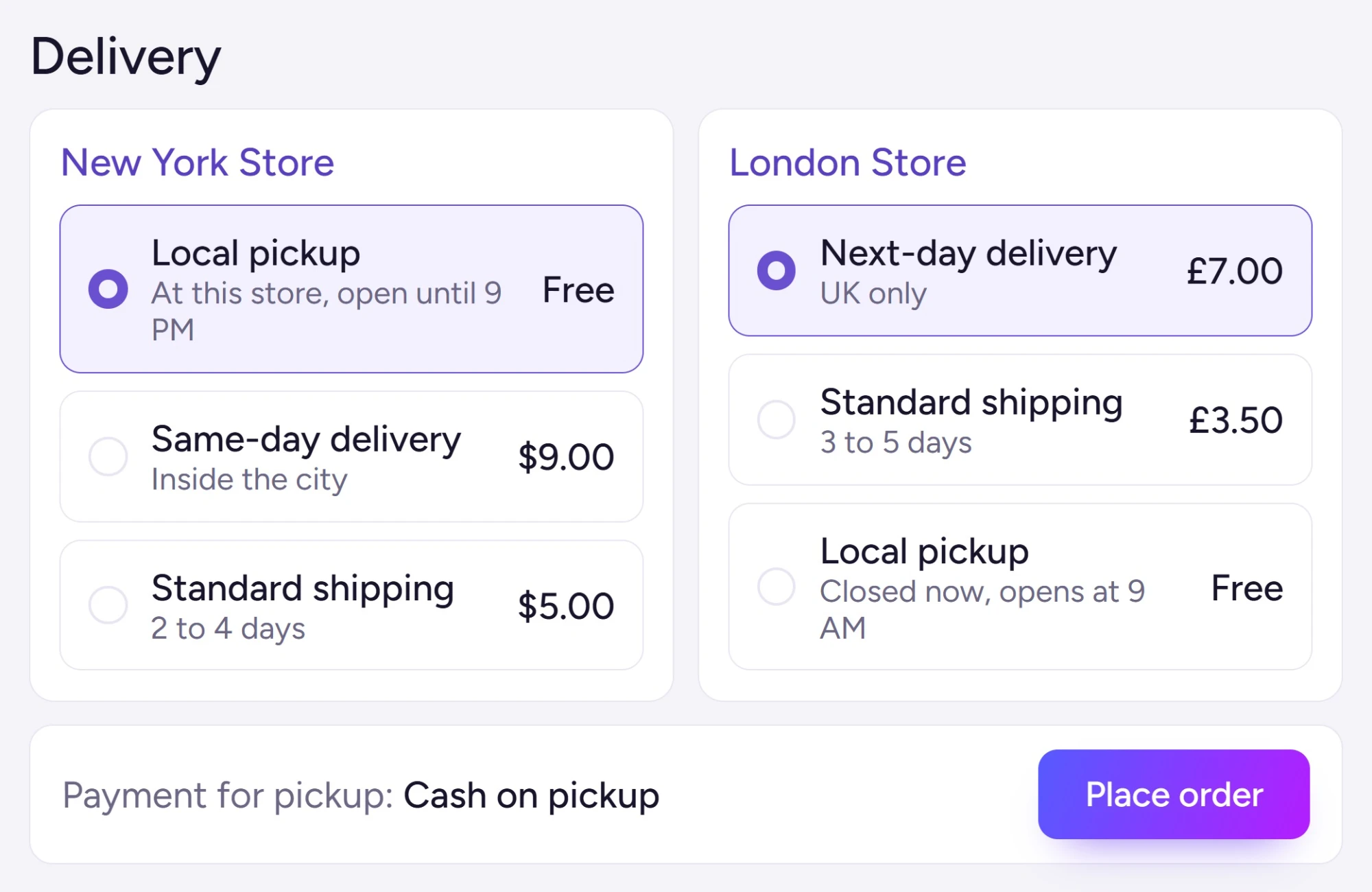
Location-Based Shipping, Delivery & Local Pickup for WooCommerce
Give every store location its own shipping setup, rates, zones, delivery rules, and pickup options configured exactly how that location needs them. Built for WooCommerce multi-location operations, you get full control over how shipping costs are calculated, applied, and presented to customers at checkout, with no guesswork and no one-size-fits-all compromise.
Whether you run two locations or twenty, each one can have its own delivery logic, so customers always see accurate costs, real availability, and pickup options that actually match where they’re shopping from.
Set Up WooCommerce Multi-Location Inventory in 3 Simple Steps
No complex configuration. No developer needed. Follow three straightforward steps to start managing stock, orders, and locations across your entire WooCommerce store network.
Install the Plugin
Download the Multi-Location Product & Inventory Management plugin directly from your WordPress dashboard, install it in seconds, and activate it: your multi-location foundation is ready immediately.
Configure Your Locations and Inventory Settings
Add as many store locations, warehouses, or pickup points as you need. Set separate stock quantities for each location, assign products and variations, define location profiles with addresses and business hours, and control how your location selector appears to customers, all from one admin area.
Start Managing Multi-Location Inventory Across All Your Stores
Track live stock levels, route orders to the right location, and manage inventory across all your WooCommerce multiple warehouse locations from a single dashboard, no switching between tabs or systems.
Advanced WooCommerce Multi-Location Inventory Features That Run Your Store on Autopilot
Beyond the basics, this WooCommerce multi-location inventory management plugin handles the complex parts, automating workflows, syncing data across multiple warehouses, and giving you real-time control without the manual grind.
Cart-Level Location Switch
Let customers change their store location directly from the cart. Stock availability, pricing, and eligible products update instantly based on the selected location, no page reload, no confusion.
AJAX Location-Based Product Filters
Customers filter products by what’s actually available at their chosen location. Cached AJAX filtering keeps results fast and accurate, no stale listings from WooCommerce multiple stock locations that carry different inventory.
Quick Stock Edit
Adjust inventory for any product across any location from a single screen. No need to open individual product pages, bulk stock edits save real time when you’re managing multiple warehouses in WooCommerce.
Per-Location Stock Alerts
Set low-stock and out-of-stock thresholds per location. When stock drops below the limit at a specific store or warehouse, the right person gets notified immediately, before a customer hits a dead end.
Social & Team Notifications
Send inventory and order alerts directly to Slack, Discord, Microsoft Teams, or Telegram. Your team stays informed in the tools they already use, no extra logins, no missed updates.
Profit & Stock Aging Reports
Track purchase costs and selling prices per location to see actual profit margins. Identify slow-moving or aging stock before it becomes a loss, then act on the data, not guesswork.
Real-Time Multi-Location Dashboard
See live inventory levels, sales activity, and order status across every location from one admin view. No manual refresh required: the dashboard reflects what’s happening right now.
Browser Push Admin Alerts
Receive real-time stock and order notifications directly in your browser via push and service-worker alerts. Stay on top of critical updates without depending on email, even when the admin tab is in the background.
Cash on Pickup by Location
Offer cash-on-pickup as a payment option for specific store locations only. Payment methods show or hide based on the customer’s selected location, so the right options appear at the right time.
CSV, API & POS Sync
Import and export inventory in bulk via CSV, XLS, or XLSX. Connect external retail, warehouse, or ERP platforms through the REST API with webhook support, keeping every system in sync without duplicate data entry.
Custom Popup Templates by Location
Show targeted offers, announcements, or messages based on the customer’s active store location. Each location can have its own popup content, relevant to that store’s products, promotions, or availability.
Inter-Location Stock Transfers & Inventory Movement
Move stock between your stores or warehouses in a few clicks, with every transfer logged for a clear record. Balance inventory across locations without manual spreadsheets or guesswork.
Location-Based SEO, Store Pages & Structured Data
Give each location its own SEO-friendly page with location-aware titles, metadata, and structured data. Help local customers and search engines find the right store for every area you serve.
Store Locator Map & Location Archive Pages
Show all your stores on an interactive map, with a dedicated archive page for each location. Customers can browse a specific store’s products, stock, and details from one place.
Mixed-Location Cart, Order Splitting & Multi-Warehouse
Let customers order from multiple locations in a single cart: the order splits automatically into separate child orders per location. Each store fulfills its own items, so stock deducts correctly and nothing gets double-counted.
Multi-Store Management, Alerts & Integrations for WooCommerce
Running multiple WooCommerce locations means juggling stock, staff, orders, and customer data across different places, often without a clear picture of what’s happening where. This plugin brings it all under one roof: assign managers to specific stores, route alerts to the right people at the right time, and connect your external systems through a structured REST API. Whether you’re managing two warehouses or twenty pickup points, every location stays visible, accountable, and in sync.
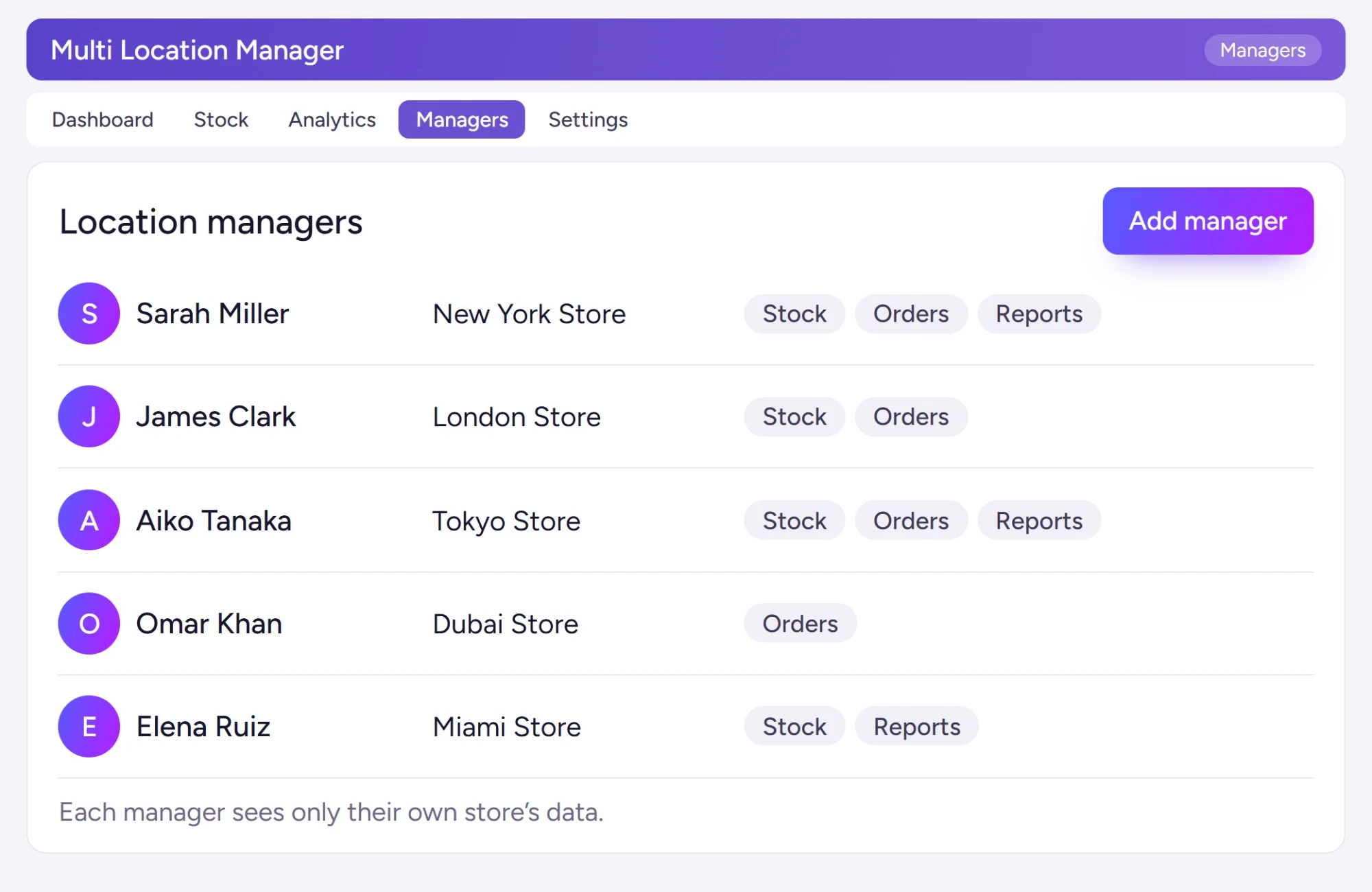
WooCommerce Shop Manager Role & Multi-Store Staff Access Control
Give each store location its own dedicated manager, with exactly the access they need and nothing more. Using location manager roles in this WooCommerce multi locations inventory management plugin, you can assign staff to specific stores, control what they see, and keep your broader operation protected from unauthorized changes.
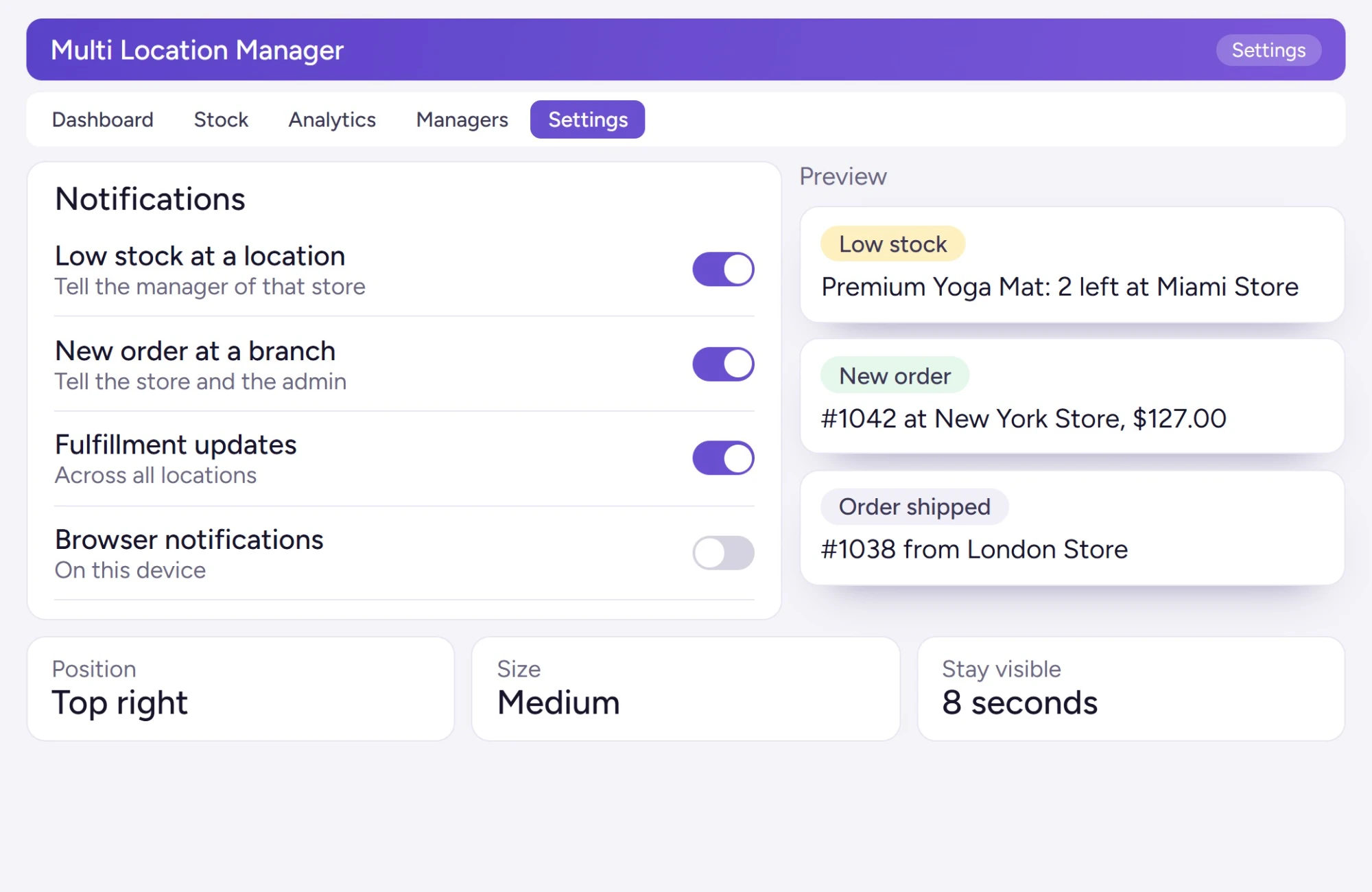
Real-Time Location-Based Notifications for WooCommerce Admin and Devices
Never miss a critical update across your stores. Whether it’s a stock drop at a specific warehouse, a high-value order at a branch, or a fulfillment event across multiple locations: this WooCommerce multi-location notification system keeps your team informed the moment it happens. No manual checking, no delays, no missed alerts.
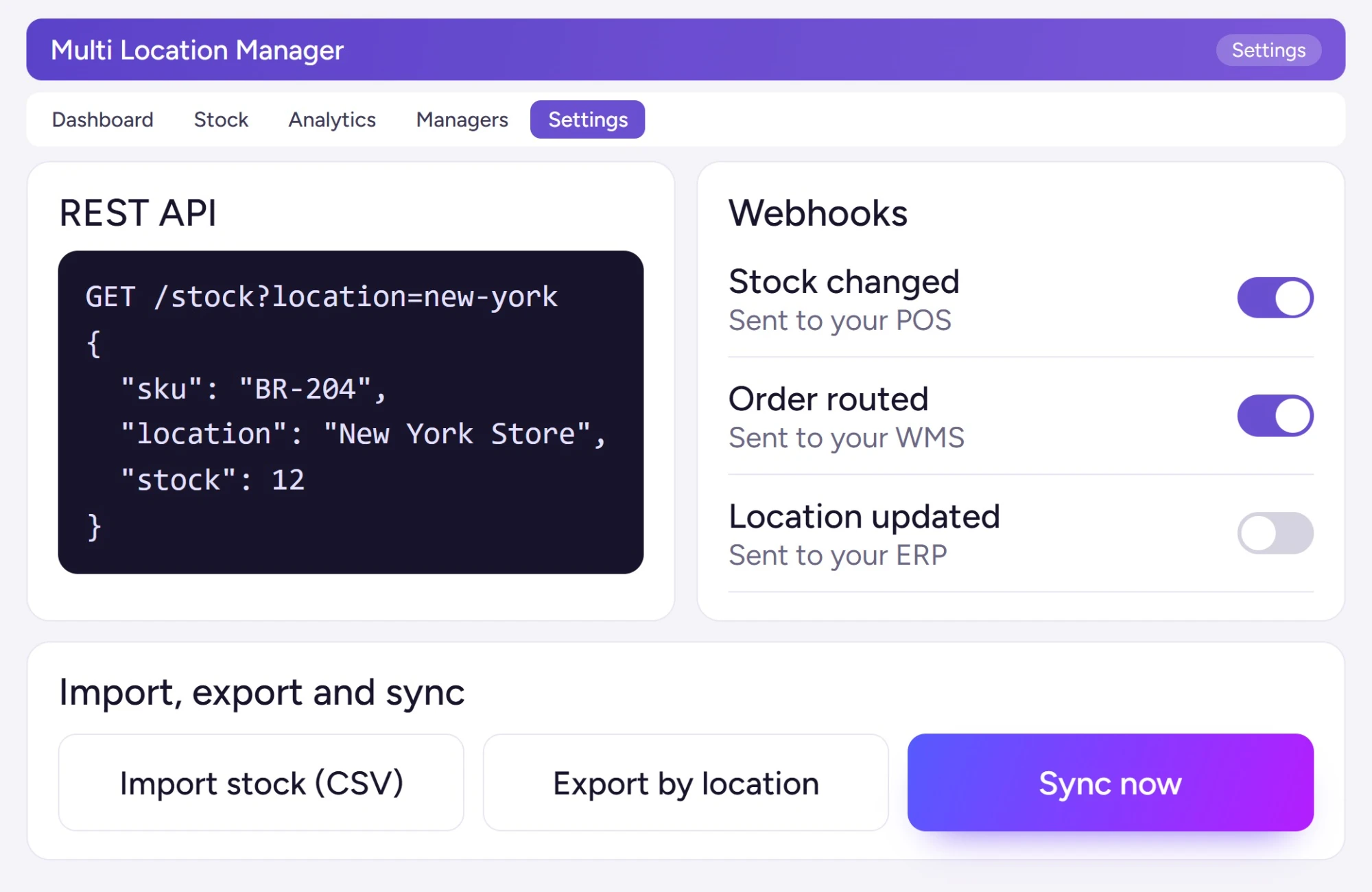
REST API Integration, Data Sync & Webhook Management for WooCommerce
Connect your WooCommerce multi-location inventory to external systems and keep data synchronized across every platform, automatically. The plugin’s built-in REST API compatibility and webhook support let your store talk to POS systems, ERP tools, WMS platforms, and third-party services without custom middleware. You stay in control of what data flows, who can access it, and when actions fire.
Why WooCommerce Store Owners Trust Plugincy?
Thousands of store owners worldwide rely on Plugincy for plugins that are reliable, lightweight, and built to grow with their business. Our WooCommerce multi-location inventory management plugin delivers consistent performance, helping stores manage products, stock, and orders across multiple locations without added complexity.
15-Day Money-Back Guarantee
Not satisfied? Get a full refund within 15 days, no questions, no hoops. Buy with complete confidence.
Secure Payment Processing
Every transaction is protected with SSL encryption and PCI-compliant systems, so your payment details stay safe from start to finish.
24/7 Customer Support
Stuck on setup, configuration, or something unexpected? Our support team is available around the clock to get you sorted fast.
Lifetime Free Updates
Pay once and stay current: new features, compatibility fixes, and improvements are included at no extra cost, forever.
Works With Your Existing WooCommerce Theme: No Custom Code Needed
Your store’s design should never have to change just because you’re managing inventory across multiple locations. This WooCommerce multi locations inventory management plugin is built to drop into your existing setup without touching your layout, colors, or custom styles.
The plugin integrates with your current WooCommerce theme at the data and logic layer: it handles location assignment, stock tracking, customer location selection, and order routing entirely behind the scenes. No template overrides, no required child theme, no developer time just to get it working.
Whether you’re running Astra, Avada, OceanWP, or a fully custom theme built with Elementor or the block editor, the plugin respects your design and works within it. The responsive location selector, product availability display, and admin controls all follow your existing styling, and if you need fine-tuned adjustments, built-in custom CSS support lets you match any store look without touching plugin files.
What Store Owners Say About This WooCommerce Multi Location Inventory Management Plugin
From small shops to multi-warehouse brands, store owners and WooCommerce developers trust Plugincy to keep inventory accurate, orders clean, and operations running across every location, without the spreadsheet chaos. Here’s what real users have to say about their experience with our WooCommerce multi location inventory management plugin.
We manage three furniture outlets across Vancouver. Stock syncs instantly across all branches, and setting location-specific pricing without touching a single line of code has saved us countless hours. It’s been rock-solid since day one.
We’re on the Pro plan mainly for the team access features. Each branch manager works within their own assigned location, no overlap, no confusion. The analytics tell us exactly which store needs restocking before it becomes a problem.
We’re a WooCommerce agency managing multi-location clients. Location-based pricing, order tagging by branch, and accurate out-of-stock visibility have made client stores far easier to run, and customer complaints about stock accuracy dropped almost completely.
We sell across five cities. Stock data stays consistent across every location, and switching between them is instant. I’ve never had to second-guess whether the numbers are right.
We run a clothing franchise across six regional branches. Stock alerts, per-location pricing, and performance reporting all work exactly as expected, and the Pro analytics helped us pinpoint which locations were actually driving sales.
Had a small issue during setup, but support replied within minutes and guided me through it perfectly. Couldn’t be happier.
We run two stores in Chicago, and stock tracking finally makes sense. Setup took minutes, and inventory updates sync the moment a sale goes through. No delays, no mismatches.
Setup across several branches went smoothly from the start. When a display issue came up, the support team resolved it quickly and followed up to make sure everything was working right.
Managing five warehouse sites used to mean hours of manual updates. Now the dashboard is fast, reports are clear, and what used to take hours wraps up in minutes. Support fixed my import issue the same day I reported it.
Three small warehouses, one clean dashboard. Real-time stock control and per-location pricing finally behave the way I always needed them to. No workarounds, no hacks.
I used to maintain separate spreadsheets for every branch. Now one dashboard handles pricing, stock levels, and location filters across all of them. The time I’ve saved is real.
Running retail and warehouse sites together used to be a mess. Now inventory stays synced in real time, reports are clean, orders are accurate, and we’ve cut manual stock errors by nearly ninety percent.
Stock tracking was genuinely chaotic before this plugin. The support team walked me through configuring reports and location syncs, patient, clear, and fast. Night and day difference from before.
We operate four tech accessory stores, and this plugin keeps all inventory accurate across locations. Stock syncing is reliable, and location-based reports help us restock fast. It’s stable, lightweight, and fits seamlessly into WooCommerce.
We manage different regions with this plugin. It keeps pricing clean per branch and updates run fast without slowing WooCommerce.
As a WooCommerce consultant, I install this plugin for most of my multi-branch clients. It’s flexible, easy to configure, and support always responds quickly with real solutions. Clients love how easily they can track stock per store.
Free vs Pro: WooCommerce Multi Location Inventory Management Plugin Feature Comparison
Not sure which plan fits your store? Compare the free and pro versions of this WooCommerce Multi Location Inventory Management plugin side by side, and pick what actually matches where your business is today. The free version covers the essentials: unlimited locations, per-location stock, customer location selection, and cart validation, all at no cost. The Pro version adds advanced stock control, location-specific pricing, order splitting, inter-location transfers, role-restricted access, and more, for stores that need full multi-location operations from one place. See exactly what each plan includes before you decide.
| Features86 features, side by side17 are in both versions. 69 are only in PRO. | PRO$79 – $599Get Started | FREE Get Started |
|---|---|---|
| Store locations and selector16 features | ||
| Create store locations | ✓ | ✓ |
| Store location taxonomy | ✓ | ✓ |
| Assign products to store locations | ✓ | ✓ |
| Customer location selector modal | ✓ | ✓ |
| Selected location stored for customer browsing | ✓ | ✓ |
| Show products based on selected location | ✓ | ✓ |
| Product title location display option | ✓ | ✓ |
| Basic location selector on frontend | ✓ | ✓ |
| Frontend location information display | ✓ | ✖ |
| Product page location selector | ✓ | ✖ |
| Single product location selector | ✓ | ✖ |
| Location information modal | ✓ | ✖ |
| Classic location popup layout | ✓ | ✖ |
| Modern location popup layout | ✓ | ✖ |
| Modern simple location popup layout | ✓ | ✖ |
| Popup layout controls | ✓ | ✖ |
Show More (70 more rows in 8 groups)
| Stock and inventory14 features | ||
| Basic product availability by location | ✓ | ✓ |
| Central inventory dashboard | ✓ | ✖ |
| Stock Central management page | ✓ | ✖ |
| Manage product stock across all locations from one screen | ✓ | ✖ |
| Location-wise stock quantity management | ✓ | ✖ |
| Location-wise backorder management | ✓ | ✖ |
| Location-wise stock status handling | ✓ | ✖ |
| Bulk inventory editing | ✓ | ✖ |
| Product location stock table | ✓ | ✖ |
| Stock Central import/export | ✓ | ✖ |
| Import stock data by location | ✓ | ✖ |
| Export stock data by location | ✓ | ✖ |
| Advanced import/export settings | ✓ | ✖ |
| Import/export v2 support | ✓ | ✖ |
| Prices and coupons4 features | ||
| Location-wise product price management | ✓ | ✖ |
| Location-wise sale price management | ✓ | ✖ |
| Location-wise coupon restrictions | ✓ | ✖ |
| Restrict coupons by store location | ✓ | ✖ |
| Cart and orders7 features | ||
| AJAX cart content check | ✓ | ✓ |
| AJAX cart clear support when changing location | ✓ | ✓ |
| Cart location change handling | ✓ | ✖ |
| Cart block location grouping | ✓ | ✖ |
| Split orders by location | ✓ | ✖ |
| Location-wise order handling | ✓ | ✖ |
| Location-wise email support | ✓ | ✖ |
| Shipping, pickup and hours8 features | ||
| Location-based shipping rules | ✓ | ✖ |
| Location-wise shipping/payment/tax controls | ✓ | ✖ |
| Location-wise local pickup | ✓ | ✖ |
| Cash on pickup payment gateway | ✓ | ✖ |
| WooCommerce Blocks support for cash on pickup | ✓ | ✖ |
| Location business hours | ✓ | ✖ |
| Location hours restriction | ✓ | ✖ |
| Restrict checkout/order availability by location hours | ✓ | ✖ |
| Location managers5 features | ||
| Location manager assignment | ✓ | ✖ |
| Assign users as location managers | ✓ | ✖ |
| Location manager admin page | ✓ | ✖ |
| Location manager access control | ✓ | ✖ |
| Manage location-specific permissions | ✓ | ✖ |
| Analytics, reviews and recommendations10 features | ||
| Dashboard analytics | ✓ | ✖ |
| Location-wise sales analytics | ✓ | ✖ |
| Inventory analytics | ✓ | ✖ |
| Customer location insights | ✓ | ✖ |
| Customer location tracking | ✓ | ✖ |
| Location-wise product recommendations | ✓ | ✖ |
| Recommendation engine | ✓ | ✖ |
| Location-wise reviews | ✓ | ✖ |
| Store location reviews | ✓ | ✖ |
| Location-based customer experience tools | ✓ | ✖ |
| SEO and location pages5 features | ||
| Location-based product filtering | ✓ | ✓ |
| Frontend product filter by location | ✓ | ✖ |
| Location archive page / location listing template | ✓ | ✖ |
| Location archive SEO support | ✓ | ✖ |
| Location-wise SEO tools | ✓ | ✖ |
| Integrations and settings17 features | ||
| WooCommerce shortcode compatibility | ✓ | ✓ |
| WooCommerce widget compatibility | ✓ | ✓ |
| Basic store-location settings page | ✓ | ✓ |
| Basic WooCommerce product/location integration | ✓ | ✓ |
| Translation-ready text | ✓ | ✓ |
| Text management / label customization | ✓ | ✖ |
| Custom frontend texts | ✓ | ✖ |
| API settings page | ✓ | ✖ |
| Inventory sync API | ✓ | ✖ |
| External inventory integration support | ✓ | ✖ |
| Cache compatibility tools | ✓ | ✖ |
| Add-ons page | ✓ | ✖ |
| Admin notifications | ✓ | ✖ |
| Advanced admin dashboard | ✓ | ✖ |
| License activation and validation | ✓ | ✖ |
| Pro updates | ✓ | ✖ |
| Priority support | ✓ | ✖ |
Every plan and price, explained: see Multi Location Product & Inventory Management pricing and the full Free vs Pro comparison
Pick Your Multi Location Inventory Management Plan for WooCommerce
Every store is different. Whether you run one WooCommerce store or manage inventory across multiple branches and warehouses, there’s a plan built for your scale. Each package gives you full control over stock, pricing, order routing, and fulfillment, with WooCommerce Multi Locations Inventory Management tools that grow with your business.
Single Site
Normally $99
$79/year
$20 Savings
- Location-Wise Stock & Pricing Control
Set separate stock quantities, regular prices, and sale prices for each store or warehouse, no more one-size-fits-all inventory - Smart Order Routing & Split Orders
Route orders by customer choice, available stock, or nearest location. When items come from multiple branches, orders split automatically. - Stock Central Bulk Management
Edit stock levels, prices, and availability across every location from one central screen, no need to open products one by one. - POS / WMS / ERP Integration Ready
Connect your existing retail, warehouse, or ERP systems using REST API, webhooks, and CSV import/export for real-time sync. - Location Manager Roles & Alerts
Assign branch staff their own controlled access. Send low-stock and order alerts via email, Slack, Discord, Microsoft Teams, or Telegram. - Location-Based Checkout Experience
Control shipping methods, payment gateways, taxes, pickup options, business hours, and store selection, all per location at checkout.
Up to Three Sites
Normally $297
$199/year
$98 Savings
- Location-Wise Stock & Pricing Control
Set separate stock quantities, regular prices, and sale prices for each store or warehouse, no more one-size-fits-all inventory - Smart Order Routing & Split Orders
Route orders by customer choice, available stock, or nearest location. When items come from multiple branches, orders split automatically. - Stock Central Bulk Management
Edit stock levels, prices, and availability across every location from one central screen, no need to open products one by one. - POS / WMS / ERP Integration Ready
Connect your existing retail, warehouse, or ERP systems using REST API, webhooks, and CSV import/export for real-time sync. - Location Manager Roles & Alerts
Assign branch staff their own controlled access. Send low-stock and order alerts via email, Slack, Discord, Microsoft Teams, or Telegram. - Location-Based Checkout Experience
Control shipping methods, payment gateways, taxes, pickup options, business hours, and store selection, all per location at checkout.
Up to Five Sites
Normally $495
$299/year
$196 Savings
- Location-Wise Stock & Pricing Control
Set separate stock quantities, regular prices, and sale prices for each store or warehouse, no more one-size-fits-all inventory - Smart Order Routing & Split Orders
Route orders by customer choice, available stock, or nearest location. When items come from multiple branches, orders split automatically. - Stock Central Bulk Management
Edit stock levels, prices, and availability across every location from one central screen, no need to open products one by one. - POS / WMS / ERP Integration Ready
Connect your existing retail, warehouse, or ERP systems using REST API, webhooks, and CSV import/export for real-time sync. - Location Manager Roles & Alerts
Assign branch staff their own controlled access. Send low-stock and order alerts via email, Slack, Discord, Microsoft Teams, or Telegram. - Location-Based Checkout Experience
Control shipping methods, payment gateways, taxes, pickup options, business hours, and store selection, all per location at checkout.
Single Site
Normally $499
$349(lifetime)
$150 Savings
- Location-Wise Stock & Pricing Control
Set separate stock quantities, regular prices, and sale prices for each store or warehouse, no more one-size-fits-all inventory. - Smart Order Routing & Split Orders
Route orders by customer choice, available stock, or nearest location. When items come from multiple branches, orders split automatically. - Stock Central Bulk Management
Edit stock levels, prices, and availability across every location from one central screen, no need to open products one by one. - POS / WMS / ERP Integration Ready
Connect your existing retail, warehouse, or ERP systems using REST API, webhooks, and CSV import/export for real-time sync. - Location Manager Roles & Alerts
Assign branch staff their own controlled access. Send low-stock and order alerts via email, Slack, Discord, Microsoft Teams, or Telegram. - Location-Based Checkout Experience
Control shipping methods, payment gateways, taxes, pickup options, business hours, and store selection, all per location at checkout.
Up to Three Sites
Normally $699
$499(lifetime)
$200 Savings
- Location-Wise Stock & Pricing Control
Set separate stock quantities, regular prices, and sale prices for each store or warehouse, no more one-size-fits-all inventory. - Smart Order Routing & Split Orders
Route orders by customer choice, available stock, or nearest location. When items come from multiple branches, orders split automatically. - Stock Central Bulk Management
Edit stock levels, prices, and availability across every location from one central screen, no need to open products one by one. - POS / WMS / ERP Integration Ready
Connect your existing retail, warehouse, or ERP systems using REST API, webhooks, and CSV import/export for real-time sync. - Location Manager Roles & Alerts
Assign branch staff their own controlled access. Send low-stock and order alerts via email, Slack, Discord, Microsoft Teams, or Telegram. - Location-Based Checkout Experience
Control shipping methods, payment gateways, taxes, pickup options, business hours, and store selection, all per location at checkout.
Up to Five Sites
Normally $999
$599(lifetime)
$400 Savings
- Location-Wise Stock & Pricing Control
Set separate stock quantities, regular prices, and sale prices for each store or warehouse, no more one-size-fits-all inventory. - Smart Order Routing & Split Orders
Route orders by customer choice, available stock, or nearest location. When items come from multiple branches, orders split automatically. - Stock Central Bulk Management
Edit stock levels, prices, and availability across every location from one central screen, no need to open products one by one. - POS / WMS / ERP Integration Ready
Connect your existing retail, warehouse, or ERP systems using REST API, webhooks, and CSV import/export for real-time sync. - Location Manager Roles & Alerts
Assign branch staff their own controlled access. Send low-stock and order alerts via email, Slack, Discord, Microsoft Teams, or Telegram. - Location-Based Checkout Experience
Control shipping methods, payment gateways, taxes, pickup options, business hours, and store selection, all per location at checkout.
Frequently Asked Questions About Multi Location Inventory Management Plugin for WooCommerce
Have questions? Here are straight answers to the most common queries about features, setup, compatibility, and usage, so you can pick the right Multi Locations Product & Inventory Management for WooCommerce solution with confidence.
Are your plugins compatible with all WordPress themes?
Yes. The plugin is built with clean, standard WooCommerce code and works smoothly with most modern WordPress and WooCommerce themes, no conflicts, no custom theme tweaks needed.
Do you offer a free version of the plugin?
Yes. A fully functional free version is available on WordPress.org with core multi-location features including unlimited locations, per-location stock, product assignment, and a customer-facing location selector. The Pro version adds pricing per location, order splitting, store detection, advanced reporting, and more.
Can I get support if I use the free version?
Yes. Free users have access to basic support. Pro users receive priority support with faster response times, useful when you’re managing inventory across multiple active locations.
How do I request a refund?
Submit a refund request to the support team within the refund policy period. The process is straightforward and resolved quickly, no complicated steps.
Will this plugin slow down my website?
No. The plugin is lightweight and performance-optimized. Your WooCommerce store runs normally even when managing stock across many locations simultaneously.
Is this plugin suitable for multi-store or multi-warehouse setups?
Yes. Whether you run multiple retail stores, several warehouses, or a mix of both, the plugin handles centralized inventory control, per-location stock, and order assignment for all of them.
Is coding knowledge required to set up the plugin?
No coding needed. Everything, locations, product assignments, stock quantities, customer selector display, is configured from the WordPress dashboard. If you can use WooCommerce, you can use this plugin.
Can I control product visibility based on location?
Yes. You can show only the products available at a customer’s selected location across the shop, search results, widgets, and product archives, so customers always see relevant, in-stock items for their store.
Can a coupon work at only some of my stores?
Yes, with PRO. A coupon can be limited to chosen stores or regions, and shoppers who use it at another store get a clear message.
Can I manage inventory across multiple WooCommerce locations with this plugin?
Yes. This is exactly what the plugin is built for. You can manage product stock, availability, and orders across unlimited stores, warehouses, or pickup points from one centralized dashboard, with real-time control over every location. It is the core purpose of Multi Locations Inventory Management for WooCommerce.
Still Have Questions? Our Team Is Ready to Help You
Our support team is ready to help with setup, configuration, and any feature question you run into. Ask anything, get clear, helpful answers so you can move forward without second-guessing.
Contact Support