
WooCommerce One Page Quick Checkout Cyber Monday Deal 2026: 40% Off
Black Friday has closed, yet your checkout can still lose a step. One Page Quick Checkout Pro is 40% off with code CMP2026 from Monday 30 November to Sunday 6 December, on every yearly and lifetime licence. Let shoppers pay in a popup, straight from the product page or on one checkout page, and leave the cart page out of the journey.
- 15-day refund on new licences
- Free plugin on WordPress.org
- Yearly renewals keep the 40%
Last updated: 12 November 2026
- Mon30 Nov
- Tue1 Dec
- Wed2 Dec
- Thu3 Dec
- Fri4 Dec
- Sat5 Dec
- Sun6 Dec
Starts Mon 30 NovEnds Sunday, 6 December 2026, 12:59 PM ET (11:59 PM GMT+6)
- 2,800+stores have installed it
- 4.3 ★★★★★from 9 WordPress.org reviews
- 15 daysrefund window on new licences
- Freeplugin on WordPress.org
WooCommerce One Page Checkout Cyber Monday Deals
Yes. During Cyber Monday week, CMP2026 cuts 40% from every One Page Quick Checkout Pro plan, 30 November to Sunday, 6 December 2026, 12:59 PM ET (11:59 PM GMT+6). One store pays $29 a year, and renewals keep that price as long as the licence runs. Pro owners get it too; new licences carry a 15-day refund.
Cyber Monday vs Black Friday deals: Quick Checkout edition
Nothing about the price moves between the two sales. Cyber Monday week uses the same 40% discount and the same renewal rule as Black Friday, under a fresh code, CMP2026, with five more days on the clock. If your checkout upgrade slipped past 1 December, this is the second window.
Black Friday 2026
1 November to 1 December
- Code
- BF2026
- Discount
- 40% off every Pro plan
- Renewals
- 40% off while active
- 1 site
- $29 a year or $71 once
- Last day
- Tuesday, 1 December
Cyber Monday 2026
Monday 30 November to Sunday 6 December
- Code
- CMP2026New
- Discount
- 40% off every Pro plan
- Renewals
- 40% off while active
- 1 site
- $29 a year or $71 once
- Last day
- Sunday, 6 DecemberLater
Bought with BF2026 already? You hold the same 40% price and the same renewal discount, so CMP2026 adds nothing for you. The new code is for stores that have not bought yet.
Choose your WooCommerce one page checkout plugin licence
CMP2026 cuts 40% from all six options below. Go yearly for a year of updates and support that renews at this lower price while the licence is active, or go lifetime and one payment covers updates and support for as long as Plugincy sells the plugin. Then pick how many stores you run.
A single shop
- Renews at $29 a year, not $49
- Paid once, never renewed
- All Pro checkout features
- Updates and support
Several shops or client stores
- Renews at $53 a year, not $89
- Paid once, never renewed
- All Pro checkout features
- Updates and priority support
Agencies and store groups
- Renews at $71 a year, not $119
- Paid once, never renewed
- All Pro checkout features
- Updates and priority support
Everything this WooCommerce quick checkout does, Free and Pro
Here is every feature in One Page Quick Checkout, grouped by the job it does: taking the order, building checkout pages, editing the form, the side cart, add to cart, quick view, cart recovery and trust badges. The tags show what the free plugin already does and what a Pro licence adds.
- Taking the order
- One page checkout
- Checkout form
- Side cart
- Add to cart
- Quick view
- Cart recovery
- Trust badges
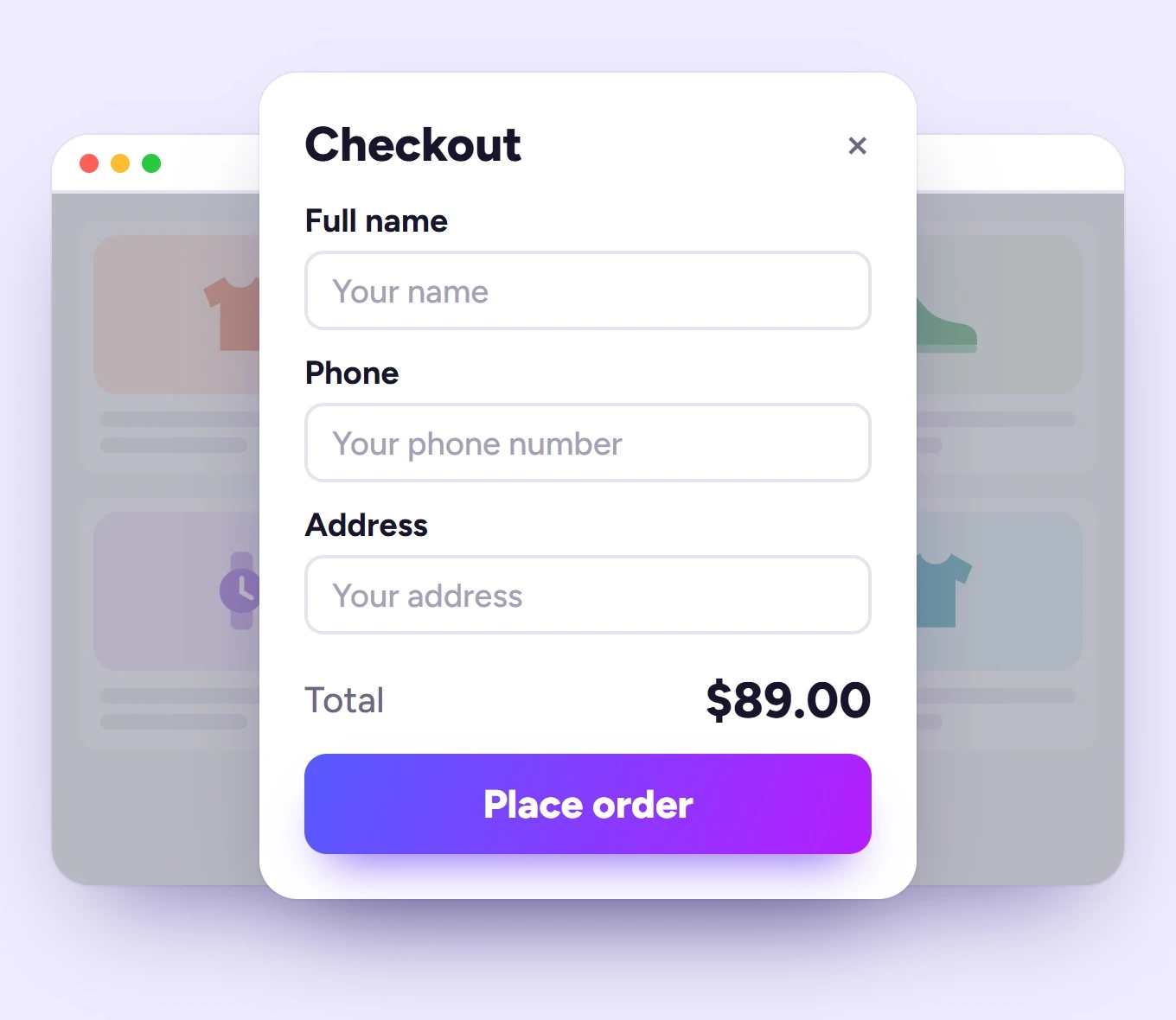
Take the order where the shopper decides
Each of these removes the trip to the cart page. Use one across the whole store or combine them product by product.
Popup checkout Free
Billing fields and Place order open in a popup, so the buyer never leaves the product or shop page.
Direct checkout Free
Add to Cart sends the buyer straight to checkout instead of stopping on the cart page.
Quick checkout on shop pages Free
Checkout buttons on shop, category and tag archives, styled with your own text and look.
Variable products Free
Direct checkout handles variable products as well as simple ones, with the chosen variation carried through.
Buy Now anywhere Free
Place a Buy Now button with a shortcode, a Gutenberg block or an Elementor widget, on any page or post.
Direct checkout links Free
One link opens checkout with the product, quantity and variation already set, ready for an email, ad or QR code.
AJAX checkout Free
Cart actions, coupon changes and checkout refreshes happen without a full page reload.
Variations on shop pages Pro
Shoppers choose size or colour right in the product list, so they can check out without opening the product.
Hide Select options Pro
Remove the default Select options button from variable products once shoppers can choose in the list.
One-click purchase Pro
A one-click purchase option sends a single product from the listing straight into checkout.
Clear cart before checkout Pro
Empty older cart items first, so a Buy Now order contains only the product the shopper just chose.
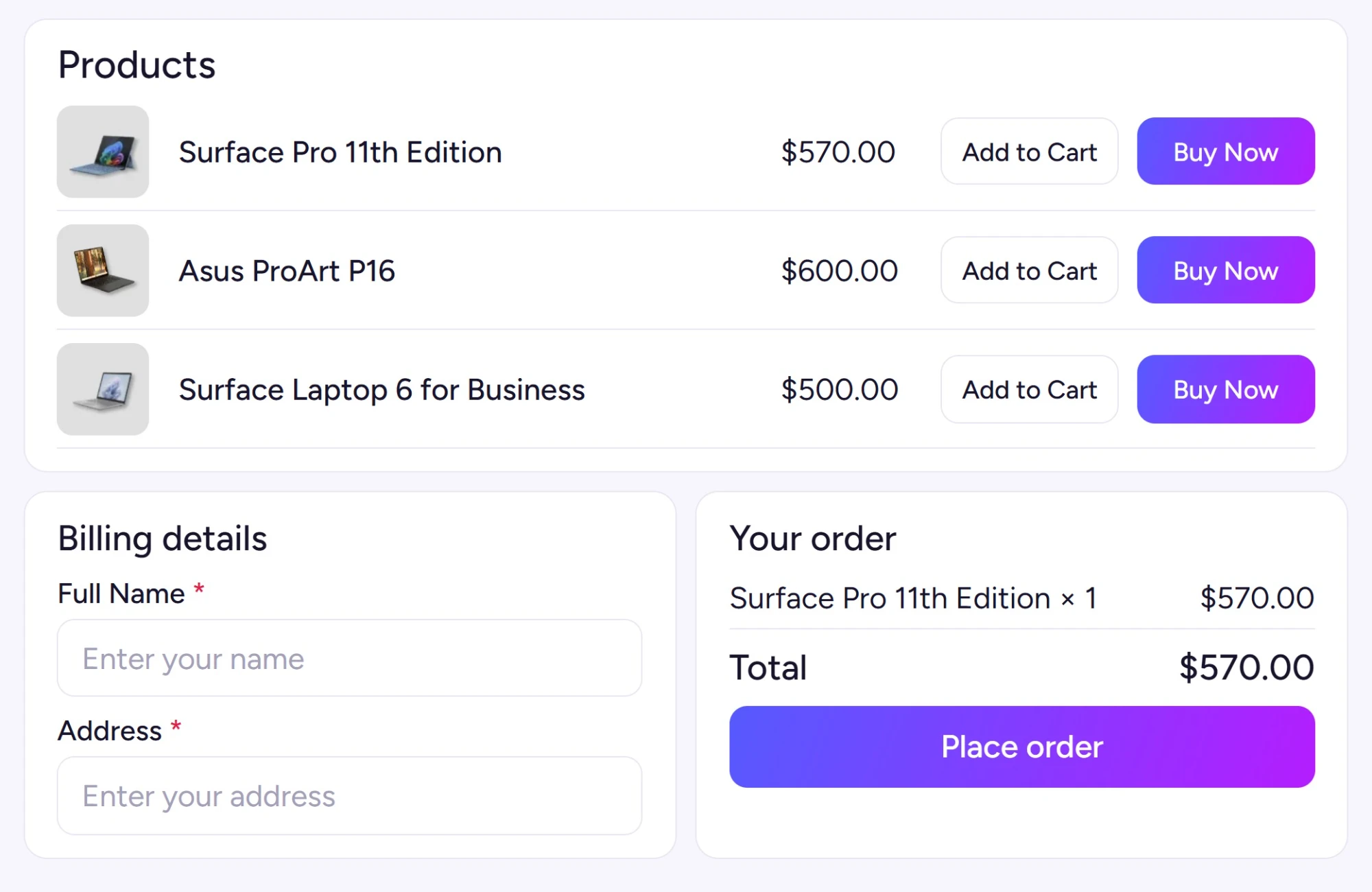
Build one page checkout pages
Products, billing details and payment on a single page. Good for landing pages, bundles and anything sold from a list.
Single-product checkout page Free
Turn any product into a page where the buyer reviews, edits and places the order in one place.
Multi-product checkout Free
Sell several products from one checkout page, with basic layouts and customisation in the free plugin.
Product query controls Free
Fill a checkout page by product IDs, categories, tags or attribute terms, with a product limit.
Checkout form shortcode Free
Drop a live checkout form on any page, with options to auto-add products, clear the cart and set quantities.
Seven layout templates Pro
Product table, list, single, slider, accordion, tabs and pricing table layouts for multi-product checkout.
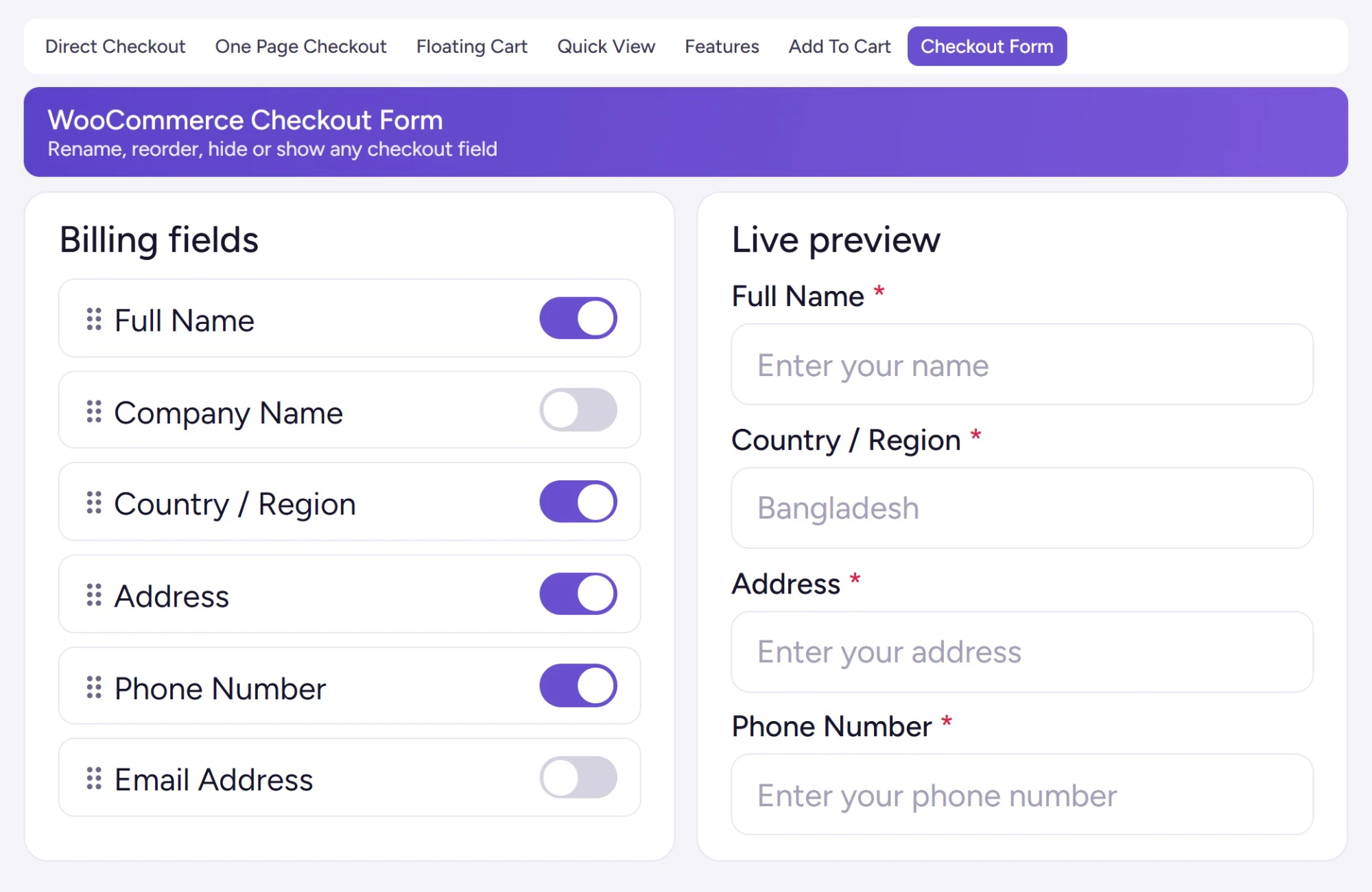
A shorter, clearer checkout form
Every field you remove is one less thing to type on a phone. Pro gives you a visual editor to decide exactly what stays.
Product images and links Free
Thumbnails confirm what is being bought, and product names link back to the product page.
Edit the order on checkout Free
Change quantities or remove a product on the checkout page itself, with no trip back to the cart.
Checkout text Free
Change the wording on buttons and headings so checkout sounds like the rest of your store.
Skip the cart page Free
Bypass the WooCommerce cart page and send customers straight to checkout.
Checkout Blocks support Free + Pro
Product links and quantity controls work on classic checkout and WooCommerce Checkout Blocks, and Pro field labels and removal carry over.
Cache protection Free
Checkout and popup requests are marked no-cache for popular cache plugins, so shoppers never see a stale form.
Visual field editor Pro
Rename labels and placeholders, switch fields between required and optional, and hide fields from a live preview.
Custom checkout fields Pro
Collect extra details such as delivery instructions or preferences directly on the checkout page.
Section visibility and layout Pro
Hide the coupon box, shipping address, privacy text or headings, and adjust the checkout layout.
Login before checkout Pro
Ask shoppers to log in before checkout opens, for stores that sell only to registered customers.
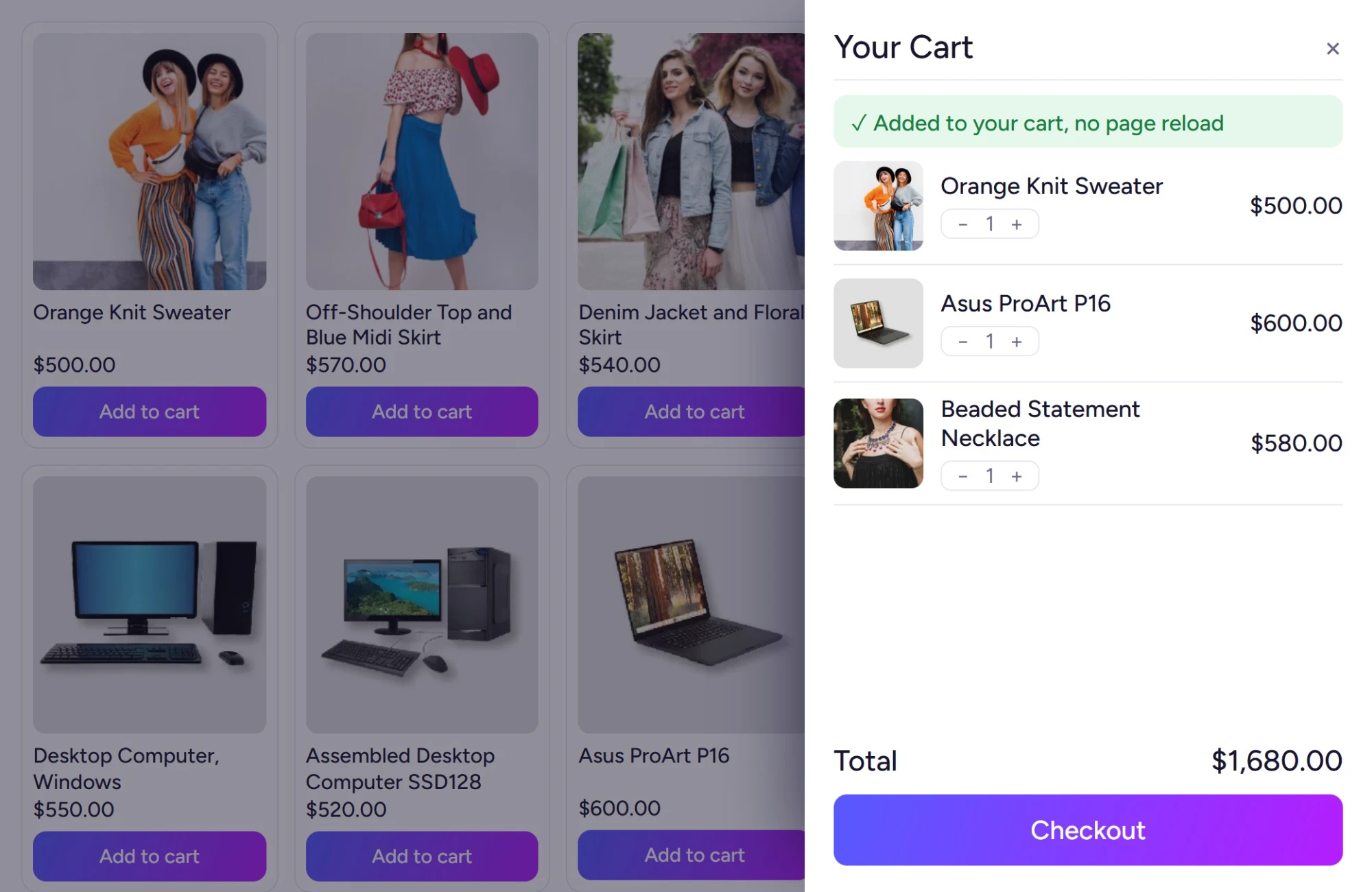
A side cart that keeps people shopping
For shoppers who add more than one item, a drawer cart shows what they have chosen and keeps checkout one click away.
Slide-out or menu cart Free
A drawer cart opens from any store page, so shoppers review their items without leaving.
Edit in the drawer Free
Change quantities and remove items inside the drawer, with totals updating through AJAX.
Place it anywhere Free
Add the floating cart with its own shortcode, Gutenberg block or Elementor widget.
Coupons in the drawer Pro
Shoppers apply or remove a coupon inside the side cart before they head to checkout.
“You may also like” Pro
Related product recommendations sit inside the drawer, next to the checkout button.
Totals and checkout button Pro
Choose which of subtotal, discount, shipping, tax and total appear, and style the checkout button.
Item details and editing Pro
Control product images, item meta, a variation editor, remove buttons and item grouping in the cart.
Your text and icons Pro
Rewrite drawer text and notices, and swap in your own cart icons to match the theme.
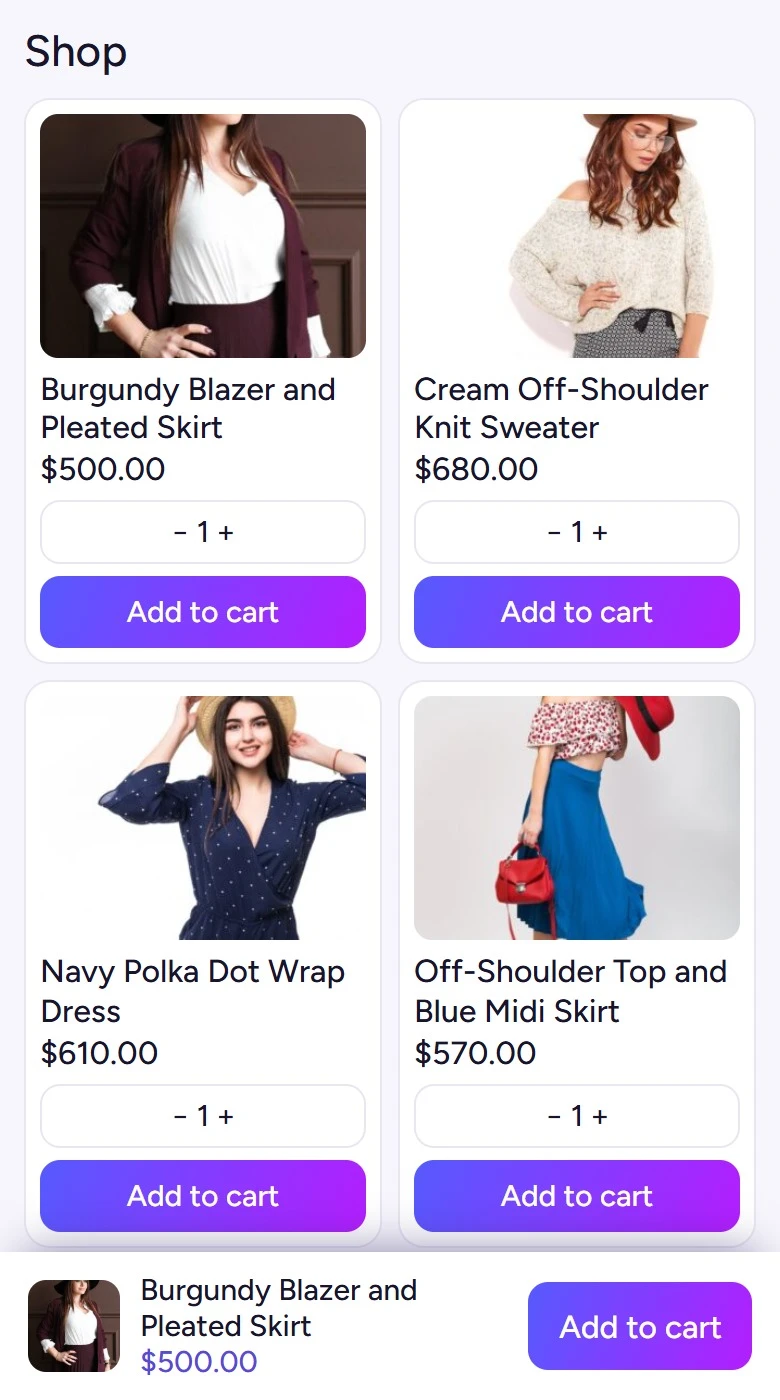
Add to cart, your way
The Add to cart button is where most buying journeys start. Decide what it says, how it looks and what happens after the click.
AJAX add to cart Free
Simple, variable and grouped products go into the cart instantly, with no page reload.
After-click behaviour Free
Decide whether a click keeps shoppers on the page, opens the popup or moves them on to checkout.
Button text and quantity Free
Change the button label, set a default quantity per product and edit the success message.
Advanced button styling Pro
Custom colours, width, icons and loading effects keep the button consistent across the store.
Notifications and redirects Pro
Confirm adds with a popup, a toast or the mini cart, and redirect after add to cart where you want.
Out-of-stock button off Pro
Disable Add to cart on products that are out of stock, so nobody tries to buy them.
Phone controls Pro
A sticky Add to cart bar on mobile, button size controls and icon-only buttons for small screens.
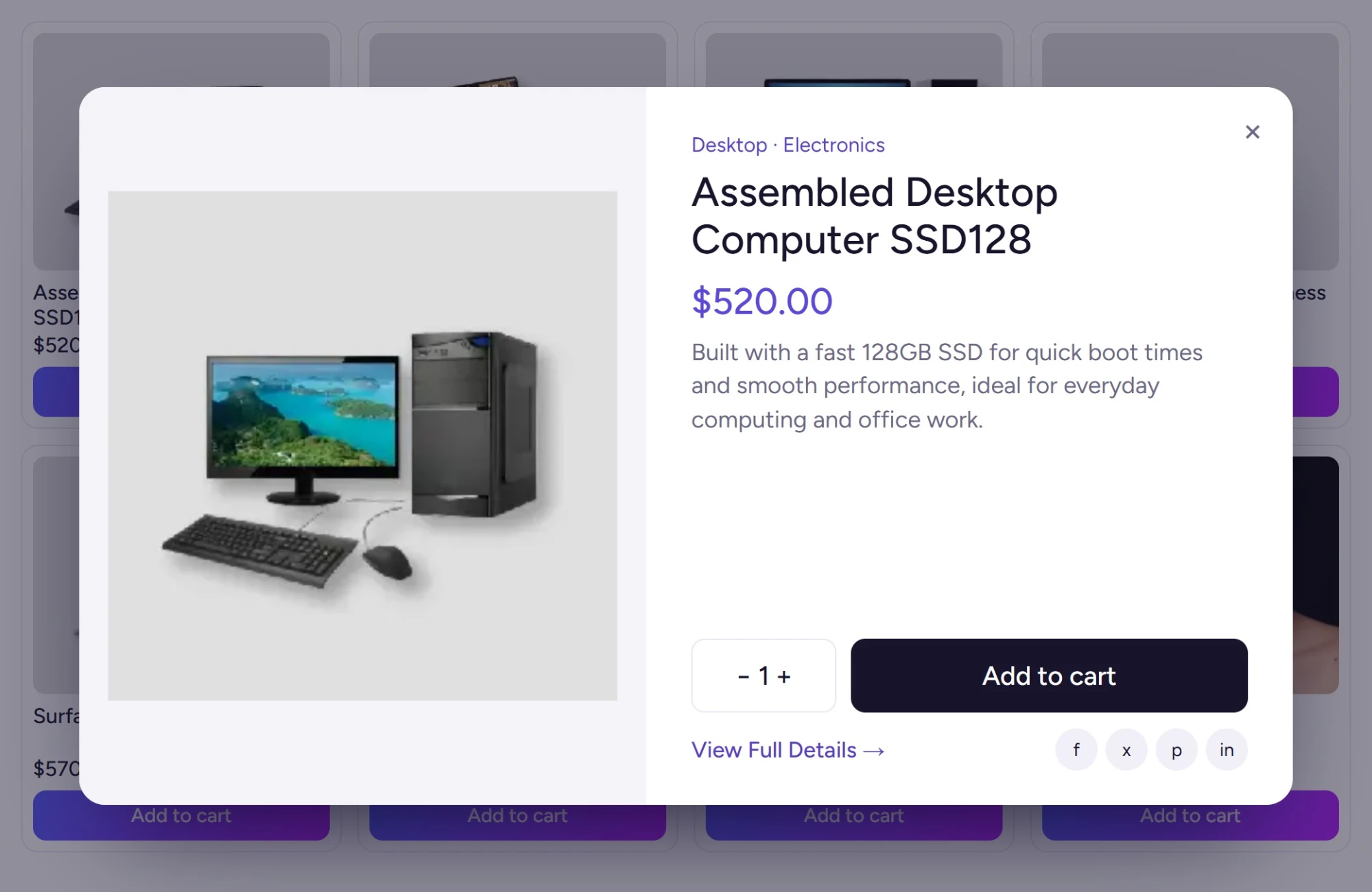
Quick view from the product list
Shoppers check the details in a popup and stay exactly where they were in the list, so browsing never resets.
Quick view popup Free
Product details open in a popup on shop and category pages, with no page load in between.
Content and look Free
Choose what the popup shows, including attributes, the image gallery and sharing, and set its text, icons and buttons.
Targeting and shortcuts Free
Pick the loops that get the button, from shop and search to sale and shortcode lists, and add keyboard shortcuts.
Quick view analytics Free
Built-in tracking shows how shoppers use the popup, so you can adjust it over time.
Buy from the popup Pro
AJAX add to cart and direct checkout inside the popup, so the list becomes a place to buy.
Size, position and motion Pro
More button positions, modal size controls, animations and a lightbox for product images.
Mobile and speed options Pro
Mobile optimisation plus preload, cache and lazy-load controls for faster popups.
Win back abandoned carts
Some shoppers add a product and leave. See who they are in the free dashboard, then let Pro follow up by email.
Recovery dashboard Free
Track cart activity, abandoned carts, recovered carts and recovery analytics from one admin page.
Customer journey events Free
Review the cart events behind each session to see where shoppers drop off.
Recovery email templates Pro
Write reminder emails from templates, each with a restore-cart link and an unsubscribe link.
Automated sending Pro
Recovery emails go out on a schedule you set, with no manual follow-up.
Opens, clicks and orders Pro
See which emails were opened and clicked and which recovered carts turned into orders.
Cart actions and export Pro
Archive, ignore, reactivate or delete carts, and export recovery data for your own records.
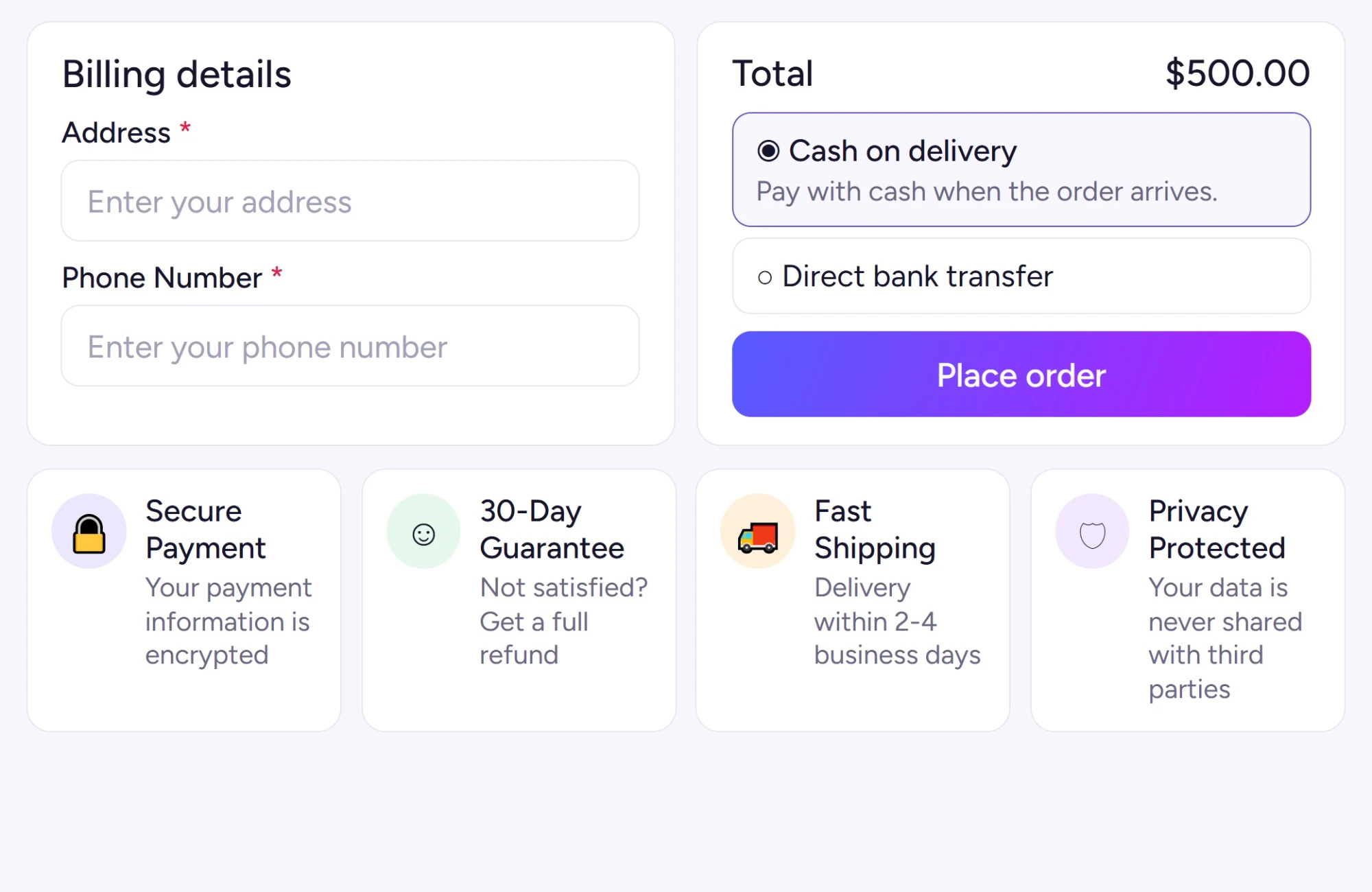
Trust badges and store-wide basics
Reassurance at the last step, plus the pieces that make the plugin fit any store and language.
Badges on checkout Pro
Show secure payment, guarantee and delivery badges right on the checkout page, where hesitation peaks.
Your icons and wording Pro
Pick an icon and write the text for each badge, such as your real delivery time or refund window.
Position, layout and HTML Pro
Choose where badges sit and their layout style, or use a custom HTML area for your own seals.
Mobile-friendly checkout Free
Popups and checkout layouts adapt to phones, tablets and desktops.
Translation ready Free
All text uses WordPress translation functions, so standard tools and multilingual plugins can translate it.
WPML-ready option text Pro
Text you enter in the plugin settings is handled for WPML, so each language gets its own wording.
Pro updates and priority support Pro
Licence activation brings Pro updates in your dashboard and priority help from the developers.
Is the WooCommerce one page checkout free plugin enough for you?
For many shops the free plugin covers the basics: popup checkout, direct checkout, a single-product checkout page, quick view, a slide-out cart and the recovery dashboard. Pro is for stores that want the visual field editor, all seven templates, recovery emails, trust badges and finer control of the cart and buttons.
| FeatureWhat you get | Free$0WordPress.org | Profrom $29with CMP2026 |
|---|---|---|
| Taking the order | ||
| Popup checkout and direct checkout | ||
| Quick checkout buttons on shop and category pages | ||
| Buy Now shortcode, block and Elementor widget | ||
| Variation selection on shop pages, hide Select options | ||
| One-click purchase and clear cart before checkout | ||
| One page checkout | ||
| Single-product and multi-product checkout pages | ||
| Seven built-in multi-product templates | ||
| Checkout form | ||
| Product images, linked titles and checkout text | ||
| Visual editor for labels, placeholders and required fields | ||
| Hide fields and sections, custom layout | ||
| Force login before checkout | ||
| Side cart and add to cart | ||
| Slide-out cart with AJAX quantity and remove | ||
| AJAX add to cart and after-click behaviour | ||
| Drawer coupons, totals, recommendations and grouping | ||
| Button colours, icons, width and loading effects | ||
| Mobile sticky add to cart and icon-only buttons | ||
| Quick view | ||
| Quick view popup | ||
| Add to cart and direct checkout inside quick view | ||
| Size, position, lightbox and preload controls | ||
| Recovery and trust | ||
| Cart recovery tracking dashboard | ||
| Recovery emails, restore links, open and click tracking | ||
| Trust badges with your icons, text and layout | ||
| Platform and support | ||
| Shortcodes, Gutenberg blocks and Elementor | ||
| Mobile-friendly checkout and translation-ready text | ||
| WPML-ready option text | ||
| Pro updates and priority support | ||
Which stores need a WooCommerce popup checkout, and six ways to use it
A popup or one page checkout helps most where the cart page is an unneeded stop. These are the stores the plugin’s own pages point to, followed by six setups you could build this week from features already in the plugin and test before Cyber Monday week ends.
- Impulse and single-product shopsBuyers decide fast, so payment sits on the product page.
- Mobile-first storesShort flows and thumb-sized buttons for phone shoppers.
- Bundles and product rangesSeveral items chosen and paid for on one page.
- Campaign sellersCheckout links for emails, ads, social posts and QR codes.
- Registered-only storesLogin required before checkout opens.
- Variable product cataloguesSizes and colours picked right in the shop list.
- Shops losing cartsRecovery tracking, then reminder emails in Pro.
- Agencies and store groupsThree or five site licences for client shops.
Six setups to try
Impulse buys in a popup
Turn on popup checkout so a shopper who decides on the product page pays right there, with the page still visible behind the form.
Links for holiday emails
Build a direct checkout link with the product, quantity and variation already set, and put it in a newsletter, an ad or a printed QR code.
Bundles on one page Pro
List a kit and its add-ons in the product table template with the checkout form underneath, so buyers set quantities and pay in one place.
Phone shoppers Pro
Keep an Add to cart bar on long product pages and open the cart as a drawer that fits small screens.
Win back carts Pro
Recovery emails go out on a schedule with a link that restores the cart, and the dashboard shows which carts came back.
Reassure at payment Pro
Add security, guarantee and delivery badges under the order, worded in your own terms, such as your actual refund window.
Will this WooCommerce checkout plugin fit your theme and builder?
It runs on the normal WooCommerce checkout, so payment gateways that work in your checkout keep working, and it is built for the major WooCommerce themes. If a theme clashes on styling, the customisation options cover it. These are the themes, builders and versions the sources list.
Themes
Named on the product page or on the Plugincy theme test list. The demo store runs on Astra.
Builders, gateways and products
Placement tools, payment and product types the plugin supports.
Requirements
From the WordPress.org listing and the Plugincy docs.
- Free version
- 1.4.6, updated 10 Nov 2026
- WordPress
- 5.3 or newer
- WooCommerce
- 3.6 or newer
- PHP
- 7.2 or newer
- Tested up to
- WordPress 7.0.8
- Checkout Blocks
- Supported field options
- Cache plugins
- Checkout kept out of cache
- Languages
- Translation ready, WPML text in Pro
Claim the deal, then add a WooCommerce one page checkout shortcode
Three steps and no account needed first. Choose a licence on the pricing page, enter CMP2026 before you pay, then install Pro and place a checkout with a shortcode, a block or an Elementor widget. The licence key arrives by email once payment clears.
Choose a licence
On the Quick Checkout pricing page, pick yearly or lifetime for 1, 3 or 5 sites.
Enter the code
Type CMP2026 in the coupon field and the total drops by 40%.
Install and switch on
Upload the Pro zip under Plugins → Add New, add your key, then turn on popup or one page checkout.
WooCommerce plugin support from the checkout’s own developers
Checkout is where money changes hands, so help comes from the people who wrote the plugin, before or after you buy. Live chat usually answers in under 5 minutes, tickets are answered within 24 hours, and the docs cover popup checkout, the side cart, quick view and cart recovery.
Live chat
Describe your checkout and theme, and a reply usually comes within minutes.
Support ticket
Send your gateway, theme and the checkout step that misbehaves.
Documentation
Guides for popup checkout, the side cart, quick view, the form editor and recovery emails.
Demo store
Try popup, direct and one page checkout at demo.plugincy.com.
WooCommerce abandoned cart, popup and pricing questions
Quick answers about the CMP2026 price, renewals, what the free plugin does, cart recovery, payment gateways, themes and refunds. They come from the plugin’s own documentation, so you can decide before the code expires on Sunday, 6 December.
Which one page checkout plugin is on sale for Cyber Monday?
One Page Quick Checkout Pro takes 40% off with CMP2026 between 30 November and 6 December 2026. A single site costs $29 a year or $71 once, three sites $53 or $149, and five sites $71 or $209.
Does CMP2026 beat the Black Friday price?
No. The discount is the same 40% and the prices match BF2026 exactly. What changes is the code and the window: Cyber Monday week runs until Sunday, 6 December, after the Black Friday code stopped on 1 December.
When does the code stop working?
At 12:59 PM ET on Sunday, 6 December 2026, which is 11:59 PM GMT+6. New licences return to normal prices afterwards, but yearly licences bought with CMP2026 keep renewing at 40% off.
How much will I pay to renew?
Yearly licences bought with the code renew at the reduced price while they stay active: $29 instead of $49 for one site, $53 instead of $89 for three, and $71 instead of $119 for five.
Do I need Pro for popup checkout?
No. Popup checkout, direct checkout, one page checkout, quick view and the slide-out cart are all in the free plugin on WordPress.org. Pro adds the visual field editor, seven multi-product templates, recovery emails and trust badges.
Does it help with WooCommerce abandoned carts?
Yes. The free plugin includes a dashboard that tracks abandoned and recovered carts. Pro adds recovery email templates sent on a schedule, restore-cart links, open and click tracking, and export of recovery data.
Will my payment gateways still work?
Yes. The plugin uses the normal WooCommerce checkout, so gateways such as PayPal and Stripe keep working as long as they display correctly in your active checkout.
Which themes and builders does it work with?
It is built for the major WooCommerce themes, and the product page names Astra, Avada, Divi, Flatsome, Kadence, Blocksy, Woodmart and others. You place checkout with shortcodes, Gutenberg blocks or Elementor widgets.
Can I use it on some products only?
Yes. You choose which products use quick checkout and which keep the standard WooCommerce checkout, and the Buy Now button can be switched on or off for product pages.
I already own Quick Checkout Pro. Can I extend at this price?
Yes. Contact support before the deal ends on 6 December and the team will help you extend or upgrade your licence at the Cyber Monday price. Live chat usually answers in under 5 minutes.
What if it does not suit my store?
Ask for a refund within 15 days of a new purchase; renewals and upgrades are excluded, as our Refund Policy explains. Testing the demo store or the free plugin first is the easiest way to be sure.
How can I get One Page Quick Checkout Pro for the lowest price?
Pick the single-site yearly plan and enter CMP2026 by 6 December. That costs $29, down from $49, and renewals stay at $29 while the licence is active. Popup and one page checkout already come in the free plugin on WordPress.org.
Is a lifetime One Page Quick Checkout licence worth it over yearly?
It is if you will run the checkout for more than two years. One site costs $71 once or $29 a year with CMP2026, and three years of yearly payments come to $87, so lifetime ends up cheaper from the third year.
WordPress Cyber Monday deals close Sunday: Quick Checkout at 40% off
Code CMP2026 removes 40% from every One Page Quick Checkout Pro licence until Sunday, 6 December 2026, 12:59 PM ET (11:59 PM GMT+6). Place a test order on the demo store, copy the code and have a shorter checkout running this week.