

Finding the right filter plugin usually becomes a bigger decision once product discovery starts affecting how people shop. In a growing WooCommerce store, filters are not just there to sort products. They shape browsing speed, page flow, and how easily shoppers reach what they actually want.
That is why Themify Product Filter vs. Dynamic AJAX Product Filters for WooCommerce is a useful comparison. Both aim to make product filtering more effective, but they come from different directions, which makes the choice less about feature count and more about which one fits the way your store is built.
Who Is This Comparison Best For?
This comparison is meant for WooCommerce store owners who are trying to improve product discovery without choosing a filter plugin blindly. When filtering starts affecting how easily shoppers move through the catalog, it helps to compare not just features, but also store fit, setup style, and the kind of browsing experience each plugin supports.
- Stores with growing catalogs and more filtering needs
- Merchants are comparing a builder-friendly setup with broader filtering flexibility
- WooCommerce sites are looking for smoother AJAX-based product discovery
- Stores that want to improve filter usability across shop and archive pages
- Teams deciding between layout-driven control and a more function-first setup
- Shops that care about both user experience and long-term filter management
- Businesses are trying to match the right plugin to how their storefront is built
Quick Summary
These two plugins are likely to appeal to different kinds of WooCommerce stores, even though both are built to improve product filtering. Themify Product Filter feels more closely tied to design-oriented store setups, especially where layout control and builder-based flexibility play a bigger role. Dynamic AJAX Product Filters for WooCommerce feels more tuned for stores that want filtering to stay fast, practical, and easier to scale across everyday catalog browsing.
- Themify Product Filter: Makes more sense for stores that want filtering to sit comfortably inside a more layout-driven storefront experience.
- Dynamic AJAX Product Filters for WooCommerce: Feels like the stronger fit for stores that want broader filtering depth, smoother AJAX behavior, and a more streamlined browsing flow.
Themify Product Filter vs Dynamic AJAX Product Filters: Core Features Comparison
At a functional level, both plugins let users refine WooCommerce products without page reloads. The difference is in URL behavior, SEO control, performance consistency, and visual flexibility. Dynamic AJAX Product Filters emphasizes predictable filtering logic and SEO-safe URLs, whereas Themify Product Filter emphasizes design options and basic filtering behavior.
| Feature Area | Dynamic AJAX Product Filters | Themify Product Filter |
|---|---|---|
| AJAX Reload-Free Filtering | Fully reload-free | Yes (AJAX) |
| Indexable Filter URLs | Yes | Limited |
| Performance on Large Catalogs | High | Medium |
| Price Filtering | Yes | Yes |
| Attribute Filtering | Yes | Yes |
| Stock Status Filtering | Yes | Yes |
| Custom Taxonomy Support | Yes | Yes |
| Mobile UX | Optimized | Theme dependent |
| SEO Control | Advanced | Basic |
| Visual Customization | Moderate | High |
Which Problems Do These Two Ajax Product Filter Plugins Solve?
Shop owners need ways for customers to quickly narrow product listings by price, attribute, category, tags, and stock status without waiting for full page reloads. When filtering is slow or confusing, users abandon product lists, explore fewer products, or leave the store entirely.
Both Themify Product Filter and the Dynamic AJAX Product Filters for WooCommerce plugin address product discovery, but take different approaches. Dynamic AJAX Product Filters focuses on consistent performance behavior and crawl-safe URLs, while Themify Product Filter focuses more on visual layouts and filter design.

Pricing Comparison Between the Two Product Filter Plugins
Price can shift the decision more than expected, especially when two plugins seem close on features at first glance. One keeps the buying path more direct with clearly structured plugin plans, while the other feels more connected to a wider ecosystem. Let’s look at how the pricing side compares before deciding which one offers better value for your store.
| Pricing Aspect | Dynamic AJAX Product Filters | Themify Product Filter |
|---|---|---|
| Free Version | Yes (most core features) | Yes |
| Feature Availability (Free) | High | Medium |
| Premium License | Paid | Paid |
| Renewal Required | Yes | Yes |
| Value for Large Stores | High | Medium |
Plugin Overview – Positioning and Store Compatibility
Feature tables can show capability, but they do not always show the kind of storefront a plugin feels most natural in. In this comparison, one plugin comes across as a broader, filter-heavy solution built for faster AJAX-driven catalog browsing, while the other feels more form-builder oriented, with stronger emphasis on layout control and how the filter interface is arranged on the page.
Dynamic AJAX Product Filters for WooCommerce
Dynamic AJAX Product Filters for WooCommerce feels aimed at stores that want a wider filtering system without making product discovery feel clunky. Its overall direction leans into real-time AJAX updates, broader filter coverage, SEO-friendly URLs, flexible placement, and compatibility with different WordPress themes, which gives it a more catalog-efficiency feel than a design-first one.

Core Features
- Real-time AJAX product updates
- Category, attribute, tag, and price filters
- Rating, stock, sale, SKU, and custom field filters
- SEO-friendly filter URLs
- Shortcode and block placement
- Page builder compatibility
- Mobile-ready layouts
- Page-specific filter display
- Visual swatch controls
- Clean permalink support
Strengths
- Covers a broader filtering range
- Feels stronger for filter-heavy catalogs
- Gives more flexibility outside one builder ecosystem
- Brings cleaner URL handling into the mix
- Works well for stores focused on faster product narrowing
Limitations
- Hosting and catalog size still affect performance
- Larger stores may need extra optimization
- Advanced setups can take more refinement
- Visual presentation is not its main differentiator
- Some themes may still need minor styling adjustments
Real WooCommerce Use Case
This plugin makes more sense in stores where shoppers regularly filter by several product signals at once, such as attributes, stock, ratings, sale status, or custom fields. It fits catalogs where filtering is expected to do more of the heavy lifting during product discovery.
Themify Product Filter
Themify Product Filter feels more like a form-builder-style filtering plugin that puts noticeable emphasis on how the filter interface is built and displayed. Its feature set highlights live search results, multiple filter combinations, drag-and-drop form building, vertical or horizontal layouts, and compatibility with Divi, Elementor, and Themify Builder, which makes it feel more layout-conscious without being limited to one ecosystem.
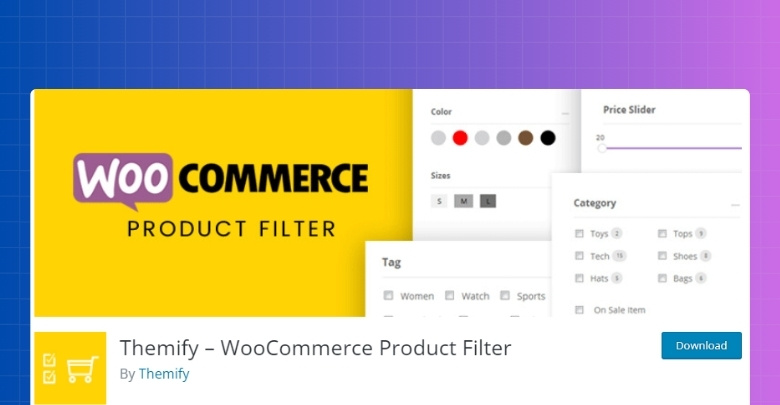
Core Features
- Live AJAX search results
- Category, attribute, tag, and price filters
- Multiple filter combinations
- Drag-and-drop form builder
- Vertical and horizontal layouts
- Search field support
- Widget and shortcode use
- Divi, Elementor, and Themify Builder compatibility
- Mobile-friendly filtering
- Theme-integrated display options
Strengths
- More interface-building flexibility
- Stronger emphasis on filter form layout
- Useful for builder-based storefronts
- Easier to picture in design-shaped shop pages
- Good fit for stores that want more control over filter presentation
Limitations
- Public feature set shows less breadth around advanced filter depth
- SEO-oriented URL handling is less clearly emphasized
- Stores with more complex filtering demands may need closer evaluation
- Best fit depends more on how important layout control is to the storefront
Real WooCommerce Use Case
Themify Product Filter fits stores where the filter form itself is part of the page design, especially when merchants want to shape the filter area through a more visual layout workflow. It makes more sense when filter presentation matters almost as much as the filtering function.
Comparison of Filter Types
Actual filtering range can change how useful a plugin feels once a store starts dealing with larger catalogs, more product data, or more specific shopper intent. That is often where a WooCommerce Ajax product filter plugin starts to show its real value. Some plugins cover the essentials well enough for everyday stores, while others give more room to filter through custom data, mixed product signals, or more layered product conditions.
| Filter Type | Dynamic AJAX Product Filters for WooCommerce | Themify Product Filter |
| Category Filters | Yes | Yes |
| Attribute Filters | Yes | Yes |
| Price Filters | Yes | Yes |
| Tag Filters | Yes | Yes |
| Rating Filters | Yes | Limited |
| Stock Status Filters | Yes | Limited |
| Sale Filters | Yes | Limited |
| SKU Filters | Yes | No |
| Custom Field Filters | Yes | Not Mentioned |
| Search Filters | Yes | Yes |
| Range Filters | Yes | Basic |
| Multi-Condition Filtering | Stronger | More limited |
Performance and Scalability Comparison
Filters can look similar in a feature list and still feel very different once shoppers start using them. Speed during interaction, how naturally results update, how easy the filter area feels to navigate, and how well the setup holds up as the catalog grows all shape the real experience far more than raw feature count.
| Comparison Area | Dynamic AJAX Product Filters for WooCommerce | Themify Product Filter |
| Result Update Flow | Feels quicker and more fluid | Feels functional, but more interface-led |
| Shopper Journey | Better for fast product narrowing | Better for layout-conscious browsing |
| Storefront Weight | Easier to keep light in the browsing flow | Can feel more present within the page layout |
| Catalog Handling | Better prepared for broader filtering demands | More comfortable with simpler filter structures |
| Scalability | Stronger fit as filtering needs expand | Better when filter depth stays more moderate |
| Admin Effort Over Time | More manageable in practical use | May need more attention as filter setups grow |
| Visual Impact | More utility-focused | More tied to how the filter area looks on the page |
| Overall Feel | Catalog-efficiency oriented | Layout-and interface-oriented |
SEO Management and Filter URL Behavior
Filter URLs do more than carry selected options from one page state to another. They can shape how filtered product views are shared, crawled, and interpreted across the site. That makes this part of the comparison worth paying attention to, especially for stores where filtering is expected to support both product discovery and long-term search visibility.
| SEO Aspect | Dynamic AJAX Product Filters | Themify Product Filter |
|---|---|---|
| Clean Filter URLs | Yes | Limited |
| Index / Noindex Control | Yes | Basic |
| Crawl Budget Optimization | High | Medium |
| Faceted Search Safety | Strong | Basic |
| Duplicate URL Risk | Low | Medium |
Setup Experience and Builder Support
Getting filters to work is one thing. Getting them to sit naturally inside the way a store is built is another. Some plugins feel easier to work into existing layouts, while others make more sense when the store relies heavily on builders, visual structure, or page-level design control.
| Setup Area | Dynamic AJAX Product Filters for WooCommerce | Themify Product Filter |
| First-Time Setup | More direct and workflow-focused | More layout-aware from the start |
| Builder Friendliness | Broad page builder support | Stronger pull for builder-led storefronts |
| Layout Integration | Easier to use across different page structures | More comfortable in visually arranged page setups |
| Filter Placement | More flexible across shop sections | More tied to how the filter form is arranged |
| Setup Feel | More practical and utility-driven | More interface-shaped |
| Launch Simplicity | Faster to put into use | May take more shaping depending on layout goals |
| Visual Control During Setup | More functional than design-led | More comfortable for stores that care about form layout |
| Best Fit | Stores wanting easier setup across varied layouts | Stores wanting filtering to work closely with page design |
Theme, Plugin, and Extension Compatibility
Compatibility tends to show its value after installation, when filters have to work alongside the active theme, product archive layout, builder setup, and the rest of the WooCommerce stack. A plugin may look strong in isolation, but real store use depends on how comfortably it fits into everything already shaping the storefront.
| Compatibility Area | Dynamic AJAX Product Filters | Themify Product Filter |
|---|---|---|
| Popular WooCommerce Themes | Yes | Yes |
| Custom Themes | High | Medium |
| Page Builders | High | Excellent for Themify |
| WooCommerce Extensions | High | Medium |
User Support and Documentation Comparison
Support tends to matter most when a filter plugin stops being a simple add-on and becomes part of the store’s everyday workflow. Setup questions, layout adjustments, builder integration, and filter behavior all become easier to manage when documentation is clear, and support feels reliable.
| Support Area | Dynamic AJAX Product Filters | Themify Product Filter |
|---|---|---|
| Documentation Quality | Clear & structured | Good |
| Technical Guidance | Strong | Moderate |
| Support Responsiveness | High | Varies |
| Learning Resources | Good | Good |
Advanced Filter SEO and Compatibility Comparison
Technical differences become more noticeable once filtering has to work inside a fuller WooCommerce setup. URL behavior, caching stability, analytics consistency, and the risk of SEO side effects can all shape how manageable a filter plugin feels over time.
| Technical Area | Dynamic AJAX Product Filters for WooCommerce | Themify Product Filter |
| URL Parameter Handling | More structured and SEO-aware | More basic and storefront-focused |
| Clean Permalink Support | Stronger | More limited |
| Cache Plugin Compatibility | Better suited to broader store setups | May need closer testing in styled layouts |
| CDN Compatibility | More comfortable in mixed performance setups | More dependent on store configuration |
| Analytics Tracking Stability | Easier to work into cleaner filter flows | May need more attention when layouts are more customized |
| SEO Risk Level | Lower when filter pages are planned carefully | Higher if filtered states are not managed well |
| Filter State Consistency | More stable across wider filtering use cases | Better in simpler filter structures |
| Scalability in Technical Setups | Stronger for stores with growing complexity | Better for narrower setup demands |
Which Product Filter Plugin Is Better for Which Type of Store?
Store fit becomes easier to judge once you stop looking at features in isolation and start looking at how filtering supports the catalog, the storefront, and the team managing it. These two plugins can both improve product discovery, but they work better in different kinds of WooCommerce environments.
| Store Type | Better Choice | Reason |
|---|---|---|
| Small store | Themify Product Filter | Visual flexibility and design |
| Medium store | Depends | UX vs performance needs |
| Large store | Dynamic AJAX Product Filters | Scalable performance |
| SEO-driven store | Dynamic AJAX Product Filters | Clean URLs |
| Builder-centric design | Themify Product Filter | Visual integration |
| Non-technical owner | Dynamic AJAX Product Filters | Easier setup |
SEO Pitfalls That Often Come With Product Filter Plugins
Filter plugins can make product discovery better, but they can also create SEO problems that are easy to miss during setup. Some issues appear gradually as filtered URLs grow, catalog pages multiply, and search engines start crawling more filter states than intended. Paying attention to these risks early can prevent a cleaner storefront experience from turning into a search visibility problem later.
- Duplicate Filter Paths: Different filter combinations can create separate URLs that lead to very similar product listings, which can weaken page signals and create unnecessary duplication.
- Thin Filtered Pages: Some filtered results pages offer very little unique value beyond a narrowed product list, making them weak candidates for indexing.
- Index Bloat: Large catalogs can generate too many crawlable filter pages, which can fill the index with low-priority URLs instead of stronger category or product pages.
- Crawl Waste: Search engines may spend time on endless filter combinations rather than focusing on core commercial pages that matter more.
- Weak Canonical Signals: Poor canonical handling can make it harder for search engines to understand which filtered or unfiltered version should be treated as primary.
- Messy URL Structures: Long parameter strings and inconsistent filter states can reduce clarity for both users and search engines.
- Low-Intent Search Pages: Not every filter combination reflects useful search intent, and indexing those pages can create noise instead of ranking value.
- Internal Link Dilution: When too many filter states become accessible through internal links, authority can spread too thin across less important URLs.
- Category Page Competition: Filtered pages can sometimes compete with main shop or category pages that should be ranking for broader commercial terms.
- Unplanned SEO Growth: A store may unintentionally create a large set of searchable filter pages without a clear strategy for which ones deserve visibility.
Which Ajax Product Filter Plugin Should I Choose?
Decision gets easier when you think about what role filtering plays in your store.
If filtering is expected to handle more of the catalog logic, support a wider range of product data, and stay dependable as the store grows, Dynamic AJAX Product Filters for WooCommerce feels like the more convincing option. It has a broader, more utility-focused feel, which makes it easier to picture in stores where filtering is part of the core shopping flow rather than just a supporting interface element.
Themify Product Filter makes more sense when the filter area is closely tied to page design and layout flow. In stores where visual structure, builder-based arrangement, and front-end presentation carry more weight, it brings a kind of value that is less about filtering depth and more about how naturally the filter form sits inside the storefront.
So the choice is not really about which plugin does more in every direction. It is about whether your store needs a more capable filtering system or a more layout-conscious one.
Frequently Asked Questions
Even after reading the full comparison, you might still have a few questions before deciding which filter plugin suits your store best. Here are some common queries store owners often ask at this stage.
Can I Use These Plugins Alongside Other WooCommerce Extensions?
Yes, both plugins are built to work with most WooCommerce extensions. Still, it’s always wise to test them on a staging site first. This helps you avoid any unwanted conflicts.
Do These Plugins Affect Website Loading Speed?
Both plugins are optimized for speed and generally won’t slow down your store. Performance can depend on your theme and hosting. Always monitor site speed after adding new plugins.
Can I Translate the Filter Labels Into Another Language?
Yes, you can translate filter labels using translation plugins or language files. This makes them suitable for multilingual stores. It’s an easy way to make the shopping experience friendlier.
Do These Plugins Require Coding Skills to Use?
No, you can set up and manage filters without coding knowledge. Both offer user-friendly settings. However, basic CSS skills can help with design tweaks if you want a custom look.
Can These Filters Work on Custom Product Pages?
Yes, you can place filters on custom product pages using shortcodes or widgets. This allows you to design unique shop sections. It’s especially useful for highlighting specific product collections.
Final Verdict: Themify Product Filter vs Dynamic AJAX Product Filters
Comparisons like Themify Product Filter vs. Dynamic AJAX Product Filters for WooCommerce are rarely about picking a winner in the abstract. They make more sense when viewed through the kind of store you are building and the role filtering is expected to play once shoppers start moving through the catalog.
Dynamic AJAX Product Filters for WooCommerce feels more convincing in stores where filtering needs to carry more weight across product discovery, catalog depth, and everyday usability. Themify Product Filter feels easier to justify when the filter area is expected to follow the visual rhythm of the storefront and sit more naturally within a layout-led shopping experience.
In the end, choice comes down to emphasis. One leans more toward filtering strength and broader storefront utility, while the other leans more toward presentation, layout flow, and design alignment.
