

Running a growing WooCommerce store often means managing stock in more than one place, like warehouses, retail locations, or regional fulfillment centers. But as your operations expand, so does the complexity. That’s when store owners start wondering: What are the challenges of multi-location inventory management in WooCommerce?
The main challenge is that WooCommerce’s default inventory system is built for single-location tracking. It doesn’t automatically update stock across warehouses or route orders based on location, leading to delays, confusion, and fulfillment errors. Managing multiple stock points requires precise coordination, something that basic WooCommerce alone can’t handle efficiently.
To help you understand what’s involved, this article breaks down the key obstacles you may face when managing inventory across multiple locations. You’ll also learn what causes them and what solutions can make your store run smoother, faster, and more reliably.
What Are the Challenges of Multi-Location Inventory Management in WooCommerce?
Managing multiple warehouses or stock locations in WooCommerce can quickly get complicated. While the platform is flexible, its core system isn’t designed for advanced multi-location tracking. From inaccurate reports to slow order fulfillment, several challenges can impact performance and efficiency. Let’s explore the most common ones.
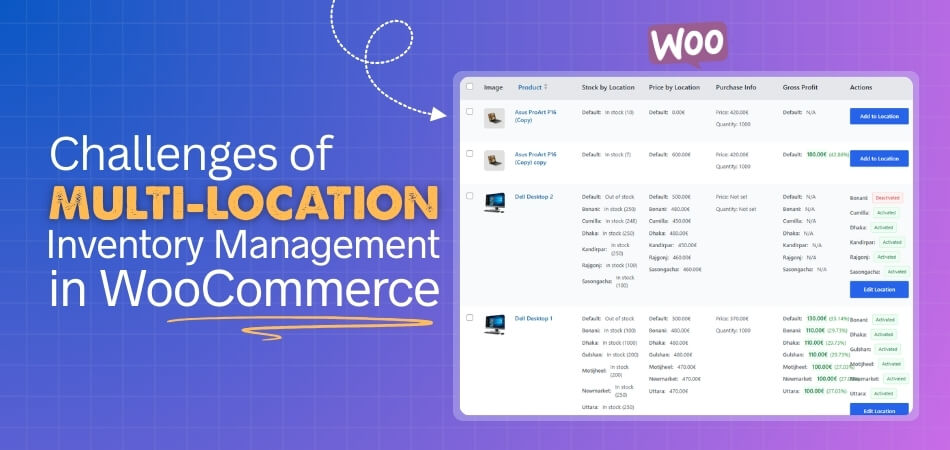
Limited Native Support
One of the main limitations of WooCommerce inventory management is its lack of built-in tools for handling multiple stock locations. Every product only has a single quantity field, which makes location-based tracking difficult. Without third-party support, store owners must rely on manual updates that are both slow and error-prone.
Delayed Stock Synchronization
Keeping multiple warehouses in sync is one of the hardest parts of inventory management. When products sell in one location, those changes aren’t instantly updated in others. This delay can cause overselling or confusion about available stock, especially during high-traffic sales periods.
Complex Order Routing
WooCommerce lacks automated order routing, meaning all orders are processed from one source. Without smart assignment to the nearest or most suitable warehouse, shipping costs increase and delivery times stretch out. This manual process can also overwhelm fulfillment teams as orders grow.
Inaccurate Reporting
Default WooCommerce reports combine all stock data into a single total. For multi-location operations, this lack of separation makes it hard to know how each warehouse performs. Without clear insights, store owners can’t make informed decisions about restocking, promotions, or regional sales trends.
Performance Issues
As you add plugins or data-sync tools to manage inventory, WooCommerce can slow down. Extra scripts and database queries often lead to longer load times, checkout delays, or even cart abandonment. Poor optimization affects not just performance but also the customer experience.
Role and Access Management
WooCommerce doesn’t have built-in controls to assign warehouse-specific roles. When multiple staff members handle inventory, it’s easy for edits to overlap or data to get overwritten. Without role-based permissions, maintaining consistent and accurate stock data becomes a real challenge.
Handling Returns and Transfers
Managing product returns and stock transfers between warehouses is another tricky task. Without a structured process, it’s easy to lose track of where items should be restocked. This can result in misplaced stock or discrepancies between online availability and actual inventory.
Plugin Compatibility
Using multiple plugins to fill WooCommerce’s inventory gaps often creates conflicts. Not all extensions are designed to work together, leading to errors in syncing, layout issues, or duplicated data. Store owners may end up troubleshooting technical problems more than managing their business.
Lack of Automation
Most WooCommerce stores depend heavily on manual processes to manage inventory. Without automation for restocking, syncing, or routing, it’s difficult to maintain accuracy as order volume grows. The result is more time spent fixing errors instead of focusing on growth.
Data Duplication and Errors
When multiple systems or spreadsheets are used for tracking, data duplication becomes common. Products can appear twice, reports show inconsistent numbers, and inventory mismatches occur. Without a centralized management solution, maintaining reliable data across multiple locations becomes an ongoing struggle.
Operational Impact of Poor Multi-Location Management
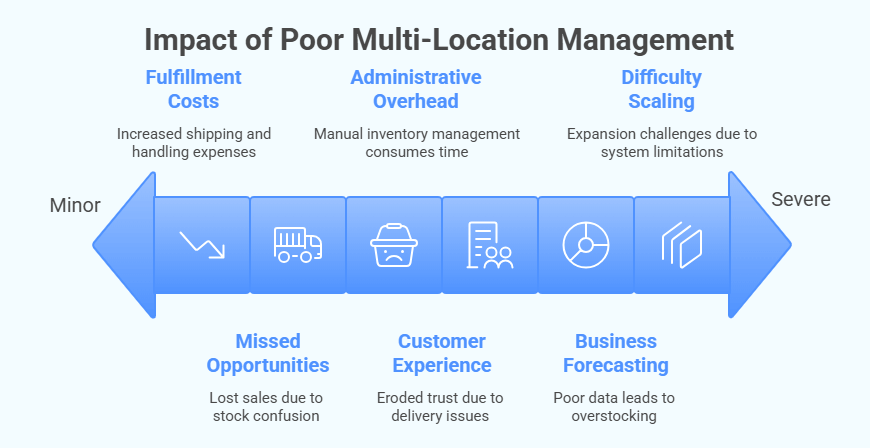
When WooCommerce stores operate across multiple warehouses without a proper system in place, the effects ripple through every part of the business. Poor inventory coordination doesn’t just cause stock confusion — it directly impacts performance, profitability, and customer trust. Here are six key operational consequences you should be aware of.
Missed Sales Opportunities
When product quantities aren’t updated instantly across all warehouses, customers may see items as unavailable even when they’re in stock elsewhere. These missed opportunities cost potential sales and damage buyer confidence. Real-time visibility helps ensure customers can always purchase from the nearest or best-stocked location.
Higher Fulfillment Costs
Without automated order routing, WooCommerce may process orders from warehouses far from the buyer’s location. This increases shipping expenses and handling times. Over time, inefficient routing leads to higher operational costs that could have been avoided with proper warehouse allocation and smart inventory mapping.
Poor Customer Experience
Customers expect quick, accurate deliveries. When outdated inventory data leads to canceled orders or delays, it erodes trust. Inconsistent order fulfillment and repeated stock issues create frustration that often drives shoppers to competitors with more reliable fulfillment systems.
Increased Administrative Overhead
Managing inventory manually across several warehouses consumes time and attention. Teams spend hours updating spreadsheets, cross-checking data, and fixing mismatched stock numbers. This added workload slows down other business functions and increases the likelihood of human errors during busy sales periods.
Inaccurate Business Forecasting
When your data isn’t centralized, reports fail to reflect the true picture of sales and inventory levels. This makes it difficult to forecast demand, plan restocks, or identify regional sales trends. Over time, poor forecasting leads to either overstocking or unexpected shortages.
Difficulty Scaling Operations
Expanding to new locations becomes a challenge when your system isn’t built for multi-location control. Each added warehouse increases complexity, and without centralized tools, tracking, and automation, managing growth becomes chaotic instead of profitable. A scalable structure is essential for long-term success.
How to Overcome These Challenges in WooCommerce
Handling inventory across several locations in WooCommerce can feel complicated without the right setup. The good news is, most of these challenges can be solved with proper tools, automation, and regular maintenance. By following these simple strategies, you can build a faster, more reliable, and scalable multi-location system.
Use a Multi-Location Inventory Plugin
The easiest way to streamline operations is by using a dedicated solution like multi location product & inventory management for WooCommerce. It lets you assign stock per warehouse, automate synchronization, and route orders by location. This ensures accurate, real-time tracking and eliminates the manual errors that slow down multi-location stores.
Automate Stock Synchronization
Set up automatic syncing between locations so inventory levels update in real time after every order or return. Automation keeps data consistent and reduces the chances of overselling, saving time and effort that would otherwise go into manual corrections.
Optimize Order Routing
Configure your system to route orders to the nearest or most cost-effective warehouse. This ensures faster delivery, lower shipping costs, and better customer satisfaction. Many advanced plugins provide location-based order fulfillment options for WooCommerce.
Improve Reporting and Analytics
Use tools that provide warehouse-level reports instead of total stock summaries. Detailed reporting helps you identify which locations perform best, plan stock transfers more effectively, and make smarter restocking decisions based on regional demand.
Enable Role-Based Permissions
Assign user roles with limited access to specific warehouses. This prevents overlapping edits and keeps your inventory records clean. Clear permissions also improve accountability among team members who manage different stock locations.
Simplify Return and Transfer Management
Create a simple return and transfer policy for all warehouses. Use a centralized dashboard to track returned or moved stock between locations. This helps avoid mismatched quantities and ensures every warehouse reflects accurate inventory.
Keep Your Site Optimized
Too many inventory operations can slow your WooCommerce site. Regularly clean your database, enable caching, and use optimized hosting. This keeps load times fast and ensures that stock updates don’t delay your customer checkout experience.
Test Plugin Compatibility
Before installing a new inventory or order management plugin, test it on a staging site. This helps identify conflicts early and ensures your store runs smoothly without breaking layouts, checkout pages, or synchronization tools.
Add Automation for Restocking
Set alerts or automatic reorder rules when stock falls below a threshold in any warehouse. Automated restocking helps maintain product availability and prevents missed sales opportunities.
Regularly Monitor and Update
Multi-location inventory systems rely on up-to-date plugins and database structures. Regularly check for software updates, run test orders, and monitor system logs to ensure everything continues to run efficiently as your business scales.
Common Mistakes Store Owners Make
Even with experience, WooCommerce store owners often face challenges when handling multi-location inventory management in WooCommerce. These small missteps may seem minor at first, but they can create long-term inefficiencies, inaccurate data, and missed opportunities as the business grows. Here are eight common mistakes you’ll want to avoid.
- Relying on Spreadsheets for Tracking: Many businesses still depend on spreadsheets for multi-location inventory updates. While easy to start with, they quickly become unreliable as sales increase and data volume grows.
- Ignoring Plugin Compatibility: Some store owners install multiple extensions without checking if they work well together. This often causes sync errors, checkout issues, or database conflicts that slow down the store.
- Overloading WooCommerce with Too Many Tools: Adding too many plugins can backfire instead of helping. It increases server load, slows performance, and makes troubleshooting more complicated.
- Skipping Regular Inventory Audits: Automation helps, but it’s not foolproof. Without routine reviews, stock discrepancies may go unnoticed, leading to fulfillment errors and frustrated customers.
- Not Setting User Roles and Permissions: Letting everyone access inventory settings creates confusion and mistakes. Clear user permissions ensure accountability and prevent unwanted changes to stock data.
- Neglecting Performance Optimization: Multi-location systems often strain WooCommerce performance. Regular database cleanup, caching, and optimized hosting keep your store running fast and stable.
- Forgetting to Test Before Going Live: Activating new inventory tools directly on a live site is risky. Testing in a staging environment first helps identify conflicts before they affect real customers.
- Failing to Train Staff on New Systems: Introducing new plugins or workflows without training can cause errors. Ensuring everyone understands how the system works keeps operations smooth and consistent across locations.
Frequently Asked Questions About Multi-Location Inventory in WooCommerce
Handling inventory across multiple warehouses can be confusing, especially for WooCommerce store owners trying to scale efficiently. Below are answers to some of the most common questions about multi-location inventory, performance, and setup challenges that store owners often face.
What Is Multi-Location Inventory Management In WooCommerce?
It’s a system that helps you manage product stock across different warehouses, stores, or fulfillment centers. Each location maintains its own stock levels, allowing for accurate order routing and faster delivery.
Does WooCommerce Support Multiple Warehouses By Default?
No, WooCommerce only supports a single stock quantity per product by default. To manage multiple warehouses, you’ll need to use a third-party plugin or a dedicated inventory management solution.
What Are The Main Challenges Of Multi-Location Inventory Management?
The biggest challenges include syncing stock across warehouses, managing order routing, and keeping reports accurate. Without automation, errors can occur easily, leading to delays and missed sales.
How Do I Avoid Overselling Between Locations?
Use real-time synchronization tools that automatically update stock across all warehouses. This ensures accurate inventory data, preventing overselling and keeping your customers informed.
Will Multi-Location Inventory Slow Down My WooCommerce Store?
It can if your setup isn’t optimized. Using too many plugins or large sync scripts may cause WooCommerce to slow loading, so regular database cleanup and caching are essential.
What Is The Best Way To Manage Inventory Across Warehouses?
The most efficient approach is to use a plugin that supports automation, reporting, and centralized control. It keeps all your locations connected and reduces manual errors in tracking stock.
Can I See Reports For Each Warehouse Separately?
Yes, advanced inventory management tools provide location-based reporting. You can view stock performance, sales trends, and order histories for each warehouse individually.
How Can I Simplify Order Routing?
Use a system that automatically assigns orders to the nearest or best-stocked warehouse. This reduces delivery time, saves on shipping costs, and improves the overall customer experience.
What Happens When Stock Runs Out In One Location?
If one warehouse runs out of a product, orders can automatically be routed to another with available stock. This ensures customers can still complete purchases without interruption.
Is Multi-Location Inventory Suitable For Small Businesses?
Yes, even small stores benefit from having location-based control if they store products in multiple areas. It helps maintain stock accuracy, improves fulfillment speed, and sets a strong foundation for future growth.
Bottom Line
So, now you know what are the challenges of multi-location inventory management in WooCommerce. From delayed syncing and reporting errors to order routing and scaling issues, these challenges often arise as stores expand and rely on multiple fulfillment points. They may seem technical, but their impact reaches deep into customer satisfaction, operations, and long-term growth.
Thankfully, WooCommerce gives you the flexibility to overcome most of these problems with the right strategy and tools. By adopting automation, improving performance, and using a reliable inventory management solution, store owners can turn complexity into clarity, keeping every location connected, efficient, and ready to grow together.
