

Your WooCommerce store’s success depends on more than just great products — it’s also about how smoothly your store runs behind the scenes. That’s where plugins come in. They’re like handy tools that add new features and make your online store smarter, faster, and easier to manage. From improving checkout experiences to automating inventory, plugins do the heavy lifting so you can focus on growth.
So, why are plugins important for your WooCommerce store?
Plugins are important for your WooCommerce store because they add helpful features to customize without coding knowledge. They make shopping easier, help manage orders, and add tools for payments, shipping, and marketing. Plugins also save time, increase sales, and help your store grow as more people visit and buy.
If you are in need of a powerful, profit-driving WooCommerce store, you should read on to learn how going with the right plugins can help you realize that goal.
Why Are Plugins Important for Your WooCommerce Store?
Running a WooCommerce store isn’t just about listing products—it’s about making your store perform better, look great, and grow with ease. Plugins bring the flexibility to add new tools and improve every part of your store without coding. Here are why plugins are important for your store.
Extending Core Functionality
Plugins give your WooCommerce store the power to handle tasks that the base version cannot manage efficiently.
- Payment gateways like Stripe or PayPal work smoothly when plugins extend checkout options, making the buying process more flexible and secure.
- Advanced inventory and stock tracking systems reduce manual work while keeping customers informed about product availability in real time.
- Subscription or booking tools enable recurring sales models, allowing store owners to grow beyond one-time transactions.
- Multi-vendor and marketplace extensions let multiple sellers list products, creating broader catalogs that attract more visitors.
Improving Store Design and User Experience
A well-designed store can turn visitors into loyal customers, and plugins help make that transformation seamless.
- Visual builder plugins enhance store layouts, making it easy to design professional pages that reflect your brand identity.
- Navigation tools ensure visitors find products quickly, reducing confusion and helping customers finish purchases faster with fewer clicks.
- Personalization plugins display dynamic product suggestions, giving each shopper a custom browsing experience that improves satisfaction.
- Using tools like the WooCommerce One Page Checkout plugin helps simplify checkout, cutting steps and keeping customers focused on completing purchases.
Enhancing Management and Automation
Managing a store takes time, but plugins help automate the small tasks that often slow owners down.
- Automated email tools handle order confirmations, shipping updates, and promotions, keeping customers informed without constant attention.
- Analytics plugins track sales trends and customer actions, giving you clear insights to improve marketing and product placement.
- CRM integrations organize customer data, helping you manage relationships while boosting repeat purchases through personalized follow-ups.
- Task automation tools process refunds, manage taxes, and update stock automatically, freeing you to focus on growing your brand.
Boosting Security and Performance
Security and speed matter for every online store, and the right plugins keep both under control effectively.
- Firewall plugins block hacking attempts and protect sensitive customer data, ensuring your store remains trustworthy and safe for transactions.
- Performance tools optimize images and cache pages, improving loading speed even during busy sales periods or traffic spikes.
- Backup plugins safeguard your site data, restoring everything quickly if something goes wrong during updates or migrations.
- Malware scanners continuously monitor for suspicious files, preventing downtime and keeping your store reliable across all devices.
Enabling Integrations and Scalability
As your store grows, plugins make sure you can expand without rebuilding everything from scratch.
- Marketing integrations connect email campaigns and social media ads, helping you reach shoppers where they already spend time online.
- Accounting tools sync orders and invoices, making financial tracking simple while reducing manual entry errors for growing stores.
- SEO plugins enhance product visibility, helping search engines find your store faster and improving your ranking in search results.
- International extensions support currencies, translations, and shipping worldwide, letting your business grow smoothly across global markets.
How Do Plugins Affect WooCommerce Site Performance?
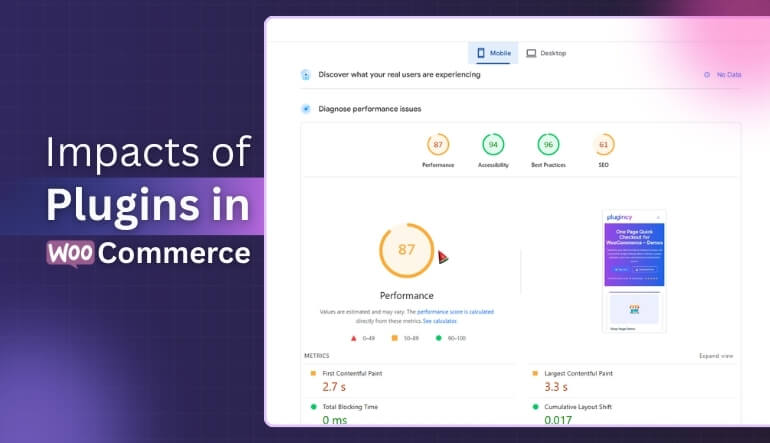
Your WooCommerce store depends on plugins to add cool features and make things work smoothly. But every plugin you install also adds a bit more work for your website to handle. Some help your store perform better, while others can slow it down. Learn how plugins affect performance to keep your site fast and healthy.
Page Load Speed
When you add a plugin, it brings extra files like code, styles, and scripts to your website. These files take time to load, and if you have too many plugins, pages open more slowly. Slow loading makes shoppers lose patience and may cause them to leave. Using lightweight plugins can help your pages load faster and keep visitors happy.
Resource Usage
Plugins use your website’s memory and CPU power whenever they run. If one plugin uses too many resources, the whole site can feel slow or even freeze. When several heavy plugins run together, your server gets overloaded. Keeping only the plugins you truly need can make your site smoother and more stable.
Database Impact
Most plugins store settings, logs, or other data in your database. Over time, all this extra data can fill up space and make searches slower. Too many unnecessary database queries can delay page responses and affect performance. Cleaning your database regularly helps keep it light and fast.
Plugin Conflicts
Sometimes plugins don’t work well with each other, especially if they’re made by different developers. These conflicts can cause errors, strange designs, or slow page loading. They may even break parts of your site, making it harder to fix later. Testing new plugins before activating them can help avoid big problems.
Unnecessary Loads
Some plugins load their scripts and styles across every page, even when they’re not needed. This wastes your site’s resources and makes each page heavier. For example, a contact form plugin doesn’t need to load on a product page. Limiting where plugins run keeps your site faster and easier to use.
Which Plugins Are Essential for Checkout and Payments?
A smooth and secure checkout is the heart of every successful WooCommerce store. The right payment plugins make transactions easier, faster, and more reliable. They help customers pay confidently while reducing cart abandonment and improving overall sales performance for your store. Here are the plugins that are essential for checkout and payments.
WooCommerce Stripe Payment Gateway
Stripe allows shoppers to pay with cards, Apple Pay, or Google Pay, giving flexibility for global customers. It ensures safe payments using advanced 3D Secure verification and encrypted processing. Store owners can also manage recurring payments for subscriptions with ease and accuracy. The plugin’s quick setup and simple dashboard make managing transactions effortless for both small and large stores.
PayPal for WooCommerce
PayPal is one of the most trusted online payment systems and adds reliability to your checkout process. It allows instant payments through PayPal accounts without extra monthly fees in many regions. Customers can check out quickly, knowing their information stays protected through PayPal’s strong security features. This plugin helps businesses handle refunds and disputes easily, improving overall buyer satisfaction.
PeachPay Checkout
PeachPay improves conversion rates by offering a modern, fast, and customizable checkout page. It supports multiple payment methods like Stripe, PayPal, and digital wallets for easy transactions. Built-in upselling options increase average order values without disturbing the checkout flow. While choosing the best WooCommerce plugins, PeachPay stands out for creating smooth and buyer-friendly experiences.
WP SmartPay
WP SmartPay connects your store with Paddle, a global payment platform supporting cards, Apple Pay, and bank transfers. It automatically manages taxes, invoicing, and receipts, saving valuable time for business owners. Customers enjoy clear pricing and automatic tax adjustments without extra steps. This plugin helps international stores stay compliant with local tax laws while accepting various payment types.
Amazon Pay
Amazon Pay lets users complete purchases using their Amazon account, making checkout quick and familiar. It benefits from Amazon’s strong reputation for trust and security, encouraging faster transactions. Customers appreciate skipping form-filling steps since their saved details are automatically used. Store owners gain an instant confidence boost from shoppers who already rely on Amazon for safe purchases.
Square for WooCommerce
Square links your online store and physical shop, keeping inventory synced automatically between both platforms. It enables secure payment processing for credit cards, contactless options, and digital wallets. Business owners enjoy unified reports that make managing sales data simpler across multiple channels. This plugin suits merchants handling in-store and online orders, ensuring a smooth experience for all customers.
How to Choose Lightweight Plugins to Avoid Slowdowns?
Your WooCommerce site works best when it loads fast and runs smoothly. Heavy plugins can slow everything down and frustrate visitors. Picking lightweight plugins keeps your store quick, stable, and easy to manage. Here are simple tips to help you choose smarter without hurting performance:
- Check Plugin Size: Small-sized plugins usually have fewer scripts and take less time to load on pages. Always look at the file size before installation to prevent extra weight.
- Read User Reviews: People often share if a plugin slows their website or causes issues. Checking honest reviews saves time and helps you avoid trouble.
- Test Plugin Speed: Before keeping a plugin, compare your site’s speed with and without it. Even small delays can affect user experience and sales.
- Limit Plugin Count: Every plugin adds extra code and server requests that can slow your store. Keep only the most important ones that improve performance.
- Avoid Overlapping Features: Two plugins doing the same job waste memory and slow down your site. Pick one reliable tool that covers multiple related tasks effectively.
- Check Update History: Regular updates show developers maintain performance and fix bugs. Outdated plugins often break features or slow down WooCommerce stores unnecessarily.
- Use Quality Sources: Official WordPress and trusted developer sites offer secure, optimized plugins. Avoid random downloads that may hide harmful or poorly written code.
- Monitor Plugin Impact: After adding any plugin, track speed using tools like GTmetrix or Pingdom. This helps identify which plugin causes slow loading times.
What Security Plugins Protect WooCommerce Stores?
Running an online store means keeping your site safe from hackers, spam, and other digital troublemakers. Security plugins make this much easier by watching your site and blocking harmful attacks. They also help you fix problems before they get worse. Here are which plugins to save your store from serious damage and lost sales.
Sucuri Security
Sucuri is a strong tool that guards your WooCommerce store from many online threats. It checks for malware, fixes blacklisted issues, and removes dangerous files automatically. The firewall keeps hackers and bots away from your website. Sucuri even offers DDoS protection, which helps your store stay online during heavy attacks.
Wordfence Security
Wordfence is one of the most trusted security plugins for WordPress and WooCommerce. It comes with a firewall and a malware scanner that work in real time. The plugin can block bad IP addresses before they harm your website. It also includes two-factor login protection to stop strangers from sneaking into your store.
All-In-One Security
This plugin gives complete protection for WooCommerce stores without being too complicated. It stops hackers from forcing their way into your site with brute-force attacks. The firewall adds another safety layer to block unwanted visitors. It’s great for beginners who want security that’s easy to use and understand.
Anti-Malware and Firewall
This plugin searches your site for hidden viruses, malware, and hacking codes. Once it finds a threat, it removes it quickly without hurting your data. The built-in firewall blocks DDoS attacks that can slow down or crash websites. It keeps your store safe so customers can shop without worry.
Limit Login Attempts Reloaded
When someone tries to guess your password too many times, this plugin steps in to block them. It limits login attempts and locks out suspicious users or bots. You can also see a list of blocked IPs for better control. This small plugin makes a big difference in keeping login areas safe.
MalCare Security
MalCare protects your WooCommerce store without slowing it down. It scans for malware daily and removes harmful files automatically. The plugin includes a firewall and login protection to stop hacking attempts. You don’t need to be a tech expert to use it—it works smoothly in the background.
Jetpack Security
Jetpack Security watches your site for downtime, malware, and unusual activity. It blocks brute-force attacks before they reach your login page. The plugin also alerts you if your website goes offline, so you can fix it fast. It’s a simple choice for store owners who want security and speed together.
How to Test Plugin Compatibility Before Installing?
Before adding any new plugin to your WooCommerce store, it’s smart to check if it fits well with your site. Some plugins may look helpful, but can cause errors or slow down your website. Testing compatibility helps keep your store stable, fast, and working without problems. Here’s how to do it easily.
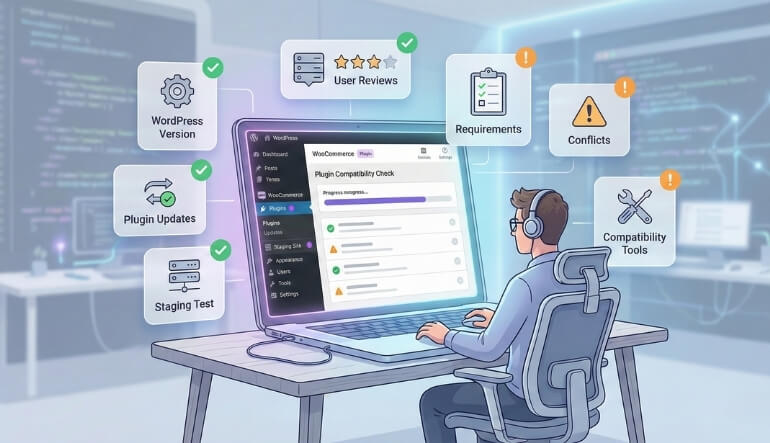
Check WordPress Version
- Always confirm the plugin works with your current WordPress version before adding it to your website setup. Older versions often lead to unexpected bugs that make features stop working correctly during checkout or payment processes.
- Read the plugin’s description to find its supported version details clearly. It’s an easy way to prevent small issues before they cause bigger headaches later.
Review Plugin Updates
- Developers who update their plugins regularly care about performance and safety. Consistent updates mean fewer problems when you add new WordPress or WooCommerce changes later.
- Avoid outdated plugins that haven’t received attention for months or years. Old code easily breaks features and creates security gaps for hackers.
Test on Staging Site
- Always test plugins on a staging site before using them live. This helps you find conflicts without risking your store’s real data.
- A staging environment gives a safe place to experiment and learn how new tools behave. You can even test how to setup WooCommerce plugin in WordPress smoothly without disturbing your customers.
Check User Reviews
- Reviews from real users help you see how well the plugin performs on similar sites. Honest feedback often points out errors or bugs early.
- Focus on low-rated reviews as well, as they tell you what problems may appear later. Reading both sides helps you make balanced and smart choices.
Verify Plugin Requirements
- Every plugin has its own list of technical needs, such as PHP version, memory, or WordPress limits. Ignoring them can make installation fail.
- If your hosting plan doesn’t meet those requirements, performance may drop sharply. Always confirm these details to ensure smooth plugin operation.
Disable Conflicting Plugins
- Before installing, note what plugins already handle similar tasks. Overlapping features can cause crashes and serious performance issues.
- Keep only one plugin for each purpose to maintain balance and stability. Less conflict means faster pages and better store performance.
Use Compatibility Checker Tools
- Tools like “Plugin Detective” or “WP Rollback” help identify potential conflicts before trouble begins. They scan code and report risky combinations.
- These tools make plugin testing easier, even for beginners. You can safely explore new options without losing your site’s stability.
Contact Plugin Support
- Good developers always answer questions and fix issues quickly. Reaching out before installation helps you understand plugin behavior better.
- Ask them about WooCommerce compatibility and future updates. Quick responses show the team’s commitment to keeping their plugin safe and stable.
Frequently Asked Questions About the Benefits of Using WooCommerce Plugins
Plugins are the heart of every WooCommerce store, helping you add new features without touching a single line of code. They make your store easier to manage, safer to run, and more appealing for shoppers. Here are ten common questions answered simply and clearly.
How Do Plugins Improve My WooCommerce Store’s Features?
Plugins add tools your store doesn’t have by default, like advanced payments, marketing pop-ups, or shipping calculators. They make your WooCommerce store more powerful, flexible, and ready for any type of business without needing extra coding skills.
Can Plugins Help Increase My Store’s Sales?
Yes, many plugins are designed to boost sales through upselling, abandoned cart recovery, and personalized product recommendations. They improve the customer experience, encouraging more purchases while simplifying store management and marketing efforts for business growth.
Do I Need Plugins If My Store Is Small?
Even small stores benefit from plugins that handle tasks like payments, inventory tracking, and emails. They save time, reduce manual work, and help small business owners focus on improving products instead of dealing with technical complexities.
How Do Plugins Improve Customer Experience?
Plugins make shopping smoother by adding quick checkout, faster searches, and personalized product suggestions. These tools help visitors find what they need easily, enjoy browsing your store, and complete their purchases without any unnecessary steps or frustration.
Are Plugins Safe to Use on WooCommerce?
Most plugins from trusted developers or the official WordPress directory are safe. However, always check reviews, update regularly, and remove unused ones to avoid security risks and keep your WooCommerce store running smoothly and securely.
Can Plugins Help With Marketing Tasks?
Yes, marketing plugins automate email campaigns, discounts, SEO optimization, and social sharing. They save you hours of effort while helping your store reach more people, attract repeat customers, and improve your overall online presence with minimal work.
How Do Plugins Affect My Store’s Design?
Plugins allow you to change your store’s look using customizable themes and layout tools. You can build better product pages, adjust colors, and add visual effects without hiring a designer, making your WooCommerce store look more professional.
Do Plugins Help With Store Analytics?
Yes, analytics plugins track traffic, sales, and customer behavior automatically. They give clear reports that help you understand what’s working and what needs improvement so you can make smarter business decisions and grow effectively over time.
Can Plugins Automate Store Management Tasks?
Absolutely, plugins can handle repetitive work like order tracking, tax calculations, and invoice creation. This automation reduces stress, minimizes errors, and gives you more time to focus on product improvements or customer engagement instead of manual operations.
How Do I Choose the Right Plugins for My Store?
Always choose plugins based on your store’s needs, reliability, and developer reputation. Read reviews, check update frequency, and test compatibility before installing. The right mix of plugins keeps your WooCommerce store fast, stable, and high-performing.
Last Words
Plugins help your WooCommerce store do more than just sell products. They make your store faster, safer, and easier to manage every day. With plugins, you can handle payments, track orders, and improve customer experience without extra effort.
Knowing why are plugins important for your WooCommerce store helps you pick the right ones that truly make a difference.
Good plugins keep your site running smoothly while saving time and reducing stress. When you choose them wisely, your WooCommerce store becomes easier to use, more secure, and better prepared to grow with your business.
