

Online stores are growing fast and need better control over their products and orders these days. Many owners now look for ways to keep things simple while avoiding mistakes that slow down daily work. This often brings a common thought to mind about why does your online store need WooCommerce inventory management.
WooCommerce inventory management helps store owners keep their stock numbers correct, updated, and organized without extra stress. It tracks every product you sell and shows what’s available right now. The system also helps avoid wrong counts, missed items, or double orders, so your store can run smoothly every day.
Would you like to know more about this topic? If so, then keep reading to find all the important details about WooCommerce inventory management.
What Does WooCommerce Inventory Management Really Mean?
WooCommerce inventory management means keeping track of how many products you have in your online store at any moment. It shows the right stock levels so you always know what is ready to sell. This helps you understand your product list in a clear and simple way.
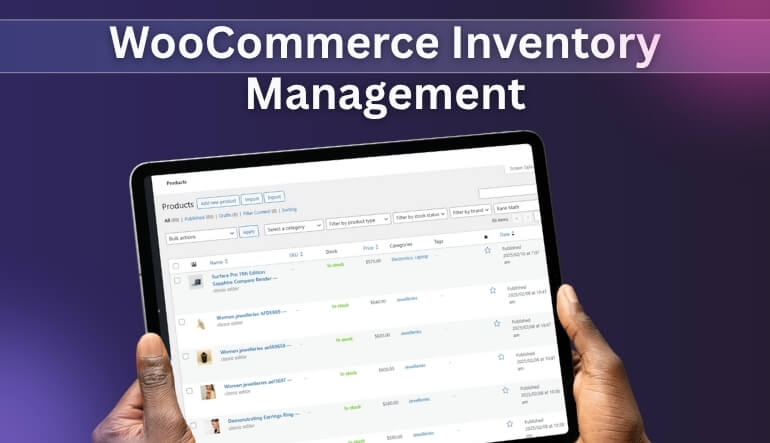
It also means updating product quantities whenever an item is added, removed, or sold. Many store owners learn how to manage inventory in WooCommerce with variable products because it helps them keep different versions of the same item in order. This gives a simple view of sizes, colors, or styles under one product.
Most importantly, WooCommerce inventory management is about staying organized so your store runs in a clean and steady way. It helps you keep product numbers correct across your whole catalog. With this basic system, you always know what you have and what needs attention.
Why Does Your Online Store Need WooCommerce Inventory Management?
You need simple tools to maintain your online store every day. Clear inventory management helps you avoid mix-ups that can slow your store. It also makes your products easier to handle during busy times. Keep reading to learn why this system matters for your store today.
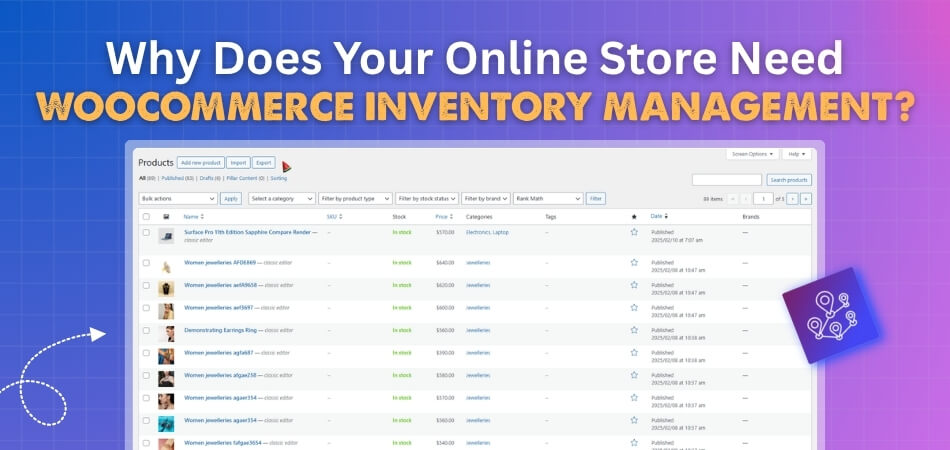
Improves Stock Accuracy
Good inventory management helps you keep product counts correct at all times. It updates the numbers when items are sold or added. This makes your store display the right amounts every day. When the numbers stay correct, your store runs with fewer problems.
Prevents Overselling
A solid system helps stop customers from buying items that are no longer available. The numbers update in real time, so your product pages stay accurate. This protects both you and your customers from order issues. It also keeps the shopping process smooth during high traffic hours.
Avoids Sudden Stockouts
A clear system helps you see when products are running low. You can restock before items disappear and cause lost sales. This keeps your store ready for steady demand. It also helps you stay calm during busy seasons.
Saves Time and Work
Inventory management cuts down long hours of checking items by hand. It updates counts for you and reduces simple mistakes. This makes daily tasks quicker and easier to handle. You spend less time fixing errors and more time improving your store.
Improves Order Handling
When your numbers are correct, your orders become simple to process. You can pack and ship items without confusion or delays. This makes customers feel happy with each purchase. A clean system keeps every order moving without stress.
Supports Better Planning
Knowing what you have and what you need helps you plan costs wisely. You avoid buying too many items that may sit unsold. This keeps your spending smart and steady. With clear data, you can choose better items for your store.
Builds Customer Trust
Customers enjoy a store that always shows accurate product numbers. They feel safe when items they want are truly available. This leads them to return more often for future orders. Simple systems like this help create strong customer trust.
How Can WooCommerce Assist with Basic Inventory Management?
Adding products to your website is not enough to run a store. You also need a simple way to track each item daily. WooCommerce gives tools that make inventory management clear and easy to use. Read below to see how these tools help with basic product tracking.
Stock Quantity Settings
You can set how many items are in stock for each product. WooCommerce shows this number so buyers know what’s still available. When the item sells, the number goes down on its own. This helps you keep track without counting by hand every day.
Low Stock Alerts
This feature warns you when stock is running low on any product. You get a message so you can restock before it runs out. It helps you avoid empty product pages. These alerts keep your store steady and your products always ready.
Backorder Settings
If an item runs out, you can let buyers still place orders. This is called allowing backorders, and WooCommerce can handle it for you. It helps you keep orders coming in even when stock is low. You choose which items allow this option.
Product Variation Tracking
When one item has many sizes or colors, each can have its own stock count. WooCommerce lets you set and manage each version easily. This means better control over all product types in your shop. It keeps each variation updated and clear to buyers.
Simple Handling for Small Stores
You don’t need special tools or hard steps to use this system. WooCommerce makes basic inventory tasks easy for small online shops. It works inside your store without needing extra apps. Even new store owners can manage product numbers without any stress.
Limits You May Face With Basic WooCommerce Inventory Management
- No Built-In Barcode Scanning: You can’t scan barcodes to track items or update inventory fast. Manual tracking slows down work and can cause mistakes.
- Limited Reporting Features: The default reports don’t show deep insights like trends or product movement. This makes planning and smart decision-making harder over time.
- Lacks Multi-Warehouse Support: You can’t manage stock across different storage places or warehouses by default. All products are tracked in just one location.
- No Bulk Stock Update Option: WooCommerce doesn’t allow simple bulk changes to inventory levels easily. Updating many items by hand takes more time and effort.
- Hard To Track Product History: You won’t see when and how stock numbers changed for each item. Missing this record makes checking past stock issues harder.
- Backorder Settings Are Too Basic: You can allow backorders, but not track or limit them in detail. This might cause issues with overpromising stock to buyers.
- No Purchase Order System: There’s no built-in tool to send purchase orders to your suppliers. You need other tools to restock properly and on time.
- Limited Support For Large Catalogs: Managing hundreds of items becomes harder without better filters or sorting tools. It may slow you down during daily product updates.
Can Inventory Management Plugins Really Save a Store Owner Time and Effort?
Yes, inventory management plugins can truly help store owners save time and avoid daily struggles with product tracking and updates. These tools handle small tasks that usually take up hours when done by hand. They make your workflow simple by keeping all item numbers updated without checking them again.
Most plugins update stock as soon as a customer buys a product from your store. This keeps the inventory list correct and helps avoid missing items. Utilizing the best WooCommerce inventory management plugin makes it easier to handle orders without needing to open each product page.
These plugins also allow bulk edits, so you can change many products quickly. You no longer need to waste time fixing things one by one. With the right tool in place, your store becomes easier to manage every single day.
What Are the Signs Your WooCommerce Store Needs an Inventory Management Plugin?
Many store owners start seeing signs when simple tools stop helping. Slow updates and constant mistakes can hurt daily store work. These issues grow fast when product lists get bigger or change often. Here are some clear signs that show you need an inventory management plugin:
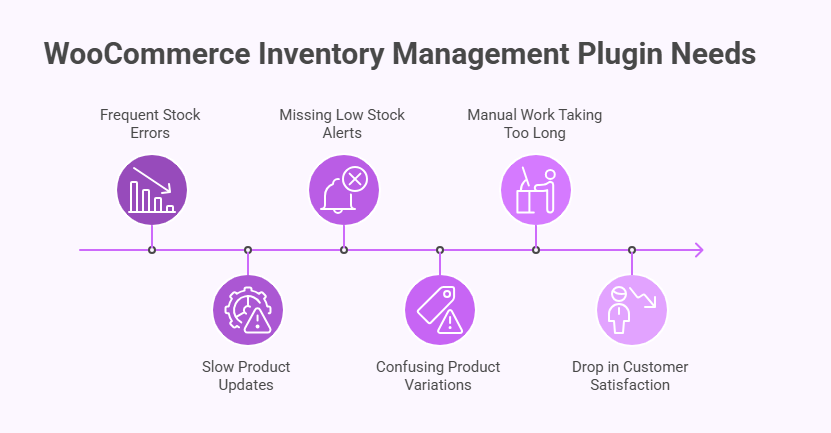
Frequent Stock Errors
When wrong product numbers appear often, it becomes hard to trust your list. Items may show as available even when the shelf is empty. These mistakes create stress and lead to unhappy buyers. Using an inventory management plugin can help fix these problems before they grow worse.
Slow Product Updates
If you need long minutes to update stock each time, that is a clear problem. Small stores can handle this, but busy shops quickly struggle. Slow updates make your store feel messy and hard to run. A plugin helps keep updates fast and simple every day.
Missing Low Stock Alerts
Stores that sell steady numbers need clear alerts when stock gets low. Without alerts, items may run out without you noticing in time. Missing these signs leads to lost sales and upset customers. Plugins can send quick reminders so you stay prepared for the next order.
Confusing Product Variations
When one item has many sizes or colors, stock mistakes grow faster. You may update one version and forget the rest without meaning to. This confusion creates wrong numbers across your shop. A tool can manage variations cleanly so each version stays correct and clear.
Manual Work Taking Too Long
If you spend many hours checking products by hand, it slows down your day. Manual work leads to more small mistakes that build over time. Long tasks also keep you from other store needs. A plugin cuts extra steps so you work smarter and faster.
Drop in Customer Satisfaction
Shoppers lose trust when items they want are not truly available. They also feel annoyed when orders take longer due to stock issues. These small troubles can stop repeat sales without you noticing right away. Better tracking can help keep buyers happy with every order placed.
Simple Plan to Improve Your WooCommerce Inventory Step by Step
Operating your store gets easier when you keep your products in clear order. A simple plan helps you avoid daily inventory problems. You can follow small steps to make your stock easier to handle. Keep reading to see a step-by-step plan you can use today.
Step 1: Review Your Current Stock Setup
Start by checking your product list to see what needs fixing. Look for wrong counts, missing items, or confusing product versions. This gives you a clear view of what must be cleaned first. A simple review helps you understand where your next steps should go.
Step 2: Set Clear Stock Numbers for Each Item
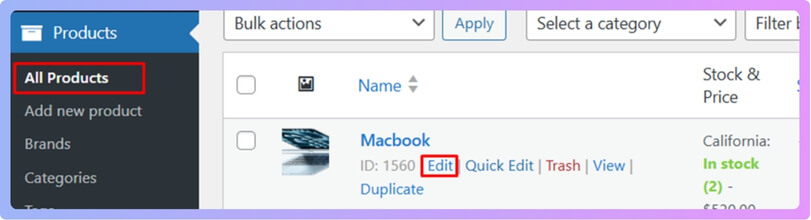
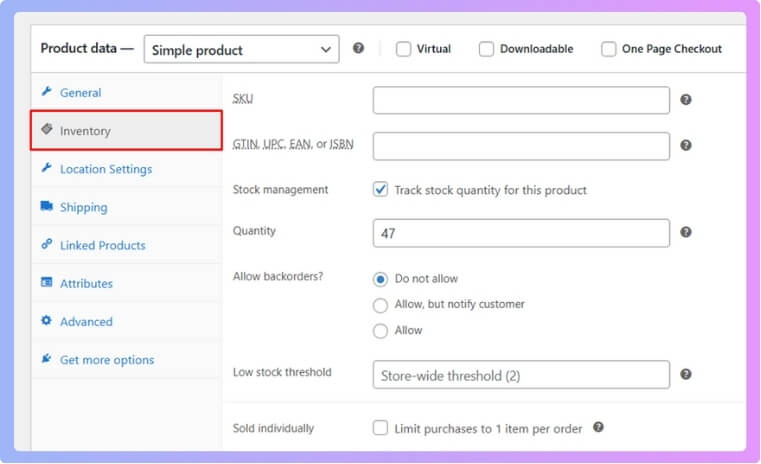
To set stock numbers in your WooCommerce store, open your dashboard and click on Products to choose the item you want to edit. Go to the Product Data box and turn on Manage stock so WooCommerce can track the item for you. Add the correct amount in the Stock quantity box so your numbers stay clean and clear. If the product has variations, open each one and add its own stock number before saving the page.
Step 3: Turn on Low Stock Alerts
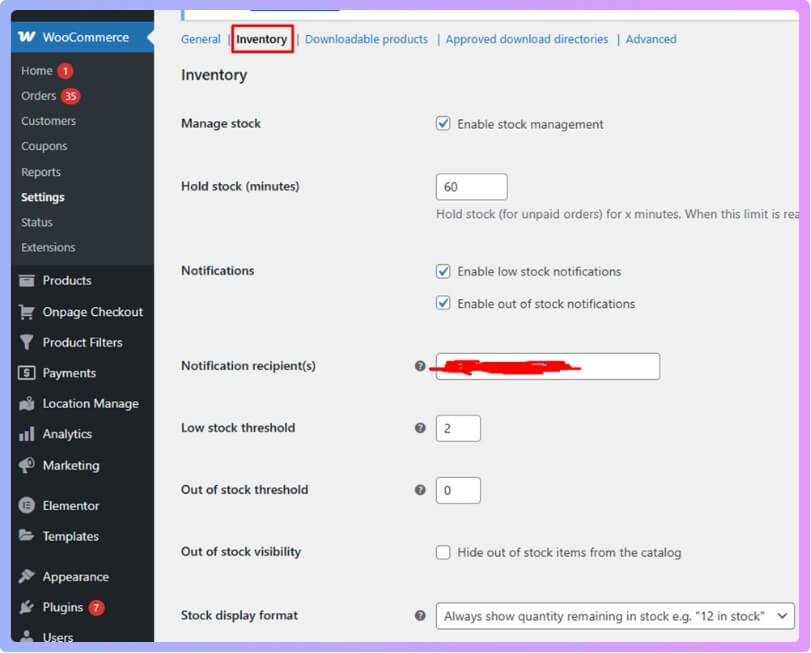
You can turn on low stock alerts by going to WooCommerce and opening the Settings page from your dashboard. Click the Products tab and then open the Inventory section to find the alert options. Turn on low stock emails and choose the number that will trigger the warning for your store. Save your changes so WooCommerce can warn you when items start running low.
Step 4: Use Bulk Edit Tools for Faster Work
Many products take longer when updated one by one. Bulk editing tools help you change many items with only a few clicks. This saves time when handling large groups of items. Simple tools like these make daily tasks much easier to manage.
Step 5: Track Product Changes Often
Keeping records helps you see how products move and change. You can check what sells fast and what stays still for weeks. These notes help you plan smarter restocks in the future. Tracking small details helps your store stay calm and steady.
Step 6: Add an Inventory Plugin When Needed
Some stores grow fast and need more help with daily tasks. A good plugin can update numbers, track items, and save time. It works with your store and keeps everything clean and simple. You can add one when your shop starts feeling hard to handle.
A clear system helps your store run steadily and keeps your products in order. Small steps each day can prevent mistakes that slow down your work. You can use simple tools to keep your items updated without extra stress. Try following easy inventory management tips for WooCommerce to keep your store clean and simple to manage.
Frequently Asked Questions
Here are some common questions people ask when learning why WooCommerce inventory management matters for an online store. These answers will help you understand how this system can support daily work and keep your shop running smoothly.
How Can Inventory Help You Handle Busy Sale Days?
A good inventory setup helps you handle busy days by keeping product numbers steady and updated. When many buyers place orders at once, you can trust that the system adjusts counts for you. This prevents mix-ups and delays in order packing. A stable setup helps you move orders quickly.
Why Does Inventory Matter For Small Online Shops?
Inventory matters for small shops because even a few mistakes can cause lost sales or upset buyers. A clean system helps you track items easily with no extra tools. It also helps you learn which items move fast. Small shops grow smoothly when they stay organized from the start.
How Can Organized Inventory Improve Store Planning?
Organized inventory helps you plan what to buy, when to restock, and how much to order. When you see clear product trends, you can make smart choices without guessing. This helps you avoid wasting money on extra items that may not sell. Better planning keeps your store steady each month.
How Can Inventory Help You Handle Busy Sale Days?
A good inventory setup helps you handle busy days by keeping product numbers steady and updated. When many buyers place orders at once, you can trust that the system adjusts counts for you. This prevents mix-ups and delays in order packing. A stable setup helps you move orders quickly.
Why Does Inventory Matter For Small Online Shops?
Inventory matters for small shops because even a few mistakes can cause lost sales or upset buyers. A clean system helps you track items easily with no extra tools. It also helps you learn which items move fast. Small shops grow smoothly when they stay organized from the start.
How Can Organized Inventory Improve Store Planning?
Organized inventory helps you plan what to buy, when to restock, and how much to order. When you see clear product trends, you can make smart choices without guessing. This helps you avoid wasting money on extra items that may not sell. Better planning keeps your store steady each month.
Can Inventory Management Help Predict Product Demand?
Yes, it helps you see which items are popular based on your store data. When you track trends, you can order more of what sells fast. This prevents sudden sellouts and improves your store flow. Knowing demand makes your decisions smarter.
Bottom Lines
Running a store online becomes much easier when your products are organized and easy to track. A simple system can help you avoid small mistakes that often turn into bigger problems. This keeps your daily work steady and less stressful.
Good tools also help your store stay clear and honest for every buyer. When your numbers stay correct, shoppers trust your store more and return with confidence. This creates a smoother shopping experience for everyone who visits your site.
Now you can clearly see why does your online store need WooCommerce inventory management and how it helps with simple daily tasks. With the right steps and tools in place, your store becomes easier to handle and ready to grow. Start improving your stock system today and enjoy a cleaner, calmer work routine.
