

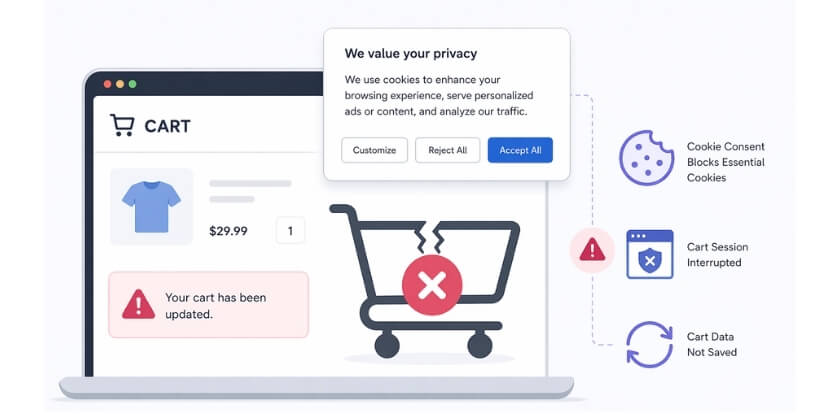
WooCommerce cart can break with cookie consent plugins when essential cart cookies, scripts, or AJAX requests are delayed, blocked, or handled incorrectly before the cart session is fully maintained. That can lead to disappearing products, broken mini cart updates, or checkout losing items unexpectedly.
In this guide, we’ll walk you through why WooCommerce cart breaks with cookie consent plugins, how to confirm whether the consent setup is causing the issue, and what to fix so cart behavior stays stable without disrupting compliance.
How the Problem Usually Shows Up on the Storefront?
Cookie consent conflicts do not always look obvious at first, because the cart may seem to work normally before key cart activity starts failing. In most stores, the issue shows up through small but disruptive cart problems that become more noticeable as shoppers move between product pages, the cart, and checkout.
Common signs usually appear like this:
- Empty Cart After Adding Products: Shoppers may click add to cart successfully, but the cart page opens with no items once the page refreshes or changes.
- Products Disappear After Refresh: Items may appear in the cart briefly, then vanish after a reload, page change, or another action in the shopping flow.
- Mini Cart Stops Updating: The mini cart may fail to reflect newly added products, updated quantities, or removed items until the shopper reloads the page.
- Checkout Loses Cart Contents: Products may go missing or appear incorrectly by the time the shopper reaches checkout, making the order feel unstable or incomplete.
- Guest Shoppers Face The Issue More: Logged-in admins may see normal cart behavior, while real shoppers experience broken sessions because consent restrictions affect guest activity differently.
- Cart Works Only After Consent: The cart may start behaving normally only after the shopper accepts cookies, which usually points to blocked essential cart behavior earlier.
Why WooCommerce Cart Breaks With Cookie Consent Plugins And How To Fix It
WooCommerce cart breaks with cookie consent plugins when essential cart cookies, scripts, or AJAX requests are blocked before the session starts properly. That can lead to empty carts, failed add-to-cart actions, broken mini cart updates, or checkout issues. Most store owners usually find the cause in one of these areas:
Essential WooCommerce Cookies Get Blocked
WooCommerce uses cart and session cookies to keep products attached to the shopper’s session across page loads. If a consent plugin blocks those cookies until the banner is accepted, the cart session may not start properly, which can leave the cart empty or cause products to disappear later.
To fix that:
- Whitelist woocommerce_cart_hash, woocommerce_items_in_cart, and wp_woocommerce_session_*.
- Mark cart and session cookies as essential, not marketing or analytics.
- Test the cart before consent is accepted to confirm that those cookies load immediately.
Functional Store Behavior Gets Misclassified
Some consent tools apply broad blocking rules and fail to separate required store behavior from optional tracking. When that happens, WooCommerce cart activity may be delayed even though it is necessary for the store to function normally.
A safer fix is to:
- Review cookie and script categories manually instead of relying only on default rules.
- Place WooCommerce cart and checkout behavior in the essential category.
- Keep analytics, ads, and tracking scripts separate from functional store activity.
AJAX Cart Updates Get Interrupted
WooCommerce relies on AJAX requests to refresh cart contents, update fragments, and keep the mini cart in sync without full page reloads. If those requests are blocked or delayed, add-to-cart may seem to work while the actual cart state fails underneath.
That usually means you should:
- Allow WooCommerce cart-related AJAX requests before optional consent is granted.
- Check whether fragment refresh requests are being blocked or delayed.
- Retest the mini cart, cart page, and checkout after changing those rules.
Cart Scripts Load Too Late Or In The Wrong Order
Many consent plugins delay JavaScript until the shopper accepts the banner or interacts with a consent category. If WooCommerce cart scripts are included in that delay, cart updates can become unstable even when the storefront still looks normal at first.
The direct fix here is to:
- Exclude core WooCommerce cart and checkout scripts from unnecessary blocking.
- Load essential cart scripts before optional marketing or analytics scripts.
- Retest after each script-setting change instead of changing several rules at once.
Consent Actions Reset The Active Cart Session
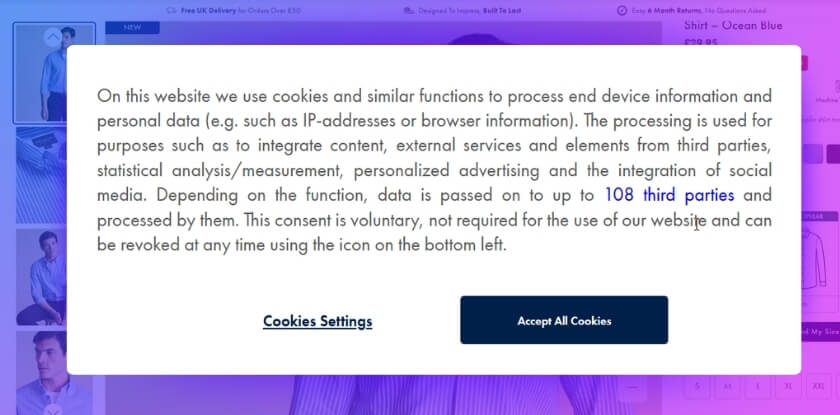
Some consent banners reload the page, rerun scripts, or reinitialize front-end behavior after the shopper accepts or changes consent settings. That reset can interrupt an active cart session and make products disappear during browsing or later in checkout.
In that case:
- Disable unnecessary page reloads after consent where possible.
- Prevent cart-related scripts from running twice after consent changes.
- Check cart stability when consent is accepted, rejected, or updated.
Cache And Optimization Layers Create Cart Mismatches
Caching, minification, defer, delay, and combine settings can preserve stale cart output while WooCommerce is trying to update live cart data in the background. When that happens alongside consent-based blocking, the cart can look empty, delayed, or inconsistent.
What helps most is to:
- Exclude cart, checkout, and other dynamic WooCommerce pages from aggressive caching.
- Review defer, delay, combine, and minify settings affecting WooCommerce assets.
- Clear every cache layer fully after each change before testing again.
Older Consent Setups May Clash With Newer WooCommerce Blocks
Stores using newer WooCommerce cart or checkout blocks can run into compatibility issues when the consent plugin was built around older WooCommerce behavior or has not been updated for newer block-based flows.
A practical way to handle that is to:
- Check whether the consent plugin supports newer WooCommerce cart and checkout blocks.
- Update both WooCommerce and the consent plugin to reduce known compatibility issues.
- Retest the full block-based cart and checkout flow as a guest shopper.
Too Many Plugins Control The Same Front-End Behavior
Consent tools often run alongside cache tools, a WooCommerce inventory management plugin, checkout customizations, and tag managers. When several tools try to control cookies, scripts, or storefront behavior at the same time, cart stability becomes much easier to break.
To reduce that risk:
- Remove overlapping controls affecting scripts, cookies, caching, or checkout behavior.
- Disable duplicate front-end features across consent, performance, and cart-related plugins.
- Simplify the WooCommerce cart flow as much as possible before testing again.
What Proper WooCommerce Cart Functionality Looks Like After The Fix?
Once the real conflict is resolved, the cart should feel steady from the first product click to the final checkout step. Instead of behaving differently before consent, after refresh, or across devices, WooCommerce should keep cart data consistent while essential shopping functions continue working as required.
A stable setup usually looks more like this:
| Before | After Fix |
| Add to cart appears to work, but the cart opens empty later. | Add to cart works normally, and the cart keeps the correct products. |
| Products disappear after a refresh or page change. | Products stay in the cart across refreshes and normal browsing. |
| The mini cart updates late, incorrectly, or not at all. | The mini cart reflects cart changes right away and stays accurate. |
| Cart behavior changes depending on whether cookies are accepted. | Essential cart functions work properly even before optional consent is accepted. |
| Guest shoppers lose cart contents while admins see no problem. | Guest shoppers and logged-in users both get stable cart behavior. |
| Cart fragments or AJAX updates fail silently in the background. | Cart refresh activity runs normally and keeps cart data in sync. |
| Checkout loses items or shows incomplete cart details. | Checkout keeps the right products, quantities, and cart totals. |
| Consent actions trigger reloads that interrupt the active session. | Accepting or declining consent no longer breaks the shopping session. |
| Cache or script settings make the cart feel inconsistent. | Cart behavior stays predictable because essential scripts and cookies load correctly. |
| Different plugins compete to control cart-related behavior. | The cart flow runs through a cleaner setup with fewer front-end conflicts. |
How Store-Level Control Helps Beyond Cookie Consent Fixes?
Fixing the consent conflict can restore cart behavior, but long-term store stability depends on how well the rest of the WooCommerce setup is managed. Stores using multi location inventory management for WooCommerce often benefit from clearer stock structure, better operational visibility, and fewer overlapping workflows that make storefront issues harder to control.
That broader stability usually comes from a few practical advantages:
- Cleaner Plugin Coordination: Fewer overlapping tools make cart behavior easier to track, test, and stabilize when front-end conflicts appear.
- Better Stock Visibility: Clearer stock control helps store teams spot issues faster before they create confusion across product, cart, or checkout pages.
- More Structured Operations: Multi Location Inventory Management plugin supports a more organized setup across locations, which reduces operational guesswork.
- Simpler Issue Tracing: Stronger store-level visibility makes it easier to identify whether the problem comes from plugins, stock logic, or storefront behavior.
- Less Storefront Friction: A cleaner WooCommerce setup reduces small disruptions that can otherwise affect the shopping journey in larger ways.
- More Predictable Workflows: Better control across inventory and store operations helps WooCommerce behave more consistently as the store grows more complex.
- Stronger Long-Term Stability: Organized store management makes future cart, checkout, and plugin-related issues easier to prevent and resolve.
Frequently Asked Questions
Even after the main issue is diagnosed and fixed, a few practical questions still come up around consent settings, cart reliability, and day-to-day store maintenance. The FAQs below cover those related concerns without repeating the core causes and fixes already discussed.
Can WooCommerce Cart Issues Return After A Plugin Update?
Yes, they can. Updates to consent plugins, cache tools, themes, or WooCommerce itself can change how cart behavior is handled, so the cart flow should be retested after major changes.
Do Browser Differences Affect WooCommerce Cart Behavior With Consent Tools?
Yes. Browsers can differ in how they handle saved preferences, stored cookies, and front-end script behavior, which can make the same issue appear inconsistently.
Should Store Owners Test Only The Cart Page After Making Changes?
No. Product pages, the mini cart, the cart page, and checkout should all be tested, because problems do not always show up at the same stage.
Can Custom Themes Make This Type Of WooCommerce Issue Harder To Detect?
Yes. Custom themes often add their own cart logic, mini cart behavior, or front-end scripts, which can make consent-related conflicts less obvious.
How Often Should A WooCommerce Store Recheck Cart Stability?
It is a good idea to retest after major plugin updates, theme changes, new performance tools, or checkout customizations, especially on more complex stores.
Can Mobile Testing Reveal Cart Problems That Desktop Testing Misses?
Yes. Consent banners, cart updates, and mini cart behavior can act differently on mobile layouts, so testing both desktop and mobile is important.
Why Does A WooCommerce Cart Problem Sometimes Affect Only Certain Pages?
Some issues appear only on specific product pages, cart flows, or checkout steps because different templates, scripts, or page rules may be active in different parts of the store.
Can Small Front-End Changes Trigger New Cart Problems Later?
Yes. Even small changes like adding a popup, tracker, script manager, or theme edit can affect how cart behavior works, especially on stores with more moving parts.
Final Takeaway
Understanding why WooCommerce cart breaks with cookie consent plugins helps store owners fix more than one visible cart problem. Once essential cart behavior is no longer blocked at the wrong time, the storefront becomes easier to trust, the checkout flow feels more consistent, and shoppers are far less likely to run into sudden friction.
Long-term results usually come from more than a single plugin adjustment. Cleaner consent handling, better plugin coordination, and stronger store-level control all help WooCommerce stay more reliable as the store grows, updates, and becomes more complex.
