

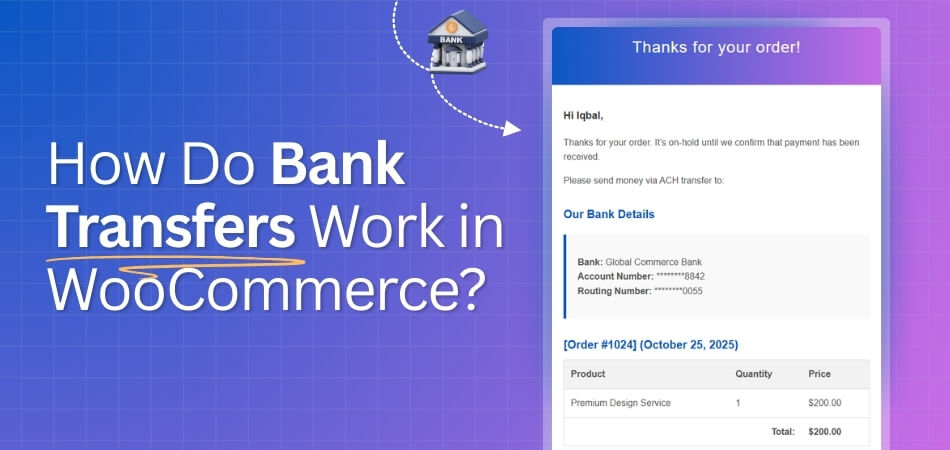
WooCommerce treats bank transfers as an offline payment method where the customer places an order first, receives your bank details at checkout, and then manually sends the payment from their bank account. Once you confirm that the money has arrived, you update the order status and proceed with fulfillment. That’s how do bank transfers work in WooCommerce.
Store owners or server customers prefer this to have more control over payment confirmation. In the article, you’ll see exactly how the process works, what steps you need to take, and when this method makes the most sense for your store.
Understanding Bank Transfers: Basics and Terminology
Bank transfers allow customers to send funds directly from one bank account to another. In WooCommerce, this method is often referred to as Direct Bank Transfer or BACS (Bankers’ Automated Clearing Services). It’s an offline payment method, meaning the transaction is completed outside of the WooCommerce platform, and the store owner manually confirms the payment once it is received.
How Bank Transfer is Different From Other Payment Methods
Unlike online payment gateways such as PayPal or credit cards, a bank transfer requires both the customer and store owner to take manual steps. After placing an order, the customer receives the store’s bank details to complete the transfer. The store owner must then check their bank account for the funds and manually update the order status.
Types of Bank Transfers
- BACS (in the UK): BACS allows electronic payments between banks and typically takes 2-3 days to clear. It is commonly used in WooCommerce for UK-based transactions.
- ACH (in the US): The Automated Clearing House (ACH) system is used for bank-to-bank transfers in the United States. Like BACS, ACH payments take a few days to process.
- Wire Transfers: A faster but often more expensive method, wire transfers are typically used for larger or international payments. These transfers usually take one or two days to complete.
How Do Bank Transfers Work in WooCommerce: Step-by-Step Flow
Bank transfers in WooCommerce provide a straightforward offline payment method, allowing customers to pay directly from their bank accounts. Although it requires manual verification, it’s a cost-effective option for many store owners. Follow these steps to set up and manage bank transfers, and ensure a smooth experience for both you and your customers.
1. Enabling the Bank Transfer Payment Method
Before anything else, you need to enable the bank transfer option in your WooCommerce settings to make it available to your customers at checkout.
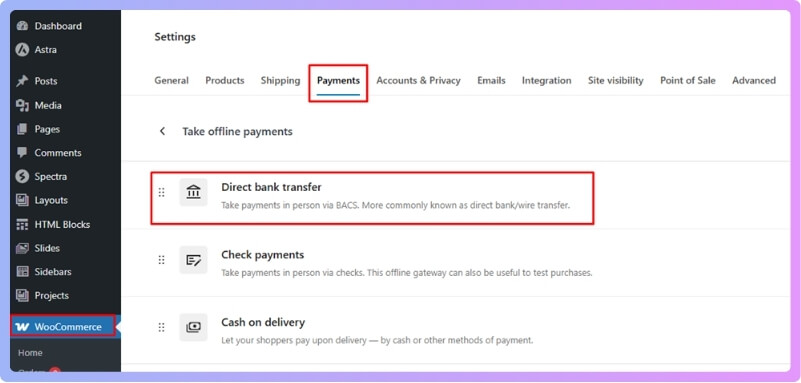
- Go to your WooCommerce → Settings → Payments.
- Find Direct Bank Transfer (or BACS, depending on your setup) in the list of payment options.
- Toggle the Enable checkbox to make it active.
- Save changes to activate the payment method on your checkout page.
2. Configuring Bank Transfer Details
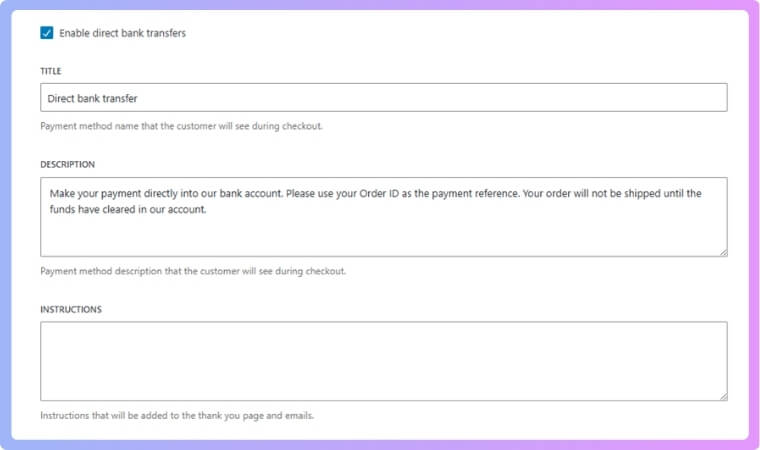
Once enabled, configure the payment method by providing clear instructions and entering your bank account details for the customer to use.
- Title: This is what customers will see at checkout (e.g., “Bank Transfer”).
- Description: Provide detailed instructions, such as “Please transfer the total amount to the following bank account details.”
- Bank Account Information: Enter necessary details like your bank name, account number, IBAN, SWIFT, etc. Make sure all information is accurate to avoid any payment issues.
- Additional Info: Add any extra instructions, like payment reference or deadlines for making the transfer.
3. Customer Experience at Checkout
Once everything is set up, here’s what the customer will experience when they select the bank transfer payment method.
- During checkout, the Bank Transfer option will appear alongside other payment methods.
- After selecting it, the customer will see your bank details and instructions for transferring the amount to your bank account.
- They will need to manually initiate the transfer from their bank, using their online banking platform or a bank visit.
4. Order Confirmation and Manual Verification
Once the customer has placed an order, you need to verify the payment before moving forward with fulfillment.
- The order status will initially be set to On Hold, which indicates that the payment is awaiting manual confirmation.
- When you see the payment in your bank account, verify the transfer, ensuring the correct amount has been received.
- After confirming, manually update the order status to Processing or Completed, depending on your fulfillment process.
5. Handling Payment Confirmation
Managing payment confirmation efficiently is key, especially if multiple orders are coming in. The payment may take several hours or days to show up in your account, depending on the transfer method.
- Bank transfers can take anywhere from a few hours to a few days to clear.
- Using tools like instant checkout for WooCommerce can help reduce payment delays by offering other quicker payment methods, though it doesn’t directly impact bank transfers.
Pros & Cons of Using Bank Transfer in WooCommerce
Bank transfers offer a cost-effective payment option for WooCommerce stores, but like any method, they come with both advantages and challenges. In this section, we’ll explore the key pros and cons of using bank transfers, helping you determine whether it’s the right choice for your business.
Pros:
- Lower Transaction Fees: Bank transfers typically come with lower or no processing fees compared to credit card or third-party payment gateways. This is ideal for store owners looking to minimize overhead, especially for larger orders.
- Customer Flexibility: Some customers prefer paying via bank transfer, particularly those who don’t use credit cards or prefer offline payment methods. This is especially true for businesses that serve specific markets or regions where credit card usage is less common.
- Full Control Over Payment: Bank transfers give store owners complete control over payment verification. This can help avoid chargebacks or fraud issues commonly associated with online payment gateways.
- Security and Trust: For customers familiar with traditional banking, bank transfers can feel more secure compared to online payment methods. They may also provide a sense of trust, particularly in high-ticket or international transactions.
Cons:
- Manual Order Confirmation: One significant downside is that orders remain “On Hold” until the store owner manually confirms receipt of payment. This can introduce delays, and order confirmation troubleshooting may be required if payments are not properly identified.
- Delayed Processing: Since bank transfers can take anywhere from a few hours to several days to clear, this method can slow down the speed at which orders are processed. Customers who expect instant order confirmation may find this frustrating.
- Potential for Errors: If customers don’t include a payment reference or make an error when entering the bank details, it could lead to confusion and delays. Proper instructions are crucial, but even then, mistakes can happen.
- Limited Automation: Unlike online payment gateways that instantly confirm payments and trigger fulfillment processes, bank transfers lack automation. This may require extra manual effort and can affect the efficiency of your store’s workflow.
When Bank Transfer Makes Sense (Use Cases)
While bank transfers are a secure and low-cost payment method, they’re not always the best fit for every store. Below are a few key scenarios where offering bank transfers in WooCommerce can be particularly advantageous for your business.
Large Transactions or High-Value Orders
For high-ticket items or bulk purchases, bank transfers make sense because they help store owners avoid hefty credit card fees. Customers who are willing to make large payments are often more comfortable with the secure, offline nature of bank transfers, providing added confidence for both parties.

B2B (Business-to-Business) Transactions
Business-to-business transactions frequently involve larger sums and long-term relationships. Bank transfers are often preferred in B2B sales due to their security and the trust between business partners. The lower fees associated with bank transfers make them ideal for these types of transactions, as they can save both parties money in the long run.
International Sales
For international transactions, bank transfers provide a secure and cost-effective alternative, especially in regions where credit card usage is lower or less trusted. Since online gateways often charge additional fees for cross-border payments, bank transfers eliminate these extra costs, making them an appealing option for businesses targeting international markets.
Customers Who Prefer Offline Payments
Certain customers are more comfortable with offline payment methods, either due to security concerns or personal preference. Offering bank transfer as a payment option can help capture this demographic, expanding your reach to those who prefer not to use credit cards or other online payment systems.
Reducing Payment Gateway Fees
Many store owners opt for bank transfers as a way to reduce payment gateway fees. Since third-party payment providers often charge significant transaction fees, using bank transfers allows businesses to save money, especially when processing large transactions. It’s an effective way to lower operational costs in the long run.
Minimizing Chargeback Risks
Bank transfers offer more control over payment verification, reducing the risk of chargebacks that are common with credit card transactions. Since the store owner manually verifies the payment, it’s easier to ensure that the transaction is legitimate before fulfilling the order, which provides additional peace of mind for both the store and the customer.
Best Practices for Securing Bank Transfer Payments in WooCommerce
When offering bank transfers as a payment method in WooCommerce, it’s crucial to ensure that the payment process and customer data are secure. By following these best practices, you can minimize the risk of fraud, errors, and payment disputes. Here are a few essential tips to help secure your bank transfer payments.
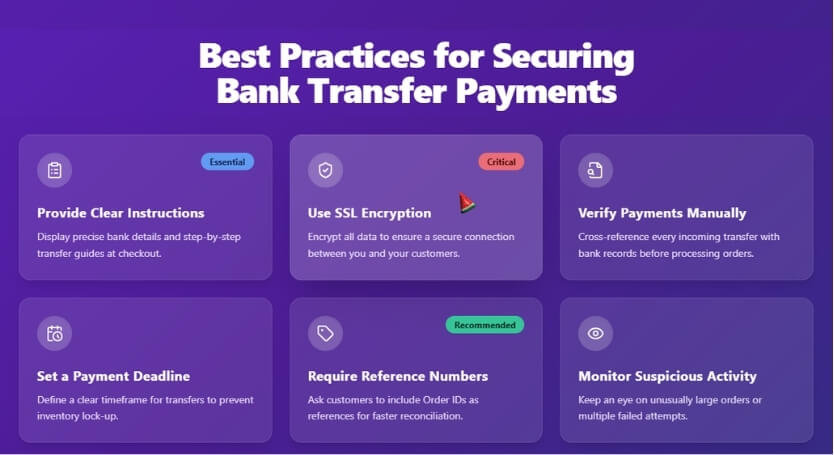
Provide Clear Payment Instructions
Make sure your bank transfer instructions are clear and detailed. Include all necessary bank account information, such as bank name, account number, and the reference number for payment. Clear communication reduces the chances of errors during the payment process. Additionally, ensuring a secure WooCommerce registration form helps protect customer data throughout the checkout process.
Use SSL Encryption for Data Protection
SSL encryption is essential for securing your WooCommerce store. By using SSL, all sensitive customer data, including bank details, is transmitted securely. This is particularly important for registration forms and order information, ensuring customers feel safe when sharing their details, including during the bank transfer payment process.
Verify Payments Manually Before Shipping
Manually verify bank transfer payments before fulfilling orders to prevent fraud. Double-check that the transfer matches the correct order amount and confirm any payment reference. By ensuring the payment is legitimate, you avoid shipping products without receiving payment, reducing the risk of chargebacks or non-payment.
Set a Payment Deadline
Setting a payment deadline within your bank transfer instructions helps prevent delayed payments. Let customers know how long they have to complete their payment before the order is automatically canceled. This helps streamline the process and prevents customers from forgetting or delaying payment, securing the transaction for your store.
Require Payment Reference Numbers
Request customers to include a unique reference number when making the payment. This reference number allows you to match the payment to the correct order easily. Without a reference, it may be difficult to identify the payment, which can cause delays in processing and fulfillment.
Monitor for Suspicious Activities
Regularly monitor your WooCommerce orders for suspicious activity, such as unusually large payments or mismatched payment references. Implement fraud detection tools or plugins to automatically flag suspicious transactions. Proactively monitoring your payments helps ensure that any potential security issues are caught early, preventing problems later in the process.
Frequently Asked Questions (FAQ)
If you’re considering or already using bank transfers as a payment method in WooCommerce, you probably have some questions about how it works, how to handle common issues, and how to ensure a secure experience. Below, we’ve gathered some of the most frequently asked questions to help guide you through the process.
How Long Does a Bank Transfer Take to Reflect in My Account?
Bank transfers typically take a few business days to process. Orders will remain “On Hold” in WooCommerce until the payment clears, and the store owner manually confirms the transfer before proceeding with order fulfillment.
Can I Accept Bank Transfers Alongside Other Payment Methods?
Yes, WooCommerce allows you to use multiple payment methods, including bank transfers, credit cards, and digital wallets. This flexibility helps cater to different customer preferences and can reduce cart abandonment.
What Happens if a Customer Ignores the Bank Transfer Instructions?
If the customer doesn’t follow the bank transfer instructions, their order will remain “On Hold.” You should follow up with the customer or cancel the order after a set period if payment isn’t received.
Can I Process Refunds for Orders Paid via Bank Transfer?
Refunds for bank transfer payments must be handled manually through your bank. After processing the refund externally, you can update the order status in WooCommerce to reflect the refunded payment.
Is Bank Transfer Payment Fee-Free in WooCommerce?
Bank transfers often do not incur third-party fees, unlike online payment gateways that charge processing fees. However, some banks may charge transaction fees, so it’s important to check with your bank to confirm.
How Do I Handle Situations Where Payment Is Delayed or Missing?
If a payment is delayed or missing, request the customer’s transaction reference and contact your bank to verify whether the transfer is still pending or delayed. This can help clarify any payment issues.
Are Bank Transfers Suitable for International Customers?
Yes, bank transfers can be a reliable option for international customers. However, it’s important to provide clear bank details (such as IBAN or SWIFT codes) and inform customers of potential delays due to international banking processes.
How Do I Ensure Payment Security While Using Bank Transfers in WooCommerce?
To ensure secure payments, use SSL encryption on your site to protect sensitive customer information. Additionally, manually verify bank transfers before fulfilling orders to prevent fraud and avoid shipping items without confirmed payment.
Final Thoughts
Now you understand how do bank transfers work in WooCommerce. This payment method provides a secure, cost-effective option for store owners and customers alike. By properly setting it up, offering clear instructions, and ensuring strong security practices, you can easily manage bank transfers within your WooCommerce store.
While manual verification is required, the lower fees and greater control over payments make bank transfers an excellent choice for many businesses. By staying proactive and addressing any issues promptly, you’ll ensure a smooth, reliable payment experience for both you and your customers. With the right setup, bank transfers can be a valuable addition to your store’s payment options.
