

Ad blockers can quietly break a WooCommerce cart when essential cart activity gets mistaken for tracking-related behavior and blocked in the background. Even when the storefront appears to load normally, cart updates, totals, mini cart behavior, or checkout flow can start failing once those requests or scripts are interrupted.
In this guide, we’ll break down why WooCommerce cart breaks with ad blockers enabled, where the cart flow usually becomes vulnerable, and what store owners can do to make cart behavior more reliable for real shoppers.
Where The Cart Flow Usually Starts Breaking
Ad-blocker-related cart issues rarely break the whole store at once. In most WooCommerce setups, the problem starts where the cart depends on live JavaScript, session continuity, or cart and checkout endpoints to keep the shopping flow moving normally. The weak points usually show up around these steps:
- Add-To-Cart Actions: The button may look clickable, but blocked scripts or requests can stop the product from being added properly in the background.
- Mini Cart Refreshes: The mini cart often depends on AJAX-driven updates, so it may stop reflecting newly added or removed products.
- Cart Totals And Quantity Changes: Quantity edits may appear to go through, while the subtotal, total, or item count fails to refresh correctly.
- Cart Persistence Between Pages: If session cookies or follow-up cart requests are interrupted, products may disappear after a refresh or page change.
- Cart And Checkout URLs: Some blocker rules can wrongly flag /cart/ or /checkout/ activity, which makes those steps more fragile under stricter privacy setups.
- Block-Based Cart And Checkout Flows: Stores using newer WooCommerce blocks can be more sensitive when Store API or related requests are interrupted.
- Checkout Handoff: The cart may seem fine on product pages, then lose items or stall once the shopper moves into checkout.
- Cross-Page Session Handling: Dynamic WooCommerce pages need to stay uncached and session-aware, so extra blocking or stale page output can break the cart flow later.
Why WooCommerce Cart Breaks With Ad Blockers Enabled?
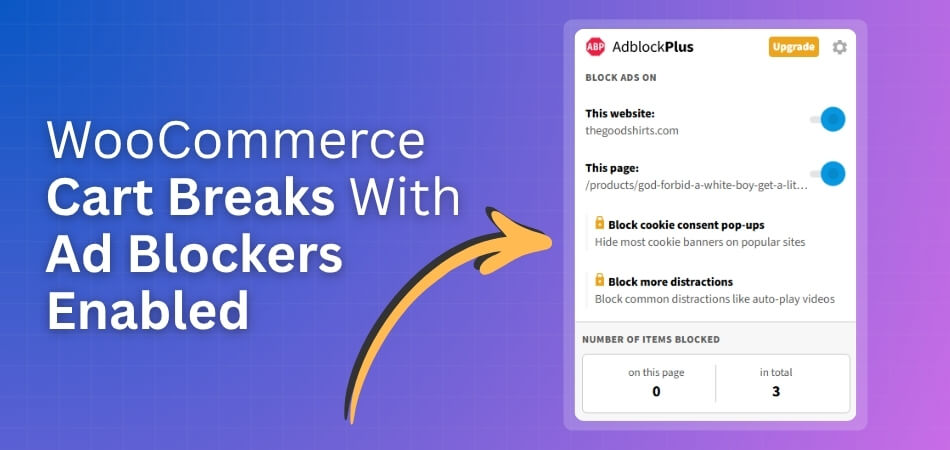
Ad blockers can break a WooCommerce cart by blocking essential AJAX requests, cart scripts, session-related behavior, or checkout calls that they mistake for tracking activity. When those functions are interrupted, add-to-cart actions, mini cart updates, totals, and checkout flow may stop working even though the storefront still appears normal. Several common storefront conditions make this problem more likely.
Cart Refresh Requests Get Blocked
WooCommerce often relies on AJAX or other dynamic requests to keep the cart updated without forcing a full page reload. Ad blockers can misread those requests as unnecessary background activity and block them before the cart finishes updating.
When that happens, shoppers may click add to cart but see no visible response, or they may change quantities without seeing totals refresh properly.
Bundled Scripts Look Too Similar To Tracking
Many ad blockers work by scanning patterns in script names, request paths, and front-end behavior. They react to signals, not business intent. If a WooCommerce store loads scripts alongside marketing, analytics, popups, or other promotional tools, essential cart scripts can get caught in the same filter logic.
This creates false positives where the blocker is not targeting the cart on purpose, but still ends up disrupting it.
Block-Based Cart And Checkout Features Become More Sensitive
Modern WooCommerce cart and checkout blocks depend more heavily on dynamic front-end requests and live rendering. That can make them more sensitive when ad blockers, privacy tools, or browser protections interrupt those background calls.
Instead of a small cart glitch, the result may be a blank cart area, a stuck loading state, missing checkout content, or a cart flow that breaks only after the shopper moves forward.
Security Or Proxy Layers Add More Interference
The problem often becomes worse when the store already has extra layers such as security plugins, CDN rules, proxy filtering, or aggressive caching. In those setups, ad blockers are not always the only source of disruption. They may combine with existing restrictions and make cart behavior even less reliable.
This is one reason the issue can be difficult to trace, especially when the store works for some visitors but fails for others.
Third-Party Front-End Tools Make Cart Behavior More Fragile
WooCommerce carts become more vulnerable when too much front-end functionality is stacked around them. Floating carts, side carts, quick view tools, pop-up add-to-cart flows, optimization plugins, and custom JavaScript can all increase the number of moving parts involved in a simple cart action.
When ad blockers interrupt one part of that chain, the whole cart experience can feel unstable even though the store still appears fully loaded.
Cart And Checkout URLs Can Be Treated Too Aggressively
Some blocker rules and strict privacy setups may also react to cart- or checkout-related paths more aggressively than expected, especially when those pages are tied to dynamic calls, session handling, or embedded scripts.
In that situation, the shopper may reach the cart or checkout page, but important parts of the experience fail to load, refresh, or stay connected to the active session.
How To Fix WooCommerce Cart Issues Caused By Ad Blockers
WooCommerce cart issues caused by ad blockers are usually fixed by protecting essential cart requests, reducing front-end dependencies, and making sure cart and checkout behavior is not grouped with scripts that look like tracking or promotional activity. The goal is not to fight ad blockers directly, but to make core cart functions more clearly essential, isolated, and reliable across different shopper environments.
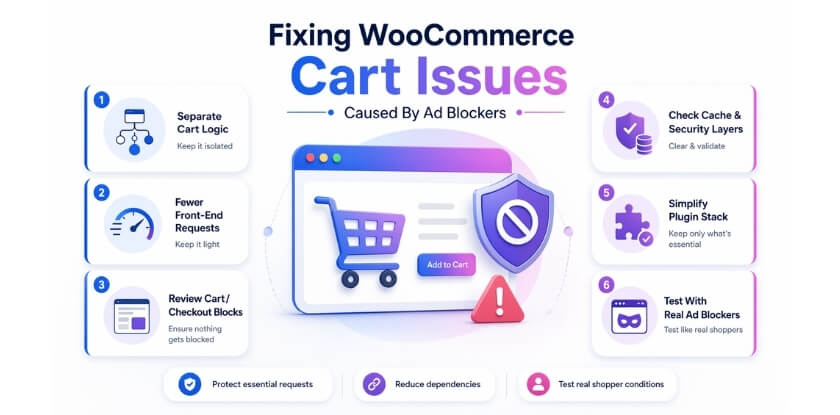
To improve cart stability, each fix should address the same weak points that usually cause the break in the first place.
Separate Essential Cart Logic From Marketing Scripts
When cart functionality sits too close to analytics, popups, retargeting tools, or promotional front-end scripts, ad blockers have a higher chance of catching the wrong requests. A cleaner separation helps reduce false positives and keeps critical cart behavior easier to protect.
Focus on things like:
- keeping cart and checkout scripts independent from ad or tracking-related assets
- avoiding script naming, paths, or bundling patterns that resemble promotional tools
- loading non-essential marketing scripts separately from cart-critical actions
- reviewing whether third-party tag managers affect cart interactions
Reduce Dependence On Sensitive Front-End Requests
The more the cart depends on chained front-end requests, the easier it becomes for one blocked action to interrupt the whole shopping flow. A more resilient setup reduces how many moving parts must fire perfectly for the cart to keep working.
That usually means simplifying cart behavior wherever possible. Stores often become more stable when add-to-cart actions, quantity changes, and cart updates rely on fewer front-end dependencies and less fragile script coordination.
Helpful improvements include:
- minimizing unnecessary AJAX-driven cart effects
- reducing extra front-end layers around add-to-cart behavior
- avoiding overly complex mini cart or popup cart interactions
- checking whether simple cart flows perform better than heavily enhanced ones
Review Block-Based Cart And Checkout Behavior Carefully
Block-based cart and checkout setups can work well, but they are often more sensitive when dynamic requests are interrupted. If the cart appears blank, freezes during loading, or breaks later in checkout, the issue may be tied to how those newer flows depend on live front-end communication.
To review that properly:
- test cart and checkout blocks with ad blockers enabled across different browsers
- check whether Store API or related cart requests are being interrupted
- compare behavior against a simpler fallback setup when needed
- make sure cart and checkout pages stay dynamic and are not being over-optimized
Keep Cache, Security, And Proxy Rules From Compounding The Issue
Ad blockers are often only part of the problem. Cart failures become harder to trace when caching, firewall rules, proxy filtering, or performance tools also interfere with dynamic WooCommerce behavior. In those cases, even a small blocker-related disruption can turn into a broken cart session or unreliable checkout handoff.
Store owners should review whether these layers are making the cart more fragile by:
- excluding cart and checkout pages from full-page caching
- preserving WooCommerce session and cart-related behavior correctly
- checking CDN, firewall, or proxy rules around cart requests
- making sure optimization tools are not delaying or combining critical cart scripts too aggressively
Simplify The Plugin And Script Stack Around The Cart
The cart usually becomes less reliable when too many plugins or custom front-end tools are attached to it. Side carts, floating carts, product popups, quick-view flows, script optimizers, and theme-level enhancements can all add extra dependencies around what should be a straightforward action.
A simpler cart layer is usually easier to keep stable. That does not mean removing every enhancement, but it does mean checking which tools are truly necessary and which ones make the cart more dependent on fragile browser-side behavior.
Priority checks include:
- disabling unnecessary cart enhancements one by one
- reviewing custom JavaScript tied to cart updates
- checking theme features that alter default WooCommerce cart behavior
- removing overlapping tools that change the same part of the cart flow
Test The Cart Under Real Ad-Blocker Conditions
Many store owners miss this issue because the cart works normally in their own browser setup. The problem only becomes visible when tested under real shopper conditions, especially with different blockers, privacy settings, devices, and browser combinations.
A proper test process should include:
- checking add-to-cart, mini cart, cart page, and checkout flow with popular ad blockers enabled
- testing both desktop and mobile browsing conditions
- comparing logged-in and guest cart behavior
- clearing cache and retesting after each meaningful change
- watching for inconsistent failures, not only total cart breakdowns
How Simpler Store Architecture Helps Beyond The Immediate Fix
Ad-blocker-related cart issues often reveal a deeper storefront weakness rather than a one-off front-end problem. When a WooCommerce store depends on too many scripts, plugins, or layered workarounds, even a small interruption can break cart behavior, checkout flow, or session continuity. A simpler setup reduces those dependencies and makes the storefront easier to keep stable, predictable, and easier to troubleshoot.
That is also where multi inventory management for WooCommerce fits naturally into the broader conversation, because more structured store operations usually make the customer-facing buying journey easier to keep reliable.
A more stable store usually benefits in several connected ways:
- Fewer Workarounds: A cleaner setup reduces the need for extra cart layers, custom scripts, and quick fixes that make the storefront more fragile.
- More Predictable Updates: Simpler storefront logic makes cart actions less dependent on too many connected requests or front-end triggers.
- Cleaner Stock Handling: Better structure behind inventory and fulfillment reduces the kind of operational confusion that often leads to unstable storefront behavior.
- Less Plugin Overlap: Stores with stronger architecture usually rely less on overlapping tools that affect product, cart, and checkout behavior at the same time.
- Easier Troubleshooting: With fewer moving parts, it becomes easier to identify whether the issue comes from blockers, caching, scripts, theme behavior, or cart logic.
- Better Long-Term Stability: A simpler architecture helps the store stay more reliable as products, traffic, and operational complexity continue to grow.
- Stronger Storefront Consistency: When backend store logic is better organized, the shopping experience is usually easier to keep stable, accurate, and trustworthy.
Tips To Keep WooCommerce Cart And Store Operations More Reliable
Fixing the immediate cart issue matters, but long-term stability usually depends on how cleanly the store is structured behind the scenes. When cart, stock, checkout, and fulfillment workflows become too layered, small storefront disruptions are more likely to turn into customer-facing problems. These practical habits can help keep the store more reliable:
- Keep Cart Logic Lean: Avoid adding unnecessary front-end layers around add-to-cart, mini cart, and checkout behavior.
- Limit Plugin Overlap: Use fewer tools that affect the same cart, stock, or checkout processes at the same time.
- Protect Dynamic Pages: Make sure cart and checkout pages stay uncached and session-aware so cart data can update correctly across the shopping flow.
- Review Store Changes Carefully: Test new themes, scripts, and optimization settings before leaving them active on live cart flows.
- Organize Inventory More Clearly: Set up stock handling with WooCommerce multi locations inventory management or other reliable inventory tools, so product and fulfillment logic stays more consistent as the store grows.
- Test Real Shopper Conditions: Check cart behavior under blocker-enabled browsers, mobile devices, and guest sessions.
- Watch For Small Failures Early: Delayed cart refreshes, missing mini cart updates, or inconsistent checkout behavior often point to a deeper structural issue.
Frequently Asked Questions
Ad-blocker-related cart problems can be difficult to interpret because the issue does not always appear the same way across every store, browser, or shopper session. These questions cover the details store owners often still want clarified after reviewing the main causes, fixes, and long-term stability considerations.
Can Ad Blockers Affect Only Some Shoppers And Not Others?
Yes. Different ad blockers, browsers, privacy settings, devices, and filter lists can all behave differently. That is why one shopper may move through the cart normally while another runs into missing updates, stuck cart behavior, or checkout issues in the same store.
How Can I Tell Whether The Issue Is Really Caused By An Ad Blocker?
The clearest sign is inconsistent cart behavior that disappears when the blocker is disabled or the site is excluded from blocking. Testing the same cart flow across multiple browsers, devices, and blocker setups usually makes the pattern easier to confirm.
Are WooCommerce Cart Problems With Ad Blockers Always Caused By AJAX?
Not always. AJAX-related cart activity is a common weak point, but it is not the only one. Session handling, dynamic page behavior, front-end script dependencies, caching mistakes, and checkout-related requests can also contribute to the problem.
Should I Switch Back From Block-Based Cart And Checkout Pages?
Not automatically. Block-based flows are not inherently wrong, but they may need more careful testing when a store already has aggressive optimization, extra front-end tools, or blocker-sensitive behavior. The better decision depends on how stable the current checkout experience is in real browsing conditions.
What Matters Most After The Immediate Fix Is Done?
Long-term reliability matters most. Fixing the visible cart issue is only part of the job. Stores usually stay more stable when cart logic is simpler, plugins overlap less, dynamic pages are handled correctly, and stock or fulfillment workflows do not depend on too many disconnected tools.
Final Thoughts
Most store owners do not begin by searching for why WooCommerce cart breaks with ad blockers enabled. They notice that something in the buying flow feels unreliable. A cart stops updating, a product disappears, or checkout behaves differently from one shopper to another. That is what makes this issue so frustrating.
Fixing the visible problem matters, but the bigger improvement comes from simplifying how the store works underneath. Cleaner cart logic, fewer overlapping scripts, and a more stable storefront make these disruptions far less likely to keep returning.
