

Plugins play a big role in keeping an online store simple, fast, and easy to handle. Many store owners look for small tools that make daily tasks smoother and help shoppers enjoy a clean browsing flow. If you want a setup that works without stress, you may already be thinking about must have WooCommerce plugins.
Must-have WooCommerce plugins include product filters, quick checkout tools, and inventory management systems. Use Dynamic AJAX Product Filter for fast sorting, One Page Quick Checkout for a smooth buying process, and Multi Location Inventory Management to track stock by location. These plugins improve speed, order flow, and stock accuracy.
If you want a clear idea of which tools can help your shop grow steadily, you will find all the important points in this article. Each section explains simple details about filters, checkout tools, stock control, and more. Keep reading to learn which plugins match your store’s needs and how they make daily tasks easier.
Must Have WooCommerce Plugins
Many shop owners look for simple tools that improve their store. These tools can help your site work fast and stay stable. You can add them without much stress or deep tech skills. Keep reading to learn the useful plugins you should install today.
Product Filter Plugins
The 1st plugin should be a product filter plugin. Because product filter plugins help people find the right items fast. They cut the long search time by showing only the items that match what the shopper wants. This makes the store feel smooth and easy to use. It also helps keep people on the page longer.
A product filter works by reading the product details you set inside WooCommerce. These details can be size, color, price, tags, or other simple parts of info. When these parts are added in the right way, the filter gives clean and clear options that are easy to click.
Here are some key points that make product filter plugins so useful:
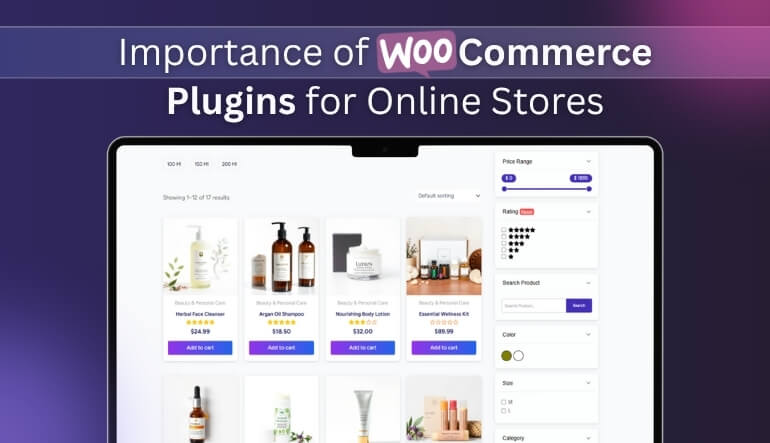
- Shoppers can sort by size, color, brand, rating, or price.
- No need to open multiple product pages one by one.
- Large stores with many items become much easier to navigate.
- Live results appear instantly when a filter is selected.
- The shop layout looks neat because extra clutter is removed.
Plugin Suggestion
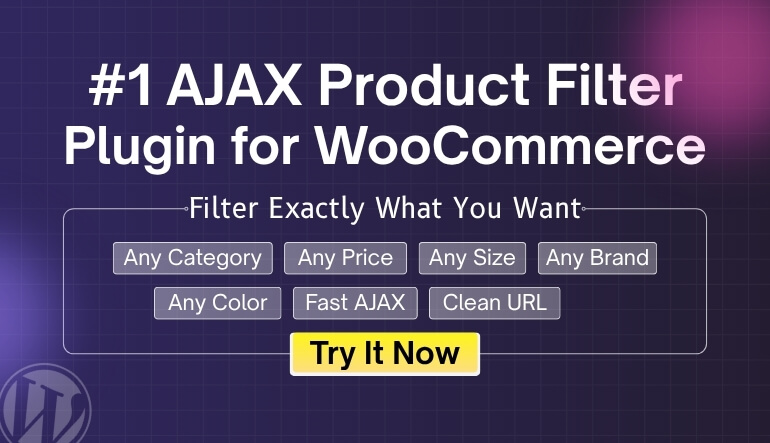
The Dynamic AJAX Product Filter plugin is a great choice if you want fast and smooth filtering. It has both free and paid options, so you can start simple and upgrade later if your store grows. Many users also like this tool because it works well with most themes and keeps the shop fast, even with many products. If you want a strong and easy filter system, the Woocommerce Ajax product filter plugin is one of the best options to try.
Key Features
- Real-time filter results with no page reload.
- Fast updates when shoppers click any filter.
- Smooth sorting and pagination that keep the page steady.
- Clean loader effects that match your shop style.
Filter Options You Can Use
- Price filter to match the user’s budget.
- Rating filter to show top-rated items.
- Category, tag, and attribute filters for size, color, material, and more.
- Quick text search for product names or custom fields.
- Brand, author, SKU, and custom meta filters for special product types.
- Stock filters to show items in stock or on sale.
- Discount filters to highlight deals.
- Length, width, height, and weight filters for size-based products.
- Date range filters to show new or time-based items.
Filter Methods Supported
- Simple query filters like ?filters=blue,large
- Query filters with keys like ?brand=adidas&size=l
- Clean link filters like /filters/adidas/large
- Key value link filters like /filters/brand=adidas
- AJAX filter with no URL change for a smooth feel
Checkout and Quick Buy Plugins
Another important plugin for WooCommerce is the checkout and quick buy plugins that make the buying steps short and easy. They remove extra fields and extra clicks, so people can place an order without feeling stuck. A short checkout helps reduce cart drop and keeps the page clean. Many stores use these tools to speed up the final step and help buyers finish faster.
These plugins work by cutting long forms into simple parts. They can hide fields you do not need, auto-fill some info, or move steps into one clean page. Some plugins also let you add a quick buy button on product pages. This lets shoppers skip the cart and go right to checkout.
Here are some clear points that show how helpful checkout and quick buy plugins are:
- Reduce long forms and make the page easy to follow.
- Help buyers complete orders in fewer steps.
- Support one page checkout for faster actions.
- Let shoppers skip the cart and buy with one click.
- Lower cart drop by removing slow-loading parts.
- Keep the buying flow smooth on mobile devices.
Plugin Suggestion
The One Page Quick Checkout for WooCommerce plugin is one of the best choices right now if you want a faster and cleaner buying flow. It has both free and paid options, so you can start with the basic tools and upgrade later if you need more power. This plugin cuts extra steps, loads fast, and helps buyers finish their orders without confusion.
Key Features at a Glance
- Quick popup checkout that keeps shoppers on the same page.
- Direct checkout from shop, category, archive, and product pages.
- Clean one page checkout flow.
- Quick view popup to preview product details.
- Visual form editor to shape your own checkout form.
- Trusted badges on checkout to build confidence.
- Smooth AJAX based checkout for fast actions.
Core Features (Free and Pro)
The plugin mixes popup checkout, direct checkout, one page checkout, and product quick view in one tool. It helps reduce cart drop and keeps the whole buying flow simple.
Popup Checkout
- Buyers can place orders inside a small popup without changing pages.
- AJAX checkout runs without reloads and feels fast and smooth.
Direct Checkout
- Skip the cart and take shoppers straight to checkout.
- Add fast checkout buttons on shop and archive pages.
- Set custom button actions to match your store style.
- Pro users can complete checkout inside a popup.
- Buyers can pick variations right from the shop or category page.
- Pro tools lets you hide the default select option button.
One Page Checkout
- Turn any product into a full one page checkout.
- Allow buyers to buy many products from one page.
- Layout styles include table, list, slider, accordion, tab, and more.
Product Quick View Popup
- Shoppers can see product info in a neat popup.
- Edit text, icons, and button styles.
- Keyboard support and social share options.
- Pro tools add mobile layout, custom size, and animation effects.
- Track popup activity with built in stats.
Extra Tools and Add Ons
- Form editor to show, hide, or edit fields.
- Buyers can update quantity from checkout.
- Remove items from checkout without going back.
- Show product images and linked product names.
- Slide out mini cart for quick access.
- Option to disable the normal cart page.
- Full add to cart control with custom labels and actions.
- Pro features for mobile design and sticky add to cart bar.
- Trusted badge support on checkout.
- Login rule to require sign in before checkout.
Inventory Management Plugins
Besides all the plugin inventory management plugin is also important as these plugins help store owners keep stock levels correct and up to date. They track every item as it is sold, returned, or updated so nothing goes out of balance. This helps prevent overselling and keeps the store running smooth, even during busy times. With the right tool, you always know what is in stock and what needs to be restocked.
These plugins work in real time. When someone buys an item, the stock number changes right away. If you add new items or edit product counts, the system updates across the whole store. This keeps your store accurate and reduces mistakes that can confuse buyers.
Here are some helpful points that show why inventory management plugins matter:
- They update stock the moment a shopper places an order.
- They stop overselling by showing the correct count at all times.
- They help track low stock items so you can restock on time.
- They give clear stock reports that make running the store easier.
- They keep product pages correct so buyers trust what they see.
Plugin Suggestion
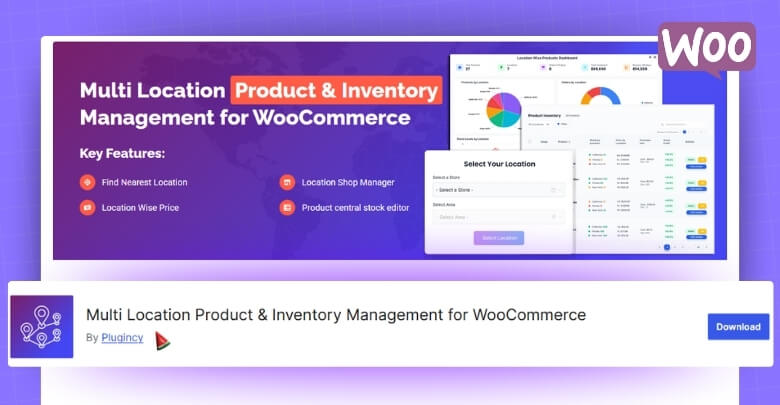
The Multi Location Product and Inventory Management for WooCommerce plugin is a strong choice if you run a store with more than one location. It helps you track stock for each place in a clear and simple way. You can also manage prices, orders, and customer location choices without any stress. The free tools cover the basics, and the pro tools add more control and smart options.
Free Version Features
Simple tools that cover the basic needs for multi location stock control.
Unlimited Location Control
- Add as many locations as you need.
- Add address, contact details, and open hours for each place.
- Use parent and child location levels.
- Turn locations on or off at any time.
- Assign products to one or many locations.
- Bulk assign locations to many products at once.
Location Based Inventory Tracking
- Manage all stock from one dashboard.
- Filter products by location to check what is available.
- Set stock numbers for each location.
- Set regular, sale, and purchase prices per location.
- Mark stock as in stock, out of stock, or backorder.
- Get low stock alerts per location.
- Track purchase price and profit margin.
- Turn products on or off for each location.
Frontend Display Options
- Show location names with product titles.
- Add location selectors as dropdowns, lists, or buttons.
- Use layouts that adjust to mobile screens.
- Show or hide location info on shop and product pages.
- Use shortcode to place the selector anywhere you want.
Customer Location Selection
- Let shoppers pick their location from the front end.
- Save their choice with cookies.
- Filter items by the selected location.
- Update the cart when the user changes location.
- Choose how to show out of stock items.
Order and Fulfillment Tools
- Orders get tagged with the location chosen by the customer.
- Filter and manage orders by location in the dashboard.
- See order counts per location.
- Support for location based order handling.
Admin Tools
- Central dashboard for all locations.
- Product and location overview table.
- Add custom CSS.
- Backup and import settings in the pro version.
- Works with WooCommerce HPOS and REST API.
- Uses safe AJAX and caching to keep things fast.
Pro Version Features
Extra tools for automation, team control, and advanced stock handling.
Geolocation Tools
- Detect the customer’s location by IP.
- Show the closest location with stock.
- Location based suggestions.
- Distance sorting coming soon.
Team and Access Control
- Add manager roles for each location.
- Assign users to a location.
- Limit dashboard access by location.
- Location based alerts and admin tools.
Advanced Reports
- Reports for stock, orders, and revenue by location.
- Track stock changes and new products.
- Visual charts for orders, revenue, and profit.
- Export reports to CSV or Excel.
- Custom date reports and schedule options coming soon.
Better Frontend Display
- Multi step location popup.
- Cascading menus for nested locations.
- Mobile ready popup layout.
- Sort products by location priority.
Technical Features
- Better REST API and block support.
- Faster queries and caching.
- License system and update system.
- Optional usage data, GDPR friendly.
Advanced Import and Export
- Export or import settings in JSON.
- Export product and location info.
- Bulk import stock and prices for each location.
These tools help your shop work better and run with less stress. You can pick the ones that match your shop needs well. Each tool adds simple support that helps your store grow steady. Try the right mix and see a clear change in your site.
Why WooCommerce Plugins Are Important for Online Stores?
Many stores need extra tools to work well with WooCommerce. These tools help add features that make the shop feel smooth. Good plugins also keep orders clear and simple for store owners. Read the points below to learn why these tools matter.
Extra Features For Your Store
Plugins add helpful tools that WooCommerce does not include by default. They give simple ways to add filters, shipping rules, payment choices, and cleaner layouts. Many stores use them to fix missing parts and improve daily tasks. These tools help the shop feel complete and keep users happy while they browse.
Better Order Control
Store owners get clearer order flow when they use the right plugins. These tools help track steps from cart to checkout without confusion. You can see order notes, stock changes, and payment details in one place. This simple view saves time and helps prevent mistakes during busy sales hours.
Smooth User Experience
Many plugins make pages easier to read and use for shoppers. They help reduce extra steps and load important parts faster. A clear menu, fast search, and short checkout can keep people on the site longer. Simple tools like these often lead to more views and better results.
Easier Store Management
Running a store becomes simpler when plugins handle small tasks for you. They update stock numbers, manage tax rules, send emails, and keep records clean. This helps store owners focus on products and customers instead of manual work. It also reduces errors that can affect sales or support needs.
Growth And Flexibility
Online shops can change over time, and plugins help them grow with ease. New tools add more choices without rebuilding the whole store. You can add filters, checkout tools, payment types, or shipping rules as needed. This steady setup helps stores stay ready for new trends or demands.
WooCommerce works better when the right plugins support key tasks. These tools keep things simple and help the store run well. With good choices your shop can stay fast and easy to use. Read each section above to pick the tools your store needs.
Balancing Free vs. Premium Plugins for Your Store
Free tools give good basic features, while paid ones offer more control. Each type helps your shop in different ways. Some stores do fine with free tools, but others need more power. The table below shows the main differences so you can choose better.
| Point | Free Plugins | Premium Plugins |
| Features | Basic tools with simple options | Advanced tools with more settings |
| Support | Community help with limited replies | Fast support from the plugin team |
| Updates | Regular updates but slower pace | Quick updates with new features |
| Customization | Fewer layout and style choices | Many design and setup options |
| Speed and Performance | Works well for small stores | Runs smoother for busy or large stores |
| Security | Basic safety checks | Extra safety and stronger code review |
| Ease of Use | Simple setup with fewer steps | Clear guides, demos, and better control |
| Best For | Small shops or new users | Growing stores that need more power |
Good plugin choices help your store stay simple and smooth. Each tool you add should make the shop easier to run. Pick features that match your needs and skip anything you do not use. Use the points above to choose the right tools for your store.
How to Choose the Right WooCommerce Plugins for Your Store?
Picking the right plugins helps your store work well every day. It also keeps your pages clean and simple for buyers to use. Good choices can improve speed and make tasks easier to handle. Read the points below to learn how to pick the right tools.
Check Ratings And Reviews
User ratings give a clear idea of how well a plugin works. Reviews help you see common issues and learn if users face slow load or errors. You can also check how people rate support and updates. These simple steps make it easier to choose tools that you can trust.
Look At Update History
A plugin stays safe when it gets steady updates from the team. Update logs show if bugs get fixed and new parts get added. Old tools can slow your store or cause errors on key pages. Checking this part helps you avoid problems before they start.
Test Compatibility With Your Setup
Your theme and other plugins must work well with each new tool. A good plugin should not break your layout or change your pages. When selecting tools, focus on plugins that enhance both performance and appearance. For example, using the best WooCommerce product page plugins can improve how customers view and interact with your products. Testing small parts first helps you catch errors early.
Compare Features With Your Needs
Each plugin should match the tasks your shop needs to handle. Look for clear parts like search tools, order tools, or better checkout tools. A simple check of features can save time and money later. Pick only the parts that improve your store rather than the tools you may never use.
Check Support And Documentation
Good help guides make setup easy and reduce mistakes. Support from the plugin team also helps when you face a bug. Many tools offer videos, notes, and clear step guides. These small parts help you fix problems fast without breaking your store.
Smart plugin choices help you keep your shop simple and fast. Each tool should add clear value to your daily work. Take time to read details, reviews, and update logs before you install. Use the steps above to find plugins that fit your store needs.
Common Problems Store Owners Face Without Useful Plugins
Many stores struggle when they lack simple tools that ease daily work. Missing features slow pages and make the whole site feel hard to use. These issues often hurt sales and reduce repeat buyers. Read the points below to understand the common problems and how to fix them.
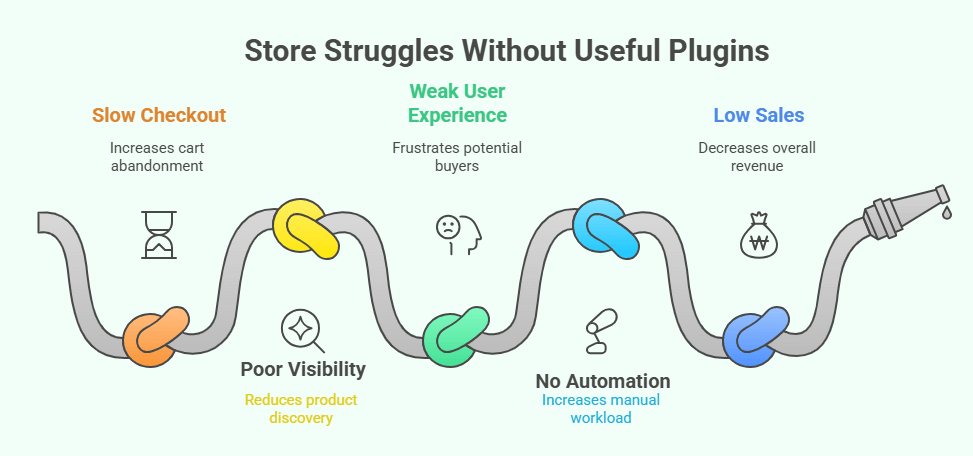
Slow And Confusing Checkout
A checkout page becomes slow when key tools are missing. Shoppers wait too long and often leave without placing an order. A simple plugin can help shorten forms and load only what buyers need. Clear steps keep people moving and reduce cart drops during busy hours.
Poor Product Visibility
Some stores lose sales because products do not show in the right place. This often happens when filters or category tools are missing. Without the right tools, store owners often struggle to manage product visibility and organization. Many essential plugins, like the Dynamic Ajax Product Filters, can help you resolve missing product categories and keep your store structure clear for customers.
Weak User Experience
A store feels hard to use when pages load slow or show messy layouts. Missing tools can remove search options, product filters, or clean menu parts. These gaps make it hard for buyers to find what they want. A few simple plugins can make the whole store easier to browse.
No Automation For Tasks
Manual work becomes heavy when there are no tools to update stock or send order notes. Simple errors happen when owners handle every small step alone. Automated tools help manage these parts without stress. This also keeps product details correct and saves time on daily tasks.
Low Sales And Conversions
Missing features often lead to fewer sales because buyers lose trust. A site with slow pages, weak search, or confusing steps makes people leave early. Clear tools help build a smooth flow from shop to checkout. This simple setup helps buyers stay longer and complete more orders.
A good set of plugins helps your store run well each day. Small tools fix common issues that hurt sales and clear up many daily tasks. Each part you add should help your pages stay simple and fast. Use the ideas above to pick tools that match your store needs.
FAQs About Must Have WooCommerce Plugins
Here are some common questions people often ask about must-have WooCommerce plugins. These answers will help you understand how these tools work and how they can make your store better. Whether you run a small shop or a growing online store, these FAQs will clear up common doubts and help you make smart choices.
What Are Must-Have WooCommerce Plugins And Why Do You Need Them?
Must-have WooCommerce plugins are tools that help your store work smoothly and offer more useful features. They add things that the default WooCommerce setup doesn’t include, like better checkout, filters, or inventory tools. These plugins save time and reduce manual work for store owners. Using them makes your online shop faster, easier to use, and more reliable for customers.
How Do WooCommerce Plugins Improve Store Speed And Performance?
Many WooCommerce plugins are built to make your store load faster and run better. They remove extra steps that slow down the site and add tools that load data quickly. For example, caching or image optimization plugins can reduce page load time a lot. A faster store keeps visitors happy and helps search engines rank your site higher.
Can You Use Too Many WooCommerce Plugins At Once?
Yes, adding too many plugins can slow down your site or cause errors. Each plugin adds new code, and if too many run together, they can use too much memory. It’s best to keep only the ones you really need and check if they work well together. Always test new plugins before adding them to your live store to make sure everything runs fine.
Are Free WooCommerce Plugins Safe To Use?
Most free plugins on the official WooCommerce or WordPress site are safe because they are reviewed by experts. But some plugins from unknown sites may contain bugs or harmful code. Always check user reviews, ratings, and how often the plugin is updated. Using trusted sources helps keep your store safe from hacks or performance issues.
How Often Should You Update Your WooCommerce Plugins?
You should update your plugins whenever a new version is released. Updates fix bugs, add new features, and improve security. Keeping plugins old can cause your store to crash or become unsafe. Always back up your site before updating to avoid losing any important data.
Can WooCommerce Plugins Help With SEO And Marketing?
Yes, many WooCommerce plugins can help improve your store’s visibility online. For example, SEO plugins help you add better titles, keywords, and descriptions for products. Marketing plugins can send emails, offer discounts, or show popups to attract customers. Using the right mix of tools can help you reach more people and boost your sales.
End Note
Running a store without the right tools can make daily work slow and confusing. Simple plugins can help your pages load faster, improve search, and make checkout smooth. Each plugin adds comfort for shoppers and helps you manage your store without stress. These are the real must have WooCommerce plugins that make your online store run better and look professional.
Before you add any plugin, read reviews, test speed, and keep updates active. Pick only tools that match your goals and skip the rest to keep your site light. Stay smart, stay updated, and build your store step by step. Best wishes for a smooth, growing WooCommerce shop ahead.
