

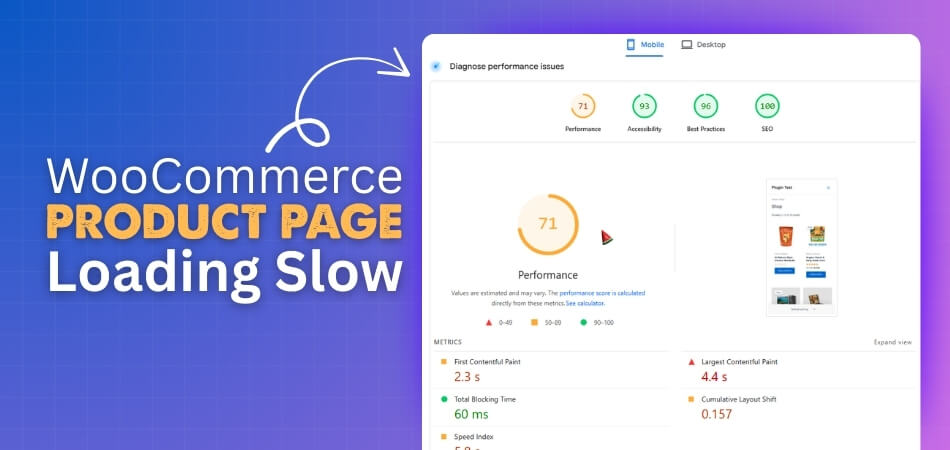
A product page should load fast and feel light when someone opens it. Many people get confused when their shop starts slowing down and they cannot tell what caused it. You may also feel the need to understand why your WooCommerce store behaves this way. This often leads to one thought in mind about WooCommerce product page loading slow.
Fix a slow WooCommerce product page by turning off unused tabs, setting smaller image sizes, limiting related products, and disabling zoom or Ajax cart fragments. Keep product data simple. For more speed, install the Dynamic AJAX Product Filter plugin to reduce database calls and load saved results instead.
Do you want to know what makes this problem happen and how you can fix it? Keep reading this article to learn every simple step, clear method, and helpful tip that can guide you to speed up your store and make each product page load much smoothly.
WooCommerce Product Page Loading Slow
If your WooCommerce product page is taking too long to load, it can affect your visitors and sales. There are a few simple settings you can adjust to make the page load faster without adding new tools or complex steps. Follow each method carefully and check your product page after every change.
1. Turn Off Unused Product Tabs
Every WooCommerce product has several tabs, such as Description, Additional Information, and Reviews. If you’re not using all of them, they still load on every product page and can slow it down.
To disable them:
- Go to WooCommerce > Settings > Products.
- If you don’t need reviews or other extra tabs, turn them off.
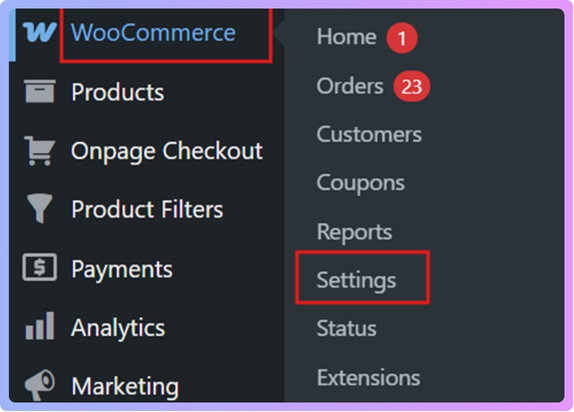
Fewer tabs mean fewer database calls and less code running, which helps reduce the loading time.
2. Set the Right Product Image Sizes
Large product images are one of the main reasons for slow page loading. You can fix this by setting smaller image sizes that still look clear but load faster.
To do this:
- Go to Appearance > Customize > WooCommerce > Product Images.
- Select smaller, optimized image dimensions for your store.

- After updating the sizes, click Regenerate Thumbnails if required.
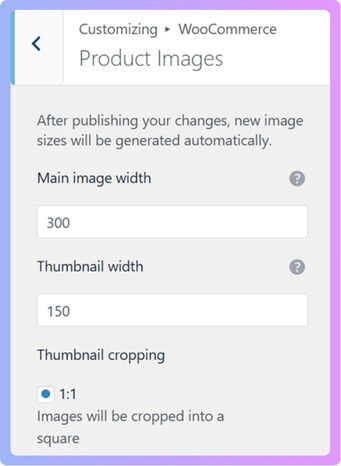
This step helps WooCommerce resize existing product photos to match your new size settings, so pages open quickly.
3. Limit Related Products Count
WooCommerce automatically shows related products at the bottom of every product page. While this can be useful, it also adds extra queries and slows loading.
You can fix this by:
- Reducing the number of related products displayed.
- Adjust this setting in your theme options or through the theme customizer.
Showing fewer related items means fewer images, fewer database requests, and faster page load times.
4. Turn Off Ajax Cart Fragments
WooCommerce automatically refreshes the cart icon using Ajax every time a page loads. This can add a delay to every request.
If your theme gives the option, you can turn this off from the customizer. Disabling it will make pages lighter and faster, especially for stores with many visitors.
5. Keep Product Data Simple
Each product can have attributes, variations, custom fields, and extra information. Having too many of these can make your product pages heavy.
When editing a product:
- Remove unused attributes.
- Delete empty or unnecessary tabs.
- Keep only the most important product details.
Simpler data means fewer database calls and faster load times.
When All These Settings Still Do Not Help
If none of these steps fix the slow load, you can use a plugin that helps manage how WooCommerce loads data. One common option is the Dynamic Ajax Product Filter plugin.
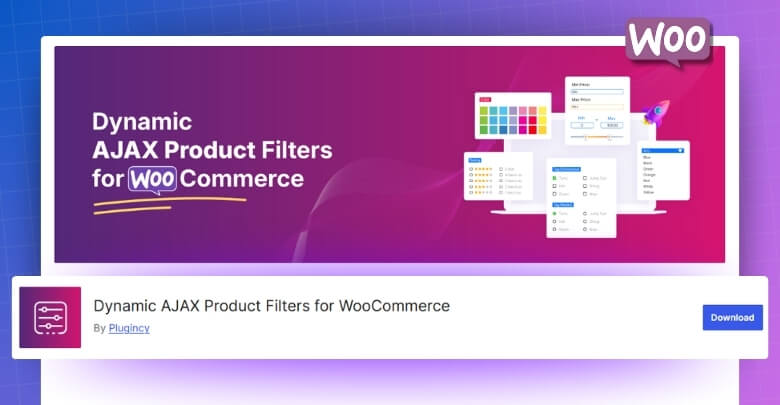
This plugin reduces how often your store asks the database for the same product filter results. Instead of repeating the same work for every visitor, it saves the results once and reuses them. Using a product filter for Woocommerce like this improves site speed, reduces server load, and makes your store run faster, especially during high traffic times.
How the Plugin Helps
Here’s how it improves your store speed:
When a user applies a product filter, the plugin sends a request to the database for the matching results. This is called a database hit. After it gets the result, it saves it as a file known as a file cache.
When another visitor uses the same filter, the plugin doesn’t ask the database again. It simply loads the saved result from that file.
Why This Helps:
- Reading from a file is much faster than querying the database again.
- It reduces the load on your server.
- Your site can handle more users without slowing down.
- It prevents repeated work for the same filter results.
The plugin stores filter results once, then loads them instantly for repeated requests. This makes your product pages load faster and stay smooth for users.
And the best part is that you don’t need to set up anything manually; it works automatically after installation. The plugin has both free and paid versions, and you can choose whichever suits your store. Here’s how you can install both versions:
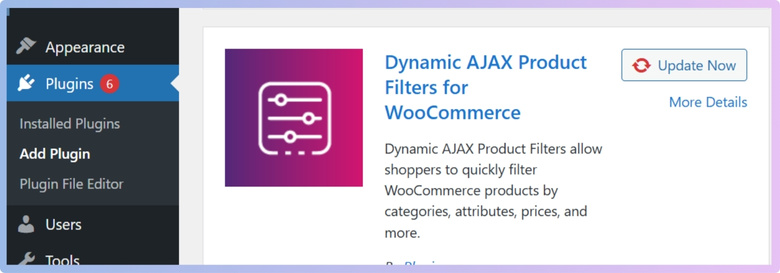
Free Version
- Go to your WordPress Admin Dashboard > Plugins.
- Click Add New Plugin.
- In the search bar, type Dynamic AJAX Product Filters for WooCommerce.

- Click Install Now, and then Activate.
Pro Version
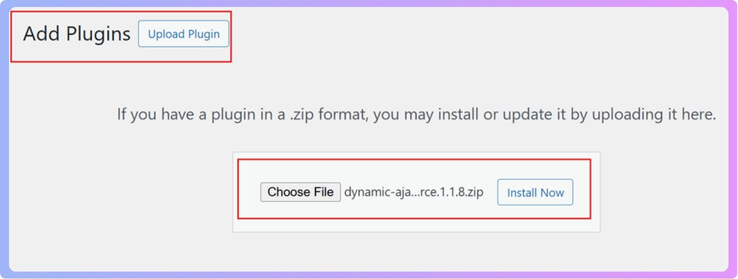
- Go to Plugins > Add New Plugin.
- Click Upload Plugin.
- Choose the plugin ZIP file.
- Click Install Now, then Activate.

Slow pages can hurt how users feel on your site. Small fixes can bring clear speed gains fast. Check these points to see what fits your store today. Try these steps to keep your product pages loading fast and smoothly.
Common Reasons Why WooCommerce Product Pages Load Slowly
The speed of a product page can change how users feel. Slow pages can push people away from your store. It often happens due to things that many site owners miss. Read the points below to learn what slows WooCommerce pages and how to fix them.
Large Image Sizes
Many sites use big images that take longer to load. These images can make each product page feel heavy and slow. Smaller and well-compressed images help the page load much faster. Sometimes, display or structure problems can also cause product pages to slow down. If you’ve been trying to troubleshoot WooCommerce category issues, or any other filter-related issue, you might notice similar factors like database errors or caching problems hurting product speed as well.
Too Many Plugins
Sites often run many plugins at the same time. Some plugins add extra scripts that slow down product pages. A few may even clash with each other and cause errors. Keeping only the needed plugins makes the site load faster. Removing heavy tools can also cut extra time during each request.
Slow Hosting Server
A weak hosting plan can slow every product page on the site. When the server responds slowly, each request takes longer to finish. Product filters and cart actions also get delayed. Better hosting gives faster load times. It also helps your site handle more users without slowing down.
Unoptimized Themes
Some themes come with heavy scripts loaded on every page. These scripts can slow down product details and filter features. Cleaning unused parts of the theme or using a lighter one helps. A simple and clean theme loads pages with less delay. This gives shoppers a smoother time on your site.
Outdated WooCommerce Version
Old versions may have bugs, slow code, or outdated scripts. These issues can hurt product page speed over time. Updating WooCommerce keeps your store safe and fast. You also get new fixes that improve how pages load. Regular updates help prevent slowdowns that build up quietly.
Users find it easier to shop when a website loads quickly. Each small fix helps cut time on every page. Slow loading often comes from simple issues you can fix fast. Try checking these points to keep your shop running smoothly and quickly.

How Does Hosting Affect WooCommerce Page Speed?
The speed of your WooCommerce store depends a lot on hosting. Slow hosting can delay each step when someone loads your product pages. Good hosting helps your store run fast even during busy times. Keep reading below to learn how hosting affects your WooCommerce page speed.
Shared Hosting Problems
Many people use shared hosting at first, but it often causes slow product pages. Your site must share space and power with many other sites. When those sites get busy, your store loads much more slowly. This delay hurts page speed and may push buyers away. Upgrading can remove these limits fast.
Slow Server Response
A weak server takes longer to answer requests from your store. When someone opens a product page, the server must fetch data. If the server is slow, the whole page lags. Images load late, and carts respond slowly. Better hosting offers a faster response time for smooth shopping.
High Traffic Pressure
Product pages slow down during high traffic on low-tier hosting. When many users visit at once, the server struggles. Pages may freeze, and carts may fail to load. Strong hosting plans handle bigger loads without slowing. This helps your store stay fast during busy hours.
Managed Hosting Benefits
Managed WooCommerce hosting gives more power and care to your store. You get built-in speed tools and better support. The server is tuned for online shops, so pages load faster. Your store stays stable during updates and traffic spikes. This setup offers a steady speed for all visitors.
Dedicated Hosting Power
A dedicated server gives your store full control of its resources. No other sites use your power, so pages load much faster. Product images, scripts, and carts run smoothly on strong hardware. This setup helps large stores stay fast at all times. It keeps buyers happy and reduces checkout delays.
Good hosting keeps your WooCommerce store fast all year round. Slow plans often hurt product pages and reduce sales. Better hosting gives your shop more strength and stable speed. Choose the right plan to help your store grow smoothly.
The Role of Images and Media in Page Load Time
Big images can slow your website and push visitors away fast. Many people leave when pages take too long to open fully. This can hurt your ranking and reduce product views. Read the simple tips below to learn how to fix these issues today.
Impact of Large Images
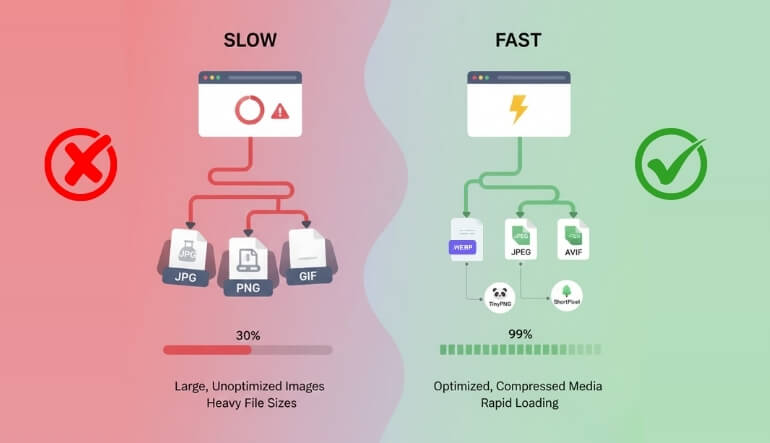
Oversized files make your pages load more slowly and feel heavy. Each big image adds extra seconds that hurt user interest. Slow sites often lose clicks and sales because visitors dislike waiting. Reducing file size helps pages open quicker and keeps people browsing longer.
Importance of Image Compression
Shrinking image size keeps pages light without hurting visual quality. Compression tools cut extra data that your page does not need. This helps speed up loading time for every visitor. Compressing large images and using next-gen formats like WebP can significantly improve product page performance, helping your WooCommerce site load faster and rank better in search results.
Helpful Tools for Image Optimization
Online tools can help you make images smaller in simple steps. TinyPNG, ShortPixel, and Imagify work well for quick fixes. They reduce file size but keep photos looking clear. Regular use keeps your product pages fast, clean, and easier for visitors to explore.
Picking the Best Image Formats
Different formats can change how quickly your images load. JPEG and WebP work well for product photos because they are light. PNG fits better for sharp graphics or icons. Using WebP can give strong quality with much smaller file size, helping pages load faster.
Value of Lazy Loading
Lazy loading helps pages open quickly by showing images only when needed. Your visitor sees the top part of the page right away without delay. Other images appear as the person scrolls down. This simple method keeps your site fast and easy to navigate.
Fast images help keep visitors on your pages longer. Better speed also gives a strong boost to your search ranking. Simple changes like compression and smart formats can make a big difference. Start improving your images now to keep your site smooth and welcoming.
How Too Many Plugins Can Slow Down WooCommerce?
Many people install many plugins without thinking much about them. Each plugin brings code that your site must load every time. This extra load makes your shop feel slow and heavy. Keep reading to learn how too many plugins can slow your WooCommerce store.
Extra Scripts Slow the Page
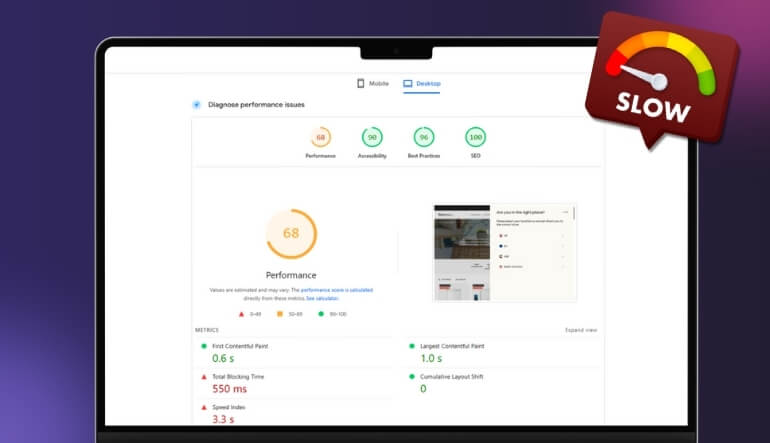
A plugin often adds its own scripts that load on your pages. When you add many plugins, your site loads many scripts at once. All these files make the page wait before it shows the content. This delay makes shoppers feel your store is slow and weak.
Large Stylesheets Add Weight
Many plugins include styles that your site must load fully. These styles can pile up and make pages feel heavy to the browser. The more styles you add, the longer your store takes to show products. This problem grows fast when you install plugins you rarely use.
Extra Database Queries Build Up
Plugins often ask the database for more details on each page. With many plugins, these small requests grow into big delays. Your server must answer all queries before showing your product page. This slows down the whole cart and checkout flow for your users.
Poor Coding Creates More Work
Some plugins are not built with clean or light code. They use more server power than needed and cause slowdowns across your shop. When several poorly built plugins run together, the load becomes even worse. This often leads to slow clicks and tired page loads.
Unused Plugins Still Load Resources
Even plugins you think are inactive often load some files. They stay in your system and add more weight than you expect. Keeping too many unused plugins creates small issues that grow bigger with time. Removing them can help your store feel faster again.
A smooth WooCommerce store needs clean code and fewer plugins. Keeping only the needed tools helps your site stay quick. Light pages make shoppers stay and explore more items. Take time to clean your plugins to keep your shop running well.
FAQs About WooCommerce Product Page Loading Slow
A slow WooCommerce product page can confuse users and hurt sales. Many store owners see delays but do not know what causes them. Simple checks can help you understand what is slowing things down. Read the FAQs below to learn helpful tips that can make your pages load faster.
How Can Caching Help Speed Up A Slow Product Page?
Caching saves a ready copy of your page so it loads quickly. When someone visits again, the server does not build the page from zero. This cuts the load time and makes the site feel smoother. A good cache setup can help your product pages open faster, even during busy times.
Can A CDN Make WooCommerce Product Pages Load Faster?
A CDN stores copies of your files on many servers across the world. When users visit your site, they get files from the closest server. This reduces wait time and helps pages load more quickly. A CDN is helpful for stores with visitors from many countries.
How Does Old PHP Version Slow Down Product Pages?
Old PHP versions run slower and process tasks less efficiently. WooCommerce relies on PHP for almost everything on your store. If your PHP version is outdated, your product pages may load slowly. Updating to a newer version gives faster speed and better support.
Why Do Product Videos Slow Down A Page?
Videos are heavier than images and take more time to load. When a video is placed on a product page, it can delay the first view. This can make users feel the page is stuck. Using lighter video settings or loading the video after a click can help speed things up.
Do External Scripts Affect WooCommerce Product Page Speed?
External scripts come from other websites and load before your page finishes. Each script adds a small delay that builds up. Too many outside calls can slow your product page a lot. Using fewer external scripts helps your site load faster.
How Do Extra Fonts Slow Down A Product Page?
Every font file must load before the page looks correct. Many font styles add extra weight and delay the page. If your store uses too many fonts, it can slow down product pages. Keeping only a few simple fonts helps reduce the load time.
Final Words
Speed makes a big difference when someone visits your store, and simple fixes can help your pages open faster without stress. When images are lighter, scripts are fewer, and product data is clean, your store feels smooth for every visitor. These steps help your shop run better and give a clear answer for why many people face WooCommerce product page loading slow issues.
Small changes can keep your store fast, stable, and easy to use every day. Try to check your hosting, image sizes, and plugins often so problems do not build up quietly. Keep your tools light, update your store on time, and use smart settings that save load time. Wishing you the best as you work toward a smooth and fast shop.
