

How to stop WooCommerce registration spam is a common concern for store owners dealing with fake accounts and malicious sign-ups. The best way to troubleshoot this issue is by taking immediate action with several simple yet effective measures. These include implementing CAPTCHA, email verification, and using anti-spam plugins to block unwanted registrations.
In this guide, we’ll cover the key steps to secure your registration forms, reduce spam, and keep your WooCommerce store clean and safe from malicious activity.
Why Registration Spam Happens in WooCommerce?
Registration spam is a common issue for many WooCommerce store owners. Several factors contribute to spam registrations occurring, often involving bots or malicious users exploiting weak points in your registration system. Here’s why it happens:
Lack of CAPTCHA or Bot Protection
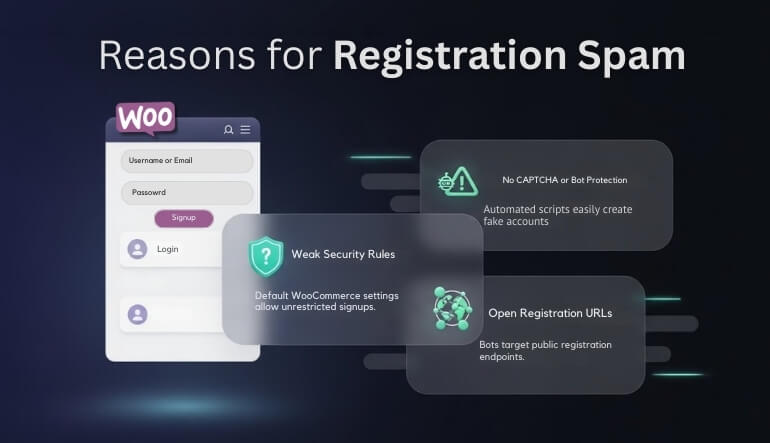
Without CAPTCHA or reCAPTCHA on registration forms, WooCommerce sites become easy targets for bots. These automated scripts can fill out registration forms in bulk, creating fake user accounts with little effort. This makes it essential to implement bot protection to block such activity effectively.
Publicly Accessible Registration Forms
By default, WooCommerce allows anyone to register on your site. This open access makes it easy for spam bots to target your store. If you’re not actively monitoring and limiting who can register, it opens the door for fake accounts to fill your database with invalid entries.
Automated Account Creation During Checkout
Allowing customers to create an account during checkout may seem convenient, but it can also lead to abuse. Bots may target this feature to create fake accounts while placing fraudulent orders, particularly if your checkout process lacks proper validation or spam protection, such as CAPTCHA.
Absence of Email Verification
If you don’t require email verification for new registrations, spammers can use fake or temporary email addresses to create accounts without any checks. This makes it difficult to track or identify fraudulent users, contributing to the overall problem of spam in WooCommerce stores.
Lack of Rate Limiting or Blocking Features
WooCommerce doesn’t automatically limit the number of registration attempts, allowing bots to submit forms repeatedly without any restrictions. Without rate limiting or automatic blocking, bots can bombard your site with fake registrations, making it important to implement protections that restrict multiple submissions within a short time frame.
Vulnerable Default Settings
Many store owners leave the default settings in place when setting up WooCommerce. These default settings often lack sufficient protection against spam, such as open registration and automatic user creation during checkout. Adjusting these settings and adding advanced security measures can significantly reduce the likelihood of spam registrations.
How to Stop WooCommerce Registration Spam? Simple Steps to Secure Your Store
Spam registrations can be a major issue for WooCommerce store owners, leading to fake accounts, fraudulent orders, and security risks. By taking simple, proactive measures, you can significantly reduce spam and ensure that only legitimate customers register and place orders on your site. Here are some effective steps to prevent spam:
1. Disable Public Registration
If your store doesn’t need users to register, go to WordPress → Settings → General and disable public registration. This limits unwanted access and ensures only necessary users create accounts. Preventing unnecessary registrations is the first step in blocking automated bot activity.
2. Implement CAPTCHA or reCAPTCHA
Adding CAPTCHA or reCAPTCHA to your registration forms is one of the best ways to block spam bots. These tools make sure only human users can complete the registration process, ensuring fake accounts don’t fill up your store’s user base and reducing spam.
3. Enable Email Verification
By enabling email verification, you require users to confirm their email addresses before completing registration. This extra step filters out fake and disposable email addresses commonly used by spammers and ensures that your database only contains valid contacts.
4. Use Anti-Spam Plugins
Anti-spam plugins like Akismet or Anti-Spam Bee automatically detect and block spammy registrations. These plugins analyze user behavior and registration patterns, identifying fake accounts and keeping your site free from unwanted sign-ups and potential fraud.
5. Limit Registration Attempts
Rate-limiting registration attempts from the same IP address can prevent bots from flooding your site with fake accounts. By limiting the number of registrations within a specific time frame, you reduce the chances of automated attacks and ensure a smoother experience for genuine users.
6. Add Hidden Fields (Honeypot Method)
The honeypot method involves adding invisible fields to your registration form. Bots fill out these hidden fields, which flags them as spam. It’s an effective, low-impact way to detect automated sign-ups without affecting the user experience.
7. Protect Checkout from Spam Users
To protect checkout from spam users, ensure that your checkout process is smooth and secure for genuine customers. If you’re using quick checkout for WooCommerce, these protections are essential to stop fake users from completing orders and to maintain the integrity of your store’s transactions.
8. Regularly Monitor User Registrations
It’s important to periodically review your user registrations for suspicious activity. Look for patterns of unusual or high-frequency sign-ups, and flag or delete any fake accounts promptly. Regular monitoring ensures that your store maintains a clean, active user base.
What Advanced Security Measures Can You Implement to Stop WooCommerce Spam?
While basic security features like CAPTCHA and email verification are useful, spammers are always finding new ways to sneak through. For stronger protection, implementing advanced security measures will significantly reduce spam and enhance your WooCommerce store’s security. Here are a few steps you can take to better protect your site.
1. Use IP Geolocation and Country Restrictions
One of the most effective ways to prevent spam is by restricting access to certain countries or IP addresses. If your store primarily serves specific regions, blocking access from high-risk or irrelevant areas can prevent bot activity before it even reaches your registration form. This adds another layer of control and minimizes spam.

2. Implement Rate Limiting and Bot Detection Tools
Rate limiting helps prevent bots from submitting multiple registration forms in a short period of time. By setting a limit on how many times an IP can try to register within a certain time frame, you can effectively block bulk bot activity. Bot detection tools can also help by recognizing unusual patterns and stopping bots before they reach your forms.
3. Enable Two-Factor Authentication (2FA) for Registrations
Adding two-factor authentication (2FA) during the registration process makes it much harder for spammers to create fake accounts. With 2FA, users are required to provide a second form of verification, such as a text message or email confirmation, which drastically reduces the likelihood of bot-created accounts.
4. Utilize Machine Learning-Based Anti-Spam Protection
Machine learning-based tools can learn from past data to identify suspicious activity that traditional methods might miss. These tools analyze user behavior patterns and flag any activity that appears automated or abnormal. By using machine learning, you can ensure your store remains protected even as spammers evolve their tactics.
5. Use Advanced Anti-Spam Plugins with Custom Rules
Plugins like Anti-Spam Bee offer more than just basic spam filtering. By customizing the rules, you can set specific criteria to block unwanted registrations based on factors like email domains, IP addresses, and user-agent behavior. This level of customization adds a layer of security tailored to your store’s unique needs.
6. Monitor Suspicious Activity Regularly
Even with advanced protections in place, it’s essential to monitor registration activity on an ongoing basis. Regularly reviewing new accounts, login attempts, and sign-up trends allows you to identify patterns of fraud or bot activity early. Setting up alerts for suspicious activities can help you stay ahead of potential threats.
Best Practices for Designing WooCommerce Registration Forms
Designing a WooCommerce registration form is more than just asking for customer details; it’s about creating a smooth, secure experience that discourages spam while encouraging genuine users to sign up. Here are some fresh best practices to help design a registration form that keeps spam at bay and enhances your customer experience.
Simplify the User Experience with Autofill Fields
To make registration faster, turn on autofill for fields like name, address, and email. This helps users complete the form quickly and lowers mistakes. A clean and simple form also helps reduce drop-off rates, especially when someone is already dealing with issues like a WooCommerce checkout page not working on the site.
Use Conditional Logic to Minimize Form Fields
Instead of overwhelming users with a long registration form, use conditional logic to display only the relevant fields based on user selections. For example, ask for additional information only if they are signing up for a newsletter or need a membership. This keeps the form minimal and less attractive to bots.
Display a Clear Privacy Policy and Terms of Service
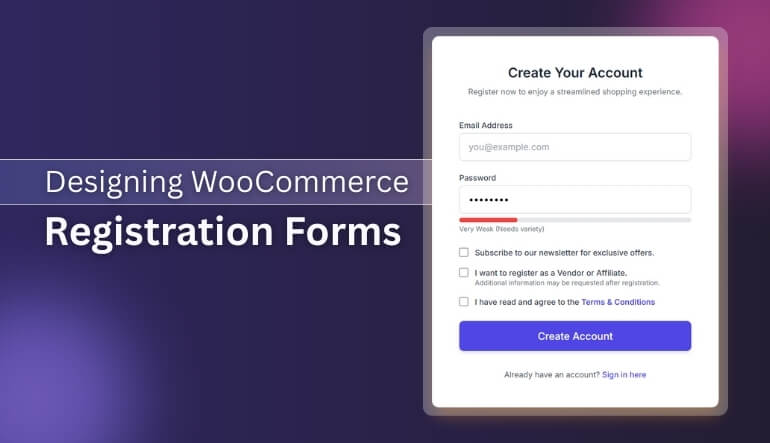
Include links to your Privacy Policy and Terms of Service directly on the registration form. This shows customers that their data will be handled securely and that they understand the terms of registration. Making these accessible helps build trust with users while ensuring compliance with data protection regulations.
Make Use of Password Strength Meters
A password strength meter helps guide users to create strong passwords, ensuring better security. Display the strength of the password as users type it in, which encourages them to select a more secure password and reduces the likelihood of weak or easily guessed passwords, enhancing account security.
Offer an Option to Subscribe to Your Newsletter During Registration
Allow users the option to subscribe to your newsletter while registering. This can help grow your email list without interrupting the registration process. Make sure the option is an opt-in choice, so users can easily decide whether they want to receive additional communications from you.
Provide Clear Error Messages and Instructions
In case users encounter an error during registration, ensure that the error messages are clear and easy to follow. Provide specific instructions on how to correct the issue (e.g., password mismatch, missing fields) to prevent frustration and reduce the chance of abandonment.
Implement a Progress Bar for Multi-Step Forms
When registration involves multiple steps (e.g., billing information, shipping details, payment methods), show a progress bar to indicate how far along the user is in the process. This can motivate users to complete the registration, knowing exactly how much more they need to do.
Customize User Roles During Registration
For stores with multiple user roles (e.g., customers, vendors, affiliates), allow users to select their role during registration. By offering this option upfront, you can streamline account management and ensure users are assigned to the appropriate category right from the start.
Essential Techniques to Avoid Registration Spam in Your WooCommerce Store
Registration spam is a common challenge for WooCommerce store owners. It not only clutters your database but can also lead to fraudulent orders and security issues. By applying these essential techniques, you can reduce spam and ensure that only genuine users are interacting with your store.
Apply the Secured Bank Transfer Method
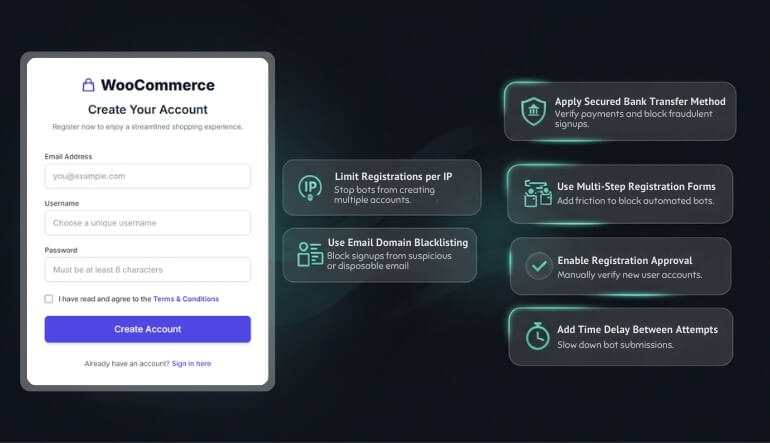
Bank transfers can be a secure and reliable payment method, but to ensure they don’t open doors for spam, you should apply secure methods. Understanding WooCommerce bank transfer payments enables you to implement additional verification steps, such as confirming payment before processing orders, which helps prevent fraudulent or spam-related transactions from going through.
Limit the Number of Registrations per IP Address
One way to prevent bots from flooding your store with spam registrations is by limiting the number of registrations that can be made from the same IP address. This helps prevent automated systems from submitting multiple fake accounts and gives you more control over who can register.
Use Multi-Step Registration Forms
Instead of having all fields visible at once, break the registration process into multiple steps. This will not only reduce the chance of bots completing the form but also make it easier for genuine users to navigate. Multi-step forms can create an additional layer of protection against automated spam submissions.
Enable Registration Approval Process
Another effective technique is to set up an approval process for new registrations. This can help you manually verify the legitimacy of each account before granting access. You can check for signs of spam, such as incomplete information or suspicious email domains, before fully activating the account.
Incorporate a Time Delay Between Registration Attempts
By introducing a small time delay between registration attempts, you can make it harder for bots to flood your system with fake accounts. For instance, adding a few seconds of wait time between each registration submission can slow down automated scripts and reduce the number of spam registrations.
Frequently Asked Questions
This FAQ section gives clear answers to the most common questions about stopping spam registrations and protecting your online store. It covers easy ways to spot spam, tools you can use to block fake signups, and steps to keep your WooCommerce checkout safe. If you want quick and helpful tips to keep your website secure and clean, the answers below will guide you in the right direction.
What Are the Most Common Signs of Registration Spam?
Some common signs of registration spam include unusually high registration rates, incomplete user profiles, and email addresses from disposable domains. You may also notice repeated registration attempts from the same IP address or suspiciously fast form submissions.
How Can I Automatically Block Spam Registrations Without Manual Intervention?
Plugins like Akismet or Spam Protection by CleanTalk can automatically detect and block spammy registrations. These tools filter out fake accounts by analyzing registration patterns and known spam behaviors, saving you from the need for manual intervention.
Can I Prevent Spam Registrations from Specific Countries?
Yes, using geolocation tools, you can restrict registrations from certain countries or regions known for high volumes of spam. By blocking IP addresses or limiting access based on location, you can reduce the likelihood of spam registrations on your site.
Is It Safe to Use Guest Checkout in WooCommerce?
Guest checkout allows customers to place orders without creating an account, and it’s generally safe. However, it’s crucial to still verify payments and use fraud prevention tools to avoid issues with fraudulent transactions, especially if registration spam is a concern.
How Can I Protect My WooCommerce Store From Fake Orders?
To reduce fake orders, use fraud detection tools that check payment information against trusted databases. Additionally, verifying payments for bank transfers before processing can help prevent fraudulent transactions and ensure that only genuine orders are processed.
Are There Any Tools to Detect and Prevent Bots from Registering?
There are several tools available that can detect and block bots from filling out registration forms, such as BotBlocker, or using hidden fields. These tools prevent automated systems from bypassing your forms and submitting fake registrations.
How Do I Handle Suspicious User Accounts After Registration?
If you spot suspicious accounts, you can place them in a “pending approval” status or manually review them for further verification. Regular monitoring of new accounts will help you identify and block fake users quickly, keeping your store’s database clean.
Can I Prevent Spam During WooCommerce Checkout?
To prevent spam during checkout, use methods such as rate limiting, email verification, and behavior analysis tools. These approaches help identify and stop fake users from completing their orders, ensuring that only legitimate customers proceed to checkout.
Conclusion
In this guide, we’ve explored various practical techniques and strategies for How to Stop WooCommerce Registration Spam. By implementing these steps, from using CAPTCHA and email verification to adopting advanced security measures like rate limiting and machine learning-based protection, you can effectively reduce spam registrations on your store.
Taking proactive measures will help you maintain a clean, legitimate user base, ensuring that your WooCommerce store runs smoothly and securely. The combination of these methods, along with a regular review of your registration process, will help you stay ahead of spammers and provide a better experience for your real customers.
