
All sections
A Slidario Pro license key turns on the Pro features, plugin updates and support on your site. You activate it once on the Slidario → License page; the plugin then checks the license once a day with plugincy.com.
This feature is part of Slidario Pro and works while your Pro license is active. In the free plugin it shows with a PRO badge.
Activate the key
- Go to Slidario → License.
- Paste the key from your purchase email into License key. If you cannot find it, click Find my key on plugincy.com.
- Click Activate license. The message License activated. Pro features, updates and support are on. appears.

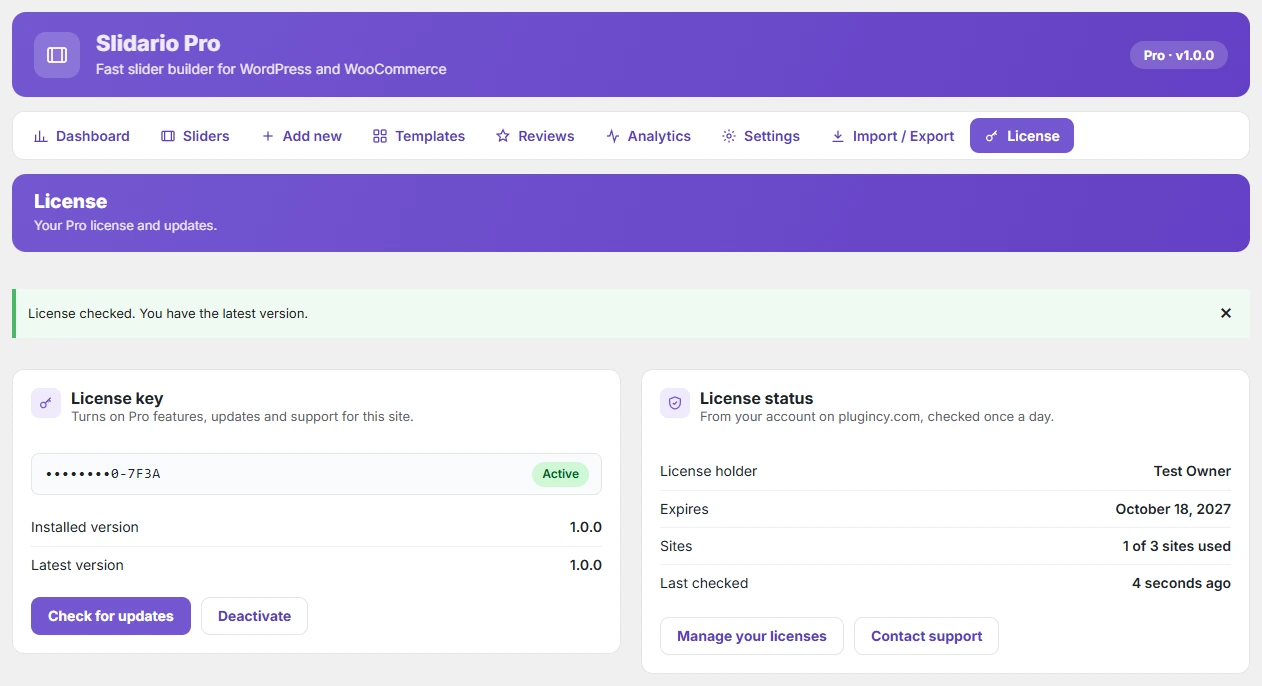
What the License page shows
| Field | Meaning |
|---|---|
| Status | Active, Expired, Disabled, Not active on this site, Not confirmed or Not valid. |
| Installed version / Latest version | Your version and the newest one on plugincy.com. |
| License holder | The name on the purchase. |
| Expires | The end date, or Never (lifetime). |
| Sites | For example 1 of 3 sites used. |
| Last checked | When plugincy.com last confirmed the license. |
Move a license to another site
Click Deactivate on the old site. That frees the site slot, and you can activate the same key on the new site. Manage your licenses opens your account on plugincy.com.
Pro features run only while the license is active. When a license expires, Pro features turn off and the free features keep working; your sliders stay. Read what happens when your Pro license ends.
Problems activating? See Pro license key errors and how to fix them.