

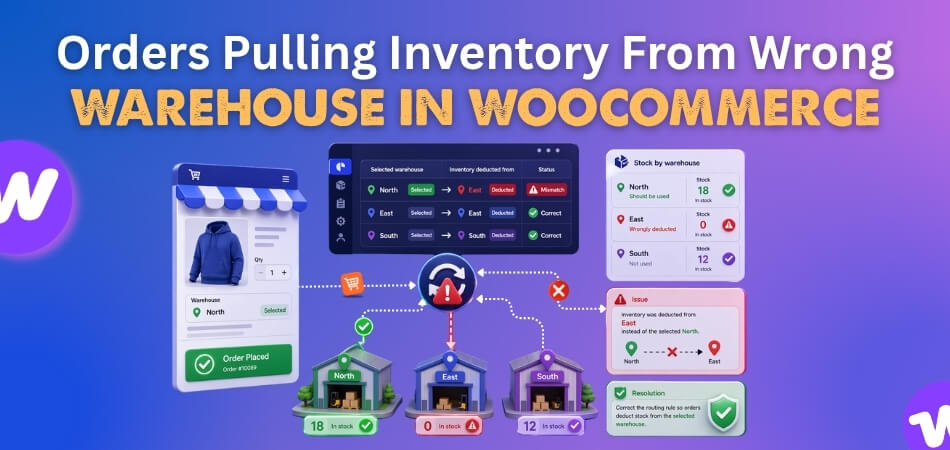
Orders pulling inventory from wrong warehouse in WooCommerce usually mean the order is being tied to the wrong fulfillment source before stock is reduced. The product may still be in stock, the order may still go through, and the deduction may still happen, but the wrong warehouse ends up carrying the inventory loss.
That kind of mistake can quietly distort warehouse balance, increase avoidable fulfillment effort, and make order handling less predictable over time.
This guide explains where warehouse assignment starts going off track, why orders keep pulling stock from the wrong location, and what helps keep deductions aligned with the right warehouse from the start.
When Order Allocation Starts Following The Wrong Warehouse
Wrong-warehouse inventory pulls usually begin before the stock change itself. In many cases, the order is already moving through WooCommerce with the wrong fulfillment path attached, so the deduction follows that path even if another warehouse should have handled it. That makes the issue easy to miss at first because checkout still works, and the order still looks normal on the surface.
What usually gives the problem away is not one obvious error, but a pattern in how warehouse usage starts drifting away from the store’s intended order flow.
- A warehouse keeps losing inventory on orders it should not be fulfilling.
- Orders skip a location that appears better suited to supply the item.
- The same warehouse keeps getting used across different order scenarios.
- Backup locations begin acting like the main fulfillment source.
- Warehouse activity no longer matches the routing logic the store is supposed to follow.
Common Patterns That Reveal A Warehouse Assignment Problem
Wrong-warehouse deductions rarely appear as one obvious checkout failure. In most stores, they show up through repeated fulfillment patterns that gradually stop matching how warehouse routing is supposed to work. Looking at those patterns makes it easier to spot when inventory is being pulled from the wrong source.
- One Warehouse Keeps Taking The Hit: The same location keeps losing stock, even when other warehouses should be handling some of those orders.
- Closer Inventory Keeps Getting Ignored: Orders continue routing past a more suitable warehouse and pull stock from a less practical location.
- Fallback Logic Starts Acting Like The Main Rule: A backup warehouse gets used so often that it stops behaving like a true fallback.
- Manual Reassignment Becomes Routine: Staff keep stepping in to correct fulfillment decisions after the order is already placed.
- Warehouse Activity Stops Matching The Fulfillment Plan: Inventory movement across locations no longer reflects how the store is supposed to route orders.
Where Warehouse Assignment Usually Starts Going Wrong
Orders pulling inventory from the wrong warehouse in WooCommerce usually start when warehouse selection is not being handled through one clear decision path. Instead of the order staying tied to the right fulfillment source from the beginning, WooCommerce may fall back to a broader stock rule, a default location, or a delayed assignment step. Here is where it starts going wrong.

Warehouse Selection Falls Back Too Easily
One of the most common problems is that the store keeps defaulting to a primary or broader stock source when the intended warehouse is not being chosen clearly enough. That fallback may seem harmless at first, but it can slowly turn one warehouse into the main deduction point even when another location should be fulfilling the order.
Automatic Routing Is Too Weak Or Missing
Some stores have multiple warehouses but no strong routing logic to decide which one should handle the order. Without that layer, warehouse selection may not reflect customer location, shipping destination, or fulfillment priority, which makes wrong-warehouse deductions more likely.
Product-To-Warehouse Assignment Is Incomplete
In some cases, the issue begins at the product level. A product may not be assigned to the correct warehouse, may inherit a broader inventory rule, or may be left without a clear warehouse connection at all. When that happens, the order can end up reducing stock from a location that was never meant to supply that item.
Stock Settings Do Not Fully Support Warehouse Logic
Even when warehouse rules are in place, stock settings can still create problems if they are not aligned with the intended inventory setup. A product may be tracked correctly in WooCommerce, but not in a way that keeps deductions tied to the right warehouse during checkout and order processing.
Warehouse Choice Happens Too Late
Sometimes the correct warehouse is identified, but only after stock has already been checked or reduced. That timing gap can send the deduction to the wrong place first, especially when the final fulfillment source is stored later in the order flow.
Sync Delays Leave Warehouse Data Behind
Stores using external inventory tools, warehouse systems, or connected stock updates can also run into timing issues. If warehouse stock does not refresh quickly enough during live order activity, WooCommerce may make a deduction decision using warehouse data that is already out of date.
Plugin Or Cache Conflicts Distort Routing
Warehouse assignment can also become unreliable when another plugin, custom rule, or caching layer interferes with the routing logic. In stores using a WooCommerce inventory management plugin, this usually becomes more noticeable when warehouse-related settings, stock behavior, or cached data stop working together as expected.
Variation-Level Warehouse Mapping Is Too Broad
Variable products add another layer of risk because one variation may be stocked differently from another. If the warehouse assignment only follows the parent product and not the selected variation, the order can still pull inventory from the wrong warehouse even when the variation itself should follow a different stock source.
Mixed Orders Are Routed Too Generally
Orders with multiple products, different fulfillment conditions, or mixed inventory sources can become harder to route correctly when one broad warehouse rule is applied to the full order. That can lead to stock being pulled from a warehouse that only fits part of the cart, not the order as a whole.
How To Fix Orders Pulling Inventory From Wrong Warehouse In WooCommerce?
Fixing wrong-warehouse deductions usually starts with tightening the point where warehouse selection becomes too broad, too late, or too disconnected from the actual fulfillment plan. In some stores, the issue begins with fallback logic. In others, it comes from weak routing, incomplete product assignment, delayed sync, or variation-level mapping that is too general. Working through the fixes in the same order as the likely causes makes the problem easier to trace and correct.
Stop Default Warehouse Fallback From Taking Over
If WooCommerce keeps falling back to a primary or broad stock source, the first fix is to narrow that behavior. A fallback warehouse should act as a backup, not as the main deduction point whenever the routing logic is unclear.
Review whether:
- a default warehouse is being used too often
- fallback logic is too broad
- first-available behavior is overriding better fulfillment rules
- backup locations are acting like the main stock source
Strengthen Automatic Warehouse Routing
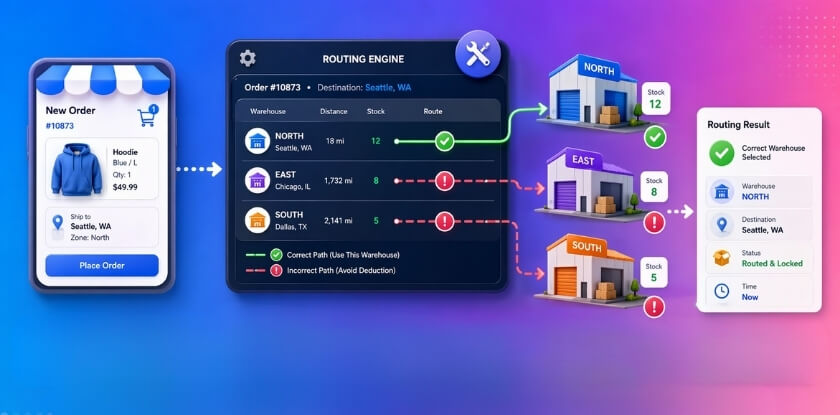
Stores with multiple warehouses need routing logic that makes a clear warehouse decision before stock is reduced. That usually means tying warehouse choice more closely to shipping destination, customer location, fulfillment priority, or another reliable order condition.
Focus on:
- how the store chooses a warehouse
- whether routing reflects real fulfillment priorities
- whether customer location affects warehouse selection
- whether the closest or best-matched warehouse is being prioritized correctly
Correct Product-To-Warehouse Assignment
If specific products are linked to the wrong warehouse, missing a warehouse assignment, or following inherited rules that do not reflect the real stock source, the order can keep deducting from the wrong location. Product-level mapping should match the warehouse that is actually meant to fulfill the item.
Check for:
- missing warehouse assignments
- inherited mapping that is too broad
- product rules that do not match real inventory locations
- catalog segments that route differently from individual product settings
Align Stock Settings With Warehouse Logic
Warehouse routing works better when stock settings support the same structure. If stock is being tracked in WooCommerce but not in a way that keeps deduction tied to the right warehouse, the order can still reduce inventory from the wrong place.
Review:
- whether stock is managed consistently on affected products
- whether stock tracking matches the warehouse setup
- whether product-level settings support location-based deduction
- whether stock is being treated too broadly for the routing model in use
Finalize Warehouse Choice Before Deduction Starts
If the warehouse decision happens too late, stock may already be reduced from the wrong place before the intended fulfillment source is fully attached to the order. The fix is to make warehouse selection happen earlier and keep that decision locked in before deduction runs.
This is easier to improve when:
- warehouse choice is stored before stock reduction
- post-payment reassignment is limited
- deduction timing matches the final routing decision
- test orders confirm that the chosen warehouse stays consistent
Improve Real-Time Sync Between Systems
If stock is connected to external inventory tools, warehouse systems, or APIs, delays between those systems and WooCommerce can cause deduction decisions to rely on outdated warehouse data. Sync behavior needs to stay close enough to live order activity to support accurate warehouse selection.
This is worth reviewing when:
- warehouse data updates slowly during checkout
- connected systems overwrite newer order decisions
- stock changes appear at different times across systems
- high-volume order periods expose more routing mistakes
Remove Plugin Or Cache Interference
Wrong-warehouse deductions can continue even after rule changes if another plugin, custom script, or cache layer is still affecting warehouse logic. In those cases, the store may keep using stale routing data or conflicting assignment rules.
A useful check includes:
- testing plugin conflicts one by one
- reviewing custom warehouse logic
- clearing WooCommerce transients and cache
- confirming warehouse-sensitive data is not being reused from older sessions
Tighten Variation-Level Warehouse Mapping
If variable products rely too heavily on parent-level routing, the selected variation may still pull stock from the wrong warehouse. The safer approach is to make sure each variation follows the warehouse logic that matches where that specific option is actually stocked.
Look closely at:
- variation-level warehouse assignments
- parent-level rules that override variation logic
- variations stocked differently across locations
- deduction behavior for high-risk options
Route Mixed Orders More Precisely
Orders that combine different products, locations, or fulfillment conditions may need more specific routing than one broad warehouse rule can provide. If the full order follows a general warehouse decision, some items may still reduce stock from the wrong place.
This matters most when:
- carts include products from different warehouse groups
- pickup and shipping conditions are mixed
- one warehouse fits only part of the order
- priority rules are too broad for item-level routing
What You’ll Notice After Fixing
Once the main routing problems are corrected, warehouse assignment usually becomes much easier to follow across checkout, stock deduction, and fulfillment. Orders stop drifting toward the wrong location, and warehouse activity starts reflecting the routing logic your store actually intends to use.
Here is how the difference usually looks before and after the fix:
| Area | Before The Fix | After The Fix |
| Warehouse Selection | Orders keep falling back to the wrong warehouse | Orders follow the intended warehouse more consistently |
| Stock Deduction | Inventory reduces from an unrelated or lower-priority location | Inventory reduces from the warehouse meant to fulfill the order |
| Fulfillment Flow | Warehouse choice changes unexpectedly during processing | Warehouse assignment stays more stable through the order flow |
| Product Mapping | Some items pull stock from broad or inherited warehouse rules | Products follow clearer warehouse-level assignment logic |
| Mixed Orders | One broad rule pushes the full order to the wrong location | Routing handles more complex order scenarios more accurately |
| Variation Handling | Selected variations may still pull from the wrong warehouse | Variation-level stock follows the intended warehouse more closely |
| Warehouse Usage | One location gets overused while others stay underused | Inventory movement aligns better with the real fulfillment plan |
| Manual Correction | Staff need to step in often after the order is placed | Fewer orders need warehouse reassignment or stock correction |
Native WooCommerce Limitations Behind Wrong-Warehouse Inventory Pulls
WooCommerce can manage products, orders, and standard stock well, but warehouse-level order routing becomes harder once a store needs inventory to be deducted from the right fulfillment location every time. That is where the default setup starts to show its limits.
To understand why wrong-warehouse deductions keep happening, it helps to look at the built-in gaps below.
- One Shared Inventory View: WooCommerce is designed around a broader stock structure, so warehouse-specific deduction logic does not stay deeply separated by default.
- No Strong Native Warehouse Routing: Orders are not automatically assigned through a built-in warehouse decision system based on fulfillment priority, proximity, or shipping logic.
- Limited Order-To-Warehouse Connection: The platform can process the order successfully without keeping the warehouse choice tightly connected to the final stock deduction.
- More Pressure On Default Rules: When warehouse logic is not clearly defined, the system is more likely to rely on broad fallback behavior instead of a precise fulfillment source.
- Variation Routing Gets Harder Faster: Once different variations are stocked across different warehouses, the default setup becomes harder to manage cleanly.
- Mixed Fulfillment Needs More Structure: Orders with different products, shipping conditions, or warehouse paths need more routing control than the core setup is built to provide.
- External Logic Becomes More Important: Stores often end up depending on added rules, plugins, or custom workflows to make warehouse assignment behave the way fulfillment actually works.
How Smarter Warehouse Assignment Improves WooCommerce Fulfillment?
Once warehouse routing becomes more consistent, fulfillment starts working in a more stable and predictable way across the store. That is where WooCommerce multi locations inventory management becomes more useful, especially for stores trying to keep warehouse choice, stock deduction, and order handling aligned as order volume grows.
Here are some of the biggest improvements a smarter setup can bring:
- Clearer warehouse decisions during order flow.
- More accurate stock deduction from the intended source.
- Fewer manual warehouse corrections after checkout.
- Better alignment between routing and fulfillment.
- More consistent handling across multiple stock locations.
- Stronger control as warehouse complexity increases.
Frequently Asked Questions
Wrong-warehouse deductions in WooCommerce often lead to a second set of questions once the main routing issue becomes clear. These FAQs focus on related concerns store owners usually have when they want smoother warehouse decisions, more dependable fulfillment flow, and fewer location-based surprises as orders grow.
Can The Same Product Be Fulfilled From Different Warehouses At Different Times?
Yes. That can happen when the store uses multiple stock locations and the fulfillment logic allows the product to be sourced from more than one warehouse, depending on availability, routing rules, or order conditions.
Why Does This Issue Sometimes Affect Only Certain Orders?
Some wrong-warehouse deductions only appear under specific conditions, such as a certain shipping region, product type, variation, or checkout path. That is why the problem can seem inconsistent until a pattern starts to emerge.
Does Warehouse Routing Need To Be Reviewed After Store Changes?
Yes. Changes to shipping setup, plugin behavior, checkout flow, or inventory rules can all affect how warehouse assignment works. Reviewing routing after major store changes helps catch new issues earlier.
Can Order Volume Make Warehouse Assignment Problems More Noticeable?
Yes. As order volume increases, small routing weaknesses become easier to spot because the same deduction mistake starts repeating more often across live orders.
Is This More Important For Stores With Regional Fulfillment?
Yes. Stores that fulfill orders from different regions usually depend more heavily on accurate warehouse assignment, since the wrong routing decision can affect speed, stock balance, and fulfillment efficiency more quickly.
Final Thoughts
Orders pulling inventory from wrong warehouse in WooCommerce can look like a small fulfillment mistake at first, but it usually creates a chain reaction behind the scenes. One location gets drained faster than expected, another sits underused, and teams end up spending more time correcting order flow than they should.
Better warehouse control changes that experience completely. When orders pull stock from the location that actually makes sense, fulfillment feels cleaner, stock movement becomes easier to follow, and day-to-day operations stop fighting against the system. That kind of consistency matters far more than fixing one order at a time.
