

Want to increase your WooCommerce sales using smart pricing strategies? Discount rules for WooCommerce help you apply automatic offers like bulk discounts, cart-based deals, and user-specific pricing without manual work. These rules make your store more attractive and encourage customers to buy more in a single order.
Instead of relying only on basic coupons, store owners now prefer dynamic discount systems that adjust pricing based on conditions like quantity, cart value, or customer behavior. If you want better conversions, higher average order value, and a smoother shopping experience, understanding and using discount rules is the next step.
Quick Answer
Discount rules for WooCommerce allow store owners to apply automatic pricing conditions such as bulk discounts, cart-based offers, and user-specific pricing. These rules work dynamically based on factors like quantity, cart value, or product category, helping increase conversions and average order value without requiring customers to manually apply coupons.
What “Discount Rules for WooCommerce” Actually Mean
Before going deeper, it’s important to clearly understand what this term really means in a practical store setup. Discount rules are not just simple coupons. They are automated pricing conditions that apply discounts based on specific triggers, without requiring manual input from the customer.
Automatic Pricing Based on Conditions
Discount rules work by setting conditions like quantity, cart value, or product type. For example, if a customer adds 3 items to the cart, the system can automatically apply a 15% discount. This removes friction and improves the buying experience because users do not need to search for or enter coupon codes.
Dynamic Behavior Instead of Static Coupons
Unlike traditional coupons, discount rules are dynamic. They change based on customer actions. For instance, the discount can increase as the cart value grows, which encourages users to add more items and boosts your average order value naturally.
Multiple Rule Types in One Store
You can run different discount rules at the same time. A store might offer bulk discounts on one category, cart-based discounts on another, and special pricing for logged-in users. This flexibility helps store owners create targeted offers for different customer segments.
Fully Automated Sales Strategy
Once configured, discount rules run automatically in the background. This means store owners can focus on marketing and operations while the pricing strategy continuously works to increase conversions and revenue.
Discount rules are automated, flexible pricing systems that replace manual coupons and help create smarter, conversion-focused WooCommerce stores.
Types of Discount Rules in WooCommerce
Now that you understand the concept, the next step is to explore the different types of discount rules you can apply. Each type serves a specific purpose and helps target different buying behaviors, which is essential for maximizing conversions.
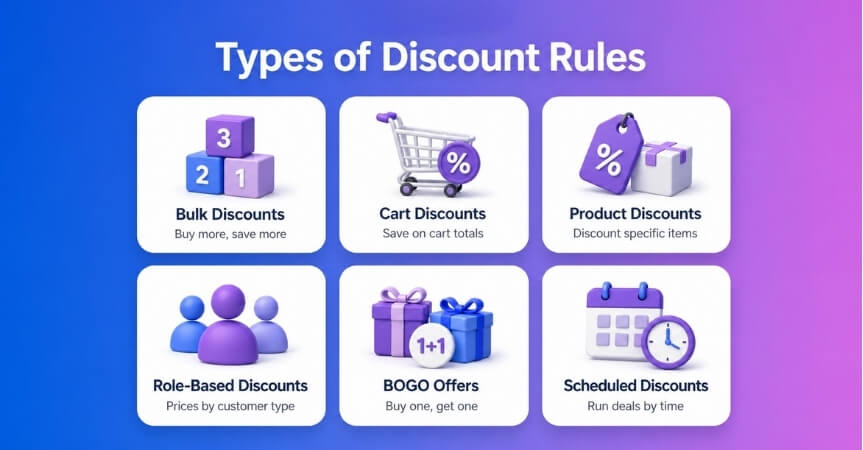
Bulk / Quantity-Based Discounts
This is one of the most commonly used discount types. Customers get a lower price when they purchase more items. For example, buy 2 items and get 10% off, buy 5 and get 20% off. This strategy increases average order value by encouraging larger purchases.
Cart-Based Discounts
These discounts are applied based on the total cart value. For instance, spend $100 and get $10 off or free shipping. This method pushes customers to add more products to reach the required threshold, making it highly effective for boosting revenue.
Product-Specific Discounts
Store owners can apply discounts to specific products or categories. For example, offering a discount only on seasonal items or slow-moving inventory helps clear stock faster while maintaining control over overall pricing.
User Role-Based Discounts
Different customer groups can receive different pricing. Wholesale buyers, subscribers, or logged-in users may get exclusive discounts. This helps build customer loyalty and supports B2B pricing strategies within WooCommerce.
Buy One Get One (BOGO) Offers
BOGO deals are powerful for increasing sales volume. For example, buy one product and get another free or at a discounted rate. These offers create urgency and make deals feel more valuable to customers.
Time-Based / Scheduled Discounts
These discounts run during specific time periods, such as flash sales or holiday promotions. Limited-time offers create urgency and encourage faster purchasing decisions from customers.
Using the right mix of discount rule types helps you target different customer behaviors and maximize both conversions and overall store revenue.
Where Default WooCommerce Falls Short
Now that you know the types of discount rules, it’s important to understand why many store owners start searching for this keyword in the first place. The limitation usually comes from default WooCommerce features, which are too basic for real growth.
Limited Coupon Functionality
WooCommerce mainly relies on coupons, which require users to manually enter codes. This creates friction in the checkout process. Many customers abandon their cart simply because they forget or cannot find a valid coupon code, which directly impacts conversions.
No Dynamic Pricing Support
By default, WooCommerce cannot adjust prices based on conditions like quantity or cart value. You cannot create tiered pricing or automatic discounts that respond to user behavior. This makes it difficult to implement advanced sales strategies that modern eCommerce stores rely on.
Lack of Automation
There is no built-in system to automatically apply discounts in the background. Store owners have to manually create and manage multiple coupons, which becomes messy and hard to scale as the store grows.
No User-Specific Pricing Control
WooCommerce does not allow you to easily set different prices for different user roles. If you want to offer special pricing for wholesalers or loyal customers, you need additional functionality that is not available by default.
Poor Experience for Advanced Offers
Offers like BOGO, cart conditions, or combined discount rules are not supported natively. Trying to implement these manually can lead to errors, conflicts, and a confusing user experience.
Default WooCommerce is suitable for basic discounts, but it lacks the flexibility, automation, and control needed for advanced pricing strategies that drive real growth.

Common Use Cases of Discount Rules in WooCommerce
Now that you understand the limitations of default WooCommerce, let’s look at how discount rules are actually used in real stores. These use cases will help you see where and how you can apply them for maximum impact.
Increase Average Order Value (AOV)
Store owners often use cart-based or quantity discounts to push customers to spend more. For example, offering “Spend $100 and get 15% off” encourages users to add extra items to unlock the deal, which directly increases total revenue per order.
Clear Slow-Moving Inventory
Discount rules can be applied to specific products that are not selling well. By offering limited-time discounts or bundle deals, store owners can quickly move old stock without affecting the pricing of best-selling products.
Run Seasonal or Flash Sales
Time-based discount rules are perfect for campaigns like Black Friday or Eid sales. These offers create urgency and drive quick decisions, helping stores generate high sales in a short period.
Reward Loyal or Logged-In Customers
User role-based discounts allow you to give special pricing to repeat buyers or members. This builds long-term customer relationships and increases retention by making customers feel valued.
Promote Specific Categories or Products
You can apply discounts only to selected categories like clothing or electronics. This helps you push high-margin or strategic products while keeping full control over your pricing strategy.
Bundle and Cross-Sell Products
Offers like “Buy 2 get 1 free” or “Buy product A and get product B at 50% off” encourage customers to purchase related items together. This improves both sales volume and product visibility.
These real-world use cases show how discount rules are not just features but powerful strategies to increase revenue, improve customer experience, and optimize inventory management.
Step-by-Step Setup: How to Create Discount Rules in WooCommerce
Now that you’ve seen real use cases, the next step is implementation. This section walks you through how to actually set up discount rules so they work automatically and correctly in your store.
Step 1: Choose the Right Plugin
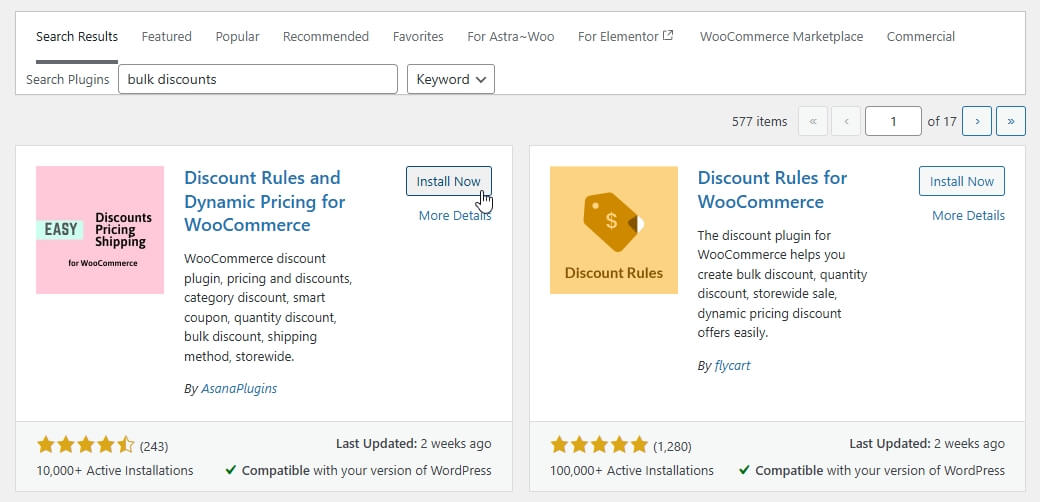
Since default WooCommerce is limited, you need a plugin that supports dynamic pricing and automation. Look for features like bulk discounts, cart conditions, and user-based pricing. Choosing the right tool is critical because it affects performance, flexibility, and long-term scalability.
Step 2: Install and Activate the Plugin
Go to your WordPress dashboard, navigate to Plugins, then add and activate your chosen discount rules plugin. After activation, you will usually see a new menu where all pricing rules can be managed from one place.
Step 3: Create a New Discount Rule
Inside the plugin dashboard, click on “Add New Rule.” Start by selecting the type of discount you want to create, such as bulk pricing, cart-based discount, or product-specific offer. This defines how the rule will behave.
Step 4: Set Conditions (The Core Logic)
Define when the discount should apply. Conditions can include:
- Minimum quantity
- Cart total value
- Specific products or categories
- User roles
These conditions control the automation and ensure the right customers get the right offers.
Step 5: Configure Discount Value
Choose how the discount will be applied. You can set:
- Percentage discount (e.g., 20% off)
- Fixed amount (e.g., $10 off)
- Free product or BOGO offer
This step directly impacts how attractive your offer will be to customers.
Step 6: Apply Display & Priority Settings
Decide how the discount appears on the front end. Some plugins allow you to show pricing tables, discount badges, or messages on product pages. Also, set rule priority if multiple discounts exist to avoid conflicts.
Step 7: Test Before Going Live
Always test your discount rules by adding products to the cart and checking if the discount applies correctly. This helps avoid issues like incorrect pricing or rules not triggering properly.
A proper setup ensures your discount rules run smoothly, apply correctly, and deliver the intended impact on conversions and customer experience.
Best Plugin to Create Discount Rules for WooCommerce
Now that you know how to set up discount rules, the next important step is choosing the right plugin. This decision directly affects your store’s performance, flexibility, and how easily you can manage advanced pricing strategies.
Dynamic Pricing & Discount Rules Plugins (What to Look For)
A good plugin should support multiple discount types like bulk pricing, cart conditions, BOGO offers, and user-based pricing. It should also provide a simple interface so you can create and manage rules without technical complexity.

Key Features You Must Have
Before selecting any plugin, make sure it includes these essential features:
- Automatic discount application: Discounts should apply instantly without requiring coupon codes. This reduces friction and improves conversion rates during checkout.
- Advanced rule conditions: You should be able to set conditions based on quantity, cart value, product category, and user roles. This gives full control over your pricing strategy.
- Multiple rules with priority control: Running multiple campaigns at once is common. The plugin must allow rule prioritization to prevent conflicts and ensure the correct discount is applied.
- Real-time pricing updates (AJAX support): Customers should see price changes instantly when they update quantities or cart values. This improves user experience and builds trust.
- Performance optimization: The plugin should not slow down your store, especially when handling large product catalogs or multiple rules.
Why a Smart Plugin Matters?
Choosing the right plugin is not just about features. It directly impacts how your customers interact with pricing. Smooth, automatic discounts increase trust, reduce confusion, and encourage users to complete purchases faster.
Recommended Approach for Maximum Results
Instead of using multiple plugins, go with a single solution that can handle:
- Dynamic pricing
- Cart rules
- User-based discounts
- Real-time updates
This keeps your store lightweight and avoids compatibility issues.
Pro Tip
Combine discount rules with quick checkout for WooCommerce to reduce friction even further. When users see automatic discounts and can complete checkout quickly, conversion rates improve significantly.
The right discount rules plugin acts as a sales engine for your store by automating pricing, improving user experience, and maximizing conversions without manual effort.
WooCommerce Discount Rules Plugins Comparison Table
Before choosing a plugin, it’s important to compare options based on real features, not just popularity. This helps you pick a solution that fits your store size, pricing strategy, and long-term growth plan.
Quick Comparison of Popular Discount Rules Plugins
| Plugin Name | Dynamic Pricing | Cart Rules | BOGO Offers | User Role Pricing | AJAX Support | Ease of Use | Best For |
| Dynamic Pricing & Discounts Plugin (Generic) | Yes | Yes | Yes | Yes | Limited | Medium | Basic to mid-level stores |
| WooCommerce Discount Rules (Flycart) | Yes | Yes | Yes | Yes | No | Easy | Beginners & small stores |
| YITH Dynamic Pricing & Discounts | Yes | Yes | Yes | Yes | Limited | Medium | Feature-rich setups |
| Advanced Dynamic Pricing (Algol+) | Yes | Yes | Yes | Yes | No | Complex | Advanced users |
| Custom Lightweight Solution (Recommended Approach) | Yes | Yes | Yes | Yes | Yes | Easy | High-performance stores |
Key Takeaways from Comparison
- Most plugins support basic discount rules, but not all offer real-time updates or smooth UX.
- AJAX support is a major advantage, as it improves customer experience by showing instant price changes.
- Ease of use matters, especially for store owners who want quick setup without technical issues.
- Performance should be a priority, especially for large WooCommerce stores with many products.
How to Choose the Right Plugin
Instead of picking the most popular option, choose based on your needs:
- Small stores → Go for simple and easy-to-use plugins
- Growing stores → Choose flexible plugins with advanced rule conditions
- Large stores → Focus on performance, AJAX updates, and scalability
Strategic Insight (SEO + Conversion)
Users searching for “discount rules for WooCommerce” often compare plugins before making a decision. Including a comparison table like this helps:
- Increase time on page
- Improve trust and authority
- Boost conversion (plugin installs or purchases)
A clear comparison helps you avoid wrong choices and select a discount rules plugin that supports both your current needs and future growth.
Common Mistakes & Troubleshooting in WooCommerce Discount Rules
After setting up discount rules, many store owners face issues that prevent them from working properly. Understanding these common mistakes will help you fix problems faster and avoid revenue loss.
Discounts Not Applying Correctly
One of the most common issues is when discounts do not trigger as expected. This usually happens بسبب incorrect conditions like wrong product selection, cart value mismatch, or missing rule triggers. Always double-check your rule logic and test different scenarios to ensure it works properly.
Conflicting Multiple Rules
Running multiple discount rules without priority settings can create conflicts. For example, two rules may try to apply at the same time, causing incorrect pricing. Setting rule priority ensures only the correct discount is applied based on your strategy.
Cache or AJAX Issues
Sometimes discounts appear broken due to caching problems or lack of AJAX updates. If your store uses caching plugins or CDN, it may prevent real-time price updates. Make sure your discount plugin supports AJAX and exclude cart/checkout pages from cache.
Incorrect User Role Conditions
If you are using role-based pricing, ensure that the correct user roles are assigned. Many times, discounts fail because the user is not logged in or the role condition is not properly configured.
Overlapping Coupon and Rule Logic
Using both coupons and automatic discount rules together can create confusion. Some plugins may override each other, leading to incorrect pricing. It’s better to use a clear strategy, either rule-based discounts or coupons, to avoid conflicts.
Not Testing Before Launch
Many store owners skip testing and directly go live. This leads to unexpected issues like wrong discount values or rules not triggering. Always test with different products, quantities, and user roles before making it live.
Quick Fix Checklist (Action-Based)
- Verify rule conditions (products, cart value, quantity)
- Set rule priority properly
- Disable cache on cart and checkout pages
- Test with logged-in and guest users
- Avoid mixing multiple discount systems unnecessarily
Most discount rule issues come from misconfiguration or conflicts. A proper setup and testing process ensures smooth performance and prevents revenue loss.
FAQ: Discount Rules for WooCommerce
What are discount rules in WooCommerce?
Discount rules in WooCommerce are automated pricing conditions that apply discounts based on factors like quantity, cart value, product type, or user role. Unlike coupons, these rules work automatically without requiring users to enter any code during checkout.
How do I create discount rules in WooCommerce?
You can create discount rules by using a dynamic pricing plugin. After installing the plugin, define the rule type, set conditions such as cart value or quantity, and configure the discount amount. Once saved, the rule will apply automatically based on the conditions you set.
Can WooCommerce apply discounts automatically?
By default, WooCommerce has limited automatic discount capabilities. For advanced automatic discounts like bulk pricing or cart-based rules, you need a plugin that supports dynamic pricing and conditional logic.
What is the best plugin for WooCommerce discount rules?
The best plugin depends on your needs, but you should look for features like dynamic pricing, cart rules, user role pricing, and real-time updates. A good plugin should be easy to use, fast, and capable of handling multiple discount rules without conflicts.
Why are my discount rules not working?
Discount rules may fail due to incorrect conditions, rule conflicts, caching issues, or user role mismatches. Always check rule settings, priority levels, and test your setup to ensure everything works as expected.
Do discount rules increase sales?
Yes, discount rules can significantly increase sales by encouraging customers to buy more, improving average order value, and creating urgency through targeted offers like bulk discounts and limited-time deals.
Final Thoughts: How to Win with Discount Rules for WooCommerce
Discount rules for WooCommerce are more than simple offers. They help automate pricing, improve customer experience, and increase sales when used strategically.
Instead of offering random discounts, focus on clear goals like increasing average order value, clearing inventory, or rewarding loyal customers. Keep the buying process simple with automatic discounts, test your rules regularly, and optimize based on performance.
When combined with faster checkout, product filters, and clear product visibility, discount rules can become a powerful growth tool for your WooCommerce store.
