

Filters can change how a WooCommerce store feels almost immediately, but not every plugin approaches that job the same way. Some are built to keep product filtering closely tied to the shop flow, while others give more room to work with custom data, layered filtering, and more advanced catalog setups.
In this Filter Everything vs. Dynamic AJAX Product Filters for WooCommerce comparison, focus is on where each plugin fits best, how their filtering approach differs, and what that means for usability, SEO, scalability, and long-term store management. Instead of treating them like two interchangeable options, this guide looks at which one makes more sense for the way your store actually works.
Who This Comparison Is For
This comparison is useful for store owners who want clarity before committing to a filtering solution. It is especially relevant for:
- Stores planning catalog growth
- SEO-driven WooCommerce sites
- Performance-focused stores
- Non-technical owners who want predictable behavior
- Agencies managing multiple WooCommerce projects
Quick Summary
Both plugins are built for serious WooCommerce filtering, but they do not feel the same in practice. Dynamic AJAX Product Filters for WooCommerce stay more focused on helping shoppers narrow products quickly inside the shop flow. Filter Everything gives more control when filtering needs to go deeper into custom data, layered logic, and more advanced catalog setups.
Dynamic AJAX Product Filters for WooCommerce is usually the easier fit for stores that want filtering to stay practical and closely tied to product discovery. Filter Everything makes more sense when the store needs broader filtering depth and more control over how filters behave behind the scenes.
Filter Everything vs. Dynamic AJAX Product Filters: Core Features Comparison
These two are closer in purpose than some of the earlier comparisons, but they still lean in different directions. Dynamic AJAX Product Filters for WooCommerce keeps the emphasis on product filtering inside the shop flow, while Filter Everything gives more room for deeper filtering logic and broader control over WooCommerce data.
| Core Feature | Dynamic AJAX Product Filters for WooCommerce | Filter Everything |
| AJAX Filtering | Yes | Yes |
| Indexable Filter URLs | Yes | Yes |
| Attribute Filtering | Yes | Yes |
| Price Filtering | Yes | Yes |
| Category and Taxonomy Filtering | Yes | Yes |
| Stock Status Filtering | Yes | Yes |
| Rating Filtering | Yes | Yes |
| Custom Field Filtering | Yes | Yes |
| Variable Product Support | Yes | Yes |
| Multi-Filter Logic | Yes | Yes |
| Filter Placement Flexibility | Widget, shortcode, and block support | Broad filter placement options |
| SEO Control Around Filter Pages | Stronger shop-focused direction | Stronger advanced filter-control direction |
| Large Catalog Handling | Strong focus | Strong, with deeper filtering flexibility |
| WooCommerce-Centered Simplicity | Stronger | More setup-heavy |
What Problem Do These Two Product Filter Plugins Solve?
Shoppers lose patience quickly when a catalog feels too broad to browse. Both plugins are built to fix that by helping people narrow products faster instead of bouncing between category pages and endless listings.
- Dynamic AJAX Product Filters for WooCommerce is made for stores that want product filtering to feel smoother inside the usual WooCommerce shop flow.
- Filter Everything solves the same core problem too, but it goes further when the catalog depends on more detailed filtering rules, custom fields, and deeper control over how results are refined.
Plugin Overview – Where Each Plugin Fits Best
These two plugins solve a similar store problem, but they fit different kinds of WooCommerce setups once the catalog and filtering needs get more demanding.
Dynamic AJAX Product Filters for WooCommerce
Dynamic AJAX Product Filters for WooCommerce fit stores that want filtering to stay closely connected to the shopping journey. It works best when the goal is to help customers refine products quickly on shop, category, and archive pages without adding too much complexity behind the scenes. For stores looking for a practical WooCommerce Ajax product filter setup, it offers a more direct fit inside the usual WooCommerce browsing flow.

Key Features:
- Real-time AJAX filtering without page reloads
- Attribute, taxonomy, category, and tag-based filtering
- Price range filtering with instant product updates
- Stock status, sale status, and rating filters
- Custom field and metadata-based filtering
- Multi-filter support across several product conditions
- Widget, shortcode, and block-based placement
- Indexable filter URLs with permalink control
Strengths:
- Feels more natural inside the WooCommerce shop flow
- Handles product-focused filtering cleanly
- Gives stronger control over filtered page behavior
- Works well for larger product catalogs
- Easier to manage in a standard WooCommerce setup
Considerations:
- Best suited to stores centered on product archive filtering
- More aligned with WooCommerce than broader site-wide filtering needs
- Makes the most sense when product discovery is the main priority
Real WooCommerce Use Case
Clothing stores, electronics catalogs, furniture shops, and parts-based stores often need customers to narrow products by price, variation, stock, rating, or attributes without slowing down the buying flow. Dynamic AJAX Product Filters for WooCommerce fit naturally in that kind of setup because filtering stays tied to the way shoppers already browse the store.
Filter Everything
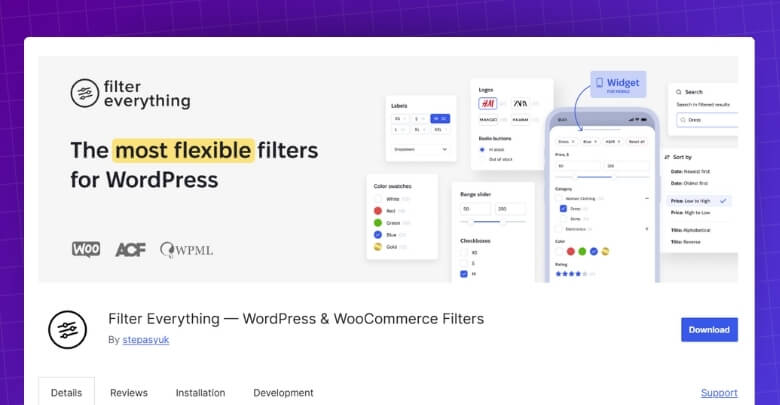
Filter Everything fits stores that need more control over how filtering works under the surface. It is better suited to WooCommerce catalogs where custom fields, variable products, advanced filter logic, and SEO-aware filter behavior are part of the setup rather than something optional.
Key Features:
- AJAX filtering across WooCommerce products
- Filters for attributes, taxonomies, categories, and tags
- Price slider and range-based filtering
- Custom field and meta-based filtering
- Variable product filtering support
- SEO-friendly filter URLs
- Advanced filter logic and layered filtering support
- Broad compatibility with WooCommerce data structures
Strengths:
- Gives deeper control over filter behavior
- Better suited to stores using custom fields heavily
- Handles more advanced filtering scenarios well
- Strong fit for layered filtering setups
- Offers more flexibility behind the scenes
Considerations:
- Best suited to stores with more detailed filtering needs
- Makes more sense when filter logic matters as much as front-end usability
- Stronger fit for setups that need more than standard shop-page filtering
Real WooCommerce Use Case
Large catalogs with detailed product specs, technical attributes, layered navigation, or custom-field-driven filtering can make better use of Filter Everything. It fits stores where narrowing products is not just about basic shop filters, but about giving shoppers more precise control over how results are filtered.
Comparing the Pricing of Two Filter Plugins
Price matters here, but not just in the usual entry-cost sense. These two plugins are sold in slightly different ways, and that changes the value discussion depending on whether you want yearly flexibility or a one-time purchase.
| Pricing Area | Dynamic AJAX Product Filters for WooCommerce | Filter Everything |
| Pricing Model | Yearly and lifetime plans | Lifetime plans only |
| Single-Site Option | Yes | Yes |
| Multi-Site Option | Yes | Yes |
| Unlimited-Site Option | Yes | Yes |
| Lower Entry Cost | Yearly plan starts lower | Lifetime plan starts higher |
| Long-Term Value | Stronger for yearly or lifetime choice | Stronger for one-time purchase value |
| Best Fit | Stores wanting more plan flexibility | Stores wanting lifetime-only licensing |

Ajax Product Filtering Types Comparison
Filter depth starts to matter once a catalog becomes more detailed. Some stores only need strong product filters that keep browsing simple. Others need more freedom in how filters are built, displayed, and combined across a larger set of product data.
| Filter Type Area | Dynamic AJAX Product Filters for WooCommerce | Filter Everything |
| Category Filters | Yes | Yes |
| Tag Filters | Yes | Yes |
| Attribute Filters | Yes | Yes |
| Price Filters | Yes | Yes |
| Rating Filters | Yes | Yes |
| Stock Status Filters | Yes | Yes |
| Sale Status Filters | Yes | Yes |
| Custom Taxonomy Filters | Yes | Yes |
| Custom Field Filters | Yes | Yes |
| Meta-Based Filtering | Yes | Yes |
Performance, User Experience, and Scalability
Speed shows up in small ways first. Products refresh a little faster, filters feel easier to use, and browsing takes less effort. Then the bigger difference appears when the catalog grows, and the store has to keep that experience consistent.
| Comparison Area | Dynamic AJAX Product Filters for WooCommerce | Filter Everything |
| AJAX Response Flow | Built around instant product updates | AJAX filtering supported |
| Shop-Page Browsing Flow | More direct and shop-centered | Strong, but more filtering-depth oriented |
| Large Catalog Handling | Stronger performance-focused positioning | Good, but more dependent on setup and filter complexity |
| Mobile Filtering Experience | Fully responsive and mobile-optimized | Works on mobile, with mobile filter button support via shortcode |
| Multi-Filter Experience | Smoother for straightforward product discovery | Better for more layered filtering logic |
| Scalability Fit | Better aligned with growing product catalogs | Better aligned with advanced filtering scenarios |
| Day-to-Day User Flow | Feels lighter in standard WooCommerce stores | Feels more powerful where deeper filtering is needed |
SEO and Indexable Filter URL Capabilities
This is where two strong filter plugins start to feel less similar. Both can help shoppers refine products quickly, but the SEO side depends on how safely filter URLs are created, controlled, and exposed to search engines.
| SEO Area | Dynamic AJAX Product Filters for WooCommerce | Filter Everything |
| Clean Filter URL Handling | Stronger shop-focused control | Strong SEO-friendly URL support |
| Indexable Filter URLs | Yes | Yes |
| Index / Noindex Control | Clearer emphasis | SEO rules available |
| Faceted Search Safety | Better aligned with selective indexing | Strong, but depends more on rule setup |
| Crawl Budget Optimization | Easier to keep tighter around filtered product pages | Good, but broader rule flexibility needs planning |
| Duplicate URL Risk | Lower when index settings are used carefully | Lower with proper SEO rule setup |
| Filtered Page Shareability | Strong | Strong |
| SEO Metadata for Filter Pages | Limited emphasis | Stronger built-in SEO rule support |
Setup Complexity and Learning Curve
Ease of setup influences long-term reliability. Plugins that require fewer adjustments reduce the risk of misconfiguration. Dynamic AJAX Product Filters for WooCommerce offers a faster setup with fewer tuning requirements. Filter Everything may require more configuration, especially when used across multiple content types.
| Setup Area | Dynamic AJAX Product Filters for WooCommerce | Filter Everything |
| First-Time Setup | More direct | More structured |
| Admin Workflow | Product-filter focused | Filter-set focused |
| Shop Page Fit | More natural | Needs more planning |
| Custom Field Setup | Included | More central to the workflow |
| SEO Rule Setup | Simpler | Deeper, but more involved |
| Day-to-Day Management | Easier for standard stores | Better for advanced filtering setups |
| Learning Curve | Lower | Moderate |
| Best Fit | Stores wanting a cleaner setup path | Stores needing more control from the start |
Theme and Plugin Compatibility
Filters do not sit in isolation for long. They have to work with the theme, fit around other plugins, and still behave properly once builders, translations, or custom store elements are part of the setup.
| Compatibility Area | Dynamic AJAX Product Filters for WooCommerce | Filter Everything |
| WooCommerce Theme Fit | Broader standard-theme fit | Works with any theme and builder |
| Elementor Support | Yes | Yes |
| Gutenberg Support | Yes | Yes |
| Divi Support | Not highlighted as a main integration | Yes |
| Other Builder Support | More limited in official positioning | Broader builder coverage |
| Widget / Shortcode Placement | Yes | Yes |
| Multilingual Compatibility | Not strongly highlighted on the main page | Stronger multilingual ecosystem fit |
| Custom Content Compatibility | More shop-centered | Broader |
Support and Documentation Comparison
Most plugin comparisons stop at features, but support usually matters later, when something does not work the way the store needs it to. That is where the difference between a more straightforward plugin and a more layered one starts to show.
| Support Area | Dynamic AJAX Product Filters | Filter Everything |
|---|---|---|
| Documentation Quality | Clear and structured | Moderate |
| Technical Guidance | Strong | Limited |
| Support Responsiveness | High | Varies |
| Suitability for Non-Technical Users | Good | Moderate |
Additional SEO & Plugin Compatibility Comparison Table
Things usually look fine until filters have to work alongside caching, tracking, custom URLs, and the rest of the store setup. That is where smaller technical differences start to matter, especially for stores that care about stable SEO behavior and fewer compatibility surprises.
| Technical Area | Dynamic AJAX Product Filters for WooCommerce | Filter Everything |
| URL Parameter Handling | Query string, permalink, or AJAX modes | SEO-friendly clean URLs |
| Cache Plugin Compatibility | Not strongly documented as a main feature | Explicitly supports popular caching plugins |
| CDN Compatibility | More standard WooCommerce-style fit | More predictable when paired with cache-friendly setups |
| Analytics Tracking Stability | Clearer when filtered URLs are preserved | Stable, but depends more on URL rule setup |
| Indexable Filter Pages | Yes | Yes |
| SEO Metadata Control | More limited emphasis | Stronger custom SEO rule support |
| Duplicate URL Risk | Lower when index settings are managed carefully | Lower when SEO rules are configured properly |
| Faceted Search Safety | Stronger fit for selective indexing | Strong, but more dependent on rule planning |
| Theme / Builder Dependency | Lower | Broader builder compatibility |
| Custom Field Compatibility | Strong | Stronger and more central |
Which Product Filter Plugin Is Better for Which Type of Store?
Most store owners do not need the better plugin in general. They need the one that fits the way their catalog works. That is where this comparison becomes more useful, because these two plugins start to separate once product complexity, filter depth, and day-to-day store management come into the picture.
| Store Type | Better Choice | Reason |
|---|---|---|
| Small store | Filter Everything | Broad flexibility |
| Medium store | Depends | Mixed priorities |
| Large store | Dynamic AJAX Product Filters | Stable performance |
| SEO-driven store | Dynamic AJAX Product Filters | Clean URLs |
| Content-heavy site | Filter Everything | Multi-post filtering |
| Non-technical owner | Dynamic AJAX Product Filters | Easier scaling |
Where Filter URLs Can Hurt SEO?
Filter URLs can be helpful when they are controlled well, but they can also turn into a quiet SEO problem when too many versions of the same page start piling up. Trouble usually comes from how those URLs are indexed, crawled, and repeated across the store.
- Too Many Near-Duplicate Pages: Small filter changes can create lots of pages with almost the same product set.
- Weak Indexation Choices: Some filtered pages may be worth keeping in search, while many others are not.
- Crawl Budget Waste: Search engines can end up spending time on endless filter combinations instead of more important pages.
- Messy URL Structures: Long and inconsistent filter URLs are harder to manage and less useful as landing pages.
- Diluted Ranking Signals: SEO value can spread across too many similar filtered pages instead of staying focused on stronger category or product pages.
- Unclear Canonical Signals: Poor canonical handling can make it harder for search engines to understand which version matters most.
- Tracking Noise in Analytics: Filtered URLs can clutter reports and make landing-page data harder to read cleanly.
How Should I Choose the Right Product Filter Plugin?
Choice usually gets easier once you stop looking at both plugins as if they solve the same store problem in the same way. One feels more natural in stores that want filtering to stay closely tied to the WooCommerce shop flow. The other makes more sense when filtering needs more depth behind the scenes.
- Dynamic AJAX Product Filters for WooCommerce: Better suited to stores that want product filtering to stay easier to manage, faster to use, and more closely connected to the regular WooCommerce browsing experience.
- Filter Everything: Makes more sense when the store needs tighter control over how filters behave, especially with custom fields, variable products, and more detailed filtering rules.
Frequently Asked Questions
Questions like these usually come up near the end, once the bigger differences are already clear. Going through them can make the final plugin choice feel a lot easier.
Can I Use These Filter Plugins Without Slowing Down My WooCommerce Store?
Yes, both plugins are built for AJAX-based filtering, which helps keep browsing smoother by updating product results without full page reloads. Real speed still depends on hosting quality, theme efficiency, product count, and how heavily the store relies on extra plugins or custom queries.
Do Filter Plugins Work Well on Mobile WooCommerce Stores?
They can, but mobile experience depends on how cleanly filters are presented on smaller screens. Good mobile filtering should be easy to open, easy to reset, and simple to use without covering too much of the product view.
Can I Show Different Filters on Different Shop or Category Pages?
Yes, many WooCommerce filter plugins allow filters to be placed based on where they are most useful. That can matter a lot for stores with different product types, because shoppers on one category page may not need the same filters as shoppers on another.
Will I Need a Developer to Set Up Product Filters Properly?
Not always. Many stores can handle the basic setup without developer help, especially when the catalog structure is straightforward. Developer support becomes more useful when the store has custom product data, advanced theme behavior, or more specific SEO and filter logic requirements.
Is It Easy to Change Filter Plugins Later?
It is possible, but changing filter plugins usually takes more than just switching one off and another on. Filter layouts, shortcode placements, URL behavior, and category-level filter settings may all need to be rebuilt or adjusted after the move.
Final Verdict: Filter Everything vs. Dynamic AJAX Product Filters
Looking at Filter Everything vs. Dynamic AJAX Product Filters for WooCommerce, the real question is not which one sounds more advanced. It is which one fits the pressure points of your store without adding the wrong kind of complexity.
Dynamic AJAX Product Filters for WooCommerce feels like the steadier choice for stores that want filtering to stay clean, quick, and closely connected to the way people already browse products in WooCommerce. Filter Everything earns its place in catalogs that ask for more precision, especially where custom data, layered conditions, and more detailed filtering behavior are already part of the setup.
