

Overselling across multiple locations can start long before a stock error becomes obvious. In many WooCommerce stores, the real problem begins when checkout approves an order before the exact warehouse, branch, or pickup location has been fully matched to live sellable stock.
In this guide, we’ll explain what causes WooCommerce overselling products across multiple locations, where the gap usually starts, and how to stop location-level stock errors before they turn into refunds, order issues, or fulfillment problems.
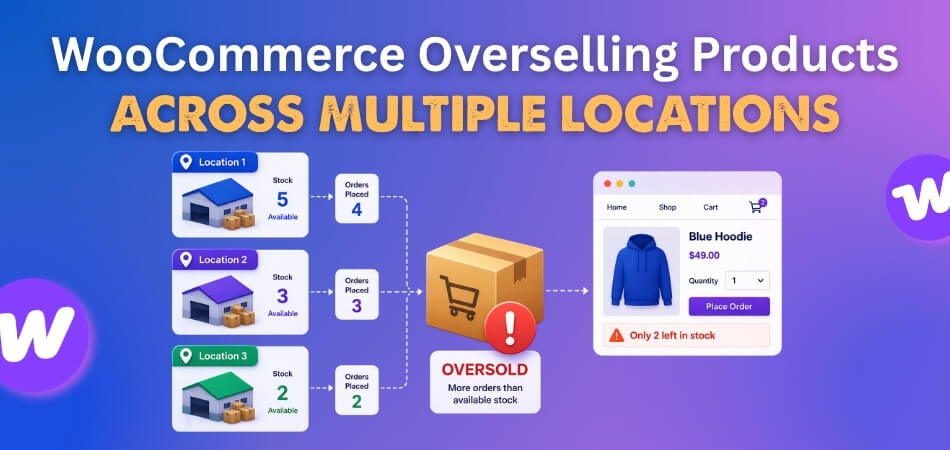
Where Multi-Location Overselling Usually Starts
Overselling across multiple locations usually begins at one point in the stock flow before it spreads into checkout, fulfillment, and stock deduction problems. Finding that starting point early makes it much easier to understand why the same item can still be approved after location-level stock should already be blocked. Here’s where multi-location overselling usually starts.
- Storefront availability can show stock too broadly.
- Cart validation can approve the wrong inventory view.
- Fulfillment location can be assigned too late.
- Stock reservation can happen after checkout moves forward.
- Final stock deduction can lag behind the actual sale.
- Inventory sync can leave one location looking available too long.
How To Notice Stock Approval Problems Before Overselling?
Overselling usually starts before the final stock error shows up. In many WooCommerce stores, the early warning signs appear when checkout, location logic, or stock approval starts allowing orders through more broadly than the real inventory should allow. The signs below can help reveal that gap before it turns into a larger inventory problem.
- Orders Keep Passing While Stock Feels Tight: Products continue moving through checkout even when one location is already close to running out of sellable inventory.
- The Same Last Unit Seems To Sell Twice: Two separate orders are accepted for what should have been the final available unit at one location.
- Assigned Locations Cannot Fulfill The Order: An order looks valid at checkout, but the warehouse or branch later shows it does not have enough stock.
- Negative Stock Appears After Checkout: Inventory at one location drops below zero, which often signals that approval happened before location-level stock was fully protected.
- Busy Sales Periods Trigger More Stock Problems: Promotions, traffic spikes, or faster order volume make overselling easier to notice because stock gaps surface much faster.
- Manual Corrections Keep Fixing The Same Pattern: Staff repeatedly adjust stock, move orders, or process refunds for similar location-based availability problems.
Why Overselling Happens Across Multiple Locations?
Overselling across multiple locations usually does not begin with one obvious stock mistake. It tends to happen when WooCommerce is trying to manage location-based inventory across checkout, fulfillment, and stock updates, but those parts are no longer working in sync. Once that happens, the same unit can look available longer than it really is.
The main reasons usually start in the areas below.
Reason 1: Location-Level Stock Is Not Controlling Checkout Properly
Checkout can still approve an order too broadly when WooCommerce is not validating against the exact stock held at the final fulfillment location. That creates a gap where a product looks available during checkout even though the assigned warehouse or branch no longer has enough sellable stock.
Reason 2: Inventory Synchronization Is Too Slow Across Locations
Overselling becomes more likely when a completed sale does not update stock quickly enough across every connected location or inventory view. During that delay, another customer can still see the same item as available and place an order before the updated stock state finishes syncing.
Reason 3: Storefront Availability Does Not Match Real Location Stock
The storefront may still show a product as available because it is pulling from broader inventory logic instead of the exact stock a specific location can fulfill. That mismatch makes it easier for customers to place orders based on availability that looks accurate on the page, but is already wrong at the location level.
Reason 4: Fulfillment Location Is Chosen Too Late
Some stores approve the order first and only determine the actual fulfillment location later in the flow, which leaves a risky gap in stock validation. By the time the location is selected, the stock that should have been used for approval may already be unavailable or reserved elsewhere.
Reason 5: Global Stock Still Influences Validation
Global or pooled stock can still affect checkout even when products are supposed to be controlled by location-level inventory. That means WooCommerce may allow the order by looking at combined stock totals, even though the one location expected to fulfill it does not actually have enough inventory.
Reason 6: Simultaneous Orders Create Stock Conflicts
Overselling often appears when two or more shoppers try to buy the same item around the same time, and both sessions pass the stock check. If stock is not reserved or reduced early enough, the same location-level unit can effectively be approved twice before WooCommerce catches the conflict.
Reason 7: Multi-Location Inventory Is Managed Through Weak Or Split Tools
Stock accuracy becomes harder to protect when multi-location inventory is handled through disconnected plugins, manual workarounds, or systems that do not share one reliable stock view. In that kind of setup, WooCommerce can end up validating, displaying, and deducting inventory through different logic paths.
Reason 8: Customers Cannot See True Location-Based Availability
Customers are more likely to place orders for unavailable products when the storefront does not clearly show which location actually has stock. Without accurate location-based availability, the buying decision is based on a broader stock view that can hide the real fulfillment limit.
How To Fix WooCommerce Overselling Products Across Multiple Locations?
Overselling across multiple locations is much easier to prevent when the same stock flow controls approval, location assignment, reservation, and deduction together. The goal is to tighten each step so WooCommerce always validates the right stock at the right location before the order moves forward.
Fix 1: Lock Checkout To The Right Location-Level Stock
If checkout is still approving orders too broadly, the first fix is to make sure WooCommerce validates against the exact location that will fulfill the order. That removes the gap where broader stock logic can approve a purchase before the real location-level inventory is confirmed.
Focus on tightening validation first:
- Validate stock against the assigned location only.
- Avoid approving orders from pooled or fallback inventory.
- Make sure checkout is not using a broader stock view than fulfillment.
Fix 2: Speed Up Inventory Synchronization Across Locations
Slow stock synchronization creates a delay where recently sold inventory can still look available at another location or storefront touchpoint. The faster stock updates move across the system, the less room there is for overselling to slip through.
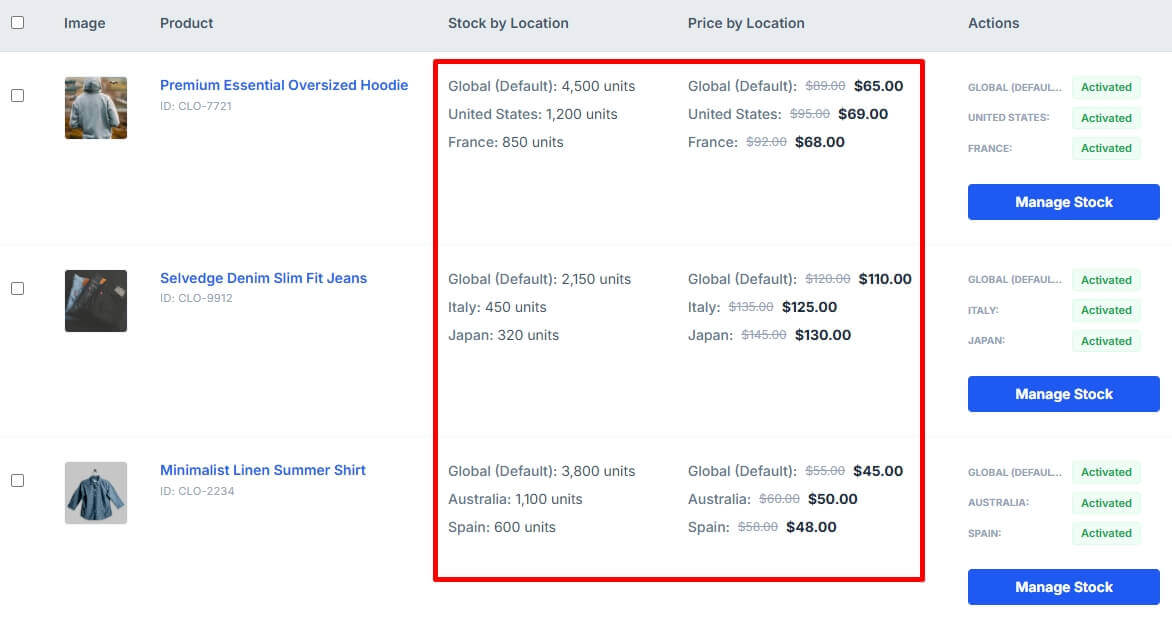
Strengthen the sync flow by:
- Updating stock instantly after each completed sale.
- Keeping connected locations and stock views in sync.
- Retesting stock updates during busy sales activity.
Fix 3: Align Storefront Availability With Real Location Stock
The storefront should reflect the stock that one actual location can fulfill, not a broader inventory impression. When availability is shown too loosely, customers can reach checkout based on inventory that the assigned location never really had.
Tighten the storefront logic by:
- Showing availability by location wherever possible.
- Avoiding broad stock messages for location-managed products.
- Making sure the product page reflects the same stock logic as checkout.
Fix 4: Choose The Fulfillment Location Earlier
Location assignment should happen before WooCommerce makes the final stock approval decision. If the system waits too long to choose the warehouse or branch, the product may already be approved using stock that the real fulfillment point cannot support.
Make the order flow more reliable by:
- Selecting the fulfillment location earlier in the checkout process.
- Storing that location before stock validation runs.
- Preventing late routing from overriding earlier stock checks.
Fix 5: Remove Global Stock From Location-Based Validation
If a product is managed by location-level inventory, WooCommerce should not rely on global stock totals during validation. Global stock can hide the fact that one specific warehouse is already out of sellable units.
Keep the stock source consistent by:
- Stopping global stock from controlling checkout approval.
- Treating location-level stock as the main inventory reference.
- Making validation and deduction use the same stock source.
Fix 6: Reserve Or Deduct Stock Earlier During Checkout
Simultaneous orders can approve the same unit when the stock is not reserved or reduced soon enough. An earlier reservation helps stop two customers from passing the same stock check before WooCommerce updates the inventory state.
Reduce the timing gap by:
- Reserving stock earlier in the checkout flow.
- Deducting stock before the same unit can be approved again.
- Testing limited-stock products under simultaneous checkout conditions.
Fix 7: Use One Stronger Multi-Location Inventory Workflow
Overselling is harder to prevent when inventory is split across weak tools, disconnected plugins, or manual workarounds. A more structured setup keeps stock validation, visibility, and deduction closer to one consistent inventory path, which is why WooCommerce multi locations inventory management becomes much more useful once stores need tighter control across warehouses or branches.
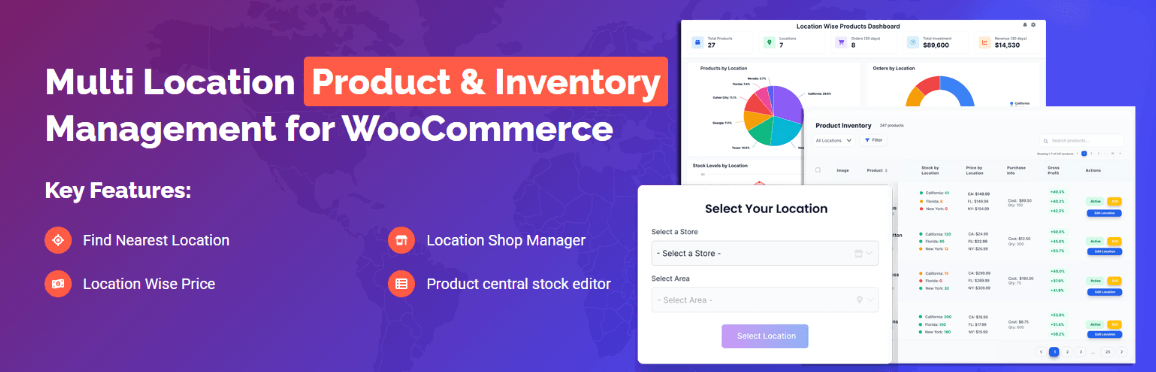
This is where stronger control matters most:
- Centralize inventory decisions across locations.
- Keep one reliable source of stock truth.
- Reduce handoffs between disconnected stock tools.
Fix 8: Show True Location-Based Availability To Customers
Customers make better stock decisions when they can clearly see which location actually has the product available. That reduces the risk of orders being placed against a broader availability view that does not match the real fulfillment limit.
Make availability clearer by:
- Showing location-based stock on the storefront.
- Letting customers see which branch or warehouse has stock.
- Keeping pickup or fulfillment choices aligned with visible inventory.
Why Manual Stock Corrections Never Solve The Real Problem
Manual stock fixes may help after an oversell happens, but they do not remove the gap that allowed the wrong order to go through in the first place. As a result, the same issue can keep coming back, especially in stores managing inventory across multiple locations. That is where the limits of manual correction start becoming clear.
- The Oversell Has Already Happened: By the time someone adjusts stock manually, the order has already been placed and the customer experience is already affected.
- Timing Gaps Still Stay In Place: Manual edits do not fix the delay between stock validation, location assignment, and stock deduction during checkout.
- The Same Issue Can Repeat Again: If the stock flow is still too loose, another customer can trigger the same overselling problem on the next order.
- Staff End Up Cleaning Instead Of Preventing: Teams spend time correcting quantities, moving orders, or handling refunds instead of keeping inventory under control earlier.
- Storefront Availability Still Looks Unreliable: Customers can keep seeing stock that feels inconsistent, even if staff are correcting the numbers in the backend afterward.
- Growth Makes Manual Fixes Less Practical: As locations, products, and order volume increase, manual correction becomes harder to maintain without repeated mistakes.
Better Multi-Location Inventory Control For WooCommerce Stores
Storewide stock accuracy becomes much harder to protect when one product can be sold, routed, and deducted through several locations at once. That is where multi location inventory management for WooCommerce gives stores a clearer way to manage location-based stock without relying on loose validation or repeated manual correction. Below are some of the ways it helps strengthen inventory control across locations:
- Location-based stock stays more visible.
- Checkout uses stronger inventory control.
- Fulfillment stays closer to real stock.
- Fewer orders slip through incorrectly.
- Daily stock handling feels more dependable.
Frequently Asked Questions
Overselling across multiple locations often leads to a few practical questions once the main stock issue becomes easier to understand. These FAQs focus on the concerns store owners usually have when they want location-based inventory to stay more reliable across the full order flow.
Can Overselling Happen Even If Total Stock Still Looks Correct?
Yes, because the issue is not always the total stock count. The bigger problem is whether the exact location expected to fulfill the order still has sellable inventory available.
Why Does One Location Oversell More Often Than Another?
That can happen when one branch has faster product movement, tighter stock levels, or weaker checkout validation tied to its location-based inventory. In that case, the same problem may appear unevenly instead of affecting every location the same way.
Does Fulfillment Logic Make Overselling Harder To Catch?
Yes, because some orders look valid at checkout and only become problematic once the real fulfillment location is applied. That delay can hide the stock gap until the order is already in process.
Can Overselling Become More Noticeable During Promotions?
Yes, because higher traffic and faster sales make timing gaps easier to expose. The more quickly limited stock moves, the easier it becomes for approval, reservation, and deduction to fall out of sync.
When Does A Store Need Stronger Location-Level Inventory Control?
That usually becomes clear when overselling keeps returning through normal order activity instead of one unusual spike. At that stage, tighter location-based stock control becomes more reliable than repeated corrections after the order is already placed.
Final Takeaways
WooCommerce overselling products across multiple locations is rarely just a small stock mistake. It usually points to a wider gap between what the storefront is approving, what checkout is validating, and what one real location can actually fulfill once the order moves forward.
Stronger location-based inventory control helps close that gap before it turns into refunds, rushed stock edits, or fulfillment confusion. Better alignment across stock approval, reservation, and deduction makes daily inventory handling easier for your team and creates a buying experience customers can trust much more confidently.
