

Finding products quickly is one of the most important parts of any WooCommerce store. A search filter plugin helps users type what they need and instantly narrow results using filters like category, price, brand, or attributes. This makes product discovery faster and more accurate.
A good WooCommerce search filter plugin improves user experience, reduces bounce rate, and increases conversions by helping users find exactly what they are looking for. In this guide, you will discover the best WooCommerce search filter plugins that combine live search with advanced filtering features.
Quick Answer
WooCommerce search filter plugins combine live search with filtering options to help users quickly find products. The best plugins support AJAX search, category filtering, and attribute-based filtering for faster and more accurate results.
Why Search Filters Improve Conversion
Search filters play a critical role in helping users find products quickly and accurately. When customers can search and refine results at the same time, the buying process becomes faster and more efficient.
- Reduces search time – Users can instantly narrow results instead of browsing through many products manually.
- Improves accuracy – Combining search with filters like category, price, or brand helps users find exactly what they want.
- Boosts user experience – Smooth and fast search results keep users engaged and reduce frustration.
- Encourages faster decisions – When users see relevant products quickly, they are more likely to make a purchase.
- Handles large catalogs efficiently – Search filters are essential for stores with many products, making navigation easier.
- Increases conversion rate – Faster discovery leads to higher intent and better chances of completing a purchase.
Search filters improve product discovery speed and accuracy, helping users find what they need faster and increasing conversions.
How Search Filters Work in WooCommerce?
To use search filters effectively, it helps to understand how they function behind the scenes. In WooCommerce, search filters combine keyword search with structured filtering to deliver accurate results quickly.
- Keyword-based search – Users type a query, and the system searches product titles, descriptions, SKUs, or tags to find matches.
- Filter integration – After the search, users can refine results using filters like category, price, brand, size, or attributes.
- AJAX-powered updates – Modern plugins update results instantly without reloading the page, keeping the browsing experience smooth.
- Search scope control – Some plugins allow searching within specific fields like titles only, SKU only, or full product data.
- Combination filtering logic – Filters work together with AND/OR logic to show more precise results based on user selection.
- Real-time suggestions – Advanced plugins show live suggestions or autocomplete results while users type.
WooCommerce search filters combine keyword search with filtering logic to deliver faster and more accurate product discovery.
Types of Search Filters (Live Search, AJAX, Faceted)
Search filters in WooCommerce come in different types, each improving how users find products. Choosing the right type depends on your store size and user behavior.
- Live Search (Autocomplete Search) – Shows instant product suggestions while users type. This helps users quickly find products without needing to press enter.
- AJAX Search Filters – Updates results instantly when users apply filters or search terms, without reloading the page. This keeps browsing smooth and fast.
- Faceted Search Filters – Allows users to refine search results using multiple filters like category, brand, price, size, and more at the same time.
- Dropdown Search Filters – Lets users select predefined options from dropdown menus along with search input. Useful for structured filtering.
- Search with Category Filtering – Combines keyword search with category selection to narrow results more accurately.
- Advanced Search (Multi-field Search) – Searches across multiple fields like product title, description, SKU, and custom fields for better accuracy.
Different types of search filters help users refine results faster, improving accuracy and overall product discovery in WooCommerce.

UX Best Practices for Search Filtering
A well-designed search filter should feel fast, clear, and easy to use. Good UX helps users find products quickly without confusion.
- Place the search bar in a visible position – Keep it at the top of the page so users can access it immediately.
- Enable instant (AJAX) results – Show results as users type or apply filters to avoid page reload delays.
- Use autocomplete suggestions – Display product suggestions, categories, or keywords while typing to guide users.
- Allow filter combination – Let users refine search results using category, price, brand, and attributes together.
- Highlight matching results – Show how results match the search query to improve clarity.
- Keep filters simple and relevant – Avoid adding too many filter options that can overwhelm users.
- Optimize for mobile users – Use a clean layout with collapsible filters and easy-to-tap elements.
A well-optimized search filter improves usability, helping users find products faster and enhancing overall browsing experience.
Top 10 WooCommerce Search Filter Plugins
When running an online store, it is important to help visitors find products quickly. A good search filter makes shopping easier and more enjoyable. There are many plugins that can improve search filters on WooCommerce. Let’s explore some of the best ones.
| Plugin Name | Free Version | Paid Version | Starting Price | Key Strength |
| Dynamic AJAX Product Filters for WooCommerce | Yes | Yes | $39/year or $79 lifetime | Fast AJAX filtering with SEO-friendly URLs and multi-filter support |
| FiboSearch (Ajax Search for WooCommerce) | Yes | Yes | $49/year | High-speed live search with autocomplete and smart suggestions |
| WooCommerce Product Search | No | Yes | $79/year | Advanced search with relevance scoring and deep WooCommerce integration |
| WooCommerce Product Filter by Barn2 | No | Yes | $79/year | Structured filtering with strong performance for large stores |
| Filter Everything | Yes | Yes | $44 (one-time) | Advanced filtering with taxonomies and custom fields support |
| JetSmartFilters | No | Yes | $43/year | Visual filtering with Elementor integration and dynamic layouts |
| YITH WooCommerce AJAX Product Filter | Yes | Yes | $105.33/year | Easy setup with preset filters and flexible UI layouts |
| FacetWP | No | Yes | $99/year | Premium faceted search with high performance for large catalogs |
| Search & Filter Pro | No | Yes | $20+/year | Developer-friendly filtering with advanced logic and customization |
| Advanced AJAX Product Filters | Yes | Yes | $44 (one-time) | Lightweight filtering with fast performance and flexible layouts |
Dynamic AJAX Product Filters for WooCommerce
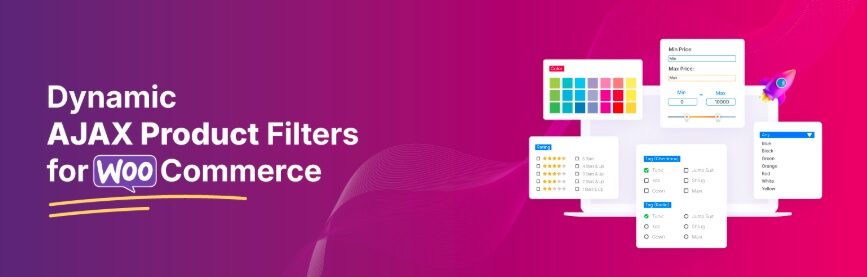
Dynamic AJAX Product Filters for WooCommerce is a powerful solution that combines search and filtering in one system. It allows users to find products using keywords and refine results instantly using filters like brand, category, price, and attributes. With AJAX-based updates, products refresh without page reload, making the browsing experience smooth and fast for any WooCommerce store.
Key Features:
- AJAX-based search and filtering with instant updates
- Supports keyword search with multi-filter combinations
- Works with categories, brand, price, attributes, and tags
- SEO-friendly URLs for filtered and search results
- Multiple layouts (sidebar, top bar, mobile panel)
- Compatible with Elementor, Gutenberg, and shortcodes
Pros
- Fast and smooth user experience
- Combines search and filtering in one system
- Works well for small and large stores
- Flexible layout and customization options
Cons
- Advanced features require Pro version
- Initial setup may require basic configuration
Price Plans
| Plan Type | Sites | Price (Discounted) | Normal Price | Features |
| Yearly | Single Site | $39/year | $49 | All pro features, full access, 1 year support, 1 year updates |
| Yearly | Up to 5 Sites | $89/year | $99 | All pro features, full access, 1 year support, 1 year updates |
| Yearly | Unlimited Sites | $189/year | $199 | All pro features, full access, 1 year support, 1 year updates |
| Lifetime | Single Site | $79 one-time | $89 | All pro features, full access, lifetime support, unlimited updates |
| Lifetime | Up to 5 Sites | $139 one-time | $149 | All pro features, full access, lifetime support, unlimited updates |
| Lifetime | Unlimited Sites | $289 one-time | $299 | All pro features, full access, lifetime support, unlimited updates |
A single pricing table makes it easier to compare yearly and lifetime plans quickly for better decision-making.
2. FiboSearch (Ajax Search for WooCommerce)
FiboSearch is one of the most popular WooCommerce search plugins focused on fast and accurate live search. It shows instant product suggestions as users type, helping them find products quickly without navigating multiple pages. While it is primarily a search plugin, it works well alongside filtering systems to improve overall product discovery.

Key Features:
- Live AJAX search with instant suggestions
- Autocomplete results while typing
- Search by product name, SKU, and description
- Mobile-friendly search interface
- Smart relevance-based product display
- Supports images, price, and product details in search results
Pros
- Extremely fast live search experience
- Easy to set up and use
- Large user base and reliable performance
- Improves product discovery speed
Cons
- Primarily search-focused, not a full filter system
- Advanced features require Pro version
- Needs integration with filter plugins for full functionality
Price
| Plan | Price | Type |
| Free Version | $0 | Basic features |
| Pro Version | $49+ | Yearly |
FiboSearch enhances WooCommerce search experience with instant results, helping users find products quickly and improving engagement.
3. WooCommerce Product Search
WooCommerce Product Search is an advanced search plugin built to improve product discovery using intelligent keyword matching and relevance scoring. It allows users to search products more accurately while integrating smoothly with WooCommerce filters. The plugin is ideal for stores that want a powerful search system combined with structured filtering.

Key Features:
- Advanced product search with relevance scoring
- Live AJAX search with instant updates
- Search across title, content, SKU, tags, and attributes
- Works with categories, brand, and other filters
- Optimized for large product catalogs
- Supports widgets and shortcodes
Pros
- Highly accurate search results
- Strong performance for large stores
- Deep WooCommerce integration
- Supports advanced filtering combinations
Cons
- No free version available
- Setup may require configuration for best results
- More focused on search than UI customization
Price
| Plan | Price | Type |
| Single Site License | $79+ | Yearly |
WooCommerce Product Search provides accurate and powerful search functionality, making it ideal for stores focused on advanced product discovery.
4. WooCommerce Product Filter by Barn2
WooCommerce Product Filter by Barn2 is built for fast and structured product filtering, with support for search-based refinement. It allows users to combine keyword search with category, brand, price, and attribute filters. The plugin is optimized for performance, making it suitable for stores with large product catalogs.

Key Features:
- AJAX-based filtering with instant updates
- Works with keyword search and multiple filters
- Supports categories, brand, price, and attributes
- Clean and structured filter layouts
- Mobile-friendly slide-out filter panel
- SEO-friendly URLs for filtered results
Pros
- Strong performance for large stores
- Clean and user-friendly interface
- Reliable and stable filtering system
- Easy to set up and manage
Cons
- No free version available
- Limited advanced UI customization
- Less focus on live search features
Price
| Plan | Price | Type |
| Single Site | $79 | Yearly |
| 5 Sites | $139 | Yearly |
| 20 Sites | $249 | Yearly |
WooCommerce Product Filter by Barn2 offers stable and performance-focused filtering, making it ideal for structured product navigation.
5. Filter Everything
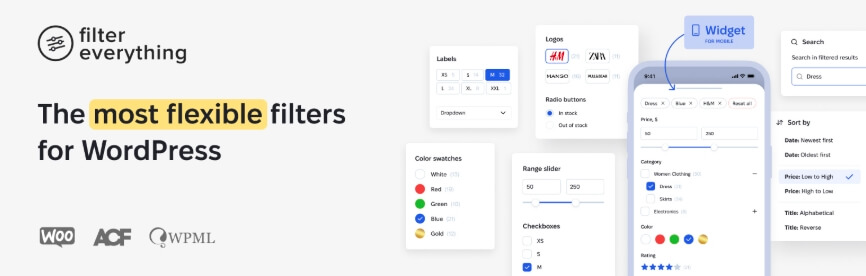
Filter Everything is a flexible plugin that combines search and filtering using taxonomies, attributes, and custom fields. It allows users to search products and refine results instantly with multiple filters. The plugin is suitable for stores that need advanced filtering logic and support for complex product structures.
Key Features:
- AJAX-based search and filtering with instant updates
- Supports filtering via categories, brand, tags, and custom fields
- Works with keyword search and multi-filter combinations
- SEO-friendly URLs for search and filtered pages
- Compatible with Elementor, Divi, and other builders
- Supports products, posts, and custom content types
Pros
- Highly flexible filtering system
- Supports complex store structures
- Strong SEO support for filtered results
- Works beyond WooCommerce products
Cons
- Setup can be complex for beginners
- Requires proper configuration for best performance
- UI customization needs manual adjustments
Price
| Plan | Price | Type |
| Regular License | $44 | One-time |
| Extended License | $144 | One-time |
Filter Everything offers advanced search and filtering flexibility, making it ideal for stores with complex product setups.
6. JetSmartFilters
JetSmartFilters combines search and filtering with strong design control, especially for Elementor and Gutenberg users. It allows users to search products and refine results using multiple filters with instant AJAX updates. The plugin is ideal for stores that want advanced filtering with full visual customization.

Key Features:
- AJAX-based search and filtering with real-time updates
- Integration with Elementor and Gutenberg
- Multiple filter types (checkbox, select, search, range)
- Supports brand, category, price, and attribute filtering
- Dynamic filtering logic based on user selection
- Flexible placement using widgets and blocks
Pros
- Full design control with page builders
- Smooth and fast filtering experience
- Supports complex filtering combinations
- Ideal for custom WooCommerce layouts
Cons
- Requires Elementor or builder for full functionality
- Can be complex for beginners
- Limited free features
Price
| Plan | Price | Type |
| Single Site | $43 | Yearly |
| Unlimited Sites | $88 | Yearly |
JetSmartFilters offers flexible and customizable search filtering, making it ideal for Elementor-based WooCommerce stores.
7. YITH WooCommerce AJAX Product Filter
YITH WooCommerce AJAX Product Filter combines search and filtering to help users quickly find products and refine results without page reload. It is designed for ease of use, offering preset filters and flexible layouts. The plugin works well for stores that want a simple setup with reliable performance.

Key Features:
- AJAX-based search and filtering with instant updates
- Supports keyword search with category, brand, and price filters
- Preset filter groups for quick setup
- Multiple layouts (sidebar, horizontal bar)
- Mobile-friendly popup filters
- Works with Elementor, Gutenberg, and shortcodes
Pros
- Easy to set up and beginner-friendly
- Clean and modern filter interface
- Good compatibility with WooCommerce themes
- Flexible layout options
Cons
- Advanced features require premium version
- Limited deep customization
- Less control compared to developer-focused plugins
Price
| Plan | Price | Type |
| Free Version | $0 | Basic features |
| Premium Version | $105.33 | Yearly |
YITH WooCommerce AJAX Product Filter offers simple and effective search filtering, making it suitable for improving product discovery.
8. FacetWP
FacetWP is a premium solution for advanced faceted search and filtering in WooCommerce. It allows users to search products and refine results using multiple filters with high speed and accuracy. The plugin is designed for large and complex stores that need powerful filtering logic and scalable performance.

Key Features:
- Advanced faceted search with AJAX filtering
- Combines keyword search with multiple filters
- Supports categories, brand, price, attributes, and custom fields
- Optimized for large product catalogs
- Developer-friendly with deep customization options
- Works with custom templates and page builders
Pros
- Extremely powerful filtering system
- High performance for large datasets
- Flexible and customizable
- Suitable for advanced WooCommerce setups
Cons
- No free version available
- Requires technical knowledge for setup
- Higher learning curve for beginners
Price
| Plan | Price | Type |
| Basic Plan | $99+ | Yearly |
FacetWP provides advanced search and filtering capabilities, making it ideal for large WooCommerce stores with complex filtering needs.
9. Search & Filter Pro
Search & Filter Pro combines keyword search with advanced filtering to help users refine results accurately. It works well for WooCommerce stores that require flexible filtering across categories, brands, and custom fields. The plugin is suitable for developers and advanced users who need more control over search logic and filtering behavior.

Key Features:
- Combines search with multi-filter functionality
- Supports categories, brand, attributes, and custom fields
- AJAX-based filtering with instant updates
- Advanced filtering logic and query control
- Works with custom post types and WooCommerce products
- Flexible layout using shortcodes and templates
Pros
- Highly flexible and customizable
- Supports complex filtering setups
- Works beyond WooCommerce products
- Good for developer-level control
Cons
- No free version available
- Requires technical knowledge
- UI setup is not beginner-friendly
Price
| Plan | Price | Type |
| Single Site License | $20+ | Yearly |
Search & Filter Pro offers advanced search and filtering flexibility, making it suitable for complex WooCommerce setups.
10. Advanced AJAX Product Filters
Advanced AJAX Product Filters combines keyword search with filtering to help users quickly refine product results. It focuses on speed and simplicity, updating products instantly without page reload. The plugin is suitable for stores that need a lightweight solution for search and filtering without complex setup.

Key Features:
- AJAX-based search and filtering with instant updates
- Supports keyword search with category, brand, and price filters
- Multiple filter layouts (slider, checkbox, dropdown)
- Flexible placement above products or in sidebars
- SEO-friendly URLs for search and filtered results
- Customizable styles and layouts
Pros
- Fast and lightweight performance
- Easy to configure and use
- Flexible layout options
- Suitable for small to medium stores
Cons
- Limited advanced features
- Basic UI customization
- May need optimization for large catalogs
Price
| Plan | Price | Type |
| Single Site | $44 | One-time |
| 3 Sites | $69 | One-time |
| 5 Sites | $109 | One-time |
Advanced AJAX Product Filters provides a simple and fast solution for combining search and filtering in WooCommerce stores.
Comparison Table (Search + Filter Capability)
This table focuses on how well each plugin handles search + filtering together, which is critical for user experience and conversions.
| Plugin Name | Live Search | AJAX Filtering | Combined Search + Filter | Large Catalog Support | UI Flexibility |
| Dynamic AJAX Product Filters for WooCommerce | Yes | Yes | Excellent | Excellent | High |
| FiboSearch (Ajax Search for WooCommerce) | Excellent | Limited | Good (with filter plugin) | Excellent | Medium |
| WooCommerce Product Search | Excellent | Yes | Excellent | Excellent | Medium |
| WooCommerce Product Filter by Barn2 | Good | Yes | Very Good | Excellent | Medium |
| Filter Everything | Good | Yes | Excellent | Good | High |
| JetSmartFilters | Good | Yes | Excellent | Good | Very High |
| YITH WooCommerce AJAX Product Filter | Good | Yes | Very Good | Good | Medium |
| FacetWP | Excellent | Yes | Excellent | Excellent | High |
| Search & Filter Pro | Good | Yes | Very Good | Good | Medium |
| Advanced AJAX Product Filters | Basic | Yes | Good | Medium | Medium |
Key Insights
- Best combined solution – Dynamic AJAX Product Filters and FacetWP offer the strongest balance between search and filtering.
- Best search-focused plugin – FiboSearch and WooCommerce Product Search provide superior live search experience.
- Best for customization – JetSmartFilters stands out with high UI flexibility.
- Best for large stores – Barn2, FacetWP, and WooCommerce Product Search handle large catalogs efficiently.
Evaluating search and filter capability together helps you choose a plugin that delivers faster product discovery and better user experience.
Which Plugin Should You Choose?
Choosing the right WooCommerce search filter plugin depends on your store size, design needs, and how advanced your filtering system should be. Below is a quick decision guide to help you pick the best option.

- Best overall (balanced search + filtering) – Dynamic AJAX Product Filters for WooCommerce
A strong all-in-one solution with fast AJAX filtering and flexible layouts, suitable for most stores. - Best for live search experience – FiboSearch
Ideal if your main focus is fast autocomplete search and instant suggestions. - Best for advanced search accuracy – WooCommerce Product Search
Great for stores that need deep keyword search and relevance-based results. - Best for large product catalogs – Barn2 Product Filter
Optimized for performance and structured filtering in large WooCommerce stores. - Best for full customization – JetSmartFilters
Perfect for Elementor users who want full design control over filters. - Best for complex filtering logic – FacetWP
Suitable for enterprise-level stores with advanced filtering requirements. - Best for flexible filtering setups – Filter Everything
Works well with custom fields and complex store structures. - Best for beginners – YITH WooCommerce AJAX Product Filter
Easy to use with preset filters and simple setup. - Best lightweight option – Advanced AJAX Product Filters
Good for stores that need fast performance without complex features. - Best for developers – Search & Filter Pro
Offers deeper control over filtering logic and custom implementations.
The best plugin depends on your store goals, so choose based on performance, ease of use, and customization needs.
Common Issues with Search Filters (And Fixes)
Even with the right plugin, search filters can sometimes behave incorrectly if not configured properly. Understanding these common issues helps you fix them quickly and maintain a smooth user experience.
- Search not returning correct results
This usually happens when products are missing proper titles, descriptions, or attributes. Make sure all product data is complete and indexed properly. - Filters not working with search
If search and filters are not connected, results may not update correctly. Enable AJAX filtering and ensure both search and filters are part of the same system. - Slow search performance
Large product catalogs can slow down search results. Use optimized plugins, enable caching, and avoid heavy queries. - Brand or attribute filters missing in search
This occurs when attributes are not assigned to products correctly. Always link attributes like brand to each product. - Search not working on mobile properly
Poor UI layout can make search difficult on small screens. Use mobile-friendly search bars and collapsible filters. - Duplicate or irrelevant results
This may be caused by poor search logic. Use plugins with relevance scoring to improve accuracy.
Fixing common search filter issues ensures accurate results, faster performance, and a better user experience.
How to Set Up a Search Filter for Your WooCommerce Store?
Setting up a search filter in WooCommerce helps users find products quickly using keywords and refine results instantly. In this guide, we will use Dynamic AJAX Product Filters for WooCommerce to create a search filter with real-time results and smooth browsing experience.
A properly configured search filter improves product discovery and helps users find items faster in your WooCommerce store.
Step 1: Install the Plugin
You can install this plugin in two ways: from the WordPress dashboard or manually.
Option A: Installation from the WordPress Dashboard
- Go to your WordPress Admin Dashboard
- From the left menu, click Plugins
- Click Add Plugins
- In the search bar, type Dynamic AJAX Product Filters for WooCommerce
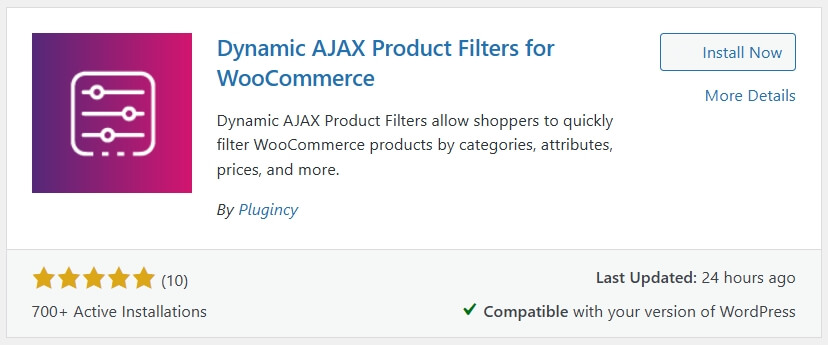
- Once you find it, click Install Now
- After installation, click Activate
Installing the plugin from the dashboard is the quickest way to start using search filters in WooCommerce.
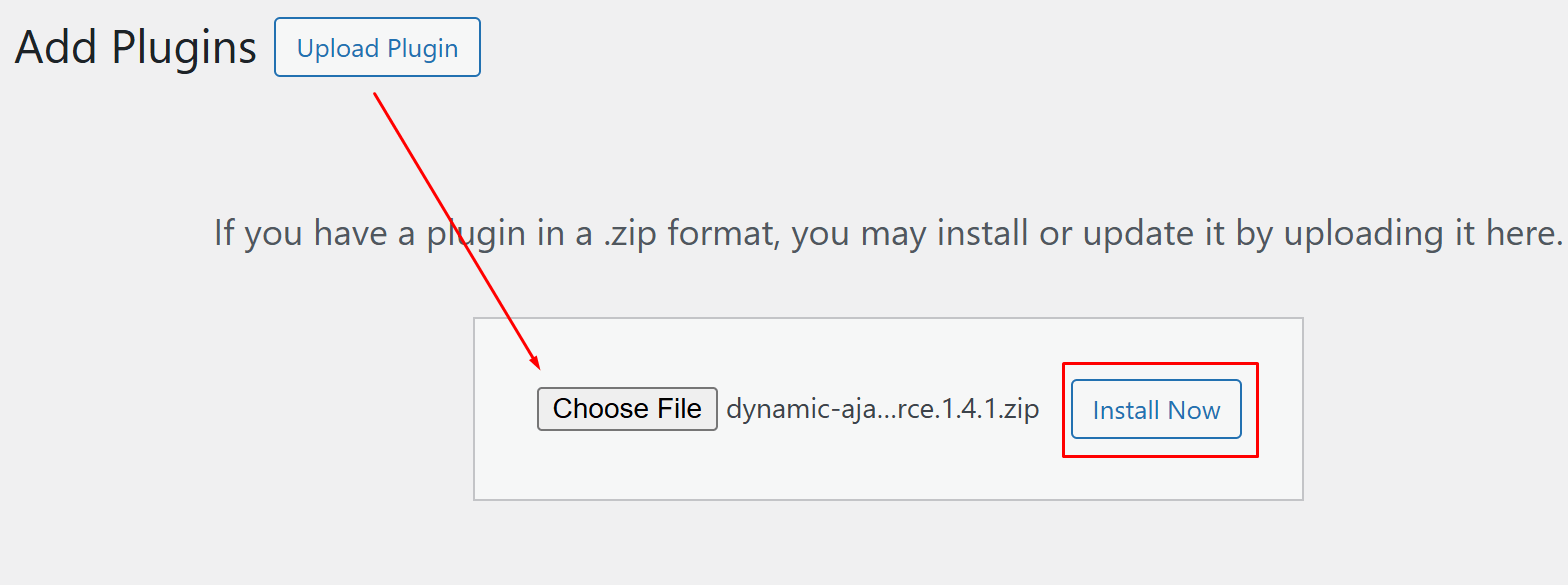
Option B: Installation Manually
- Download the plugin from the WordPress directory or the official website
- Once downloaded, go to your WordPress Admin Dashboard
- Click on Plugins
- Select Add New Plugin
- Click Upload Plugin
- Choose the plugin ZIP file you downloaded
- Click Install Now, then Activate
If You Have the Premium Version
- After purchasing the premium version, you will receive a license key
- Copy the license key
- Go to Product Filters → Plugin License
- Paste the license key into the license box
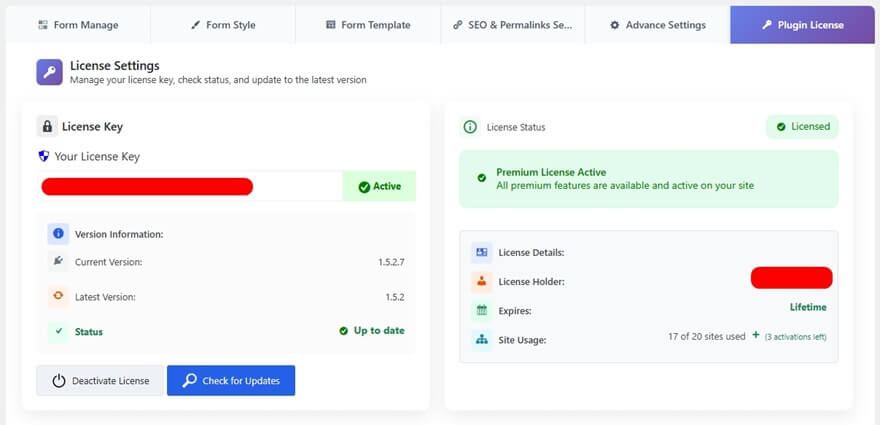
- You can now use the premium features
Step 2: Accessing Product Filters
- From your WordPress Admin Dashboard, go to Product Filters
- This section allows you to manage and configure all filtering options for your products
Step 3: Enabling the Search Feature
- Inside the Product Filters section, click on Form Manage
- Here, you will find settings related to filter forms
- Look for the option called Show Search
- Enable this option to activate the search functionality
- This allows users to search products by title, description, or other attributes
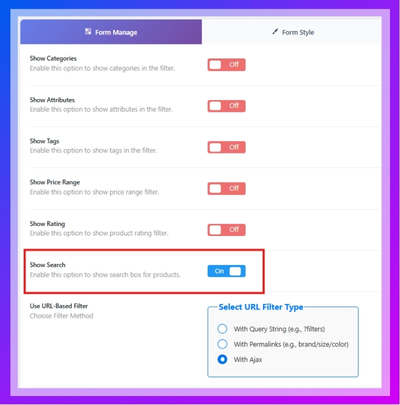
Enabling the search feature allows customers to quickly find products using keywords combined with filters.
Step 4: Styling the Search Field
If you want the search field to match your site design, you can customize it.
- Go to Product Filters → Form Style
- Adjust how the search field looks:
- Input Field: Change background color, border, padding, and font size
- Button Style: Customize button color, hover effect, and font
- Responsive Design: Check appearance on desktop, tablet, and mobile
Step 5: Testing the Search Functionality
After enabling and styling the search option, test how it works.
- Go to your store frontend
- Enter different search queries in the search box
- Check if results update dynamically while typing or after clicking search
- Make sure relevant products appear
- Test on multiple devices to confirm smooth performance
By following these steps, you can successfully add and customize a search filter for your WooCommerce store. This helps users find products faster and improves the browsing experience. Testing ensures your search filter works accurately and delivers a smooth user experience across all devices.
FAQ (Search + Filter Plugins)
What is a WooCommerce search filter plugin?
A WooCommerce search filter plugin combines keyword search with filtering options like category, brand, and price, helping users quickly find relevant products.
Do I need both search and filter plugins?
Not always. Some plugins combine both features. However, using a dedicated search plugin with a filter plugin can improve accuracy and performance.
Which plugin is best for live search?
FiboSearch and WooCommerce Product Search are strong options for fast and accurate live search with instant suggestions.
Can search filters improve conversion rates?
Yes. Faster product discovery reduces friction, helping users find what they want quickly and increasing the chance of purchase.
Are search filter plugins SEO-friendly?
Yes, if they support clean URLs and proper indexing. This helps search engines understand filtered pages.
Do these plugins work with Elementor?
Many plugins like JetSmartFilters and Dynamic AJAX Product Filters support Elementor and other page builders.
What is the difference between search and filtering?
Search uses keywords to find products, while filtering refines results based on attributes like price, category, or brand.
Understanding search and filter plugins helps you choose the right solution for better product discovery and performance.
Conclusion
WooCommerce search filter plugins play a key role in improving how users find products in your store. By combining keyword search with filtering options, they make product discovery faster, more accurate, and easier to use. This reduces user frustration and keeps visitors engaged.
Choosing the right WooCommerce search filter plugin depends on your store size, product complexity, and design needs. Plugins that offer fast AJAX search, flexible filtering, and mobile-friendly layouts provide the best results for both usability and conversions.
When implemented correctly, search filters help users find exactly what they need in less time, leading to higher engagement and better sales performance.
A well-optimized WooCommerce search filter improves product discovery, enhances user experience, and increases conversion potential.
