

Choosing the best WooCommerce checkout plugin can directly impact your store’s conversions. Many store owners struggle with slow checkout pages, unnecessary steps, and cart abandonment. A well-optimized checkout system simplifies the buying process, improves user experience, and helps customers complete orders faster without distractions.
A powerful WooCommerce one page checkout plugin or WooCommerce direct checkout plugin can remove friction from the final step. Features like instant checkout, auto-fill fields, and secure payment integration reduce drop-offs and build trust. These small improvements often lead to higher conversion rates and better customer satisfaction.
In this guide, we break down the top 10 WooCommerce checkout plugins for 2026 based on performance, usability, and real-world value. You will learn what makes each plugin effective, how they compare, and which one fits your store needs. Keep reading to find the right solution to improve your checkout experience and increase sales.
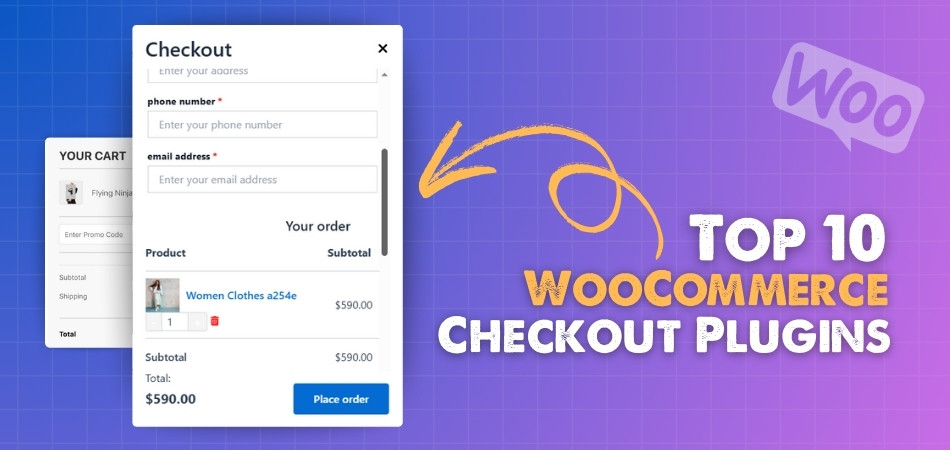
Why Default WooCommerce Checkout Is Not Enough?
Now that you understand what a checkout page includes, the next question is important. Why do many store owners still look for better solutions? The default WooCommerce checkout works, but it often lacks the speed, flexibility, and conversion-focused features needed for modern stores.
Common Limitations of Default Checkout
Too Many Steps in The Process
The default flow usually takes users through multiple pages. This extra friction can slow down the buying journey and increase the chances of cart abandonment, especially on mobile devices where users expect fast interactions.
Limited Customization Options
While WooCommerce allows basic edits, it does not provide deep control over layout, field structure, or user flow. Store owners often struggle to create a checkout that matches their brand or improves usability.
No Built-In Direct Checkout Experience
By default, users must go through the cart page before checkout. A WooCommerce direct checkout plugin removes this step and sends users straight to payment, which can significantly improve conversions.
Lack of One Page Checkout Optimization
Modern stores prefer a single-page experience. A WooCommerce one page checkout plugin combines cart and checkout into one simple interface, reducing confusion and making the process faster.
Basic User Experience and Performance Issues
The default checkout does not include features like AJAX updates, instant validation, or smart field handling. This can make the experience feel slow and outdated compared to optimized solutions.
What Store Owners Actually Need?
To improve conversions, most stores look for a system that is fast, simple, and flexible. This is where the best WooCommerce checkout plugin makes a difference by adding features like:
- One-page or direct checkout flow
- Faster loading with AJAX updates
- Custom checkout fields and layouts
- Mobile-friendly design
- Trust signals like badges and secure payment display
These improvements are not just design upgrades. They directly impact how quickly users complete purchases and how much revenue your store generates.
Default checkout is a starting point, but optimized checkout plugins turn it into a conversion-focused system that drives real sales growth.
Top 10 WooCommerce Checkout Plugins 2026
Choosing the best WooCommerce checkout plugin can feel overwhelming because many tools promise faster checkout and higher conversions. This guide simplifies the decision by highlighting proven plugins that improve checkout speed, reduce friction, and increase completed orders. You will find clear comparisons to help you choose the right solution for your store.
A well-optimized checkout can directly impact revenue. Plugins like a WooCommerce one page checkout plugin or WooCommerce direct checkout plugin remove unnecessary steps, reduce cart abandonment, and guide users straight to payment. Below is a quick comparison of the top checkout plugins for 2026 based on features, flexibility, and real-world performance.
| Plugin Name | Free Version | Paid Version | Key Strength |
| One Page Quick Checkout for WooCommerce | Yes | Yes | One-page checkout with AJAX, direct checkout, and popup options. |
| Cart All In One For WooCommerce | Yes | Yes | Sidebar cart + menu cart with integrated checkout and flexible styling. |
| Side Cart & Checkout for WooCommerce | No | Yes | Sliding side cart with built-in checkout, coupons, and upsells. |
| Barn2 – WooCommerce Fast Cart | No | Yes | Popup checkout with upsells and address autocomplete. |
| Quick Checkout for WooCommerce | No (Trial only) | Yes | Checkout from product, catalog, or landing pages with buy-now buttons. |
| PeachPay for WooCommerce | Yes | No | Free express popup checkout with 20+ payment gateways and currency switcher. |
| Fluid Checkout for WooCommerce – Lite | Yes | Yes | Flexible one-page or multi-step checkout with trust symbols. |
| WooCommerce One Page Checkout and Layouts | Yes | Yes | One-page layouts with AJAX updates and custom styling. |
| Cashier for WooCommerce | No | Yes | All-in-one checkout with field editor, side cart, upsells, and subscriptions. |
| WooCommerce One Page Checkout | No | Yes | Official WooCommerce extension for one-page product + checkout flow. |
One Page Quick Checkout for WooCommerce
Checkout delays often lead to lost sales, and One Page Quick Checkout for WooCommerce solves this by turning the entire checkout process into a fast, single-page experience. Instead of moving users through multiple steps, it keeps everything in one place, making the buying journey smoother, faster, and more reliable.
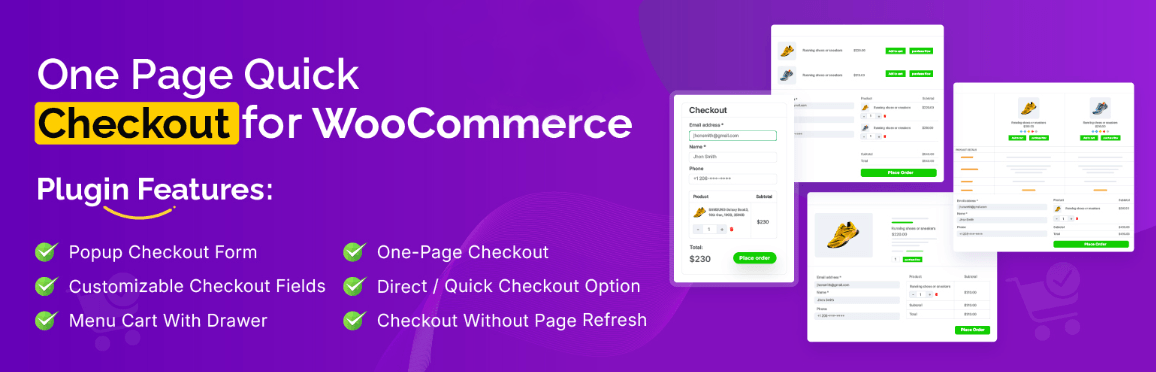
As a powerful WooCommerce one page checkout plugin and WooCommerce direct checkout plugin, it removes unnecessary friction by allowing users to skip the cart page, use AJAX-based checkout, and complete purchases instantly. This directly improves conversion rates and reduces cart abandonment, especially on mobile devices.
What They Offer
This plugin combines multiple checkout optimization features into one system. Below is a clear breakdown of what you get in both free and pro versions.
Free Features
These features are enough for small to mid-level stores that want faster checkout without complexity:
- One-page checkout ready templates: Create single-page checkout for simple or variable products using pre-built layouts. This reduces setup time and helps launch a faster checkout experience quickly.
- AJAX checkout without page reload: Customers can complete purchases without refreshing the page. This improves speed and keeps users engaged throughout the checkout process.
- Direct checkout basics: Skip the cart page and redirect users directly to checkout. This is useful for stores focused on quick purchases and landing page funnels.
- Add to Cart customization controls: Modify button text, enable AJAX add to cart, manage redirects, and control quantity behavior to match your checkout strategy.
- Quick View functionality (basic): Allow customers to preview products with layout options and keyboard navigation, improving product exploration without leaving the page.
- Checkout helper tools: Includes quantity controller, product image display, minimum item rules, and cart page disable options to streamline checkout flow.
Pro Features
For growing and high-conversion stores, the pro version unlocks advanced control and optimization:
- Advanced checkout layouts and field control: Fully customize checkout design, fields, and structure to match your brand and improve usability.
- Enhanced Add to Cart experience: Add animations, sticky cart for mobile users, and smart notifications to improve interaction and engagement.
- Direct checkout upgrades: Includes popup checkout, one-click purchase, grouped product checkout, and mobile-optimized flows for faster conversions.
- Advanced Quick View features: Enable social sharing, attribute display, custom sizes, loading effects, and flexible shortcode placement.
- Extended checkout options: Add express checkout, address auto-complete, multi-step checkout, CAPTCHA protection, forced login, and trust badges for better security and trust.
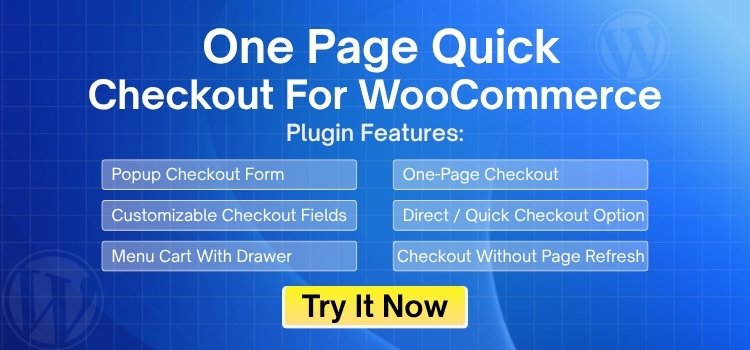
Pricing
The pricing is structured for flexibility depending on store size:
| Plan | Yearly Price | Lifetime Price |
| Single Site | $39/year | $89/lifetime |
| Up to Five Sites | $89/year | $189/lifetime |
| Unlimited Sites | $139/year | $289/lifetime |
This makes it a cost-effective option compared to many premium checkout plugins.
Plugin Specifications
- Version: 1.2.0
- Active Installations: 50+
- WordPress Requirement: 5.0 or higher
- Tested Up To: 6.8.2
- PHP Requirement: 7.2 or higher
- Developer: Plugincy
One Page Quick Checkout for WooCommerce is best for store owners who want to reduce checkout steps, enable direct checkout, and improve conversions using a fast, AJAX-powered checkout experience.
If your goal is to increase sales and reduce checkout friction, this plugin is one of the best WooCommerce checkout plugin options available. It combines one-page checkout, direct checkout, and popup checkout into a single system, making it suitable for both small stores and high-traffic businesses.
A faster checkout flow is one of the easiest ways to improve conversions, and this plugin gives you multiple tools to achieve that without complex setup.
Cart All In One for WooCommerce
A slow or multi-step checkout can frustrate users and lead to abandoned carts. Cart All In One for WooCommerce solves this by combining cart and checkout into a single, interactive experience. It allows customers to manage their cart, view details, and complete purchases without leaving the current page.
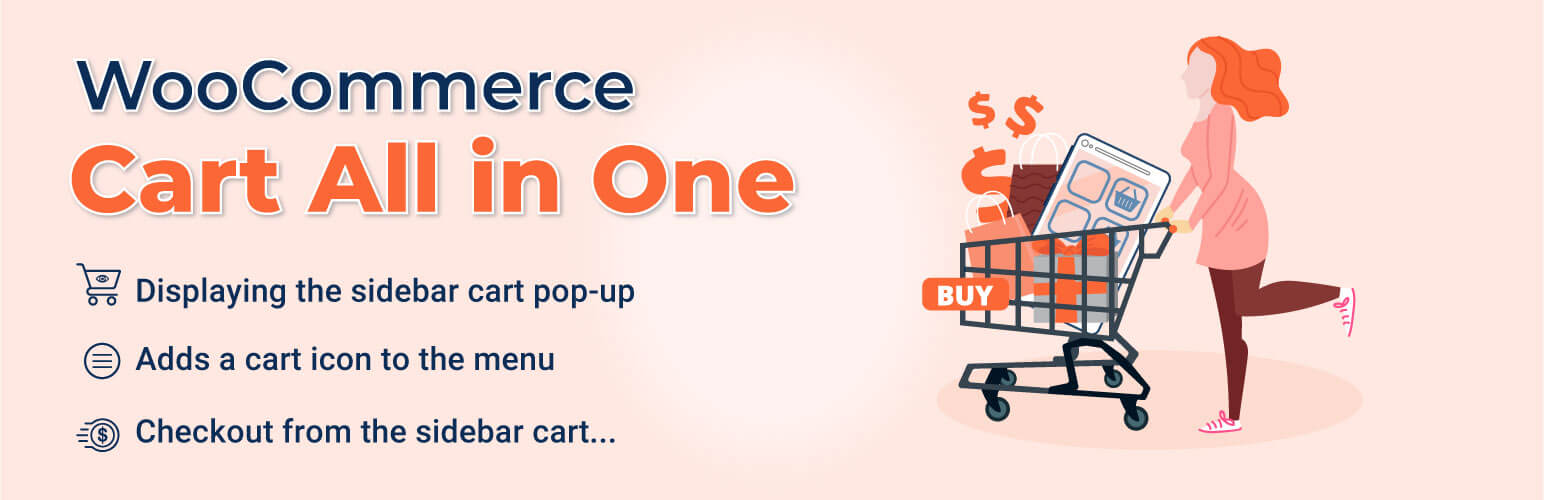
This plugin works well as a WooCommerce direct checkout plugin alternative by reducing steps and improving flow. With sidebar cart, AJAX updates, and integrated checkout, it creates a faster and smoother shopping experience that helps increase conversions.
What They Offer
This plugin focuses on improving cart interaction and simplifying the checkout journey. Below is a clear breakdown of its core features.
Free Features
These features are useful for stores that want better cart usability without complex setup:
- Sidebar cart popup with real-time updates: Displays cart items, totals, coupons, and related products in a side panel. Quantity and price updates happen instantly, keeping users engaged.
- Menu cart integration: Adds a cart icon to the navigation menu with item count and dropdown preview. This makes it easy for users to access their cart from any page.
- AJAX add to cart functionality: Allows users to add products without page reload. You can also control which products use AJAX for better performance.
- Variable product popup: Customers can select variations and quantities directly from shop or archive pages, reducing extra clicks and improving shopping speed.
- Basic design and interaction controls: Includes styling options for position, triggers, colors, animations, and “fly to cart” effects to enhance the shopping experience.
Pro Features
The pro version adds deeper control and checkout integration for better performance and conversions:
- Sticky Add to Cart bar: Adds a customizable sticky bar on product pages with templates, ratings, and styling. This keeps the purchase option visible at all times.
- Checkout inside sidebar cart: Customers can complete the full checkout process directly within the side cart. This removes the need for a separate checkout page and improves flow.
- Recently viewed products module: Displays previously viewed items to encourage users to return and complete purchases, increasing engagement and sales.
- Advanced styling and layout control: Unlocks full customization options for layout, colors, and design, allowing better brand alignment.
Price
| Plan | Price | Discount | Notes |
| 1 Year Plan | $39 | — | Equals $3.25 monthly, billed annually |
| 2 Years Plan | $62.40 | Save 20% | Extra Support (12 months): $9.38 – $46.88 |
Plugin Specifications
- Version: 1.1.19
- Active Installations: 7,000+
- WordPress Requirement: 5.0 or higher
- Tested Up To: 6.8.2
- PHP Requirement: 7.0 or higher
- Developers: VillaTheme, Andy Ha
Cart All In One for WooCommerce is best for store owners who want to combine cart and checkout into a single sidebar experience with AJAX updates and minimal user friction.
This plugin is a strong choice if you want to improve cart interaction and reduce checkout steps without fully redesigning the checkout page. It is not a full WooCommerce one page checkout plugin, but it delivers a smooth, conversion-focused cart-to-checkout flow.
Side Cart & Checkout for WooCommerce
Checkout distractions often lead to abandoned carts, especially when users are forced to switch between pages. Side Cart & Checkout for WooCommerce solves this by combining cart and checkout into a single sliding panel or popup. This keeps users focused, reduces friction, and allows them to complete purchases without leaving the current page.
It works as a strong WooCommerce direct checkout plugin alternative, giving store owners a faster and more interactive checkout flow. By keeping everything accessible in one place, it improves user experience and helps increase completed orders.
What They Offer
This plugin focuses on speed, convenience, and real-time interaction. Below is a breakdown of its core functionality.
Free Version
- This plugin does not offer a free version. It is a premium solution designed for stores that want advanced checkout control from the start.
Pro Features
These features are built to simplify checkout and improve conversions:
- Flexible cart display (side panel or popup): Choose between a sliding side cart or centered popup to match your store design and user behavior preferences.
- Quick checkout inside cart: Customers can complete the entire checkout process directly inside the cart panel or popup, reducing steps and improving speed.
- Floating cart icon for instant access: Add a customizable floating cart icon with item count that opens the cart instantly from any page.
- Buy Now button for direct action: Enable direct “Buy Now” buttons that send customers straight to checkout, improving conversions for fast purchases.
- AJAX-based real-time updates: Users can add, edit, or remove items and see totals update instantly without page reloads, improving performance and usability.
- Editable cart panel controls: Allow users to update quantities, remove items, and view real-time fees, shipping, and discounts directly inside the cart.
- Built-in coupon field: Customers can apply discount codes inside the side cart or popup without navigating away.
- Cross-sell and related product display: Show related products inside the cart to encourage additional purchases and increase average order value.
- Continue shopping option: Users can close the cart quickly and return to browsing without losing their progress.
- Content visibility controls: Control what information appears in the cart, including images, prices, quantities, shipping details, and order summary.
- Full design customization: Adjust colors, text, overlays, border radius, and layout to match your brand and improve visual experience.
- Replace default cart and checkout: Completely replace WooCommerce’s default cart and checkout pages with a faster side cart or popup flow.
Price
Fast Cart + Quick View
| Plan Type | 1 Site | Up to 5 Sites | Up to 20 Sites |
| Annual | $129 | $249 | $399 |
| Lifetime | $449 | $799 | $1499 |
Single Plugin
| Plan Type | 1 Site | Up to 5 Sites | Up to 20 Sites |
| Annual | $79.00 | $139 | $249 |
| Lifetime | $299 | $449 | $899 |
Plugin Specifications
- Version: 1.1.4
- Active Installations: Not publicly listed
- WordPress Requirement: Not specified
- Tested Up To: Not mentioned
- PHP Requirement: Not specified
- Developer: Extify Plugins
Side Cart & Checkout for WooCommerce is best for stores that want to replace traditional cart and checkout pages with a fast, AJAX-powered side panel or popup checkout experience.
This plugin is a great choice for stores that want a modern checkout experience without forcing users through multiple pages. It is not a full WooCommerce one page checkout plugin, but it delivers a similar benefit by keeping cart and checkout together in one smooth flow.
A seamless cart-to-checkout experience reduces drop-offs, and this plugin achieves that by keeping everything fast, simple, and in one place.
Barn2 – WooCommerce Fast Cart
Slow and multi-step checkout flows can reduce conversions and frustrate users. Barn2 – WooCommerce Fast Cart solves this by turning the cart and checkout into a fast popup experience. Instead of redirecting users to separate pages, it keeps everything in one place, helping customers complete purchases quickly and easily.
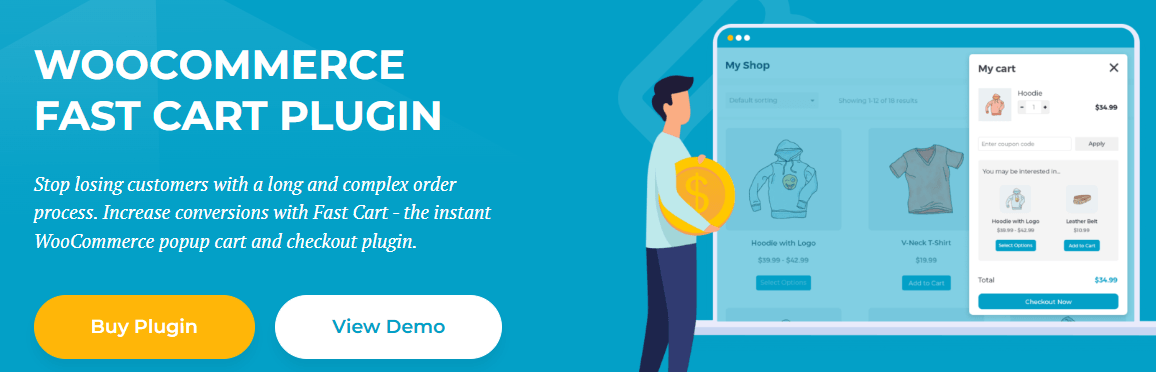
This plugin works as a powerful WooCommerce direct checkout plugin and popup-based checkout solution. By reducing steps and keeping users engaged, it improves checkout speed and increases completed orders.
What They Offer
This plugin focuses on speed, usability, and a modern popup checkout experience.
Free Version
- This plugin does not offer a free version. It is a premium solution designed for performance-focused stores.
Pro Features
These features are built to improve checkout flow and increase conversions:
- Popup or floating cart experience: Automatically opens a popup cart after adding products or allows users to access it through a floating icon for quick interaction.
- Instant on-page checkout inside popup: Customers can complete checkout directly within the popup, including features like Google address autocomplete for faster input.
- Flexible layout options: Choose between side cart or centered popup layouts to match your store design and user preference.
- Replace or keep default WooCommerce pages: You can use Fast Cart alongside default cart/checkout pages or fully replace them for a streamlined experience.
- Direct checkout functionality: Skip the cart page and take customers directly to checkout after adding products, reducing unnecessary steps.
- Built-in upsell features: Show related products inside the popup cart to increase average order value.
- Floating cart icon customizationL: Control icon position, style, and trigger behavior, including shortcode-based placement.
- Mobile-friendly and accessible design: Fully responsive and built following accessibility standards, ensuring usability across all devices.
- Wide payment gateway compatibility: Works with Stripe, PayPal, Amazon Pay, Braintree, and other standard WooCommerce gateways.
- Shipping method integration: Displays all configured shipping options directly within the checkout popup.
- Block-based checkout compatibility: Supports WooCommerce’s newer block-based cart and checkout systems.
- Translation and multilingual support: Compatible with WPML, Weglot, and TranslatePress for global stores.
- Developer-friendly customization: Supports template overrides and hooks for advanced customization.
Pricing
Barn2 – WooCommerce Fast Cart offers flexible pricing based on usage and bundle selection. You can choose between a combined package or a single plugin license depending on your needs.
Fast Cart + Quick View (Bundle Pricing)
| Plan Type | 1 Site | Up to 5 Sites | Up to 20 Sites |
| Annual | $129 | $249 | $399 |
| Lifetime | $449 | $799 | $1499 |
This bundle is ideal if you want both fast checkout and product quick view features in one package.
Single Plugin Pricing (Fast Cart Only)
| Plan Type | 1 Site | Up to 5 Sites | Up to 20 Sites |
| Annual | $79 | $139 | $249 |
| Lifetime | $299 | $449 | $899 |
This option is suitable if you only need the popup cart and checkout functionality without additional features.
Plugin Specifications
- Version: 1.3.5
- Active Installations: Used on 2,800+ websites
- WordPress Requirement: 6.1 or higher
- Tested Up To: WooCommerce 10.0.3
- PHP Requirement: 7.4 or higher
- Developer: Barn2 Media Ltd.
Barn2 WooCommerce Fast Cart is best for store owners who want a fast popup checkout experience with direct checkout, upsells, and real-time cart interaction.
If you want a modern popup-style checkout that reduces steps and keeps users engaged, this plugin is a strong option. It is especially useful for stores focused on speed and improving cart-to-checkout flow
A popup-based checkout can significantly reduce friction, and this plugin delivers a fast and smooth buying experience that helps increase conversions.
Quick Checkout for WooCommerce | One Page Checkout
Long and complex checkout flows often lead to lost sales. Quick Checkout for WooCommerce improves this by allowing customers to complete purchases directly from the same page. It removes unnecessary steps and creates a faster, more focused buying experience from start to finish.

This plugin works as both a WooCommerce one page checkout plugin and a WooCommerce direct checkout plugin, making it ideal for stores that want instant purchase options. By enabling checkout from product pages, shop pages, and landing pages, it significantly reduces friction and improves conversion rates.
What They Offer
This plugin is built for speed, flexibility, and direct conversion-focused checkout. Below is a breakdown of its features.
Free Version
- Trial version available: The plugin offers a fully functional trial for the first 50 orders. After reaching this limit, a paid license is required to continue using premium features.
Pro Features
These features are designed to optimize checkout flow and improve user experience:
- On-page checkout for landing pages: Place the checkout form directly on custom landing pages. This is ideal for sales funnels where users can complete purchases without navigating away.
- Buy Now buttons for instant checkout: Add direct purchase buttons that skip the cart and take users straight to checkout, reducing steps and improving conversions.
- Checkout from shop and catalog pages: Customers can add products and open checkout directly from archive or category pages, speeding up the buying process.
- Flexible shortcode placement: Insert checkout forms or buttons anywhere on your site using shortcodes, giving full control over placement and layout.
- Wide addon compatibility: Works with WooCommerce Subscriptions, Bookings, Product Add-Ons, Gravity Forms, and other extensions without breaking checkout flow.
- Theme-friendly integration: Uses your theme’s default checkout styling, ensuring a consistent look without requiring heavy customization.
- Conditional checkout fields: Show or hide fields based on cart contents or user actions, helping simplify forms and improve usability.
- Lightweight and performance optimized: Built to load quickly and maintain smooth checkout performance across devices, including mobile.
Price
| Plan | Price (per year) | Websites Covered |
| Single | $76 | 1 website |
| Plus | $149 | Up to 5 websites |
| Ultimate | $229 | Up to 15 websites |
Plugin Specifications
- Plugin details: Not publicly available
- Designed for performance-focused WooCommerce stores
- Compatible with most themes and extensions
Quick Checkout for WooCommerce is best for store owners who want to enable direct checkout from product, shop, or landing pages to reduce steps and increase conversions.
If your goal is to create a fast and conversion-focused checkout experience, this plugin is a strong option. It is especially useful for landing page funnels and stores that rely on quick purchase actions rather than traditional cart flows.
Reducing checkout steps can significantly improve sales, and this plugin makes it easy to turn any page into a direct conversion point.
PeachPay for WooCommerce
Extra checkout steps often reduce conversions, especially when users are forced through slow or complex flows. PeachPay for WooCommerce solves this by offering a fast, streamlined checkout experience through a single popup interface. It allows customers to complete purchases quickly, reducing friction and improving overall shopping satisfaction.
As a powerful WooCommerce direct checkout plugin, PeachPay focuses on speed and simplicity. Its one-click checkout for returning users and multi-payment support make it a strong choice for stores targeting global customers and repeat buyers.
What They Offer
PeachPay is built for fast, secure, and flexible checkout experiences. Below is a breakdown of its core features.
Core Features
- Wide payment integration support: Works with 20+ payment providers, including Stripe, PayPal, Square, Apple Pay, Google Pay, Klarna, Affirm, ACH, COD, and more. This ensures flexibility for different customer preferences.
- Express checkout popup: Customers can complete checkout instantly from any page using a popup. Returning users benefit from one-click checkout, which significantly improves conversion rates.
- Multi-currency support: Supports 135+ currencies, making it ideal for international stores targeting global customers.
- Checkout field customization: Easily add, remove, or rename billing, shipping, and custom fields to simplify the checkout process.
- Address autocomplete functionality: Suggests full addresses while typing, reducing input errors and speeding up checkout.
- Product recommendations inside checkout: Displays related or targeted products during checkout to increase average order value.
- Advanced analytics and tracking: Track abandoned carts, payment methods, and key checkout data to optimize performance and conversions.
- Built-in bot protection: Prevents automated fake checkout attempts, improving security and reducing spam orders.
- Flexible payment controls: Restrict payment methods by region or currency, set fees or limits, enable 3D Secure, and manage refunds or disputes.
Pricing
PeachPay is completely free to use. There are:
- No annual subscription fees
- No platform or service charges
- No percentage-based fees from the plugin
You only pay standard processing fees to payment providers like Stripe or PayPal.
Plugin Specifications
- Version: 1.117.4
- Active Installations: 500+
- WordPress Requirement: 5.8 or higher
- Tested Up To: 6.8.2
- PHP Requirement: 7.0 or higher
- Developers: PeachPay, Tom Fanelli, Vikrant Sant
PeachPay for WooCommerce is best for store owners who want a free, fast, and global-ready checkout solution with one-click payments and multi-currency support.
If you are looking for a free yet powerful checkout solution, PeachPay is one of the best options available. It is especially effective for stores with international customers and repeat buyers who benefit from fast, one-click checkout.
A faster checkout with fewer steps can significantly improve conversions, and PeachPay delivers that without adding extra cost to your store.
Fluid Checkout for WooCommerce – Lite
A long and confusing checkout process can reduce conversions and frustrate customers. Fluid Checkout for WooCommerce – Lite improves this by transforming the default checkout into a clean, structured, and user-friendly flow. It simplifies the experience, reduces distractions, and helps users complete purchases more easily.
Unlike a typical WooCommerce one page checkout plugin, Fluid Checkout focuses on optimizing the existing checkout with better layouts, smart field handling, and trust-building elements. This makes it ideal for stores that want a more professional and conversion-friendly checkout without changing the entire flow.
What They Offer
This plugin enhances the checkout experience with usability improvements, better design, and performance-focused features.
Free Features
These features are designed to improve the default WooCommerce checkout experience:
- Optimized checkout layout: Creates a clean and distraction-free checkout page that helps users focus on completing their purchase.
- Trust symbols for better confidence: Displays reassurance icons during checkout to build trust and reduce hesitation.
- Instant field validation: Validates user inputs in real time, reducing errors and making the form easier to complete.
- Dedicated shipping phone field: Allows collection of a separate phone number for shipping, which can be useful for delivery coordination.
- Hidden optional fields: Shows only required inputs by default, reducing clutter and improving usability.
- Auto-save customer data: Ensures users do not lose progress if they refresh or leave the page during checkout.
- Step review sections: Allows users to skip already completed steps, making the process faster and more efficient.
- Flexible field order control: Lets you adjust the sequence of billing and shipping fields based on your store needs.
- Multiple layout options: Supports both single-step and multi-step checkout flows for flexibility.
- Inline login option: Customers can log in directly during checkout without leaving the page.
Pro Features
The pro version adds deeper customization and advanced checkout improvements:
- Professional design templates: Choose from layouts like Classic, Boxed, Split, and Minimalist to match your store design.
- Full funnel optimization: Enhances cart, checkout, order confirmation, and payment pages for a consistent experience.
- Edit cart directly in checkout: Customers can update cart items without navigating away, improving convenience.
- Account matching system: Automatically links guest orders with existing customer accounts for better user management.
- Trust symbols across funnel: Adds reassurance elements on cart and order confirmation pages to improve confidence.
- Express checkout buttons: Supports Apple Pay, Google Pay, and other quick payment options directly in checkout.
- Local pickup and store collection options: Offers alternative delivery methods for better flexibility.
- Integrated coupon functionality: Allows customers to apply discount codes directly on cart and checkout pages.
- Additional features and tools: Includes gift messages, packing slips, and international phone number support.
- Advanced address control: Customize billing and shipping logic, including forcing billing to match shipping when needed.
Price
| Plan | Fluid Checkout PRO | Fluid Checkout PRO+ Complete Bundle |
| 1 Site | $115.83/ year | $150.93 / year |
| 5 Sites | $232.83 / year | $291.33 / year |
| 25 Sites | $583.83 / year | $700.83 / year |
Plugin Specifications
- Version: 4.1.0
- Active Installations: 20,000+
- WordPress Requirement: 5.0 or higher
- Tested Up To: 6.8.2
- PHP Requirement: 7.4 or higher
- Developer: Diego Versiani
Fluid Checkout for WooCommerce is best for store owners who want to improve the default checkout experience with a cleaner layout, better usability, and trust-focused design elements.
If you want to upgrade your checkout without fully replacing it, Fluid Checkout is a strong choice. It improves usability, design, and performance while keeping the familiar WooCommerce flow intact.
Small improvements in checkout design and usability can significantly impact conversions, and this plugin focuses exactly on those high-impact areas.
WooCommerce One Page Checkout and Layouts
A cluttered checkout can confuse users and reduce conversions. WooCommerce One Page Checkout and Layouts solves this by combining cart and checkout into a clean, single-page experience. It removes unnecessary steps and helps customers complete purchases faster with fewer distractions.
As a flexible WooCommerce one page checkout plugin, it focuses on simplicity, speed, and design control. With built-in layouts and AJAX updates, it improves checkout flow while keeping the experience smooth across devices.
What They Offer
This plugin provides essential tools to simplify checkout and improve usability without adding unnecessary complexity.
Free Features
These features are suitable for stores that want a simple and effective one-page checkout setup:
- One-page checkout with live updates: Displays cart and checkout together on a single page with real-time updates, reducing steps and improving user flow.
- Skip cart functionality: Sends customers directly to checkout after adding products, minimizing friction in the purchase journey.
- Inline quantity editing: Allows users to adjust product quantities without reloading the page, improving convenience.
- AJAX-powered sections: Instantly updates product data and form fields without page refresh, keeping checkout fast and responsive.
- Predefined checkout layouts: Provides ready-to-use templates that help store owners set up quickly without complex configuration.
- Mobile-friendly design: Optimized for smartphones and tablets, ensuring a smooth checkout experience across devices.
- Basic styling controls: Includes simple options to adjust colors and layout sections for better visual consistency.
Pro Features
The pro version adds more control and customization for advanced use cases:
- Additional layout options: Includes accordion layouts, multi-step checkout flow, and advanced order table designs for better structure.
- Advanced customizer panel: Gives deeper control over checkout design, allowing you to refine layout and user experience.
- Remove order notes option: Helps simplify checkout by removing unnecessary fields, improving completion rates.
- Field visibility control: Show or hide billing and shipping fields based on your store requirements.
- Checkout field editor: Customize labels, placeholders, and required fields to improve usability.
- Digital product optimization: Offers specific settings for downloadable or non-shipping products to simplify checkout.
- Custom checkout design builder: Create a fully personalized checkout layout that matches your brand identity.
- Advanced color customization: Control tab colors and design elements to align with your store’s branding.
Pricing
- Free version available with core features
- Pro version available for advanced customization at $19 (one-time)
This makes it one of the most affordable checkout optimization plugins.
Plugin Specifications
- Version: 4.1.2
- Last Updated: 1 week ago
- Active Installations: 4,000+
- WordPress Requirement: 4.5 or higher
- Tested Up To: 6.8.2
- PHP Requirement: 5.6 or higher
WooCommerce One Page Checkout and Layouts is best for store owners who want a simple, affordable one-page checkout solution with basic customization and fast setup.
This plugin is a solid option for small to mid-level stores looking for a lightweight best WooCommerce checkout plugin alternative. It delivers core one-page checkout functionality without complexity or high cost.
Simplifying checkout into one page can significantly improve conversions, and this plugin offers an easy way to achieve that with minimal setup.
Cashier for WooCommerce
Extra steps during checkout can reduce conversions and frustrate users. Cashier for WooCommerce removes that friction by combining product selection, cart, and checkout into a single, streamlined experience. It allows customers to complete purchases faster while keeping everything simple and organized.
As a powerful WooCommerce one page checkout plugin and WooCommerce direct checkout plugin, Cashier focuses on reducing clicks, improving speed, and increasing completed orders. It is especially useful for stores that want advanced checkout control with built-in upsells and business insights.
What They Offer
This plugin delivers an all-in-one checkout system with advanced features designed to improve both user experience and store performance.
Core Features
- All-in-one one-page checkout system: Combines product list, cart, checkout form, and payment options into a single page, reducing steps and improving conversion rates.
- Advanced checkout field editor: Add, remove, reorder, or customize checkout fields without coding, helping create a cleaner and more user-friendly form.
- Direct checkout and one-click purchase: Enable “Buy Now” buttons that skip the cart and allow returning users to complete purchases instantly.
- Flexible add to cart redirect control: Send users directly to checkout or any custom page after adding a product, improving flow for different sales strategies.
- Product recommendations and upsells: Display “frequently bought together” products to increase average order value during checkout.
- Side cart integration for quick edits: Allow customers to update cart items from a side panel without leaving the checkout page.
- Minimum and maximum quantity rules: Set purchase limits per product to control order size and manage inventory more effectively.
- Edit product variations inside cart: Customers can change options like size or color directly from the cart without restarting the process.
- Quick empty cart option: Provide a one-click cart clear option with confirmation for better usability.
- Cost and profit tracking: Track product costs and calculate profit per order directly within WooCommerce.
- Printable PDF invoices: Enable both customers and admins to generate invoices easily for records and documentation.
- Cart notices and promotional messages: Display shipping thresholds, offers, or important messages inside the cart to guide users.
- Subscription support: Fully compatible with WooCommerce Subscriptions for recurring billing products.
- Advanced Buy Now link options: Create direct checkout links with auto-applied coupons, custom shipping defaults, and personalized button text.
Price
| Plan | Price |
| 1 Year Plan | $149 |
| 2 Years Plan | $238.40 (20% off) |
Plugin Specifications
- Version: 3.8.0
- Active Installations: 300
- WordPress Requirement: 4.9 or higher
- Tested Up To: WordPress 6.7.1, WooCommerce 9.4.2
- PHP Requirement: 5.6 or higher
- Developer: StoreApps
Cashier for WooCommerce is best for store owners who want a complete one-page checkout system with advanced customization, upsells, and built-in business tracking features.
If you are looking for a feature-rich checkout solution, Cashier stands out as one of the best WooCommerce checkout plugin options for advanced stores. It goes beyond checkout by combining sales, analytics, and optimization tools in one platform.
A powerful checkout system not only speeds up purchases but also increases order value, and Cashier is built to handle both effectively.
WooCommerce One Page Checkout
Multiple checkout steps often slow down purchases and increase drop-offs. WooCommerce One Page Checkout solves this by combining product selection and checkout into a single page. This creates a faster and more streamlined buying process, helping customers complete orders with less friction.
As an official solution, it works well as a WooCommerce one page checkout plugin for stores that want a stable and reliable setup. It focuses on simplifying checkout while maintaining compatibility with core WooCommerce features and extensions.
What They Offer
This plugin is designed to create flexible one-page checkout experiences across different types of pages.
Free Version
- This plugin does not offer a free version. It is a premium extension developed by the official WooCommerce team.
Pro Features
These features help create a flexible and conversion-friendly checkout flow:
- Complete one-page purchase flow: Displays product selection and checkout form on a single page, allowing customers to add or remove items and complete payment without leaving.
- Turn any page into checkout: Use shortcodes to add checkout functionality to any page or post, including product pages and landing pages.
- Simple setup options: Enable checkout per product using a checkbox or configure it through the Classic Editor, making setup quick and easy.
- Custom landing page support: Build dedicated sales or promotional pages with checkout embedded directly into the content.
- Flexible product display control: Show specific products based on IDs or categories using shortcode attributes for better targeting.
- Built-in and custom layout templates: Choose from layouts like product list, table, single product, or pricing table, or create your own custom design.
- Wide product type compatibility: Works with WooCommerce extensions like Subscriptions, Bookings, and Bundles for complex product setups.
- Payment gateway compatibility: Fully supports gateways that use WooCommerce’s standard checkout system, ensuring stable performance.
- Auto-scroll functionality: Automatically scrolls users to notices or updates after adding products, improving usability.
- Important limitation to note: Does not fully replace the default checkout page, which is still required for certain payment gateways and order confirmations.
Price
| Plan | Price |
| 1 Year Plan | $79 |
| 2 Years Plan | $126.40 (20% off) |
Plugin Specifications
- Version: 2.9.5
- Active Installations: 10,000+
- WordPress Requirement: Not specified
- Tested Up To: WordPress 6.7 and WooCommerce 9.6
- PHP Requirement: Not specified
- Developer: Woo (Official WooCommerce Team)
WooCommerce One Page Checkout is best for store owners who want an official, reliable solution to create one-page checkout experiences using shortcodes and flexible layouts.
This plugin is a solid choice if you prefer an official WooCommerce extension with stable performance. While it may lack some modern UX features, it provides reliable one-page checkout functionality for a wide range of stores.
A simple and reliable checkout setup can improve conversions, and this plugin offers a trusted way to implement one-page checkout in WooCommerce.
How to Choose the Best WooCommerce Checkout Plugin (Buyer’s Guide)
Now that you have explored the top options, the next step is choosing the right plugin based on your store’s needs. Not every plugin fits every business, so understanding what matters most will help you make a better decision.
Key Factors to Consider Before Choosing
- Checkout flow type (One-page vs Direct checkout): If your goal is faster conversions, a WooCommerce one page checkout plugin keeps everything in one place. On the other hand, a WooCommerce direct checkout plugin skips the cart and sends users straight to payment, which works well for quick purchases and landing pages.
- Store type and product complexity: Simple product stores can use lightweight checkout plugins, while stores with subscriptions, bundles, or variable products need plugins with better compatibility and advanced field control.
- Customization and design flexibility: Some plugins offer full control over checkout layout, fields, and styling, while others are more limited. Choose based on how much control you need over branding and user experience.
- Performance and speed optimization: A slow checkout reduces conversions. Look for plugins that support AJAX updates, fast loading, and mobile optimization to ensure smooth performance.
- Payment gateway support: Make sure the plugin supports your required payment methods such as Stripe, PayPal, Apple Pay, or local gateways, especially if you are targeting international customers.
- Upsell and revenue features: Plugins with product recommendations, upsells, and smart cart features can increase average order value and overall revenue.
Which Plugin Should You Choose?
To make it simple:
- Choose One Page Quick Checkout for WooCommerce if you want an all-in-one, conversion-focused solution
- Choose PeachPay for WooCommerce if you need a free, fast, and global checkout system
- Choose Cashier for WooCommerce if you want advanced features with upsells and analytics
- Choose Fluid Checkout if you prefer improving the default checkout instead of replacing it
The best WooCommerce checkout plugin depends on your goal. For higher conversions, use one-page or direct checkout. For flexibility, choose a plugin with strong customization and payment support.
Final Tip Before Implementation
Always test your checkout after installing any plugin. Check loading speed, mobile usability, and payment flow to ensure everything works smoothly before going live.
Choosing the right checkout plugin is not just about features, it is about creating a faster and smoother buying experience that turns visitors into customers.
How to Set Up WooCommerce One-Page Checkout Plugin?
A long and complicated checkout process can lead to lost sales and lower conversions. To solve this, you can use a WooCommerce one page checkout plugin that combines product selection, cart, and checkout into a single, streamlined page. This approach reduces friction, speeds up the buying process, and helps customers complete their orders more easily. In this guide, we will use One Page Quick Checkout for WooCommerce by Plugincy to show how you can install, enable, and customize a one-page checkout experience for your store.
Step 1: Installing the Plugin
You can install the plugin in two ways:
Option A: From WordPress Dashboard
-
- Log in to your WordPress Admin Dashboard.
- Go to Plugins > Add New.
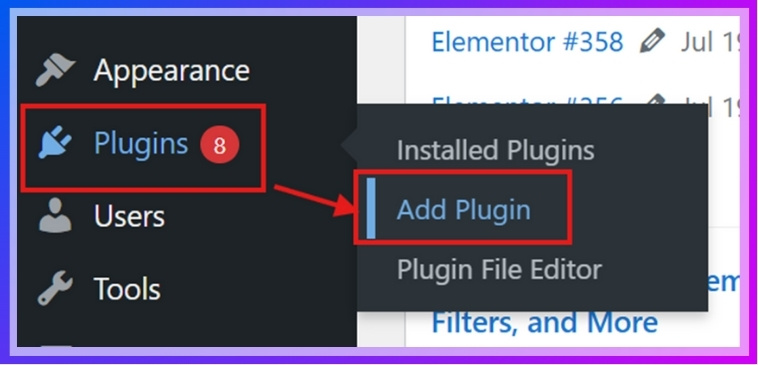
- In the search bar, type One Page Quick Checkout for WooCommerce.
- Click Install Now.
- Once installed, click Activate.
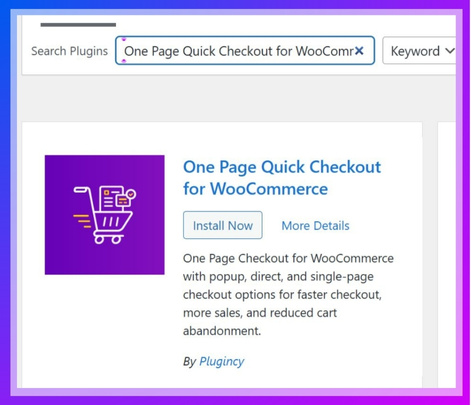
Now the free plugin is ready to use.
Option B: Manual Upload (Free or PRO Version)
- If using the free version, download it from the WordPress Plugin Directory.
- If you purchased the PRO version, you’ll get a download link (ZIP file) by email from the plugin’s official website.
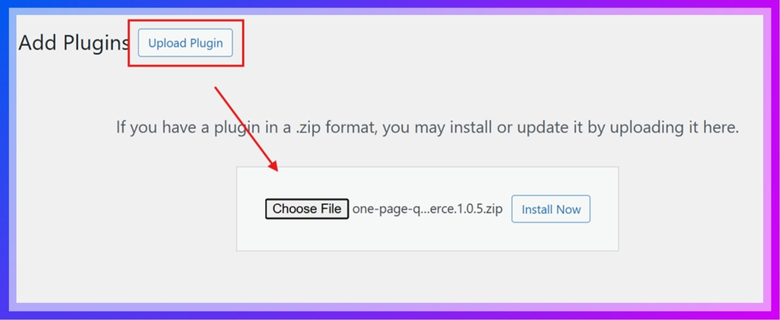
- In your WordPress dashboard, go to Plugins > Add New.
- Click the Upload Plugin at the top.
- Select the ZIP file and click Install Now.
- After installation, click Activate.
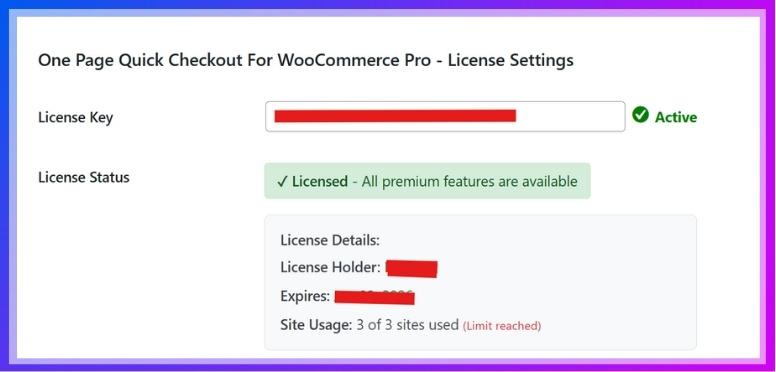
For the PRO version:
- Go to Onpage Checkout > Plugin License in your dashboard.
- Enter the License Key to unlock PRO features.
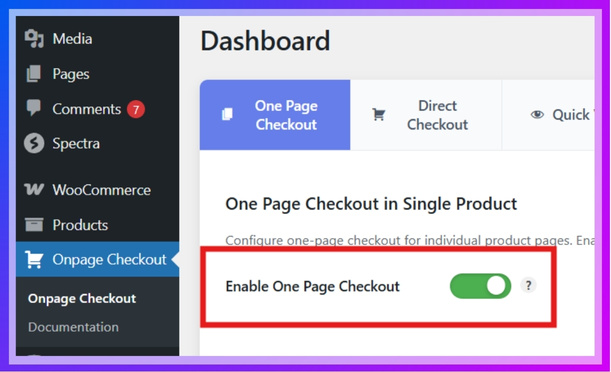
Step 2: Enabling One Page Checkout
After activation, the one-page checkout feature is usually enabled by default. But if not:
- Go to your dashboard menu.
- Navigate to Onpage Checkout > One Page Checkout.
- Toggle Enable One Page Checkout to ON.
Step 3: Enable for Specific Products
Sometimes you may only want certain products to have one-page checkout. Here’s how:
- Go to Products > All Products.
- Click Edit on the product you want.
- Scroll down to the One Page Checkout settings section.
- Turn Enable One Page Checkout ON.
- Save changes.
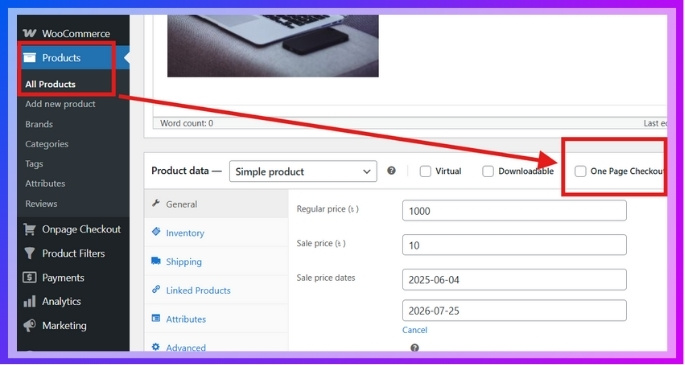
Now only that product will show checkout on its page.
Step 4: Enable for All Products
If you want all products in your store to have one-page checkout:
- Go to Onpage Checkout > One Page Checkout.
- Turn ON Enable for All Products.
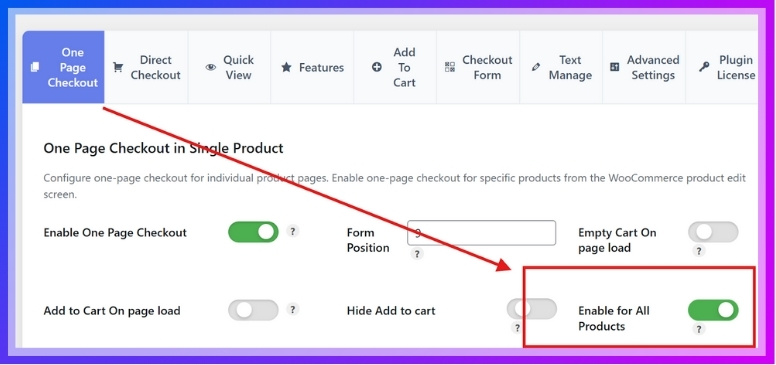
Now, every product page will include the checkout form.
Step 5: Customize Checkout Options
The plugin gives you customization options to fit your store’s needs.
Here are the main settings you can adjust:
- Form Position: Decide where the checkout form appears (above product, below product, or after description).
- Empty Cart on Page Load: Clears the cart every time the page loads. Helpful for limited-time sales.
- Add to Cart on Page Load: Automatically adds the product to the cart when the page opens.
- Hide Add to Cart Button: Useful if you want customers to check out directly without extra clicks.
- Checkout Layout: Adjust design so it matches your store’s theme.
To change these:
- Go to Onpage Checkout > One Page Checkout.
- Adjust settings as needed.
- Click Save Changes.
Step 6: Test the Checkout
This is very important. Always test before going live.
- Open any product page from your store.
- You should now see the checkout form directly on that product page.
- Try adding customer details and placing a test order (you can use a test payment method if available).
- Confirm everything works smoothly.
Tips for Beginners
- If something doesn’t show up, clear your website cache or browser cache.
- If using a theme or another plugin that modifies WooCommerce checkout, check compatibility.
- For PRO users, explore advanced options like custom fields and different layouts for better design.
FAQs About Top 10 WooCommerce Checkout Plugins
Choosing the right checkout plugin is a critical step for improving conversions, and it is natural to have questions before making a decision. Below are some of the most common questions store owners ask when selecting the best WooCommerce checkout plugin.
What Is the Main Role of a WooCommerce Checkout Plugin?
A WooCommerce checkout plugin improves the final step of the buying process by making it faster, simpler, and more user-friendly. It reduces unnecessary steps, adds features like one-page checkout or direct checkout, and helps customers complete purchases without confusion. This leads to higher conversion rates and fewer abandoned carts.
How Do Checkout Plugins Help Reduce Cart Abandonment?
Checkout plugins reduce cart abandonment by removing friction in the buying process. Features like clean forms, faster loading, auto-fill fields, and one-click checkout make it easier for customers to complete their orders. The smoother the checkout experience, the more likely users are to finish their purchase instead of leaving.
Can I Use More Than One Checkout Plugin Together?
In most cases, it is not recommended to use multiple checkout plugins at the same time. Since they modify the same checkout flow, conflicts can occur, leading to broken layouts, slow performance, or checkout errors. It is better to choose one reliable plugin that meets your needs.
Do Checkout Plugins Work with All Payment Gateways?
Most checkout plugins support popular payment gateways like Stripe, PayPal, and bank transfers. However, some advanced or region-specific gateways may require additional configuration. Always check compatibility before installing a plugin to ensure a smooth payment experience for your customers.
Which WooCommerce Checkout Plugin Is Best for Beginners?
For beginners, plugins that offer simple setup and ready-to-use templates are ideal. Options like one-page checkout plugins or direct checkout plugins are easier to configure and deliver quick results without complex customization.
Which WooCommerce Checkout Plugin Is Best for Conversions?
The best WooCommerce checkout plugin for conversions is one that reduces steps and speeds up the checkout process. Plugins with one-page checkout, direct checkout, and AJAX updates usually perform better because they remove friction and help users complete purchases faster.
Is One Page Checkout Better Than Default WooCommerce Checkout?
Yes, in most cases, one-page checkout performs better than the default checkout. It combines cart and checkout into a single page, reducing clicks and improving user experience. This leads to lower cart abandonment and higher conversion rates.
Does Checkout Speed Really Affect Sales?
Yes, checkout speed has a direct impact on sales. A slow or complicated checkout increases drop-offs, while a fast and simple checkout encourages users to complete their purchases. Even small improvements in speed can significantly boost conversions.
WooCommerce checkout plugins help increase conversions by simplifying the checkout process, reducing steps, and improving user experience with faster and cleaner checkout flows.
Final Thoughts
Choosing the right checkout plugin can directly impact your store’s performance and revenue. A faster, simpler checkout experience reduces cart abandonment, improves user satisfaction, and increases completed orders.
If you want an all-in-one solution, One Page Quick Checkout for WooCommerce by Plugincy is the best choice. It combines one-page checkout, direct checkout, popup checkout, and AJAX features into a single system, making it ideal for improving conversions.
For a free and global-friendly option, PeachPay for WooCommerce is a strong alternative. It offers one-click checkout, multi-currency support, and fast payment processing, which works well for international stores.
If you prefer advanced features with upsells and analytics, Cashier for WooCommerce is a powerful option for scaling stores.
Before going live, always test your checkout flow on desktop and mobile, check payment gateways, and remove unnecessary steps. Even small improvements can make a big difference in your sales performance.
The right checkout plugin does not just improve user experience, it directly increases revenue by turning more visitors into paying customers.
