

Attribute filtering is one of the most powerful ways to improve product discovery in a WooCommerce store. It allows customers to refine products using specific details like size, color, brand, material, and more, instead of browsing through hundreds of items.
With the right WooCommerce attribute filter plugin, users can quickly narrow down choices, making shopping faster and more convenient. These plugins help organize your product catalog, reduce confusion, and guide customers directly to what they are looking for.
Quick Answer
WooCommerce attribute filter plugins allow users to filter products based on attributes like size, color, brand, and material. The best plugins support AJAX filtering, multi-select options, and mobile-friendly layouts for better user experience.
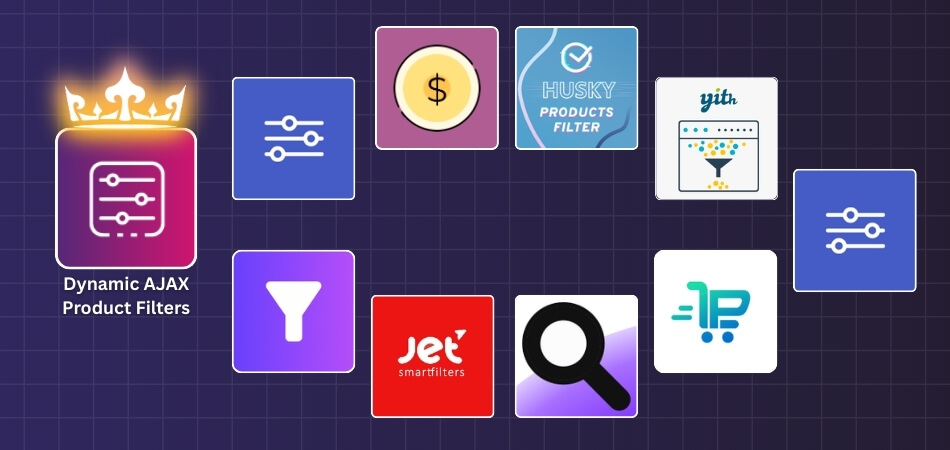
Why Attribute Filters Improve UX & Conversion
Attribute filters are one of the most powerful tools in WooCommerce because they help users quickly refine products based on specific needs. Instead of browsing endlessly, customers can directly narrow down options using attributes like size, color, brand, or material.
- Improves product discovery – Users can quickly find relevant products by selecting specific attributes instead of browsing entire categories
- Reduces decision fatigue – Filtering removes unnecessary options, helping users focus only on what matches their preferences
- Speeds up navigation – Customers can reach the desired product faster without going through multiple pages
- Enhances shopping experience – Clean and organized filters make browsing smoother and more intuitive
- Supports multi-condition filtering – Users can combine attributes like size + color + brand for precise results
- Increases buying confidence – When users find exactly what they need, they are more likely to complete the purchase
- Boosts conversion rates – Faster product matching leads to higher engagement and improved checkout completion
Attribute filters simplify product selection, improve user experience, and help customers find exactly what they need, increasing overall conversions.
Why Attribute Filters Improve UX & Conversion
Attribute filters are one of the most powerful tools in WooCommerce because they help users quickly refine products based on specific needs. Instead of browsing endlessly, customers can directly narrow down options using attributes like size, color, brand, or material.
- Improves product discovery – Users can quickly find relevant products by selecting specific attributes instead of browsing entire categories
- Reduces decision fatigue – Filtering removes unnecessary options, helping users focus only on what matches their preferences
- Speeds up navigation – Customers can reach the desired product faster without going through multiple pages
- Enhances shopping experience – Clean and organized filters make browsing smoother and more intuitive
- Supports multi-condition filtering – Users can combine attributes like size + color + brand for precise results
- Increases buying confidence – When users find exactly what they need, they are more likely to complete the purchase
- Boosts conversion rates – Faster product matching leads to higher engagement and improved checkout completion
Attribute filters simplify product selection, improve user experience, and help customers find exactly what they need, increasing overall conversions.

Types of Attribute Filters (Checkbox, Dropdown, Swatches, Multi-Select)
Attribute filters can be displayed in different formats depending on your store design and product type. Choosing the right format improves usability and helps customers interact with filters more easily.
- Checkbox filters – Show attribute options as a list where users can select one or multiple values. Ideal for attributes like size or brand.
- Dropdown filters – Place options inside a compact dropdown menu. Useful for saving space, especially on mobile devices.
- Color swatches – Display color attributes visually using color boxes instead of text, making selection faster and clearer.
- Image swatches – Use images to represent attributes like fabric, pattern, or style for better visual understanding.
- Multi-select filters – Allow users to choose multiple attribute values at once, improving flexibility in product selection.
- Radio button filters – Let users select only one option at a time, useful for attributes where a single choice is required.
Choosing the right attribute filter type improves usability and helps customers interact with filters more effectively.
UX Best Practices for Attribute Filtering
A well-designed attribute filter should feel intuitive and responsive. Good UX helps users refine products quickly and keeps them engaged throughout the browsing process.
- Show only relevant attributes – Display filters that match the current category or product type to avoid clutter and confusion
- Group related attributes – Keep similar filters together, such as size, color, and brand, for easier navigation
- Enable multi-select filtering – Allow users to choose multiple attribute values to refine results more precisely
- Use visual elements where possible – Apply color or image swatches instead of plain text for better clarity and faster selection
- Display product count per option – Show how many products match each attribute to guide user decisions
- Keep filters responsive – Use AJAX updates so results refresh instantly without page reload
- Optimize for mobile users – Use collapsible or slide-out filters to maintain a clean interface on smaller screens
Following UX best practices ensures attribute filters are easy to use, improving navigation and overall shopping experience.
Top 10 WooCommerce Attribute Filter Plugins (Comparison Table)
When customers browse products with multiple options like size, color, or brand, attribute filters help them quickly narrow down choices. A WooCommerce attribute filter plugin makes this process faster and more organized, improving how users interact with your store.
Below is a comparison table of the best plugins to help you choose the right solution based on features, performance, and flexibility.
| Plugin Name | Free Version | Paid Version | Starting Price | Key Strength |
| Dynamic AJAX Product Filters for WooCommerce | Yes | Yes | $39/year or $79 lifetime | Smart attribute filtering with variation-aware logic and flexible display styles |
| WooCommerce Product Filter by Barn2 | No | Yes | $79/year | High-performance attribute filtering with fast AJAX and indexing support |
| Filter Everything | Yes | Yes | $44 (one-time) | Advanced attribute filtering with custom fields and flexible logic |
| YITH WooCommerce AJAX Product Filter | Yes | Yes | $105/year | Easy setup with attribute filters, clean UI, and SEO-friendly options |
| JetSmartFilters | No | Yes | $43/year | Visual attribute filters with Elementor integration and dynamic UI control |
| HUSKY (WOOF) – WooCommerce Products Filter | Yes | Yes | $42 (one-time) | Flexible attribute filtering with advanced logic and customization |
| Product Filter by WBW | Yes | Yes | $59/year | Beginner-friendly setup with simple attribute filtering options |
| Advanced AJAX Product Filters | Yes | Yes | $44 (one-time) | Lightweight filtering with fast AJAX updates and clean URLs |
| WPC Smart Filters for WooCommerce | Yes | Yes | $29/year | Basic attribute filtering for small stores with easy setup |
| WooCommerce Product Filters (Official Plugin) | No | Yes | $79/year | Native WooCommerce solution with stable attribute filtering |
Top 10 WooCommerce Attribute Filter Plugins
Finding products quickly is important for any online store, and attribute filters make that process smoother. These filters help shoppers refine choices like size, color, or brand. Let’s look at how different plugins make this task easier.
Dynamic AJAX Product Filters for WooCommerce
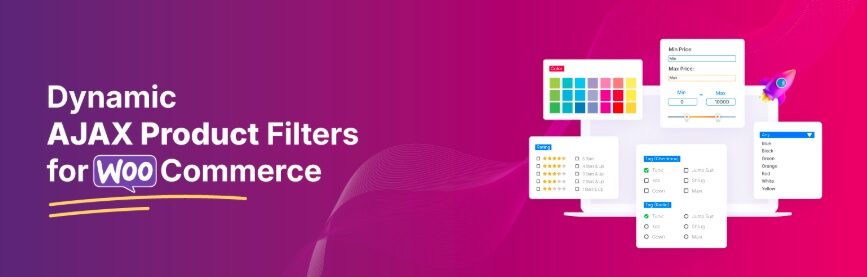
In modern WooCommerce stores, attributes like color, size, material, and brand play a key role in how customers choose products. Dynamic AJAX Product Filters for WooCommerce helps bring these attributes into focus by allowing users to refine results instantly. This creates a smoother browsing experience and makes product discovery more structured and efficient.
Key Features
Here are the main features that make this plugin effective for attribute-based filtering. Each feature focuses on improving product discovery and making navigation smoother.
Free Features
- Attribute-Based Filtering – Allows customers to refine products using attributes like size, color, brand, or material, helping them quickly find relevant options
- Flexible Price Filtering – Supports multiple formats such as sliders, dropdowns, and input fields for accurate price selection
- Category-Based Refinement – Lets users narrow results within specific categories alongside attribute filtering
- Tag Filtering Support – Enables more precise searches by combining product tags with selected attributes
- Rating-Based Filtering – Helps users discover well-reviewed products by applying rating conditions
- AJAX Filtering and Sorting – Updates product results instantly while maintaining smooth pagination and sorting
- Multiple Display Styles – Attributes can appear as dropdowns, checkboxes, color boxes, or image-based swatches
- Variation-Aware Filtering – Shows only available attribute options based on product variations to avoid confusion
- Flexible Placement Options – Filters can be added using widgets, shortcodes, or page builder sections
- Auto-Hide Empty Options – Removes attribute values with no matching products to keep filters clean
Pro Features
- Hierarchical Attribute Control – Allows better handling of parent and child attribute values for detailed filtering
- SEO-Friendly Filter URLs – Generates clean and structured links for filtered pages to improve search visibility
- Advanced Rating Options – Adds more control over rating-based filtering within attribute combinations
- Import and Export Settings – Makes it easy to transfer filter configurations between different stores
- Custom Loading Effects – Provides multiple loading styles to improve the filtering experience
- Custom Template Support – Enables unique product layouts with integrated attribute filters
- Priority Support Access – Offers dedicated assistance for setup and advanced configurations
Pricing
| Plan | Price (Discounted) | Normal Price | Features |
| Single Site | $39/year | $49 | Full access, all pro features, 1 year support, 1 year updates |
| Up to 5 Sites | $89/year | $99 | Full access, all pro features, 1 year support, 1 year updates |
| Unlimited Sites | $189/year | $199 | Full access, all pro features, 1 year support, 1 year updates |
| Single Site (Lifetime) | $79 one-time | $89 | Full access, lifetime support, unlimited updates |
| Up to 5 Sites (Lifetime) | $139 one-time | $149 | Full access, lifetime support, unlimited updates |
| Unlimited Sites (Lifetime) | $289 one-time | $299 | Full access, lifetime support, unlimited updates |
This plugin offers flexible pricing with both yearly and lifetime plans, making it suitable for different store sizes and long-term usage needs.
2. WooCommerce Product Filter by Barn2
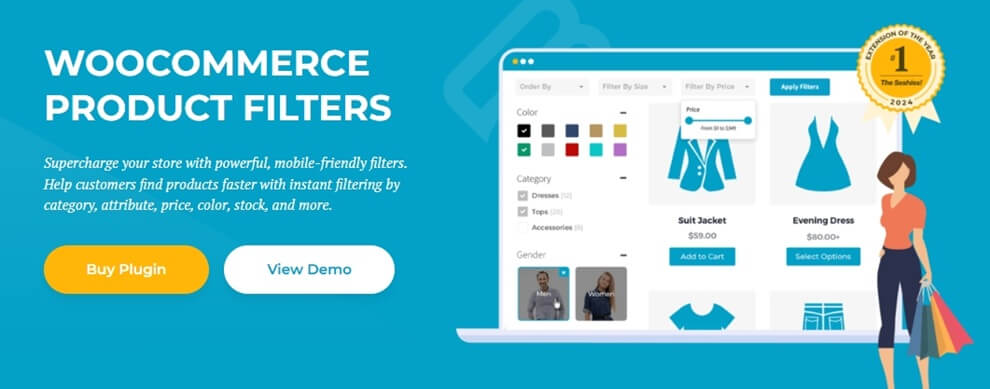
WooCommerce Product Filter by Barn2 provides a structured way to handle attribute filtering across your store. It allows customers to refine products using attributes like size, color, brand, and more with smooth performance. The plugin is built for reliability and works well for stores with large product catalogs.
Key Features
Here are the main features that support effective attribute filtering and improve product discovery.
Free Features
- Attribute Filtering System – Lets users narrow down products using attributes such as size, color, and brand for faster navigation
- Instant Filtering Experience – Updates results quickly when users select attribute options
- Multi-Filter Compatibility – Works alongside price, category, and other filtering conditions
- Clean Filter Layouts – Provides structured layouts that are easy to understand and use
- Mobile-Optimized Filtering – Includes slide-out panels for better usability on smaller screens
- Flexible Placement – Filters can be placed in sidebars or above product listings
Pro Features
- Advanced Filter Logic – Allows more precise combinations of attributes and conditions
- Performance Optimization – Handles large catalogs efficiently without slowing down
- SEO-Friendly Filtering – Creates clean and structured filter URLs
- Custom Display Control – Adjust how filters appear across different pages
- Priority Support – Access to dedicated assistance for setup and optimization
Limitations
- No free version available
- Less design flexibility compared to visual builder-based plugins
- Advanced customization options are limited
Pricing
| Plan | Price | Type |
| Single Site | $79/year | Yearly |
| 5 Sites | $139/year | Yearly |
| 20 Sites | $249/year | Yearly |
Barn2 Product Filter offers stable and performance-focused attribute filtering, making it a strong choice for medium to large WooCommerce stores.
3. Filter Everything
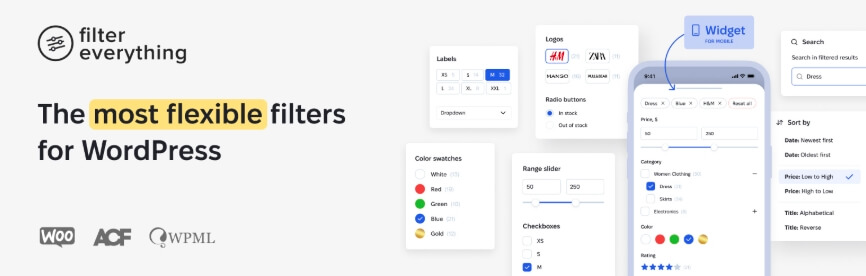
Filter Everything is built for stores that need deeper control over attribute filtering. It allows users to refine products using attributes like size, color, brand, and even custom fields. This makes it a strong option for stores with complex catalogs where basic filtering is not enough.
Key Features
These features focus on flexibility and advanced filtering control.
Free Features
- Attribute and Taxonomy Filtering – Lets users filter products using standard attributes and custom taxonomies
- Real-Time Result Updates – Refreshes product listings instantly after selecting filter options
- Multi-Condition Filtering – Supports combining attributes with categories, tags, and pricing
- Custom Field Filtering – Allows filtering based on additional product data beyond default attributes
- Flexible Display Options – Supports multiple layouts for better usability
- Page Builder Compatibility – Works with Elementor and other popular builders
Pro Features
- Advanced Query Control – Provides more precise filtering logic for complex product setups
- SEO-Optimized URLs – Generates structured links for filtered pages to improve visibility
- Indexing Support – Helps manage large product catalogs efficiently
- Filter Visibility Control – Show or hide filters based on product availability
- Priority Support Access – Dedicated help for setup and advanced configurations
Limitations
- Setup can be complex for beginners
- Requires configuration for best performance
- UI customization may need manual adjustments
Pricing
| Plan | Price | Type |
| Regular License | $44 | One-time |
| Extended License | $144 | One-time |
Filter Everything offers advanced attribute filtering capabilities, making it ideal for stores that need flexible and detailed filtering control.
4. YITH WooCommerce AJAX Product Filter
YITH WooCommerce AJAX Product Filter offers a simple and reliable way to implement attribute filtering in your store. It helps customers refine products using attributes like size, color, and brand with quick updates. The plugin is suitable for store owners who want an easy setup with consistent performance.

Key Features
These features focus on usability and quick implementation.
Free Features
- Attribute-Based Filtering – Allows customers to refine products using size, color, brand, and other attributes
- Live Filtering Experience – Updates product results instantly when users select filter options
- Predefined Filter Presets – Provides ready-made configurations to simplify setup
- Multiple Layout Options – Supports sidebar, horizontal, and mobile-friendly filter displays
- Multi-Filter Support – Works with price, category, and tag-based filtering
- Shortcode Integration – Enables flexible placement across pages
Pro Features
- Advanced Filter Types – Adds more control over how attribute filters behave
- SEO-Friendly URLs – Generates structured links for filtered pages
- Filter Visibility Options – Control when and where filters appear
- Custom Styling Options – Adjust the look and feel of filter layouts
- Priority Support Access – Dedicated assistance for premium users
Limitations
- Full features require premium version
- Limited flexibility for complex filtering logic
- Advanced customization options are restricted
Pricing
| Plan | Price | Type |
| Free Version | $0 | Basic features |
| Premium Version | $105.33/year | Yearly |
YITH WooCommerce AJAX Product Filter is a user-friendly solution for attribute filtering, ideal for stores looking for easy setup and reliable performance.
5. JetSmartFilters
JetSmartFilters is a powerful solution for stores that want full control over attribute filtering and design. It works seamlessly with Elementor, allowing you to build advanced filter layouts using attributes like size, color, brand, and more. This plugin is ideal for stores that focus on both performance and visual customization.

Key Features
These features focus on flexibility and visual control.
Free Features
- Attribute-Based Filtering – Allows users to refine products using attributes such as size, color, and brand
- Instant Filtering Updates – Refreshes product listings immediately after selection
- Multiple Filter Types – Supports checkboxes, dropdowns, radio buttons, and range filters
- Flexible Filter Placement – Lets you position filters anywhere on the page
- Responsive Design Support – Ensures filters work smoothly across devices
Pro Features
- Advanced Filter Widgets – Offers more control over how filters are displayed and behave
- Elementor Integration – Full design control using Elementor widgets
- Dynamic Filtering Logic – Supports complex filtering combinations
- Custom Styling Options – Adjust layouts and UI based on your store design
- Performance Optimization – Handles large catalogs efficiently
Limitations
- Works best with Elementor or similar builders
- Not beginner-friendly for non-technical users
- Free version is limited
Pricing
| Plan | Price | Type |
| Single Site | $43/year | Yearly |
| Unlimited Sites | $88/year | Yearly |
JetSmartFilters is ideal for stores that need customizable attribute filtering with strong design flexibility and advanced control.
6. HUSKY (WOOF) – WooCommerce Products Filter
HUSKY (formerly WOOF) is a flexible plugin that gives store owners more control over attribute filtering. It allows customers to refine products using attributes like size, color, brand, and more with dynamic updates. This plugin is suitable for stores that need customizable filtering logic without relying heavily on visual builders.

Key Features
These features focus on flexibility and control over filtering behavior.
Free Features
- Attribute Filtering System – Enables filtering based on product attributes such as size, color, and brand
- Dynamic Result Updates – Refreshes product listings immediately when filters are applied
- Advanced Filtering Logic – Supports AND/OR conditions for more precise results
- Multi-Filter Support – Works alongside price, category, and tag-based filters
- Shortcode and Widget Support – Allows flexible placement across different pages
- Search Integration – Works with keyword search for better product discovery
Pro Features
- Extended Filtering Options – Adds more control over how filters behave
- Custom Layout Support – Adjust filter design and placement
- Performance Enhancements – Improves handling of larger product catalogs
- Additional Extensions – Access to extra modules for advanced use cases
- Priority Support Access – Dedicated assistance for premium users
Limitations
- Interface feels outdated compared to modern plugins
- Setup can be confusing for beginners
- Performance depends on proper configuration
Pricing
| Plan | Price | Type |
| Free Version | $0 | Basic features |
| Premium Extensions | $42+ | One-time |
HUSKY offers flexible attribute filtering with advanced control, making it suitable for stores that need customizable filtering logic.
7. Product Filter by WBW
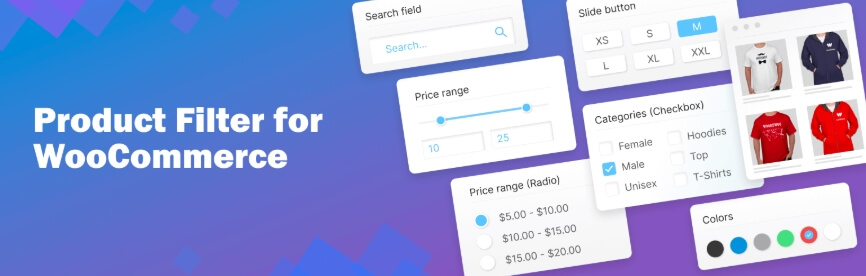
Product Filter by WBW is a simple and practical solution for adding attribute filters to a WooCommerce store. It allows customers to refine products using attributes like size, color, and brand without complex setup. This plugin is well-suited for small to medium stores that want quick implementation and reliable performance.
Key Features
These features focus on ease of use and fast setup.
Free Features
- Attribute-Based Filtering – Lets users narrow down products using attributes such as size, color, and brand
- Instant Result Updates – Refreshes product listings immediately after selection
- Flexible Display Types – Supports dropdown, checkbox, and radio-style filters
- Multi-Filter Support – Works with price, category, and other filtering options
- Drag-and-Drop Builder – Simplifies filter creation and management
- Shortcode Integration – Allows filters to be placed anywhere on the site
Pro Features
- Extended Filter Options – Adds more control over attribute behavior
- Custom Layout Settings – Adjust how filters are displayed
- Performance Improvements – Better handling of larger product catalogs
- Advanced UI Controls – Additional styling and interaction options
- Priority Support Access – Dedicated help for premium users
Limitations
- Limited advanced filtering capabilities
- Basic design customization
- Not ideal for complex or large-scale stores
Pricing
| Plan | Price | Type |
| Free Version | $0 | Basic features |
| Pro Version | $59+/year | Yearly |
Product Filter by WBW is a beginner-friendly option for adding basic attribute filtering without complexity.
8. Advanced AJAX Product Filters
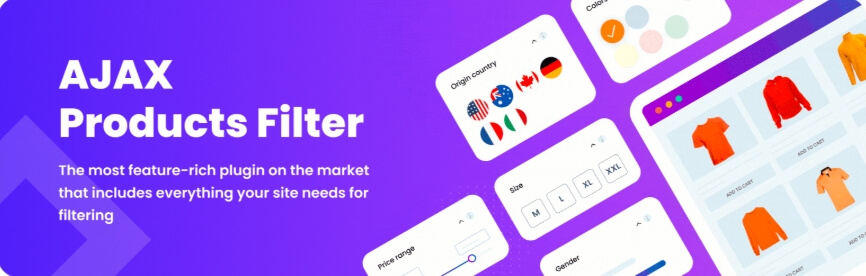
Advanced AJAX Product Filters is designed for stores that need fast and lightweight attribute filtering. It allows users to refine products using attributes like size, color, and brand with quick updates. The plugin is suitable for store owners who want performance-focused filtering without complex setup.
Key Features
These features focus on speed and simplicity.
Free Features
- Attribute-Based Filtering – Enables filtering using attributes such as size, color, and brand
- Real-Time Updates – Refreshes product results immediately after selection
- Flexible Filter Styles – Supports checkbox, dropdown, and slider-based filters
- Multi-Filter Compatibility – Works with category, price, and other attributes
- Simple Placement Options – Allows filters to be added in sidebars or above product listings
- Clean URL Structure – Generates structured links for filtered results
Pro Features
- Extended Filtering Controls – More options for managing attribute behavior
- Custom Styling Options – Adjust filter appearance based on store design
- Performance Enhancements – Improved handling of larger product catalogs
- Additional Layout Options – More flexibility in filter placement
- Priority Support Access – Dedicated assistance for premium users
Limitations
- Limited advanced features compared to premium plugins
- Basic UI customization
- May require optimization for large catalogs
Pricing
| Plan | Price | Type |
| Single Site | $44 | One-time |
| 3 Sites | $69 | One-time |
| 5 Sites | $109 | One-time |
Advanced AJAX Product Filters offers fast and simple attribute filtering, making it suitable for performance-focused WooCommerce stores.
9. WPC Smart Filters for WooCommerce
WPC Smart Filters for WooCommerce provides a lightweight and straightforward way to add attribute filtering to your store. It allows customers to refine products using attributes like size, color, and brand with quick response times. This plugin is ideal for smaller stores that need simple filtering without complex setup.
Key Features
These features focus on simplicity and ease of use.
Free Features
- Attribute-Based Filtering – Displays filter options based on product attributes such as size, color, and brand
- Quick Result Updates – Refreshes product listings instantly after selection
- Minimal Interface Design – Keeps filters clean and easy to use
- Multi-Filter Compatibility – Works alongside price, category, and other filters
- Flexible Placement Options – Can be added to sidebars or product pages
- Theme Compatibility – Works with most WooCommerce themes
Pro Features
- Extended Filter Options – Adds more control over attribute behavior
- Custom Layout Settings – Adjust how filters are displayed
- Performance Improvements – Better handling of larger catalogs
- Advanced UI Controls – Additional styling and interaction options
- Priority Support Access – Dedicated assistance for premium users
Limitations
- Limited advanced filtering capabilities
- Basic design customization
- Not suitable for large or complex stores
Pricing
| Plan | Price | Type |
| Free Version | $0 | Basic features |
| Pro Version | $29+/year | Yearly |
WPC Smart Filters is a simple and efficient solution for basic attribute filtering in WooCommerce stores.
10. WooCommerce Product Filters (Official Plugin)
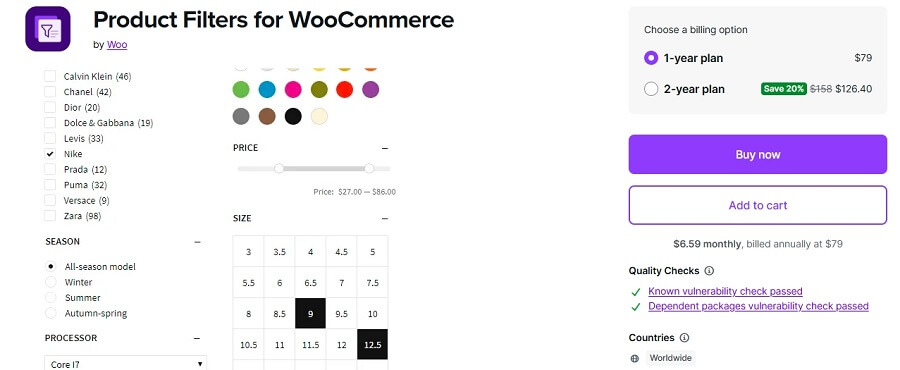
WooCommerce Product Filters is the official plugin developed by the WooCommerce team, offering a reliable way to implement attribute filtering. It uses native WooCommerce attributes like size, color, and brand to help customers refine products easily. This plugin is best suited for store owners who prefer a stable and officially supported solution.
Key Features
These features focus on stability and seamless integration.
Free Features
- No free version available
Pro Features
- Attribute-Based Filtering – Uses WooCommerce attributes for accurate product filtering
- Real-Time Product Updates – Refreshes results instantly when filters are applied
- Native WooCommerce Integration – Fully compatible with core WooCommerce features
- Multi-Filter Support – Works with price, category, stock, and other attributes
- Block-Based Filtering System – Designed for modern WooCommerce themes
- Reliable Performance – Regular updates and long-term support
Limitations
- No free version available
- Limited design customization
- Fewer advanced filtering features compared to third-party plugins
Pricing
| Plan | Price | Type |
| Single Site License | $79+/year | Yearly |
WooCommerce Product Filters provides a stable and reliable attribute filtering solution with strong compatibility and consistent performance.
Comparison Table (Attribute Filter Capability)
This table compares how well each plugin handles attribute-based filtering, including flexibility, performance, and usability.
| Plugin Name | Attribute Filter Support | AJAX Filtering | Multi-Attribute Combination | Large Catalog Performance | UI Flexibility |
| Dynamic AJAX Product Filters for WooCommerce | Excellent | Yes | Excellent | Excellent | High |
| WooCommerce Product Filter by Barn2 | Excellent | Yes | Excellent | Excellent | Medium |
| Filter Everything | Excellent | Yes | Excellent | Good | High |
| YITH WooCommerce AJAX Product Filter | Very Good | Yes | Very Good | Good | Medium |
| JetSmartFilters | Excellent | Yes | Excellent | Good | Very High |
| HUSKY (WOOF) | Very Good | Yes | Excellent | Depends on setup | High |
| Product Filter by WBW | Good | Yes | Good | Medium | Medium |
| Advanced AJAX Product Filters | Good | Yes | Good | Medium | Medium |
| WPC Smart Filters for WooCommerce | Basic | Yes | Basic | Small stores | Low |
| WooCommerce Product Filters (Official Plugin) | Very Good | Yes | Very Good | Good | Medium |
Key Insights
- Best overall attribute filtering – Dynamic AJAX Product Filters and Barn2 provide strong performance with flexible filtering options
- Advanced filtering control – Filter Everything and JetSmartFilters support complex multi-attribute combinations
- Large store support – Some plugins handle thousands of products efficiently with optimized queries
- Beginner-friendly options – WBW and WPC Smart Filters are easier to set up but offer fewer advanced features
A strong attribute filter plugin improves product discovery, making it easier for users to find relevant products quickly and efficiently.
Which Attribute Filter Plugin Should You Choose?
Choosing the right WooCommerce attribute filter plugin depends on your store size, product complexity, and how much control you need over filtering behavior. Here’s a practical decision guide:
- Best overall solution – Dynamic AJAX Product Filters for WooCommerce
Balanced performance, flexible attribute handling, and easy integration for most stores. - Best for large catalogs – WooCommerce Product Filter by Barn2
Built for stability and speed when handling thousands of products and attributes. - Best for advanced filtering logic – Filter Everything
Ideal for stores that need complex attribute combinations and custom field support. - Best for design flexibility – JetSmartFilters
Perfect for Elementor users who want full control over filter layout and UI. - Best for beginners – YITH WooCommerce AJAX Product Filter
Simple setup with ready-made configurations for quick implementation. - Best free option – HUSKY (WOOF)
Offers flexible attribute filtering without upfront cost. - Best lightweight option – Advanced AJAX Product Filters
Good for stores that need fast filtering with minimal setup. - Best for small stores – WPC Smart Filters for WooCommerce
Easy to use with basic attribute filtering features. - Best official solution – WooCommerce Product Filters
Reliable and fully compatible with WooCommerce core features.
The right attribute filter plugin helps users quickly find relevant products, improving navigation, user experience, and conversion rates.
Common Issues with Attribute Filters (And Fixes)
Attribute filters are powerful, but incorrect setup can lead to inaccurate results or poor user experience. Here are the most common issues and how to fix them:
- Attribute filter not showing
This usually happens when attributes are not created or assigned to products. Make sure attributes like size, color, or brand are properly added and linked. - Products not appearing after filtering
If attribute values are missing in variations, filtered results may return empty. Ensure all products have correct attribute assignments. - Inconsistent attribute naming
Using different formats like “Blue” and “blue” or “XL” and “Extra Large” can break filtering accuracy. Keep naming consistent. - Empty attribute options displayed
Showing attributes with no products confuses users. Enable auto-hide for empty options. - Slow filtering performance
Large catalogs can slow down filters. Use AJAX-based plugins and optimized queries for better speed. - Filters not working together
Some plugins don’t handle multi-attribute logic properly. Use plugins that support combined filtering (AND/OR conditions). - Poor mobile experience
Too many attributes can clutter small screens. Use collapsible or slide-out filters for better usability.
Fixing attribute filter issues ensures accurate results, faster browsing, and a smoother shopping experience for users.
How to Set Up Attribute Filters for WooCommerce Products?
You can create attribute filters in WooCommerce using the default settings, but the built-in options are limited. If you need better control, faster filtering, and more customization, using a plugin is the better approach.
In this guide, we will use Dynamic AJAX Product Filters for WooCommerce to set up attribute-based filtering. This allows users to refine products using attributes like size, color, brand, and more, helping them find relevant items quickly.
Below is a step-by-step process to install the plugin and configure attribute filters for your store.
Step 1: Install the Plugin
You can install the plugin in two ways: directly from the WordPress dashboard or by uploading it manually.
Option 1: Install from the WordPress Dashboard
- Log in to your WordPress Admin Dashboard
- Go to Plugins → Add New
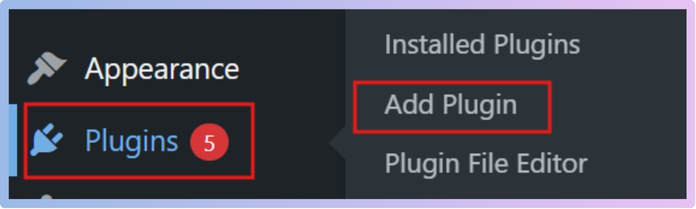
- In the search bar, type Dynamic AJAX Product Filters for WooCommerce
- Locate the plugin in the results
- Click Install Now, then click Activate after installation
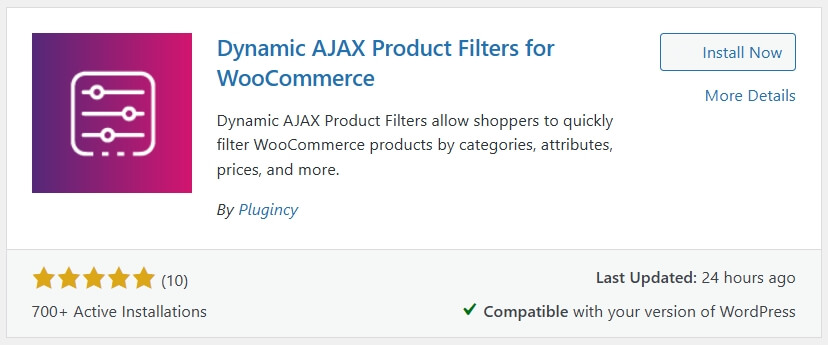
Installing the plugin is the first step to enabling flexible and advanced attribute filtering in WooCommerce.
Option 2: Manual Installation
- Download the plugin ZIP file from the WordPress Plugin Directory or the official website
- Log in to your WordPress Admin Dashboard
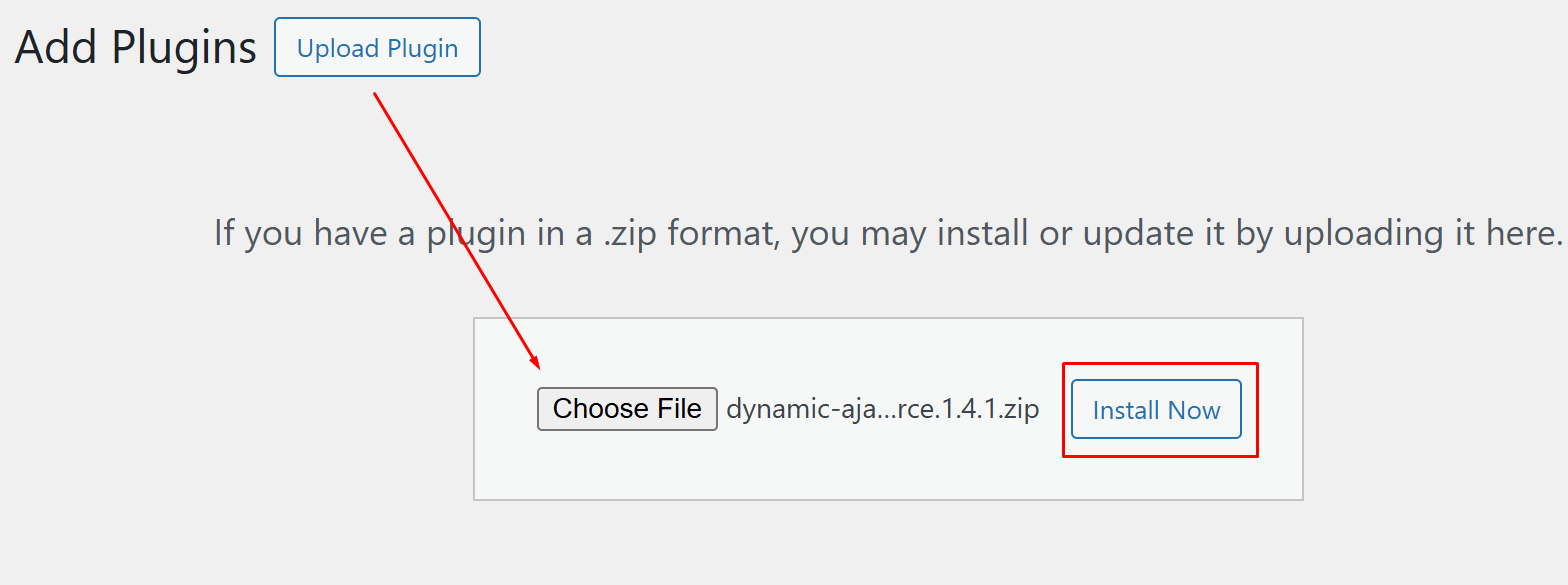
- Go to Plugins → Add New
- Click Upload Plugin at the top
- Click Choose File and select the downloaded ZIP file
- Click Install Now, then Activate
Premium Version Setup
If you have purchased the premium version, follow these steps:
- Go to Product Filters → Plugin License
- Paste your license key into the provided field
- Click Save to unlock premium features
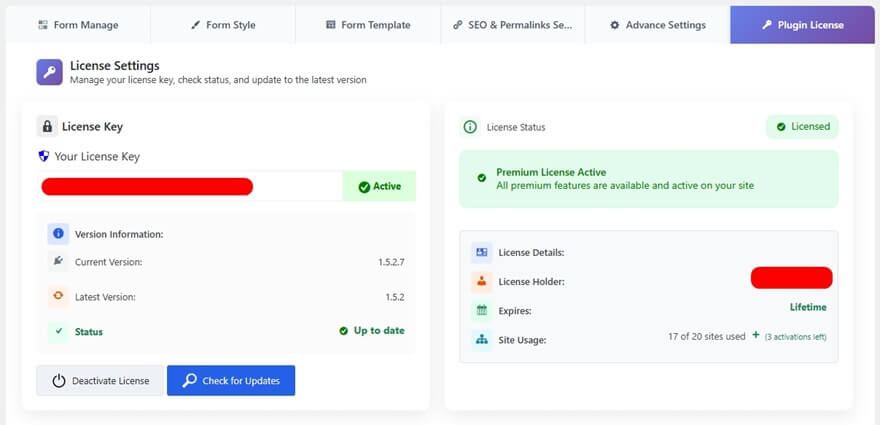
Once this step is completed, you can move on to the main setup process.
Activating the premium version gives access to advanced attribute filtering features and extended customization options.
Step 1: Create Attributes and Terms
Create the attributes you want to use for filtering, then add their values.
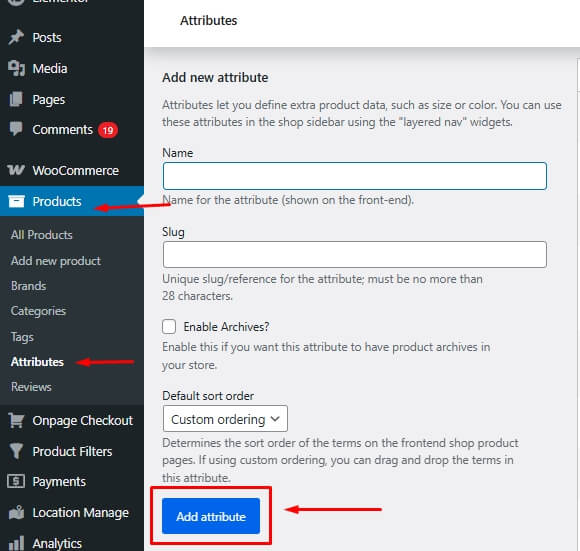
- Go to Products → Attributes
- In the Add new attribute section, enter:
- Name: For example, Processor
- Slug: For example, processor
- Click Add Attribute
- Click Configure terms next to the newly created attribute
- In the Add new term section, enter a value (for example, AMD Athlon), then click Add New
- Repeat this process for all required values, such as AMD Ryzen 5, AMD Ryzen 7

Properly structured attributes and terms ensure accurate filtering and improve product organization in your store.
Step 2: Assign Attributes to Products
Attach the created attributes and their values to each product.
- Go to Products → All Products
- Edit an existing product or click Add New
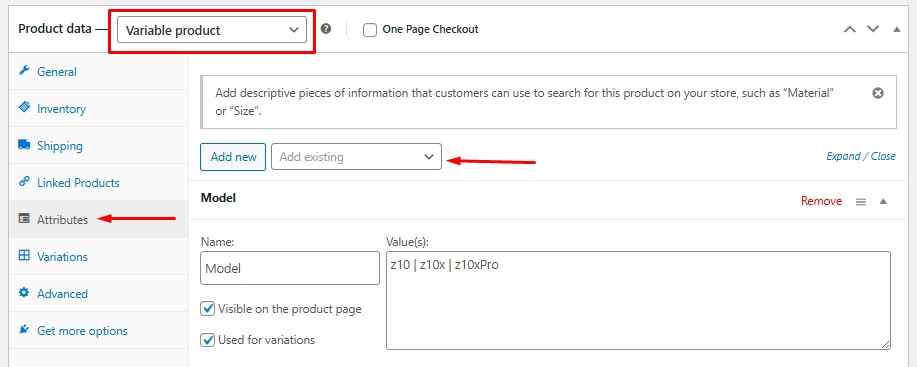
- Scroll to the Product data section and open the Attributes tab
- Select your attribute from the dropdown and click Add
- Choose the terms that apply to the product
- Click Save attributes, then Update or Publish
Step 3: Manage Attributes in the Filter Widget Form
Decide whether the attribute should appear in the filter.
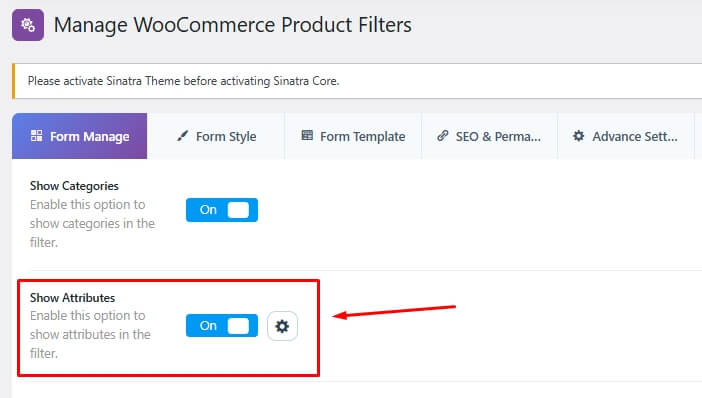
- Go to Product Filters → Form Manage
- Find the Show Attributes option
- Turn it on to display the attribute filter
Step 4: Style and Customize the Attribute Widget
Set how the attribute filter looks and behaves.
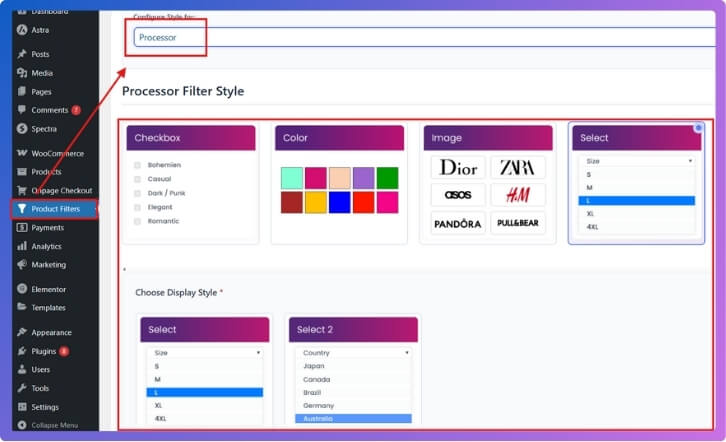
- Go to Product Filters → Form Style
- Select the attribute you want to customize (for example, Processor or Color)
- Choose a display style:
- Checkbox
- Color
- Image
- Dropdown
- Adjust settings based on your selected style:
- Assign colors for each term if using color style
- Upload images for each term if using image style
- Click Save
Step 5: Display the Product Filter on Your Website
Place the filter where visitors can use it.
- Open the page or widget area where you want the filter
- Add this shortcode: [plugincy_filters]
- To show products along with filters, add: [products]
- You can place the shortcode in a sidebar widget or inside page content
Final Check
Make sure everything works correctly on the front end.
- Visit your page and test the filters
- Check if products update when selecting different attributes
- If results do not appear, confirm that attributes and terms are properly assigned
Correct attribute assignment and filter setup ensure accurate results and a smooth product browsing experience.
FAQ (Attribute Filter Plugins)
What is a WooCommerce attribute filter plugin?
A WooCommerce attribute filter plugin lets users refine products using attributes like size, color, brand, or material, helping them quickly find relevant items.
How do I add attribute filters in WooCommerce?
Create attributes in Products → Attributes, assign them to products, then use a filter plugin to display and manage attribute-based filtering.
Why are my attribute filters not working?
This usually happens when attributes are not assigned properly or product variations are missing. Make sure attributes are linked to each product.
Can attribute filters be combined with other filters?
Yes, most plugins allow combining attributes with price, category, rating, and other filters for precise product discovery.
Do attribute filters improve SEO?
They can improve SEO if the plugin supports clean URLs and proper indexing for filtered pages.
Can I use color or image swatches for attributes?
Yes, many plugins support visual filters like color swatches and image-based options for better user interaction.
Are attribute filters mobile-friendly?
Most modern plugins support responsive layouts, including collapsible or slide-out filters for mobile devices.
Attribute filter plugins improve product discovery and help users quickly find the exact products they need, enhancing both usability and conversions.
Conclusion
WooCommerce attribute filter plugins play a key role in helping customers quickly find products based on specific details like size, color, brand, and material. By allowing users to refine results efficiently, these plugins improve navigation and reduce the time needed to locate the right product.
Choosing the right WooCommerce attribute filter plugin depends on your store size, product structure, and customization needs. Plugins that offer fast AJAX filtering, multi-attribute combinations, and mobile-friendly layouts provide the best results for both usability and conversions.
When implemented correctly, attribute filters not only simplify product discovery but also enhance user experience and increase overall sales performance.
A well-implemented attribute filter improves product discovery, enhances usability, and increases conversion potential in WooCommerce stores.
