

Filtering is a central component of any large WooCommerce store offering many products. Effective filters help users narrow down products by size, color, price, category, stock status, and other attributes without waiting for full page reloads. But not all filter plugins behave the same: some prioritize configurability and visual flexibility while others focus on performance, SEO, or scalability.
Premmerce Product Filter vs. Dynamic AJAX Product Filters for WooCommerce is worth comparing because both improve product discovery in different ways. This guide looks at their differences in filtering behavior, flexibility, performance, and store fit so you can choose the one that better matches your catalog and growth plans.
Who This Comparison Is For
This guide is intended for:
- WooCommerce store owners planning catalog growth
- Stores that depend on organic search traffic
- High-traffic eCommerce stores
- Non-technical owners who want reliable behavior
- Agencies and developers building WooCommerce sites
Instead of surface-level feature lists, this comparison evaluates real-world behavior and long-term impact.
Quick Summary
Premmerce Product Filter is a solid match for WooCommerce stores that want organized filtering, dependable category and attribute filtering, and a setup that feels more conventional. It fits stores looking for a practical solution without needing too much customization in how filters behave.
Dynamic AJAX Product Filters for WooCommerce stands out more for stores that want greater control over the filtering experience itself. It is better suited to shops that care about smoother AJAX interactions, broader filtering flexibility, and a setup that can adapt more comfortably as catalog size and filtering demands increase.
Premmerce Product Filter vs. Dynamic AJAX Product Filters: Core Features Comparison
Both plugins support essential filtering needs such as price, category, and attribute filters. Their behavior, however, varies significantly in how they handle URL structure, mobile UX, filter configuration, and scalability under heavy traffic.
| Feature Area | Dynamic AJAX Product Filters | Premmerce Product Filter |
|---|---|---|
| AJAX Reload-Free Filtering | Fully reload-free | Yes (AJAX) |
| Indexable Filter URLs | Yes | Limited |
| Large Catalog Performance | High | Medium |
| Price Filtering | Yes | Yes |
| Attribute Filtering | Yes | Yes |
| Stock Status Filtering | Yes | Yes |
| Custom Taxonomy Support | Yes | Yes |
| Mobile Filtering UX | Optimized | Theme dependent |
| SEO Control | Advanced | Basic |
| Filter Setup Complexity | Low | Medium |
| Visual Customization | Moderate | High |
What Problem Do These Two Product Filters Plugins Solve?
Large WooCommerce catalogs can quickly turn product browsing into guesswork. When shoppers have to dig through too many listings to find the right variation, price range, or product type, the shopping experience becomes slower and less efficient. That often leads to lower engagement, fewer product views, and more abandoned visits.
Both plugins are meant to remove that friction by helping customers narrow results faster and more accurately. The real comparison is not whether they add filters, but how well they improve product discovery, support different catalog sizes, and make browsing easier for shoppers.
Plugin Overview – Where Each Plugin Stands
Both plugins help WooCommerce stores improve product discovery, but they are built with different priorities. Dynamic AJAX Product Filters for WooCommerce leans more toward filtering flexibility and growth, while Premmerce Product Filter fits stores that want a more standard and structured filtering setup.
Dynamic AJAX Product Filters for WooCommerce
Dynamic AJAX Product Filters for WooCommerce is positioned as a more flexible filtering solution for stores that want greater control over how filters work across the shop page. It is better suited to WooCommerce setups where Advanced Ajax product filters are needed beyond basic category and attribute selection, especially when smoother product discovery plays a bigger role in the buying experience.

Core Features
- Real-time AJAX filtering without full page reloads
- Category, attribute, and taxonomy-based filtering
- Price, stock status, tag, and rating filters
- SKU, product ID, brand, and author filtering
- Custom meta and custom taxonomy support
- AND/OR filter logic with multi-select support
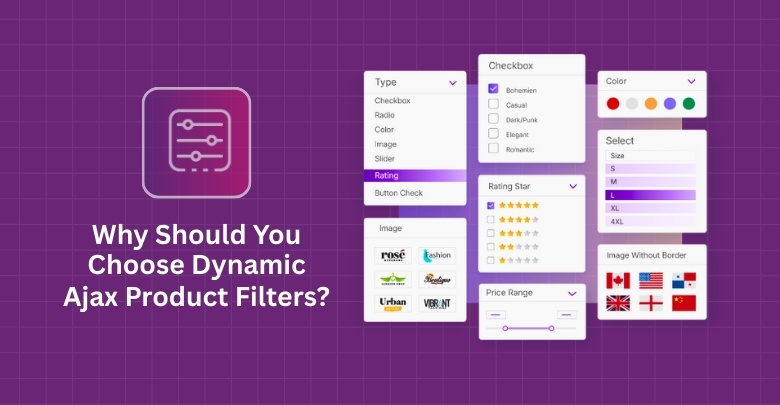
- Multiple filter styles including dropdowns, checkboxes, radios, and swatches
- Flexible placement with widgets, shortcodes, blocks, and builders
- SEO-friendly filter URLs and AJAX-only mode
- Mobile-friendly filter layouts for smaller screens
Strengths
- Covers a wide range of filtering needs
- Supports more advanced filter combinations
- Gives strong control over filter display
- Works across different page builder setups
- Offers useful SEO-focused filtering options

Limitations
- Advanced features may require the Pro version
- May feel more feature-heavy for simple stores
Real WooCommerce Use Case
Good for WooCommerce stores with large catalogs, varied product data, and more complex filtering needs. It also fits stores that want flexible filter placement, mobile-friendly filtering, and more control over how shoppers narrow down products.
Premmerce Product Filter
Premmerce Product Filter is built for WooCommerce stores that want a more structured filtering setup with AJAX support, clean filtered URLs, and built-in SEO settings. It focuses on practical catalog filtering features like price filtering, search result filtering, active filters, and simplified filter management through a single widget, making it a solid fit for stores that prefer a more standard filtering approach.
Core Features
- AJAX product filtering with dynamic result updates
- Single widget to manage available filters
- Category, attribute, and price-based filtering
- Search result filtering support
- Active filters widget support
- Display of only available attributes by category
- Deferred loading for faster page load handling
- Clean URL generation for filtered pages
- SEO settings for filter-based pages
- Custom taxonomy support in Premium
- Colors and labels in Premium
- Gutenberg block support
- Compatibility with popular WooCommerce themes
Strengths
- Uses a single widget for filter management
- Includes built-in caching for speed improvement
- Offers SEO-focused filter page settings
- Supports clean URLs for filtered pages
- Works with many popular WooCommerce themes
- Compatible with Yoast SEO
Limitations
- Some useful features are Premium-only
- Custom taxonomies require the Premium version
- Visual filter options require the Premium version
- Advanced SEO landing page features require Premium
Real WooCommerce Use Case
Suitable for WooCommerce stores that want a more structured filtering setup with built-in SEO options and standard catalog filtering. It can work well for shops that rely on category, attribute, and price filtering and want clean filtered URLs without needing a highly customized filter experience.
Dynamic AJAX Product Filters vs. Premmerce Product Filter: Pricing Comparison
Pricing can change how practical a filter plugin feels, especially when some features are only available in premium plans. Store owners usually look at features first, but long-term value depends on how much you need from the free version and what stays locked behind paid access.
| Pricing Area | Dynamic AJAX Product Filters for WooCommerce | Premmerce Product Filter |
| Free Version Available | Yes | Yes |
| Premium Version Available | Yes | Yes |
| Entry Cost Direction | More feature-led value | More premium feature gating |
| Free Version Coverage | Broader everyday filtering use | Good basics, with more limits |
| Premium-Only Features | Advanced extras | Several useful filtering and SEO features |
| Best Fit by Budget | Better for stores wanting more upfront | Better for stores ready to unlock more features |
Filtering Types Comparison
Filtering range can make a noticeable difference in how useful a plugin feels on a live WooCommerce store. Some stores only need the basics, while others need more advanced filtering options to help shoppers narrow products more precisely.
| Filter Type | Dynamic AJAX Product Filters | Premmerce Product Filter |
|---|---|---|
| Category | Yes | Yes |
| Attributes | Yes | Yes |
| Price Range | Yes | Yes |
| Stock Status | Yes | Yes |
| Tags | Yes | Yes |
| Custom Taxonomies | Yes | Yes |
Performance, User Experience, and Scalability
Performance consistency plays a major role in conversions. Filters must respond quickly, even when multiple conditions are applied. Dynamic AJAX Product Filters for WooCommerce maintains consistent, predictable performance even with heavy filter combinations and large catalogs. Premmerce Product Filter delivers good performance in many scenarios, but may require additional tuning for large catalogs or complex filter behavior.
| Performance Area | Dynamic AJAX Product Filters | Premmerce Product Filter |
|---|---|---|
| AJAX Response Speed | Fast & predictable | Good |
| Large Catalog Handling | High | Medium |
| Multi-Filter Stability | Consistent | Setup-dependent |
| Page Load Impact | Low | Medium |
| Scalability | Strong | Moderate |
Predictable speed reinforces user confidence and conversions.
SEO and Indexable Filter URL Capabilities
Filtered URLs contribute to how search engines crawl and index product pages. Clean URL control helps avoid crawl waste and duplicate content issues, while poorly controlled URL parameters can dilute ranking signals.
Dynamic AJAX Product Filters offers strong control over URL parameters and indexability. Premmerce Product Filter provides basic control, requiring manual SEO strategies to avoid indexing low-value filtered URLs.
| SEO Factor | Dynamic AJAX Product Filters for WooCommerce | Premmerce Product Filter |
| SEO-Friendly Filter URLs | Yes | Yes |
| Clean Permalink Support | Yes | Clean URL support |
| Query String URL Support | Yes | Not clearly highlighted |
| SEO Titles and Meta Descriptions | Yes | SEO settings for filtered pages |
| AJAX-Only Filtering Mode | Yes | Not clearly highlighted |
| Filter Landing Page Features | Basic SEO-oriented URL controls | More advanced in Premium |
| Best Fit for SEO Use | Stores wanting flexible URL behavior and AJAX/SEO control | Stores wanting structured filtered pages with built-in SEO focus |
URL controls reduce long-term SEO maintenance.
Setup Complexity and Learning Curve
Plugins that are easier to set up reduce technical overhead. Simpler configurations mean less time troubleshooting and more time selling products.
Dynamic AJAX Product Filters offers a straightforward setup with well-documented defaults. Premmerce Product Filter provides flexible setup options, but this additional configurability can increase setup time for non-technical users.
| Setup Aspect | Dynamic AJAX Product Filters | Premmerce Product Filter |
|---|---|---|
| Initial Setup Time | Short | Medium |
| Configuration Complexity | Low | Medium |
| Technical Knowledge Needed | Minimal | Moderate |
| Misconfiguration Risk | Low | Medium |
A simpler setup helps minimize maintenance.
Theme and Plugin Compatibility
Compatibility with themes and other plugins ensures filters behave consistently. Poor compatibility can break filters or cause inconsistent product loading.
Dynamic AJAX Product Filters show reliable compatibility across many themes and WooCommerce extensions. Premmerce Product Filter works well in most cases, but may need CSS or layout tweaks for advanced theme designs.
| Compatibility Area | Dynamic AJAX Product Filters | Premmerce Product Filter |
|---|---|---|
| Popular WooCommerce Themes | Yes | Yes |
| Custom Themes | High | Medium |
| Page Builders | High | Good |
| WooCommerce Extensions | High | Medium |
Strong compatibility reduces surprises.
Support and Documentation Comparison
Good documentation and responsive support prevent configuration frustration and reduce downtime when issues arise.
Dynamic AJAX Product Filters provides structured, clear documentation and strong developer support. Premmerce Product Filter offers good documentation focused on visual setup and filtering logic, though advanced SEO and performance topics may require external guidance.
| Support Area | Dynamic AJAX Product Filters | Premmerce Product Filter |
|---|---|---|
| Documentation Quality | Clear & structured | Good |
| Technical Guidance | Strong | Moderate |
| Support Responsiveness | High | Varies |
| Learning Resources | Extensive | Good |
Better support fosters confidence and faster problem resolution.
Advanced SEO & Plugin Compatibility Comparison
For stores with more moving parts, technical SEO and plugin compatibility can matter just as much as the filters themselves. URL structure, cache behavior, theme fit, and compatibility with the wider WooCommerce setup often decide how smoothly the plugin works over time.
| Advanced Area | Dynamic AJAX Product Filters | Premmerce Product Filter |
| SEO-Friendly URL Support | Clearly highlighted | Clearly highlighted |
| Clean Permalink Filtering | Yes | Yes |
| Crawlable Filter Pages | Yes | Supported through clean URLs / landing pages |
| AJAX Filtering | Yes | Yes |
| Theme Compatibility Notes | Broad, builder-heavy | Broad, theme-list based |
| Page Builder Compatibility | Clearly highlighted | Not clearly emphasized |
| Analytics-Specific Features | Not clearly highlighted | Not clearly highlighted |
Which Plugin Is Better for Which Type of Store?
Store size, catalog complexity, and filtering goals can make one plugin a better fit than the other. Some WooCommerce stores only need a reliable way to handle standard product filters, while others need broader filter coverage and more control over how filtering works across the storefront.
| Store Type | Better Choice | Reason |
|---|---|---|
| Small store | Premmerce Product Filter | UI flexibility |
| Medium store | Depends | UX vs performance tradeoffs |
| Large store | Dynamic AJAX Product Filters | Scalable performance |
| SEO-focused store | Dynamic AJAX Product Filters | Clean URLs |
| Custom filter logic | Premmerce Product Filter | Flexible setup options |
| Non-technical owner | Dynamic AJAX Product Filters | Easier setup |
Your growth path should inform the plugin choice.
Hidden SEO Risks With Ajax Product Filter Plugins
Not every filtering issue shows up as a technical error. In many WooCommerce stores, the bigger problem is that filters quietly create too many low-value page variations. Over time, that can weaken how clearly search engines understand which pages matter most.
Filtered URLs can also become messy when too many combinations are generated from attributes, price ranges, and other filter choices. That makes it easier for search engines to spend time on pages that add little unique value instead of prioritizing core shop and category pages.
Another risk appears when filtered pages are allowed to behave like standalone landing pages without a clear SEO purpose. Some may deserve visibility, but many do not. Without a clear strategy, filtered pages can dilute relevance rather than strengthen it.
Filtering can also affect internal linking signals. When shoppers and crawlers are pushed into endless filter paths, important category pages may lose some of their prominence within the site structure.
Choosing a filter plugin is not only about shopper convenience. It is also about keeping filtered navigation useful without turning it into an SEO distraction.
Which Plugin Should I Choose?
Dynamic AJAX Product Filters for WooCommerce is the better pick when your store needs more room to work with different filter types, layouts, and product data. It feels like the stronger option for stores that expect filtering to play a bigger role in product discovery as the catalog grows.
Premmerce Product Filter is a better match for stores that want filtering to stay simple, organized, and easier to manage day to day. It works well when the goal is to cover standard filtering needs without adding too much complexity to the setup.
In the end, it comes down to how much flexibility your store really needs. For broader filtering control, Dynamic AJAX Product Filters for WooCommerce makes more sense. For a more straightforward and structured setup, Premmerce Product Filter is often the easier fit.
Frequently Asked Questions
After going through the details and comparisons, you might still have a few doubts before making a choice. Here are some practical questions that often come up and can help clear your mind.
Can I Use These Plugins on a Multilingual Store?
Yes, both plugins can work with multilingual stores when paired with popular translation tools. You may need small adjustments for certain filter labels. Always test on a staging site before going live.
Do These Plugins Work With Custom-Built WooCommerce Themes?
They can work with custom themes as long as the theme follows WooCommerce coding standards. Some extra CSS adjustments may be needed. Always check compatibility before committing to a plugin.
Will These Plugins Affect My Website Speed?
Any filter plugin adds some load, but both are designed to be lightweight. Using proper hosting and caching will keep performance stable. Premmerce even includes built-in caching for smoother results.
Can I Track How Customers Use Filters?
Yes, you can track filter usage with tools like Google Analytics or other tracking scripts. This helps you understand shopping behavior. Insights from this can guide better filter design choices.
Are These Plugins Easy to Remove If I Change My Mind?
Yes, you can deactivate and delete them from your WordPress dashboard. Always back up your site before removal. Some custom URLs or landing pages may need manual cleanup afterward.
Final Verdict: Premmerce Product Filter vs Dynamic AJAX Product Filters
Choosing between Premmerce Product Filter vs. Dynamic AJAX Product Filters comes down to how your store uses filtering and how much flexibility you want going forward. Dynamic AJAX Product Filters for WooCommerce is the stronger fit for stores that need broader filtering options, more display control, and a setup that can support more complex product discovery as the catalog grows.
Premmerce Product Filter, on the other hand, makes more sense for stores that want a more structured filtering system with a simpler setup and built-in SEO-focused features. For stores with more standard filtering needs, it can be a practical and easier option to manage.
Ultimately, the better plugin is the one that matches your store’s current needs without limiting how you want to grow later.
