

If your WooCommerce store has many products, category filters make browsing much easier for users. Instead of searching manually, customers can quickly navigate through categories and find relevant products faster. This improves user experience and keeps visitors engaged on your site.
A good WooCommerce category filter plugin helps organize products clearly and allows users to refine results without confusion. In this guide, you will find the best WooCommerce category filter plugins that improve navigation, speed, and overall store usability.
Quick Answer
WooCommerce category filter plugins help users browse products by category using structured navigation and real-time filtering. The best WooCommerce category filter plugins improve user experience, reduce search time, and increase conversions. Popular options include Dynamic AJAX Product Filters, Barn2 Product Filters, and Filter Everything.
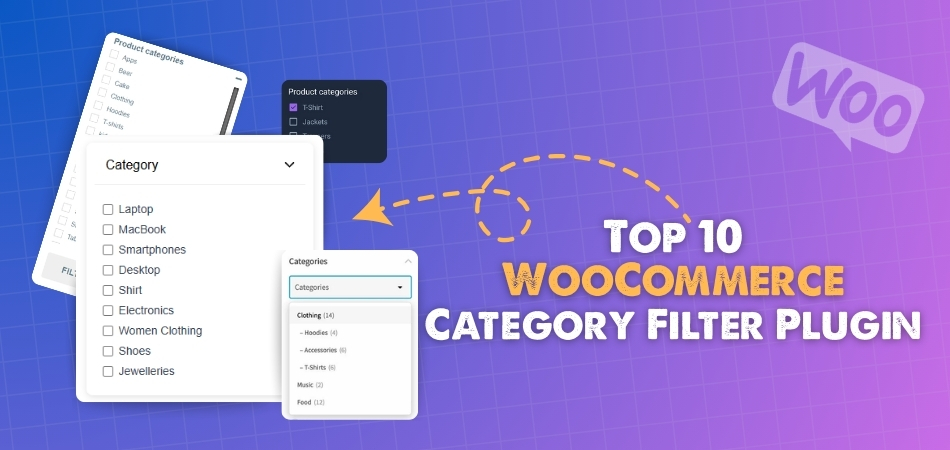
Why Category Filters Improve UX
Category filters play a key role in helping users navigate a WooCommerce store more efficiently. Instead of browsing through all products, users can quickly narrow down options by selecting relevant categories, which saves time and improves the overall experience.
- Faster product discovery – Users can jump directly to the category they are interested in without scrolling through unrelated products.
- Clear navigation structure – Categories organize products in a logical way, making it easier for users to understand how items are grouped.
- Reduced browsing effort – Instead of searching manually, users can filter products with a few clicks and find what they need quickly.
- Better user engagement – When navigation is simple and structured, users are more likely to explore multiple categories and stay longer on the site.
- Improved mobile experience – Category filters simplify navigation on smaller screens where space is limited.
- Higher conversion potential – When users find products faster, they are more likely to complete a purchase.
Category filters improve user experience by simplifying navigation and helping customers quickly find relevant products in your WooCommerce store.
Category vs Filter (Key Difference)
Understanding the difference between categories and filters is important before choosing a WooCommerce category filter plugin. While both help users find products, they serve different purposes in navigation and filtering.
Comparison Table
| Aspect | Categories | Filters |
| Purpose | Organize products into broad groups | Refine products within a category |
| Function | Navigation structure | Product filtering |
| Nature | Static (fixed structure) | Dynamic (changes based on selection) |
| Usage | Helps users browse sections | Helps users narrow down results |
| Example | Electronics, Clothing, Accessories | Price, Color, Size, Brand |
| User Experience | Guides users through store layout | Speeds up product discovery |
| SEO Impact | Creates indexable category pages | Helps target long-tail filtered queries |
- Categories define structure – They group products into main sections and help users understand store organization.
- Filters refine results – They allow users to narrow down products based on specific conditions.
- Categories are static – Once created, they remain consistent across the store.
- Filters are dynamic – They update results instantly based on user input.
Categories organize your store structure, while filters refine product selection, and using both together creates a better browsing experience.
Hierarchical Filtering Explained
Category filters become much more powerful when they follow a hierarchical structure. This means categories are arranged in parent and child relationships, allowing users to drill down step by step instead of seeing everything at once.
- Parent and child categories – A main category like “Clothing” can include subcategories such as “Men,” “Women,” and “Kids,” making navigation more structured.
- Step-by-step filtering – Users can first choose a broad category and then narrow it down further, reducing confusion and improving clarity.
- Better organization for large stores – Hierarchical filtering keeps product listings clean and prevents overwhelming users with too many options.
- Improved user flow – Each selection leads to a more refined set of products, guiding users naturally toward what they need.
- Supports advanced filtering combinations – Works well alongside other filters like price, color, or size for more precise results.
Endnote: Hierarchical category filtering helps organize products clearly, making it easier for users to navigate large WooCommerce stores step by step.
Top 10 WooCommerce Category Filter Plugins
If your store has multiple product categories, using the right WooCommerce category filter plugin helps users navigate faster and find relevant products without confusion. These plugins improve structure, speed, and overall browsing experience by allowing users to filter products based on categories in real time.
Comparison Table
| Plugin Name | Starting Price | Free Version Available | Focus On |
| Dynamic AJAX Product Filters for WooCommerce | $39/year | Yes | Real-time AJAX category filtering with flexible layouts |
| WooCommerce Product Filter by Barn2 | $79/year | No | Structured category filtering with high performance |
| Filter Everything | $44 (one-time) | Yes | Advanced filtering across categories and taxonomies |
| YITH WooCommerce AJAX Product Filter | $105/year | Yes | Preset-based filtering with strong customization |
| JetSmartFilters | $43/year | No | Visual category filtering for Elementor users |
| HUSKY – WooCommerce Products Filter | $42 (one-time) | Yes | Flexible shortcode-based filtering for advanced use |
| Product Filter by WBW | $59/year | Yes | Simple category filtering with easy setup |
| Advanced AJAX Product Filters | $44 (one-time) | Yes | Lightweight filtering with customizable layouts |
| WPC Smart Filters for WooCommerce | $29/year | Yes | Basic category filtering for small stores |
| WooCommerce Product Filters | $79/year | No | Official filtering solution with stable integration |
Key Insights
This comparison makes it easier to understand which WooCommerce category filter plugin fits different types of stores and use cases. Here are the most important takeaways:
- Best overall performance – Dynamic AJAX Product Filters and Barn2 Product Filter offer the fastest AJAX speed with stable performance, making them ideal for most WooCommerce stores.
- Best for large product catalogs – Plugins with strong query optimization like Dynamic AJAX and Barn2 handle large inventories better without slowing down the site.
- Best for customization and UI control – JetSmartFilters and Filter Everything provide more flexibility in design and layout, especially for advanced users.
- Best for beginners – Product Filter by WBW and WPC Smart Filters are easier to set up and manage, making them suitable for small stores or new users.
- Best budget-friendly options – Plugins with free versions like HUSKY, WBW, and WPC Smart Filters offer good starting points without initial cost.
- Best official and stable option – WooCommerce Product Filters ensures strong compatibility since it is developed by the WooCommerce team.
Choosing the right plugin depends on your store size, customization needs, and performance requirements, so focus on what fits your use case best.
Top 10 WooCommerce Category Filter Plugins
There are countless WooCommerce filter plugins on the market, but not all of them handle categories effectively. Shoppers need clear paths to the right products, and category filters make that possible. To save you time, we’ve highlighted the top 10 plugins that truly excel at category-based filtering and improve store navigation.
1. Dynamic AJAX Product Filters for WooCommerce
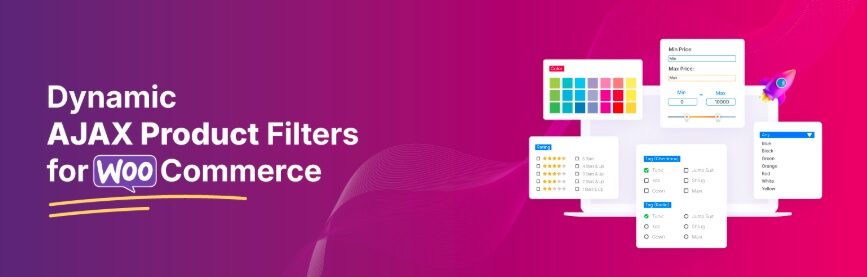
Dynamic AJAX Product Filters for WooCommerce improves category-based navigation by updating products instantly without reloading the page. It allows users to browse categories smoothly and find relevant products faster. The plugin works well for both small and large stores and supports flexible filter placement across different layouts.
Key Features:
- AJAX-based category filtering with instant updates
- Supports hierarchical category filters
- Multiple layout options (sidebar, top bar, mobile panel)
- Works with categories, attributes, tags, and price filters
- SEO-friendly URLs for filtered pages
- Compatible with Elementor and Gutenberg
Pros
- Fast filtering without page reload
- Flexible layout and placement options
- Works well for large product catalogs
- Easy to integrate with existing WooCommerce stores
Cons
- Advanced features require Pro version
- Initial setup may take some time for beginners

Price
| Plan | Price | Type |
| Free Version | $0 | Basic features |
| Pro Version | $39+ | Yearly |
Dynamic AJAX Product Filters provides fast and flexible category filtering, making product navigation easier and more efficient.
WooCommerce Product Filter by Barn2
WooCommerce Product Filter by Barn2 helps improve category-based navigation by allowing users to filter products quickly within structured categories. It is designed for stores that need clean and reliable filtering with strong performance. The plugin works smoothly across different layouts and provides a simple way to refine products without slowing down the browsing experience.
Key Features:
- Fast AJAX-based category filtering
- Supports hierarchical category filters
- Multiple filter styles (checkbox, dropdown, radio)
- Works with categories, attributes, tags, and price
- Mobile-friendly slide-out filter panel
- Clean URL structure for filtered pages
Pros
- Easy to set up with guided options
- Stable performance for medium and large stores
- Clean and simple user interface
- Good compatibility with WooCommerce themes
Cons
- No free version available
- Limited customization compared to advanced plugins
Price
| Plan | Price | Type |
| Single Site | $79 | Yearly |
| 5 Sites | $139 | Yearly |
| 20 Sites | $249 | Yearly |
WooCommerce Product Filter by Barn2 offers reliable and structured category filtering, making it suitable for stores that need stable performance.
Filter Everything
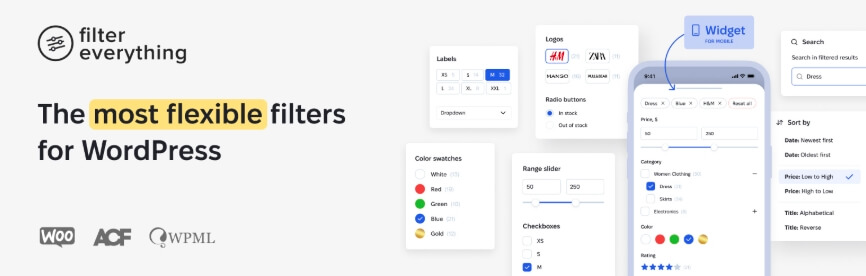
Filter Everything is a flexible WooCommerce category filter plugin that allows users to refine products across categories, tags, and custom taxonomies. It works well for stores with complex structures where products are organized in multiple levels. The plugin supports real-time filtering and adapts to different layouts, making navigation smoother for users.
Key Features:
- AJAX-based category filtering with instant updates
- Supports categories, tags, taxonomies, and custom fields
- Works with hierarchical category structures
- SEO-friendly URLs for filtered pages
- Compatible with Elementor, Divi, and other builders
- Supports filtering across products, posts, and custom content
Pros
- Highly flexible filtering system
- Supports advanced category structures
- Works beyond WooCommerce products
- Good SEO support for filtered pages
Cons
- Setup can be complex for beginners
- Requires proper configuration for best performance
Price
| Plan | Price | Type |
| Regular License | $44 | One-time |
| Extended License | $144 | One-time |
Filter Everything offers advanced category filtering flexibility, making it suitable for stores with complex product structures.
YITH WooCommerce AJAX Product Filter
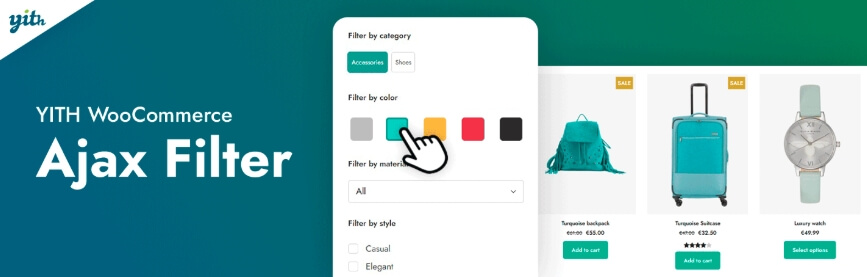
YITH WooCommerce AJAX Product Filter helps users navigate products by category with instant updates and a clean interface. It is designed for store owners who want simple setup with flexible filter layouts. The plugin improves category-based browsing by allowing users to refine results quickly without reloading the page.
Key Features:
- AJAX-based category filtering with real-time updates
- Supports categories, tags, attributes, price, and ratings
- Multiple filter layouts (sidebar, horizontal bar)
- Pre-built filter presets for quick setup
- Mobile-friendly popup filter panel
- Works with Elementor, Gutenberg, and shortcodes
Pros
- Easy to configure and beginner-friendly
- Clean and modern filter design
- Good compatibility with WooCommerce themes
- Flexible display options
Cons
- Advanced features require premium version
- Limited deep customization compared to developer-focused plugins
Price
| Plan | Price | Type |
| Free Version | $0 | Basic features |
| Premium Version | $105.33 | Yearly |
YITH WooCommerce AJAX Product Filter offers simple and flexible category filtering, making it a good option for improving navigation and usability.
JetSmartFilters
JetSmartFilters is a powerful WooCommerce category filter plugin designed for stores using Elementor or Gutenberg. It allows you to create dynamic category filters with full design control, making it easier for users to browse products visually. The plugin supports real-time filtering, helping users refine category results instantly without interrupting the browsing flow.

Key Features:
- AJAX-based category filtering with instant updates
- Deep integration with Elementor and Gutenberg
- Multiple filter types (checkbox, select, range, search)
- Supports hierarchical category filtering
- Dynamic filtering logic based on user selection
- Flexible placement using widgets and blocks
Pros
- Full design control with page builders
- Smooth and fast filtering performance
- Supports complex filtering combinations
- Ideal for custom-designed WooCommerce stores
Cons
- Requires Elementor or builder for full functionality
- Can be complex for beginners
- No fully functional free version
Price
| Plan | Price | Type |
| Single Site | $43 | Yearly |
| Unlimited Sites | $88 | Yearly |
JetSmartFilters offers advanced category filtering with strong design flexibility, making it ideal for Elementor-based WooCommerce stores.
HUSKY (WOOF) – WooCommerce Products Filter
HUSKY (formerly WOOF) is a flexible WooCommerce category filter plugin that helps users navigate products using structured category filtering. It is suitable for stores that need more control over how filters behave, especially when dealing with complex category structures. The plugin supports real-time updates and works well across different layouts.

Key Features:
- AJAX-based category filtering with instant results
- Supports hierarchical category filtering
- Filter by categories, tags, attributes, and custom taxonomies
- Shortcode and widget support for flexible placement
- Advanced filtering logic (AND/OR conditions)
- Search by SKU, text, or metadata
Pros
- Highly customizable filtering system
- Works with complex category structures
- Free version available with strong core features
- Flexible placement using widgets and shortcodes
Cons
- Interface feels outdated compared to modern plugins
- Setup may be complex for beginners
- Performance depends on configuration
Price
| Plan | Price | Type |
| Free Version | $0 | Basic features |
| Premium Extensions | $42+ | One-time |
HUSKY (WOOF) provides flexible and customizable category filtering, making it suitable for stores that need advanced filtering control.
Product Filter by WBW
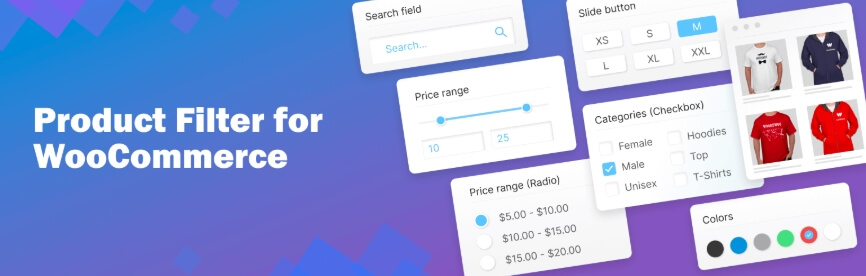
Product Filter by WBW is a simple WooCommerce category filter plugin that helps users navigate products using clear and easy filtering options. It is designed for store owners who want a quick setup without dealing with complex configurations. The plugin improves category browsing by allowing users to refine products directly on the shop page.
Key Features:
- AJAX-based category filtering with instant updates
- Supports categories, tags, attributes, and price filters
- Multiple filter display types (checkbox, dropdown, radio)
- Drag-and-drop filter builder for easy setup
- Compatible with Elementor and WooCommerce themes
- Shortcode and widget support for flexible placement
Pros
- Easy to set up and beginner-friendly
- Lightweight and fast performance
- Free version available with essential features
- Works well with standard WooCommerce stores
Cons
- Limited advanced filtering options
- Basic UI compared to premium plugins
- Not ideal for very large product catalogs
Price
| Plan | Price | Type |
| Free Version | $0 | Basic features |
| Pro Version | $59+ | Yearly |
Product Filter by WBW offers simple and reliable category filtering, making it a good choice for small to medium WooCommerce stores.
Advanced AJAX Product Filters
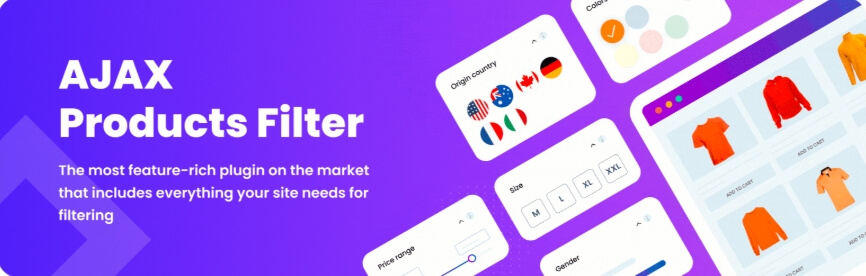
Advanced AJAX Product Filters is a lightweight WooCommerce category filter plugin that helps users refine products quickly within categories. It focuses on speed and simplicity, making it a good option for stores that need fast filtering without complex setup. The plugin updates results instantly, improving browsing flow and usability.
Key Features:
- AJAX-based category filtering with real-time updates
- Supports categories, attributes, tags, and price filters
- Multiple filter layouts (slider, checkbox, dropdown)
- Flexible placement above products or in sidebars
- SEO-friendly URLs for filtered results
- Customizable styles and layouts
Pros
- Fast and lightweight performance
- Easy to configure and use
- Flexible layout options
- Works well for small to medium stores
Cons
- Limited advanced features compared to premium plugins
- UI customization is basic
- May require optimization for large catalogs
Price
| Plan | Price | Type |
| Single Site | $44 | One-time |
| 3 Sites | $69 | One-time |
| 5 Sites | $109 | One-time |
Advanced AJAX Product Filters provides fast and simple category filtering, making it a practical option for stores focused on performance.
WPC Smart Filters for WooCommerce
WPC Smart Filters for WooCommerce is a lightweight category filter plugin that helps users navigate products quickly within structured categories. It is designed for simplicity and speed, making it suitable for stores that need basic filtering without complex configuration. The plugin updates results instantly and works smoothly across different devices.
Key Features:
- AJAX-based category filtering with instant updates
- Supports categories, attributes, tags, and price filters
- Simple and clean filter interface
- Lightweight performance for faster loading
- Shortcode and widget support for placement
- Compatible with most WooCommerce themes
Pros
- Very easy to set up
- Lightweight and fast
- Free version available
- Good for small WooCommerce stores
Cons
- Limited advanced filtering features
- Basic UI customization options
- Not ideal for large or complex stores
Price
| Plan | Price | Type |
| Free Version | $0 | Basic features |
| Pro Version | $29+ | Yearly |
Endnote: WPC Smart Filters offers simple and fast category filtering, making it a good option for smaller WooCommerce stores.
WooCommerce Product Filters (Official Plugin)
WooCommerce Product Filters is the official filtering solution developed by the WooCommerce team. It provides reliable category filtering with direct integration into the WooCommerce system. The plugin is built for stability and compatibility, making it a good choice for store owners who prefer an official solution.
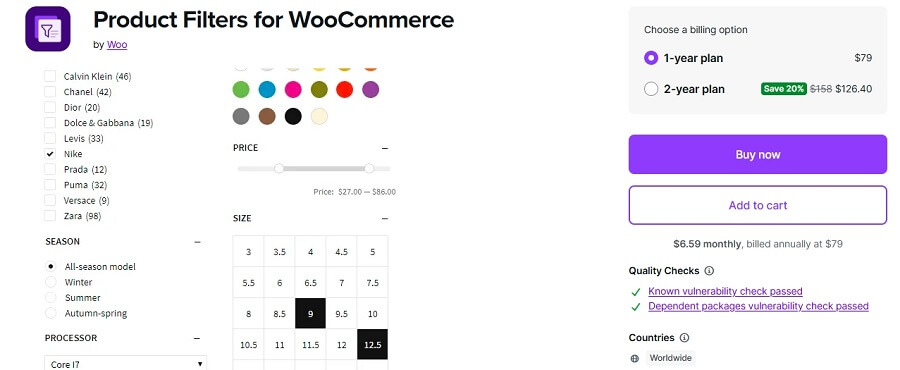
Key Features:
- Native integration with WooCommerce
- AJAX-based category filtering
- Supports categories, attributes, tags, and stock filters
- Block-based filter system for modern themes
- Clean and simple filter interface
- Regular updates and compatibility with WooCommerce core
Pros
- High reliability and stability
- Strong compatibility with WooCommerce features
- Regular updates from official developers
- Easy integration with block-based themes
Cons
- Limited customization options
- Fewer advanced features compared to third-party plugins
- Premium-only solution
Price
| Plan | Price | Type |
| Single Site License | $79+ | Yearly |
WooCommerce Product Filters offers stable and reliable category filtering, making it suitable for stores that prefer an official WooCommerce solution.
Navigation Performance Comparison (Table + Insights)
Choosing the right WooCommerce category filter plugin depends on how well it handles navigation speed, category structure, and overall performance. Below is a comparison to help you understand which plugins perform better for different store sizes and needs.
Comparison Table
| Plugin | AJAX Speed | Hierarchical Category Support | Large Store Performance | UI Flexibility |
| Dynamic AJAX Product Filters | Very Fast | Yes | Excellent | High |
| Barn2 Product Filter | Very Fast | Yes | Excellent | Medium |
| Filter Everything | Fast | Yes | Good | High |
| YITH AJAX Product Filter | Fast | Yes | Good | Medium |
| JetSmartFilters | Fast | Yes | Good | Very High |
| HUSKY (WOOF) | Medium | Yes | Depends on setup | High |
| Product Filter by WBW | Medium | Yes | Medium | Medium |
| Advanced AJAX Product Filters | Fast | Yes | Medium | Medium |
| WPC Smart Filters | Medium | Yes | Small stores | Low |
| WooCommerce Product Filters | Medium | Yes | Good | Medium |
Key Insights
- Best for speed: Dynamic AJAX Product Filters and Barn2 provide the fastest category filtering with smooth navigation.
- Best for large stores: Plugins with optimized queries handle large catalogs better without slowing down performance.
- Best for flexibility: JetSmartFilters and Filter Everything offer more control over layout and design.
- Beginner-friendly options: WBW and WPC Smart Filters are easier to use but have limited scalability.
Choosing a plugin with fast navigation and strong category support ensures better user experience and smoother product browsing.
Use Case Recommendation (Best Plugin by Scenario)
Different WooCommerce stores have different needs, so choosing the right category filter plugin depends on your specific use case. Below are the best recommendations based on common scenarios:
- Best for all-around performance – Dynamic AJAX Product Filters for WooCommerce
Ideal for most stores because it balances speed, flexibility, and ease of use with strong category filtering support. - Best for large and high-traffic stores – WooCommerce Product Filter by Barn2
Designed for performance and stability, making it suitable for stores with large product catalogs. - Best for advanced customization – JetSmartFilters
Perfect for Elementor users who want full control over layout and filter design. - Best for complex filtering setups – Filter Everything
Suitable for stores with multiple categories, taxonomies, and custom filtering requirements. - Best for beginners and quick setup – Product Filter by WBW
Easy to install and configure, making it ideal for small to medium stores. - Best free option – HUSKY (WOOF)
Offers strong filtering features in the free version with flexible configuration options. - Best lightweight solution – WPC Smart Filters for WooCommerce
Good for small stores that need simple category filtering without heavy features. - Best official solution – WooCommerce Product Filters
Reliable and stable option for those who prefer a plugin built by WooCommerce.
Selecting the right plugin based on your store type ensures better performance, smoother navigation, and improved user experience.
Common Mistakes to Avoid
While setting up WooCommerce category filter plugins, small mistakes can reduce performance and affect user experience. Avoiding these issues helps ensure your filters work smoothly and deliver accurate results.
- Using too many categories – Creating too many unnecessary categories can confuse users and make navigation harder instead of easier.
- Poor category structure – Not organizing categories in a clear parent-child hierarchy can lead to messy filtering and poor user flow.
- Not enabling AJAX filtering – Without AJAX, filters reload the page, slowing down the browsing experience.
- Ignoring mobile optimization – Filters that are not mobile-friendly can make navigation difficult on smaller screens.
- Duplicate or inconsistent category names – Similar or repeated category names can cause confusion and incorrect filtering results.
- Not assigning categories properly – If products are not assigned to correct categories, they may not appear in filter results.
- Overloading filters with too many options – Adding too many filter options can overwhelm users and reduce usability.
Avoiding these common mistakes ensures your WooCommerce category filters remain clean, accurate, and user-friendly.
How to Set Up and Configure Category Filter Plugins for your WooCommerce Store?
Setting up a category filter in WooCommerce is simple when you use the right plugin. It helps organize products clearly and makes navigation easier for customers. In this guide, we will use Dynamic AJAX Product Filters for WooCommerce as an example to show how to install and configure category filters for your store.
Using Dynamic AJAX Product Filters makes it easier to create fast and structured category filtering for better navigation.
Installing a Category Filter Plugin
Installing a category filter plugin in WooCommerce is a simple process that helps you add powerful filtering options to your store. In this guide, we will use Dynamic AJAX Product Filters for WooCommerce as it is easy to set up and works smoothly.
For Free Version
Step 1: Go to Plugins Section
Log in to your WordPress dashboard and go to Plugins → Add New. This is where you can install any free plugin from the WordPress directory
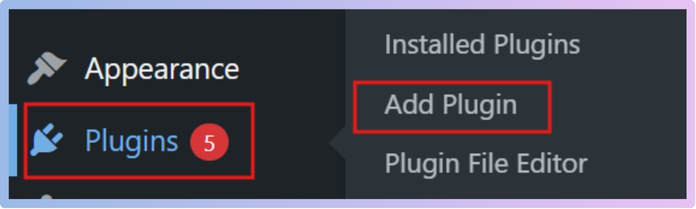
Step 2: Search for the Plugin
Type “Dynamic AJAX Product Filters” in the search box. When it appears in the results, click Install Now.
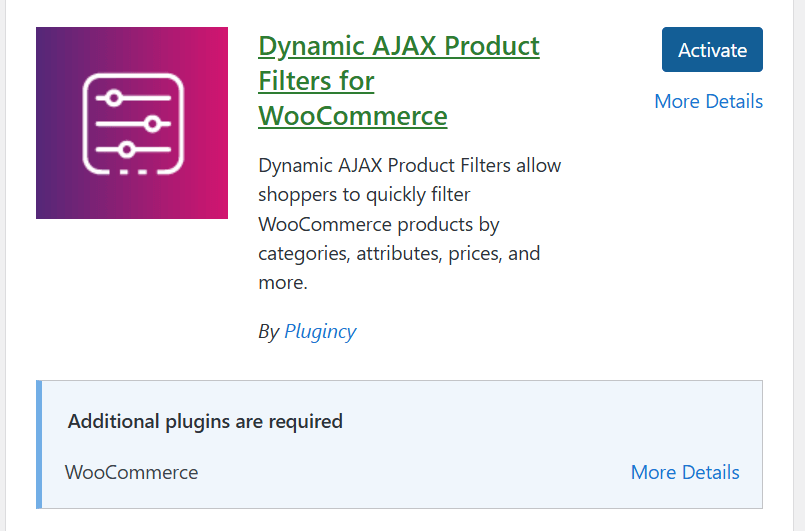
Step 3: Activate the Plugin
Once the installation is complete, click the Activate button. A new Product Filters menu will appear in your dashboard.
Endnote: Installing the plugin correctly is the first step to enabling category filtering in your WooCommerce store.
For Pro Version
Step 1: Download the Plugin File
If you have purchased the Pro version from the Plugincy website, log in to your account and download the plugin ZIP file to your computer.
Step 2: Upload the File Manually
Go to your WordPress dashboard, then navigate to Plugins → Add New. Click Upload Plugin at the top, choose the ZIP file from your computer, and click Install Now.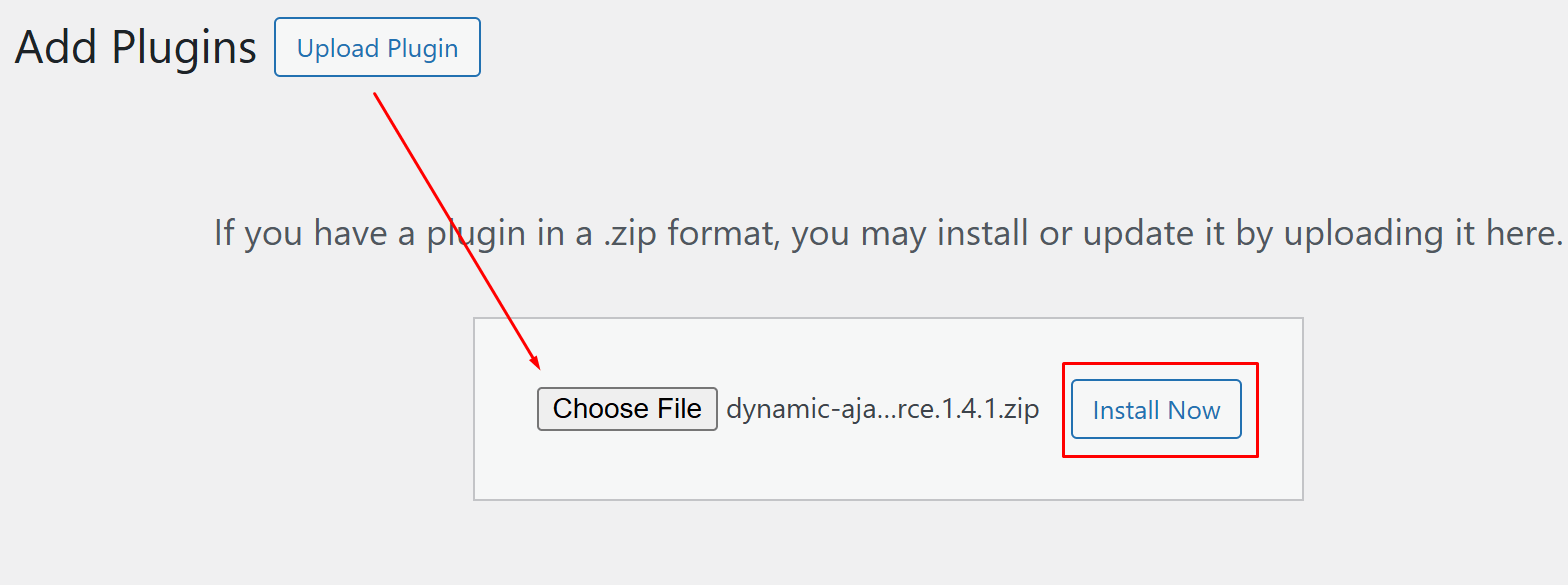
Step 3: Activate and Ready to Go
After installation, click Activate Plugin. You will now see the Product Filters menu in your dashboard, ready for setup.
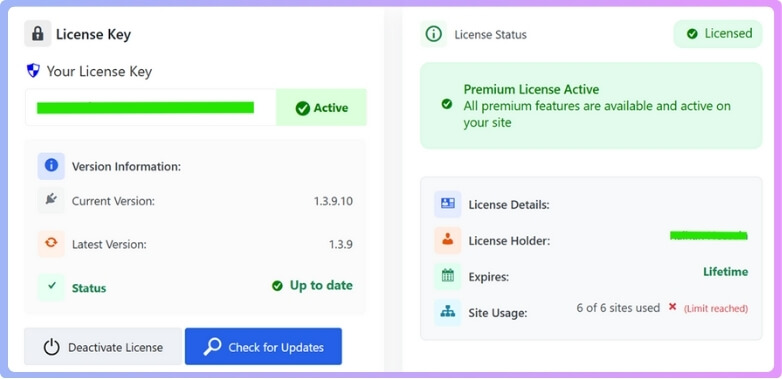
Endnote: Installing the Pro version gives you access to advanced category filtering features for better control and performance.
Configuring the Category Filter
Configuring the category filter using Dynamic AJAX Product Filters for WooCommerce is simple. Follow these steps to create categories, assign them to products, and display the filter on your store with real-time updates.
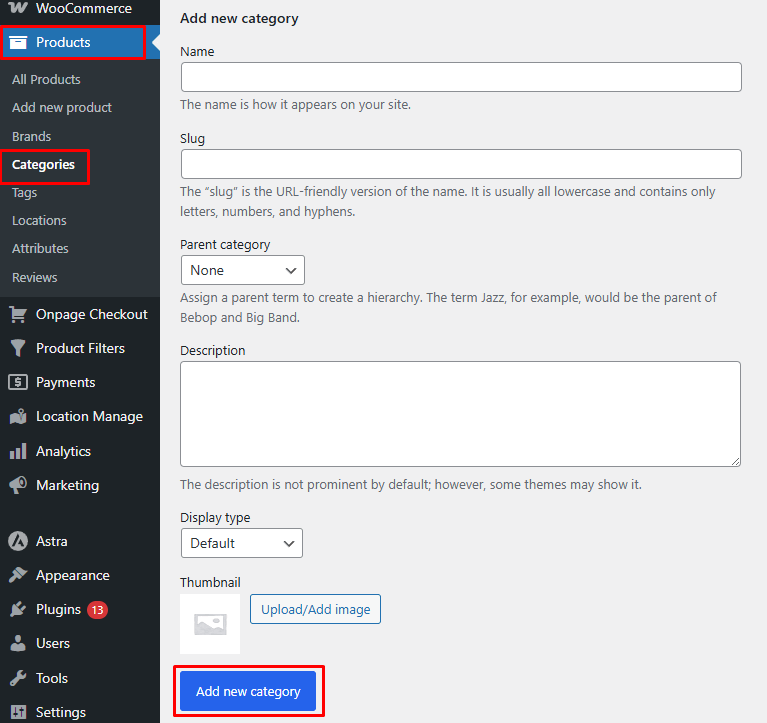
Step 1: Create Product Categories
Go to your WordPress dashboard, open Products → Categories, and add the categories you need (such as Electronics, Desktop, Laptop). Enter the name, slug, and description if required, then click Add New Category.
Step 2: Assign Categories to Products
Go to Products → All Products and open each product or create a new one. On the right side, select the correct category and save your changes so each product is linked properly.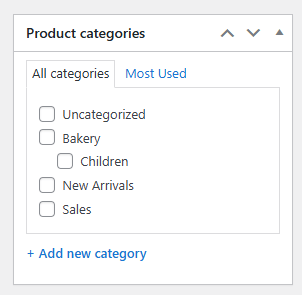
Step 3: Remove or Add Categories in the Filter Widget Form
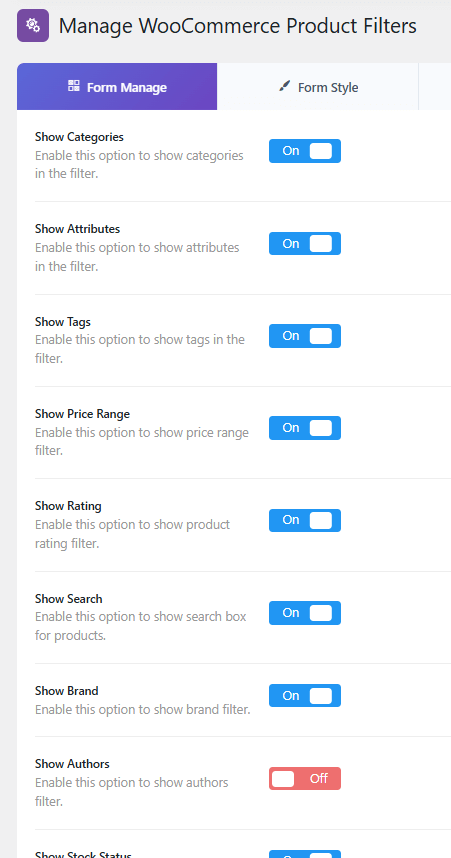
Go to Product Filters → Form Manage. Find the option called Show Categories and enable it to display categories in the filter. You can turn it off if you want to hide them.
Step 4: Adjust Filter Settings
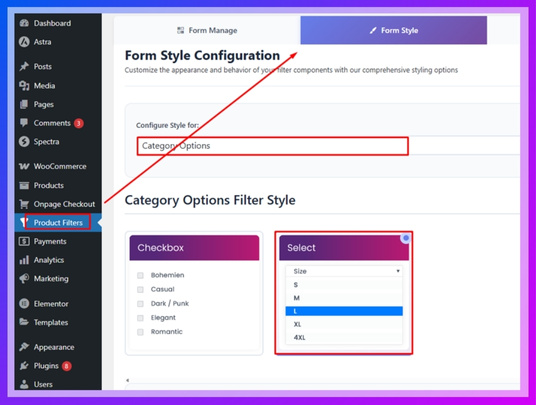
Go to Product Filters → Form Style. From here, you can control how the filter looks by choosing layouts, adjusting colors, and matching it with your store design for both desktop and mobile.
Step 5: Display the Category Filter on Your Store
Open the page where you want to show the category filter. Add the shortcode [plugincy_filters] in the content or widget area. To display products alongside the filter, also add the [products] shortcode.
Proper configuration of category filters ensures smooth navigation and helps users quickly find products in your WooCommerce store.
FAQ
What is a WooCommerce category filter plugin?
A WooCommerce category filter plugin allows users to browse products by selecting categories, helping them quickly narrow down items and improve navigation within the store.
Why should I use category filters in WooCommerce?
Category filters make it easier for users to find products without scrolling through everything. This improves user experience, reduces search time, and increases engagement.
Can I combine category filters with other filters?
Yes, most WooCommerce filter plugins allow you to combine category filters with price, color, size, and other attributes for more precise product filtering.
Which is the best WooCommerce category filter plugin?
Dynamic AJAX Product Filters is a strong choice for most stores due to its speed and flexibility. Barn2 and Filter Everything are also good options depending on your needs.
Do category filters affect SEO?
Yes, category filters can improve SEO by creating structured navigation and helping search engines understand your product organization when URLs are optimized properly.
Why are my category filters not working?
This usually happens when categories are not assigned correctly to products or the filter plugin is not configured properly. Checking setup and enabling AJAX often solves the issue.
These FAQs help answer common questions about WooCommerce category filters and ensure a smoother setup and better user experience.
Conclusion
WooCommerce category filter plugins are essential for improving product navigation, especially in stores with a large number of items. A well-structured category filter helps users quickly find relevant products without confusion, making the browsing experience smoother and more efficient.
Choosing the right WooCommerce category filter plugin depends on your store size, performance needs, and level of customization. Plugins with fast AJAX filtering, clear category structure, and mobile-friendly design deliver the best results for both usability and conversions.
When set up correctly, category filters not only improve navigation but also support better engagement and higher chances of purchase.
