

Are you looking for the best WooCommerce color filter plugins to improve how customers browse your store? Color plays a major role in buying decisions, especially in fashion, electronics, and lifestyle products. When users can quickly select products by color, it reduces search time and improves engagement.
A well-implemented WooCommerce color filter allows shoppers to visually explore products using swatches, making the experience faster and more intuitive. In this guide, you will find the best WooCommerce color filter plugins along with practical insights on UX, performance, and conversions.
Quick Answer
WooCommerce color filter plugins help users filter products by color using swatches or dropdowns. The best WooCommerce color filter plugins improve visual browsing, increase engagement, and boost conversions. Top options include Dynamic AJAX Product Filters, YITH Product Filter, and JetSmartFilters, offering fast filtering, swatch support, and flexible customization.
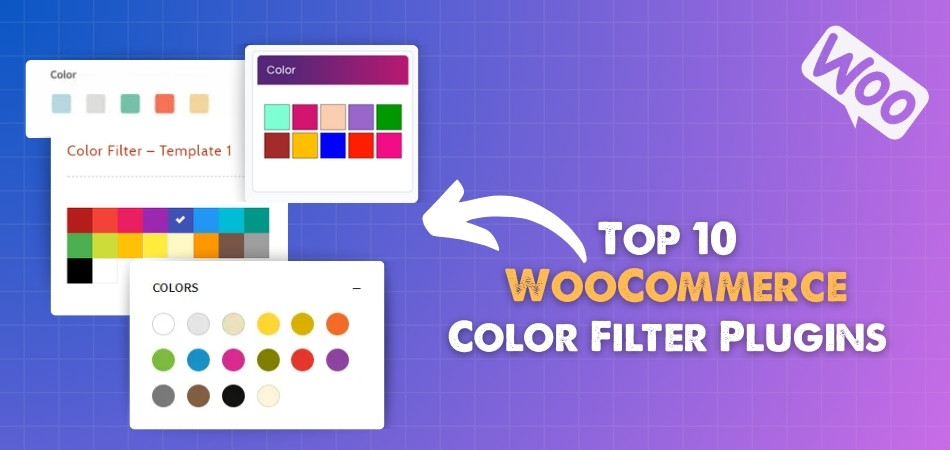
Why Color Filters Increase Engagement
Color is one of the first things users notice when browsing products. A strong WooCommerce color filter plugin allows customers to instantly narrow down options based on visual preference instead of reading product titles.
This improves engagement by making browsing faster and more interactive. Users stay longer on the site, explore more products, and are more likely to make a purchase when they can easily find items in their preferred color.
Types of Color Filters (Swatches vs Dropdown)
Understanding different color filter types helps you choose the right experience for your store.
Color Swatches
Color swatches display clickable color boxes or circles. This is the most effective method because it provides instant visual feedback and improves product discovery.
Dropdown Filters
Dropdown filters list color names in text format. While simple, they are less engaging compared to swatches and may slow down decision-making.
For most stores, swatches are the preferred choice due to better usability and higher conversion impact.
UX Best Practices for Color Filtering
A good WooCommerce color filter should follow strong UX principles to ensure smooth interaction.
- Use clear and accurate color swatches
- Keep filter placement visible (sidebar or top bar)
- Allow multi-select options for better filtering
- Show product count for each color
- Ensure fast response with AJAX filtering
These practices help users navigate your store easily and reduce friction during product selection.
Top 10 WooCommerce Color Filter Plugins (Comparison Table)
Color filters allow customers to quickly find products by visual attributes like color, shade, or variation. This improves product discovery, especially for fashion, furniture, and design-based stores.
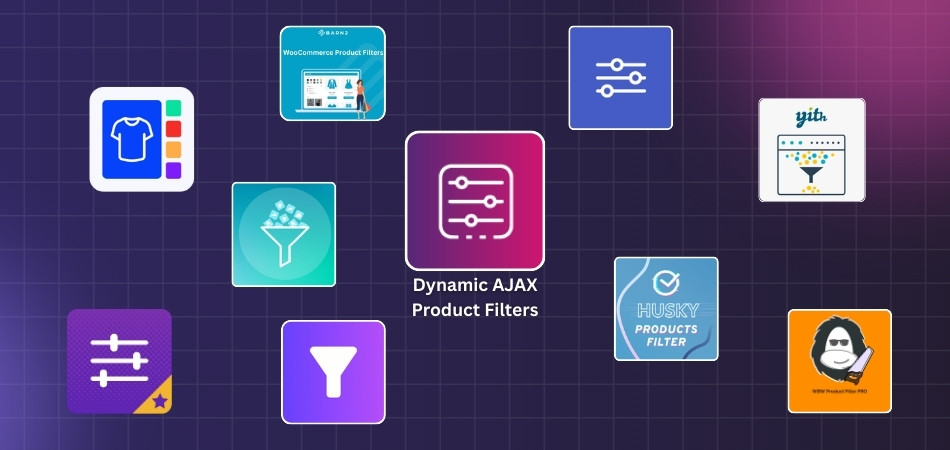
The table below compares the best WooCommerce color filter plugins based on UI options, performance, and flexibility.
Here is your WooCommerce Color Filter Plugins Comparison Table (clean, optimized, and aligned with your plugin list + real filtering features):
| Plugin Name | Color Filter Type | AJAX Support | Swatches (Color/Image) | Variation Support | UI Flexibility |
| Dynamic AJAX Product Filters for WooCommerce | Advanced (color + image swatches) | Yes | Yes | Excellent | High |
| YITH WooCommerce AJAX Product Filter | Advanced | Yes | Yes | Very Good | Medium |
| JetSmartFilters | Dynamic visual filters | Yes | Yes | Excellent | Very High |
| Variation Swatches (GetWooPlugins) | Attribute-based swatches | Yes | Yes | Excellent | Medium |
| Filter Everything | Taxonomy-based filtering | Yes | Yes | Good | High |
| Product Filter by WBW | Standard + visual filters | Yes | Yes | Good | Medium |
| HUSKY (WOOF) | Flexible filtering | Yes | Yes | Very Good | High |
| Barn2 WooCommerce Product Filters | Indexed filtering + swatches | Yes | Yes | Excellent | Medium |
| Advanced AJAX Product Filters | Basic to advanced | Yes | Yes | Good | Medium |
| WPC Smart Filters | Basic color filtering | Yes | Limited | Small stores | Low |
Key Insights
- Best overall color filtering – Dynamic AJAX Product Filters provides advanced swatches, AJAX speed, and flexible UI
- Best for visual UI – JetSmartFilters offers the highest design control for color filters
- Best for variation-heavy stores – Variation Swatches plugins handle color variations effectively
- Best performance for large stores – Barn2 Product Filters uses indexing to ensure fast filtering even with large catalogs
A well-designed color filter improves visual product discovery, helping customers quickly find products that match their preferences and boosting conversions.
Top 10 WooCommerce Color Filter Plugins
If you sell products in multiple colors, a WooCommerce color filter plugin makes browsing much easier for your customers. These plugins allow users to select their preferred color using visual swatches instead of plain text, helping them see exactly what they are choosing.
Below is a list of the top WooCommerce color filter plugins that offer speed, flexibility, and a better visual browsing experience for your store.
Dynamic AJAX Product Filters for WooCommerce
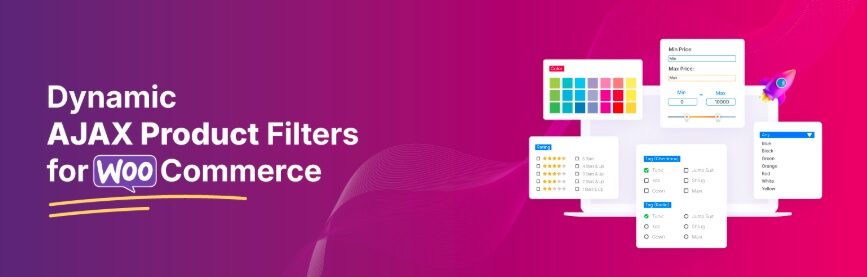
Shopping becomes faster and smoother when customers can instantly see matching products without page reloads. With Dynamic AJAX Product Filters for WooCommerce, real-time filtering ensures results update immediately, keeping the browsing experience uninterrupted. It works well with different store layouts and remains fully responsive across devices, making it easier for users to explore products and find the right option based on color.
Key Features:
- Supercharged AJAX Filtering Engine – Instantly updates products when filters are applied without reloading the page, including smooth pagination and consistent loading effects.
- Wide Range of Filter Options (Basic to Advanced) – Allows filtering by price, rating, categories, tags, and also supports brand, SKU, and custom fields.
- Color Filter with Visual Swatches – Displays color options as clickable swatches instead of text, helping users select colors visually with instant updates.
- Stock, Sale & Discount Filters – Lets users filter products based on availability, sale status, or discounts, making it easier to find active offers.
- Dimensions, Weight & Date Filters – Supports filtering using product metrics such as size, weight, or date-based conditions.
- Flexible Filtering with SEO-Friendly URLs – Supports clean URLs, query-based filtering, and structured links for better performance and SEO handling.
- Widget & Shortcode Support with Page Builder Integration – Filters can be placed using widgets, shortcodes, or blocks and work smoothly with Elementor and the WordPress block editor.
- Mobile-Friendly, SEO-Optimized UI – Responsive layouts with touch-friendly controls, collapsible filters, and optimized structure for better usability across devices.

Price:
| Plan Type | Price (USD) | Original Price (USD) | Billing Cycle | Features |
| Single Site | $39 | $49 | Yearly | All Pro features, Full access, 1 year support, 1 year updates |
| Up to 5 Sites | $89 | $99 | Yearly | All Pro features, Full access, 1 year support, 1 year updates |
| Unlimited Sites | $189 | $199 | Yearly | All Pro features, Full access, 1 year support, 1 year updates |
| Single Site | $79 | $89 | Lifetime | All Pro features, Full access, Lifetime support, Unlimited updates |
| Up to 5 Sites | $139 | $149 | Lifetime | All Pro features, Full access, Lifetime support, Unlimited updates |
| Unlimited Sites | $289 | $299 | Lifetime | All Pro features, Full access, Lifetime support, Unlimited updates |
Dynamic AJAX Product Filters for WooCommerce provides a powerful and flexible color filtering system, helping users quickly find products through visual selection and improving overall store usability.
Variation Swatches for WooCommerce
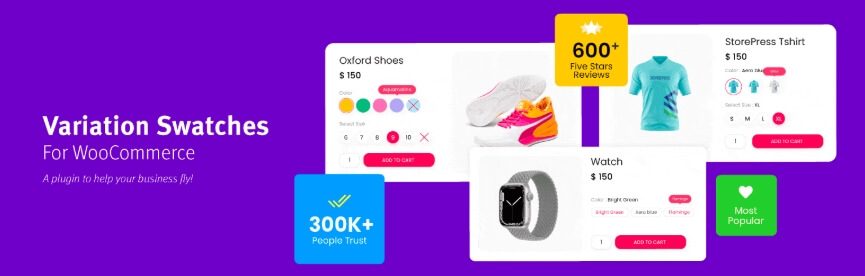
Shoppers can select product options quickly without relying on standard dropdown menus. WooCommerce Variation Swatches by GetWooPlugins converts dropdowns into clickable visual swatches, making the selection process more modern and user-friendly. By replacing text options with color, image, button, or radio formats, it creates a smoother experience where users can easily choose product variations.
Key Features:
- Visual Swatch Types (Color, Image, Button, Radio) – Replaces dropdown fields with clickable swatches such as color boxes, images, text buttons, or radio options, making selection easier for users.
- Auto-Convert Dropdowns to Image Swatches Based on Variation Image – Automatically turns variation dropdowns into image swatches when images are available, reducing manual setup.
- Swatches on Shop or Archive Pages – Displays swatches not only on product pages but also on category and shop pages, allowing users to select variations earlier.
- Image Tooltip on Archive Pages – Shows preview images when hovering over swatches, helping users view details instantly.
- Text Tooltip on Archive Pages – Displays descriptive text when users hover over swatches, improving clarity for each variation.
- Dual-Color Variation Swatches – Allows a single swatch to display two colors, useful for products with mixed color variations.
- Quick View Support – Works inside quick view popups, enabling users to select variations without leaving the product grid.
Price:
It offers both yearly and lifetime pricing plans:
| Plan | Price | Billing Type | Domains/Sites |
| Starter | $49.00 | Yearly | Single domain/site |
| Business | $149.00 | Yearly | Five domains/sites |
| Developer | $299.00 | Yearly | Unlimited domains/sites |
| Starter Lifetime | $149.00 | Lifetime | Single domain/site |
| Business Lifetime | $449.00 | Lifetime | Five domains/sites |
Variation Swatches for WooCommerce improves visual product selection by replacing dropdowns with interactive swatches, making color-based filtering faster and more user-friendly.
HUSKY – WooCommerce Products Filter
Your store becomes easier to navigate when customers can quickly find what they need without delays. HUSKY – WooCommerce Products Filter provides fast and smooth filtering in real time, helping users narrow down products efficiently. It integrates well with most WooCommerce store designs and keeps the browsing experience simple and consistent. The plugin works in the background without interrupting user flow, making product discovery more comfortable and effective.

Key Features:
- Filter by Categories, Attributes, Tags, Taxonomies, Meta Fields, and Price – Allows users to refine products using multiple filter options such as categories, tags, price ranges, and custom fields for more accurate results.
- SEO-Friendly Filter Links – Generates clean and readable URLs that can be indexed, helping improve search visibility and supporting better SEO structure.
- Front-End Builder for Filters – Lets you create and arrange filter forms directly on the front end, making layout adjustments easier without backend complexity.
- Shortcode and Widget Usage – Supports shortcodes like [woof] and widgets, giving flexibility to place filters anywhere on your site, including pages and sidebars.
- AJAX-Powered Product Search – Updates results instantly without page reload, improving browsing speed and user experience.
- Real-Time Product Count Updates – Displays the number of matching products dynamically as users apply filters, helping them understand results instantly.
- Search by SKU, Text, or Metadata – Enables advanced filtering by SKU, product titles, descriptions, or custom metadata fields for deeper product discovery.
Price:
| License Type | Price | Includes |
| Regular License | $42 | Quality checked by Envato, future updates, 6 months support (extend to 12 months for $13.88) |
| Extended License | $142 | Quality checked by Envato, future updates, 6 months support (extend to 12 months for $43.88) |
HUSKY – WooCommerce Products Filter offers flexible filtering options with real-time performance, making it suitable for stores that need advanced product filtering capabilities.
Product Filter by WBW
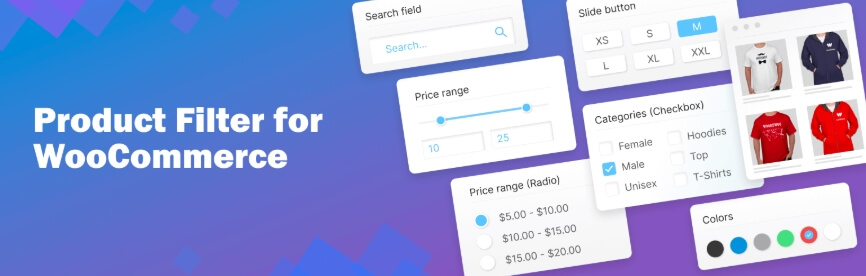
Shopping becomes easier when users can quickly narrow down products without scrolling through everything. WooCommerce Product Filter by WBW allows visitors to refine results using simple and flexible filter controls directly on the shop page. It fits smoothly with most store designs and works well with tools like Elementor, making it easy to add and manage filters. The interface is responsive and user-friendly, helping customers browse faster and find products with confidence.
Key Features:
- Comprehensive Filtering – Allows users to filter products by price or price range, categories, tags, author, featured items, sale items, stock status, ratings, search terms, and product attributes.
- Flexible Display Options – Supports multiple display types such as radio buttons, dropdown menus, checkboxes, and icon-based filters for attributes like color, size, or ratings.
- AJAX Live Search – Displays results instantly without page reload, creating a faster and smoother browsing experience.
- Elementor Integration – Works with Elementor, allowing you to design and place filters directly using the page builder interface.
- Filter Statistics Section – Includes a dashboard that tracks how users interact with filters, helping you understand behavior and improve store performance.
- Live Preview – Shows changes in real time, so you can adjust filter layouts and settings before publishing.
- Product Sorting Options – Provides multiple sorting methods such as popularity, rating, price, newest, or alphabetical order to improve product navigation.
Price:
| Sites Allowed | Yearly Price | Yearly Benefits | Lifetime Price | Lifetime Benefits |
| Unlimited | $149.00 | 1 year updates, 1 year support | $399.00 | Lifetime updates, lifetime support |
| 5 Sites | $89.00 | 1 year updates, 1 year support | $249.00 | Lifetime updates, lifetime support |
| Single Site | $59.00 | 1 year updates, 1 year support | $199.00 | Lifetime updates, lifetime support |
Product Filter by WBW offers flexible filtering options with an easy setup, making it a practical choice for improving product navigation in WooCommerce stores.
YITH WooCommerce AJAX Product Filter
Finding the right product should feel fast and simple, not slow or confusing. YITH WooCommerce AJAX Product Filter improves this by updating results instantly as users apply filters, keeping the browsing experience smooth and uninterrupted. It fits well with most WooCommerce store designs and works across different pages, helping users stay focused and find products with less effort.

Key Features:
- Filter by multiple options (categories, tags, price, size, color, reviews, brand, stock, sale) – Allows users to narrow down products using different filter types for better accuracy.
- Unlimited filter groups (presets) – Create multiple filter setups and display them on specific pages such as shop, category, or custom pages.
- Works on any page (widgets, shortcodes, Gutenberg, Elementor) – Easily place filters anywhere using familiar tools without complex setup.
- Flexible layout options (sidebar or horizontal bar) – Choose between vertical sidebar filters or a horizontal filter bar based on your store design.
- Dynamic filters based on user selection – Filters can adjust automatically depending on previous selections, showing only relevant options.
- Multiple display styles (checkboxes, dropdowns, color swatches, images, labels, icons) – Customize the filter appearance to match your store layout.
- Mobile-friendly modal filters – On smaller devices, filters open in a popup for easier interaction and better usability.
Price:
| Plan Type | Price | Billing Cycle | Includes |
| Single Site License | $105.33 | Yearly | 1 year updates, 1 year support, 30-day money-back guarantee |
YITH WooCommerce AJAX Product Filter offers flexible filtering with strong customization options, helping users quickly find products and improving the overall browsing experience.
Filter Everything
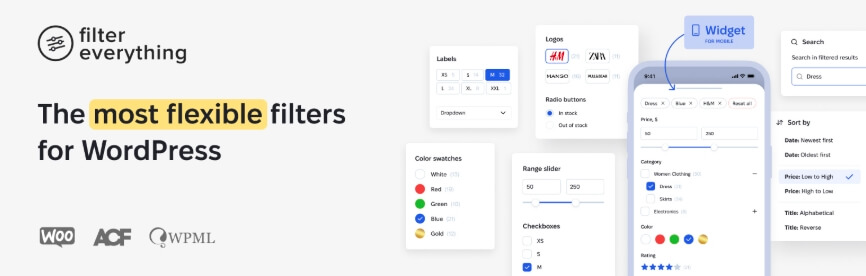
Helping users quickly find what they need without extra clicks is key to a better browsing experience. Filter Everything for WordPress allows visitors to refine content instantly with real-time updates that fit smoothly into any WooCommerce store. It works with products, posts, and custom content types, adapting to different layouts and devices to keep browsing simple and responsive.
Key Features:
- Filters any post types – Supports filtering across products, blog posts, pages, and custom post types, making it useful for different types of websites.
- Supports multiple filtering criteria – Allows filtering by categories, tags, taxonomies, product attributes, custom fields, authors, and dates for more precise results.
- Easy integration with widgets or shortcodes – Add filters quickly using widgets or shortcodes, making setup flexible and simple.
- Compatible with popular page builders – Works smoothly with Elementor, Divi, WPBakery, Oxygen, and other builders for easy visual layout control.
- Search by keyword and sorting options – Users can search by keywords and sort results by date, popularity, or custom criteria.
- Supports color swatches and brand logos – Adds visual filtering options like color swatches and brand logos to improve product selection.
- Step-by-step filtering layouts – Filters can be displayed in guided steps or arranged vertically or horizontally based on your layout needs.
Price:
| License Type | Price | Included Support | Extend to 12 Months | Discounted Extension Price |
| Regular License | $44 | 6 months | $34.13 | $14.63 |
| Extended License | $144 | 6 months | $104.13 | $44.63 |
Filter Everything provides flexible filtering across multiple content types, making it a strong option for WooCommerce stores that need advanced and customizable filtering.
WooCommerce Product Filter by Barn2
Helping customers find products quickly without frustration improves the overall shopping experience. WooCommerce Product Filter by Barn2 enhances standard filtering with fast, smooth performance. Results update instantly as users refine their selections, keeping browsing clear and focused. It integrates well with different store designs and works across devices, making product discovery simple and efficient.
Key Features:
- Filter by anything you need – Allows users to refine products by categories, price, size, color, attributes, tags, stock status, ratings, and more.
- Multiple filter styles available – Offers dropdowns, checkboxes, radio buttons, labels, color swatches, range sliders, and image filters for flexible display.
- Fast AJAX filtering for instant results – Updates product listings immediately without reloading the page, improving browsing speed.
- Mobile-friendly slide-out panel – Filters slide in from the side on mobile devices, keeping the interface clean and easy to use.
Unique URLs for each filter option – Each filter selection generates its own URL, making it easier to share and helping search engines index filtered pages. - Flexible layout options – Filters can be displayed in a vertical sidebar or a horizontal bar above products, depending on your store layout.
- Built-in setup wizard and pre-configured options – Helps you get started quickly with ready-made filter setups, reducing manual work.
Price:
| Plan Type | Sites Allowed | Price ($) | Notes / Features |
| Annual Payment | 1 Site | $79 | Advanced product filters, filter by anything |
| Annual Payment | Up to 5 Sites | $139 | Advanced product filters, filter by anything |
| Annual Payment | Up to 20 Sites | $249 | Advanced product filters, filter by anything |
| Lifetime Purchase | 1 Site | $299 | Advanced product filters, filter by anything |
| Lifetime Purchase | Up to 5 Sites | $449 | Advanced product filters, filter by anything |
| Lifetime Purchase | Up to 20 Sites | $899 | Advanced product filters, filter by anything |
WooCommerce Product Filter by Barn2 offers fast and flexible filtering with strong performance, making it suitable for stores that need reliable and scalable product filtering.
Advanced AJAX Product Filters
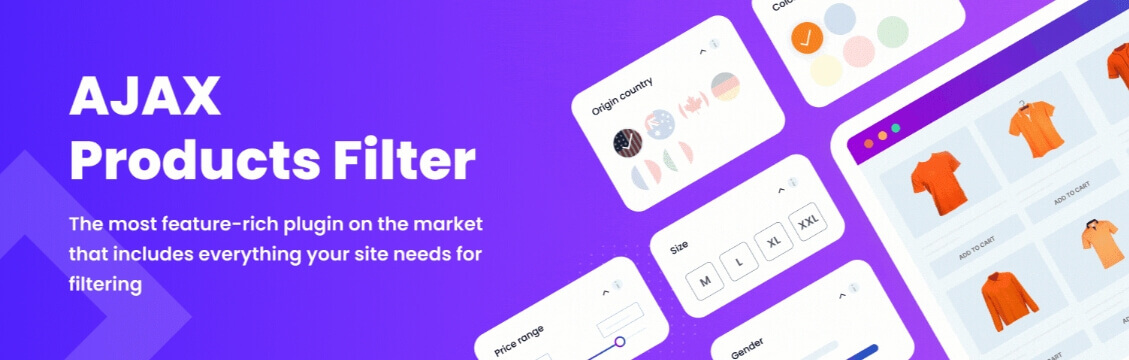
Finding products in a large store should feel fast and simple. Advanced AJAX Product Filters for WooCommerce improves browsing by updating product listings instantly without page reload. This keeps navigation smooth and helps users stay focused while filtering products. It fits well with different store designs and supports a consistent shopping experience across devices.
Key Features:
- Multiple filter layouts (slider, image, color, and more) – Choose different styles for each filter, including sliders, images, or color blocks to match your store design.
- Flexible filter placement above products – Place filters above product listings, inside sections, or behind toggle buttons for a cleaner layout.
- Unlimited filters using one widget or shortcode – Create multiple filters and manage them from a single widget or shortcode for better control.
- AJAX filtering with pagination and sorting – Instantly updates product lists while supporting AJAX-based pagination and sorting for smoother browsing.
- SEO-friendly URLs reflecting filters – Generates clean and readable URLs based on selected filters, improving usability and SEO structure.
- Include or exclude specific values – Control which filter options are visible, allowing you to show or hide values as needed.
- High customization of styles and layouts – Customize filter appearance including sliders, buttons, colors, and layout styles to match your store design.
Price:
| Plan Type | Sites Allowed | Price (USD) | Discount | Features |
| Single Site | 1 Site | $44 | – | Unlimited updates, premium lifetime support, best price, 30-day money-back guarantee |
| Up to 3 Sites | 3 Sites | $69 | 48% off | Unlimited updates, premium lifetime support, best price, 30-day money-back guarantee |
| Up to 5 Sites | 5 Sites | $109 | 50% off | Unlimited updates, premium lifetime support, best price, 30-day money-back guarantee |
| Up to 10 Sites | 10 Sites | $160 | 62% off | Unlimited updates, premium lifetime support, best price, 30-day money-back guarantee |
Advanced AJAX Product Filters provides flexible layouts and real-time filtering, helping users quickly refine products and improving overall store navigation.
JetSmartFilters
Filtering becomes more flexible when you can design everything visually. JetSmartFilters for WooCommerce is built for users who work with Elementor or Gutenberg, allowing you to create advanced filters with full design control. It supports AJAX filtering, making product updates instant and keeping the browsing experience smooth and interactive.

Key Features:
- Advanced AJAX filtering – Updates products instantly without page reload, improving speed and user experience.
- Multiple filter types – Supports checkboxes, radio buttons, select dropdowns, range sliders, date filters, and search filters.
- Elementor and Gutenberg integration – Fully compatible with page builders, allowing you to design filter layouts visually.
- Smart filtering logic – Filters can work together dynamically, showing only relevant options based on user selection.
- Color swatches and visual filters – Supports visual filtering using colors, images, and icons.
- Flexible placement options – Filters can be placed anywhere on the page using widgets or blocks.
Price:
| Plan Type | Price | Billing | Notes |
| Single Site | $43 | Yearly | Includes updates and support |
| Unlimited Sites | $88 | Yearly | Includes updates and support |
JetSmartFilters is a strong choice for stores using Elementor or Gutenberg that need flexible and visually customizable filtering.
WPC Smart Filters for WooCommerce
A simple and lightweight filtering system can be enough for many stores. WPC Smart Filters for WooCommerce provides an easy way to add product filters with AJAX support while keeping performance stable. It is suitable for small to medium stores that need fast and basic filtering without complex setup.
Key Features:
- AJAX product filtering – Updates product listings instantly without page reload for faster browsing.
- Multiple filter types – Supports price, categories, attributes, tags, and custom filters.
- Color filter support – Includes color swatches for visual product filtering.
- Lightweight performance – Designed to work smoothly without slowing down your store.
- Easy setup and configuration – Simple interface for quick installation and setup.
- Shortcode and widget support – Place filters anywhere using widgets or shortcodes.
Price:
| Plan Type | Price | Billing | Notes |
| Free Version | $0 | Lifetime | Basic filtering features |
| Pro Version | $29+ | Yearly | Advanced features and support |
WPC Smart Filters is a lightweight and easy-to-use option for adding basic WooCommerce filtering without affecting performance.
UI Comparison Table (Swatches, Hover, Preview)
Choosing the right WooCommerce color filter plugin depends heavily on how the filter looks and behaves visually. Features like color swatches, hover previews, and UI flexibility directly impact user interaction and product discovery.
| Plugin | Color Swatches | Hover Preview | UI Flexibility |
| Dynamic AJAX Product Filters | Yes | Yes | High |
| YITH WooCommerce AJAX Filter | Yes | Limited | Medium |
| JetSmartFilters | Yes | Yes | Very High |
| Variation Swatches (GetWooPlugins) | Yes | Yes | Medium |
| Filter Everything | Yes | Limited | High |
| Product Filter by WBW | Basic | No | Medium |
| HUSKY (WOOF) | Yes | Limited | High |
| Barn2 Product Filter | Yes | No | Medium |
| Advanced AJAX Product Filters | Yes | Yes | High |
| WPC Smart Filters | Basic | No | Medium |
Plugins with swatches and hover preview provide a more interactive and visually clear filtering experience, especially for color-based product selection.
Mobile UX Optimization
Mobile users rely heavily on simple and touch-friendly filters, especially when browsing products by color. A well-optimized WooCommerce color filter plugin ensures that filters are easy to access, quick to use, and visually clear on smaller screens.
- Touch-friendly color swatches – Swatches should be large enough to tap easily without misclicks, improving usability on mobile devices.
- Collapsible or slide-out filter panels – Filters should open in a drawer or popup instead of taking full screen space, keeping the layout clean.
- Fast AJAX updates – Product results should refresh instantly without page reload to maintain smooth browsing.
- Clear color visibility – Colors must be distinct and easy to recognize, even on smaller displays.
- Sticky or easy-to-access filter button – A visible filter button helps users quickly open filters without scrolling.
- Minimal clutter in filter options – Showing only relevant color options keeps navigation simple and avoids confusion.
A mobile-optimized WooCommerce color filter improves usability, making it easier for users to browse and select products quickly on smaller screens.
Conversion Impact (Visual Selection Psychology)
Color-based filtering plays a strong role in how users make buying decisions. When customers can visually select products instead of reading through options, the process feels faster and more natural. This reduces effort and helps users stay focused while browsing.
- Faster decision-making – Visual swatches allow users to identify their preferred color instantly, reducing the time spent searching.
- Reduced cognitive load – Instead of reading product details, users can rely on visual cues, making the experience easier and less tiring.
- Higher engagement – Interactive elements like color swatches encourage users to click, explore, and view more products.
- Stronger emotional connection – Colors often influence preferences, helping users feel more confident in their choices.
- Lower bounce rate – When users quickly find what they want, they are more likely to stay and continue browsing.
- Improved conversion rate – A smoother filtering experience leads to better product discovery and increases the chances of purchase.
Visual color filtering simplifies product discovery, helping users make faster decisions and increasing overall conversions in WooCommerce stores.
Best Plugin Recommendation
Choosing the right WooCommerce color filter plugin depends on performance, visual experience, and flexibility. Among all options, one plugin stands out as the most balanced solution for most stores.
Dynamic AJAX Product Filters for WooCommerce is the best overall choice for color filtering.
- Strong visual filtering support – Displays color swatches clearly, making it easy for users to select products visually.
- Fast AJAX performance – Updates products instantly without page reload, keeping browsing smooth.
- Flexible layout options – Works in sidebar, top bar, or mobile panels based on your store design.
- Advanced filtering system – Supports multiple filters like price, category, attributes, and color together.
- Scalable for all store sizes – Works well for both small and large WooCommerce stores.
This plugin combines speed, usability, and flexibility, making it suitable for most WooCommerce setups.
Dynamic AJAX Product Filters provides a balanced combination of speed and visual filtering, making it a reliable choice for WooCommerce color filtering.
Why You Need a Color Filter in Your WooCommerce Store?
A color filter is a simple yet powerful feature for any WooCommerce store. It lets shoppers quickly narrow down products based on their preferred colors, making browsing faster and more enjoyable. This not only improves the shopping experience but can also lead to more sales.
1. Quicker Product Discovery
A color filter helps customers quickly find products in their preferred color without going through every page. It saves time, makes navigation smooth, and keeps them engaged. Shoppers can instantly view only the products they want, which improves satisfaction and reduces the chance of leaving.
2. Better Shopping Experience
When a store is easy to explore, customers are more likely to stay and shop. A color filter gives them control over what they see. Instead of endless scrolling, they can focus on their chosen colors, making browsing less tiring and more enjoyable for everyone.
3. Makes Browsing More Organized
Without a filtering option, products can appear scattered and overwhelming, especially in larger stores. A color filter groups items neatly by shade, helping customers focus only on relevant options. This organized view reduces confusion, makes the site look professional, and increases trust in your store.
4. Encourages More Purchases
A color filter can lead to higher sales because customers can easily see all items matching their preferences. If they find several appealing products in their favorite shade, they are more likely to add more to their cart, which increases your overall sales and order values.
5. Useful for Many Product Types
A color filter is helpful for clothing, accessories, electronics, or even home goods. Any product where appearance matters can benefit. It makes it simple for customers to match items with their style, décor, or theme, giving them a faster, easier, and more satisfying shopping experience overall.
How to Set Up and Configure Color Filter Plugins for your WooCommerce Store?
A plugin makes it easy to add and manage color filters without any coding. You can control how filters look, make them work smoothly on mobile devices, and save time during setup. In this example, we will use Dynamic AJAX Product Filters for WooCommerce. You can quickly set up a WooCommerce color filter and use AJAX to update results instantly without reloading the page.
Step 1: Install the Plugin
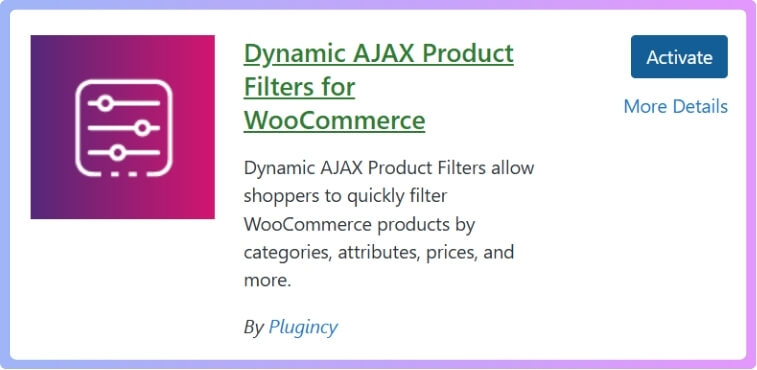
Before creating any color filters, you need to install and activate the plugin. You can install Dynamic AJAX Product Filters for WooCommerce directly from the WordPress plugin section or upload it manually.
From your WordPress dashboard:
- Go to Plugins → Add New
- Search for Dynamic AJAX Product Filters for WooCommerce
- Click Install and then Activate
Install it Manually
You can also install the plugin manually using the ZIP file from your WordPress dashboard.
- Go to Plugins and click Add New Plugin
- Click Upload Plugin
- Click Choose File and select the plugin ZIP file from your computer
- Click Install Now, then click Activate
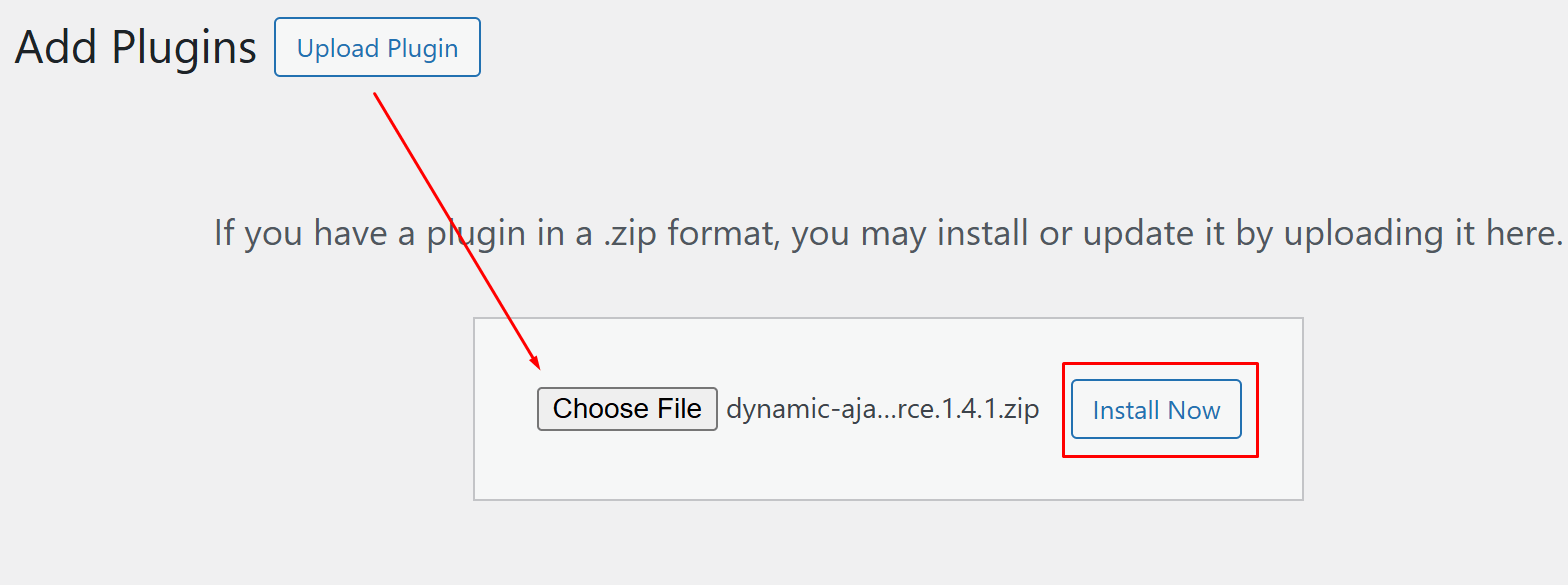
Manual installation is useful when you have the Pro version or a downloaded plugin file ready to upload.
Step 2: Create Categories, Tags, or Attributes
The plugin needs product data to work properly, so you should first set up the categories, tags, or attributes you want to use for filtering.
A. Create Categories (Optional for Color Filter)
Categories help organize your products and can be included in filters if needed.
- Go to Products → Categories
- Enter:
- Name (e.g., “Laptops”)
- Slug (e.g., “laptops”)
- Parent (optional)
- Description (optional)
- Click Add New Category
- Assign the category to products under Products → All Products
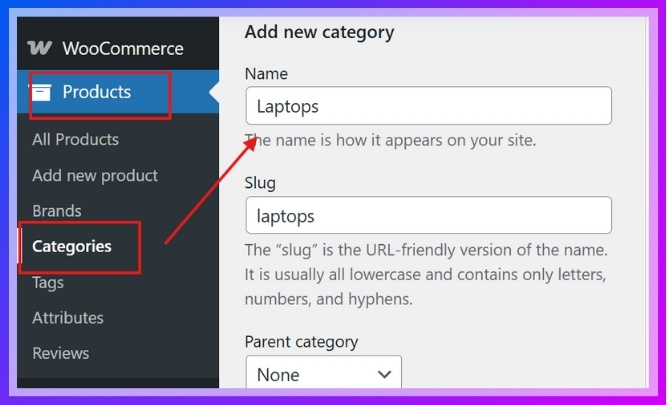
Proper category setup helps structure your store and supports better filtering when needed.
B. Create Attributes for Colors
Attributes are required to set up color filtering in WooCommerce.
- Go to Products → Attributes
- Add:
- Name: Color
- Slug: color
- Click Add Attribute
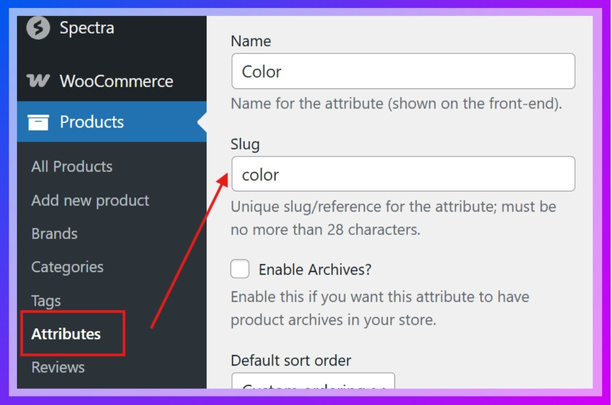
- Click Configure terms next to the Color attribute
- Add color terms such as Red, Blue, Green, and others as needed

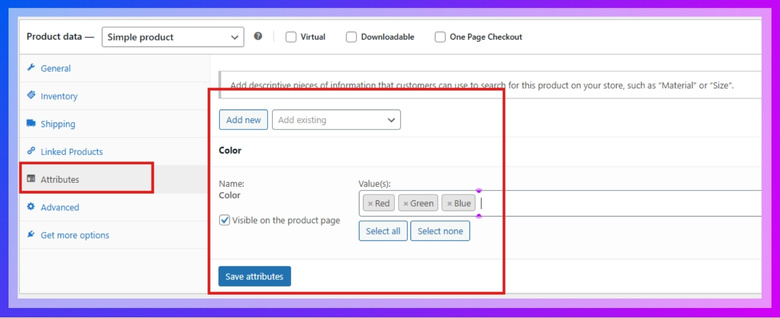
C. Assign Attributes to Products
Once your attributes are ready, assign them to your products.
- Go to Products → All Products
- Edit an existing product or click Add New Product
- In Product data → Attributes, select Color and click Add
- Choose the color terms and click Save attributes
- Update or publish the product
Assigning color attributes properly ensures the WooCommerce color filter displays accurate results for each product.
Step 3: Customize the Filter Form (Add Color Filter Widget)
Now it’s time to choose which filters will appear and how they will look.
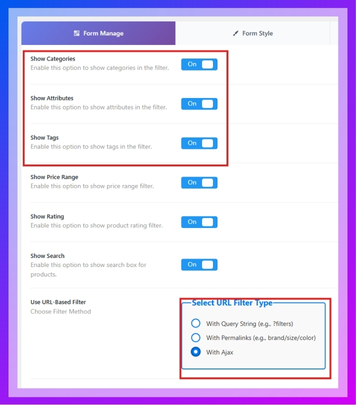
Access Form Settings
- Go to Product Filters → Form Manage
- Make sure your selected filters (Categories, Tags, Attributes) are active
- Enable With Ajax for faster loading without refreshing the page
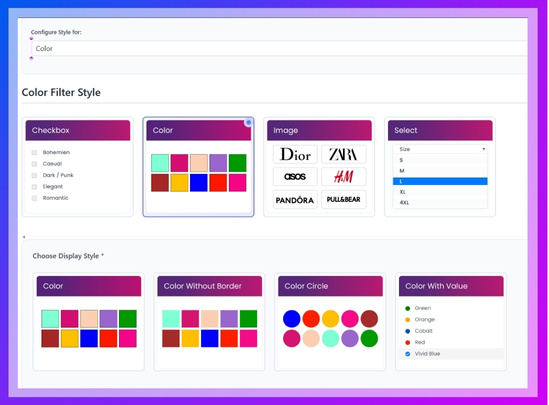
Customize Style for Color Filter
- Go to Product Filters → Form Style
- In Select Attribute, choose Color
- Select one of the style options:
- Color
- Color without border
- Color circle
- Color with value
- Save the changes
Step 4: Set Up Color Swatch Filter
The swatch filter allows users to select a visual color instead of reading text.
- In Form Style, under the Color attribute:
- Set Display type to Color
- Choose a swatch style (circle, color with value, etc.)
- Assign each term a matching color if it is not set automatically
- Save your settings
Step 5: Display the Filter on Your Site
Finally, add the filter to your store pages so customers can use it.
- Use the shortcodes:
- [plugincy_filters] for the filter form
- [products] to display products with filters
- Place the shortcodes inside square brackets
- Add them to:
- A page
- A widget area
- The sidebar
Proper setup and placement of the color filter ensures users can easily find products using visual selection, improving overall browsing experience.
Common Issues (Wrong Variation Mapping)
Sometimes WooCommerce color filters do not work correctly due to improper setup of attributes or variations. These issues can affect how products appear in the filter results.
- Color not showing in filter – This usually happens when the color attribute is not assigned to the product or not added as a filter option.
- Wrong products appearing – Occurs when variations are not linked properly with the correct color terms, causing mismatched results.
- Duplicate or missing colors – Happens when similar color names are created multiple times or not standardized across products.
- Filter not updating results – This can be caused by AJAX being disabled or conflicts with other plugins or themes.
- Swatches not displaying correctly – If color values are not assigned or configured properly, swatches may appear blank or incorrect.
- Variation not linked to attribute – If a product variation is created without linking to the color attribute, it will not appear in filtering.
Most color filter issues are caused by incorrect attribute or variation setup, so proper configuration ensures accurate and reliable filtering results.
FAQ
What is the best WooCommerce color filter plugin?
Dynamic AJAX Product Filters is one of the best WooCommerce color filter plugins because it offers fast AJAX filtering, clear color swatches, and flexible layout options.
Why is my WooCommerce color filter not working?
This usually happens when color attributes are not assigned to products or variations are not linked correctly. Enabling AJAX and checking attribute setup often fixes the issue.
Should I use color swatches or dropdown for filtering?
Color swatches are better because they allow users to select visually, making the browsing experience faster and easier compared to text-based dropdowns.
Can I combine color filters with other filters?
Yes, most WooCommerce filter plugins allow combining color filters with price, category, size, and other attributes for more accurate product filtering.
Do color filters improve conversion rates?
Yes, color filters help users find products faster and reduce browsing time, which can lead to higher engagement and better conversion rates.
Why are my color swatches not showing?
This can happen if color values are not assigned to attributes or if the plugin settings are not configured correctly for swatch display. These FAQs cover common questions about WooCommerce color filters and help ensure smooth setup and better filtering performance.
Conclusion
WooCommerce color filter plugins play an important role in improving how users explore products, especially in stores where visual choice matters. By allowing customers to select colors through swatches instead of text, the browsing process becomes faster, clearer, and more engaging.
Choosing the right WooCommerce color filter plugin ensures smooth performance, better mobile usability, and accurate product filtering. When set up correctly with proper attributes and variations, color filters help users quickly find what they need without confusion.
A well-optimized color filter not only improves navigation but also supports higher engagement and better conversion results across your store.
A properly configured WooCommerce color filter enhances visual product discovery, making it easier for users to find products and increasing overall store performance.
