

WooCommerce variable product stock not working often happens when stock is not properly configured across product, variation, and global settings. Unlike simple products, variable products rely on multiple layers of stock control, and even a small misalignment can prevent stock from updating correctly after an order. In many cases, store owners face WooCommerce variable product stock not updating even though orders are being placed successfully. In most cases, the issue comes from how stock is configured and processed rather than a limitation of WooCommerce itself.
Check These First when Variable Product Stock Fails
Before going deeper, quickly verify these key areas. Most WooCommerce variable product inventory problems are caused by simple misconfigurations rather than complex technical errors. If you are using a WooCommerce Inventory Management Plugin, these checks are even more important because stock behavior can be influenced by how variation-level inventory is configured.
- Stock is controlled at the wrong level: If stock is enabled only on the parent product, WooCommerce will not reduce stock for individual variations. Variable products require stock to be managed at the variation level for accurate tracking.
- Variation stock values are incomplete: WooCommerce needs a defined stock quantity for each variation. If this is missing, the system cannot reduce stock during checkout, even if orders are placed successfully.
- “Hide out of stock” setting is affecting visibility: When this option is enabled, variations with zero stock may disappear from the product page. This can create confusion, making it seem like WooCommerce is not updating stock when it is actually hiding unavailable variations.
- Outdated product data due to caching: In some cases, stock updates correctly in the backend but does not reflect on the frontend because of caching. This creates the impression that WooCommerce variable product stock is not working.
- Backorders are enabled for variations: If backorders are allowed, WooCommerce will continue accepting orders even when stock reaches zero. This behavior can make it seem like stock is not working, while in reality, it is following the configured settings.
- Theme or plugin conflict is interrupting stock updates: Custom themes or third-party plugins may override WooCommerce stock logic. This can prevent variation stock from updating correctly, especially when using AJAX-based cart or checkout systems.
How WooCommerce Handles Variable Product Stock?
To properly fix WooCommerce variable product stock not working, you need to understand how WooCommerce manages stock across the entire product structure. Variable products are more complex than simple products because stock can be controlled at multiple levels, including global settings, parent product, and individual variations.
Product-Level vs Variation-Level Stock Control
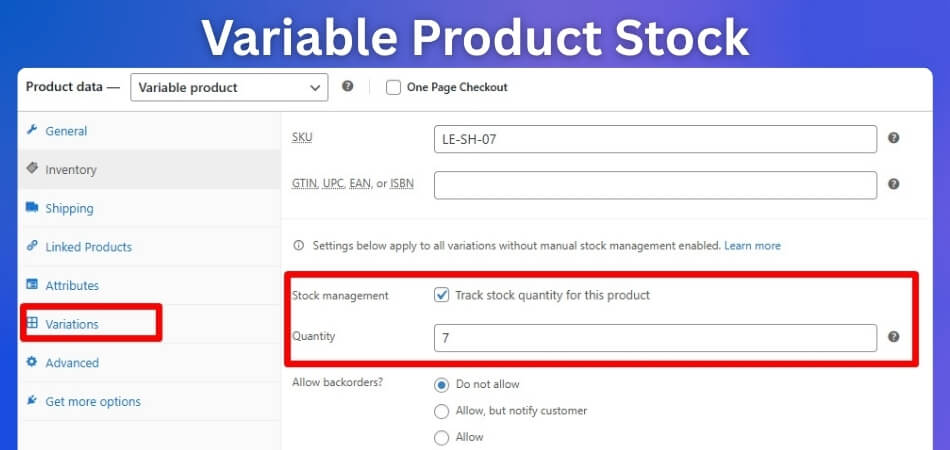
- Parent product acts as a container, not a stock controller: In WooCommerce, the variable (parent) product mainly defines attributes like size or color. By default, it does not control stock unless you explicitly enable stock management at the parent level. This is why many users face WooCommerce variable product stock not updating issues when stock is configured at the wrong level.
- Each variation has its own independent stock value: WooCommerce treats every variation as a separate product with its own stock quantity. When a customer selects a variation and places an order, only that specific variation’s stock should be reduced. If this link is broken, stock will not update correctly.
How Stock Is Stored and Tracked
- Stock is stored using variation IDs in the database: WooCommerce assigns a unique ID to each variation and stores stock values using meta fields like
_stockand_manage_stock. If these values are missing or incorrectly set, WooCommerce cannot track or reduce stock properly. - Global stock settings affect all productsWooCommerce → Settings → Products → Inventory controls whether stock management is enabled globally. If this setting is disabled, even correctly configured variations will not reduce stock.
When WooCommerce Reduces Stock
- Stock reduction depends on order lifecycle settings
WooCommerce can reduce stock:- When an order is placed
- When payment is completed
If this timing is delayed or misconfigured, multiple orders may be processed before stock is updated, creating the illusion that WooCommerce variable product stock is not working.
Where Things Typically Break
- Mismatch between selected variation and stock mapping: If WooCommerce cannot correctly match the selected variation with its stock data, no stock reduction will happen. This often occurs due to attribute misconfiguration or frontend issues.
- System delays caused by cache, API, or plugins: Even when stock updates correctly in the backend, caching layers or API delays can prevent the updated value from appearing on the frontend, leading to confusion.
Variable Product Stock Flow
| Step | Expected Behavior | Common Issue | Result |
|---|---|---|---|
| Product Loaded | Variations and stock loaded correctly | Cache shows outdated data | Wrong stock displayed |
| Variation Selected | Correct variation ID is identified | Attribute mismatch | Stock not linked |
| Add to Cart | Variation is added with correct stock reference | Missing variation mapping | Stock not tracked |
| Checkout | System validates stock before order | Delay or misconfiguration | Multiple orders allowed |
| Order Placed | Stock reduces for selected variation | Variation stock not enabled | No stock reduction |
| Order Completed | Final stock update stored | Sync/cache issue | Stock appears unchanged |
Common WooCommerce Variable Product Stock Issues
Now that you understand how WooCommerce handles variable product stock, the next step is to identify what actually goes wrong. In most cases, WooCommerce variable product stock not working is caused by a combination of incorrect product settings, variation misconfiguration, or system-level conflicts.
Stock is managed at the wrong level (parent vs variation)
One of the most common issues is enabling stock management at the parent product level instead of individual variations. WooCommerce does not automatically reduce parent-level stock for variable products, so if variation-level stock is not configured, stock will not update correctly.

“Manage stock” is not enabled for variations
Even if stock management is enabled globally, WooCommerce requires “Manage stock” to be turned on for each variation. If this option is disabled, WooCommerce will not track or reduce stock, leading to WooCommerce variable product stock not updating issues.
Variation stock quantity is missing or set incorrectly
Each variation must have a valid stock quantity. If the field is empty or incorrect, WooCommerce cannot reduce stock during checkout. This is a simple but very common cause of WooCommerce variable product inventory problems.
“Hide out of stock” setting creates confusion
When enabled, WooCommerce hides variations that are out of stock. This can make it appear that stock is not updating, when in reality the variation is simply not visible anymore after reaching zero.
Stock reduction timing is misconfigured
WooCommerce allows stock to be reduced either when an order is placed or after payment. If this timing is set incorrectly, stock updates may be delayed, making it seem like WooCommerce variable product stock is not working.
Cache or CDN serving outdated stock data
Caching systems can store old product data, including stock levels. Even if WooCommerce updates stock correctly in the backend, users may still see outdated values until the cache is cleared.
Backorders enabled for variable products
If backorders are allowed, WooCommerce will continue accepting orders even after stock reaches zero. This behavior can make it appear that stock is not reducing, even though the system is working as configured.
Plugin or theme conflicts affecting stock updates
Third-party plugins or custom themes can override WooCommerce’s default stock logic. This may prevent variation stock from reducing or cause incorrect inventory behavior during checkout.
Quick Fix Checklist for WooCommerce Variable Product Stock Issues
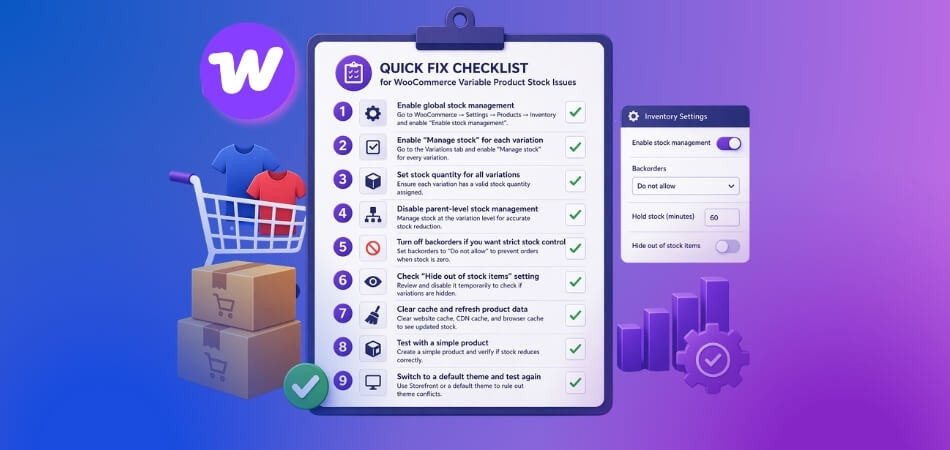
If WooCommerce variable product stock is not working, you can often fix it by correcting a few key settings. This checklist covers both product-level and variation-level configurations to quickly resolve stock update problems.
Enable global stock management in WooCommerce settings
Go to WooCommerce → Settings → Products → Inventory and make sure “Enable stock management” is turned on. If this is disabled, WooCommerce will not track or reduce stock for any product, including variable products.
Enable “Manage stock” for each variation
Open your product, go to the Variations tab, and enable “Manage stock” for every variation. WooCommerce requires this setting at the variation level to track and reduce stock correctly.
Set stock quantity for all variations
Ensure each variation has a valid stock quantity assigned. If the field is empty or incorrect, WooCommerce cannot update stock during checkout, which leads to WooCommerce variable product stock not updating issues.
Disable parent-level stock management (if not needed)
For variable products, it is best to manage stock at the variation level. If stock is controlled at the parent level, WooCommerce may not reduce stock correctly for individual variations.
Turn off backorders if you want strict stock control
If backorders are enabled, WooCommerce will continue accepting orders even when stock reaches zero. Set backorders to “Do not allow” to prevent confusion and ensure stock behaves correctly.
Check “Hide out of stock items” setting
Navigate to WooCommerce → Settings → Products → Inventory and review the “Hide out of stock items” option. Disable it temporarily to confirm whether variations are hidden instead of not updating.
Clear cache and refresh product data
Clear your website cache, CDN cache, and browser cache. Cached pages can show outdated stock values, making it appear that WooCommerce variable product stock is not working when it actually is.
Test with a simple product to isolate the issue
Create a simple product and check if stock reduces correctly. If it works, the issue is likely specific to variable product configuration rather than a global WooCommerce problem.
Switch to a default theme and test again
Temporarily switch to a default theme like Storefront. If stock starts working, your current theme is likely overriding WooCommerce variation logic.
Advanced Debugging for WooCommerce Variable Product Stock Issues
If basic configuration fixes do not solve the problem, you need to investigate how WooCommerce is handling stock at the system level. In most advanced cases, WooCommerce variable product stock not working is caused by issues in hooks, database values, or third-party integrations.
- Check WooCommerce stock reduction hooks: WooCommerce uses hooks like
woocommerce_reduce_order_stockto reduce stock when an order is placed. If a plugin or custom code overrides or disables these hooks, stock will not update. Review your theme’s functions.php and installed plugins to ensure these hooks are working correctly. - Stock is linked to variation-specific inventory records: Each variation operates as a separate inventory unit within WooCommerce. When a customer selects a variation, the system must correctly map that selection to its stored stock value. If this mapping fails, stock reduction will not occur.
- Test stock reduction based on order status: WooCommerce may reduce stock at different stages such as “processing” or “completed” depending on your configuration. If orders remain in pending or failed status, stock will not be reduced. Testing different order statuses helps identify where the issue occurs.
- Inspect database stock values directly: WooCommerce stores stock data in meta fields like
_stock,_manage_stock, and_stock_status. If these values are missing or incorrect for variations, stock updates will fail. Checking the database helps confirm whether the issue is at the data level. - Debug REST API or external inventory sync: If your store is connected to ERP, POS, or inventory systems, stock may not update due to API sync issues. Verify that stock changes are correctly pushed and received between WooCommerce and external systems.
- Enable WooCommerce logs and debugging mode: Turn on WooCommerce logging and WordPress debug mode to capture errors related to stock updates. Logs can reveal hidden problems like failed queries, plugin conflicts, or broken hooks affecting stock behavior.
- Check AJAX and frontend variation scripts: WooCommerce relies on JavaScript to handle variation selection. If AJAX scripts fail or are overridden by a theme or plugin, the correct variation may not be passed to the cart, preventing stock reduction.
Variable Product Debug Flow
| Debug Step | What to Check | Possible Issue | Expected Fix |
|---|---|---|---|
| Hook Execution | Stock reduction hooks | Hook overridden or missing | Restore default WooCommerce hooks |
| Variation Mapping | Variation ID in order | Incorrect variation assignment | Fix attributes and variation setup |
| Order Status | When stock reduces | Wrong timing configuration | Adjust stock reduction settings |
| Database Values | Stock meta fields | Missing or incorrect values | Update stock data properly |
| API Sync | External system updates | Sync delay or failure | Fix API/webhook configuration |
| Frontend Scripts | Variation selection logic | AJAX/script conflict | Fix theme or plugin scripts |
Variable Product Stock Behavior (Product vs Variation Breakdown)
To fully understand why WooCommerce variable product stock is not working, you need to see how stock behaves at different levels. Many issues happen because store owners confuse parent product settings with variation-level stock control. The table below highlights how stock behaves across different levels and where things typically go wrong.
WooCommerce Variable Product Stock Behavior Table
| Level | Expected Behavior | Common Mistake | Result |
|---|---|---|---|
| Global Settings | Stock management enabled for all products | Stock management disabled globally | No stock tracking at all |
| Parent Product | Defines attributes (size, color) | Managing stock at parent level only | Variation stock not reduced |
| Variation Level | Each variation has its own stock | “Manage stock” not enabled per variation | Stock not tracked for variations |
| Variation Quantity | Specific quantity set for each variation | Quantity missing or incorrect | Stock cannot be reduced |
| Backorder Settings | Controls overselling behavior | Backorders enabled unintentionally | Stock appears unchanged |
| Product Visibility | Shows or hides out-of-stock items | “Hide out of stock” enabled | Variations disappear instead of updating |
| Checkout Process | Stock reduces when order is placed | Delay in stock reduction timing | Multiple orders allowed |
| Cache/System Layer | Shows real-time stock values | Cached data not refreshed | Outdated stock displayed |
Most WooCommerce variable product stock not updating issues are not caused by a single error. Instead, they happen when multiple levels, such as global settings, product setup, and variation configuration are not aligned properly.
Best Practice Recommendation to Fix WooCommerce Variable Product Stock Issues
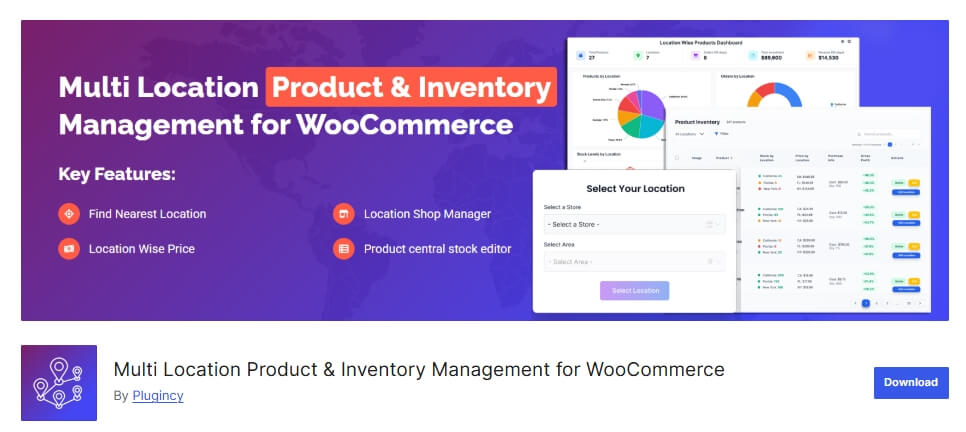
If your store handles variable products, multiple attributes, and high order volume, relying only on default WooCommerce stock settings may not be enough. Variable product stock depends on multiple layers, such as global settings, product configuration, variation mapping, and system performance, and even small issues can break stock updates. Using a reliable system like Multi Location Product Management for WooCommerce ensures that stock is managed accurately across all levels and prevents WooCommerce variable product stock not working problems caused by delays, misconfiguration, or conflicts. 🏆 Plugincy – Best All-in-One WooCommerce Inventory & Checkout Optimization Solution
Accurate stock control across product and variation levels
Plugincy ensures that stock is managed correctly at both the parent product and variation level. This eliminates issues where WooCommerce variable product stock not updating due to incorrect configuration or missing variation-level tracking.
Real-time stock updates during checkout and order processing
The system reduces stock instantly when an order is placed, preventing delays that often cause WooCommerce variable product inventory problems. This is especially important for stores with high traffic or fast-moving products.
Prevents stock mismatch and overselling issues
Plugincy helps maintain consistent stock behavior by preventing overselling and ensuring that the correct variation stock is reduced during checkout. This avoids common issues caused by backorders, race conditions, or incorrect stock mapping.
Seamless integration with plugins and external systems
The solution works smoothly with inventory tools, APIs, and multi-location setups. This reduces plugin conflicts and ensures that stock remains synchronized across all systems without breaking WooCommerce’s default behavior.
Optimized for complex WooCommerce environments
Whether your store uses variable products, multiple warehouses, or advanced checkout flows, Plugincy provides a stable and scalable solution that keeps your inventory accurate and reliable.
Frequently Asked Questions
To help you quickly understand and fix common problems, here are answers to the most frequently asked questions related to WooCommerce variable product stock not working and how to resolve it effectively.
Why is WooCommerce variable product stock not updating after an order?
This usually happens when stock management is not enabled at the variation level or when WooCommerce cannot correctly map the selected variation to its inventory. In some cases, caching, plugin conflicts, or delayed stock reduction settings can also prevent stock from updating.
Does WooCommerce reduce stock for variable products automatically?
Yes, WooCommerce reduces stock automatically, but only when stock management is enabled and properly configured. Each variation must have its own stock quantity, otherwise WooCommerce variable product stock not working issues can occur.
Should I manage stock at product level or variation level?
For variable products, stock should be managed at the variation level. The parent product is mainly used for attributes, and WooCommerce relies on variation-specific stock values to update inventory correctly during checkout.
Why does stock work for simple products but not variable products?
Simple products use a single stock value, while variable products require individual stock settings for each variation. If variation settings are incomplete or misconfigured, WooCommerce variable product stock not updating problems may occur.
Can caching plugins affect WooCommerce stock updates?
Yes, caching plugins can serve outdated stock data, especially on product pages. Even if WooCommerce updates stock correctly in the backend, users may still see old values until the cache is cleared.
How do I fix WooCommerce variable product inventory problems?
Start by enabling stock management globally, then configure stock for each variation. After that, check cache settings, plugin conflicts, and stock reduction timing to ensure everything is working correctly.
Final Thoughts
WooCommerce variable product stock not working is usually not a core system issue but a result of misconfiguration, delayed updates, or conflicts between different layers of your store. Once you understand how WooCommerce manages stock across global settings, products, and variations, fixing the issue becomes much easier. Instead of relying only on quick fixes, focus on building a stable setup where stock is managed correctly at every level and updated in real time. This ensures accurate inventory, prevents overselling, and creates a smoother shopping experience for your customers.
